D-Link DIR-655 1.32NA Firmware Final
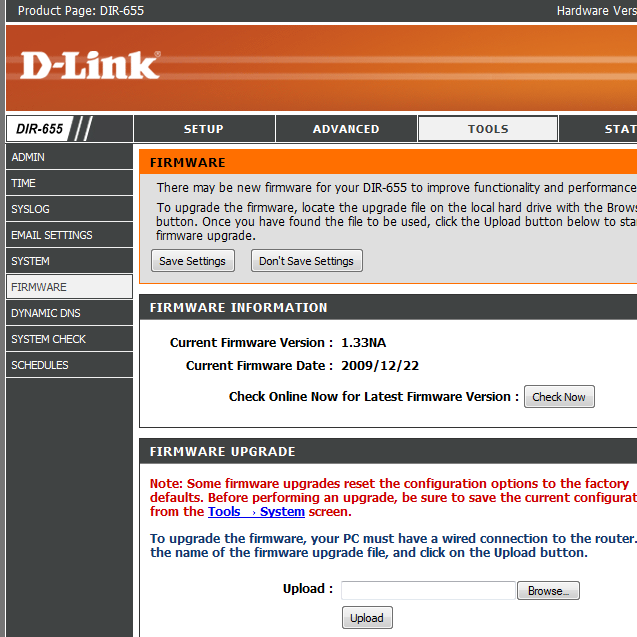
Update 16th January 2010: 1.33b01NA has been released.
Update: D-Link has released a new beta firmware for the DIR-655 here, it ONLY fixes *a* SharePort issue.
This is old news but I thought it would be best to point out that the final firmware version of 1.32 is out, here is the change log:
Firmware: 1.32NA
Date: 07/20/091. Fix when disable DHCP server and enable DHCP server, LAN PC cannot get IP.
2. Fix using wireless client to configure Access Control rules, cause DUT reboot.
3. Fix UPnP bug.
4. Disable CAPTCHA by default
5. Fixed QRS issue, can’t set up wireless setting.
6. Fixed Router DHCP IP range issue.
7. Fixed WPS UI Show Error warning message.
8. Fix potential security leak with CAPTCHA.
9. Fix USB LED issue about Shareport.
10.Fix Shareport HP932C with Wins 7 issue
11. Fix if set more than 8 Trigger or Firewall port in Application Rules. It will show Warning message.
12. Fix bug: When QRS set wan type of rt to DHCP, the rt will not set Primary and second DNS.Note: This firmware does not allow downgrading to pre-1.3x.
So far it appears that the DNS Relay lockup bug has not been fixed, SharePort is still acting up for users and in some cases even worse, some people report smoother file transfers however.
Download here:
D-Link DIR-655 Firmware 1.32NA
Related posts:
Comments:
Trackbacks/Pingbacks:
-
Link: WTS: Dir-655 Lifetime Warranty! - VRForums - IT Show 2010 | The Most Happening IT & Singapore Lifestyle Community
Date: February 6, 2010
Time: 9:41 pm
Leave a Reply


Date: October 18, 2009
Time: 6:59 am
Hi,
Am I o the only one having problems with 1.32NA ? From time to time my 655 A3 stops responding (no traffic, access to router denied). I’m really getting irritated. The 1.21 was a delight compared to the 1.32 . I’m really sorry I upgraded the firmware.
Date: October 18, 2009
Time: 2:00 pm
If you check out a few of the related post at the bottom of this article there are many comments in them that might help you out, especially here.
From the sounds of your problem, you are experiencing the DNS Relay bug that was introduced with firmware 1.32, information on it can be found here. The easiest way to get around the locking up is to turn off the DNS Relay feature of the router.
Date: October 20, 2009
Time: 6:58 am
Thx. I have turned off the DNS relay. Will see how that goes. Just had a lock up a couple of minutes ago so I started googlind d-link dir-655 1.32 firmware and i got back to this page.
Date: October 20, 2009
Time: 7:08 am
At least do you know, has d-link said anything about their crappy firmware, is it being fixed, or should I take the axe and start hacking away? Poor device, I really like my router, but the orangutans from D-Link are making crazy. If I ever catch one of them I’ll make him/her eat the router with the antennas connected and while pluged in the outlet in one swallow. And that will be the last time I come in contact with anything from D-Link.
I’m so sorry I upgraded the firmware, I can’t downgrade, I’m (we all are) at their mercy.
If it’s not broken don’t fix it. Damn….
Date: October 20, 2009
Time: 10:19 am
The axe seems like it might be a good idea this stage, but the fact that firmware existed at one stage that actually worked makes me think if people complain enough they might revert some of the changes that broke it.
However according to some people they may be using a standardised firmware for their latest products so getting things fixed might not be as easy as it should normally be.
Date: November 14, 2009
Time: 12:08 pm
I am experiencing the exact same issue as toto. I was so happy with my firmware 1.21 until I had the stupid idea to upgrade to 1.32 and have my connection drop every hour!
However, there could be hope, I found this:
DIR-655 Firmware Release Notes
===================================
Firmware: 1.32b09NA Beta
Date: 11/11/09
1. Corrects DNS Relay issue.
Can be found at »ftp://ftp.dlink.com/Gateway/dir655/Beta/Firmware/
But I am dubious to try new things at that stage… Anyone tried?
Date: November 14, 2009
Time: 5:35 pm
Yep, posted about it here, I am hesitant to recommend it to people because they have basically said that if the firmware messes up your router, they won’t replace/fix it.
However I don’t see anything wrong with using it, you can always go back to the earlier 3.x series firmwares, it seems a little early to find out if it definitely works at this stage.
Date: December 15, 2009
Time: 8:12 am
So has anyone tried the beta FW yet? DNS relay issue fixed? No? Bricked router? I’m hesitant to try it… Thanks!
Date: December 16, 2009
Time: 3:06 am
Yes! I have done that…
ftp://ftp.dlink.com/Gateway/dir655/Beta/Firmware/dir655_fw_132b09NA_beta.zip
It works, my D-Link is not Bricked!
I hope it helps to solve my DHCP/ DNS problems….
I have to wait and see if it works….
Afther the upgrade, I automaticly was redirected to:
http://dir-655.bsecure.com/ afther I made a account a could go on the Internet again…. very strange that D-Link does this!
Date: December 27, 2009
Time: 8:53 pm
I’ve tried the new beta firmware too, and I have no problems for over a month now. It seems to have fix the dns problem.
the link you were redirected too , wasn’t that for securespot / whatever it’s called?
I have disabled that as I use my providers dns servers (less than 1 ms ping reply and I trust them. no problem so far with them. And I don’t have enough net to spare…
Hopefully they will release a european non-beta firmware so I can get back to the EU firmware (not that I have something against US
).
Date: December 27, 2009
Time: 11:54 pm
My Dir655 is stable with this firmware version “dir655_fw_132b09NA_beta.zip” so it’s ‘OK’ for me.
Beta is no problem for me, if it works, it is good
Date: January 3, 2010
Time: 7:59 pm
Hi there!
I am having problems upgrading my D655 from 1.31 to 1.32, after the upgrade process it says is still in 1.31…
So, anyone knows what’s happening?
Thanks.
Date: January 10, 2010
Time: 8:46 am
Hi,
I found a different bug with the 1.3 versions of the firmware. I don’t know if it affects the older versions, since you can’t downgrade from 1.3.
The bug is that if you enter for the NTP server a hostname that resolves to multiple addresses, e.g. pool.ntp.org, the WAN link effectively dies–greater than 70% packet loss and very high latency. The admin web page also becomes unstable.
If you disconnect the WAN cable so that you can get to the admin page again, if you disable NTP or change it to a name that resolves to one server (e.g. ntp1.dlink.com), then everything works again.
I’ve reported this to DLink….
Date: January 11, 2010
Time: 7:20 pm
After I upgrade from 1.11 to 132b09NA I have problem’s with power cycles, rooter restart’s very often,
so i back to 1.31 and with DNR Relay Disabled it’s work fine
Date: January 12, 2010
Time: 6:00 am
I’m using the latest firmware and i am truly dissapointed, the connections table doesn’t clear up so i have to pull the power cord just it’ll release the connections… i’ve read that this is a very common problem with routers, but why, just clear the damn connections table and there are no settings to force it to either… any help, suggestions?
Date: January 13, 2010
Time: 1:18 pm
The best suggestion is to wait for D-Link as there aren’t really any more things that can be done on the user side to get these working again, but if you’re the adventurous type you can try the B09 build of the firmware that is supposed to fix one type of lockup issue.
Date: January 16, 2010
Time: 8:02 pm
Hi guys, Firmware 1.33b01NA has been released.
Date: February 11, 2010
Time: 5:00 am
I just realized that the N standard has been ratified, so thought I’d check if there is newer firmware for my dir655 A3. I’m still running 1.21 2008/10/09 After seeing all the problems listed here and the fact that my router seems to work great , I can’t see any reason for upgrading my firmware.
Date: February 11, 2010
Time: 2:36 pm
1.21 is a great firmware version and the newer versions don’t really add much, especially if you’re having no issues with 1.21.
Date: February 19, 2010
Time: 7:13 am
Hi guys,
After installing Firmware 1.33NA, did you experiencing that your D-Link DIR-655 router is behaving properly/normally now? Ben? Popolito? toto? Is the router working properly for you know toto? Or you still feel axing your router? Thanks!!!
Date: February 19, 2010
Time: 7:25 am
Re-phrasing my comment…
Hi guys,
After installing Firmware 1.33NA, are your D-Link DIR-655 routers now behaving properly/normally? Ben? Popolito? toto? Is your router working properly now toto? Or you still feel axing your router? Thanks!!!
Date: February 19, 2010
Time: 12:36 pm
In my case 1.33NA worked much better than any of the other 1.3x firmware.
Date: February 19, 2010
Time: 10:38 pm
The same in my case, the router is working ok again. No problems so far and i’ve upgraded the day after the new firmware appeared on ftp site. Why do you ask?
Date: February 20, 2010
Time: 6:50 am
Thanks for your feedback guys!!!
I have a friend who recently bought D-Link DIR-655 router which has 1.32NA f/w on it, and he too sometimes experience dropping connections on this router (or freezing while browsing – I guess the DNS issue). So I was wondering if this 1.33NA will indeed fix this dropping issue, and it seems like it will. Thanks again!
Date: February 24, 2010
Time: 3:41 am
Just an FYI, d-Link has released firmware 1.33NA for the DIR-655 on their site.
ftp://ftp.dlink.com/Gateway/dir655/Firmware/dir655_firmware_133NA.zip
Date: February 24, 2010
Time: 7:00 am
Hello guys,
We just upgraded two DIR-655 routers to 1.33NA firmware. After 3 days, one router experienced losing connections about once or twice a day (compared before w/ 1.32NA – a lot of times everyday). The other router on the other hand, we didn’t experience any problem, yet.
My only question is, on both of these routers, after upgrading to 1.33NA, we noticed that the “Enable DNS Relay” is “unchecked” (Setup – Network Settings – Router Settings). So I don’t why it is unchecked. The “Enable DNS Relay” is supposed to be checked, right??? Anybody? Thanks!!!
Date: February 24, 2010
Time: 5:39 pm
DNS relay simply means that the router is used as a DNS cache by default, if you had it on before then you should probably put it back on, in the past this feature has caused problems but the majority of users believe it is fixed now.
Date: February 25, 2010
Time: 4:14 am
K! Thanks Ben! I still wonder why it is showing unchecked after upgrading the F/W to 1.33NA.
Date: March 10, 2010
Time: 9:43 am
Unchecked should be the default. A lot of issues occur with having DNS relay enabled on D-Link routers. Especially SIP VoIP calls suffer when DNS relay is enabled.
Date: March 10, 2010
Time: 9:55 am
Just curious John, why would SIP VoIP calls suffer if DNS relay is enabled? How and in what way?
What I know is that SIP VoIP calls will suffer if the Stateful Packet Inspection (SPI) and SIP-ALG are enabled on Firewall settings, but not if the DNS Relay is enabled.
Thanks!