This page has been translated from English

Post مد وصلة دير موجه 655 وشيربوينت / SharePort

2 أكتوبر 2008 -- 05:49
Post Image

تحديث 16 يناير 2010 : صدر 1.33b01NA تم .

تحديث 2 نوفمبر 2009 : كل المستخدمين وجود مشاكل مع SharePort ، وتحقق من هذا المنصب للحصول على أحدث المعلومات.

التحديث : تأكد من أن تقرأ التعليقات الواردة أدناه لمعرفة أي شيء جديد حول هذه الميزة ، العديد من البق تم إصلاح منذ إصدار الأصلي ، اعتبارا من أغسطس 2009 الثابتة 1.32NA الأخير هو أحدث البرامج الثابتة ، قرأت عن ذلك وتحميله هنا .

لقد تملكها في مد وصلة دير موجه 655 للعام الماضي وذلك حسب توجيه أفضل بكثير من أي وقت مضى التي استخدمت الأول ، على الرغم من أنني لم تدفع 150 دولار أكثر من ما كنت قد دفعت لجهاز التوجيه من قبل ، حتى لقد حصلت على لقد دفعت ما ل.

بدءا من الإصدار 1.21 بيتا 04 من البرامج الثابتة دير هناك الآن 655 شير وظيفة متاحة. شير وسائل الإعلام وغيرها من المواقع استدعاء جزئيا أو SharePort كما تسمى في كل مكان آخر بما في ذلك البرنامج نفسه هو وسيلة للمنتجات دي لينك للمشاركة أوسب] جهاز على الشبكة المحلية ، وانا ذاهب في محاولة لعدم الخلط بين أي أنت لذلك سوف مزيد أود أن أشير إلى أنه فقط SharePort من الآن فصاعدا.

SharePort هي ميزة مثيرة للاهتمام ان كنت فعلا تريد ان تكون قادرة على القيام به منذ سنوات قليلة ، من قبل الأجهزة [أوسب مشاركة من الكمبيوتر بحيث يمكن استخدامها على كمبيوتر آخر كما لو ان العبوة الناسفة كانت مربوطة فعلا في جهاز الكمبيوتر. أدت في النهاية مد وصلة هذه التكنولوجيا في الحياة على نحو محدود مع SharePort.

هذه هي الطريقة التي يعمل SharePort ، سأستخدم بلدي دير 655 والأخ MFC - 150C الخاصة بمنصات جمع كمثال على ذلك.
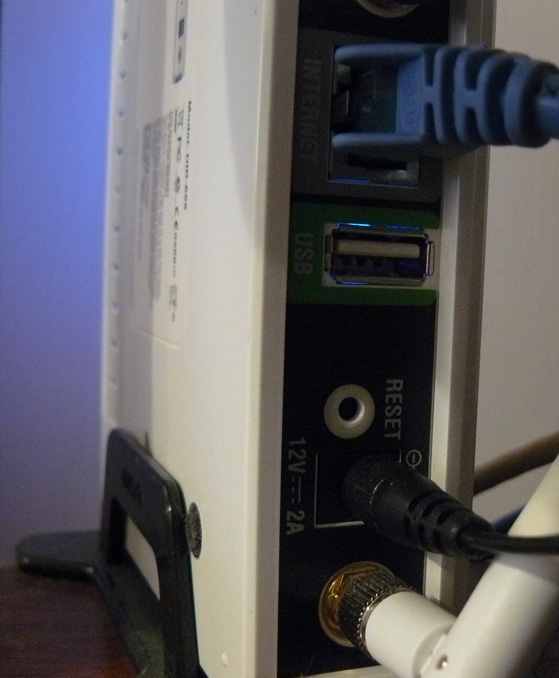
في دير 655 ومنفذ [أوسب على ظهره ، ويبدو أن التجارب تشير إلى أن 1.1 أوسب] مينة ، وحتى الآن كان يستخدم الميناء لإعدادات اللاسلكية التي يمكن تخزينها على مفتاح الناقل التسلسلي العام.

DIR-655 DIR-655 USB Port

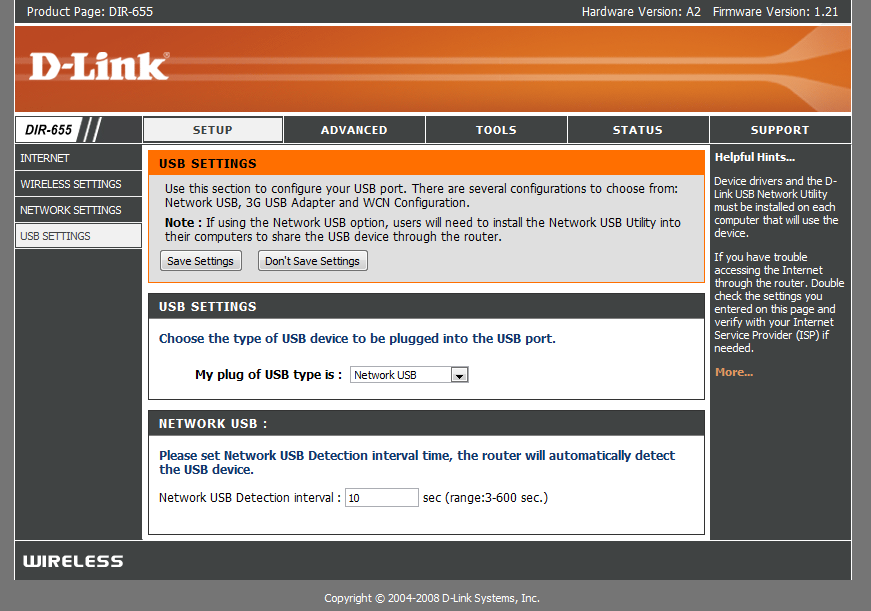
بعد تثبيت نظام تشغيل جديد غير منفذ [أوسب والعثور على مزيد من الاستخدام ، كنت استقبل نحن مع القائمة الجديدة في إطار الإعداد الذي يتحكم في استخدام الميناء.

New USB Page

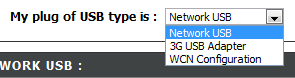
كما ترون لا يوجد الكثير من الإعداد لهذا المنفذ الناقل التسلسلي العام ، WCN التكوين هو الافتراضي ، يتم استخدام هذا المفتاح لتكوين لاسلكية ، واختيار مربع القائمة المنسدلة :

Choices

اختيار شبكة [أوسب يضع جهاز التوجيه في وضع SharePort ، واختيار الجيل الثالث 3G [أوسب محول قليلا من لغزا بالنسبة لي ، أنا لست متأكدا من الأجهزة المتوافقة مع هذا حتى الآن ، ولكن مثل معظم الناس ، ولدي خدمة الجيل الثالث 3G واستخدامها على سبيل الاحتياط فقط من خلال ربط الجهاز تصل الى ميناء الناقل التسلسلي العام واختيار الجيل الثالث 3G [أوسب محول سيكون مفيد جدا.

ويشترك تلقائيا بمجرد اختيار شبكة [أوسب الجهاز ، ولكن من أجل ربط يجب تثبيت البرنامج SharePort من مد وصلة ، وهذا لا يزال في بيتا يبدو حتى استخدام الحذر مع الخ الخ ، لم تكن لدي مشكلة مع حتى الآن ، ويبدو الى حد ما مصقول. بمجرد أن يتم تثبيت تأكد من السماح ليتم تشغيله عند بدء التشغيل وتشغيلها على الفور ، وإلا فلن تكون قادرة على استخدام الجهاز دون تشغيل البرنامج يدويا SharePort في كل مرة ، فإنه يستخدم فقط 2MB من ذاكرة الوصول العشوائي حتى انها ليست موردا خنزير.

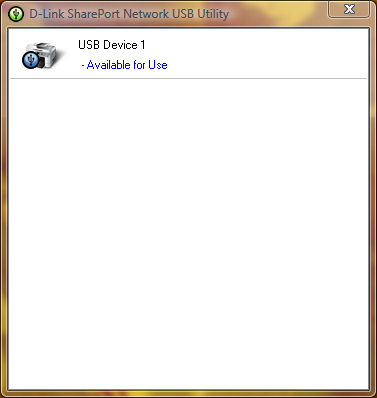
SharePort Printer

إذا كان لديك جهاز أوسب] هو على اتصال وبعد ذلك فائدة SharePort يجب عرض مثل هذا بمجرد النقر المزدوج على أيقونة في علبة النظام. انها ستسمح ثم لك بتشغيل من خلال معالج لتركيب الجهاز ، ستحتاج برنامج تشغيل الجهاز الخاص بك مؤتمر نزع السلاح أو أحدث برنامج تشغيل لموقعه على الانترنت ، في نهاية سوف يطلب منك إذا كنت تريد الاتصال تلقائيا إلى الجهاز عند طباعة إذا فمن طابعة ، وهذا هو فكرة جيدة على خلاف ذلك عليك ان تختار يدويا للاتصال.

هذا هو كل شيء مرة واحدة تقام على كل كمبيوتر يستخدم الجهاز ، ستلاحظ أن كل الدول أن جهاز الطابعة بشكل مؤقت وغير متصل ، الطباعة إلى الطابعة على أية حال ، يكشف البرنامج SharePort التي تم إرسالها إلى الطباعة إلى الطابعة و تلقائيا بتعيين الطابعة إلى الكمبيوتر والطابعة بينما هو التواصل مع جهاز الكمبيوتر الخاص بك سوف تظهر وصلة ، مرة واحدة مهمة الطباعة قد انتهى فإنه سيعود ثم العودة إلى دون اتصال ، مؤقتا.

الحد من هذه الميزة هو أنه سوف يعمل فقط على جهاز كمبيوتر واحد في وقت واحد ، أوسب] أدوات ببساطة ليست مصممة لتكون متصلا أجهزة الكمبيوتر 2 في ذلك مرة واحدة فمن المنطقي لماذا هذا هو الحال.
لم أحاول أشياء مثل كاميرات ولكن من المعروف أنها في العمل ، ولكن بمعدل أبطأ من المعتاد ، وميزة من الطابعة الماسح يعمل بشكل جيد ، ولكن يجب عليك الاتصال يدويا باستخدام برنامج SharePort لاستخدامها ، تأكد من قطع الاتصال بعد الانتهاء.

وكما ذكرت في بداية هذه المقالة البرنامج SharePort شيء لقد كنت في انتظار وقتا طويلا ل، انها ميزة كبيرة نظرا موجه لي ليس هو آخر هناك الآن ، ويبدو تقريبا مثل مد وصلة تخلت عن إضافة جديدة ملامح لها ، لكنه يظهر أيضا مدى نجاح الجهاز يمكن أن تعمل إذا كان يمكن معالجة جهاز أوسب] في حين انه يؤدي كل من واجبات أخرى.

الوظائف ذات الصلة :

  1. مد وصلة تحديث SharePort
  2. مد وصلة SharePort الإصدار الجديد 1.10 ودير 1.30 البرنامج الدائم 655
  3. مد وصلة دير 1.32 بناء 655 بيتا SharePort الإصلاح 04 01
  4. مد وصلة دير الثابتة 1.34b02 655 بيتا وSharePort 3.0
  5. مد وصلة دير 655 1.32NA الثابتة النهائي

التعليقات :

  1. ترقية البرامج الثابتة على جهاز التوجيه فقط بلدي دير 655 إلى 1.21. عندما بدأت لتثبيت التطبيق المساعدة SharePort تحطمت مكتبي وأجهزة الكمبيوتر المحمول على حد سواء هي ويندوز فيستا هوم بريميوم نظام التشغيل. ودعا Dlink الدعم الفني ولكن وجدت أي قضايا. وكان أي شخص نفس المشكلة؟ في حاجة الى حل لهذه المشكلة... الرجاء المساعدة.

  2. حسنا أنا لا يزال قيد 1.21 بيتا 04 ، قد يكون هناك شيء مع 1.21 النهائي ، كما أنه قد يكون فكرة جيدة لإعادة تحميل الأداة المساعدة من ftp://ftp.dlink.com/Gateway/dir655/Apps/SharePort_Network_USB_Utility_094. الرمز البريدي ، وربما إعادة فلاش جهاز التوجيه مع ftp://ftp.dlink.com/Gateway/dir655/Firmware/dir655_firmware_121.zip أو ftp://ftp.dlink.com/Gateway/dir655/Firmware/dir655_firmware_121_no_securespot.zip في no_securespot ملف يحتوي على أحدث التاريخ على أنه من البرامج الثابتة 1.21 القياسية. أي نوع من البرامج التي لديك حاليا يعمل على كل من أجهزة الكمبيوتر؟ محاولة اغلاق قبالة الماسحات الفيروسات وغيرها على حد سواء عند تثبيت هذا.

  3. أنا مجرد تركيب البرامج الثابتة 1.13 في بلدي 4500 دغل وكذلك تثبيت الأداة المساعدة كما shareport. Shareport ليس بصفتي recionizing التوجيه على شبكة الاتصال أو هد بلدي الخارجية باعتبارها متصلة. أي افكار؟

  4. أحاول فعلا للوصول الى الجزء السفلي من مشكلة مشابهة ابن تعاني ، منذ بضعة أيام بلدي جهاز كمبيوتر الكشف عن توقف عندما كان على الطابعة وأكثر من مرة كما لم يكشف عندما تم توصيل جهاز التوجيه.

    أنا قد قمت بإعادة تثبيت ذلك ، إعادة تمهيد جهاز التوجيه ، وأنه لا تغيير ، حتى عندما يكون كل جهاز كمبيوتر آخر يعمل تماما.

    الحلول الممكنة : في الحقيقة لدي مشكلة محددة فقط ، ويبدو أنها لا يمكن أن تعترف الأجهزة عندما يكون لديك أكثر من بطاقة شبكة تمكين ، لذلك إذا كنت تشغل إم وير الخ سيكون لديك لتعطيل اتصالات شبكة الاتصال الأخرى وإعادة تمهيد قبل أن سيبدأ الكشف مرة أخرى. إذا كنت قادرا على الحصول عليها من هذا العمل أيضا اسمحوا لي أن أعرف.

  5. مرحبا!

    ويبدو أن هذا يعمل فقط على إصدار الولايات المتحدة من 655. وقد لمع أنا الثابتة إلى أحدث نسخة من الاتحاد الاوروبي وليس هناك من الشاشة كما هو موضح أعلاه.

    أردت فقط أن أوضح أن هذا هو لمستخدمي الولايات المتحدة فقط. كل شخص آخر ، لا يكون مخطئا في التفكير وهذا التوجيه أي شيء آخر غير الوصول إلى شبكة الإنترنت.

  6. شكرا لرؤساء متابعة ، لقد تم استخدام إصدار الولايات المتحدة من البرامج الثابتة للاتحاد الافريقي في بلدي اشترى 655.

    انني لا أنصح بذلك ، ولكن لا أعتقد أن هناك أي فرق على الإطلاق في الأجهزة لمختلف المناطق سواء.

  7. بن شكرا لهذا البرنامج التعليمي الكبير -- باستخدام التعليمات الخاصة بك ، وكنت قادرا على تحديث البرامج الثابتة ، تثبيت الأداة المساعدة طباعة والطباعة باستخدام الكمبيوتر المحمول جهاز توجيه متصل! فقط كلمة شكر.

    ك لمعلوماتك ، لقد استخدمت البرمجيات راوتر دي لينك الخاصة "التحقق من وجود تحديثات البرامج الثابتة" الميزة ، وأوصت تلقائيا الإصدار 1.21 (بتاريخ 10/9/2008). الآن أنا دوري الطباعة مرضيا ، على كمبيوتر محمول فيستا على أساس (كومباك) ، و/ إكس بي الصفحة الرئيسية القائمة على سطح المكتب (كومباك). لا يزال لديك آخر ديل كمبيوتر محمول للاتصال. طابعة إتش بي هو منضدية F4180 الكل في واحد. وكان لتثبيت شير وبرنامج تشغيل الطابعة على كمبيوتر محمول إتش بي ، ولكن ذلك لم يكن صفقة كبيرة.

    فارق واحد وقد لاحظت من ما كنت قد قال : لم يكن لديك لإعادة الطابعة في كل مرة أقوم باستخدامها. مرة واحدة صباحا متصل الأول ، يبقى متصلا إلا إذا كنت تختار الى "الافراج" عليه. إذا كان أحد من توصيل جهاز كمبيوتر ، وتريد الطباعة من مختلف واحد ، وسوف نقدم لكم خيار "طلب" الافراج من الجهاز متصل. ثم ، الجهاز الذي يرتبط حاليا يتلقى رسالة منبثقة تطلب منها ذلك لقطع مستخدم آخر قد تستخدم الطابعة. شريط يظهر أيضا اسم الكمبيوتر أيهما الجهاز متصل حاليا بنشاط في الطابعة. ربما كان هذا آخر تحديث البرامج الثابتة التي تم تضمينها في إصدار 10/9/08؟

    ك لمعلوماتك ، أنا مستخدم في الولايات المتحدة.

  8. شكرا لتعليقك ليزا ، انا مسرورة لانك تحب تعليماتي.

    لم أكن في الواقع تأتي عبر هذا ، يتم تعيين كافة أجهزة الكمبيوتر بلدي لصناعة السيارات في الاتصال حتى يتم توصيل إلا إلى الطابعة في بضع ثوان قصيرة أن يتم إرسال مهمة الطباعة ، ثم قطع مرة أخرى ، وأفترض أنه سيكون جزءا من الألغام ولكن أيضا أنا لم آت عبر نظرا لعدم وجود أي أنها مرتبطة إلى جهاز كمبيوتر واحد لمدة طويلة بما فيه الكفاية لطلب استخدام تكنولوجيا المعلومات.

  9. بالتأكيد هناك مشاكل مع الإصدارات 1.2 و 1.21 الاصدار من البرامج الثابتة - 655 دير.

    تعيين الملقمات الظاهرية لا يعمل بشكل صحيح للحزم الصادرة. يمكنني تشغيل خدمة البريد التي بدأت تعمل بشكل متقطع على هذه الدورات اثنين من البرامج الثابتة. العودة إلى 1.11 حل المشكلة. اتصالات المنفذ 25 (بروتوكول نقل البريد الإلكتروني) والطريق إلى الملقم الداخلية المناسبة على شبكة بلدي ولكن على ما يبدو فإن المدخرات الدراسية ملقمات لم يكن دائما الحصول على العودة إلى الملقم البعيد الموصل. هذا يترك بروتوكول نقل البريد الإلكتروني إجراءات إضافية في انتظار الاتصالات التي لا تأتي ابدا ، وانقضاء مهلة. وفي بعض الأحيان يتم فقدان خادم يحيل سوف تتخلى عن والبريد.

    أيضا ، لا يمكن أن يتم تكوين الجداول بشكل صحيح.. البرامج الثابتة بشكل غير صحيح الأعلام أضعاف أي الباطلة : 23:00 حتي 5:00 في غير صالح وطيب في 1.2x 1.11.

  10. هذا هو بريان السوء ، وأنا لم تشهد أي شيء سيئ للغاية مع هذه برنامج مبني نفسي ، ولكن البعض الآخر الإبلاغ المشاكل. وقد شغل سابقا أنا قبالة 1.2 حيث ان الناس كانوا تواجه مشاكل معها ، ولكن يبدو ليست كل القضايا التي قد يكون تم إصلاح.

  11. وأتساءل عما إذا كنت قد اختبار شيء بالنسبة لي... هل يمكن أن محاولة إنشاء جدول باستخدام 11:00 حتي 5:00 ومعرفة ما اذا كان يرى أن صالح؟ وهذا يقول لي إذا كان هذا هو مشكلة عالمية مع 1.21 أو شيء thats مجرد مشكلة مع وحدتي... والثابتة. تشك

  12. وأنا التي تعاني من نفس الخطأ ، ويبدو أن ليس مثل تمتد على مدى أكثر من منتصف الليل. ماذا يحدث عند وضع برنامج زمني 23:00 حتي 12:00 واحد 12:00 حتي 5:00؟

  13. لقد وجدت في الموقع حيث الفرنسية الفرنسية ممثل dlink المطالبات وظائف shareport سيكون متاحا في الاسابيع برنامج مبني في الاتحاد الأوروبي :
    http://www.clubic.com/actualite-170094-dlink-routeurs-dir-655-dir-855.html

    واحدة من التعليق أدناه المقالة الأجهزة العليا للرقابة الامريكية الثابتة يعمل بشكل جيد على أجهزة الاتحاد الأوروبي (كما كتب بن -- وربما لا توجد فروق في الأجهزة) ، shareport يعمل بشكل جيد ، وpixma كانون متعدد الوظائف يمكن تفحص عن طريق ميناء المشتركة.
    ابن يأمر دير 655 بالنسبة لي...

  14. @ يونيو (وغيره)... ركضت ايضا الى "تثبيت SharePort" تحطمت بي نظم المسألة. (على حد سواء الخامس 0.94 و 1.0 الإصدارات)

    ذهب تحديث البرامج الثابتة ودير في 655 ذهب كبيرة ، ودفع غرامة. موجه / لاسلكي سريع التمزيق.

    ذهب لتثبيت البرنامج SharePort وتحطمت بلدي SP3 إكس بي وفيستا هوم بريميوم أنظمة سيئة فظيعة. كان قادرا على الحصول عليها عن طريق الذهاب استعادة النظام ، ولكن لم يكن جميلة لبعض الوقت.

    ابن الشك صراع مع متوسط الحرة 8) ، الذي هو قطعة من البرامج المشتركة على أنظمة جميع بلدي.

    ويمكن تأكيد أي شخص آخر ربما / SharePort متوسط الحرة الصراع سائق 8 الذين قد تحطمت نظمها خلال / بعد تثبيت SharePort؟

    ابتهاج ،

  15. حسنا ، لدي نفس المشكلة يونيو شير الإصدار 1.0 تعطل أجهزة الكمبيوتر المحمول الخاص بي عند تثبيت وإلغاء تثبيت. لقد البرامج الثابتة 1.21 ولكن لا اعتقد أن الأمور لأنني لا يمكن تثبيت البرنامج حتى دون ان تتحطم. ودعا Dlink الدعم ويقولون أن لا يتم اعتماد شير وأوسب] مينة على دير 655.

    قد يسعى للمنتجات البديلة التي يمكن أن تدعم بشكل صحيح في القرص الصلب. أي توصيات؟ قد أحاول مطار أبل Extreeme الآن أنه قادر على جيجابت ووضع ثنائي.

  16. أنا متأكد تقريبا في حالتي وجود تعارض بين برنامج تشغيل برنامج التشغيل SharePort وشيء آخر. ابن يميل بقوة لصالح كونها نوعا من حماية النظام (الوروك؟) ميزة من متوسط 8 الحرة في حالتي.

    على أنظمة اختبار سريرا ، ويمكنني أن تثبيت SharePort على ما يرام (v.94 أو v1.0). ليتم تثبيتها ولكن إذا كان لدي أول متوسط الحرة 8 تثبيت آلات زرقاء الشاشة خلال نهاية عملية التثبيت... عندما إما برنامج تشغيل أو خدمة المحاولات. الغريب ، على نظام "الحقيقي" هو الدبابات أثناء التثبيت ، على نظام ظاهري ، فإنه دبابات فقط من خلال إلغاء SharePort مع 8 متوسط الحرة.

    ومع ذلك ، (على أنظمة الظاهري) لو كنت أول إلغاء متوسط الحرة 8 ، تمهيد ، تثبيت SharePort ، التمهيد ، ثم تثبيت متوسط الحرة 8 كل شيء يبدو سعيدا.

    يجب أن أفعل أكثر قليلا مخرج أولا قبل أن ينتقل إلى بلادي "نظم" العيش. ولم يكن الكثير من المرح القيام استعادة النظام على اثنين من أصل ثلاثة نظم بلدي في نهاية هذا الاسبوع.

    لا اعتقد انها قضية router-hardware/firmware قدر ما استطيع ان اقول. بلدي دير 655 إذا دمر سريع وقوي. أنا لم الترقية إلى البرامج الثابتة 1.21 والتي تمكن هذه الميزة SharePort جديدة ، ولكن لا أرى كيف يمكن للجهاز التوجيه الثابتة التي تؤثر على النظم. أنا مقتنع أنه مع برنامج SharePort نفسها وعلى وجه التحديد سائق أو الخدمة الصراع في تهيئة التثبيت. أود فقط أن أحدد وجهة الصراع.

    ونعم... لقد قضيت أكثر من 30 دقيقة على الهاتف مع دعم Dlink الليلة الماضية ، وكان بجانب قيمة لها. وأخيرا حصلت على التكنولوجيا الفقراء لتصعيد استنتاجاتي الى المشرف وربما جعل فإنه إلى مكتب الفني في Dlink.

    ووفقا لهذا الرجل ، ليست هناك الأحدث "في الغرف الخلفية" الإصدارات المتاحة لSharePort في هذا الوقت.

    اسمحوا هل تعرف ما أعرف.

    وإلا لقد كنت في غاية السعادة مع الجهاز 655 دير الشاملة. وكان سيئة للغاية SharePort ميزة واحدة من العوامل الحاسمة ليذهب مع هذا النموذج.

    تنفس الصعداء....

    (راجع للشغل ، نشرت لي الحق في التعليق الوارد أعلاه الألغام SteveW في أعلاه... على نحو ما المستعرض المحاصرين اسم يونيو في مجال الكاتب.)

    ابتهاج ،

  17. هذا امر جيد مخرج العمل هناك كلوز ، سيكون من قضية البرمجيات SharePort بالتأكيد ، وربما متوسط لا تلعب لطيفة سواء ، وأنهم لم يحصلوا على وجه الدقة أفضل سجل في الآونة الأخيرة بشأن قضايا مع البرامج الأخرى. وسوف نرى ما اذا كان يمكنني معرفة أي شيء غدا بشأن متوسط / SharePort ، أنا متأكد من واحدة من الشركات يعرف شيئا.

    وأود أن لا نتوقع مد وصلة لتحديث البرنامج لفترة من الوقت ولكن اعتقد انهم لن يعرفوا أن لعلى يقين.

    نأمل اذا ما يكفي من الناس لديهم مشكلة على الرغم من أنها سوف اصلاحها في وقت قريب ، والبرنامج نفسه للعمل مع جميع الأجهزة SharePort قادرة وهناك عدد غير قليل من هؤلاء هناك الآن.

    بالمناسبة لقد غيرت اسمك في التعليق الوارد أعلاه SteveW حتى يمكن فهم الحديث على الوجه الصحيح ، اسمحوا لي أن أعرف إذا كنت تواجه البق مع نظام التعليقات ، هو قانون بلدي لذلك لديه إمكانية البق.

  18. أنا أيضا تثبيت 1.21 على 655 بلدي دير والبرامج الناقل التسلسلي العام. العثور على جهاز الكمبيوتر ماثلة الطابعة مباشرة. مفكرة بلادي (لاسلكي) sharport تقول انها لا تستطيع العثور على جهاز الناقل التسلسلي العام. أي اقتراحات؟

  19. حاول تعطيل أي بطاقات الشبكة الأخرى ، وإعادة تشغيل ، حتى بطاقة إيثرنت ، ويحصل الخلط Shareport بسهولة عن طريق شبكة اتصالات متعددة ، وإذا كان قيد فمور محاولة تعطيل بطاقات الشبكة VMNet.

    أيضا مؤقتا تعطيل أي جدران الحماية قد يكون لديك على الكمبيوتر المحمول في حالة واحدة فقط يتم حظر الاتصال.

  20. لها نفس القضية ولكن انا Valca تشغيل جديد الفيروسات نورتون حتى وأنا أتساءل عما اذا كان بعض الشيء أخرى لها بعد ذلك الفيروسات.

  21. مرحبا شباب. التجارب لا تزال هذه القضية.

    كان لي في السابق يشتبه متوسط 8 حتى نهاية هذا الاسبوع وجدت بعض الوقت الحر. قررت وضع نظريتي للاختبار في بيتي بريم فيستا. SP1 النظام.

    أنا إلغاء تثبيت متوسط 8 ، قدم دليلا نقطة استعادة (شيء جيد فعلت) تمهيد ، حتى الآن جيد جدا. تثبيت ثم انني SharePort.

    الموت الزرقاء.

    استعادة استعادة النظام الخاص بي حفظ نقطة نظام بلدي. والآن عدت الى نقطة الصفر.

    انتقل إلى دورة الكمبيوتر الظاهرية جديدة باستخدام إكس بي SP2 البكر التثبيت. تثبيت SharePort على ما يرام. أي قضايا. إلغاء تثبيته على ما يرام.

    كنت قد القادم المتهم كان العكس شريط مراقب الذي هو أيضا مشترك في جميع الأنظمة الثلاثة بلدي.

    تثبيت والعكس شريط مراقب وإعادة تمهيد. جيد. هناك استقرار القضايا.

    ذهب لتثبيت SharePort (v1.0) وقرب نهاية الإعداد... تماما مثل أنظمة بلدي الحقيقي... النظام الظاهري لم تمهيد لأسود على الشاشة فورا.

    Hmmmm.

    حتى لقد إلغاء تثبيت والعكس شريط مراقب من بلدي ، ووضع نظم في استعلام رسالة إلى فريق دعمهم سأل عما إذا كان يمكن أن ننظر إلى هذا بشكل مستقل.

    رؤية كيف يبدو كل من SharePort ومراقب والعكس شريط على حد سواء ويبدو أن ربط إلى برامج تشغيل الشبكات ويندوز / خدمات هذا منطقي جدا.

    سيعطي آخر تحديث إذا / عندما يستجيب.

    ليس متأكدا مما اذا كان شجاعا بما يكفي وأنا فقط حتى الآن لتكرار التجربة على أنظمة بلدي يعيش مرة أخرى.

    - ابتهاج!

  22. مرحبا بالجميع ، أنا العلامة التجارية الجديدة لهذا كله. ترقية مؤخرا إلى DIR655. عظيم. 1 5 كمبيوتر سطح المكتب. سطح المكتب يحتوي على بطاقة شبكة المشروع ، راوتر ، دي اس ال مودم الخ كمبيوتر تشغل جميع الأجهزة 802.11G الداخلية.
    إذا كنت افصل كابل الناقل التسلسلي العام من Oki550 ليزر ملونة من سطح المكتب ، وبتوصيله أوسب] ميناء على DIR655. هذا هو في نهاية المطاف (أو نظريا) سوف تسمح لنا الطباعة إلى أن الليزر دون تحول على أول كمبيوتر سطح المكتب؟
    في الوقت الراهن هو أن هدفي في نهاية المطاف ، وهذا هو سؤالي الأول.
    شكرا
    ديف

  23. نعم هذا سوف يسمح بالوصول إلى الطابعة في أي وقت على جهاز التوجيه ، والطابعة وجهاز التوجيه 2 فقط هي الأشياء التي تحتاج إلى أن يكون على لهذا العمل ، ولكن التي يتم توفيرها من أنهم لا الطريق من خلال سطح المكتب في أي مرحلة. وكما يتضح من التعليقات التي ينبغي أن تمارس قليلا من الحذر عند تثبيت البرنامج Shareport لأنها لا تلعب بشكل جيد مع البرامج الأخرى التي قد مكونات الشبكات.

  24. يا شباب لقد وجدت هذه القضية... إلغاء لها صافي المحدد لذلك وكنت جيدة للذهاب ^ _ ^

  25. بن ،

    فقط لتأكيد ما كنت المشتبه بهم وأكدت الشبكة نيك... المحدد لبرنامج مراقب 2 لا صراع حاسم مع تطبيق SharePort (في هذا الوقت).

    كان لي إلغاء تثبيته من البداية إكس بي (SP3) ويندوز فيستا هوم بريميوم (SP1) نظم. ثم أنا تثبيته SharePort بعد إنشاء نظام نقطة استعادة (فقط لتكون آمنة).

    ذهب تركيب غرامة ، وهذه المرة لم يلاحظ أي الموت الزرقاء أو الصراعات. تطبيق SharePort العثور بسرعة الوميض سيجيت جهاز تخزين وكنت قادرا على "جبل / الاتصال" لديها وقراءة وكتابة ملفات من كافة الأنظمة.

    يمكن أن تكون واضحة... نظام واحد فقط أن تكون متصلا جهاز في وقت واحد بقدر ما استطيع ان اقول. غير أنه يعمل الآن كبير.

    يا للعجب! وكان هذا العمل doozie هذه المسألة خارج. بفضل نيك لنشرها تأكيد.

    لم أكن إرسال بريد إلكتروني إلى فريق دعم صافي المحدد لعن الموضوع ، ولكن حتى الآن أي رد.

    لست متأكدا إذا ما كان يحدث مع جميع برامجها (المدفوعة / الحرة) أو مجرد مراقب مع صافي 2 المحدد.

    وبفضل جميع!

    هتاف!

    خامسا ، كلاوس

  26. مرحبا ، أنا المالكة للدير 855 كما بلادي القديمة العزيز دير 655 ذهب إلى شقة أخواتي كحل دائم. ومع ذلك سأكون مهتما جدا في معرفة ما إذا كانت دير 855 يدعم هذه الميزة أيضا. قد يكون جيدا على إضافة لجهاز التوجيه اللاسلكي الخاص بي رهيبة بالفعل.

    دانيال

  27. دانيال ،

    ووفقا لبيان صحفى مد وصلة ، يتم تضمين دير 855 في تلك التي تدعم SharePort.

    http://www.dlink.com/press/pr/؟prid=442

    نقلا عن :

    "الميزة المبتكرة SharePort أوسب] شبكة سد يتوفر على مد وصلة إكستريم نون جيجابت المسار النماذج -- دير - 655 ، دير 825 ، 855 ودير دغل راوتر - 4500 لعب مع GameFuelâ" ¢. ترقية التكنولوجيا SharePort باللغات على RangeBooster ن دير 628. من أصحاب هذه المسارات الحالية سوف تكون قادرة على رفع مستوى التكنولوجيا SharePort عن طريق تحميل أحدث البرامج الثابتة وفائدة العميل من وصلة الموقع دال ، http://www.dlink.com ".

    وأعتقد أن هذا الارتباط إلى دير 855 الثابتة وSharePort تحميل الصفحة :

    البرامج الثابتة --
    http://www.dlink.com/products/support.asp؟pid=548&sec=1 # الثابتة

    (وهذا واحد يبحث عن طريق لطيفة 855 نموذج ، الطريق. طرازات 655 عادي تبدو لي! ؛)

    حظا سعيدا!

    خامسا كلوز

  28. مرحبا ، لقد DIR655 بلدي لمدة 1 أسبوع. في إصدار الاتحاد الأوروبي ، ولكن الولايات المتحدة الثابتة 1.21 تشغيل smothly. Shareport يعمل ، ولكن غير مستقر للغاية.

    أول قضية ، وتقاسم قرص... الحملة على مدى واي فاي ليست فكرة جيدة إيمهو. أي مشكلة في الشبكة وفيستا لديك مشاكل مع الجهاز. أيضا أداء مسألة (800kB / ثانية عند 2M / ق نسخ الملفات بين أجهزة الكمبيوتر المحمولة عندما ن مع محولات واي فاي).
    ولكن أنا اشتريت هذا التوجيه لمشاركة الطابعة. ومن الممكن ، ولكن Shareport المساعدة (1.0) يعمل فقط على حساب المحلية. عند العمل على حساب الدليل النشط ، في إطار الأداة المساعدة المنبثقة يظهر جهاز متصل بمنفذ [أوسب جهاز التوجيه. ولكن عند النقر على أيقونة صينية إطار التطبيق لا يظهر. التطبيق على شريط المهام ولكن ليس له نافذة لتحديد الجهاز والقيام بالاتصال.
    كل شيء على حساب محلي على ما يرام. ويبدو أن مسألة المساعدة SharePort. وكان نظام التشغيل المثبت قبل اسبوع ، aplications يست كثيرة مثبتة.

    أي أفكار؟
    بيوتر

  29. كلوز ، شكرا جزيلا لك ، وكنت تعاني من هذه المشكلة حتى الآن. قضيت عطلة نهاية الاسبوع بلدي كله من أجل لا شيء ، شكرا لك!
    هذا المحدد صافي تمتص : \

  30. مرحبا ، أنا أواجه هذا isue مع dlink 655 v1.21
    وv.1.0 shareport...
    الطابعة multifuction والعمل... الحملة الخاطفة لا تشوبه شائبة في 2 إكس بي SP3 ، ويندوز فيستا 64 1 آلات ،
    ولكن عندما أقوم بتوصيل بود لمسة ضد 2.0 ، الأداة المساعدة shareport يظهر "متوفرة للاستخدام"
    وحاول الاتصال به وجميع 3 من انخفاض بلدي جهاز كمبيوتر هو الاتصال بشبكة الانترنت ، لاسلكي ، وماثلة ، وغني عن القول أن متعود إيتووش الاتصال واستعادة الانترنت تلقائيا ، مثل جهاز التوجيه يدخل في دائرة السلطة أو شيء.
    ثم حاولت الإجراء نفسه ولكن مع أجهزة أي بود نانو هذا الوقت ، وتخمين ما ، وعملت الكمال!
    هو أي شخص بعد هذه المشكلة ومعرفة أو للمشكلة في ذلك؟
    ثنإكس لمساعدتكم.

  31. مرحبا هناك!
    لذلك.. لدي جهاز توجيه دير - 655 في الاتحاد الأوروبي وحاولت الولايات المتحدة 1.21 الثابتة نفسي. أنا لا أذهب إلى الكذب ، فإن رفع مستوى البرامج الثابتة لا تذهب دون عقبة. عندما قمت بتحميل البرامج الثابتة على جهاز التوجيه ، لم أتمكن من الوصول إلى صفحة إدارة التوجيه بعد الآن... ولكن بعد إعادة كل شيء عاد الى طبيعته (قد يكون فكرة جيدة لحفظ تكوين جهاز التوجيه قبل أن تفعل تحديث البرامج الثابتة). على أي حال ، وأنا أشجع الجميع مع 655 غير الولايات المتحدة ودير لمحاولة البرامج الثابتة 1.21... كل شيء حتى الآن وتعمل بشكل جيد وحتى تمكن من إرفاق الطابعة لديها وتعمل الشيء العظيم... المقبل في محاولة لجهاز تخزين : مد

  32. نتذكر الرجال ، وجهاز التوجيه ويبدو أن يقتصر على... 1.1 بسرعة ، أي نحو 1MB/second ذلك لا ينصح إلا إذا كان لديك جهاز صغير وليس لدينا الكثير لنقل ، والموجهات أيضا ليست هي الأسرع نظم نقل البيانات لذلك خلال [أوسب ربما يضع الكثير من الضغط على الجهاز الذي يمكن أن يسبب أي شيء بسرعة أبطأ من الشبكات المحلية اللاسلكية والمتسربين إلى إعادة تمهيد جهاز التوجيه.

    شكرا لجميع البحوث كلاوس الخاص ، نأمل في وقت قريب واحدة من الشركات هي قادرة على حل المشاكل مع التوافق.

  33. كنت اتمنى لكم يمكن أن تساعدني في موضوع آخر.

    أنا مؤخرا ترقية من جهاز توجيه آخر مد وصلة لدير 655. ورفع مستواها لو / ث 1.21. وآلات متعددة على شبكة الاتصال المحلية مجموعة العمل التي شاهدناها جميعا كل غرامة أخرى مع كبار السن جهاز التوجيه. الآن أنا غير قادر على رؤية أي من الأجهزة الأخرى على شبكة الاتصال المحلية. أعرف أني لست غاب عن شيء في غاية البساطة كنت اتمنى لك أن تعطيني رؤساء متابعة. انظر كافة العقد الغرامة الانترنت والملكية الفكرية محفوظة ، وضمن نطاق دتب. ما الذي فاتني؟ شكرا كثيرا

  34. 2 هناك أمور قبالة أعلى رأسي أن لديك مشاكل عندما شبكات متحركة ، عندما أساسا التغييرات الشبكة انها ترتيبات الملكية الفكرية ، وبعض البرامج جدار الحماية بما في ذلك جدار حماية ويندوز وعادة زونلرم يستطيع ان يصد جهاز كمبيوتر من يجري 'اكتشاف' إذ تعتقد هذه الشبكة الجديدة هو الشبكة العامة على شبكة الانترنت بدلا من شبكة الاتصال المحلية الخاصة ، وإذا كنت تشغل ويندوز فيستا ونفس الشيء يمكن أن يحدث ، تأكد من أجهزة الكمبيوتر لديك اتصال شبكة الاتصال الخاصة بهم أو لتعيين الصفحة الرئيسية الخاصة ، تلك التي ينبغي أن تكون حقا مرات فقط عند هذه المشكلة ينبغي تحدث.

    إذا كانت لاسلكية أيضا التأكد من أن يتم تعطيل قسم اللاسلكي في خصائص لاسلكية متقدمة لأن ذلك سوف يؤدي إلى تأثير مماثل.

  35. أواجه مشكلة الموت الزرقاء نفسه على ويندوز فيستا كما ذكر من قبل الآخرين. ومضى الكمبيوتر الى الموت الزرقاء في نهاية Shareport تثبيت وBSOD'ed ثم في كل مرة حاولت الدخول. لقد تريند مايكرو للمركبات والشبكات الافتراضية الخاصة العميل نورتل Contivity. كلاهما البرامج الأساسية وأنا لا يمكن إلغاء سواء. يمكن لأي واحدة من هذه مشكلة؟

  36. مرحبا ،
    أنا مهتم في الترقية إلى هذا التوجيه حتى لقد بحثت مختلف المحافل عن أدلة.

    اليوم لاحظت وجود جديد (لا تزال v1.21) ملف تحديث 12.12.08. حاول أي شخص إذا كان هذا هو نسخة جديدة مع الإصلاحات أم لا؟

  37. أنا محاولة إعطائها ومعرفة ما اذا كان تغيير أي شيء مبني على قضايا الناس وكان ، في تلك المذكرة مسألة جديدة وقد لاحظت نشأت ، من حين لآخر بعد أن جهاز التوجيه لأكثر من أسبوع shareport البرنامج على كافة أجهزة الكمبيوتر يبدأ اعطاء أخطاء الاتصال ، إذا كنت تركت لفترة من الوقت يمكن أن يكون هناك مئات على الشاشة ، إعادة تشغيل جهاز التوجيه توقف عن الأخطاء لبعض الوقت.

  38. و1.21 هو نفس النظام الذي كان صدر قبل بضعة أشهر ، فقط مع التاريخ تغير ، ولكن حوالي 2 أو 3 إصدارات وقد وصفت 1.21 بدون علامة بيتا ، والأخيرة واحدة B10 1.21 يجري في نوفمبر تشرين الثاني ، حتى إذا كنت تحميل 1.21 في تشرين الاول ، او في وقت سابق ، تحميل البرنامج وتثبيته مرة أخرى ، فإنه يحدد عدد قليل من المشاكل مع ميناء الشحن وحفظ الإعدادات.

  39. مرحبا عصابة ،

    موضوع كبير!

    أواجه مشكلة shareport ، وأراد أن نرى ما اذا كان أي شخص لديه خبرة واحدة.

    هنا الإعداد بلدي :

    1. دير 655 مع البرامج الثابتة 1.21
    2. فوز إكس بي برو آلة (كعميل فمور) مع shareport 1
    3. الأقراص الصلبة الخارجية يسترن ديجيتال

    القرص الثابت هو موصول أوسب] مينة على جهاز التوجيه ، ولكن أنا لم تتمكن من الاتصال به من جهاز إكس بي وين للمحترفين. آلة إكس بي سوف يخطر لي باستمرار أن لديها "العثور على" محرك الأقراص الثابتة ، ولكن رمز علبة Shareport تواصل البقاء الأحمر ، واللون الأخضر أبدا. بعد حوالي 30 ثانية ، سوف الاشعار العودة. أنا تماما في حيرة ، لأنه workeed في الماضي عندما كان هذا العميل الظاهري على مضيف آخر. وأنا أعلم أن فمور قد تسبب هذا ، لكنني لا أرى كيف ، لأنني واحد فقط تمكين محول الشبكة على جهاز إكس بي (سد إيثرنت). قضيت ساعات في محاولة للحصول على هذا العمل... أي أفكار سيكون موضع تقدير كبير!

    شكرا ،

    جون

  40. لدي هذا الإعداد دير 655 البرنامج الدائم 1.2.1 وShareport حصلت على عمل إذا كنت تعطيل جدار الحماية OneCare بلدي مايكروسوفت.

    لا أحد يعرف من ميناء لاستخدامها من قبل SharePort دي لينك؟

  41. إذا ذهبت إلى موقع الويب جميع Dlink لجهاز التوجيه ، سوف ترى أنه يقول :
    "تم تصميم هذه البرامج الثابتة للمنتجات الولايات المتحدة فقط.
    باستخدام هذه البرامج الثابتة على جهاز خارج الولايات المتحدة سوف إفراغ الضمان الخاص بك ويمكن أن تجعل الجهاز غير قابل للاستخدام.

    يرجى الاتصال بمكتب دي لينك في المنطقة للحصول على تحديثات البرامج الثابتة التي تتوافق مع المنتج دي لينك ".
    و،
    "أضيفت ¤ ميزات SharePort.
    ¤ إشعار البريد الإلكتروني الثابتة المسألة.

    يرجى تحميل الأداة المساعدة SharePort وانظر دليل SharePort قبل الاستخدام. "
    لديك لتحميل الأداة الفعلية لاستخدامه!

  42. أوه ، وكنت قد نسيت تقريبا ، وهذا هو لx86 إصدار نظام التشغيل فقط. غير معتمد x64.

  43. مرحبا جيمس ، وأنا لست متأكدا من الموانئ نفسي ولكن إذا كنت فتح موجه الأوامر واستخدام الأمر 'نتستت]' فقط بعد محاولة الاتصال باستخدام Shareport ، ابحث عن الملكية الفكرية وجهاز التوجيه يجب أن تكون قادرا على رؤية جميع المنافذ التي جهاز كمبيوتر يتم الاتصال جهاز التوجيه ل، قد OneCare لديك ملف السجل الذي قد يسمح لك أن تفعل شيئا مماثلا ، فقط للتأكد من أنك تقوم بتشغيل تطبيقات الشبكة وأقل ما يمكن في ذلك الوقت كما يمكن الحصول على قوائم طويلة جدا ، والقيام ليس لديها أي برامج p2p يشغل في ذلك الوقت أيضا.

    مرحبا جودي ، لقد اختبرت الإصدار 0.94 والإصدار 1.00 على ويندوز إكس بي x64 ويندوز فيستا x64 وليس لديه مشاكل ، وهناك نسخة x64 التي لا تسمح لتشغيل هذا؟

  44. أنا فقط حصلت على DIR628 دي لينك التي لديها أيضا الأداة shareport. ومع ذلك ، أواجه مشكلة بعض غريبة نوعا ما ، وأتساءل عما إذا كان أي شخص يمكن أن تقدم بعض المساعدة أو اقتراحات.

    على كمبيوتر محمول فيستا زوجتي ، الأداة المساعدة shareport أوسب] شبكة مثبتة على نحو سلس ، وتعمل بشكل جيد. بدأت فائدة أوسب] شبكة على سطح المكتب الخاص بي إكس بي برو ، وتركيب أول المعلق وعندما أعيد تشغيل ، ولكن لا يمكن أن نرى وراء هذه الأجهزة جهاز التوجيه. لقد سعيت إعدادات جدار الحماية المختلفة (وتحولت في نهاية المطاف من جميع الجدران النارية لمجرد محاولة منه) في الايام القليلة الماضية وليس هناك ما يبدو للعمل فعلا.

    الشيء الوحيد الذي يبدو أن العمل إذا كنت إلغاء تثبيت الأداة المساعدة shareport ، تثبيته ، ثم للمرة الأولى أنها حصلت بدأت بعد إعادة تثبيت ، ورأيت أن الأجهزة. إذا كنت الخروج وإعادة تشغيل المرافق العامة ، انها نفس المشكلة القديمة لعدم رؤية أي جهاز. إعادة التشغيل وأيضا من نفس المشكلة في عدم رؤية أي شيء. الطريقة الوحيدة للحصول عليه للعمل حتى الآن ، يبدو أن إلغاء -> إعادة تمهيد -> وانها عملت فقط بعد ذلك التسلسل.

    أي شخص لديه أي فكرة بشأن ما قد تكون هذه المشكلة؟ وعندما عملت انها عملت ، عظيم. حصلت على 80 ميغابايت في الثانية من هد الخارجية التي ليست كبيرة ولكن لا بأس بها أيضا. يمكن أن أضع أيضا كل من الطابعة متعددة الوظائف وعالية الدقة لبلدي وراء مركزا وصول كل منهما. إنه لأمر رائع حقا بهذه الطريقة. أود فقط أن أتمكن من الحصول عليها للعمل على أجهزة الكمبيوتر بلدي جميع. بالمناسبة ، نظام بلدي الآخر هو ماك وليس هناك نسخة ماك لذلك فائدة. : (

    آسف لخدمات البريد طويلة ، أي مساعدة أو اقتراح يحظى بالتقدير حقا. شكرا.

  45. لقد رأيت بعض الحالات التي يتعذر فيها الأجهزة يمكن العثور على جهاز كمبيوتر عشوائيا ، ولكن أنا لم تشهد هذا على جهاز كمبيوتر في كل مرة بعد أن تم تثبيته. هو جهاز كمبيوتر قادرة على الكشف عن جهاز التوجيه باستخدام الأداة المساعدة Shareport؟

    انقر بزر الماوس الأيمن على أيقونة Shareport ، في القائمة يجب أن تشاهد اسم جهاز التوجيه الخاص بك وانها عنوان بروتوكول الإنترنت ، تأكد من يتم تحديده ، اذا لم يذهب إليها وقائمة جديدة سوف تفتح ، تأكد من النقر على تمكين ، أيضا you can click on Configuration to get some advanced settings.

    D-Link Shareport Network Selection

    If the router doesn't show up in the list then there may be some connection settings on that PC that are limiting the connection between it and the router.

    I'm also waiting on a Mac version of the software, though I think it might not happen any time soon.

  46. Anybody use a USB hub on the shareport and get more than 1 device to work?

  47. Ben – thanks for the response. The PC that I am problem with is directly connected to the route through a wired connection using a CAT5 cable. It is the primary system that I use to set up and configure the router. When I had the problem, the top line in the right-click screen of the shareport icon, the one showing the IP addresses and things was not visible. I only got things from the “Advanced Options” down.

    Mike – I did put a USB hub in and connected a Canon MP470 printer and a external HD at the same time. I was able to see both of them and were able to connect to them from my Vista laptop.I didn't try to read/write to the HD and print at the same time though.

    By the way, I made a typo earlier. I think I was only getting 8 Mbps, not 80. So roughtly 1 MB/sec read throughput is what I was getting. Not very fast but good enough to move small amount of data.

  48. I'm having the same trouble: Have a Dlink655 with a wired connection to a Vista Home Premium laptop and an older desktop box running Win XP.

    Shareport works just fine on the laptop – I want to use it for a shared printer.

    I can install shareport fine on the XP machine, but it doesn't find any devices connected… and I also don't see the router's IP address upon right-click. I disabled firewalls, uninstalled antivirus software etc. but to no avail.

    Would love some hints if anyone has them!

  49. To Jacko

    I went into admin, clicked on ADVANCED, then WISH on the left, then I made sure it was ENABLED and for PRIORITY CLASSIFIERS I clicked AUTOMATIC. محاولة ذلك.

  50. Mike – you said you “went into admin, clicked on ADVANCED, then WISH on the left, then I made sure it was ENABLED and for PRIORITY CLASSIFIERS I clicked AUTOMATIC…”

    I assume you are talking about the web administration page for the Dlink655 router? What is the “WISH” thing you talked about? I have a Dlink628 and I didn't see anything that looks like “WISH” in the advanced menu. I was wondering if you can explain what that menu does, I might be able to find the equivalence in my router. شكرا.

  51. I've checked out the DIR-628 emulator on the D-Link site and it appears that router doesn't have WISH at all, perhaps you could try messing about with the QOS settings as they are similar to WISH except they affect both wired and wireless on the WAN side of things, but may not have the same effect as WISH, personally I have WISH off and have no problems.

  52. مرحبا جميعا ،

    I tried changing the WISH settings, but no luck. The Vista laptop has no issues with Shareport at all, whereas the XP machine cannot even recognize the router.

    If the issue is router-side, I don't know why the Vista box would work and the XP box not?

    وذلك بفضل!

  53. Hey guys, i am seeing the same thing on the dlink dir-825. Wireless PC's see my printer connected to the usb shareport fine. My wired PC's lose the printer whenever they are restarted. If i reboot the dir-825 the wired pc's will see the router again.

    When I click the sharepoint icon, I see the ipaddress for the router when it's working correctly with the printer. When it's not, the ip address is not there and the first entry is advanced options.

    I tried changing the wish settings but no change….

  54. Hi Jacko and hoc, are either of your PCs that have this problem set to connect to the router via DHCP or via menually entered static IPs?

  55. مرحبا
    Both my laptop (Vista) and desktop (XP) are connected by wire to the router, and both are set up using DHCP.
    وذلك بفضل!

  56. I talked to dlink 3rd level today who was passing this on to the product manager. I need this to work so have done a good amount of testing. My PC's are all connecting via dhcp, all vista (some x32 and some x64).

    From the testing here i have found that the wireless PC's always detect the printer connected to the shareport. The wired PC's are inconsistent… at best. If I reboot the dir-825, the wired pc's will immediately detect the shareport printer and keep it until the network connection is interrupted. If i pull the network cable on the wired pc, and then plug it back in, they will lose the printer and not re-establish it (exactly what happens when you power off your PC).

    Hoping we can come up with a better solution than rebooting the router every day!!! I'm sure linksys would like to hear about that.

  57. hoc,

    I think you may be on to something. In my set up, the system that has problem seeing the network USB port is connected to the router through a CAT5 directly. The laptop using wireless connection has always been good. I have an additional variable in my environment on the OS used. The wired desktop uses XP while the wireless laptop uses Vista.

    I installed Windows 7 Beta on the wired machine over the weekend. I was again able to see the printer on the network USB port upon first start of the utility. When I exited out and restart the utility, I had problem again. I will try rebooting the router when I got home tonight.

  58. I am getting a 'Connection failed, please try again.' message every minute or so from SharePort Network USB utility.

    It's odd because I have my printer on the USB port and it works fine.

    Any theories on where to look??

  59. I get that too on every computer other than mine, strangely uninstalling/reinstalling doesn't fix it either, the only thing I did was upgrade the firmware, my computer installed SharePort after the firmware upgrade yet the other PCs have had it installed since before and they experience the problem.

    I can't see any link between the Operating System they were running or the firewall/antivirus software either, what I have done is turned off the startup option in the program and run the programs only when I need to print.

  60. Can anyone recommend a setup for allowing a mac and a PC to access and use the same external harddisk over a network? Or where I can find info on this? Here are the challenges:

    - Both PC and Mac are a bit old, so no N-standard
    - Formatting of disk: has to be HSF+ and PC will use MacDrive?
    - Considered buying an entertainment PC and use this as “Server”

    Suggestions?

  61. Dlink released an update to the sharepoint utility software this week. For my wired pc issues it does help, but is not a complete fix.
    At start-up my wired pc doesn't see the printer connected to the shareport. In the 1.0 version, the dialog box for the utility started with “advanced options”. Now it starts with the address for the router.

    I can force the utility to see the printer by selecting disable and then enable in that shareport dialog. Still not a complete solution but getting better…

  62. Shareport is not finding my router in the pop up menu from the system tray icon. I have the DIR 655 and a vista x64 OS. Dlink support stated that shareport does not support 64 bit vista OS but posts here seem to contradict that. Any recommendations, advice would be much appreciated.

  63. I installed Shareport 1.14 and it works better, although when I disconnect from a hard drive it says it's busy and should I force or cancel. Force seems to work and I can re-connect ok

  64. I've just upgrade my firmware and everything work's fine. I've test USB HDD and USB Printer both work fine. I'm pleased with DIR-655. Real cool

  65. Finally got second laptop to connect to printer hanging off DIR-855. The cuplrit was OneCare – thanks James 30 December. Once One Care Firewall was disabled my Shareport icon turned green and the printer was able to be used. Only took me a couple of days and many grey hairs !

  66. مرحبا جميعا ،
    I setup the DIR-655 for a friend – one older desktop with Windows ME and a new laptop with Vista. The desktop is wired to the router, the laptop is wireless. I installed Shareport and hooked up his printer to the USB on the router. وهي تعمل! for a few days. Now the printer seems to have disappeared…. sort of. It's not listed in any application, but if I click on the Shareport Utility, it says the printer (a fairly new HP) is available. There's got to be something I'm missing here. Anyone know?
    (For now, he's not trying to print from the desktop, but I was thinking a usb hub would allow me to hook the printer to the desktop as well as the router.)
    شكرا

  67. Oh well, I went to my friend's house and everything worked fine… of course! The printer was available and I clicked Connect and it connected. It did reinstall the printer driver. Who knows what he did — he did say he'd been turning. So maybe when I rebooted, it got straightened out.

    I am still interested in using a usb hub so his desktop is wired to the printer. So, if anyone has done that and has any “gotchas” to warn me about, I'd appreciate it. I'm thinking printer to hub and hub to desktop and hub to router.
    شكرا

  68. Just got a DIR-655 last week after all the good reviews. I downloaded the SharePort fw 1.21 (2008/10/09). I'ma bit disappointed with it. Wanted to share some of the issues I'm seeing perhaps you have solutions to share;

    - Clients (3x Vista Acers, & XP Pro Lenovo) have hard time getting an IP address with WPA-personal, and WPA2-personal after wake-up. I must have the laptop try few times until it succeeds. They worked quite fine with cheap Belkin 802.11g routers

    - Connection drops even though signal is in the 85% or greater most of the time

    - Finally, I bought this when I heard about the SharePort fw. This feature was a big disappointment. I thought it may work as a printserver, but clients have to request and grant the connection before use… very stupid when no one is using the already connected client! – Also, if the laptop sleeps, the connection gets stuck and a USB disconnect/re-connect must be done for the printer to be re-discovered. Lastly, my Canon MF MP830 is not happy with it. The print preview doesn't work anymore, the printer doesn't wake up on jobs, and the jobs error out frequently.

  69. having the same issue as this guy below is telling every thing is ok but when i click on the utility on task bar nothing flashes on desktop.it work well on my other computer running vista 32 home premium , it was doing good on this system too but i don't know why it start acting up like this.this is vista 32 ultimate any suggestion guys would be appreciated.
    “Author: Pit
    Date: Nov 8, 2008

    Hi, I have my own DIR655 for 1 week. Its an EU version, but US firmware 1.21 run smothly. Shareport works, but not very stable.

    First issue, sharing USB disk drive over the WiFi is not a good idea IMHO. Any network problem and Vista have issues with device. Also performance is an issue (800kB/s when 2M/s when copying files between laptops with WiFi n adapters).
    But I purchased this router for printer sharing. And it is possible, but Shareport Utility (1.0) works only on the local account. When working on the active directory account, the utility's popup window shows the device connected to the router's USB port. But when clicking on the tray icon the app window is not shown. Application is on the taskbar but has no window to select device and do connect.
    On the local account everything is OK. Seems to be the SharePort Utility issue. The OS was installed a week ago, not many aplications installed.
    "

  70. forget to tell in above post im using Dlink-655 with firmware 1.21 (latestone) and share port utility 1.14. hope that u guys will provide some assistance on this issue.

  71. For KingTut: I have a similar problem on my laptop, the problem is caused by the channels the router is using for wireless, sometimes it will get out of range of standard wireless cards, even my laptop's N card doesn't work properly sometimes, try forcing the wireless channel to something like channel 6 for a while and see how it goes, you can also try having the channel set to 20Mhz, not 20/40.

    For bally: It's possible SharePort needs certain permissions to run properly, it may be a good idea to get in contact with D-Link so they are aware of this issue, it could be a bug that they are unaware of as of yet.

  72. Just installed the latest firmware for DIR-655 and Shareport on three Vista and three XP Pro SP3 pcs. The vista pc's are both wired and wireless and works fine. Te XP pc's refuse to find the router (all three wired). What more is that the Shareport uses up all CPU power when I try to exit the application. There is definitely problems with the software. All firewalls have been turned off. The XP machines have different Anti virus (AVG, Avast and Norman). One of the XP PC's are connected directly to the router, two through a access point. Changing channels or stopping other applications using communication ports have no effect. The Shareport has been tested 0.94 and also updated to 1.0 and tested with clean installations. If anyone is able to run Shareport on XP, please explain how it was installed. Also try Exiting the application and check the CPU meeter.

  73. dlink support q-less regarding active directory matter. even no reply for 4 days upto now. WTF Support they r providing . just dont even know what the thing is

  74. Just wondering out loud: do you think that it would be possible to use DIR-655´s USB port for something else then sharing a printer?

    It certainly doesn´t sound to be good enough for usb-hdd´s for very low transfer speeds that´s been mentioned over here.

    Could it be used for hosting a very small web server from an USB stick, like a static home page?

  75. I have the same problem after install all my laptops, Vista and XP starts to crash and no one could reach the printer plugged in the USB port….

  76. I think i have a different problem here.. i connected a usb hard disk on the usb port of my dir-655 (1.21 firmware) and installed the shareport utility on my vista32 and xp sp3 computers.. I get no router name when i right click the utility in the system tray so I can't select any usb device from the router.. By double clicking the utility, i get no detected usb device in the utiliy's panel either.. I even tried without wirewall, to no avaqil.. what's up with this?

  77. ..also, whenever i boot vista32 i get a 'new hardware found' message and the request to install drivers for the router.. except that there are no drivers in the cd that came with it or on dlink's website… any suggestions? (by the way, the router works, as I can connect wireless and share my internet connection..)

  78. For Stefano:

    Try downloading/installing SharePort again, the drivers are a combination of generic drivers that Windows should already have and 1 or 2 that should be installed with that setup program.

    Looks like the program has installed but has been unsuccessful in installing the drivers for some reason, it is most likely that the setup program has exited and deleted the required driver files in the temporary directory before it has had a chance to install them.

    Have you V-Lited or stripped down your Windows XP cds in any way? Sometimes removing inbuilt drivers stops less common drivers that some hardware needs.

    For Gustavo:

    Unfortunately this software and the drivers don't play well with other software and drivers and there is so many possible incompatabilities, it crashes many computers with seemingly no reason.

    If there is any software that is installed on those Laptops however unconnected they may seem to the problem, try removing them temporarily.

    For Mika:

    I don't think there's much chance of that being possible until they create some sort of interface that allows the router to use the stick for storage so it can run an additional server, then I think the router may not have the processing power needed for such a task.

    For Bally:

    This would be more of an additional feature in D-Link's eyes, they would have no obligation to get it working correctly, it's just the way those companies work, they don't get much more money on additional functionality such as this so it's not really worth their time.

    For GC:

    I've never experienced cpu usage issues at any time with SharePort on XP or vista, using different virus scanners or wireless/wired, or even through another access point, I actually have the program set to not startup as it has all sorts of problems when it's allowed to run all the time.

    My installation was fairly straight forward so it probably won't help you much, double clicked on the install file, installed with default options and when it was done restarted.

    FOR ALL:

    I had problems with the program telling me the usb device was connected, then not every 10 minutes or so, then when attempting to use it it would disconnect each time, seems that the router no longer liked my usb extension cable, so I removed it and all is good now, so try changing usb cables when things don't work out properly.

  79. for Ben.
    Thanks for the answer… my xp install is fairly clean, so i don't think it has any problems.. also, i didn't detect any problems while installing the shareport utility in both computers, so i find it hard to believe it's a bad installation.. i'm clueless..

  80. Hi Ben, what version is your router? AU or US? Have you tried 3G USB modem on your router?

  81. Getting the same issue with my wired connection to the DIR-655, Shareport software works after fresh install, connects to the printer shared through the router, but only until the first suspend or reboot, then Shareport no longer detects the router. I'd rather not have to uninstall and reinstall the software every reboot. أي أفكار؟

  82. Hi Adam, I have the AU version router, I have no idea what kind of 3g usb modem they are referring to and have none to test anyway other than my phone (which I assume doesn't count).

    Edward, I'm not sure what is going on with that issue but hopefully D-Link fix it as more than a handful of people seem to be experiencing it.

  83. مرحبا الجميع!

    I just read most of this comments here, but it seems that I have diffrent kind of problem. Although I know that D-Link DIR-655 is exellent, I am thinking to buy DIR-855 or DIR-825 which are DualBand. I have TOSHIBA Qosmio F50-10K, so inegrated wireless card uses Atheros AR9280 chipset.

    1. Can somebody tell me does my wireless card support 2,4GHz and 5 GHz simultaneously?

    2. Which D-Link wireless Router should I buy?

    Thanks for any comment!

  84. Hi Jerry,

    Your wireless card supposedly does do 2.4ghz/5ghz simultaneously, though I would check with nay documentation that came with it just to make sure.

    I'm not too sure about those 2 routers as I have not had any experience personally with any of them, however I have heard that the DIR-855s have all sorts of issues, however we hear of all sorts of issues with the 655 so it really depends on what kind of bugs you can handle. If you want you can even go for another brand such as Linksys, their routers have great reviews lately.

    I forgot to mention before for DIR-655 users:
    There is a new beta firmware out called 1.22b05 , a significant portion of users have reported that it works great, much better than their recent releases, however this is a beta so be careful and don't install if you're worried about voiding your warranty etc, if it does fail and you're running the beta firmware they are likely to say no to a warranty replacement.

  85. جيري ،
    I bought 2 of the DIR-825 routers. They do simultaneous 2.4GHz and 5GHz, which is why I wanted them instead of the 655.

    I am having trouble, though, in getting Shareport to recogni the router on my Vista Ultimate system.

  86. I have Blink as my Security software and there's a conflict with eeyet.sys driver of Blink (EEye).

    Would it help to uninstall Blink, install shareport and reinstall Blink or will i always get the conflict between the drivers!

    شكرا

  87. Hi Sebastien, You will probably always get conflict with that driver, unless SharePort is updated by D-Link to stop conflicting, or if the security software company changes how it works.

  88. I have a laptop computer running Vista home premium and Windows Live OneCare for a firewall. I installed the Shareport software for my new 655. As long as I have the firewall turned off, the software works. I am using version 1.00 of the USB Network Utility. Can anyone identify the ports I need to enable to pass through the firewall?

  89. Well I'm not sure the specifics but…

    It uses an open incoming port at port 9303 using the UDP protocol so try opening that port on the firewall.

    It doesn't appear to do any other activity incoming or outgoing so I'm assuming that's all you need to fix.

  90. So with share port i have to decide either having internet security on my network or a usb device is that what i'm understanding and expiriencing with trend micro

  91. I'd stick with security ؛)

  92. مرحبا! I got another problem. I got d-link dir-655 Firmware 1.21EU and Hardware version A3. I have installed drivers for printer and shareport. The pc with wired network/cable found the printer on shareport, but the wireless/cableless network didnt found the printer. لماذا؟

  93. The DIR-655 is a great router, but the shareport utility is absolutely the worst piece of garbage I have ever had the displeasure of using. It is flaky at best…sometimes it works fine but most of the time it just simply doesn't work. If they are going to release this feature, they need to ensure it works. Otherwise it just serves to frustrate users.

  94. There is a new version of SharePort (in a way, it has a lower version number but is newer), also there is now an OSX version out.

  95. I have a DIR-655 router and have been trying to get the Shareport utility to work. I have three computers in the network: a laptop with Vista and two desktops, one Vista one XP. The laptop uses a wireless connection and the two desktops are hooked to the router with ethernet cable. The laptop and the XP desktop work fine. But the Vista desktop only works sometimes. It's really random, sometimes the Shareport utility recognizes the printer plugged into the router and sometimes it doesn't. أي افكار؟

  96. I'm seeing more and more cases of Ethernet connected PCs that can't get SharePort working correctly where wireless PCs work fine, I would have expected the opposite to happen.

    If there is no software on the Vista PC that could block it intermittently, such as a VPN or an active firewall then it may just be one of those times where it just doesn't want to work, as an outside the box idea try updating the network card's drivers on that PC, occasionally I have seen that fix all sorts of strange network application issues.

    If you have time to spare it doesn't hurt to send an e-mail to D-Link explaining the symptoms, if we get enough in they may be able to stabilise the program more.

    PS Try the new 1.10 version if you haven't already: ftp://ftp.d-link.com/Gateway/dir655/Apps/dir655_pc_shareport_utility_110.zip

  97. Take a look at the d-link forums before upgrading to shareport 110. People are having some issues with it.

    http://forums.dlink.com/index.php?topic=5098.0

  98. Looks like Ben has already addressed this on the main site. BTW, thanks to Ben I have my Canon MP610 working wireless using shareport 114 and FW121. Thanks Ben!

  99. Thank you for your information Lex. I wasn't aware that they had to be used with the 1.30 firmware but it makes a bit more sense now, I'll update the main post to reflect that.

  100. Hi Ben and all,

    thanks for all the tips and hints, i've read everything.
    I bought a 655 a few days ago and tried to get the shareport working since (tried really hard).
    I just wanted to view some movies on my laptop without having to turn on the PC and make backups to the USB-HDD. Shareport seemed great and made me pay 179 EUR.

    Tomorrow it's going back to the shelf. I want my money back.

    I hope the people at D-Link think twice next time before launching something so crappy!

  101. They are having alot of trouble keeping customers at this stage, It would have helped them alot if they had not advertised shareport as a feature.

  102. I tried getting Shareport to work for a while and finally gave up and uninstalled it. Now I am trying to print the old fashioned way (over the network and not using the d link's USB hub) and I am having huge problems. Printing over the network was fine before shareport, now after intsalling and uninstalling it I have serious issues. Printing takes FOREVER. I mean it is VERY slow. Could the shareport software have left something on my machine that is causing this? شكرا.

  103. It could have done something, SharePort connects you straight to the printer, so you install drivers for the printer that are configured to connect via usb, if they weren't uninstalled properly then there may be some redundancy that is causing the slowness, try removing all of the printers listed in “Printers & Faxes” and reinstall the network printer driver, unfortunately printer drivers are tricky to remove completely but that should at least remove some connection to the old (USB SharePort) drivers.

  104. شكرا. Where exactly would I find the “network printer driver?”

  105. Well when you have all your printers uninstalled and you find the printer over the network windows should prompt to install the printer, you may have to right click it and click connect if double clicking doesn't work, here's an example:

    network-printer-install

    Often it will get the driver for the printer from the other computer or windows update so you don't have to find it, however if it asks for a driver simply use the printer's driver cd and it will install those instead.

  106. Hello all, I noticed you guys are posting on the shareport Utility.
    I just wanted to give you guys out there a heads up on the New firmware for DIR655 (ver 1.31) that requires you to upgrade the shareport utility to ver 1.10

    It seems there is a bug in the utility or the firmware. Once installed the utility is able to “see” the printer and connect to it with the connect button, however, if you want to be able to connect to the printer automatically (like with ver 1.14)your not going to be able too.
    After spending a couple of hours on the phone with Dlink and various support personnel, I was finally told by a “software specialist” that it will not work and I will have to manually connect every time I want to print.

    Some may thinks, that's no big deal just hit the connect button, but when you have several computers and they all want to print from that particular printer it can be a hassle to go to every machine and connect then disconnect.

    So if you decide you want to upgrade your firmware, keep this bit of info in mind.
    Until then I have to wait till another software upgrade to become available and hope that it resolves the problem.

    أوه! and by the way once you upgrade the routers' firmware to ver 1.31 you CAN NOT revert back to the previous one.

  107. Thanks for the information, I wasn't aware of the bug in the newer version, hopefully they fix them all later on, but I wouldn't bet on it.

  108. يا بن ،

    Thanks for the tutorial and screenshots. I have tried your method to set up the SharePort 1.14 with my DIR-655 Firmware V. 1.21. It is working well. وذلك بفضل!

    Initially, the print job encountered a problem. I just restart the print job and use SharePort to disconnect with the printer then reconnect again, then it starts printing as normal.

    وذلك بفضل!

    دنيس

  109. يا رفاق!

    I am also interested in the D-Link DIR-655 and I want to connect my USB hard disk to it as some kind of mini-NAS. Has anyone here successfully connected a USB hard disk yet and (more importantly) tested the speed you can achive through this connection? Thanks a lot in advance,

    ديفيد

  110. Connecting a hard disk works however the connection is limited to USB 1.1 speeds (12 Megabits/Second or 1.5 Megabytes/Second), so it's quite slow, generally not recommended if you're going to be transferring large files.

  111. Hi guys, just letting you know there is a new version of the DIR-655 firmware that you can read about here that fixes a few SharePort issues.

  112. مهلا...

    Anyone know if the usb utility can be used when the router is configured static as an access point? I ask because I have had no luck in doing so. '-'

    Thanks in advance for any help.

  113. I just upgraded to the latest firmware…

    Firmware Version : 1.31NA, 2009/04/24

    Besides the Web Environment not working in Opera, the speeds for the SharePort with a USB2.0 HDD are really slow… I get from 800KB/s to 2MB/s… while I think USB2.0 directly connected should be around 30MB/s.

  114. Hi Julio,

    SharePort only works at USB 1.1 speeds and you're getting the correct speeds for that. I wouldn't recommend hard drive usage with it as there have been a few people talk about losing data when the software/connection decides to act up.

  115. Hi Ben,
    انا من الهند.
    Recently bought the DIR 655. (H/w Ver: A3 & F/w Ver: 1.11WW)
    and couldn't use the usb port for accessing the external hard disc or a printer. on calling the tech support, they said the hardware version you are using doesn't support this feature, it should be A4.
    Is this the problem of h/w ver. or F/w version.

  116. I don't think they have been telling the truth there, the A3 can use SharePort, however you will need to upgrade to a newer firmware version to be able to use this, either a 1.2x version or a 1.3x version, keep in mind if you upgrade to the 1.3x series of firmware you will not be able to downgrade again.

  117. thanks a lot Ben for clearing this confusion. I have another query. After speaking to the D Link tech support, they say if i upgrade the firmware version, then the warranty on the product won't be valid. so should i just go ahead with the upgrade.
    and why do you think after upgrading the firmware, i may need to downgrade it again.

  118. When it comes to the 1.3x firmwares they do have problems that the 1.2x series don't have, but they do fix a few problems with SharePort that were causing a few users to not be able to use it, all DIR-655 routers respond differently to different firmwares so what works for one may not work properly for another.

    To be safe I would recommend using a 1.2x version firmware to use at first, if it doesn't work properly for whatever reason you can downgrade the firmware back to the version you currently have.

    Most people have only a few problems with 1.31 but if you want to readup on these check out the D-Link Forums here

  119. Had the same problem with SharePort not finding the USB-printer (connected to a DIR-825 router) on one my computers. Tried updating firmeware, s/w, just about everything, but no. At one time though, it did find the device, which set me off thinking. This might just sound stupid: but don't touch the mouse (USB-connecdted) while rebooting”. Works for me every time!!! Anybody that could understand why?

  120. That is a very odd solution for it, but if it works then I would encourage people to test it out if they have that issue, doesn't hurt to try. Perhaps disconnecting such usb devices while rebooting would also work?

  121. I connect Buffalo Drive Station external usb harddisk to my DIR-655. Before I use Network USB Utility to access the harddisk, the router is working fine (no disconnection when surfing internet). However, after I connect to my external harddisk via Network USB Utility and then try to copy files to the harddisk, every time after a few seconds, the connection to the router is broken. I have to reboot my computer.

    Does anyone encounter this problem? كيف يمكنني حل هذا؟ شكرا لك.

  122. I had a problem with Shareport (1.14) not detecting my Seagate 1 TB USB HDD connected to my DIR-855 (1.12EU)
    It would only detect if i connected my laptop (Vista) to the DIR-855 through cable, not wireless.

    Problem was resolved after disabling my ethernet adapter, keeping only the wifi adapter enabled, then rebooting.

    So it seems like Shareport “locks” onto the initial adapter used for connecting.

    Now it works like a charm, with no noticeable delay r/w on the HDD vs connecting directly to the laptops usb-port.

  123. مرحبا

    I have read the dfferent posts but not seem people having a similar problem…
    FW : 1.32NA
    1 computer with Vista, 1 with XP

    Bought the router last week.

    Globally it works fine but I have problems using the shareport utility frequently.
    If I want to print :
    When I switch the router on, it connects to the printer (Samsung ML2510) and everything works fine. The page prints.
    If the router is up for a few hours and I want to print, the router sees the printer, shows it as “available” but is not able to connect to the printer. It always tries (can see the trying to connect to samsung ML2510, please wait). The message stops and comes back 2 seconds after and even after 10 minutes it is still not able to connect to the printer.
    If I reboot the router, everything works fine.

    If I wait a few more hours, same pattern, not able to connect to the printer except if I reboot the router.

    Do you have any ideas ?
    Thank you !
    جغ

  124. Same problem here, works fine and dandy after install but a day or two later you try to connect, it says connecting, times out in a refresh to available status, and nothing. I'm so frustrated with this shareport utility and every time I call customer svc some Indian person with the thickest accent I've heard answers the phone. I bought this router specifically for this feature and it's very broken. It's a huge oversight on an otherwise excellent router. أي شخص يحصل على أي أفكار؟

  125. Same problem here on a dgl-4500, not very happy worked well for the first 2 days then nothing. All PC's are XP.

  126. All users having issues with SharePort, check out this post I have made about a possible newer version of the software.

  127. Hi, I have a DLink DIR-628 router and I acctually buy it for the shareport application… Like some of the people here it worked fine for maybe two days, the its doesnt find anything that I connect to the port. Recently I download a shareport update to see if that would fix the problem but it didn't. I hope someone can help me

  128. Did you try rebooting the router? Just disconnect the power, wait a minute and reconnect. See if that helps.

  129. I have done that, but again you will have to do it every 2 days. If I reboot the computer it sometimes shows 2 of the same usb device. I will have to scrap the whole idea and share the damn thing through a networked PC. What a joke, get it right the first time…Is it that hard to fix it? While I am on this topic ever scince I have updated the frimware the router just periodically shuts down? It was a great router before not sure what is happening now?

  130. The router is shutting down?
    As in off completely or a reboot?

    If it's turning off then you may have a much bigger but slightly less common problem with it, if it's rebooting then I'd still suggest to give D-Link a call/email and see if you can get it replaced with a new one.

  131. It just reboots periodicaly, I will call but I don't think it is under waranty

  132. Some people have luck when calling the manufacturer (in this case D-Link) directly when out of warranty but I wouldn't hold my breath.

  133. Spoke with DLink tech support yesterday, and after an HOUR of trying to get the SharePort to work, I was transferred to a 4th support agent who actually knew what he was talking about. Within seconds, he informed me that not all devices are supported, and that DLINK will not publish a list of devices that are. My 250GB Western Digital USB drive will not work, which defeats the purpose of paying extra for the SharePort feature.

  134. i bought this router for the shareport feature and after readings hours of the above and trying numerous tweaks i still cannot get my external drive connected. i love the performace of the 655 but feel a little ripped off by our D-link bros – as it just isn't worth anymore effort to try to get this puppy to work 'as advertised'.

    Dear D-LINK – please get your sh$t together. xoxox

  135. Currently have two laptops connected to my DIR-655. However, only one can detect the printer though the router's USB port. The other one has “No USB device is detected” message. Would appreciate assitance from anyone. وذلك بفضل!

  136. صباح الخير ،

    I had similar Shareport issues two weeks ago. I wrote to DLink and their answer solved my problem. I take the liberty to show it below in the hope it will help somebody. IN my case I was not using the proper version of the Shareport utility.

    With the firmware 1.32NA make sure that the shareport utility that you using is version 1.10. This can be downloaded from the following link http://www.dlink.ca/products/?pid=530

  137. Having the same problem as jimmey above.
    Got a DIR-655 V1.21 and shareport V1.15, running on a vista laptop. I use a Dynex 7port USB hub on the router.
    Seems like I can use 2 Lexar thumb drives fine and can use my IPOD hook up fine as well as my HP printer, all @ once if i wanted but if i hooked up my 500GB lacie external HD it sends windows explorer into (not responding) after i try to connect. tried the same HD just into slots on laptop and no problems.
    وتف!
    Thinking maybe this HD is incompatible as well.
    Any idea's of which HD's will work?

  138. There are many usb storage devices that don't work at all and more that don't work properly, I haven't heard anything from D-Link about any reasons why.

    Is the hub self powered? The hard drive may be after more power than the router can supply to it, a hub with it's own power source may be able to provide enough power instead.

  139. QUOTE from Author: Denis Galipeau Date: October 1, 2009 Time: 7:55 am, you wrote : “With the firmware 1.32NA make sure that the shareport utility that you using is version 1.10. This can be downloaded from the following link http://www.dlink.ca/products/?pid=530

    ———————————–

    Dear Sir/Madame
    It took me two days to search, read, install, reboot… and messed up with DIR-655, finally I got the FW upgrade to 1.32NA + SharePort 1.15 just after I bought the 655 3 days ago (I returned the 825 Dual Bands to exchange for this 655) and your post makes my day. I uninstall the 1.15 Share Port and install V1.10 as you said http://farm3.static.flickr.com/2541/3983347534_0b8a0cc795_o.jpg

    Thank you, et al.

  140. hi here is jean from germany…

    i have trouble setting up my printer to the router above and i really need some help on it.

    first at all im using the dlink dir-655 router (Version A2). the first thing i did was updating the firmware up to the latest 1.32NA. after that i configured my internet and all the network settings. it works just fine but here is my problem: i cant setting up my printer (a canon pixma ip4500). under the setting usb-settings i just dont have the possibility to choose usb, only shareport or wcn configuration. i already installed the sharport utility (version 1.15) on my computer. the printer drivers are installed too.

    before i used a separate printserver. but i cant use it anymore because i switched to wpa2 and draft-n in my whole network. the printserver doesnt work with it so i need the usb port on the router.

    i also tried to change the connection type to an ip-port on my computer. i did all the settings (ip-adress of the router, lpr with byte counting and stuff) but it doesnt work. my printer doesnt get shown online on the shareport utility. how can i make my printer work???

    very thanx for your help.

  141. its jean again…

    my problem changed a little. i kicked off the shareport utility v1.15 from my computer and i reinstalled v1.10. now the utility shows my printer online. the drivers are still installed of my printer.

    but i still dont get my printer work. even its connected. i guess i need to configure the connection settings on the port settings of the printer local on my computer, because its not working about the settings in the shareport utility.

    how do i get my printer work??? thanx a lot.

  142. Try to reinstall that printer driver to your computer and test print to make sure it works then from there connect that printer USB cable to the router. Now it must works.

  143. I agree, it seems the printer is being correctly connected to, remove any cases of that printer that you already have installed as they would be pointing to the wrong device location and then reinstall the printer to change the location from a network device (before) to a virtual usb port (now on shareport).

  144. I have firmware 1.32NA with Shareport 1.2.0 B3. Didn't work until I opened port TCP/UDP 19540 in my router (DIR-655). Works perfectly now with all my wireless laptops. ك

  145. “I have firmware 1.32NA with Shareport 1.2.0 B3. Didn't work until I opened port TCP/UDP 19540 in my router (DIR-655). Works perfectly now with all my wireless laptops. KK”

    Please let us know how to do that. شكرا.

  146. Do you have any more specific information on where you opened the port kk? There are many ways of opening a port on the router.

  147. I guess that can be in the http://192.168.0.1/Advanced/Gaming.shtml at ADVANCED/PORT FORWARDING and check your Computer name/select + IP/add, to allow it can see TCP/UDP in range of 19540 ? Since mine is working with 1.32NA vs 1.10 Shareport and I did not know much so I try not to touch anything and if kk can give us the correct answer what had been done, that would be fantastic.

  148. The only problem I have with it is that you can't forward that port to more than one computer and if it does work by forwarding to only one of the computers then I'm not sure how it would change anything, unless it's some sort of bug in the router.

  149. I assume as Dlink or someone stated that the shareport can only be used for users one at a time, so I also assume the Router Admin can go ahead input all computer name + its IP into the port forwarding list, be readied for users to use as one person at a time. Well if FW 1.32NA + SP 1.10 work as it is, why not just use this configuration, make it simple. My thought.

  150. hello people, its jean again.

    i still have this problem to connect my printer but now i can be more specific. i tested it on different computers in my network and it only works on my netbook… so here is what i did:

    i connected the printer to the router via usb. the shareport utility shows my printer as available. if i want to connect it, it works just fine (on my netbookk). now i plugged off the printer and i plugged on an usb-hub on my router. now i plugged in a second device, my printer again and an optical disk drive. the utility shows both as available and the connection works fine too on my netbook, even with both devices at the same time.

    but this only works on my netbook. maybe (i think) it really must have to do anything with a port opening on my other computers. on my netbook it works. i have win home on it. unfortunately it doesnt work on my other computers in my network (i have win pro on each one on it).

    i already know that i only can connect one computer to those devices. even when i disconnect the devices from my netbook, i cant get them run on an other machine. the utility shows those devices on my other computers as available but i damn cant get it connected there.

    now im really out of advice here and i need some help. someone please need to tell me how it works with the port opening or some other reason.

    الرجاء المساعدة. thanx alot.

  151. Many people have insisted that re-flashing the firmware on the router does wonders for it's reliability but I'm not such a fan, but it's always worth a try.

    It's a good sign that the devices can be seen at least on the other PCs, is there any form of firewall or antivirus software that the other PCs have that isn't installed on the netbook?

    I notice from your previous comments that you are already on 1.32, so flashing the firmware shouldn't cause any harm, I would recommend trying the firmware here , it fixes a SharePort bug of some kind, it may be the bug that you are experiencing. At the very least some users that have had trouble with 1.32NA have reported that the firmware just works better anyway, which could be caused any number of things from a better flash to it's ability to wipe the settings. I'm *still* yet to test how SharePort works with it, but I may do so shortly.

    The port forwarding idea above is interesting, but doesn't sound practical as SharePort is automatic and port forwarding is not, so you would be forever going in and changing the port forwarding options to each PC.

  152. last night i tried that thing about opening a port on the router and -how surprising- it doesnt work either.

    i need to know how to open this port on the other computers, i dont know. maybe this works.

    i have already thought about switching back to an older version of the firmware on the router. but i think that would not change anything. its how you said before, its a good sign, that the devices are shown as available on the other computers.

    by the way i have installed on each machine the same antivir software, service pack 3 and included the windows firewall. the only thing different on my netbook is, i have xp home on it and xp pro on the others. oh yes on each machine i also have peer guardian installed.

    i doesnt work even if i terminate the task of peer gaurdian or the other firewall software. there is also no way to change something in the win registry about the shareport utility.

    so how does this work with the port opening or do you have some other advice maybe i should try to get back to an older version of the firmware.

    thanx alot.

  153. For starters I would recommend the fixed firmware here as it really has helped with SharePort's connectivity and stability for me, you can also try going to the earlier firmware as well, I think 1.30 or 1.31 supports the older version that seemed to work well for people.

    I don't know how the whole port forwarding thing is supposed to work and it just seems really strange to me.

    I don't think the software you are running would cause any problems as I also run them on the computers that don't have SharePort issues.

    This is a little off-topic but I started using PeerBlock a few months ago, it's a recent fork of PeerGuardian where they have performed many fixes and even have a signed driver, I highly recommend it if you find PeerGuardian to be a little unstable/slow like I did.

  154. im back and i solved this problem. the solution is so damn easy *self-banging-head-against-a-wall*

    in the network options i just needed to unmark the utility in the firewall options. now it works fine. :)

  155. Great news Jean, glad you were able to get it all worked out properly.

  156. Quote from: Jean Seidel, Comment #154

    im back and i solved this problem. the solution is so damn easy *self-banging-head-against-a-wall*

    in the network options i just needed to unmark the utility in the firewall options. now it works fine. :)

    Good info. Hah haha :) )) that can make an early TGIF for this week

  157. I have a 1.5TB WD USB hard drive. I have the 655 with 1.32NA A2 firmware. I can connect to the drive but nothing happens I do not get explorer opening up to auto play or anything. Happening with WinXp home and WinXP pro…
    I don't see the drive show up in my computer but if I connect the usb 1.5TB drive to my pc or laptop I can see it and read/write to it.

  158. I also am using shareport 1.10 newest one for this firmware

  159. I used a corsair usb stick and it open and works perfectly!

  160. Some of these drives, especially the newer ones need extra USB power to turn on fully and I don't believe the router has the power capability in the USB port to do so, if you have a self-powered 4 port usb hub or anything like that you can try connecting through it as it should have the necessary power.

    If you a clicking sound that happens every 1-2 seconds at a regular interval from the drive when it's plugged into that port it's a sign that it's not getting the power that it needs as it is stuck in the power up cycle, my external USB drive does the same thing if it connects to a port that doesn't have enough power for it.

    Officially D-Link insist that large drives do actually work, just in reality people are finding that it's hit and miss.

  161. مرحبا

    I have tried do download shareport to my computers, all of them running win xp.
    Every time the installation is almost completed, the computer goes into “bluescreen”, and I have to restart it. The same happens again if I try to run the program.
    The only time I manage to run the program is when I disconnect any network connection…but then I don't have much use for the software…
    Do any of you have any ideas why my computer crashes??

    please reply!

    المخاطب

  162. Find any software that the computers share in common, for example security or Anti-virus software and try disabling them while you do the install and see if it occurs during, some software needs to be uninstalled before it will let it work properly though.

    It seems that it may be caused by the network card's driver or some service running on it like the security software from above.

    The easiest way to know for certain what specifically is causing it is to Google search the message that appears in your blue screen, usually just the error code(s) are needed, if it states a .sys file then you can search and find what it's for.

    Usually a driver update can help but if it's occurring on multiple PCs with different hardware then it's probably some software conflicting with SharePort, it is very picky and in many cases will not install with certain software installed.

  163. I have DIR-655 firmware 1.21
    Network USB Utility 0.93
    3 computers on network

    2 computers recognize and can connect to the usb printer (an HP Laserjet 1200) through Network USB Utility with no problems.

    3rd computer has been able to connect with no problems for months until upgrade to version 1.15 from the program. After install both version 0.93 and 1.15 were present but neither saw the router. Uninstalled 0.93 and 1.15 still did not see router. Uninstalled 1.15 and reinstalled 0.93 and 0.93 still did not see router. Uninstalled 0.93. Removed referrences in HKEY_CURRENT_USER / SOFTWARE / D-Link and HKEY_LOCAL_MACHINE / SOFTWARE / D-Link to both 0.93 and 1.15. Restored factory default on DIR-655. Reset all settings. Reinstalled 0.93 but still no connection to router.

    When right clicking on the red icon in the taskbar on the 3rd computer, the menu does not include the top portion that lists the router name and ip. The top of the box is right above Advanced Options. The router name and ip are present on the 1st and 2nd computers.

    I have hit a frustrating dead end. I do not understand why this no longer works on this computer. Other than my previous attempt to upgrade to 1.15 through the network usb utility program itself there are no other software changes on the 3rd computer. I'd be grateful for any ideas on how to fix…

  164. To remove HKEY completely, you may need the Registry cleaner such as http://www.yamicsoft.com/ or I guess you can Restore your system to the old Point before the date you installed 1.15 if that Point is still available in your System Tool / System Restore.

    I suspect your 3rd computer must has something not compatible in the Window itself or so ?

  165. I do have restore points prior to the installation of 1.15 but all attempts to restore to these points fail. I will look at the registry cleaner next.

  166. Registry cleaned and defrag'd. Smart uninstaller utilized to ensure Network USB Utility and Shareport completely uninstalled (it did find a registry key I did not previously locate). Unfortunately, after doing a fresh install of the Network USB Utility ver. 0.93 from the disk that came with the router, it still doesn't display the D-Link Router at the top of the menu displayed when right-clicking on the icon. The utility is still red – not recognizing the network and the utility states no usb devices are connected to the network. I am connected to the network and have internet access. The other computers on the network are recognizing the device and network through the USB Utility. Some fragment of the previous 1.15 install must still be screwing this up…

  167. Even with registry cleaner, sometimes user has to reboot and reclean by two or more passes as my experienced and surprised some still shows up.

  168. Hello – glad I found this thread/forum.
    I purchased ( just 2 weeks ago ) a D-Link ( my first ) DIR-628 SPECIFICALLY for the Shareport feature.
    I'm running Windows 7 64bit on my main system… and I've flashed the router firmware to the latest rev. and have downloaded the latest Shareport util. I've been on the phone several times with D-Link ( support ) and they pretty much have given up… with the last word being “Sorry, doesn't work with Windows 7″… watch for an update to this utility.
    I figured I could make this work in a Virtual Machine running WinXP Pro~32bit as the guest OS… still nothing. Is this just a waste of my time and money ? Should I return the router and get a NetGear ?
    I've never owned a D-Link before… are they a reputable company with good intentions to make their products work ( even if I have to wait for some update ? ) ?
    ويرجع الفضل في ذلك مسبقا!
    Cheers, Sean

  169. The SharePort Utility works with Windows 7 (x86/x64) just fine, in theory it should always work, it's just that it is easier for them to say it doesn't as I don't think they support Windows 7 officially with their current range of routers yet.

    D-Link have made progress with their SharePort software but it takes them a lot of time to fix things and they don't seem too enthusiastic about it anymore.

    D-Link used to be a reputable company with good intentions…

    Netgear routers are pretty good, their latest range beat D-Link's hands down IMO :)

  170. I have not been able to fix this problem. I have uninstalled the program using the software at http://www.yamicsoft.com/ and cleaned the registry many, many times. Whatever happened when I chose to upgrade to the SharePort Utility 1.15 from within the Network USB Utility program has modified some file on my computer that is not getting fixed when the program is uninstalled…even when it is all completely uninstalled and the registry cleaned. I know that the failed, attempted upgrade did not modify the router because the other computers in my residence that are using version 0.93 of the Network USB Utility (and which never underwent the attempted upgrade to 1.15) continue to be able to print to the printer connected to the usb port on the router. Its just this, my computer, on which I had attempted the upgrade. I have even installed the software on a laptop and had it wirelessly connected to the router and it could print from the printer. So something has been changed on the computer as a result of the installation of 1.15 that doesnt show up when uninstalling the program. The change has to do with this computer's recognition of the server ip address because when Network USB Utility 0.93 is reinstalled it fails to recognize the network or list it in the box you get from right clicking the utility icon on the task bar. This computer is connected to the router and does have internet access as this is the computer i am posting this message with. Any ideas on what file may have been modified by 1.15 so I can attempted to fix it. My only other option is a complete reinstall of all my programs on a new hard drive…I would like to avoid that.

  171. i have a dir 655 router firmware 1.30v
    shareport v1.15.9 installed on the systems on the network.
    am using an hp laserjet 1320 printer
    the problem i have is once the shareport is launched i keep getting the pop up message that reads: connection failed! the server is not responding/your internet connection is down.please check and try again later on and on.and i cant seem to print.this message was not coming on before just started i reset the router when i had issues to it.i have uninstalled and reinstalled the shareport on my system but i still get this message.what could be wrong?
    also what should be the normal setup,after installing the shareport on your system dou installed the driver for the printer

  172. Jeff, I had the same problem after doing a firmware upgrade on my 635. I had to disable the “auto channel scan” (located in wireless settings) which allowed me to fix the routers channel to channel [x]. I also checked that my “transmission rate” was set to “auto”. هته
    Secondly, with the shareport I can get my 1TB hard drive to work but not my 3 Mobile 3G modem. I believe I have set it up correctly and my ISP is listed in the WWAN ISP dialogue box. Any further tips???

  173. Quote from: Jeff, Comment #170

    I have not been able to fix this problem. … The change has to do with this computer's recognition of the server ip address because when Network USB Utility 0.93 is reinstalled it fails to recognize the network or list it in the box you get from right clicking the utility icon on the task bar. This computer is connected to the router and does have internet access as this is the computer i am posting this message with. Any ideas on what file may have been modified by 1.15 so I can attempted to fix it. My only other option is a complete reinstall of all my programs on a new hard drive…I would like to avoid that.

    Hi Jeff

    I have exactly the same problem. 3 notebooks, 2 work fine with SharePort, one simply refuses to see the router / usb devices. All computers have the same setup, OS, security, but something obviously must be different and I just can't figure out what it is. I tried everything and I consider myself quite computer savvy. Any success stories from your side in the meantime?

  174. Hi guys, Firmware 1.33b01NA has been released .

  175. I see some of you have got sharepoint to work, good for you. I cant seem to get it to work at all. What a load of bxllxcks! I'm in the UK and have 1.21EU firmware and tried to use 1.15 sharepoint sofware, the router is Version A5. I just get a series of what sounds (like a usb device being plugged in and then out). As a wireless router it is good but I have to say I didnt do enough research and was expecting the usb port to work. Don't buy this thing if you need a NAS style sharing thing. I haven't tried my printer and probably won't waste my time doing so.

  176. I had a similar problem. Turned out to be the Windows Firewall, of all things.
    راجع :
    http://forums.dlink.com/index.php?topic=9786.0

  177. I have a DLink DIR-635 also with an usb sharepoint/port but I cannot find the sharepoint software, or how to use this
    where can I find it?

    شكرا

  178. Firmaware and SharePort Utility for D-LINK D-635:
    http://www.dlink.com.au/tech/Download/download.aspx?product=DIR-635&revision=REV_B&filetype=Firmware

  179. Question – rather than have one device operate from 3 computers, can you operate 3 devices (laser, inkjet and storage) from one computer using a usb 2.0 4 point hub (for example) on the router?

  180. Do i need to install printer drivers on all my computers using the shareport printer? Seems like there are no working printer drivers (Canon LBP 2900) on my laptop running under Win 7 64-bit version. Are there any solutions?

  181. You must install printer drivers on all computers, if there aren't any for your operating system then you're out of luck.

  182. I am operating on windows xp PRO with a D-Link DIR-655 router (Firmware Version: 1.21) and I have installed the the latest SharePort utitity (version 3.0.0 R1).

    I am trying to connect my iosafe solo 1.5 TB external HD to my router via USB either through my computer or the USB port on the back of the router. The problem I am having is that the SharePort Utility simply cannot detect my hard drive. I have added it and SXUPTP to my list of exception for Windows firewall. I have configured my external hard drive for file sharing by right clicking on the drive icon and manually selecting the settings through sharing and security.I have tried using a different USB cord. I have also tried uninstalling/reinstalling the SharePort Utility

    I am not sure if the problem lies with the SharePort Utility or with the iosafe freeware. I read quite a few blogs and support forums and i seem to be the only one having this problem that i know of. I do not have another external hard drive to test unfortunately.

  183. i have a new dr 628 router with a usb port on it ,but cant find a shareport utility to use it,do you know how? i want to put my seagate 1.5 tb external drive on it,and also,my camera chip photos,and my usb printer.i have a laptop ustairs,and 2 tabletops down stairs with, the epson stylus cx6000,printer,downstairs,and do video editing/photos.is this a good idea to use all this on the usb port,downstairs,router?thanks for your help! mk.

  184. Either this or this should work for you, depending on which version of firmware your router is running.

  185. Quote from: Ben, Comment #184

    Either this or this should work for you, depending on which version of firmware your router is running.

    your second file for 114 WORKED!!!!! I thank you ever so much for your help. I've looked everywhere and tried everything.
    What did you do to make this work? where did you find this? how did you figure this out?

  186. D-Link has changed the SharePort software and the firmware for their routers a few times, generally a certain firmware version needs to match up with a certain version of the SharePort software.

    D-Link's website has the software in their support/downloads section for each router.

  187. I have a DIR-655 router and now I cannot send emails from Outlook on my computer. Very frustrating that it doesn't work like it did before I installed the router. Any suggestions to make it work again?

  188. Wish I could read what you wrote darrinmurremn – might be helpful to me.

  189. That was just Russian spam, it gets through on occasion.

    I assume any other Internet activity is working correctly for you though?

    There may be something specific with the configuration from your Internet provider that they may be able to help you out with, or there might be something that D-Link support can help you out with over the phone.

    I personally don't know of any reason that the email would stop working as the router is really only redirecting and doesn't normally interfere with email protocols. I'll comment in here if I find anything out though.

  190. Yes, the other activity is working fine. I've been on the phone with dlink & qwest. Since the email worked when we bypassed the router qwest says it's the router. شكرا على التعليق.

  191. Hi TG,

    I have a Dir-655 and I have plugged a USB hub into the back. Into the hub, I have a printer and a 2 TB hard drive. Both are detected, but when I print, the system kicks out the HD and it has to auto scan as if everything was turning back on. Also, sometimes the HD goes to sleep and I have to unplug, let it wind down and then plug everything back in. How do I set the router to keep everything on all the time if even possible?

    شكرا ،
    ميل

  192. Does it do this when you plug either device directly into the router?

    This router has issues with devices that need a lot of power through usb and this sounds like they are losing power at some point, if the hub is self powered then I'm not too sure what could be causing it though as it should be able to handle it.

    The router doesn't really have any usb settings, but SharePort might have some related to idle power down.

  193. Hello Ben,

    أشكركم على الرد. The printer seems ok at all times. But, the HD is another matter. I havn't plugged the drive directly into the router yet, but will try that and reply. Sorry for the delay in responding, I didn't click the auto notification box.

    I couldn't find anything in the shareport utility to increase the power at any point, but will review again. Maybe I missed something.

    ميل

  194. Does printer connected by SharePoint work even the server is turn off?
    If it can, then I will try to use it.

    يرجع الفضل في ذلك مسبقا.

  195. As long as the router is connected to the PC you want to use SharePort with, and is turned on, it will work.

  196. Whenever I connect my Samsung scx4623f multifunction printer, it will show up and connect but then immediately disconnect. وسوف يقول المتاحة لقليلا ولكن لن تكون قادرة على طباعة وبعد ذلك يبدأ الحوار الاتصال الطابعة مرة أخرى. كي تبدو أنها تحتفظ الاتصال والانفصال. هذا هو على كل Win7 ويندوز فيستا.

  197. مرحبا ،
    I would like to use my Dlink Dir655 router and the USB port on the back to connect a 1.5TB drive (in an external case of course) to stream media to my XBox 360. Does anyone know if/how this can be done?

    شكرا لكم مقدما!

Trackbacks/Pingbacks:

  1. Link: Shared printer printing too many copies
    Date: August 1, 2010
    Time: 3:25 am

اترك رد

XHTML: You can use these tags: <a href="" title=""> <abbr title=""> <acronym title=""> <b> <blockquote cite=""> <cite> <code> <del datetime=""> <em> <i> <p> <q cite=""> <strike> <strong>

الرجاء مغادرة هذين المجالين كما هو :

المحمية من قبل المدافع الخفية .