D-Link DIR-655 Router und SharePoint / Shareport

Update 16. Januar 2010: 1.33b01NA freigegeben wurde.
Update 2. November 2009: Alle Benutzer haben Probleme mit Shareport, lesen Sie in diesem Beitrag für die neuesten Informationen.
Update: Stellen Sie sicher, lesen Sie die Kommentare unten, um etwas Neues zu dieser Funktion hat viele Fehler wurden seit der ursprünglichen Version behoben, ab August 2009 Firmware 1.32NA FINAL ist die neueste Firmware, darüber lesen und downloaden Sie hier.
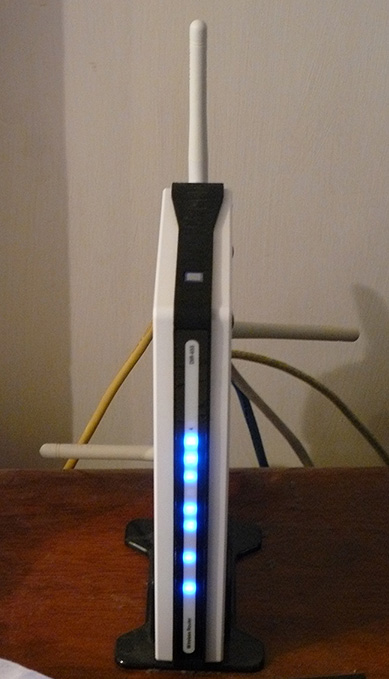
Ich habe einen D-Link DIR-655 Router für das vergangene Jahr im Besitz und es ist bei weitem die beste Router, den ich je benutzt haben, obwohl ich 150 Dollar mehr als das, was ich für einen Router zu zahlen, bevor nicht bezahlen, so dass ich bekommen habe was ich bezahlt.
Beginnend mit der Version 1.21 Beta 04 des DIR-655 Firmware gibt es jetzt SharePoint-Funktionen zur Verfügung. SharePoint als die Medien und auf anderen Websites oder teilweise nennen es Shareport, wie es überall sonst auch in die Software selbst ist ein Weg für D-Link aufgerufen wird, Produkte mit einem USB-Gerät über das LAN zu teilen, werde ich versuchen, nicht zu verwechseln Sie weiter so werde ich im Folgenden nur als Shareport von nun an.
Shareport ist ein interessantes Feature, das ich wollte eigentlich in der Lage, vor ein paar Jahren zu tun, durch den Austausch von USB-Geräte von einem Computer, so dass sie auf einem anderen PC verwendet, als ob das Gerät tatsächlich in den PC eingesteckt werden. D-Link endlich diese Technologie zum Leben erweckt in einer begrenzten Art und Weise mit Shareport.
Dies ist, wie Shareport funktioniert, werde ich mit meinem DIR-655 und Brother DCP-150C MFC als Beispiel.
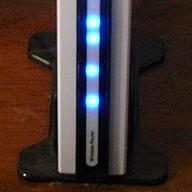
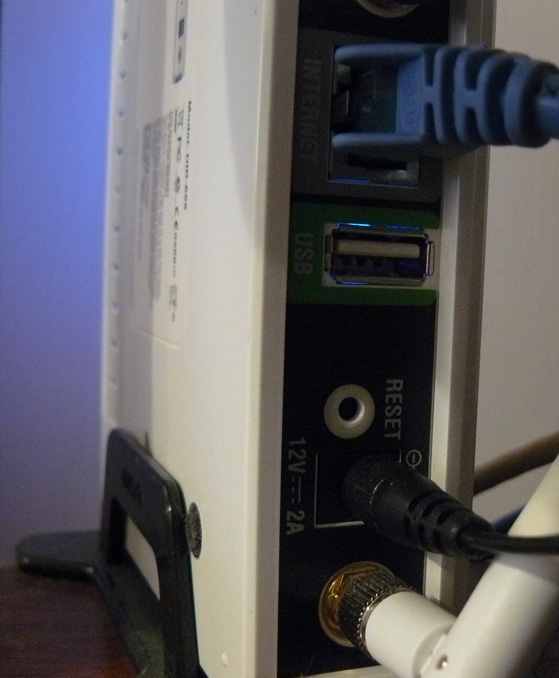
Der DIR-655 hat einen USB-Anschluss auf der Rückseite, scheinen Tests, um anzuzeigen, es ist ein USB 1.1-Anschluss, bis jetzt wurde der Hafen für die WLAN-Einstellungen können auf einem USB-Stick gespeichert werden.
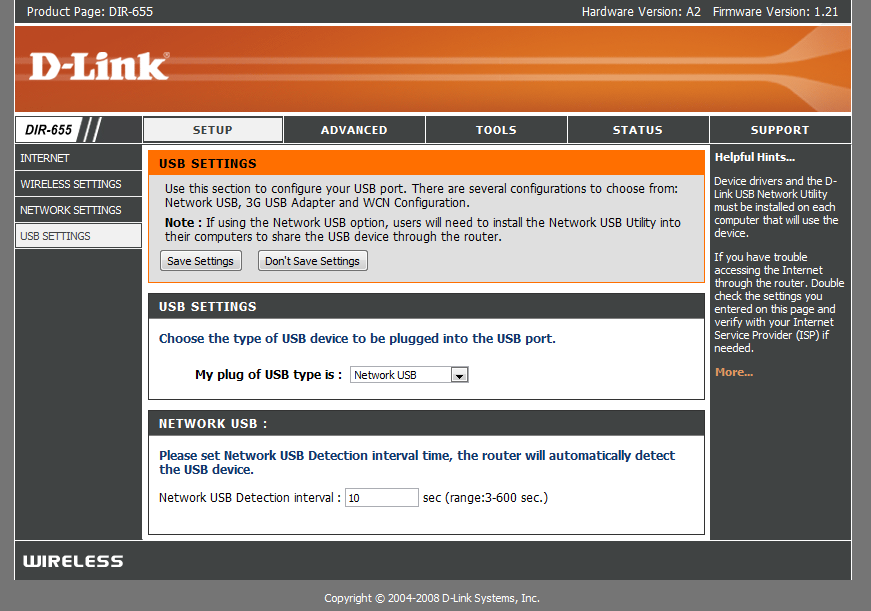
Nach der Installation der neuen Firmware jedoch den USB-Port verfügt über mehr Verwendung gefunden, wir sind mit einem neuen Setup-Menü unter, dass die Nutzung des Hafens Kontrollen begrüßt.
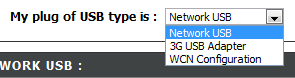
Wie Sie sehen können gibt es nicht viel, um das Setup des USB-Anschluss, ist die Konfiguration WCN Standardmäßig ist dieser für die drahtlose Konfiguration Schlüssel verwendet wird, wählen Sie das Dropdown-Feld:

Die Wahl Network USB stellt der Router in Shareport Modus wählen 3G-USB-Adapter ist ein bisschen wie ein Rätsel für mich, ich bin mir nicht sicher, welche Geräte sind kompatibel mit diesem doch, so wie die meisten Menschen tun, ich habe einen 3G-Dienst und die Verwendung dieser als Backup nur Sie das Gerät bis zu den USB-Port und wählen 3G-USB-Adapter wäre sehr praktisch.
Wenn Sie Network USB gewählt ist das Gerät automatisch freigegeben, aber um in Verbindung zu treten, müssen Sie den Shareport Software von D-Link zu installieren, das ist immer noch in der Beta scheint es so mit Vorsicht verwenden, etc etc, ich habe nicht hatte ein Problem mit es noch, und es scheint ziemlich poliert. wenn es installiert ist, stellen Sie sicher, damit sie beim Systemstart ausgeführt wird, und es sofort ausgeführt, da Sie sonst nicht in der Lage, das Gerät ohne manuell ausführen Shareport die Software jedes Mal verwenden, verwendet es nur 2 MB RAM so dass es nicht eine Ressource hog.

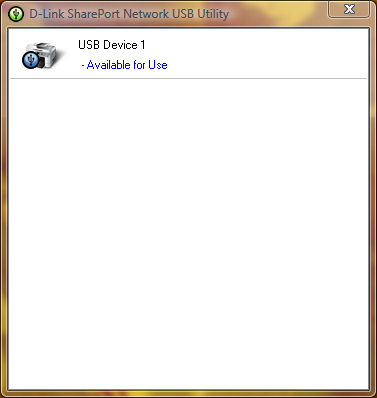
Wenn Ihr USB-Gerät eingeschaltet ist und eine Verbindung zum Shareport Programm sollte wie folgt angezeigt, wenn Sie einen Doppelklick auf das Symbol in der Taskleiste. Es wird dann können Sie durch einen Assistenten für die Installation des Geräts ausführen, werden Sie Ihr Gerät das Bedürfnis Treiber-CD oder den neuesten Treiber für ihre Website, am Ende werden Sie gefragt, ob Sie automatisch an das Gerät anschließen möchten, wenn Sie drucken, wenn es ist ein Drucker, das ist eine gute Idee, sonst manuell wählen müssen, um in Verbindung zu treten.
Wenn das alles auf jedem Computer, der vom Gerät eingerichtet wird, werden Sie, dass jedes Gerät Staaten feststellen, dass der Drucker angehalten und offline, auf dem Drucker drucken ohnehin die Shareport Software erkennt, dass ein Druck wurde an den Drucker gesendet, und es weist automatisch den Drucker an den Computer und während der Drucker kommuniziert mit dem PC wird es zeigen als verbunden, wenn der Druckauftrag abgeschlossen ist wird es dann wieder zurück zum offline, machte eine Pause.
Die Beschränkung auf diese Funktion ist, dass es nur auf einem PC in einer Zeit funktionieren wird, einfach USB-Geräte sind nicht darauf ausgelegt, auf 2 PCs angeschlossen einst so macht es Sinn, warum dies der Fall ist.
Ich habe nicht versucht so etwas wie Webcams jedoch die sie von jeher zu arbeiten, jedoch in einem langsameren Tempo als normal sind, arbeitet der Scanner-Funktion meiner Drucker in Ordnung, jedoch müssen Sie manuell eine Verbindung mit dem Shareport Software zu verwenden, stellen Sie sicher, dass Sie beim Trennen wenn Sie fertig sind.
Wie ich bereits zu Beginn dieses Artikels die Shareport Software ist etwas, was ich haben eine lange Zeit des Wartens wurde, ist es ein großer Vorteil bei meinem Router ist nicht die neueste jetzt da draußen, und es schien fast, wie D-Link hatte Zugabe erhalten neue Funktionen, die es, es zeigt auch, wie gut das Gerät funktionieren, wenn es ein USB-Gerät verarbeiten kann, während er leistet allen seinen anderen Aufgaben können.
In Verbindung stehende Pfosten:
Kommentare:
Lassen Sie eine Antwort


Datum: 14. Oktober 2008
Time: 5:57
Just Firmware-Upgrade auf meinem DIR 655 Router auf 1,21. Als ich begann, die Shareport-Dienstprogramm es abgestürzt ist meine Desktop-und Laptop-Computern auch Windows Vista Home Premium Betriebssystem installieren. Called Dlink technischen Support, fand aber keine Probleme. Wer hatte das gleiche Problem? Brauchen Sie eine Lösung für dieses Problem ... please help.
Datum: 14. Oktober 2008
Zeit: 11.47 Uhr
Nun, ich noch 1,21 Beta 04 geschaltet sind, könnte es etwas mit 1,21 endg., auch könnte es eine gute Idee, erneut herunterladen, das Dienstprogramm von ftp://ftp.dlink.com/Gateway/dir655/Apps/SharePort_Network_USB_Utility_094. zip und möglicherweise erneut die Flash-Router mit ftp://ftp.dlink.com/Gateway/dir655/Firmware/dir655_firmware_121.zip ODER ftp://ftp.dlink.com/Gateway/dir655/Firmware/dir655_firmware_121_no_securespot.zip die no_securespot Datei hat ein neueres Datum auf sie als die Standard-Firmware 1,21. Welche Software benutzen Sie zurzeit haben, die auf beiden Computern? Versuchen Sie, Absperren Virenscanner etc. auf beiden bei der Installation dieses.
Datum: 16. Oktober 2008
Time: 4:56
Ich habe gerade installierten Firmware 1,13 auf meiner DGL-4500 sowie die Shareport Dienstprogramm installiert. Shareport recionizing ist nicht mein Router über das Netzwerk oder meine externe HD als verbunden. Any thoughts?
Datum: 16. Oktober 2008
Time: 6:44 pm
Eigentlich bin ich versucht, auf den Grund zu einem ähnlichen Problem bin ich erleben, vor ein paar Tagen meinen PC nicht mehr feststellen können, wenn mein Drucker auf und wurde erhalten, die meiste Zeit auch nicht erkennen, wenn der Router angeschlossen wurde.
Ich habe sie neu installiert, der Router neu gestartet und es ändert sich nicht, auch wenn jeder andere PC funktioniert perfekt.
Mögliche Lösung: Eigentlich habe ich nur das Problem behoben haben, scheint es, kann es nicht erkennen, Geräte, wenn Sie mehr als eine Netzwerkkarte aktiviert, so if you're running VMware etc Sie die anderen Netzwerkverbindungen und neu starten, bevor es zu deaktivieren haben beginnt wieder erkennen. Wenn Sie in der Lage sind, um es arbeiten auch von dieser let me know.
Datum: 18. Oktober 2008
Time: 5:54 pm
Hallo!
Offenbar funktioniert das nur auf der US-Version des 655. Ich habe die Firmware auf den neuesten EU-Version geflasht und es gibt keinen Bildschirm wie oben beschrieben.
Ich wollte nur klarstellen, dass dies für Benutzer in den USA ist ähnlich. Alle anderen, nicht in das Denken dieser Router wird alles andere als Web-Access-Netzwerk verwechselt werden.
Datum: 19. Oktober 2008
Time: 12:13 am
Thanks for the heads up, ich habe mit der US-Version der Firmware in meinem AU 655 gekauft.
Ich empfehle das nicht tun, aber ich glaube nicht, gibt es überhaupt einen Unterschied in der Hardware für die verschiedenen Regionen nicht.
Datum: 20. Oktober 2008
Time: 5:35
Ben-Dank für dieses großartige Tutorial - mit Ihren Anweisungen, konnte ich das Firmware-Update, installieren Sie die Print-Utility und drucken Sie auf meinen Router angeschlossenen Laptop! Nur ein Wort des Dankes.
Als FYI, benutzte ich die D-Link Router-Software die eigene "Kontrolle für Firmware-Updates"-Funktion, und es wird automatisch empfohlene Version 1.21 (vom 10/9/2008). Jetzt habe ich den Druck, Freude, Eierkuchen auf einem Vista-basierten Laptop (Compaq) und ein XP-Home-basierte Desktop-(Compaq). Haben noch eine Dell-Laptop zu verbinden. Der Drucker ist ein HP Deskjet F4180 All-In-One. Had to SharePoint installieren und die HP-Druckertreiber auf dem Laptop, aber das ist keine große Sache war.
Ein Unterschied habe ich von dem, was Sie gesagt hätten bemerkt: Ich habe nicht an den Drucker jedesmal, wenn ich es wieder benutzen. Wenn ich verbunden bin, bleibt er verbunden, wenn ich die "Freigabe" es opt. Wenn einer der PC's verbunden ist, und Sie möchten von einem anderen ein zu drucken, stellen wir Ihnen die Möglichkeit, "den Antrag auf eine Freilassung" aus der Maschine, verbunden ist. Dann erhält der Maschine, die zurzeit verbunden ist ein Pop-Up-Nachricht aufgefordert, die Verbindung zu trennen, damit ein anderer Benutzer den Drucker verwenden darf. Die Statusleiste zeigt auch den Namen des Computers von welcher Maschine wird derzeit aktiv an den Drucker angeschlossen. Vielleicht war dies ein Firmware-Update, das in der 10/9/08 Version enthalten war?
Als FYI, ich bin ein Nutzer in den USA.
Datum: 20. Oktober 2008
Zeit: 12.34 Uhr
Vielen Dank für Ihren Kommentar Lisa, ich bin froh, dass du gerne meine Anweisungen.
Ich habe nie wirklich über diesen kommen, sind alle Computer auf Auto-Verbindung, so dass sie nur an den Drucker kurz einige Sekunden, dass der Druckauftrag gesendet wird angeschlossen, dann schaltet es wieder, ich vermute, es wäre Teil der mine too jedoch habe ich nicht ganz durch, um nicht mit einem PC verbunden ist lang genug für einen anderen die Verwendung dieser Daten zu verlangen, enthalten.
Datum: 23. Oktober 2008
Time: 7:48
Es gibt definitiv Probleme mit ver. 1.2 & 1,21 Versionen der DIR-655 Firmware.
Die Virtual Server Mapping nicht ordnungsgemäß für ausgehende Pakete zu arbeiten. Ich laufe eine E-Mail-Server, der Funktionsweise zeitweise auf diese beiden U-Firmware gestartet. Zurückkehren zu 1,11 löste das Problem. Verbindungen zu Port 25 (SMTP) würde auf dem Weg zum entsprechenden internen Server in meinem Netzwerk, aber es scheint den Servern bzw. war nicht immer zurück zu den entfernten Server verbinden. Dies lässt den SMTP-Routine wartet auf weitere Kommunikation, kommt nie und das Zeitlimit. Manchmal ist die Übertragung von Server aufgeben und E-Mail geht verloren.
Außerdem können Termine nicht korrekt konfiguriert .. die Firmware nicht korrekt Fahnen mal als ungültig bedeutet: 11pm zu 5am in 1.2x und Ordnung ungültig, 1.11.
Datum: 23. Oktober 2008
Zeit: 11.52 Uhr
That's pretty bad Brian, habe ich nichts erlebt zu schlecht mit diesen Firmwares mich, aber andere Probleme berichten. Früher hielt ich ab 1.2 als Menschen mit Problemen mit sich, aber es scheint nicht alle Probleme können behoben haben.
Datum: 24. Oktober 2008
Time: 6:35
Ich frage mich, wenn Sie etwas für mich testen könnte ... könnten Sie versuchen, einen Zeitplan mit 11pm zu 5 Uhr und sehen, ob es der Auffassung, dass gültig? Das wird mir sagen, ob dies ein allgemeines Problem mit 1,21 oder etwas das ist nur ein Problem mit meinem Gerät und Firmware .... thx
Datum: 24. Oktober 2008
Time: 4:47 pm
Erlebe ich den gleichen Fehler, scheint nicht wie Spanning über Mitternacht. Was passiert, wenn Sie einen Zeitplan Set aus 11PM bis 12 Uhr und eine von 12AM zu 5AM?
Datum: 27. Oktober 2008
Time: 7:28
Ich habe die Website, auf französisch französisch dlink Vertreter Ansprüche Shareport Funktionalität finden, werden in Wochen verfügbar sein in den EU-Firmwares:
http://www.clubic.com/actualite-170094-dlink-routeurs-dir-655-dir-855.html
Einer der Kommentar unter dem Artikel sais US-Firmware funktioniert der EU-Hardware (wie Ben schrieb - wahrscheinlich gibt es keine Unterschiede in der Hardware), Shareport funktioniert gut, und Canon Multifunktionsgerät pixma kann über den gemeinsamen Port-Scan.
Ich bin der Bestellung der DIR-655 für mich ...
Datum: 28. Oktober 2008
Time: 2:03
@ Jun (und alle anderen) ... Ich lief in die "Installation Shareport" stürzte mein System Problem. (beide V ,94-und 1.0-Releases)
Der DIR-655 ging in großen, Firmware-Update feinen ging. Router / Wireless-Ripping schnell.
Ging an den Shareport Software zu installieren und es stürzte mein XP SP3 und Vista Home Premium Systeme furchtbar schlecht. Konnte erst einmal laufen über den System wiederherzustellen, aber war nicht schön für eine Weile.
Ich habe den Verdacht einen Konflikt mit AVG Free 8, die ein gemeinsames Stück Software auf allen meinen Systemen.
Kann jemand anderes vielleicht bestätigen eine Shareport / AVG Free 8 Treiber Konflikt, die ihre Systeme haben können, stürzte während oder nach der Installation Shareport?
-Cheers
Datum: 28. Oktober 2008
Time: 7:35
Nun, ich habe das gleiche Problem wie Juni Sharepoint Version 1.0 stürzt mein Laptop bei der Installation und Deinstallation. Ich habe Firmware 1,21, aber ich glaube nicht, dass Dinge, die ich da nicht einmal die Software installieren, ohne Absturz. Called Dlink unterstützen, und sie sagen, dass Sharepoint und den USB-Anschluss nicht auf der DIR-655 unterstützt werden.
Könnten versuchen, ein alternatives Produkt, dass eigentlich eine Festplatte unterstützen kann. Any recommendations? Ich könnte die Apple Airport Extreeme versuchen jetzt, wo es Gigabit-und Dual-Mode fähig.
Datum: 28. Oktober 2008
Time: 9:30 pm
Ich bin fast sicher, in meinem Fall gibt es einen Konflikt zwischen dem Fahrer Shareport Fahrer und etwas anderes. Ich bin stark gebeugt zu Gunsten der es als eine Art Schutz-System (HIPS?)-Funktion von AVG Free 8 in meinem Fall.
Im Test-Bett-Systeme, kann ich installieren Shareport just fine (v.94 oder v1.0). Allerdings, wenn ich zum ersten Mal AVG Free 8 installiert haben, die Maschinen Blue-Screen während dem Ende der Installation ..., wenn entweder der Fahrer oder der Dienst versucht, installiert werden. Neugierig auf ein "echtes" System ist Tanks während der Installation auf einem virtuellen System ist es nur Tanks während der Deinstallation von Shareport mit AVG Free 8.
Jedoch (auf der Virtual-Systeme), wenn ich zuerst deinstallieren AVG Free 8, Neustart, Shareport, starten, dann installieren Installation von AVG Free 8 scheint alles glücklich.
Ich brauche ein bisschen mehr zur Fehlerbehebung erstes tun, bevor ich zu meinen "Live"-Systeme zu bewegen. Es war nicht viel Spaß dabei ein System Wiederherstellung auf zwei von meinen drei Systeme an diesem Wochenende.
Ich glaube nicht, es ist ein router-hardware/firmware Problem so gut wie ich sagen kann. Meine DIR-655, wenn Rippen schnell und solide. Ich habe ein Upgrade auf 1,21 Firmware, die diese neue Funktion ermöglicht Shareport, aber ich sehe nicht, wie der Router-Firmware ist Auswirkungen auf die Systeme. Ich bin überzeugt, es mit den Shareport Software selbst und insbesondere ein Treiber oder Dienst Konflikt bei der Installation Initialisierung. Ich habe nur dingfest zu dem Konflikt Punkt.
Und ja ... Ich habe über 30 Minuten am Telefon mit Dlink Unterstützung gestern Abend und es war neben wertlos. Ich habe endlich den Armen tech meine Erkenntnisse zu den Betreuern zu eskalieren, und vielleicht wird es eine technische Schreibtisch Dlink.
Nach dieser Kerl, gibt es keine neueren "back-room"-Versionen zur Verfügung Shareport zu diesem Zeitpunkt.
Werden Sie wissen, was ich herausfinden.
Andernfalls Ich bin sehr zufrieden mit dem DIR-655 Gerät insgesamt. Schade, dass die Shareport Funktion war einer der entscheidenden Faktoren für die gehen mit diesem Modell.
Seufz ....
(BTW-I posted den Kommentar rechts oben über mir SteveW's ... irgendwie den Browser gefangen Juni den Namen in das Feld Autor.)
-Cheers
Datum: 29. Oktober 2008
Time: 2:44
Das ist gut Fehlerbehebung arbeiten dort Claus, es wäre ein Software-Problem Shareport sicher, vielleicht AVG ist nicht schön spielen entweder haben sie nicht genau das hat die beste Platte vor kurzem in Bezug auf Probleme mit anderer Software. Ich werde sehen, ob ich herausfinden kann, was morgen in Bezug auf AVG / Shareport, ich bin sicher, dass eines der Unternehmen, etwas weiß.
Ich würde nicht erwarten, dass D-Link, um die Software für eine Weile zu aktualisieren, aber ich denke, sie würde nur wissen, das ist sicher.
Hoffentlich, wenn genügend Menschen die Frage, obwohl sie es bald zu beheben, haben die Software selbst hat sich mit allen Shareport fähige Hardware funktionieren, und es ist ein ganz wenige von denen, jetzt da draußen.
Übrigens habe ich Ihren Namen in der Anmerkung oben SteveW verändert, so kann das Gespräch richtig verstanden zu werden, lassen Sie mich wissen, wenn Sie Fehler mit dem Kommentar-System, es ist mein Code, damit es die Möglichkeit von Fehlern ist.
Datum: 31. Oktober 2008
Time: 8:34
Ich habe auch installiert 1,21 auf meinem DIR-655 und der USB-Software. Meine festverdrahteten Computer gefunden den Drucker sofort aus. Mein Notebook (wireless) sharport sagt, es nicht finden können, ein USB-Gerät. Irgendwelche Vorschläge?
Datum: 31. Oktober 2008
Zeit: 10.20 Uhr
Deaktivieren Sie alle anderen Netzwerkkarten und neu zu starten, auch die Ethernet-Karte, wird Shareport leicht durch mehrere Netzwerkverbindungen verwirrt, wenn es ausgeführt wird VMWare deaktivieren Sie die VMnet Netzwerkkarten.
Auch vorübergehend deaktivieren Sie alle Firewalls können Sie auf dem Laptop nur für den Fall ein Anschluss gesperrt wird.
Datum: 2. November 2008
Zeit: 10.51 Uhr
Nachdem das gleiche Problem wie Valca aber ich bin mir läuft die neue Norton Virenscanner und ich frage mich, ob einige der anderen, was dann einen Virenscanner.
Datum: 3. November 2008
Time: 4:14
Hallo Jungs. Noch die Prüfung der Frage.
Ich hatte vorher vermutet AVG 8 so an diesem Wochenende ich etwas Zeit gefunden. Beschlossen, meine Theorie auf die Probe auf meinem Vista Home Prem setzen. SP1-System.
Ich deinstalliert AVG 8, einen manuellen Restore Point (gut, was ich tat) neu gestartet, so weit so gut. Dann installierte ich Shareport.
BSOD.
Systemwiederherstellung mit meinem save-Punkt mein System wiederhergestellt. Nun war ich zurück auf Feld eins.
Umzug auf einen neuen Virtual PC-Sitzung mit einer unberührten XP SP2-Installation. Installierte Shareport just fine. Keine Fragen. Deinstalliert es just fine.
Weiter vermute ich hatte, war NetLimiter Monitor, die auch auf allen meinen drei Systeme verbreitet.
NetLimiter Monitor installiert und neu gestartet. Gut. Keine Fragen der Stabilität.
Went to install Shareport (v1.0) und am Ende des Setup ... genau wie meine reale Systeme ... das virtuelle System hat eine sofortige schwarzen Bildschirm neu zu starten.
Hmmmm.
So habe ich von meinem NetLimiter Monitor-Systeme deinstalliert und in eine E-Mail-Anfrage an die Support-Team gefragt, ob sie sehen können in diese unabhängig.
Zu sehen, wie es sowohl Shareport und NetLimiter Monitor scheinen beide in das Windows-Netzwerk-Treiber Haken / Dienstleistungen dies macht ziemlich guten Sinn erscheint.
Will ein weiteres Update geben, wenn / falls sie zu reagieren.
Nicht sicher, ob ich mutig genug bin, nur noch das Experiment auf meinem Live-System zu wiederholen.
-Cheers!
Datum: 3. November 2008
Time: 7:27
Hallo allerseits, ich bin Brand new, all diese. Es wurde kürzlich auf der DIR655. Großartig. 1 Desktop 5 Notebooks. Desktop hat die PCI-Netzwerkkarte, Router, DSL-Modem etc. Notebooks sind alle laufenden internen 802.11g-Geräten.
Wenn ich das USB-Kabel aus der Oki550 Farblaser aus dem Desktop, und stecken Sie ihn in den USB-Port auf der DIR655. Ist dies letztendlich (oder theoretisch) gehen, damit wir zu drucken, Laser, ohne sich über die erste Desktop-Computer?
Denn jetzt, dass mein oberstes Ziel und das ist meine erste Frage.
Danke
Dave
Datum: 3. November 2008
Time: 3:10 pm
Ja, dieser Zugriff auf den Drucker jederzeit den Router ist erlaubt, den Drucker und Router sind die einzigen 2 Dinge, die Notwendigkeit, sich auf diese Arbeit werden, vorgesehen ist jedoch, dass sie nicht Route über den Desktop zu jedem Zeitpunkt. Wie aus den Bemerkungen sollten Sie ein wenig Vorsicht bei der Installation der Software Shareport, da es nicht gut mit anderen Software-Komponenten hat sich die Vernetzung spielen Vorgang gesehen werden.
Datum: 4. November 2008
Time: 6:30 pm
Hey Jungs Ich habe das Problem ... Die Netto-Limiter deinstallieren, und Sie sind gut zu gehen ^ _ ^
Datum: 6. November 2008
Time: 12:01 am
Ben,
Nur, um zu bestätigen, was ich vermutet Nick hat bestätigt, ... the Net Limiter 2 Monitor-Programm wird kritisch Konflikt mit den Shareport Anwendung (zu dieser Zeit).
Ich hatte es von meinem XP Home (SP3) und Windows Vista Home Premium (SP1)-Systeme deinstalliert. Dann habe ich neu installiert Shareport nach dem Erstellen der Systemwiederherstellung Punkte (nur um sicher zu sein).
Installation ging gut diese Zeit und keinen BSOD oder Konflikte wurden nicht beobachtet. Die Shareport Anwendung schnell fanden die Seagate USB-Flash-Speicherlösung und ich konnte "mount / connect" zu ihm und Lesen / Schreiben von Dateien von allen Systemen.
Um es klar zu ... nur ein System sein kann, um das Gerät zu einer Zeit, soweit ich sagen kann, verbunden. Außer, dass es jetzt funktioniert super.
Puh! Das ist eine Arbeitsweise, die doozie auszustellen war. Dank Nick für die Buchung eine Bestätigung.
Ich habe eine E-Mail an die Net-Limiter-Support-Team über das Thema zu senden, aber noch keine Antwort.
Nicht sicher, ob es mit all ihren Programmen (bezahlt wird auftreten, kostenlos) oder einfach nur mit Net Limiter 2 Monitor.
Vielen Dank an Alle!
Prost!
Claus-V.
Datum: 7. November 2008
Time: 12:34 am
Hallo, ich bin im Besitz der R-855 als mein lieber alter DIR-655 ging zu meinen Schwestern Wohnung als eine dauerhafte Lösung. Allerdings wäre ich sehr daran interessiert zu erfahren, ob der DIR-855 diese Funktion unterstützt auch. Es könnte ein gutes Add-On für meine bereits awesome Wireless Router.
Daniel
Datum: 8. November 2008
Time: 6:13
Daniel,
Nach einer D-Link Pressemitteilung der DIR-855 ist in jenen, die Shareport unterstützt inbegriffen.
http://www.dlink.com/press/pr/?prid=442
Letzter:
"Die innovativen Shareport USB Netzwerk-Bridging-Funktion ist bei D-Link zur Verfügung Wireless N Gigabit Router-Modelle - die DIR-655, DIR-825, DIR-855 und DGL-4500 Gaming Router mit GameFuelâ" ¢. Die Shareport Technologie-Upgrade ist auch auf der Wireless N DIR-628. Aktueller Eigentümer dieser Router können zu Shareport Technologie durch Download der aktuellsten Firmware und Client-Dienstprogramm aus dem D-Link-Website aktualisieren, http://www.dlink.com. "
Ich denke, dies ist der Link zu der DIR-855 Firmware und Shareport Download-Seite:
Firmware --
http://www.dlink.com/products/support.asp?pid=548&sec=1 # Firmware
(Das ist eine gut aussehende 855-Modell by-the-way. Makes my 655 Blick Ebene!
Viel Glück!
Claus V.
Datum: 8. November 2008
Time: 9:41 pm
Hallo, ich habe meine eigene DIR655 für 1 Woche. Die EU-Version, aber 1,21 US-Firmware laufen smothly. Shareport funktioniert, aber nicht sehr stabil.
Erste Ausgabe, gemeinsame Verwendung eines USB-Laufwerk über die WiFi ist keine gute Idee IMHO. Jedes Netzwerk Problem und haben Probleme mit Vista-Gerät. Auch die Leistung ist ein Thema (800kB / s bei 2 m / s beim Kopieren von Dateien zwischen Laptops mit WiFi-N-Adapter).
Aber ich gekauft Router für Druckerfreigabe. Und es ist möglich, aber Shareport Utility (1.0) funktioniert nur auf das lokale Konto. Bei Arbeiten an der Active Directory-Konto, zeigt das Dienstprogramm die Popup-Fenster das Gerät den USB-Port des Routers angeschlossen. Aber wenn Sie auf das Tray-Icon im App-Fenster wird nicht angezeigt. Die Anwendung ist in der Taskleiste auf, hat aber keine Fenster Gerät auswählen und verbinden.
Auf dem lokalen Konto ist alles OK. Scheint die Shareport Utility Problem. Das Betriebssystem wurde vor einer Woche installiert ist, nicht viele Applikationen installiert.
Any ideas?
Piotr
Datum: 9. November 2008
Time: 8:18
Claus, thank you very much, war ich von diesem Problem leiden bis heute. Ich habe mein ganzes Wochenende für nichts, danke!
dieses Netz Limiter sucks: \
Datum: 10. November 2008
Time: 1:27 pm
Hallo, ich bin mit dieser isue mit dlink 655 v1.21
und Shareport v.1.0 ...
MULTIFUCTION Drucker und USB-Flash-Laufwerk funktioniert einwandfrei am 2. XP SP3 und 1 vista 64 Maschinen,
aber wenn ich einen iPod touch v. 2.0, der Shareport Utility zeigt "zur Nutzung"
und versuchen, eine Verbindung herzustellen und allen 3 Tropfen meinem PC ist der Internetanschluss, Wireless-und Kabel und natürlich sagen, dass die itouch in Verbindung zu pflegen und das Internet wird automatisch wieder hergestellt ist, wie der Router geht in eine Macht-Zyklus oder so etwas.
Dann versuchte ich dasselbe Verfahren, aber mit einem iPod nano dieser Zeit, und raten, was war perfekt!
Ist jemand mit diesem Problem und wissen oder die Abhilfe für dieses?
Danke für Ihre Hilfe.
Datum: 14. November 2008
Time: 1:29 pm
Hallo da!
Also .. Ich habe eine EU-Richt-655 Router und versuchte die 1,21 US-Firmware mich. Ich will nicht lügen, nicht die Firmware-Aktualisierung nicht reibungslos über die Bühne gehen. Wenn ich die Firmware hochgeladen, um den Router, konnte ich nicht auf die Verwaltung Seite des Routers nicht mehr ... aber nach einem Reset ging alles wieder normal (es wäre eine gute Idee, um die Konfiguration des Routers zu speichern, bevor Sie das tun, Firmware-Update). Egal, ich alle ermutigen, mit uns nicht DIR-655, die 1,21 Firmware versuchen ... so weit ist alles gut und arbeiten sogar geschafft, meinen Drucker zu verbinden und es funktioniert super ... nächste, was zu versuchen, ist ein Speichergerät
Datum: 15. November 2008
Time: 10:16 pm
Denken Sie daran, Jungs, scheint der Router an USB 1.1-Geschwindigkeit begrenzt werden, dh etwa 1MB/second so dass es nicht zu empfehlen, wenn Sie ein kleines Gerät haben und haben nicht viel zu übertragen, auch Router sind nicht die schnellsten Systemen der Übertragung von Daten über die USB-stellt wahrscheinlich eine Menge Druck auf das Gerät, das alles von langsameren Geschwindigkeiten und Wireless-LAN-Aussetzer auf den Router neu gestartet verursachen könnten.
Wir danken Ihnen für Ihre Forschung Claus, hoffentlich bald eines der Unternehmen ist in der Lage, die Probleme mit der Kompatibilität zu beheben.
Datum: 26. November 2008
Time: 3:22
Ich hatte gehofft, du könntest mir mit einem anderen Problem zu helfen.
Ich habe vor kurzem ein Upgrade von einem anderen D-Link Router DIR-655 ein. Bis f / w 1,21 upgraded. Haben Sie mehrere Rechner in einem lokalen Netzwerk-Arbeitsgruppe, dass alle sahen gut mit den älteren Router. Now I cant einen von den anderen Maschinen auf dem LAN. Ich weiß, ich habe etwas verpasst so einfache Ich hatte gehofft, Sie können mir ein Heads-up. Alle Knoten finden Sie im Internet schöne und ip's sind reserviert und im DHCP-Bereich. Was habe ich verpasst? Viel Dank
Datum: 26. November 2008
Time: 1:25 pm
Es gibt 2 Dinge, von der Oberseite meines Kopfes, die Probleme beim Übergang Netze, vor allem, wenn das Netz ändert sich die IP-Arrangements, einige Firewall-Software einschließlich der Windows-Firewall ZoneAlarm und allgemein kann ein PC entfernt, 'Block ausfindig gemacht werden, da ihrer Ansicht nach dieses neue Netz ist ein öffentliches Netzwerk über das Internet statt eines privaten LAN, wenn Sie mit Windows Vista das gleiche passieren kann, stellen Sie sicher, dass Ihre PCs haben ihre Netzwerkverbindung zum Home oder "Privat", die sollte wirklich nur die Zeiten, in denen dieses Problem sollte auftreten.
Wenn sie sind drahtlos auch sicherstellen, dass Wireless-Partition in der Advanced Wireless Eigenschaften wie diese deaktiviert ist, wird ein ähnliches beeinträchtigt wird.
Datum: 11. Dezember 2008
Zeit: 10.55 Uhr
Ich habe den gleichen BSOD Problem auf Vista als von anderen erwähnt. Der PC ging am Ende der Shareport BSOD installieren und dann BSOD'ed jedes Mal wenn ich versuchte, um sich einzuloggen. Ich habe Trend Micro AV und dem Nortel VPN-Client. Beide Programme sind von wesentlicher Bedeutung, und ich kann nicht deinstalliert werden entweder. Kann nur einer dieser beiden ein Problem?
Datum: 18. Dezember 2008
Time: 11:01 pm
Hallo,
Ich bin in der Aktualisierung auf diese Router interessiert, damit ich verschiedene Foren nach Hinweisen gesucht haben.
Heute habe ich bemerkt, gibt es eine neue (noch v1.21) Datei aktualisiert 12.12.08. Jeder versuchte, ob es sich um eine neue Version mit Updates oder nicht?
Datum: 19. Dezember 2008
Time: 2:57 pm
Ich werde es versuchen und sehen, ob es aufgrund von Problemen die Menschen Veränderungen gelitten haben, beachten Sie, dass auf ein neues Problem Ich habe bemerkt, entstanden ist, gelegentlich nach dem Router auf mehr als einer Woche Shareport Software auf allen Computern gestartet Out-Anschluss gibt Fehler, wenn sie für eine Weile gibt es Hunderte auf dem Bildschirm, dem Neustart des Routers nicht mehr Fehler, die für eine Weile verlassen sind.
Datum: 20. Dezember 2008
Time: 6:52 pm
Die 1,21 ist die gleiche wie die, die vor ein paar Monaten veröffentlicht wurde, nur mit dem Zeitpunkt änderte sich jedoch über 2 oder 3 Versionen haben etikettiert wurden 1,21 ohne eine Beta-Tag, mit dem zuletzt die 1,21 B10 im November, also wenn Sie heruntergeladen 1,21 im Oktober oder noch früher, laden Sie sie wieder, und es behebt einige Probleme mit der Port-Weiterleitung und Speichern der Einstellungen zu installieren.
Datum: 29. Dezember 2008
Time: 6:59
Hallo Gang,
Great Thread!
Ich habe ein Shareport Problem, und wollte sehen, ob jemand das gleiche erlebt hat.
hier ist mein Setup:
1. DIR-655 mit Firmware 1,21
2. Win XP Pro Maschine (als VMware-Client) mit Shareport 1
3. WD externe Festplatte
Die Festplatte ist an den USB-Port auf dem Router, aber ich bin nicht in der Lage, ihm in Verbindung zu treten aus dem die Win XP pro Maschine. Die XP-Rechner wird fortlaufend informieren Sie mich, dass es "hat festgestellt," die Festplatte, aber die Shareport Symbol in der Taskleiste weiterhin bleiben rot, und nie wird grün. Nach ca. 30 Sekunden wird die Anmeldung zurück. Ich bin völlig ratlos, wie es workeed in der Vergangenheit, als ich diese vm Kunde hatte auf einem anderen Rechner. Ich weiß, dass vmware verursacht werden, kann dies, aber ich sehe nicht, wie, weil ich nur einen Netzwerkadapter aktiviert auf dem XP-Rechner (Bridged Ethernet). Ich habe Stunden damit verbracht, diese an die Arbeit ... Any ideas würde sehr geschätzt werden, zu erhalten!
Danke,
John
Datum: 30. Dezember 2008
Time: 8:02
Ich habe dieses Setup DIR-655 Firmware 1.2.1 und Shareport ich zu deaktivieren, wenn ich meine Microsoft OneCare-Firewall arbeiten.
Kennt jemand die Port's von D-Link verwendet Shareport?
Datum: 31. Dezember 2008
Time: 12:08 am
Wenn Sie alle Internetseite Dlink für den Router gehen, werden Sie sehen, dass er sagt,
"Diese Firmware ist nur für US-Produkte entwickelt.
Mit dieser Firmware auf einem Gerät außerhalb der Vereinigten Staaten die Garantie erlischt und das Gerät unbrauchbar zu machen.
Bitte kontaktieren Sie den D-Link-Büro in Ihrer Region für Firmware-Updates, die mit dem D-Link-Produkt kompatibel sind. "
und,
"¤ Added Shareport Funktionen.
¤ Fixed E-Mail-Benachrichtigung Problem.
Bitte laden Sie das Dienstprogramm und Shareport Shareport finden Sie in der Bedienungsanleitung vor der Verwendung. "
Sie müssen den tatsächlichen Nutzen herunterladen, um es benutzen zu können!
Datum: 31. Dezember 2008
Time: 12:10 am
Oh, und ich fast vergessen, das ist für x86-Version OS's only. x64 wird nicht unterstützt.
Datum: 2. Januar 2009
Time: 3:12
Hallo James, ich bin nicht sicher, ob der Häfen mich jedoch, wenn Sie öffnen eine Eingabeaufforderung, und verwenden Sie den Befehl "netstat" nur nach dem Versuch, eine Verbindung mit Shareport, suchen Sie nach IP des Routers, und Sie sollten in der Lage, alle Ports sehen, dass der PC die Verbindung zum Router, kann OneCare eine Log-Datei, mit denen Sie einen ähnlichen zu tun haben könnte, so stellen Sie sicher, dass Sie laufen so wenig Netzwerk-Anwendungen wie möglich zu dieser Zeit als die Listen kann man ziemlich lange und haben keine P2P-Programme laufen zur Zeit nicht.
Jody Hallo, ich habe Version 0.94 und Version 1.00 unter Windows XP x64 und Windows Vista x64 getestet und keine Probleme hatte, gibt es eine x64-Version nicht zulässt, dass dieser zu laufen?
Datum: 7. Januar 2009
Time: 5:38 pm
Ich habe ein D-Link DIR628 die auch die Shareport Dienstprogramm. Allerdings bin ich mit ein paar recht seltsame Problem und frage mich, ob jemand etwas Hilfe oder Anregungen zu bieten hat.
Auf Vista Laptop meiner Frau, die Shareport USB Netzwerk-Dienstprogramm installiert ist und reibungslos funktioniert gut. Auf meinem XP Pro Desktop, die erste Installation und hing, als ich neu gestartet wurde, begann das Netzwerk-Dienstprogramm USB aber nicht sehen konnte, die Geräte hinter dem Router. Ich habe versucht, verschiedene Firewall-Einstellungen (und später auch deaktiviert alle Firewalls nur versuchen, es zu) in den letzten Tagen und nichts schien wirklich funktioniert.
Das einzige, was schien zu funktionieren, wenn ich den Shareport Programm zu deinstallieren, neu installieren, dann das erste Mal wurde es nach der Neuinstallation begann, konnte ich die Geräte zu sehen. Wenn ich Ausfahrt aus und starten Sie das Programm an, das alte Problem der nicht zu sehen jedem Gerät. Neustart hat auch das gleiche Problem, nicht etwas zu sehen. Der einzige Weg, um es so weit zu arbeiten, scheint zu sein, deinstallieren-> Neustart-> neu installieren und es funktionierte nur nach dieser Sequenz.
Wer hat eine Ahnung, was das Problem sein könnte? Wenn es funktioniert, war es großartig. Ich habe 80 Mbit / s von einer externen HD, die nicht groß, aber nicht allzu schlecht. Ich könnte auch meine beiden setzen MFP Drucker und HD hinter einem Hub-and-Zugang alle beide. Es ist wirklich wunderbar, dass Art und Weise. Ich wünschte nur, ich bekommen kann es auf allen meinen Computern zu arbeiten. By the way, mein anderes System ein Mac, und es ist kein Mac-Version für das Programm.
Sorry für die lange Mail, jede Hilfe oder Vorschlag ist wirklich zu schätzen. Danke.
Datum: 7. Januar 2009
Time: 6:36 pm
I have seen a few instances where the devices can't be found on a pc randomly, however I have not experienced this on a PC every time after it has been installed. Is the PC able to detect the router using the Shareport utility?
Right click on the Shareport icon, in the menu you should see the name of your router and it's IP address, make sure it is selected, if not go to it and a new menu will open up, make sure you click on Enable, also you can click on Configuration to get some advanced settings.
If the router doesn't show up in the list then there may be some connection settings on that PC that are limiting the connection between it and the router.
I'm also waiting on a Mac version of the software, though I think it might not happen any time soon.
Date: January 8, 2009
Time: 4:19 am
Anybody use a USB hub on the shareport and get more than 1 device to work?
Date: January 8, 2009
Time: 5:21 am
Ben – thanks for the response. The PC that I am problem with is directly connected to the route through a wired connection using a CAT5 cable. It is the primary system that I use to set up and configure the router. When I had the problem, the top line in the right-click screen of the shareport icon, the one showing the IP addresses and things was not visible. I only got things from the “Advanced Options” down.
Mike – I did put a USB hub in and connected a Canon MP470 printer and a external HD at the same time. I was able to see both of them and were able to connect to them from my Vista laptop.I didn't try to read/write to the HD and print at the same time though.
By the way, I made a typo earlier. I think I was only getting 8 Mbps, not 80. So roughtly 1 MB/sec read throughput is what I was getting. Not very fast but good enough to move small amount of data.
Date: January 8, 2009
Time: 10:28 am
I'm having the same trouble: Have a Dlink655 with a wired connection to a Vista Home Premium laptop and an older desktop box running Win XP.
Shareport works just fine on the laptop – I want to use it for a shared printer.
I can install shareport fine on the XP machine, but it doesn't find any devices connected… and I also don't see the router's IP address upon right-click. I disabled firewalls, uninstalled antivirus software etc. but to no avail.
Would love some hints if anyone has them!
Date: January 8, 2009
Time: 2:42 pm
To Jacko
I went into admin, clicked on ADVANCED, then WISH on the left, then I made sure it was ENABLED and for PRIORITY CLASSIFIERS I clicked AUTOMATIC. Probieren Sie es aus.
Date: January 10, 2009
Time: 4:44 am
Mike – you said you “went into admin, clicked on ADVANCED, then WISH on the left, then I made sure it was ENABLED and for PRIORITY CLASSIFIERS I clicked AUTOMATIC…”
I assume you are talking about the web administration page for the Dlink655 router? What is the “WISH” thing you talked about? I have a Dlink628 and I didn't see anything that looks like “WISH” in the advanced menu. I was wondering if you can explain what that menu does, I might be able to find the equivalence in my router. Danke.
Date: January 10, 2009
Time: 3:04 pm
I've checked out the DIR-628 emulator on the D-Link site and it appears that router doesn't have WISH at all, perhaps you could try messing about with the QOS settings as they are similar to WISH except they affect both wired and wireless on the WAN side of things, but may not have the same effect as WISH, personally I have WISH off and have no problems.
Date: January 12, 2009
Time: 1:45 am
Hallo alle,
I tried changing the WISH settings, but no luck. The Vista laptop has no issues with Shareport at all, whereas the XP machine cannot even recognize the router.
If the issue is router-side, I don't know why the Vista box would work and the XP box not?
Danke!
Date: January 12, 2009
Time: 2:25 am
Hey guys, i am seeing the same thing on the dlink dir-825. Wireless PC's see my printer connected to the usb shareport fine. My wired PC's lose the printer whenever they are restarted. If i reboot the dir-825 the wired pc's will see the router again.
When I click the sharepoint icon, I see the ipaddress for the router when it's working correctly with the printer. When it's not, the ip address is not there and the first entry is advanced options.
I tried changing the wish settings but no change….
Date: January 12, 2009
Time: 4:38 pm
Hi Jacko and hoc, are either of your PCs that have this problem set to connect to the router via DHCP or via menually entered static IPs?
Date: January 13, 2009
Time: 3:10 am
Hallo
Both my laptop (Vista) and desktop (XP) are connected by wire to the router, and both are set up using DHCP.
Danke!
Date: January 14, 2009
Time: 3:14 am
I talked to dlink 3rd level today who was passing this on to the product manager. I need this to work so have done a good amount of testing. My PC's are all connecting via dhcp, all vista (some x32 and some x64).
From the testing here i have found that the wireless PC's always detect the printer connected to the shareport. The wired PC's are inconsistent… at best. If I reboot the dir-825, the wired pc's will immediately detect the shareport printer and keep it until the network connection is interrupted. If i pull the network cable on the wired pc, and then plug it back in, they will lose the printer and not re-establish it (exactly what happens when you power off your PC).
Hoping we can come up with a better solution than rebooting the router every day!!! I'm sure linksys would like to hear about that.
Date: January 14, 2009
Time: 7:14 am
hoc,
Ich glaube, Sie können auf etwas werden. In my set up, the system that has problem seeing the network USB port is connected to the router through a CAT5 directly. The laptop using wireless connection has always been good. I have an additional variable in my environment on the OS used. The wired desktop uses XP while the wireless laptop uses Vista.
I installed Windows 7 Beta on the wired machine over the weekend. I was again able to see the printer on the network USB port upon first start of the utility. When I exited out and restart the utility, I had problem again. I will try rebooting the router when I got home tonight.
Date: January 17, 2009
Time: 2:23 am
I am getting a 'Connection failed, please try again.' message every minute or so from SharePort Network USB utility.
It's odd because I have my printer on the USB port and it works fine.
Any theories on where to look??
Date: January 17, 2009
Time: 3:24 pm
I get that too on every computer other than mine, strangely uninstalling/reinstalling doesn't fix it either, the only thing I did was upgrade the firmware, my computer installed SharePort after the firmware upgrade yet the other PCs have had it installed since before and they experience the problem.
I can't see any link between the Operating System they were running or the firewall/antivirus software either, what I have done is turned off the startup option in the program and run the programs only when I need to print.
Date: January 18, 2009
Time: 7:18 am
Can anyone recommend a setup for allowing a mac and a PC to access and use the same external harddisk over a network? Or where I can find info on this? Here are the challenges:
- Both PC and Mac are a bit old, so no N-standard
- Formatting of disk: has to be HSF+ and PC will use MacDrive?
- Considered buying an entertainment PC and use this as “Server”
Anregungen?
Date: January 19, 2009
Time: 9:49 am
Dlink released an update to the sharepoint utility software this week. For my wired pc issues it does help, but is not a complete fix.
At start-up my wired pc doesn't see the printer connected to the shareport. In the 1.0 version, the dialog box for the utility started with “advanced options”. Now it starts with the address for the router.
I can force the utility to see the printer by selecting disable and then enable in that shareport dialog. Still not a complete solution but getting better…
Date: January 22, 2009
Time: 1:38 pm
Shareport is not finding my router in the pop up menu from the system tray icon. I have the DIR 655 and a vista x64 OS. Dlink support stated that shareport does not support 64 bit vista OS but posts here seem to contradict that. Any recommendations, advice would be much appreciated.
Date: January 24, 2009
Time: 12:49 pm
I installed Shareport 1.14 and it works better, although when I disconnect from a hard drive it says it's busy and should I force or cancel. Force seems to work and I can re-connect ok
Date: January 25, 2009
Time: 8:29 am
I've just upgrade my firmware and everything work's fine. I've test USB HDD and USB Printer both work fine. I'm pleased with DIR-655. Real cool
Date: January 25, 2009
Time: 2:00 pm
Finally got second laptop to connect to printer hanging off DIR-855. The cuplrit was OneCare – thanks James 30 December. Once One Care Firewall was disabled my Shareport icon turned green and the printer was able to be used. Only took me a couple of days and many grey hairs !
Date: January 26, 2009
Time: 12:18 pm
Hallo alle,
I setup the DIR-655 for a friend – one older desktop with Windows ME and a new laptop with Vista. The desktop is wired to the router, the laptop is wireless. I installed Shareport and hooked up his printer to the USB on the router. It worked! for a few days. Now the printer seems to have disappeared…. sort of. It's not listed in any application, but if I click on the Shareport Utility, it says the printer (a fairly new HP) is available. There's got to be something I'm missing here. Wer weiß?
(For now, he's not trying to print from the desktop, but I was thinking a usb hub would allow me to hook the printer to the desktop as well as the router.)
Danke
Date: January 27, 2009
Time: 4:37 am
Oh well, I went to my friend's house and everything worked fine… of course! The printer was available and I clicked Connect and it connected. It did reinstall the printer driver. Who knows what he did — he did say he'd been turning. So maybe when I rebooted, it got straightened out.
I am still interested in using a usb hub so his desktop is wired to the printer. So, if anyone has done that and has any “gotchas” to warn me about, I'd appreciate it. I'm thinking printer to hub and hub to desktop and hub to router.
Danke
Date: February 1, 2009
Time: 3:01 pm
Just got a DIR-655 last week after all the good reviews. I downloaded the SharePort fw 1.21 (2008/10/09). I'ma bit disappointed with it. Wanted to share some of the issues I'm seeing perhaps you have solutions to share;
- Clients (3x Vista Acers, & XP Pro Lenovo) have hard time getting an IP address with WPA-personal, and WPA2-personal after wake-up. I must have the laptop try few times until it succeeds. They worked quite fine with cheap Belkin 802.11g routers
- Connection drops even though signal is in the 85% or greater most of the time
- Finally, I bought this when I heard about the SharePort fw. This feature was a big disappointment. I thought it may work as a printserver, but clients have to request and grant the connection before use… very stupid when no one is using the already connected client! – Also, if the laptop sleeps, the connection gets stuck and a USB disconnect/re-connect must be done for the printer to be re-discovered. Lastly, my Canon MF MP830 is not happy with it. The print preview doesn't work anymore, the printer doesn't wake up on jobs, and the jobs error out frequently.
Date: February 3, 2009
Time: 7:14 am
having the same issue as this guy below is telling every thing is ok but when i click on the utility on task bar nothing flashes on desktop.it work well on my other computer running vista 32 home premium , it was doing good on this system too but i don't know why it start acting up like this.this is vista 32 ultimate any suggestion guys would be appreciated.
“Author: Pit
Date: Nov 8, 2008
Hi, I have my own DIR655 for 1 week. Its an EU version, but US firmware 1.21 run smothly. Shareport works, but not very stable.
First issue, sharing USB disk drive over the WiFi is not a good idea IMHO. Any network problem and Vista have issues with device. Also performance is an issue (800kB/s when 2M/s when copying files between laptops with WiFi n adapters).
But I purchased this router for printer sharing. And it is possible, but Shareport Utility (1.0) works only on the local account. When working on the active directory account, the utility's popup window shows the device connected to the router's USB port. But when clicking on the tray icon the app window is not shown. Application is on the taskbar but has no window to select device and do connect.
On the local account everything is OK. Seems to be the SharePort Utility issue. The OS was installed a week ago, not many aplications installed.
"
Date: February 3, 2009
Time: 7:17 am
forget to tell in above post im using Dlink-655 with firmware 1.21 (latestone) and share port utility 1.14. hope that u guys will provide some assistance on this issue.
Date: February 3, 2009
Time: 11:37 am
For KingTut: I have a similar problem on my laptop, the problem is caused by the channels the router is using for wireless, sometimes it will get out of range of standard wireless cards, even my laptop's N card doesn't work properly sometimes, try forcing the wireless channel to something like channel 6 for a while and see how it goes, you can also try having the channel set to 20Mhz, not 20/40.
For bally: It's possible SharePort needs certain permissions to run properly, it may be a good idea to get in contact with D-Link so they are aware of this issue, it could be a bug that they are unaware of as of yet.
Date: February 5, 2009
Time: 5:15 pm
Just installed the latest firmware for DIR-655 and Shareport on three Vista and three XP Pro SP3 pcs. The vista pc's are both wired and wireless and works fine. Te XP pc's refuse to find the router (all three wired). What more is that the Shareport uses up all CPU power when I try to exit the application. There is definitely problems with the software. All firewalls have been turned off. The XP machines have different Anti virus (AVG, Avast and Norman). One of the XP PC's are connected directly to the router, two through a access point. Changing channels or stopping other applications using communication ports have no effect. The Shareport has been tested 0.94 and also updated to 1.0 and tested with clean installations. If anyone is able to run Shareport on XP, please explain how it was installed. Also try Exiting the application and check the CPU meeter.
Date: February 7, 2009
Time: 8:41 am
dlink support q-less regarding active directory matter. even no reply for 4 days upto now. WTF Support they r providing . just dont even know what the thing is
Date: February 11, 2009
Time: 5:22 am
Just wondering out loud: do you think that it would be possible to use DIR-655´s USB port for something else then sharing a printer?
It certainly doesn´t sound to be good enough for usb-hdd´s for very low transfer speeds that´s been mentioned over here.
Could it be used for hosting a very small web server from an USB stick, like a static home page?
Date: February 12, 2009
Time: 12:02 am
I have the same problem after install all my laptops, Vista and XP starts to crash and no one could reach the printer plugged in the USB port….
Date: February 13, 2009
Time: 7:03 pm
I think i have a different problem here.. i connected a usb hard disk on the usb port of my dir-655 (1.21 firmware) and installed the shareport utility on my vista32 and xp sp3 computers.. I get no router name when i right click the utility in the system tray so I can't select any usb device from the router.. By double clicking the utility, i get no detected usb device in the utiliy's panel either.. I even tried without wirewall, to no avaqil.. what's up with this?
Date: February 13, 2009
Time: 7:07 pm
..also, whenever i boot vista32 i get a 'new hardware found' message and the request to install drivers for the router.. except that there are no drivers in the cd that came with it or on dlink's website… any suggestions? (by the way, the router works, as I can connect wireless and share my internet connection..)
Date: February 13, 2009
Time: 10:55 pm
For Stefano:
Try downloading/installing SharePort again, the drivers are a combination of generic drivers that Windows should already have and 1 or 2 that should be installed with that setup program.
Looks like the program has installed but has been unsuccessful in installing the drivers for some reason, it is most likely that the setup program has exited and deleted the required driver files in the temporary directory before it has had a chance to install them.
Have you V-Lited or stripped down your Windows XP cds in any way? Sometimes removing inbuilt drivers stops less common drivers that some hardware needs.
For Gustavo:
Unfortunately this software and the drivers don't play well with other software and drivers and there is so many possible incompatabilities, it crashes many computers with seemingly no reason.
If there is any software that is installed on those Laptops however unconnected they may seem to the problem, try removing them temporarily.
For Mika:
I don't think there's much chance of that being possible until they create some sort of interface that allows the router to use the stick for storage so it can run an additional server, then I think the router may not have the processing power needed for such a task.
For Bally:
This would be more of an additional feature in D-Link's eyes, they would have no obligation to get it working correctly, it's just the way those companies work, they don't get much more money on additional functionality such as this so it's not really worth their time.
For GC:
I've never experienced cpu usage issues at any time with SharePort on XP or vista, using different virus scanners or wireless/wired, or even through another access point, I actually have the program set to not startup as it has all sorts of problems when it's allowed to run all the time.
My installation was fairly straight forward so it probably won't help you much, double clicked on the install file, installed with default options and when it was done restarted.
FOR ALL:
I had problems with the program telling me the usb device was connected, then not every 10 minutes or so, then when attempting to use it it would disconnect each time, seems that the router no longer liked my usb extension cable, so I removed it and all is good now, so try changing usb cables when things don't work out properly.
Date: February 14, 2009
Time: 11:44 am
for Ben.
Thanks for the answer… my xp install is fairly clean, so i don't think it has any problems.. also, i didn't detect any problems while installing the shareport utility in both computers, so i find it hard to believe it's a bad installation.. i'm clueless..
Date: March 2, 2009
Time: 11:31 am
Hi Ben, what version is your router? AU or US? Have you tried 3G USB modem on your router?
Date: March 3, 2009
Time: 5:47 pm
Getting the same issue with my wired connection to the DIR-655, Shareport software works after fresh install, connects to the printer shared through the router, but only until the first suspend or reboot, then Shareport no longer detects the router. I'd rather not have to uninstall and reinstall the software every reboot. Any ideas?
Date: March 4, 2009
Time: 10:02 pm
Hi Adam, I have the AU version router, I have no idea what kind of 3g usb modem they are referring to and have none to test anyway other than my phone (which I assume doesn't count).
Edward, I'm not sure what is going on with that issue but hopefully D-Link fix it as more than a handful of people seem to be experiencing it.
Date: March 6, 2009
Time: 11:35 am
Hallo allerseits!
I just read most of this comments here, but it seems that I have diffrent kind of problem. Although I know that D-Link DIR-655 is exellent, I am thinking to buy DIR-855 or DIR-825 which are DualBand. I have TOSHIBA Qosmio F50-10K, so inegrated wireless card uses Atheros AR9280 chipset.
1. Can somebody tell me does my wireless card support 2,4GHz and 5 GHz simultaneously?
2. Which D-Link wireless Router should I buy?
Thanks for any comment!
Date: March 6, 2009
Time: 3:43 pm
Hi Jerry,
Your wireless card supposedly does do 2.4ghz/5ghz simultaneously, though I would check with nay documentation that came with it just to make sure.
I'm not too sure about those 2 routers as I have not had any experience personally with any of them, however I have heard that the DIR-855s have all sorts of issues, however we hear of all sorts of issues with the 655 so it really depends on what kind of bugs you can handle. If you want you can even go for another brand such as Linksys, their routers have great reviews lately.
I forgot to mention before for DIR-655 users:
There is a new beta firmware out called 1.22b05 , a significant portion of users have reported that it works great, much better than their recent releases, however this is a beta so be careful and don't install if you're worried about voiding your warranty etc, if it does fail and you're running the beta firmware they are likely to say no to a warranty replacement.
Date: March 6, 2009
Time: 3:47 pm
Jerry,
I bought 2 of the DIR-825 routers. They do simultaneous 2.4GHz and 5GHz, which is why I wanted them instead of the 655.
I am having trouble, though, in getting Shareport to recogni the router on my Vista Ultimate system.
Date: March 7, 2009
Time: 12:30 am
I have Blink as my Security software and there's a conflict with eeyet.sys driver of Blink (EEye).
Would it help to uninstall Blink, install shareport and reinstall Blink or will i always get the conflict between the drivers!
Danke
Date: March 7, 2009
Time: 2:58 pm
Hi Sebastien, You will probably always get conflict with that driver, unless SharePort is updated by D-Link to stop conflicting, or if the security software company changes how it works.
Date: March 25, 2009
Time: 11:40 am
I have a laptop computer running Vista home premium and Windows Live OneCare for a firewall. I installed the Shareport software for my new 655. As long as I have the firewall turned off, the software works. I am using version 1.00 of the USB Network Utility. Can anyone identify the ports I need to enable to pass through the firewall?
Date: March 26, 2009
Time: 7:12 pm
Well I'm not sure the specifics but…
It uses an open incoming port at port 9303 using the UDP protocol so try opening that port on the firewall.
It doesn't appear to do any other activity incoming or outgoing so I'm assuming that's all you need to fix.
Date: April 9, 2009
Time: 8:29 am
So with share port i have to decide either having internet security on my network or a usb device is that what i'm understanding and expiriencing with trend micro
Date: April 9, 2009
Time: 1:00 pm
I'd stick with security
Date: April 11, 2009
Time: 2:57 pm
Hallo! I got another problem. I got d-link dir-655 Firmware 1.21EU and Hardware version A3. I have installed drivers for printer and shareport. The pc with wired network/cable found the printer on shareport, but the wireless/cableless network didnt found the printer. Warum?
Date: April 13, 2009
Time: 12:42 pm
The DIR-655 is a great router, but the shareport utility is absolutely the worst piece of garbage I have ever had the displeasure of using. It is flaky at best…sometimes it works fine but most of the time it just simply doesn't work. If they are going to release this feature, they need to ensure it works. Otherwise it just serves to frustrate users.
Date: April 16, 2009
Time: 9:52 pm
There is a new version of SharePort (in a way, it has a lower version number but is newer), also there is now an OSX version out.
Date: April 18, 2009
Time: 1:51 am
I have a DIR-655 router and have been trying to get the Shareport utility to work. I have three computers in the network: a laptop with Vista and two desktops, one Vista one XP. The laptop uses a wireless connection and the two desktops are hooked to the router with ethernet cable. The laptop and the XP desktop work fine. But the Vista desktop only works sometimes. It's really random, sometimes the Shareport utility recognizes the printer plugged into the router and sometimes it doesn't. Any thoughts?
Date: April 18, 2009
Time: 12:33 pm
I'm seeing more and more cases of Ethernet connected PCs that can't get SharePort working correctly where wireless PCs work fine, I would have expected the opposite to happen.
If there is no software on the Vista PC that could block it intermittently, such as a VPN or an active firewall then it may just be one of those times where it just doesn't want to work, as an outside the box idea try updating the network card's drivers on that PC, occasionally I have seen that fix all sorts of strange network application issues.
If you have time to spare it doesn't hurt to send an e-mail to D-Link explaining the symptoms, if we get enough in they may be able to stabilise the program more.
PS Try the new 1.10 version if you haven't already: ftp://ftp.d-link.com/Gateway/dir655/Apps/dir655_pc_shareport_utility_110.zip
Date: April 19, 2009
Time: 3:42 am
Take a look at the d-link forums before upgrading to shareport 110. People are having some issues with it.
http://forums.dlink.com/index.php?topic=5098.0
Date: April 19, 2009
Time: 3:50 am
Looks like Ben has already addressed this on the main site. BTW, thanks to Ben I have my Canon MP610 working wireless using shareport 114 and FW121. Thanks Ben!
Date: April 19, 2009
Time: 9:25 pm
Thank you for your information Lex. I wasn't aware that they had to be used with the 1.30 firmware but it makes a bit more sense now, I'll update the main post to reflect that.
Date: April 22, 2009
Time: 5:12 am
Hi Ben and all,
thanks for all the tips and hints, i've read everything.
I bought a 655 a few days ago and tried to get the shareport working since (tried really hard).
I just wanted to view some movies on my laptop without having to turn on the PC and make backups to the USB-HDD. Shareport seemed great and made me pay 179 EUR.
Tomorrow it's going back to the shelf. I want my money back.
I hope the people at D-Link think twice next time before launching something so crappy!
Date: April 22, 2009
Time: 12:00 pm
They are having alot of trouble keeping customers at this stage, It would have helped them alot if they had not advertised shareport as a feature.
Datum: 19. Mai 2009
Time: 12:10 pm
I tried getting Shareport to work for a while and finally gave up and uninstalled it. Now I am trying to print the old fashioned way (over the network and not using the d link's USB hub) and I am having huge problems. Printing over the network was fine before shareport, now after intsalling and uninstalling it I have serious issues. Printing takes FOREVER. I mean it is VERY slow. Could the shareport software have left something on my machine that is causing this? Danke.
Datum: 19. Mai 2009
Time: 4:41 pm
It could have done something, SharePort connects you straight to the printer, so you install drivers for the printer that are configured to connect via usb, if they weren't uninstalled properly then there may be some redundancy that is causing the slowness, try removing all of the printers listed in “Printers & Faxes” and reinstall the network printer driver, unfortunately printer drivers are tricky to remove completely but that should at least remove some connection to the old (USB SharePort) drivers.
Date: May 20, 2009
Time: 1:03 am
Danke. Where exactly would I find the “network printer driver?”
Date: May 20, 2009
Time: 3:51 pm
Well when you have all your printers uninstalled and you find the printer over the network windows should prompt to install the printer, you may have to right click it and click connect if double clicking doesn't work, here's an example:
Often it will get the driver for the printer from the other computer or windows update so you don't have to find it, however if it asks for a driver simply use the printer's driver cd and it will install those instead.
Date: May 21, 2009
Time: 2:05 am
Hello all, I noticed you guys are posting on the shareport Utility.
I just wanted to give you guys out there a heads up on the New firmware for DIR655 (ver 1.31) that requires you to upgrade the shareport utility to ver 1.10
It seems there is a bug in the utility or the firmware. Once installed the utility is able to “see” the printer and connect to it with the connect button, however, if you want to be able to connect to the printer automatically (like with ver 1.14)your not going to be able too.
After spending a couple of hours on the phone with Dlink and various support personnel, I was finally told by a “software specialist” that it will not work and I will have to manually connect every time I want to print.
Some may thinks, that's no big deal just hit the connect button, but when you have several computers and they all want to print from that particular printer it can be a hassle to go to every machine and connect then disconnect.
So if you decide you want to upgrade your firmware, keep this bit of info in mind.
Until then I have to wait till another software upgrade to become available and hope that it resolves the problem.
Oh! and by the way once you upgrade the routers' firmware to ver 1.31 you CAN NOT revert back to the previous one.
Date: May 21, 2009
Time: 4:41 pm
Thanks for the information, I wasn't aware of the bug in the newer version, hopefully they fix them all later on, but I wouldn't bet on it.
Date: May 28, 2009
Time: 8:27 am
Hey Ben,
Thanks for the tutorial and screenshots. I have tried your method to set up the SharePort 1.14 with my DIR-655 Firmware V. 1.21. It is working well. Danke!
Initially, the print job encountered a problem. I just restart the print job and use SharePort to disconnect with the printer then reconnect again, then it starts printing as normal.
Danke!
Dennis
Date: June 3, 2009
Time: 4:01 pm
Hey guys!
I am also interested in the D-Link DIR-655 and I want to connect my USB hard disk to it as some kind of mini-NAS. Has anyone here successfully connected a USB hard disk yet and (more importantly) tested the speed you can achive through this connection? Thanks a lot in advance,
David
Date: June 3, 2009
Time: 9:38 pm
Connecting a hard disk works however the connection is limited to USB 1.1 speeds (12 Megabits/Second or 1.5 Megabytes/Second), so it's quite slow, generally not recommended if you're going to be transferring large files.
Date: June 5, 2009
Time: 10:41 am
Hi guys, just letting you know there is a new version of the DIR-655 firmware that you can read about here that fixes a few SharePort issues.
Date: June 8, 2009
Time: 9:15 pm
Hey…
Anyone know if the usb utility can be used when the router is configured static as an access point? I ask because I have had no luck in doing so. '-'
Thanks in advance for any help.
Date: June 16, 2009
Time: 10:20 am
I just upgraded to the latest firmware…
Firmware Version : 1.31NA, 2009/04/24
Besides the Web Environment not working in Opera, the speeds for the SharePort with a USB2.0 HDD are really slow… I get from 800KB/s to 2MB/s… while I think USB2.0 directly connected should be around 30MB/s.
Date: June 16, 2009
Time: 12:42 pm
Hi Julio,
SharePort only works at USB 1.1 speeds and you're getting the correct speeds for that. I wouldn't recommend hard drive usage with it as there have been a few people talk about losing data when the software/connection decides to act up.
Date: July 9, 2009
Time: 10:55 am
Hi Ben,
I am from India.
Recently bought the DIR 655. (H/w Ver: A3 & F/w Ver: 1.11WW)
and couldn't use the usb port for accessing the external hard disc or a printer. on calling the tech support, they said the hardware version you are using doesn't support this feature, it should be A4.
Is this the problem of h/w ver. or F/w version.
Date: July 9, 2009
Time: 12:53 pm
I don't think they have been telling the truth there, the A3 can use SharePort, however you will need to upgrade to a newer firmware version to be able to use this, either a 1.2x version or a 1.3x version, keep in mind if you upgrade to the 1.3x series of firmware you will not be able to downgrade again.
Date: July 11, 2009
Time: 2:18 am
thanks a lot Ben for clearing this confusion. I have another query. After speaking to the D Link tech support, they say if i upgrade the firmware version, then the warranty on the product won't be valid. so should i just go ahead with the upgrade.
and why do you think after upgrading the firmware, i may need to downgrade it again.
Date: July 11, 2009
Time: 1:09 pm
When it comes to the 1.3x firmwares they do have problems that the 1.2x series don't have, but they do fix a few problems with SharePort that were causing a few users to not be able to use it, all DIR-655 routers respond differently to different firmwares so what works for one may not work properly for another.
To be safe I would recommend using a 1.2x version firmware to use at first, if it doesn't work properly for whatever reason you can downgrade the firmware back to the version you currently have.
Most people have only a few problems with 1.31 but if you want to readup on these check out the D-Link Forums here
Date: July 24, 2009
Time: 12:25 am
Had the same problem with SharePort not finding the USB-printer (connected to a DIR-825 router) on one my computers. Tried updating firmeware, s/w, just about everything, but no. At one time though, it did find the device, which set me off thinking. This might just sound stupid: but don't touch the mouse (USB-connecdted) while rebooting”. Works for me every time!!! Anybody that could understand why?
Date: July 24, 2009
Time: 6:09 pm
That is a very odd solution for it, but if it works then I would encourage people to test it out if they have that issue, doesn't hurt to try. Perhaps disconnecting such usb devices while rebooting would also work?
Date: July 25, 2009
Time: 10:23 pm
I connect Buffalo Drive Station external usb harddisk to my DIR-655. Before I use Network USB Utility to access the harddisk, the router is working fine (no disconnection when surfing internet). However, after I connect to my external harddisk via Network USB Utility and then try to copy files to the harddisk, every time after a few seconds, the connection to the router is broken. I have to reboot my computer.
Does anyone encounter this problem? How can I solve this? Danke.
Date: July 26, 2009
Time: 3:45 am
I had a problem with Shareport (1.14) not detecting my Seagate 1 TB USB HDD connected to my DIR-855 (1.12EU)
It would only detect if i connected my laptop (Vista) to the DIR-855 through cable, not wireless.
Problem was resolved after disabling my ethernet adapter, keeping only the wifi adapter enabled, then rebooting.
So it seems like Shareport “locks” onto the initial adapter used for connecting.
Now it works like a charm, with no noticeable delay r/w on the HDD vs connecting directly to the laptops usb-port.
Date: August 8, 2009
Time: 9:24 pm
Hallo
I have read the dfferent posts but not seem people having a similar problem…
FW : 1.32NA
1 computer with Vista, 1 with XP
Bought the router last week.
Globally it works fine but I have problems using the shareport utility frequently.
If I want to print :
When I switch the router on, it connects to the printer (Samsung ML2510) and everything works fine. The page prints.
If the router is up for a few hours and I want to print, the router sees the printer, shows it as “available” but is not able to connect to the printer. It always tries (can see the trying to connect to samsung ML2510, please wait). The message stops and comes back 2 seconds after and even after 10 minutes it is still not able to connect to the printer.
If I reboot the router, everything works fine.
If I wait a few more hours, same pattern, not able to connect to the printer except if I reboot the router.
Do you have any ideas ?
Danke!
GG
Date: August 14, 2009
Time: 12:22 am
Same problem here, works fine and dandy after install but a day or two later you try to connect, it says connecting, times out in a refresh to available status, and nothing. I'm so frustrated with this shareport utility and every time I call customer svc some Indian person with the thickest accent I've heard answers the phone. I bought this router specifically for this feature and it's very broken. It's a huge oversight on an otherwise excellent router. Anyone have any ideas?
Date: August 18, 2009
Time: 10:48 am
Same problem here on a dgl-4500, not very happy worked well for the first 2 days then nothing. All PC's are XP.
Date: August 20, 2009
Time: 9:44 pm
All users having issues with SharePort, check out this post I have made about a possible newer version of the software.
Date: September 11, 2009
Time: 5:51 am
Hi, I have a DLink DIR-628 router and I acctually buy it for the shareport application… Like some of the people here it worked fine for maybe two days, the its doesnt find anything that I connect to the port. Recently I download a shareport update to see if that would fix the problem but it didn't. I hope someone can help me
Date: September 14, 2009
Time: 7:48 am
Did you try rebooting the router? Just disconnect the power, wait a minute and reconnect. See if that helps.
Date: September 15, 2009
Time: 5:47 am
I have done that, but again you will have to do it every 2 days. If I reboot the computer it sometimes shows 2 of the same usb device. I will have to scrap the whole idea and share the damn thing through a networked PC. What a joke, get it right the first time…Is it that hard to fix it? While I am on this topic ever scince I have updated the frimware the router just periodically shuts down? It was a great router before not sure what is happening now?
Date: September 15, 2009
Time: 3:50 pm
The router is shutting down?
As in off completely or a reboot?
If it's turning off then you may have a much bigger but slightly less common problem with it, if it's rebooting then I'd still suggest to give D-Link a call/email and see if you can get it replaced with a new one.
Datum: 16. September 2009
Time: 11:41 am
It just reboots periodicaly, I will call but I don't think it is under waranty
Datum: 16. September 2009
Time: 1:36 pm
Some people have luck when calling the manufacturer (in this case D-Link) directly when out of warranty but I wouldn't hold my breath.
Date: September 20, 2009
Time: 1:59 am
Spoke with DLink tech support yesterday, and after an HOUR of trying to get the SharePort to work, I was transferred to a 4th support agent who actually knew what he was talking about. Within seconds, he informed me that not all devices are supported, and that DLINK will not publish a list of devices that are. My 250GB Western Digital USB drive will not work, which defeats the purpose of paying extra for the SharePort feature.
Date: September 24, 2009
Time: 10:52 am
i bought this router for the shareport feature and after readings hours of the above and trying numerous tweaks i still cannot get my external drive connected. i love the performace of the 655 but feel a little ripped off by our D-link bros – as it just isn't worth anymore effort to try to get this puppy to work 'as advertised'.
Dear D-LINK – please get your sh$t together. xoxox
Datum: 26. September 2009
Time: 8:51 pm
Currently have two laptops connected to my DIR-655. However, only one can detect the printer though the router's USB port. The other one has “No USB device is detected” message. Would appreciate assitance from anyone. Danke!
Date: October 1, 2009
Time: 7:55 am
Bonjour,
I had similar Shareport issues two weeks ago. I wrote to DLink and their answer solved my problem. I take the liberty to show it below in the hope it will help somebody. IN my case I was not using the proper version of the Shareport utility.
With the firmware 1.32NA make sure that the shareport utility that you using is version 1.10. This can be downloaded from the following link http://www.dlink.ca/products/?pid=530
Date: October 2, 2009
Time: 9:04 am
Having the same problem as jimmey above.
Got a DIR-655 V1.21 and shareport V1.15, running on a vista laptop. I use a Dynex 7port USB hub on the router.
Seems like I can use 2 Lexar thumb drives fine and can use my IPOD hook up fine as well as my HP printer, all @ once if i wanted but if i hooked up my 500GB lacie external HD it sends windows explorer into (not responding) after i try to connect. tried the same HD just into slots on laptop and no problems.
WTF!
Thinking maybe this HD is incompatible as well.
Any idea's of which HD's will work?
Date: October 2, 2009
Time: 5:31 pm
There are many usb storage devices that don't work at all and more that don't work properly, I haven't heard anything from D-Link about any reasons why.
Is the hub self powered? The hard drive may be after more power than the router can supply to it, a hub with it's own power source may be able to provide enough power instead.
Date: October 5, 2009
Time: 3:53 pm
QUOTE from Author: Denis Galipeau Date: October 1, 2009 Time: 7:55 am, you wrote : “With the firmware 1.32NA make sure that the shareport utility that you using is version 1.10. This can be downloaded from the following link http://www.dlink.ca/products/?pid=530 ”
------------
Dear Sir/Madame
It took me two days to search, read, install, reboot… and messed up with DIR-655, finally I got the FW upgrade to 1.32NA + SharePort 1.15 just after I bought the 655 3 days ago (I returned the 825 Dual Bands to exchange for this 655) and your post makes my day. I uninstall the 1.15 Share Port and install V1.10 as you said http://farm3.static.flickr.com/2541/3983347534_0b8a0cc795_o.jpg
Thank you, et al.
Date: October 14, 2009
Time: 4:10 am
hi here is jean from germany…
i have trouble setting up my printer to the router above and i really need some help on it.
first at all im using the dlink dir-655 router (Version A2). the first thing i did was updating the firmware up to the latest 1.32NA. after that i configured my internet and all the network settings. it works just fine but here is my problem: i cant setting up my printer (a canon pixma ip4500). under the setting usb-settings i just dont have the possibility to choose usb, only shareport or wcn configuration. i already installed the sharport utility (version 1.15) on my computer. the printer drivers are installed too.
before i used a separate printserver. but i cant use it anymore because i switched to wpa2 and draft-n in my whole network. the printserver doesnt work with it so i need the usb port on the router.
i also tried to change the connection type to an ip-port on my computer. i did all the settings (ip-adress of the router, lpr with byte counting and stuff) but it doesnt work. my printer doesnt get shown online on the shareport utility. how can i make my printer work???
very thanx for your help.
Date: October 14, 2009
Time: 5:01 am
its jean again…
my problem changed a little. i kicked off the shareport utility v1.15 from my computer and i reinstalled v1.10. now the utility shows my printer online. the drivers are still installed of my printer.
but i still dont get my printer work. even its connected. i guess i need to configure the connection settings on the port settings of the printer local on my computer, because its not working about the settings in the shareport utility.
how do i get my printer work??? thanx a lot.
Date: October 14, 2009
Time: 10:24 am
Try to reinstall that printer driver to your computer and test print to make sure it works then from there connect that printer USB cable to the router. Now it must works.
Date: October 14, 2009
Time: 2:52 pm
I agree, it seems the printer is being correctly connected to, remove any cases of that printer that you already have installed as they would be pointing to the wrong device location and then reinstall the printer to change the location from a network device (before) to a virtual usb port (now on shareport).
Date: October 25, 2009
Time: 4:28 am
I have firmware 1.32NA with Shareport 1.2.0 B3. Didn't work until I opened port TCP/UDP 19540 in my router (DIR-655). Works perfectly now with all my wireless laptops. KK
Date: October 26, 2009
Time: 8:29 am
“I have firmware 1.32NA with Shareport 1.2.0 B3. Didn't work until I opened port TCP/UDP 19540 in my router (DIR-655). Works perfectly now with all my wireless laptops. KK”
Please let us know how to do that. Danke.
Date: October 26, 2009
Time: 8:58 am
Do you have any more specific information on where you opened the port kk? There are many ways of opening a port on the router.
Date: October 26, 2009
Time: 9:35 am
I guess that can be in the http://192.168.0.1/Advanced/Gaming.shtml at ADVANCED/PORT FORWARDING and check your Computer name/select + IP/add, to allow it can see TCP/UDP in range of 19540 ? Since mine is working with 1.32NA vs 1.10 Shareport and I did not know much so I try not to touch anything and if kk can give us the correct answer what had been done, that would be fantastic.
Date: October 26, 2009
Time: 10:35 am
The only problem I have with it is that you can't forward that port to more than one computer and if it does work by forwarding to only one of the computers then I'm not sure how it would change anything, unless it's some sort of bug in the router.
Date: October 26, 2009
Time: 11:10 am
I assume as Dlink or someone stated that the shareport can only be used for users one at a time, so I also assume the Router Admin can go ahead input all computer name + its IP into the port forwarding list, be readied for users to use as one person at a time. Well if FW 1.32NA + SP 1.10 work as it is, why not just use this configuration, make it simple. My thought.
Date: October 28, 2009
Time: 5:22 am
hello people, its jean again.
i still have this problem to connect my printer but now i can be more specific. i tested it on different computers in my network and it only works on my netbook… so here is what i did:
i connected the printer to the router via usb. the shareport utility shows my printer as available. if i want to connect it, it works just fine (on my netbookk). now i plugged off the printer and i plugged on an usb-hub on my router. now i plugged in a second device, my printer again and an optical disk drive. the utility shows both as available and the connection works fine too on my netbook, even with both devices at the same time.
but this only works on my netbook. maybe (i think) it really must have to do anything with a port opening on my other computers. on my netbook it works. i have win home on it. unfortunately it doesnt work on my other computers in my network (i have win pro on each one on it).
i already know that i only can connect one computer to those devices. even when i disconnect the devices from my netbook, i cant get them run on an other machine. the utility shows those devices on my other computers as available but i damn cant get it connected there.
now im really out of advice here and i need some help. someone please need to tell me how it works with the port opening or some other reason.
PLEASE HELP. thanx alot.
Date: October 28, 2009
Time: 10:28 am
Many people have insisted that re-flashing the firmware on the router does wonders for it's reliability but I'm not such a fan, but it's always worth a try.
It's a good sign that the devices can be seen at least on the other PCs, is there any form of firewall or antivirus software that the other PCs have that isn't installed on the netbook?
I notice from your previous comments that you are already on 1.32, so flashing the firmware shouldn't cause any harm, I would recommend trying the firmware here , it fixes a SharePort bug of some kind, it may be the bug that you are experiencing. At the very least some users that have had trouble with 1.32NA have reported that the firmware just works better anyway, which could be caused any number of things from a better flash to it's ability to wipe the settings. I'm *still* yet to test how SharePort works with it, but I may do so shortly.
The port forwarding idea above is interesting, but doesn't sound practical as SharePort is automatic and port forwarding is not, so you would be forever going in and changing the port forwarding options to each PC.
Date: October 28, 2009
Time: 7:37 pm
last night i tried that thing about opening a port on the router and -how surprising- it doesnt work either.
i need to know how to open this port on the other computers, i dont know. maybe this works.
i have already thought about switching back to an older version of the firmware on the router. but i think that would not change anything. its how you said before, its a good sign, that the devices are shown as available on the other computers.
by the way i have installed on each machine the same antivir software, service pack 3 and included the windows firewall. the only thing different on my netbook is, i have xp home on it and xp pro on the others. oh yes on each machine i also have peer guardian installed.
i doesnt work even if i terminate the task of peer gaurdian or the other firewall software. there is also no way to change something in the win registry about the shareport utility.
so how does this work with the port opening or do you have some other advice maybe i should try to get back to an older version of the firmware.
thanx alot.
Date: October 28, 2009
Time: 7:53 pm
For starters I would recommend the fixed firmware here as it really has helped with SharePort's connectivity and stability for me, you can also try going to the earlier firmware as well, I think 1.30 or 1.31 supports the older version that seemed to work well for people.
I don't know how the whole port forwarding thing is supposed to work and it just seems really strange to me.
I don't think the software you are running would cause any problems as I also run them on the computers that don't have SharePort issues.
This is a little off-topic but I started using PeerBlock a few months ago, it's a recent fork of PeerGuardian where they have performed many fixes and even have a signed driver, I highly recommend it if you find PeerGuardian to be a little unstable/slow like I did.
Date: October 28, 2009
Time: 8:05 pm
im back and i solved this problem. the solution is so damn easy *self-banging-head-against-a-wall*
in the network options i just needed to unmark the utility in the firewall options. now it works fine.
Date: October 28, 2009
Time: 8:14 pm
Great news Jean, glad you were able to get it all worked out properly.
Date: October 29, 2009
Time: 2:37 am
Good info. Hah haha
)) that can make an early TGIF for this week
Date: October 29, 2009
Time: 9:10 am
I have a 1.5TB WD USB hard drive. I have the 655 with 1.32NA A2 firmware. I can connect to the drive but nothing happens I do not get explorer opening up to auto play or anything. Happening with WinXp home and WinXP pro…
I don't see the drive show up in my computer but if I connect the usb 1.5TB drive to my pc or laptop I can see it and read/write to it.
Date: October 29, 2009
Time: 9:11 am
I also am using shareport 1.10 newest one for this firmware
Date: October 29, 2009
Time: 9:19 am
I used a corsair usb stick and it open and works perfectly!
Date: October 29, 2009
Time: 10:21 am
Some of these drives, especially the newer ones need extra USB power to turn on fully and I don't believe the router has the power capability in the USB port to do so, if you have a self-powered 4 port usb hub or anything like that you can try connecting through it as it should have the necessary power.
If you a clicking sound that happens every 1-2 seconds at a regular interval from the drive when it's plugged into that port it's a sign that it's not getting the power that it needs as it is stuck in the power up cycle, my external USB drive does the same thing if it connects to a port that doesn't have enough power for it.
Officially D-Link insist that large drives do actually work, just in reality people are finding that it's hit and miss.
Date: November 13, 2009
Time: 5:48 am
Hallo
I have tried do download shareport to my computers, all of them running win xp.
Every time the installation is almost completed, the computer goes into “bluescreen”, and I have to restart it. The same happens again if I try to run the program.
The only time I manage to run the program is when I disconnect any network connection…but then I don't have much use for the software…
Do any of you have any ideas why my computer crashes??
please reply!
thnx
Date: November 13, 2009
Time: 8:10 pm
Find any software that the computers share in common, for example security or Anti-virus software and try disabling them while you do the install and see if it occurs during, some software needs to be uninstalled before it will let it work properly though.
It seems that it may be caused by the network card's driver or some service running on it like the security software from above.
The easiest way to know for certain what specifically is causing it is to Google search the message that appears in your blue screen, usually just the error code(s) are needed, if it states a .sys file then you can search and find what it's for.
Usually a driver update can help but if it's occurring on multiple PCs with different hardware then it's probably some software conflicting with SharePort, it is very picky and in many cases will not install with certain software installed.
Date: November 25, 2009
Time: 7:02 am
I have DIR-655 firmware 1.21
Network USB Utility 0.93
3 computers on network
2 computers recognize and can connect to the usb printer (an HP Laserjet 1200) through Network USB Utility with no problems.
3rd computer has been able to connect with no problems for months until upgrade to version 1.15 from the program. After install both version 0.93 and 1.15 were present but neither saw the router. Uninstalled 0.93 and 1.15 still did not see router. Uninstalled 1.15 and reinstalled 0.93 and 0.93 still did not see router. Uninstalled 0.93. Removed referrences in HKEY_CURRENT_USER / SOFTWARE / D-Link and HKEY_LOCAL_MACHINE / SOFTWARE / D-Link to both 0.93 and 1.15. Restored factory default on DIR-655. Reset all settings. Reinstalled 0.93 but still no connection to router.
When right clicking on the red icon in the taskbar on the 3rd computer, the menu does not include the top portion that lists the router name and ip. The top of the box is right above Advanced Options. The router name and ip are present on the 1st and 2nd computers.
I have hit a frustrating dead end. I do not understand why this no longer works on this computer. Other than my previous attempt to upgrade to 1.15 through the network usb utility program itself there are no other software changes on the 3rd computer. I'd be grateful for any ideas on how to fix…
Date: November 25, 2009
Time: 7:41 am
To remove HKEY completely, you may need the Registry cleaner such as http://www.yamicsoft.com/ or I guess you can Restore your system to the old Point before the date you installed 1.15 if that Point is still available in your System Tool / System Restore.
I suspect your 3rd computer must has something not compatible in the Window itself or so ?
Date: November 26, 2009
Time: 2:42 am
I do have restore points prior to the installation of 1.15 but all attempts to restore to these points fail. I will look at the registry cleaner next.
Date: November 26, 2009
Time: 10:45 am
Registry cleaned and defrag'd. Smart uninstaller utilized to ensure Network USB Utility and Shareport completely uninstalled (it did find a registry key I did not previously locate). Unfortunately, after doing a fresh install of the Network USB Utility ver. 0.93 from the disk that came with the router, it still doesn't display the D-Link Router at the top of the menu displayed when right-clicking on the icon. The utility is still red – not recognizing the network and the utility states no usb devices are connected to the network. I am connected to the network and have internet access. The other computers on the network are recognizing the device and network through the USB Utility. Some fragment of the previous 1.15 install must still be screwing this up…
Date: November 26, 2009
Time: 3:31 pm
Even with registry cleaner, sometimes user has to reboot and reclean by two or more passes as my experienced and surprised some still shows up.
Date: November 28, 2009
Time: 1:25 pm
Hello – glad I found this thread/forum.
I purchased ( just 2 weeks ago ) a D-Link ( my first ) DIR-628 SPECIFICALLY for the Shareport feature.
I'm running Windows 7 64bit on my main system… and I've flashed the router firmware to the latest rev. and have downloaded the latest Shareport util. I've been on the phone several times with D-Link ( support ) and they pretty much have given up… with the last word being “Sorry, doesn't work with Windows 7″… watch for an update to this utility.
I figured I could make this work in a Virtual Machine running WinXP Pro~32bit as the guest OS… still nothing. Is this just a waste of my time and money ? Should I return the router and get a NetGear ?
I've never owned a D-Link before… are they a reputable company with good intentions to make their products work ( even if I have to wait for some update ? ) ?
Thanks in advance !
Cheers, Sean
Date: November 28, 2009
Time: 3:19 pm
The SharePort Utility works with Windows 7 (x86/x64) just fine, in theory it should always work, it's just that it is easier for them to say it doesn't as I don't think they support Windows 7 officially with their current range of routers yet.
D-Link have made progress with their SharePort software but it takes them a lot of time to fix things and they don't seem too enthusiastic about it anymore.
D-Link used to be a reputable company with good intentions…
Netgear routers are pretty good, their latest range beat D-Link's hands down IMO
Date: December 2, 2009
Time: 2:01 am
I have not been able to fix this problem. I have uninstalled the program using the software at http://www.yamicsoft.com/ and cleaned the registry many, many times. Whatever happened when I chose to upgrade to the SharePort Utility 1.15 from within the Network USB Utility program has modified some file on my computer that is not getting fixed when the program is uninstalled…even when it is all completely uninstalled and the registry cleaned. I know that the failed, attempted upgrade did not modify the router because the other computers in my residence that are using version 0.93 of the Network USB Utility (and which never underwent the attempted upgrade to 1.15) continue to be able to print to the printer connected to the usb port on the router. Its just this, my computer, on which I had attempted the upgrade. I have even installed the software on a laptop and had it wirelessly connected to the router and it could print from the printer. So something has been changed on the computer as a result of the installation of 1.15 that doesnt show up when uninstalling the program. The change has to do with this computer's recognition of the server ip address because when Network USB Utility 0.93 is reinstalled it fails to recognize the network or list it in the box you get from right clicking the utility icon on the task bar. This computer is connected to the router and does have internet access as this is the computer i am posting this message with. Any ideas on what file may have been modified by 1.15 so I can attempted to fix it. My only other option is a complete reinstall of all my programs on a new hard drive…I would like to avoid that.
Date: December 3, 2009
Time: 6:38 pm
i have a dir 655 router firmware 1.30v
shareport v1.15.9 installed on the systems on the network.
am using an hp laserjet 1320 printer
the problem i have is once the shareport is launched i keep getting the pop up message that reads: connection failed! the server is not responding/your internet connection is down.please check and try again later on and on.and i cant seem to print.this message was not coming on before just started i reset the router when i had issues to it.i have uninstalled and reinstalled the shareport on my system but i still get this message.what could be wrong?
also what should be the normal setup,after installing the shareport on your system dou installed the driver for the printer
Date: December 14, 2009
Time: 8:47 pm
Jeff, I had the same problem after doing a firmware upgrade on my 635. I had to disable the “auto channel scan” (located in wireless settings) which allowed me to fix the routers channel to channel [x]. I also checked that my “transmission rate” was set to “auto”. HTH
Secondly, with the shareport I can get my 1TB hard drive to work but not my 3 Mobile 3G modem. I believe I have set it up correctly and my ISP is listed in the WWAN ISP dialogue box. Any further tips???
Date: December 21, 2009
Time: 10:22 pm
Hi Jeff
I have exactly the same problem. 3 notebooks, 2 work fine with SharePort, one simply refuses to see the router / usb devices. All computers have the same setup, OS, security, but something obviously must be different and I just can't figure out what it is. I tried everything and I consider myself quite computer savvy. Any success stories from your side in the meantime?
Date: January 16, 2010
Time: 8:01 pm
Hi guys, Firmware 1.33b01NA has been released .
Date: January 17, 2010
Time: 6:35 am
I see some of you have got sharepoint to work, good for you. Ich kann nicht scheinen, um es überhaupt zu arbeiten. Was für eine Last von bxllxcks! Ich bin im Vereinigten Königreich und haben 1.21EU Firmware und versuchte auf 1,15 SharePoint-Software, den ADSL Router verwenden ist die Version A5. Bekomme ich nur eine Reihe von Tönen, was (wie ein USB-Gerät eingesteckt wird und dann aus). Als Wireless Router ist es gut, aber ich muss sagen, ich didnt nicht genug Forschung und erwartete den USB-Anschluss an die Arbeit. Kaufen Sie nicht dieses Ding, wenn Sie einen NAS-Stil-Sharing, was brauchen. Ich habe nicht versucht meinen Drucker und wird wahrscheinlich nicht meine Zeit dies zu tun.