Tech Gremlin

Post 開発-リンクDIRを655ルータおよびSharePoint / SharePort

2008年10月2日- 5:49午後
Post Image

更新2010年1月16日 :1.33b01NAリリースされている

更新2009年11月2日:すべてのユーザーSharePort、最新の情報については、 このポストをチェックアウトすると問題があります。

それについてここでそれをダウンロード更新日:何か、この機能についての新たなを見つけるには下のコメントを読んで、多くのバグは、最初のリリース以来、固定されているとして、8月2009ファームウェア1.32NA FINALは、最新のファームウェアは、読み取り確認してください。

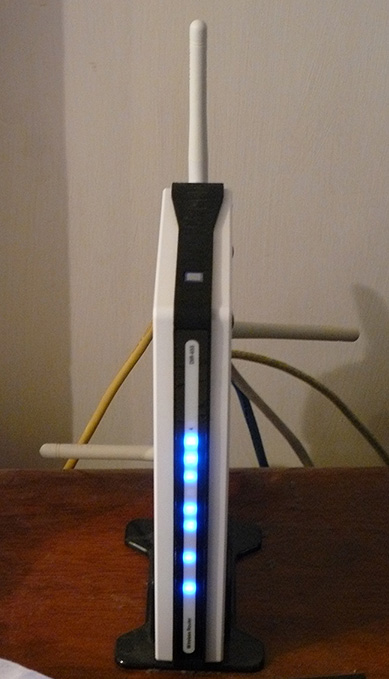
私は、D -リンクDIRを過去1年間に655ルータを所有し、それまでのところ、最高のルータは、私が今まで使用していることですが、こういう150ドル私は、ルータの前に何を支払っている以上払っていたので、私は手に入れた私は何を支払っている。

バージョン1.21ベータ04は、DIRのはこれで、SharePointの機能をご利用され655のファームウェアでの起動。 SharePointの一部か、またはSharePortとして他の場所自体はDのようにされているソフトウェアなどと呼ばれるコールは、メディアや他のサイトとして、LAN経由でUSBデバイスを共有する製品のリンクを、私は何かを混同しないようにするつもりだより詳細なので、私はそれにSharePortとしてのみ、今からで参照されます。

SharePortは、私が実際にしたかったの興味深い機能は、数年前にはできるようにする、などの場合は、デバイスが実際にお使いのPCに接続されていたので、それらを別のPC上で使用することができるコンピュータからUSBデバイスを共有しています。 開発、最終的に生活にSharePortと限定された方法でこの技術を持っているリンクします。

このようにSharePort、私はDIRを655とブラザーのDCP - 150℃のMFCの例として使用する機能です。
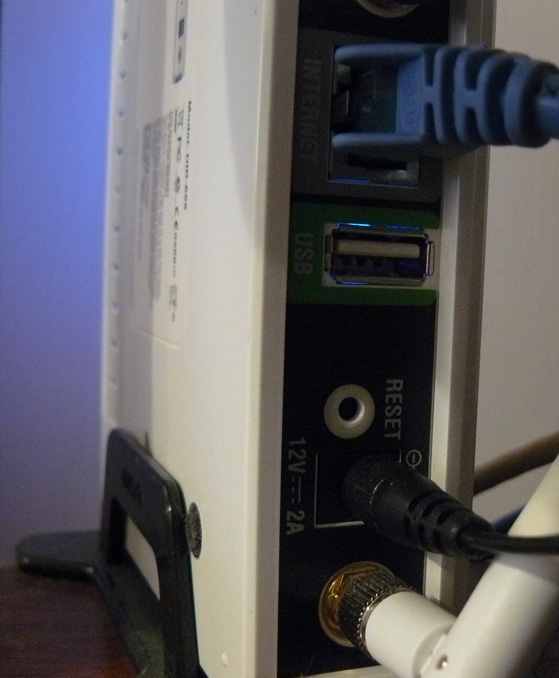
は、DIR - 655の背面にあるUSBポートを備え、テストでは、USB 1.1ポート、今までは、ポート無線LANの設定は、USBキーに格納されることに使用されたことを示すためだ。

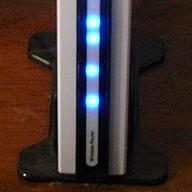
DIR-655 DIR-655 USB Port

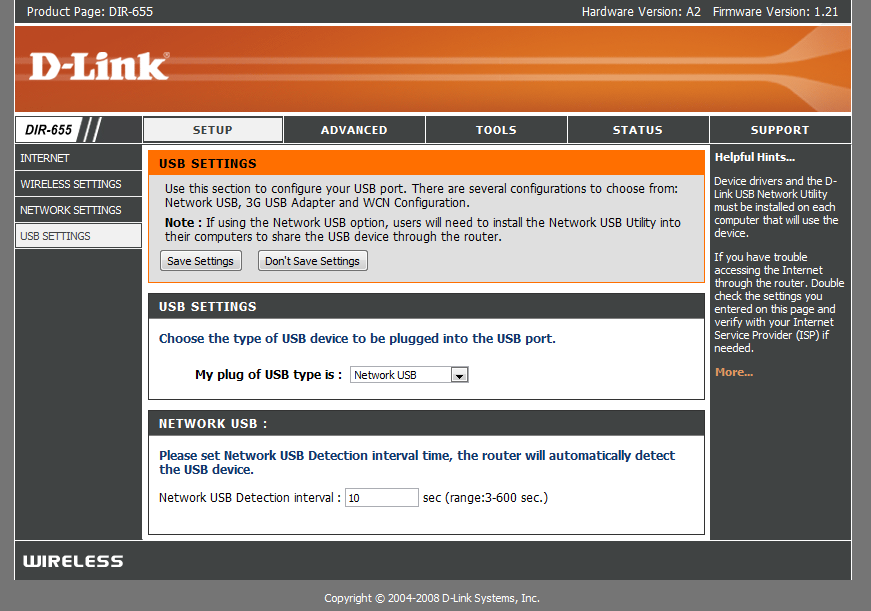
ただし、USBポートには、新しいファームウェアをインストールした後、われわれはセットアップでは、ポートの使用を制御の下に新しいメニューをもって迎えの使用を発見した。

New USB Page

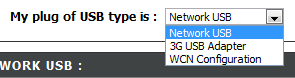
として、そこには、このUSBポートのセットアップのことはあまりないことがわかります、WCNの設定デフォルトでは、これは、無線の設定キーは、ドロップダウンボックスを選択使用されてです:

Choices

を選択するネットワークのUSB SharePortモードでは、3GのUSBアダプタを選択すると、ルータを置く謎のビットは私に、私はどのデバイスこれではまだ対応していますしかし、ほとんどの人が、私は、3Gサービスを持っており、それを使用してはよく分からないですバックアップ専用のUSBポートにデバイスを接続すると3GのUSBアダプタは非常に便利になるを選択している。

一度デバイスネットワークのUSBを選択して、自動的にただしの順序は、DからSharePortソフトウェアのリンクをインストールする必要があります接続するために、これはまだベータ版では共有されてとても注意して等等、私はできないとの問題があったが使用されますそれは、まだかなり洗練されたようだ。 一度それを起動時に実行し、すぐにそれを実行できることを確認しますがインストールされ、それ以外の場合、手動でSharePortソフトウェアは、それぞれの時間を実行せずにデバイスを使用することはできませんが、それだけ2MバイトのRAMを使用しますので、リソースではない豚。

SharePort Printer

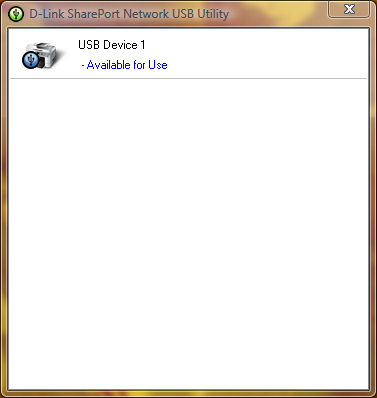
お使いのUSBデバイスをクリックし、SharePortユーティリティは、このように、システムトレイのアイコンを一度ダブルクリックして表示する必要が接続されます。 その後は、デバイスをインストールするためのウィザードを実行するには、末尾に、ドライバCDやウェブサイトに、最新のドライバは、デバイスの必要がある場合は、自動的にデバイスに接続するときに、印刷要求されるようになりますがこれはプリンタのことです、これはそれ以外の場合、手動で接続することを選択する必要があります良いアイデアです。

かつてはすべてのデバイスを使用する各コンピュータ上で設定されて、そのプリンタにされている各デバイスの状態を通知されますが一時停止し、オフラインで印刷するプリンタにとにかく、SharePortソフトウェアを検出するには、印刷してプリンタに送信されているが自動的にコンピュータとプリンタの割り当ては、プリンタには、一度、印刷ジョブをされているが再度オフラインに戻りますので、完了に接続が表示されますあなたのPCとの通信が一時停止します。

この機能の制限は、それだけを1台のPC上での時間で、USBデバイスを簡単に設計されて2台のPCには接続することが一度なので、なぜこの場合には理にかなって仕事ということです。
私のwebcamしかし、これらの動作は確認されているようなことを試していませんが、通常よりも遅い速度がで、私のプリンタのスキャナ機能が正常に動作しますただし、手動でそれを使用するSharePortソフトウェアを使って接続する必要が必ず切断する後に行われます。

私SharePortソフトウェアは私のために長い時間を待っているものは、この資料の開始時に述べたように、これは素晴らしい機能を自分のルータを検討しているが今すぐに最新ではないですし、ほぼすべてのDのように思えた、リンクを追加あきらめていたが、新しいそれに機能を、それも中には、すべての他の職務を実行している場合は、USBデバイスを扱うことができる方法もデバイスが動作することができますを示しています。

関連記事:

  1. 開発- SharePort新しいリリース1.10およびDIR - 655 1.30ファームウェアのリンク
  2. 開発- SharePortアップデートリンク
  3. 開発-リンクDIRを655 1.32ビルド04ベータ01 SharePort修正
  4. 開発-リンクDIRを655 1.32NAファームウェアファイナル
  5. 開発-リンクDIRを655 BETA01ファームウェア1.32NA

コメント数:

  1. ちょうど私はDir 655ルータ上で1.21にファームウェアをアップグレードしました。 私がそれは私のデスクトップおよびラップトップコンピュータは、Windows Vista Home PremiumはOSはクラッシュSharePortユーティリティアプリケーションをインストールするようになりました。 Dlink技術サポートと呼ばれるが、何の問題が見つかりました。 誰でも同じ問題を抱えていましたか? この問題は...してください上のソリューションを必要とヘルプには、。

  2. まあ私はまだ1.21ベータ04を実行していると、何か1.21最後のも、それを再するための良いアイデアをダウンロードするユーティリティftp://ftp.dlink.com/Gateway/dir655/Apps/SharePort_Network_USB_Utility_094からかもしれないとの可能性があります。郵便番号と可能性を再no_securespot ftp://ftp.dlink.com/Gateway/dir655/Firmware/dir655_firmware_121_no_securespot.zipまたはftp://ftp.dlink.com/Gateway/dir655/Firmware/dir655_firmware_121.zipを使用してルータのフラッシュファイルには、標準の1.21のファームウェアよりも上に新しい日付があります。 ソフトウェアのどのような現在の両方のコンピュータで実行されていますか? 両方の場合には、このインストールでは、ウイルススキャナなどをシャットオフしてください。

  3. 私はちょうど私dglのファームウェア1.13をインストール- 4500と同様shareportユーティリティをインストールします。 Shareportとして接続されているネットワーク、または外付けのHDには私のルーターrecionizingされていません。 任意の考え?

  4. 私は実際に私は、数日前に私のPCのときに自分のプリンターでは検出が停止が発生している同様の問題の底に取得しようとしているときにも、ルータに接続されたことを検出していないほとんどの時間を。

    私は、それを再インストールしてルータを再起動していても、他のすべてのPCの完全動作を変更しません。

    考えられる解決方法:実際には私はこの問題を修正して、それをするときが2つ以上のネットワークカードが有効になっているので、もしVMwareの場合、その前の他のネットワーク接続と再起動を無効にするなどがあります実行しているデバイスを認識できないようです再度検出を開始します。 もしまた、この教えてから作業を得ることが知っている。

  5. やあ!

    どうやら655の米国版でのみ動作します。 私は、最新のEUのバージョンにファームウェアのフラッシュがあるとしても画面が上記のようです。

    ちょうどそれは、この米国のユーザーのみが明らかにしたかった。 誰も、何かのWebアクセス以外のネットワークがこのルータの考えに誤解されることはありません。

  6. 頭に、感謝を、私からAUのファームウェアの米国バージョンを使用してきた655を買った。

    私は、しかし、私はすべてそれぞれの地域には、ハードウェアですべての違いのいずれかであると信じていないことはお勧めしません。

  7. ベンは、このチュートリアルでは偉大な-あなたの命令を使用して、私は、ファームウェアをアップデートすることができたと、印刷ユーティリティおよび印刷私のルーターに接続されたパソコンを使ってインストールをありがとう! 感謝の気持ちだけの単語。

    として参考、私は、Dを使用"機能は、ファームウェアのアップデート用のルータのソフトウェアの独自の"チェックリンクして自動的にバージョン1.21をお勧めします()2008年10月9日付け。 今は互角の印刷だ、Vista上で安心し、ノートパソコン(コンパック)ベース、およびXPの/ホーム-デスクトップ(Compaqのベース)。 まだ接続するために、別のDellのラップトップがあります。 プリンタのHP Deskjet F4180すべてがオールインワン。 とラップトップ上のHPのプリンタドライバのSharePointをインストールしていれば、それは大したことないされました。

    私は、プリンタの私はそれを使用するたびに再接続する私が言っていたから気づいている1つの違い:必要はありません。 一度接続しています限り、私は""をリリースすることを選ぶと、接続されたままになります。 いずれかのPCの接続されては、別の1から印刷するには、それはあなた"は、接続されているマシンからのリリース"を要求するオプションが提供されます。 次に、現在接続されているマシンのポップアップメッセージが別のユーザーがプリンタを使用するかもしれないが、接続を切断するよう要求を受け取ります。 ステータスバーにも、どちらかのマシンが現在積極的にプリンタに接続されているコンピュータ名を示しています。 たぶんこれは、08/10/09リリースに含まれていた別のファームウェアのアップデートでしたか?

    FYIとして、私は米国のユーザーです。

  8. あなたのコメントをリサしていただきありがとうございます、あなたは私の指示が好きうれしいです。

    私は実際には、この上は、すべて自分のコンピュータに自動的に設定されて来ることがないので、彼らだけの短い数秒後には、印刷ジョブが送信されると、プリンタに接続されて、それを再度切断接続すると、私はそれを一部になると仮定私もしかし、私のため上の別のそれの使用を要求することのいずれかのPC十分な長さに接続する必要がないため出ていない。

  9. 間違いなくこれはバージョン1.2とは、DIR 1.21バージョン- 655のファームウェアの問題です。

    仮想サーバーのマッピングが正しく発信パケットに対しては機能しません。 私は、断続的に、これらの2つのファームウェア回転数で動作を開始したメールサーバーを実行します。 1.11に戻すと、この問題を解決しました。 接続ポート25(smtp)にすると自分のネットワーク上で、適切な内部サーバーへのルートがサーバーrespは、常にバックアップ遠隔接続するサーバーになっていたようだ。 これは、smtpのルーチンの追加の通信のためになることは、タイムアウト待ちの葉。 場合によっては、送信サーバーとはあきらめて、メールは失われます。

    また、スケジュールが正しく..設定することはできません 無効な例としては、ファームウェアが誤ってフラグ時間:23時を5am定休1.2倍[OK]を1.11には無効です。

  10. これはかなりブライアン、私は何もこれらのファームウェアを、自分自身に悪い経験していないが、他の問題を報告しているのは残念だ。 以前は私もオフに開催さ1.2として人々がそれで問題が発生していたが、固定されていることがすべての問題ではないが表示されます。

  11. もしあなたが私に何かをテストできないでしょうか...あなたのスケジュールを朝5:00に23時を使用してセットアップしようとすると参照してください場合には、有効な判断? もしこれが私のユニットとファームウェア1.21か何かthatsちょうど問題と普遍的な問題ですそれは私に教えてくれる...。 『THX

  12. 私は、真夜中の上にまたがるようにしないように思われると同じエラーが発生しています。 どのようなとき、午後11時から午後12時のスケジュールを設定すると1つの午前12時から5時はどうなるの?

  13. 私は数週間におけるEUのファームウェアで使用され、そこフランス語dlink代表shareport機能を主張してフランス語のウェブサイトを発見した:
    http://www.clubic.com/actualite-170094-dlink-routeurs-dir-655-dir-855.html

    1つの記事は、以下のコメントのEUのハードウェア上で正常に動作米国ファームウェアサイス(ベン書き込み-だろうが、ハードウェアに違いはありません)、shareportうまく動作しますし、キヤノンの多機能pixma共有ポートを介してスキャンすることができます。
    私は、DIRの順序だ- 655私のため...

  14. @ 6月(と誰か)...私はまた、"インストールSharePort"私のシステムで問題がクラッシュに見舞われた。 (両方ともV 0.94と1.0のリリース)

    は、DIR - 655の素晴らしい、ファームウェアのアップデート罰金巡りました。 ルータ、無線の高速リッピング/。

    SharePortソフトウェアをインストールするに行ったし、私のXP SP3およびVista Home Premiumをシステムひどく悪い墜落した。 システムの復元を介して行く彼らを取得することになりましたではなく、かなりしばらくの間でした。

    私のAVG Free 8のすべての私のシステム上のソフトウェアの共通部分が競合の疑いだ。

    誰可能性がある人には、システムがクラッシュ可能性がありますSharePort / AVG Freeは8ドライバの競合を確認することはできます/ SharePortをインストールした後?

    -乾杯

  15. まあ、私は6月と同じ問題があります。 Sharepointのバージョン1.0がクラッシュした私のラップトップにインストールとアンインストール。 私は1.21のファームウェアがあるが、私が一番大事なので、私もクラッシュせずにソフトウェアをインストールすることができないとは思わない。 Dlinkサポートと呼ばれ、彼らは、SharepointやUSBポートには、DIR - 655でサポートされているという。

    が正常にハードディスクドライブをサポートすることができます代替製品を求めるかもしれない。 何かお勧め? 私は今は、ギガビットは、モード対応のデュアルアップル空港Extreemeてみてください。

  16. 私はほとんど私の場合はSharePortドライバと何かの間にドライバの競合が確実だ。 私は強くそれを有利に私の場合、システムの保護のいくつかの種類のシステム(HIPS)のAVG Free 8の機能をされて傾いている。

    試験ではベッドのシステムでは、私SharePort問題なくインストールすることができます(v.94またはv1.0を)。 しかし、もし私が最初のAVGがフリー8のインストールプロセスの...のいずれかに、ドライバまたはサービスの試行の終了時にマシンの青い画面にインストールされてインストールされています。 AVG Freeは8 SharePortのアンインストール時に、仮想システム上でのインストール中に面白いことに、"本物"のシステムには戦車、それだけタンク。

    しかし、仮想システム()の場合、私は最初にアンインストールのAVG Free 8、リブートし、その後のAVG Free 8のすべてをインストールするSharePort、リブートし、インストール幸せだ。

    私の前に、私の""システムのライブに移動するビットのトラブルシューティングの詳細最初に行う必要があります。 これはあまり面白いのはシステム上で復元していた2つの私の3つのシステムは、この週末のうち。

    私はそれをrouter-hardware/firmwareの問題として私の知ることができます最高のものだと考えていません。 マイDIRを655の場合、高速と固体のリッピング。 私は、この新しいSharePort機能を有効に1.21のファームウェアをアップグレードでしたが、どのようにルーターのファームウェアは、システムに影響を与えるが表示されません。 私は、SharePortソフトウェア自体は具体的には、ドライバやインストールの初期化時にサービスが競合して納得させた。 私は、競合ポイントくぎ付けにする必要があります。

    とはい...私はDlinkサポートと電話で30分、最後の夜を過ごし、その価値の横にされた。 私はようやく上司に、私の調査結果を昇格させるかもしれないDlinkで技術的な机に掲載される貧しいハイテク得た。

    この男によると、存在しない新しい"戻って部屋のこの時点で"バージョンSharePortご利用いただけます。

    私が何を見つける教えてくださいます。

    そうでなければ私は非常には、DIR - 655デバイスの全体的な満足している。 あまりにもSharePort機能は、このモデルを一緒に行くのを決定する要因のが残念。

    ため息をつく...。

    (ところで、私はSteveWの上に地雷を上のコメントを右...著者フィールドに何とかしてブラウザの閉じ込められた6月の名前を掲載。)

    -乾杯

  17. それは良いのトラブルシューティング作業はサンタクロースは確かに、おそらくAVGのいずれか素晴らしい演奏されていないためSharePortソフトウェアの問題になる、彼らはまさに最高記録は最近、他のソフトウェアの問題に関する得たれていません。 場合、私は何も明日のAVG / SharePortに関する企業のうち、私は確信している1つを見つけることができる私が表示されます何かを知っている。

    私は開発、しばらくの間、ソフトウェアの更新へのリンクにはならないだろうけど、彼らだけのことを知っていると思います。

    うまくいけば十分な人々の問題かかわらず、すぐに修正されますが、ソフトウェア自体はすべてのSharePort対応のハードウェアで動作するようにしてはかなりのものがいくつかある今だ。

    ので、バグの可能性があるので、会話を正しく理解することができます私SteveWを上のコメントに自分の名前を変更している方法では、場合は、コメントシステムのバグ経験を私に教えて、それは私のコードがあります。

  18. 私も自分のディレクトリに1.21をインストール- 655およびUSBソフトウェアです。 私のハードワイヤードコンピュータをすぐにプリンタが見つかりました。 私のノートPC()sharportワイヤレスのため、USBデバイスを見つけることができないと言う。 任意の提案?

  19. 他のネットワークカードや再起動を無効にするも、イーサネットカード、Shareport簡単に複数のネットワーク接続により、混同される場合にはVMWareを実行してみてくださいVMNetネットワークカードを無効にしてください。

    また、一時的には、ラップトップだけの場合1つの接続をブロックしているのかもしれない任意のファイアウォールを無効にします。

  20. Valcaと同じ問題を持つが、私の場合は、いくつかのことをして、ウイルススキャナ、他の私は疑問に思っているので、新しいノートンウイルススキャナを実行しています。

  21. どうも、みなさん。 まだ問題がテスト。

    私は以前ので、この週末私はいくつかの自由時間を見つけてAVG 8は推測していた。 テストに私のVistaホームプレム私の理論に決めた。 SP1のシステムです。

    私は、手動で復元ポイント(良いことを私はこれまでのところ良い)リブートしなかったしたAVG 8をアンインストールしました。 それから私はSharePortインストールされます。

    BSODを。

    システムの復元保存を使用して、私のシステムの復元ポイントします。 今は振り出しに戻っていた。

    上の新鮮なVirtual PCセッション手付かずのXP SP2のインストールを使用して移転。 SharePort問題なくインストールされます。 何の問題。 それだけで良いのアンインストール。

    次のI NetLimiterモニタは、すべて私の3つのシステムで共通されていたと思う。

    インストールされてNetLimiterを監視および再起動する。 良い。 いいえ安定性の問題。

    と私の本当のシステムでは、セットアップの終わり近くに...と同じようにSharePort(v1.0を)をインストールするに行った...仮想システムをすぐに黒い画面が起動しなかった。

    うーむ。

    だから、私はシステムからNetLimiterモニタをアンインストールし、Eメールのクエリでのサポートチームにすればには、この独立して見ることができます求める掲示を出す。

    どのように両方のSharePortとNetLimiterの両方をモニタは、Windowsネットワークドライバにフックするように見える/サービスは、このかなり理にかなって表示を見て。

    別の更新プログラムの場合/ときに応答を与えるだろう。

    もし私に十分なだけではまだ私の生きてシステム上で、再度の実験を繰り返して勇敢午前探してください。

    -乾杯!

  22. 、私はブランドのすべてに新たなハイいる。 最近ではDIR655にアップグレード。 すばらしい。 1デスクトップ5ノートブック。 デスクトップのDSLモデム等ノートPC内部のすべての802.11Gのデバイスを実行されているPCIネットワークカード、ルータ、しています。
    もし私がデスクトップからOki550カラーレーザーから、USBケーブルを取り外すと、USBポートにDIR655の上にプラグイン。 この最終的には(または、理論的には)私たちに印刷できるように向かっているのは、レーザーデスクトップコンピュータを最初にオフにせずに?
    今のところは私の究極の目的であり、これが私の最初の質問です。
    ありがとう
    デイブ

  23. はい、このプリンタをルータ上での任意の時間にアクセスできるようになるには、プリンタとルータの唯一の2物事が必要なため、この動作するように上に存在するが、しかしそれらは、デスクトップを介して任意の段階でのルートはありません提供されます。 このように注意のビットとしてうまくは、ネットワークコンポーネントが他のソフトウェアで再生されない場合Shareportソフトウェアのインストールを行使しなければならないコメントが見られることができます。

  24. 私は、問題が...そのネットリミッターをアンインストールがおい連中がすると行ってもいいです^ _ ^

  25. ベン、

    ちょうど私が何を疑われるとニックは認識しています...ネットリミッタ2モニタプログラムを批判的にSharePortアプリケーションは、この(当時)と競合しないことを確認します。

    私のXPホーム(SP3)およびVista Home Premiumを(SP1)のシステムからアンインストールした。 それから私は、システムの復元ポイントを作成した後に(だけ)の安全のためSharePort再インストールしました。

    インストールの罰金とはブルースクリーンか、この時間だったの競合が観察された。 SharePortアプリケーションが迅速にシーゲイト社のUSBフラッシュストレージデバイスを見つけ、私は"マウントすることができた/"それに接続して、読み取り/すべてのシステムからファイルを書き込みます。

    明確にするために... 1つしかシステムがそのデバイスに一度に限り、私の知ることができますに接続することができます。 よりも、それが動作するような他の。

    やれやれ! そのdoozieその問題に取り組んでいた。 確認の転記のため、ニックに感謝します。

    僕はこの問題については、当期純リミッターサポートチームが、応答がない、まだメールを送っていた。

    もし、すべてのプログラム(有料/で発生することがないことを確認無料)またはネットリミッタ2モニタだけで。

    ありがとう!

    乾杯!

    -サンタクロース五

  26. こんにちは、私は、Dirを所有している- 855私の愛する昔はDirとして655妹のアパートに恒久的な解決策として行った。 しかし、私は非常の場合は、DIR - 855は同様にこの機能がサポートさを知ることに興味があると思います。 これは、追加の良い私のはすでに素晴らしい無線ルータのかもしれない。

    ダニエル

  27. ダニエル、

    Dによると、プレスリリースには、DIR - 855これらのSharePortがサポートに含まれているリンクします。

    http://www.dlink.com/press/pr/?prid=442

    引用:

    "革新的なSharePortのUSBネットワークブリッジ機能の開発に利用されてエクストリームÑギガビットルータモデルリンクGameFuelâ"¢と-は、DIR - 655 DIRを825にします。DIR - 855とDGL - 4500ゲーミングルーター。 SharePort技術のアップグレードもRangeBoosterムディレクトリで利用可能です。628。 これらのルータの現在の所有者SharePort技術には、Dからの最新のファームウェアおよびクライアントユーティリティをダウンロードしてアップグレードすることができるリンク、ウェブサイトhttp://www.dlink.com。"

    これは、DIR - 855のファームウェアおよびSharePortダウンロードページへのリンクだと思う:

    ファームウェア-
    http://www.dlink.com/products/support.asp?pid=548&sec=1#ファームウェア

    (それは、1つの見栄えの良い方向で855のモデルです。私の655見て普通にします! ;)

    頑張って!

    サンタクロース五

  28. こんにちは、私は1週間は自分自身のDIR655している。 そのEUのバージョンは、米国のファームウェア1.21を実行するsmothly。 Shareportが、非常に安定して動作します。

    最初の問題は、WiFi経由でUSBディスクドライブを共有することをお勧めIMHOされていません。 デバイスとすべてのネットワークの問題とVistaが問題。 また、パフォーマンスの問題です(約800KB /時分/秒時のWiFiムアダプタとノートパソコン間でファイルをコピーする)。
    しかし、私はプリンタを共有するため、このルータを購入しました。 そして、それは可能ですがShareportユーティリティ(1.0)は、ローカルアカウントで動作します。 アクティブディレクトリのアカウントを使用し、ユーティリティのポップアップウィンドウには、デバイスは、ルータのUSBポートに接続されています。 しかし、アプリケーションウィンドウが表示されない場合は、トレイのアイコンをクリックします。 アプリケーションは、タスクバー上のですが、デバイスを選択するに接続することはしないウィンドウがあります。
    万事OKされているローカルアカウントをします。 と思われるSharePortユーティリティを発行する。 OSには1週間前に、インストールされていない多くのaplicationsインストールされます。

    任意のアイデア?
    ピオトル

  29. サンタクロースは、非常に多く、私は、この問題に苦しんでいた今までありがとうございました。 私の週末は何もない、あなたに感謝過ごした!
    このネットリミッタ吸う:\

  30. こんにちは、私dlink 655 v1.21でこのisueが午前
    とshareport v.1.0 ...
    2 XP SP3でmultifuctionプリンタとUSBフラッシュドライブを動作さ完璧、1 Vistaの64機、
    しかし、ときに私は、shareportユーティリティ"使用可能"を示して2.0対iPod touchを接続
    とし、3件すべての私のPCのドロップは、インターネット接続、ワイヤレス、およびハードワイヤードとitouchの文句を言わないとの接続は、インターネットを自動的に復元されることは言うまでもないを接続するには、ルータのようなものだとすると、電源を入れ直すか何かに入ります。
    次にiが同じ手順を試みたが、iPod nanoは、この時間で、何が、完璧な仕事を推測!
    誰も、この問題が発生し、またはこれに回避策を知っている?
    あなたの助けのthanx。

  31. こんにちは!
    ..だから 私は、dir - 655 EUのルータがあると1.21アメリカ自身ファームウェアを試みた。 私はうそをするには、ファームウェアのアップグレードを滞りなく行っていないつもりはない。 私がルータにファームウェアのアップロード、iには、ルータの管理ページにはもう得ることができませんでした...しかし、後にリセット、すべて正常に戻って行った(これは、ルータの設定を保存するには良い考えかもしれない前に、あなたのことを行うファームウェアのアップデート)。 とにかく、私たちdirは、非- 655 1.21のファームウェアを試して...これまでのところ、すべての作業罰金、さらにそれを自分のプリンタを接続し、管理して素晴らしい... ...しようとする次の事は作品を誰もが奨励するストレージデバイスです :エ

  32. みんな覚えておいてルータの場合を除き、小さなデバイスを持って転送することがあまりないので、推奨されていないUSBにも、ルータは、最速のシステムのようにデータを転送していない1.1の速度で、1MB/secondについてはすなわち、限定されるように見えるUSB経由で、おそらくどのルータを再起動する遅いLANの速度と無線中退から何かを引き起こす可能性がデバイス上のひずみの多くを置きます。

    すべての研究サンタクロース、うまくいけばすぐに1つの企業のためのいただきありがとうございます互換性の問題を修正することができます。

  33. 私は別の問題で私を助けることを願っていた。

    私は最近、別のDからアップグレードしたディレクトリへのルータのリンク- 655。 のF / W 1.21にアップグレード。 ローカルネットワークのワークグループに複数のマシンがありますが、すべての古いルータとお互いに罰金を見た。 今私は、LAN上の他のマシンを参照して傾ける。 私はあなたが私に頭を与えることを望んでいた何か簡単な見逃している知っている。 すべてのノードを参照してインターネットの罰金とipの予約され、dhcpの範囲内。 何を見逃している? 多くのおかげで

  34. 私の頭の上から2物事が持つ問題がネットワークを移動する、主にネットワークは、IPアドレスの手配の変更は、Windowsファイアウォールは、一般的にZoneAlarmを'されてからPCをブロックすることを含むいくつかのファイアウォールソフトウェアを検出'として考えて、この新しいネットワークそれらは実際にのみアクセスするときに問題を持たなければならない場合は、同じことが起こることが、あなたのパソコンは、ネットワーク接続のホームネットワークまたはプライベートに設定されていることを確認しますWindows Vistaを実行しているプライベートLANの代わりに、インターネット上のパブリックネットワークは、が発生します。

    もしワイヤレスはまた、ワイヤレスのパーティションは、このように高度なワイヤレスのプロパティにも同様の影響を与える原因となります無効になっていることを確認されます。

  35. 私はVista上では、同じブルースクリーンの問題として他の人が言及したことです。 PCのShareportの終わりにしてインストールして私は、ログインしようとするたびにBSOD'edブルースクリーンに行きました。 私がTrend MicroのAVとは、Nortel Contivity VPNクライアント。 どちらも重要なプログラムであり、私はどちらかをアンインストールすることはできません。 可能性がこれらの問題があるのいずれか?

  36. やあ、
    ので、手がかりを求めて別のフォーラムを検索して私は、このルータへのアップグレードに興味を持っています。

    今日の私はそこに新しい(まだv1.21です)12.12.08更新されたファイルに気付いた。 この修正プログラムかどうかで新しいバージョンは、誰でもみましたか?

  37. 私はそれを試してみてあげるよもしそうでなければ、その上で私は気づいている新たな問題に注意したが生じている問題を人々に基づいて何か変更を参照してください時々週のすべてのコンピュータ上のshareportソフトウェアを複数起動するための上のルータをした後、ばしている間は画面上に何百ものことができるルータを再起動中のエラーを停止するための左には、接続エラーを与える。

  38. 1.21 1つは、数ヶ月前には、日付だけで変更するには、約2または3のバージョンのベータ版をタグなしで、11月の最後の1つされて1.21 B10をを1.21ラベル付けされているリリースされたものと同じなので、場合に10月に、または1.21をダウンロード前に、もう一度おり、それを修正ポートの転送や保存の設定にはいくつかの問題をダウンロードしてインストール。

  39. こんにちは、一団、

    すばらしいスレッド!

    私は、shareport問題が発生していると、誰かが同じ経験して見たいと思った。

    ここに私のセットアップの:

    1。 DIRを655のファームウェア1.21と
    2。 ウィンXP Proのマシン(VMwareのクライアントとして)1 shareportと
    3。 WDの外付けHDD

    HDDをルータ上でのUSBポートに接続されていますが、私はそれをするためには、Win XPのプロのマシンから接続することはできませんよ。 XPマシンを継続的には、""は、HDDが見つかりましたがありますが、Shareportトレイにアイコンが赤色にご滞在を続けており、緑色に変わりはない私に通知されます。 約30秒後には、通知戻ってくるだろう。 損失を私は完全に、それ以前のように私は別のホスト上でこのvmクライアントいたworkeedで。 私は、VMwareが原因かもしれないけど、私はどのようので、私は1つのネットワークアダプタを持って、XPのマシン上で()ブリッジイーサネットを有効に表示されません。 私はこの仕事に...すべてのアイデアをいただければ幸いです取得しようとして時間を費やしてきた!

    ありがとう、

    ジョン

  40. 私は、このセットアップDIRを655と1.2.1のファームウェアShareportもし私を無効にする私のマイクロソフトOneCareファイアウォールで動作するように持っている。

    誰もがポートDで使用されると知っているか、SharePortリンク?

  41. もし、すべてのルータのDlinkのウェブサイトに行くと、それによると、表示されます。
    "このファームウェアは、米国製品のためだけに設計されます。
    デバイス上のアメリカ合衆国の外に、このファームウェアを使用すると、保証が無効になるデバイスが使用できなくなることがあります。

    してくださいは、D非接触では、D -リンクの製品と互換性がファームウェアのアップデートにお住まいの地域のオフィスリンクします。"
    および、
    "¤追加SharePort備えています。
    ¤固定の電子メール通知を発行します。

    してください。SharePortユーティリティをダウンロードしてSharePortを使用する前に、マニュアルを参照してください。"
    それを実際に使用するユーティリティをダウンロードする必要があります!

  42. Oh, and I almost forgot, this is for x86 version OS's only. x64 is not supported.

  43. Hi James, I'm not sure of the ports myself however if you open up a command prompt and use the command 'netstat' just after attempting to connect using Shareport, look for the router's IP and you should be able to see all ports that the PC is connecting to the router for, OneCare may have a log file that might allow you to do a similar thing, just make sure you're running as little network applications as possible at the time as the lists can get pretty long and do not have any p2p programs running at the time either.

    Hi Jody, I have tested version 0.94 and version 1.00 on Windows XP x64 and Windows Vista x64 and have had no problems, is there an x64 version that doesn't allow this to run?

  44. I just got a D-Link DIR628 which also has the shareport utility. However, I am having some rather strange problem and wonder if anyone can offer some help or suggestions.

    On my wife's Vista laptop, the shareport network USB utility installed smoothly and works nicely. On my XP Pro desktop, the first installation hung and when I rebooted, the network USB utility started but couldn't see the devices behind the router. I have been trying different firewall settings (and eventually turned off all firewalls just to try it) the last few days and nothing seemed to really work.

    The only thing that seemed to work is if I uninstall the shareport utility, reinstall it, then the first time it got started after reinstall, I could see the devices. If I exit out and restart the utility, it's the same old problem of not seeing any device. Rebooting also has the same problem of not seeing anything. The only way to get it to work so far, seems to be uninstall->reboot->reinstall and it only worked after that sequence.

    Anyone has any idea on what this problem might be? When it worked, it worked great. I got 80 Mbps from an external HD which is not great but not too bad either. I could also put both my MFP printer and the HD behind a hub and access both of them. It's really wonderful that way. I just wish I can get it to work on all my computers. By the way, my other system is a Mac and there isn'ta Mac version for that utility. :(

    Sorry for the long mail, any help or suggestion is really appreciated. ありがとう。

  45. I have seen a few instances where the devices can't be found on a pc randomly, however I have not experienced this on a PC every time after it has been installed. Is the PC able to detect the router using the Shareport utility?

    Right click on the Shareport icon, in the menu you should see the name of your router and it's IP address, make sure it is selected, if not go to it and a new menu will open up, make sure you click on Enable, also you can click on Configuration to get some advanced settings.

    D-Link Shareport Network Selection

    If the router doesn't show up in the list then there may be some connection settings on that PC that are limiting the connection between it and the router.

    I'm also waiting on a Mac version of the software, though I think it might not happen any time soon.

  46. Anybody use a USB hub on the shareport and get more than 1 device to work?

  47. Ben – thanks for the response. The PC that I am problem with is directly connected to the route through a wired connection using a CAT5 cable. It is the primary system that I use to set up and configure the router. When I had the problem, the top line in the right-click screen of the shareport icon, the one showing the IP addresses and things was not visible. I only got things from the “Advanced Options” down.

    Mike – I did put a USB hub in and connected a Canon MP470 printer and a external HD at the same time. I was able to see both of them and were able to connect to them from my Vista laptop.I didn't try to read/write to the HD and print at the same time though.

    By the way, I made a typo earlier. I think I was only getting 8 Mbps, not 80. So roughtly 1 MB/sec read throughput is what I was getting. Not very fast but good enough to move small amount of data.

  48. I'm having the same trouble: Have a Dlink655 with a wired connection to a Vista Home Premium laptop and an older desktop box running Win XP.

    Shareport works just fine on the laptop – I want to use it for a shared printer.

    I can install shareport fine on the XP machine, but it doesn't find any devices connected… and I also don't see the router's IP address upon right-click. I disabled firewalls, uninstalled antivirus software etc. but to no avail.

    Would love some hints if anyone has them!

  49. To Jacko

    I went into admin, clicked on ADVANCED, then WISH on the left, then I made sure it was ENABLED and for PRIORITY CLASSIFIERS I clicked AUTOMATIC. 試してみましょう。

  50. Mike – you said you “went into admin, clicked on ADVANCED, then WISH on the left, then I made sure it was ENABLED and for PRIORITY CLASSIFIERS I clicked AUTOMATIC…”

    I assume you are talking about the web administration page for the Dlink655 router? What is the “WISH” thing you talked about? I have a Dlink628 and I didn't see anything that looks like “WISH” in the advanced menu. I was wondering if you can explain what that menu does, I might be able to find the equivalence in my router. ありがとう。

  51. I've checked out the DIR-628 emulator on the D-Link site and it appears that router doesn't have WISH at all, perhaps you could try messing about with the QOS settings as they are similar to WISH except they affect both wired and wireless on the WAN side of things, but may not have the same effect as WISH, personally I have WISH off and have no problems.

  52. こんにちはすべて、

    I tried changing the WISH settings, but no luck. The Vista laptop has no issues with Shareport at all, whereas the XP machine cannot even recognize the router.

    If the issue is router-side, I don't know why the Vista box would work and the XP box not?

    ありがとう!

  53. Hey guys, i am seeing the same thing on the dlink dir-825. Wireless PC's see my printer connected to the usb shareport fine. My wired PC's lose the printer whenever they are restarted. If i reboot the dir-825 the wired pc's will see the router again.

    When I click the sharepoint icon, I see the ipaddress for the router when it's working correctly with the printer. When it's not, the ip address is not there and the first entry is advanced options.

    I tried changing the wish settings but no change….

  54. Hi Jacko and hoc, are either of your PCs that have this problem set to connect to the router via DHCP or via menually entered static IPs?

  55. やあ
    Both my laptop (Vista) and desktop (XP) are connected by wire to the router, and both are set up using DHCP.
    ありがとう!

  56. I talked to dlink 3rd level today who was passing this on to the product manager. I need this to work so have done a good amount of testing. My PC's are all connecting via dhcp, all vista (some x32 and some x64).

    From the testing here i have found that the wireless PC's always detect the printer connected to the shareport. The wired PC's are inconsistent… at best. If I reboot the dir-825, the wired pc's will immediately detect the shareport printer and keep it until the network connection is interrupted. If i pull the network cable on the wired pc, and then plug it back in, they will lose the printer and not re-establish it (exactly what happens when you power off your PC).

    Hoping we can come up with a better solution than rebooting the router every day!!! I'm sure linksys would like to hear about that.

  57. hoc,

    I think you may be on to something. In my set up, the system that has problem seeing the network USB port is connected to the router through a CAT5 directly. The laptop using wireless connection has always been good. I have an additional variable in my environment on the OS used. The wired desktop uses XP while the wireless laptop uses Vista.

    I installed Windows 7 Beta on the wired machine over the weekend. I was again able to see the printer on the network USB port upon first start of the utility. When I exited out and restart the utility, I had problem again. I will try rebooting the router when I got home tonight.

  58. I am getting a 'Connection failed, please try again.' message every minute or so from SharePort Network USB utility.

    It's odd because I have my printer on the USB port and it works fine.

    Any theories on where to look??

  59. I get that too on every computer other than mine, strangely uninstalling/reinstalling doesn't fix it either, the only thing I did was upgrade the firmware, my computer installed SharePort after the firmware upgrade yet the other PCs have had it installed since before and they experience the problem.

    I can't see any link between the Operating System they were running or the firewall/antivirus software either, what I have done is turned off the startup option in the program and run the programs only when I need to print.

  60. Can anyone recommend a setup for allowing a mac and a PC to access and use the same external harddisk over a network? Or where I can find info on this? Here are the challenges:

    - Both PC and Mac are a bit old, so no N-standard
    - Formatting of disk: has to be HSF+ and PC will use MacDrive?
    - Considered buying an entertainment PC and use this as “Server”

    提案?

  61. Dlink released an update to the sharepoint utility software this week. For my wired pc issues it does help, but is not a complete fix.
    At start-up my wired pc doesn't see the printer connected to the shareport. In the 1.0 version, the dialog box for the utility started with “advanced options”. Now it starts with the address for the router.

    I can force the utility to see the printer by selecting disable and then enable in that shareport dialog. Still not a complete solution but getting better…

  62. Shareport is not finding my router in the pop up menu from the system tray icon. I have the DIR 655 and a vista x64 OS. Dlink support stated that shareport does not support 64 bit vista OS but posts here seem to contradict that. Any recommendations, advice would be much appreciated.

  63. I installed Shareport 1.14 and it works better, although when I disconnect from a hard drive it says it's busy and should I force or cancel. Force seems to work and I can re-connect ok

  64. I've just upgrade my firmware and everything work's fine. I've test USB HDD and USB Printer both work fine. I'm pleased with DIR-655. クールなリアル

  65. Finally got second laptop to connect to printer hanging off DIR-855. The cuplrit was OneCare – thanks James 30 December. Once One Care Firewall was disabled my Shareport icon turned green and the printer was able to be used. Only took me a couple of days and many grey hairs !

  66. こんにちはすべて、
    I setup the DIR-655 for a friend – one older desktop with Windows ME and a new laptop with Vista. The desktop is wired to the router, the laptop is wireless. I installed Shareport and hooked up his printer to the USB on the router. It worked! for a few days. Now the printer seems to have disappeared…. sort of. It's not listed in any application, but if I click on the Shareport Utility, it says the printer (a fairly new HP) is available. There's got to be something I'm missing here. Anyone know?
    (For now, he's not trying to print from the desktop, but I was thinking a usb hub would allow me to hook the printer to the desktop as well as the router.)
    ありがとう

  67. Oh well, I went to my friend's house and everything worked fine… of course! The printer was available and I clicked Connect and it connected. It did reinstall the printer driver. Who knows what he did — he did say he'd been turning. So maybe when I rebooted, it got straightened out.

    I am still interested in using a usb hub so his desktop is wired to the printer. So, if anyone has done that and has any “gotchas” to warn me about, I'd appreciate it. I'm thinking printer to hub and hub to desktop and hub to router.
    ありがとう

  68. Just got a DIR-655 last week after all the good reviews. I downloaded the SharePort fw 1.21 (2008/10/09). I'ma bit disappointed with it. Wanted to share some of the issues I'm seeing perhaps you have solutions to share;

    - Clients (3x Vista Acers, & XP Pro Lenovo) have hard time getting an IP address with WPA-personal, and WPA2-personal after wake-up. I must have the laptop try few times until it succeeds. They worked quite fine with cheap Belkin 802.11g routers

    - Connection drops even though signal is in the 85% or greater most of the time

    - Finally, I bought this when I heard about the SharePort fw. This feature was a big disappointment. I thought it may work as a printserver, but clients have to request and grant the connection before use… very stupid when no one is using the already connected client! – Also, if the laptop sleeps, the connection gets stuck and a USB disconnect/re-connect must be done for the printer to be re-discovered. Lastly, my Canon MF MP830 is not happy with it. The print preview doesn't work anymore, the printer doesn't wake up on jobs, and the jobs error out frequently.

  69. having the same issue as this guy below is telling every thing is ok but when i click on the utility on task bar nothing flashes on desktop.it work well on my other computer running vista 32 home premium , it was doing good on this system too but i don't know why it start acting up like this.this is vista 32 ultimate any suggestion guys would be appreciated.
    “Author: Pit
    Date: Nov 8, 2008

    Hi, I have my own DIR655 for 1 week. Its an EU version, but US firmware 1.21 run smothly. Shareport works, but not very stable.

    First issue, sharing USB disk drive over the WiFi is not a good idea IMHO. Any network problem and Vista have issues with device. Also performance is an issue (800kB/s when 2M/s when copying files between laptops with WiFi n adapters).
    But I purchased this router for printer sharing. And it is possible, but Shareport Utility (1.0) works only on the local account. When working on the active directory account, the utility's popup window shows the device connected to the router's USB port. But when clicking on the tray icon the app window is not shown. Application is on the taskbar but has no window to select device and do connect.
    On the local account everything is OK. Seems to be the SharePort Utility issue. The OS was installed a week ago, not many aplications installed.
    "

  70. forget to tell in above post im using Dlink-655 with firmware 1.21 (latestone) and share port utility 1.14. hope that u guys will provide some assistance on this issue.

  71. For KingTut: I have a similar problem on my laptop, the problem is caused by the channels the router is using for wireless, sometimes it will get out of range of standard wireless cards, even my laptop's N card doesn't work properly sometimes, try forcing the wireless channel to something like channel 6 for a while and see how it goes, you can also try having the channel set to 20Mhz, not 20/40.

    For bally: It's possible SharePort needs certain permissions to run properly, it may be a good idea to get in contact with D-Link so they are aware of this issue, it could be a bug that they are unaware of as of yet.

  72. Just installed the latest firmware for DIR-655 and Shareport on three Vista and three XP Pro SP3 pcs. The vista pc's are both wired and wireless and works fine. Te XP pc's refuse to find the router (all three wired). What more is that the Shareport uses up all CPU power when I try to exit the application. There is definitely problems with the software. All firewalls have been turned off. The XP machines have different Anti virus (AVG, Avast and Norman). One of the XP PC's are connected directly to the router, two through a access point. Changing channels or stopping other applications using communication ports have no effect. The Shareport has been tested 0.94 and also updated to 1.0 and tested with clean installations. If anyone is able to run Shareport on XP, please explain how it was installed. Also try Exiting the application and check the CPU meeter.

  73. dlink support q-less regarding active directory matter. even no reply for 4 days upto now. WTF Support they r providing . just dont even know what the thing is

  74. Just wondering out loud: do you think that it would be possible to use DIR-655´s USB port for something else then sharing a printer?

    It certainly doesn´t sound to be good enough for usb-hdd´s for very low transfer speeds that´s been mentioned over here.

    Could it be used for hosting a very small web server from an USB stick, like a static home page?

  75. I have the same problem after install all my laptops, Vista and XP starts to crash and no one could reach the printer plugged in the USB port….

  76. I think i have a different problem here.. i connected a usb hard disk on the usb port of my dir-655 (1.21 firmware) and installed the shareport utility on my vista32 and xp sp3 computers.. I get no router name when i right click the utility in the system tray so I can't select any usb device from the router.. By double clicking the utility, i get no detected usb device in the utiliy's panel either.. I even tried without wirewall, to no avaqil.. what's up with this?

  77. ..also, whenever i boot vista32 i get a 'new hardware found' message and the request to install drivers for the router.. except that there are no drivers in the cd that came with it or on dlink's website… any suggestions? (by the way, the router works, as I can connect wireless and share my internet connection..)

  78. For Stefano:

    Try downloading/installing SharePort again, the drivers are a combination of generic drivers that Windows should already have and 1 or 2 that should be installed with that setup program.

    Looks like the program has installed but has been unsuccessful in installing the drivers for some reason, it is most likely that the setup program has exited and deleted the required driver files in the temporary directory before it has had a chance to install them.

    Have you V-Lited or stripped down your Windows XP cds in any way? Sometimes removing inbuilt drivers stops less common drivers that some hardware needs.

    For Gustavo:

    Unfortunately this software and the drivers don't play well with other software and drivers and there is so many possible incompatabilities, it crashes many computers with seemingly no reason.

    If there is any software that is installed on those Laptops however unconnected they may seem to the problem, try removing them temporarily.

    For Mika:

    I don't think there's much chance of that being possible until they create some sort of interface that allows the router to use the stick for storage so it can run an additional server, then I think the router may not have the processing power needed for such a task.

    For Bally:

    This would be more of an additional feature in D-Link's eyes, they would have no obligation to get it working correctly, it's just the way those companies work, they don't get much more money on additional functionality such as this so it's not really worth their time.

    For GC:

    I've never experienced cpu usage issues at any time with SharePort on XP or vista, using different virus scanners or wireless/wired, or even through another access point, I actually have the program set to not startup as it has all sorts of problems when it's allowed to run all the time.

    My installation was fairly straight forward so it probably won't help you much, double clicked on the install file, installed with default options and when it was done restarted.

    FOR ALL:

    I had problems with the program telling me the usb device was connected, then not every 10 minutes or so, then when attempting to use it it would disconnect each time, seems that the router no longer liked my usb extension cable, so I removed it and all is good now, so try changing usb cables when things don't work out properly.

  79. for Ben.
    Thanks for the answer… my xp install is fairly clean, so i don't think it has any problems.. also, i didn't detect any problems while installing the shareport utility in both computers, so i find it hard to believe it's a bad installation.. i'm clueless..

  80. Hi Ben, what version is your router? AU or US? Have you tried 3G USB modem on your router?

  81. Getting the same issue with my wired connection to the DIR-655, Shareport software works after fresh install, connects to the printer shared through the router, but only until the first suspend or reboot, then Shareport no longer detects the router. I'd rather not have to uninstall and reinstall the software every reboot. 任意のアイデア?

  82. Hi Adam, I have the AU version router, I have no idea what kind of 3g usb modem they are referring to and have none to test anyway other than my phone (which I assume doesn't count).

    Edward, I'm not sure what is going on with that issue but hopefully D-Link fix it as more than a handful of people seem to be experiencing it.

  83. こんにちはみんな!

    I just read most of this comments here, but it seems that I have diffrent kind of problem. Although I know that D-Link DIR-655 is exellent, I am thinking to buy DIR-855 or DIR-825 which are DualBand. I have TOSHIBA Qosmio F50-10K, so inegrated wireless card uses Atheros AR9280 chipset.

    1。 Can somebody tell me does my wireless card support 2,4GHz and 5 GHz simultaneously?

    2。 Which D-Link wireless Router should I buy?

    Thanks for any comment!

  84. Hi Jerry,

    Your wireless card supposedly does do 2.4ghz/5ghz simultaneously, though I would check with nay documentation that came with it just to make sure.

    I'm not too sure about those 2 routers as I have not had any experience personally with any of them, however I have heard that the DIR-855s have all sorts of issues, however we hear of all sorts of issues with the 655 so it really depends on what kind of bugs you can handle. If you want you can even go for another brand such as Linksys, their routers have great reviews lately.

    I forgot to mention before for DIR-655 users:
    There is a new beta firmware out called 1.22b05 , a significant portion of users have reported that it works great, much better than their recent releases, however this is a beta so be careful and don't install if you're worried about voiding your warranty etc, if it does fail and you're running the beta firmware they are likely to say no to a warranty replacement.

  85. Jerry,
    I bought 2 of the DIR-825 routers. They do simultaneous 2.4GHz and 5GHz, which is why I wanted them instead of the 655.

    I am having trouble, though, in getting Shareport to recogni the router on my Vista Ultimate system.

  86. I have Blink as my Security software and there's a conflict with eeyet.sys driver of Blink (EEye).

    Would it help to uninstall Blink, install shareport and reinstall Blink or will i always get the conflict between the drivers!

    ありがとう

  87. Hi Sebastien, You will probably always get conflict with that driver, unless SharePort is updated by D-Link to stop conflicting, or if the security software company changes how it works.

  88. I have a laptop computer running Vista home premium and Windows Live OneCare for a firewall. I installed the Shareport software for my new 655. As long as I have the firewall turned off, the software works. I am using version 1.00 of the USB Network Utility. Can anyone identify the ports I need to enable to pass through the firewall?

  89. Well I'm not sure the specifics but…

    It uses an open incoming port at port 9303 using the UDP protocol so try opening that port on the firewall.

    It doesn't appear to do any other activity incoming or outgoing so I'm assuming that's all you need to fix.

  90. So with share port i have to decide either having internet security on my network or a usb device is that what i'm understanding and expiriencing with trend micro

  91. I'd stick with security ;)

  92. こんにちは! I got another problem. I got d-link dir-655 Firmware 1.21EU and Hardware version A3. I have installed drivers for printer and shareport. The pc with wired network/cable found the printer on shareport, but the wireless/cableless network didnt found the printer. なぜ?

  93. The DIR-655 is a great router, but the shareport utility is absolutely the worst piece of garbage I have ever had the displeasure of using. It is flaky at best…sometimes it works fine but most of the time it just simply doesn't work. If they are going to release this feature, they need to ensure it works. Otherwise it just serves to frustrate users.

  94. There is a new version of SharePort (in a way, it has a lower version number but is newer), also there is now an OSX version out.

  95. I have a DIR-655 router and have been trying to get the Shareport utility to work. I have three computers in the network: a laptop with Vista and two desktops, one Vista one XP. The laptop uses a wireless connection and the two desktops are hooked to the router with ethernet cable. The laptop and the XP desktop work fine. But the Vista desktop only works sometimes. It's really random, sometimes the Shareport utility recognizes the printer plugged into the router and sometimes it doesn't. 任意の考え?

  96. I'm seeing more and more cases of Ethernet connected PCs that can't get SharePort working correctly where wireless PCs work fine, I would have expected the opposite to happen.

    If there is no software on the Vista PC that could block it intermittently, such as a VPN or an active firewall then it may just be one of those times where it just doesn't want to work, as an outside the box idea try updating the network card's drivers on that PC, occasionally I have seen that fix all sorts of strange network application issues.

    If you have time to spare it doesn't hurt to send an e-mail to D-Link explaining the symptoms, if we get enough in they may be able to stabilise the program more.

    PS Try the new 1.10 version if you haven't already: ftp://ftp.d-link.com/Gateway/dir655/Apps/dir655_pc_shareport_utility_110.zip

  97. Take a look at the d-link forums before upgrading to shareport 110. People are having some issues with it.

    http://forums.dlink.com/index.php?topic=5098.0

  98. Looks like Ben has already addressed this on the main site. BTW, thanks to Ben I have my Canon MP610 working wireless using shareport 114 and FW121. Thanks Ben!

  99. Thank you for your information Lex. I wasn't aware that they had to be used with the 1.30 firmware but it makes a bit more sense now, I'll update the main post to reflect that.

  100. Hi Ben and all,

    thanks for all the tips and hints, i've read everything.
    I bought a 655 a few days ago and tried to get the shareport working since (tried really hard).
    I just wanted to view some movies on my laptop without having to turn on the PC and make backups to the USB-HDD. Shareport seemed great and made me pay 179 EUR.

    Tomorrow it's going back to the shelf. I want my money back.

    I hope the people at D-Link think twice next time before launching something so crappy!

  101. They are having alot of trouble keeping customers at this stage, It would have helped them alot if they had not advertised shareport as a feature.

  102. I tried getting Shareport to work for a while and finally gave up and uninstalled it. Now I am trying to print the old fashioned way (over the network and not using the d link's USB hub) and I am having huge problems. Printing over the network was fine before shareport, now after intsalling and uninstalling it I have serious issues. Printing takes FOREVER. I mean it is VERY slow. Could the shareport software have left something on my machine that is causing this? ありがとう。

  103. It could have done something, SharePort connects you straight to the printer, so you install drivers for the printer that are configured to connect via usb, if they weren't uninstalled properly then there may be some redundancy that is causing the slowness, try removing all of the printers listed in “Printers & Faxes” and reinstall the network printer driver, unfortunately printer drivers are tricky to remove completely but that should at least remove some connection to the old (USB SharePort) drivers.

  104. ありがとう。 Where exactly would I find the “network printer driver?”

  105. Well when you have all your printers uninstalled and you find the printer over the network windows should prompt to install the printer, you may have to right click it and click connect if double clicking doesn't work, here's an example:

    network-printer-install

    Often it will get the driver for the printer from the other computer or windows update so you don't have to find it, however if it asks for a driver simply use the printer's driver cd and it will install those instead.

  106. Hello all, I noticed you guys are posting on the shareport Utility.
    I just wanted to give you guys out there a heads up on the New firmware for DIR655 (ver 1.31) that requires you to upgrade the shareport utility to ver 1.10

    It seems there is a bug in the utility or the firmware. Once installed the utility is able to “see” the printer and connect to it with the connect button, however, if you want to be able to connect to the printer automatically (like with ver 1.14)your not going to be able too.
    After spending a couple of hours on the phone with Dlink and various support personnel, I was finally told by a “software specialist” that it will not work and I will have to manually connect every time I want to print.

    Some may thinks, that's no big deal just hit the connect button, but when you have several computers and they all want to print from that particular printer it can be a hassle to go to every machine and connect then disconnect.

    So if you decide you want to upgrade your firmware, keep this bit of info in mind.
    Until then I have to wait till another software upgrade to become available and hope that it resolves the problem.

    ああ! and by the way once you upgrade the routers' firmware to ver 1.31 you CAN NOT revert back to the previous one.

  107. Thanks for the information, I wasn't aware of the bug in the newer version, hopefully they fix them all later on, but I wouldn't bet on it.

  108. Hey Ben,

    Thanks for the tutorial and screenshots. I have tried your method to set up the SharePort 1.14 with my DIR-655 Firmware V. 1.21. It is working well. ありがとう!

    Initially, the print job encountered a problem. I just restart the print job and use SharePort to disconnect with the printer then reconnect again, then it starts printing as normal.

    ありがとう!

    デニス

  109. Hey guys!

    I am also interested in the D-Link DIR-655 and I want to connect my USB hard disk to it as some kind of mini-NAS. Has anyone here successfully connected a USB hard disk yet and (more importantly) tested the speed you can achive through this connection? Thanks a lot in advance,

    デビッド

  110. Connecting a hard disk works however the connection is limited to USB 1.1 speeds (12 Megabits/Second or 1.5 Megabytes/Second), so it's quite slow, generally not recommended if you're going to be transferring large files.

  111. Hi guys, just letting you know there is a new version of the DIR-655 firmware that you can read about here that fixes a few SharePort issues.

  112. Hey…

    Anyone know if the usb utility can be used when the router is configured static as an access point? I ask because I have had no luck in doing so. '-'

    Thanks in advance for any help.

  113. I just upgraded to the latest firmware…

    Firmware Version : 1.31NA, 2009/04/24

    Besides the Web Environment not working in Opera, the speeds for the SharePort with a USB2.0 HDD are really slow… I get from 800KB/s to 2MB/s… while I think USB2.0 directly connected should be around 30MB/s.

  114. Hi Julio,

    SharePort only works at USB 1.1 speeds and you're getting the correct speeds for that. I wouldn't recommend hard drive usage with it as there have been a few people talk about losing data when the software/connection decides to act up.

  115. Hi Ben,
    I am from India.
    Recently bought the DIR 655. (H/w Ver: A3 & F/w Ver: 1.11WW)
    and couldn't use the usb port for accessing the external hard disc or a printer. on calling the tech support, they said the hardware version you are using doesn't support this feature, it should be A4.
    Is this the problem of h/w ver. or F/w version.

  116. I don't think they have been telling the truth there, the A3 can use SharePort, however you will need to upgrade to a newer firmware version to be able to use this, either a 1.2x version or a 1.3x version, keep in mind if you upgrade to the 1.3x series of firmware you will not be able to downgrade again.

  117. thanks a lot Ben for clearing this confusion. I have another query. After speaking to the D Link tech support, they say if i upgrade the firmware version, then the warranty on the product won't be valid. so should i just go ahead with the upgrade.
    and why do you think after upgrading the firmware, i may need to downgrade it again.

  118. When it comes to the 1.3x firmwares they do have problems that the 1.2x series don't have, but they do fix a few problems with SharePort that were causing a few users to not be able to use it, all DIR-655 routers respond differently to different firmwares so what works for one may not work properly for another.

    To be safe I would recommend using a 1.2x version firmware to use at first, if it doesn't work properly for whatever reason you can downgrade the firmware back to the version you currently have.

    Most people have only a few problems with 1.31 but if you want to readup on these check out the D-Link Forums here

  119. Had the same problem with SharePort not finding the USB-printer (connected to a DIR-825 router) on one my computers. Tried updating firmeware, s/w, just about everything, but no. At one time though, it did find the device, which set me off thinking. This might just sound stupid: but don't touch the mouse (USB-connecdted) while rebooting”. Works for me every time!!! Anybody that could understand why?

  120. That is a very odd solution for it, but if it works then I would encourage people to test it out if they have that issue, doesn't hurt to try. Perhaps disconnecting such usb devices while rebooting would also work?

  121. I connect Buffalo Drive Station external usb harddisk to my DIR-655. Before I use Network USB Utility to access the harddisk, the router is working fine (no disconnection when surfing internet). However, after I connect to my external harddisk via Network USB Utility and then try to copy files to the harddisk, every time after a few seconds, the connection to the router is broken. I have to reboot my computer.

    Does anyone encounter this problem? How can I solve this? ありがとうございました。

  122. I had a problem with Shareport (1.14) not detecting my Seagate 1 TB USB HDD connected to my DIR-855 (1.12EU)
    It would only detect if i connected my laptop (Vista) to the DIR-855 through cable, not wireless.

    Problem was resolved after disabling my ethernet adapter, keeping only the wifi adapter enabled, then rebooting.

    So it seems like Shareport “locks” onto the initial adapter used for connecting.

    Now it works like a charm, with no noticeable delay r/w on the HDD vs connecting directly to the laptops usb-port.

  123. こんにちは

    I have read the dfferent posts but not seem people having a similar problem…
    FW : 1.32NA
    1 computer with Vista, 1 with XP

    Bought the router last week.

    Globally it works fine but I have problems using the shareport utility frequently.
    If I want to print :
    When I switch the router on, it connects to the printer (Samsung ML2510) and everything works fine. The page prints.
    If the router is up for a few hours and I want to print, the router sees the printer, shows it as “available” but is not able to connect to the printer. It always tries (can see the trying to connect to samsung ML2510, please wait). The message stops and comes back 2 seconds after and even after 10 minutes it is still not able to connect to the printer.
    If I reboot the router, everything works fine.

    If I wait a few more hours, same pattern, not able to connect to the printer except if I reboot the router.

    Do you have any ideas ?
    ありがとうございました!
    GG

  124. Same problem here, works fine and dandy after install but a day or two later you try to connect, it says connecting, times out in a refresh to available status, and nothing. I'm so frustrated with this shareport utility and every time I call customer svc some Indian person with the thickest accent I've heard answers the phone. I bought this router specifically for this feature and it's very broken. It's a huge oversight on an otherwise excellent router. Anyone have any ideas?

  125. Same problem here on a dgl-4500, not very happy worked well for the first 2 days then nothing. All PC's are XP.

  126. All users having issues with SharePort, check out this post I have made about a possible newer version of the software.

  127. Hi, I have a DLink DIR-628 router and I acctually buy it for the shareport application… Like some of the people here it worked fine for maybe two days, the its doesnt find anything that I connect to the port. Recently I download a shareport update to see if that would fix the problem but it didn't. I hope someone can help me

  128. Did you try rebooting the router? Just disconnect the power, wait a minute and reconnect. See if that helps.

  129. I have done that, but again you will have to do it every 2 days. If I reboot the computer it sometimes shows 2 of the same usb device. I will have to scrap the whole idea and share the damn thing through a networked PC. What a joke, get it right the first time…Is it that hard to fix it? While I am on this topic ever scince I have updated the frimware the router just periodically shuts down? It was a great router before not sure what is happening now?

  130. The router is shutting down?
    As in off completely or a reboot?

    If it's turning off then you may have a much bigger but slightly less common problem with it, if it's rebooting then I'd still suggest to give D-Link a call/email and see if you can get it replaced with a new one.

  131. It just reboots periodicaly, I will call but I don't think it is under waranty

  132. Some people have luck when calling the manufacturer (in this case D-Link) directly when out of warranty but I wouldn't hold my breath.

  133. Spoke with DLink tech support yesterday, and after an HOUR of trying to get the SharePort to work, I was transferred to a 4th support agent who actually knew what he was talking about. Within seconds, he informed me that not all devices are supported, and that DLINK will not publish a list of devices that are. My 250GB Western Digital USB drive will not work, which defeats the purpose of paying extra for the SharePort feature.

  134. i bought this router for the shareport feature and after readings hours of the above and trying numerous tweaks i still cannot get my external drive connected. i love the performace of the 655 but feel a little ripped off by our D-link bros – as it just isn't worth anymore effort to try to get this puppy to work 'as advertised'.

    Dear D-LINK – please get your sh$t together. xoxox

  135. Currently have two laptops connected to my DIR-655. However, only one can detect the printer though the router's USB port. The other one has “No USB device is detected” message. Would appreciate assitance from anyone. ありがとう!

  136. Bonjourのは、

    I had similar Shareport issues two weeks ago. I wrote to DLink and their answer solved my problem. I take the liberty to show it below in the hope it will help somebody. IN my case I was not using the proper version of the Shareport utility.

    With the firmware 1.32NA make sure that the shareport utility that you using is version 1.10. This can be downloaded from the following link http://www.dlink.ca/products/?pid=530

  137. Having the same problem as jimmey above.
    Got a DIR-655 V1.21 and shareport V1.15, running on a vista laptop. I use a Dynex 7port USB hub on the router.
    Seems like I can use 2 Lexar thumb drives fine and can use my IPOD hook up fine as well as my HP printer, all @ once if i wanted but if i hooked up my 500GB lacie external HD it sends windows explorer into (not responding) after i try to connect. tried the same HD just into slots on laptop and no problems.
    WTF!
    Thinking maybe this HD is incompatible as well.
    Any idea's of which HD's will work?

  138. There are many usb storage devices that don't work at all and more that don't work properly, I haven't heard anything from D-Link about any reasons why.

    Is the hub self powered? The hard drive may be after more power than the router can supply to it, a hub with it's own power source may be able to provide enough power instead.

  139. QUOTE from Author: Denis Galipeau Date: October 1, 2009 Time: 7:55 am, you wrote : “With the firmware 1.32NA make sure that the shareport utility that you using is version 1.10. This can be downloaded from the following link http://www.dlink.ca/products/?pid=530

    ———————————–

    Dear Sir/Madame
    It took me two days to search, read, install, reboot… and messed up with DIR-655, finally I got the FW upgrade to 1.32NA + SharePort 1.15 just after I bought the 655 3 days ago (I returned the 825 Dual Bands to exchange for this 655) and your post makes my day. I uninstall the 1.15 Share Port and install V1.10 as you said http://farm3.static.flickr.com/2541/3983347534_0b8a0cc795_o.jpg

    Thank you, et al.

  140. hi here is jean from germany…

    i have trouble setting up my printer to the router above and i really need some help on it.

    first at all im using the dlink dir-655 router (Version A2). the first thing i did was updating the firmware up to the latest 1.32NA. after that i configured my internet and all the network settings. it works just fine but here is my problem: i cant setting up my printer (a canon pixma ip4500). under the setting usb-settings i just dont have the possibility to choose usb, only shareport or wcn configuration. i already installed the sharport utility (version 1.15) on my computer. the printer drivers are installed too.

    before i used a separate printserver. but i cant use it anymore because i switched to wpa2 and draft-n in my whole network. the printserver doesnt work with it so i need the usb port on the router.

    i also tried to change the connection type to an ip-port on my computer. i did all the settings (ip-adress of the router, lpr with byte counting and stuff) but it doesnt work. my printer doesnt get shown online on the shareport utility. how can i make my printer work???

    very thanx for your help.

  141. its jean again…

    my problem changed a little. i kicked off the shareport utility v1.15 from my computer and i reinstalled v1.10. now the utility shows my printer online. the drivers are still installed of my printer.

    but i still dont get my printer work. even its connected. i guess i need to configure the connection settings on the port settings of the printer local on my computer, because its not working about the settings in the shareport utility.

    how do i get my printer work??? thanx a lot.

  142. Try to reinstall that printer driver to your computer and test print to make sure it works then from there connect that printer USB cable to the router. Now it must works.

  143. I agree, it seems the printer is being correctly connected to, remove any cases of that printer that you already have installed as they would be pointing to the wrong device location and then reinstall the printer to change the location from a network device (before) to a virtual usb port (now on shareport).

  144. I have firmware 1.32NA with Shareport 1.2.0 B3. Didn't work until I opened port TCP/UDP 19540 in my router (DIR-655). Works perfectly now with all my wireless laptops. 株式会社

  145. “I have firmware 1.32NA with Shareport 1.2.0 B3. Didn't work until I opened port TCP/UDP 19540 in my router (DIR-655). Works perfectly now with all my wireless laptops. KK”

    Please let us know how to do that. ありがとう。

  146. Do you have any more specific information on where you opened the port kk? There are many ways of opening a port on the router.

  147. I guess that can be in the http://192.168.0.1/Advanced/Gaming.shtml at ADVANCED/PORT FORWARDING and check your Computer name/select + IP/add, to allow it can see TCP/UDP in range of 19540 ? Since mine is working with 1.32NA vs 1.10 Shareport and I did not know much so I try not to touch anything and if kk can give us the correct answer what had been done, that would be fantastic.

  148. The only problem I have with it is that you can't forward that port to more than one computer and if it does work by forwarding to only one of the computers then I'm not sure how it would change anything, unless it's some sort of bug in the router.

  149. I assume as Dlink or someone stated that the shareport can only be used for users one at a time, so I also assume the Router Admin can go ahead input all computer name + its IP into the port forwarding list, be readied for users to use as one person at a time. Well if FW 1.32NA + SP 1.10 work as it is, why not just use this configuration, make it simple. My thought.

  150. hello people, its jean again.

    i still have this problem to connect my printer but now i can be more specific. i tested it on different computers in my network and it only works on my netbook… so here is what i did:

    i connected the printer to the router via usb. the shareport utility shows my printer as available. if i want to connect it, it works just fine (on my netbookk). now i plugged off the printer and i plugged on an usb-hub on my router. now i plugged in a second device, my printer again and an optical disk drive. the utility shows both as available and the connection works fine too on my netbook, even with both devices at the same time.

    but this only works on my netbook. maybe (i think) it really must have to do anything with a port opening on my other computers. on my netbook it works. i have win home on it. unfortunately it doesnt work on my other computers in my network (i have win pro on each one on it).

    i already know that i only can connect one computer to those devices. even when i disconnect the devices from my netbook, i cant get them run on an other machine. the utility shows those devices on my other computers as available but i damn cant get it connected there.

    now im really out of advice here and i need some help. someone please need to tell me how it works with the port opening or some other reason.

    PLEASE HELP. thanx alot.

  151. Many people have insisted that re-flashing the firmware on the router does wonders for it's reliability but I'm not such a fan, but it's always worth a try.

    It's a good sign that the devices can be seen at least on the other PCs, is there any form of firewall or antivirus software that the other PCs have that isn't installed on the netbook?

    I notice from your previous comments that you are already on 1.32, so flashing the firmware shouldn't cause any harm, I would recommend trying the firmware here , it fixes a SharePort bug of some kind, it may be the bug that you are experiencing. At the very least some users that have had trouble with 1.32NA have reported that the firmware just works better anyway, which could be caused any number of things from a better flash to it's ability to wipe the settings. I'm *still* yet to test how SharePort works with it, but I may do so shortly.

    The port forwarding idea above is interesting, but doesn't sound practical as SharePort is automatic and port forwarding is not, so you would be forever going in and changing the port forwarding options to each PC.

  152. last night i tried that thing about opening a port on the router and -how surprising- it doesnt work either.

    i need to know how to open this port on the other computers, i dont know. maybe this works.

    i have already thought about switching back to an older version of the firmware on the router. but i think that would not change anything. its how you said before, its a good sign, that the devices are shown as available on the other computers.

    by the way i have installed on each machine the same antivir software, service pack 3 and included the windows firewall. the only thing different on my netbook is, i have xp home on it and xp pro on the others. oh yes on each machine i also have peer guardian installed.

    i doesnt work even if i terminate the task of peer gaurdian or the other firewall software. there is also no way to change something in the win registry about the shareport utility.

    so how does this work with the port opening or do you have some other advice maybe i should try to get back to an older version of the firmware.

    thanx alot.

  153. For starters I would recommend the fixed firmware here as it really has helped with SharePort's connectivity and stability for me, you can also try going to the earlier firmware as well, I think 1.30 or 1.31 supports the older version that seemed to work well for people.

    I don't know how the whole port forwarding thing is supposed to work and it just seems really strange to me.

    I don't think the software you are running would cause any problems as I also run them on the computers that don't have SharePort issues.

    This is a little off-topic but I started using PeerBlock a few months ago, it's a recent fork of PeerGuardian where they have performed many fixes and even have a signed driver, I highly recommend it if you find PeerGuardian to be a little unstable/slow like I did.

  154. im back and i solved this problem. the solution is so damn easy *self-banging-head-against-a-wall*

    in the network options i just needed to unmark the utility in the firewall options. now it works fine. :)

  155. Great news Jean, glad you were able to get it all worked out properly.

  156. Quote from: Jean Seidel, Comment #154

    im back and i solved this problem. the solution is so damn easy *self-banging-head-against-a-wall*

    in the network options i just needed to unmark the utility in the firewall options. now it works fine. :)

    Good info. Hah haha :) )) that can make an early TGIF for this week

  157. I have a 1.5TB WD USB hard drive. I have the 655 with 1.32NA A2 firmware. I can connect to the drive but nothing happens I do not get explorer opening up to auto play or anything. Happening with WinXp home and WinXP pro…
    I don't see the drive show up in my computer but if I connect the usb 1.5TB drive to my pc or laptop I can see it and read/write to it.

  158. I also am using shareport 1.10 newest one for this firmware

  159. I used a corsair usb stick and it open and works perfectly!

  160. Some of these drives, especially the newer ones need extra USB power to turn on fully and I don't believe the router has the power capability in the USB port to do so, if you have a self-powered 4 port usb hub or anything like that you can try connecting through it as it should have the necessary power.

    If you a clicking sound that happens every 1-2 seconds at a regular interval from the drive when it's plugged into that port it's a sign that it's not getting the power that it needs as it is stuck in the power up cycle, my external USB drive does the same thing if it connects to a port that doesn't have enough power for it.

    Officially D-Link insist that large drives do actually work, just in reality people are finding that it's hit and miss.

  161. やあ

    I have tried do download shareport to my computers, all of them running win xp.
    Every time the installation is almost completed, the computer goes into “bluescreen”, and I have to restart it. The same happens again if I try to run the program.
    The only time I manage to run the program is when I disconnect any network connection…but then I don't have much use for the software…
    Do any of you have any ideas why my computer crashes??

    please reply!

    thnx

  162. Find any software that the computers share in common, for example security or Anti-virus software and try disabling them while you do the install and see if it occurs during, some software needs to be uninstalled before it will let it work properly though.

    It seems that it may be caused by the network card's driver or some service running on it like the security software from above.

    The easiest way to know for certain what specifically is causing it is to Google search the message that appears in your blue screen, usually just the error code(s) are needed, if it states a .sys file then you can search and find what it's for.

    Usually a driver update can help but if it's occurring on multiple PCs with different hardware then it's probably some software conflicting with SharePort, it is very picky and in many cases will not install with certain software installed.

  163. I have DIR-655 firmware 1.21
    Network USB Utility 0.93
    3 computers on network

    2 computers recognize and can connect to the usb printer (an HP Laserjet 1200) through Network USB Utility with no problems.

    3rd computer has been able to connect with no problems for months until upgrade to version 1.15 from the program. After install both version 0.93 and 1.15 were present but neither saw the router. Uninstalled 0.93 and 1.15 still did not see router. Uninstalled 1.15 and reinstalled 0.93 and 0.93 still did not see router. Uninstalled 0.93. Removed referrences in HKEY_CURRENT_USER / SOFTWARE / D-Link and HKEY_LOCAL_MACHINE / SOFTWARE / D-Link to both 0.93 and 1.15. Restored factory default on DIR-655. Reset all settings. Reinstalled 0.93 but still no connection to router.

    When right clicking on the red icon in the taskbar on the 3rd computer, the menu does not include the top portion that lists the router name and ip. The top of the box is right above Advanced Options. The router name and ip are present on the 1st and 2nd computers.

    I have hit a frustrating dead end. I do not understand why this no longer works on this computer. Other than my previous attempt to upgrade to 1.15 through the network usb utility program itself there are no other software changes on the 3rd computer. I'd be grateful for any ideas on how to fix…

  164. To remove HKEY completely, you may need the Registry cleaner such as http://www.yamicsoft.com/ or I guess you can Restore your system to the old Point before the date you installed 1.15 if that Point is still available in your System Tool / System Restore.

    I suspect your 3rd computer must has something not compatible in the Window itself or so ?

  165. I do have restore points prior to the installation of 1.15 but all attempts to restore to these points fail. I will look at the registry cleaner next.

  166. Registry cleaned and defrag'd. Smart uninstaller utilized to ensure Network USB Utility and Shareport completely uninstalled (it did find a registry key I did not previously locate). Unfortunately, after doing a fresh install of the Network USB Utility ver. 0.93 from the disk that came with the router, it still doesn't display the D-Link Router at the top of the menu displayed when right-clicking on the icon. The utility is still red – not recognizing the network and the utility states no usb devices are connected to the network. I am connected to the network and have internet access. The other computers on the network are recognizing the device and network through the USB Utility. Some fragment of the previous 1.15 install must still be screwing this up…

  167. Even with registry cleaner, sometimes user has to reboot and reclean by two or more passes as my experienced and surprised some still shows up.

  168. Hello – glad I found this thread/forum.
    I purchased ( just 2 weeks ago ) a D-Link ( my first ) DIR-628 SPECIFICALLY for the Shareport feature.
    I'm running Windows 7 64bit on my main system… and I've flashed the router firmware to the latest rev. and have downloaded the latest Shareport util. I've been on the phone several times with D-Link ( support ) and they pretty much have given up… with the last word being “Sorry, doesn't work with Windows 7″… watch for an update to this utility.
    I figured I could make this work in a Virtual Machine running WinXP Pro~32bit as the guest OS… still nothing. Is this just a waste of my time and money ? Should I return the router and get a NetGear ?
    I've never owned a D-Link before… are they a reputable company with good intentions to make their products work ( even if I have to wait for some update ? ) ?
    Thanks in advance !
    Cheers, Sean

  169. The SharePort Utility works with Windows 7 (x86/x64) just fine, in theory it should always work, it's just that it is easier for them to say it doesn't as I don't think they support Windows 7 officially with their current range of routers yet.

    D-Link have made progress with their SharePort software but it takes them a lot of time to fix things and they don't seem too enthusiastic about it anymore.

    D-Link used to be a reputable company with good intentions…

    Netgear routers are pretty good, their latest range beat D-Link's hands down IMO :)

  170. I have not been able to fix this problem. I have uninstalled the program using the software at http://www.yamicsoft.com/ and cleaned the registry many, many times. Whatever happened when I chose to upgrade to the SharePort Utility 1.15 from within the Network USB Utility program has modified some file on my computer that is not getting fixed when the program is uninstalled…even when it is all completely uninstalled and the registry cleaned. I know that the failed, attempted upgrade did not modify the router because the other computers in my residence that are using version 0.93 of the Network USB Utility (and which never underwent the attempted upgrade to 1.15) continue to be able to print to the printer connected to the usb port on the router. Its just this, my computer, on which I had attempted the upgrade. I have even installed the software on a laptop and had it wirelessly connected to the router and it could print from the printer. So something has been changed on the computer as a result of the installation of 1.15 that doesnt show up when uninstalling the program. The change has to do with this computer's recognition of the server ip address because when Network USB Utility 0.93 is reinstalled it fails to recognize the network or list it in the box you get from right clicking the utility icon on the task bar. This computer is connected to the router and does have internet access as this is the computer i am posting this message with. Any ideas on what file may have been modified by 1.15 so I can attempted to fix it. My only other option is a complete reinstall of all my programs on a new hard drive…I would like to avoid that.

  171. i have a dir 655 router firmware 1.30v
    shareport v1.15.9 installed on the systems on the network.
    am using an hp laserjet 1320 printer
    the problem i have is once the shareport is launched i keep getting the pop up message that reads: connection failed! the server is not responding/your internet connection is down.please check and try again later on and on.and i cant seem to print.this message was not coming on before just started i reset the router when i had issues to it.i have uninstalled and reinstalled the shareport on my system but i still get this message.what could be wrong?
    also what should be the normal setup,after installing the shareport on your system dou installed the driver for the printer

  172. Jeff, I had the same problem after doing a firmware upgrade on my 635. I had to disable the “auto channel scan” (located in wireless settings) which allowed me to fix the routers channel to channel [x]. I also checked that my “transmission rate” was set to “auto”. HTH
    Secondly, with the shareport I can get my 1TB hard drive to work but not my 3 Mobile 3G modem. I believe I have set it up correctly and my ISP is listed in the WWAN ISP dialogue box. Any further tips???

  173. Quote from: Jeff, Comment #170

    I have not been able to fix this problem. … The change has to do with this computer's recognition of the server ip address because when Network USB Utility 0.93 is reinstalled it fails to recognize the network or list it in the box you get from right clicking the utility icon on the task bar. This computer is connected to the router and does have internet access as this is the computer i am posting this message with. Any ideas on what file may have been modified by 1.15 so I can attempted to fix it. My only other option is a complete reinstall of all my programs on a new hard drive…I would like to avoid that.

    Hi Jeff

    I have exactly the same problem. 3 notebooks, 2 work fine with SharePort, one simply refuses to see the router / usb devices. All computers have the same setup, OS, security, but something obviously must be different and I just can't figure out what it is. I tried everything and I consider myself quite computer savvy. Any success stories from your side in the meantime?

  174. Hi guys, Firmware 1.33b01NA has been released .

  175. I see some of you have got sharepoint to work, good for you. I cant seem to get it to work at all. What a load of bxllxcks! I'm in the UK and have 1.21EU firmware and tried to use 1.15 sharepoint sofware, the router is Version A5. I just get a series of what sounds (like a usb device being plugged in and then out). As a wireless router it is good but I have to say I didnt do enough research and was expecting the usb port to work. Don't buy this thing if you need a NAS style sharing thing. I haven't tried my printer and probably won't waste my time doing so.

返信コメントを残す

XHTML:これらのタグ:<aのhref=の""のtitle=の""を使用することができます><abbrのtitle=の""><acronymのtitle=の""title=""> <b>ダウンロード<blockquote cite="">の<code>"デル日時="""の<em> <i> <p>の<qのcite=の""<strike>の<strong>