This page has been translated from English

Post D-Link DIR-655 Router e SharePoint SharePort /

2 de outubro de 2008 - 05:49
Post Image

Update 16 de janeiro de 2010: 1.33b01NA foi liberado .

Update 2 de novembro de 2009: Todos os usuários que têm problemas com SharePort, confira esse post para as últimas informações.

Update: Certifique-se de ler os comentários abaixo para encontrar nada de novo sobre esta funcionalidade, tem muitos bugs foram corrigidos desde a versão original, a partir de agosto 2009 Firmware 1.32NA final é o mais recente firmware, leia sobre ele e faça o download aqui .

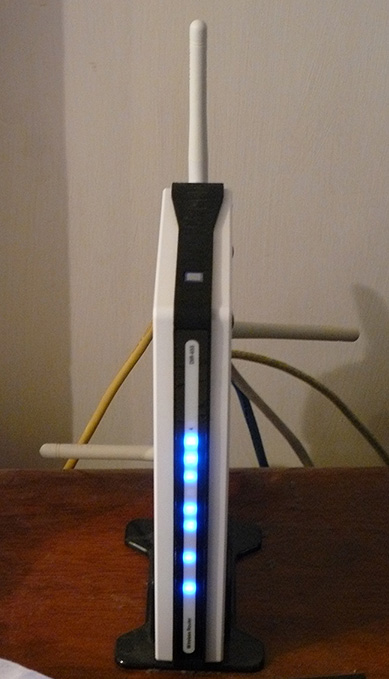
Já tive um D-Link DIR-655 roteador para o ano passado e é de longe o melhor roteador que eu já usei, apesar de eu ter pago 150 dólares a mais do que eu paguei por um roteador antes, assim que eu comecei o que eu tenho pago.

Começando com a versão 1.21 Beta 04 do firmware DIR-655, existe agora a funcionalidade do SharePoint disponíveis. SharePoint como a mídia e em outros sites ou parcialmente chamá-lo SharePort como é chamado em todo o lado, incluindo o software em si é uma forma de produtos D-Link para compartilhar um dispositivo USB através da LAN, eu vou tentar não confundir qualquer ainda assim, vou me referir a ele somente como SharePort partir de agora.

SharePort é uma característica interessante que eu realmente queria ser capaz de fazer há alguns anos, por meio de dispositivos USB partilha de um computador para que eles possam ser utilizados em outro PC como se o aparelho estava realmente conectado ao seu PC. D-Link, finalmente, esta tecnologia trouxe para a vida de uma forma limitada com SharePort.

Isto é como SharePort funciona, vou usar o meu DIR-655 e Brother DCP-150C MFC como um exemplo.
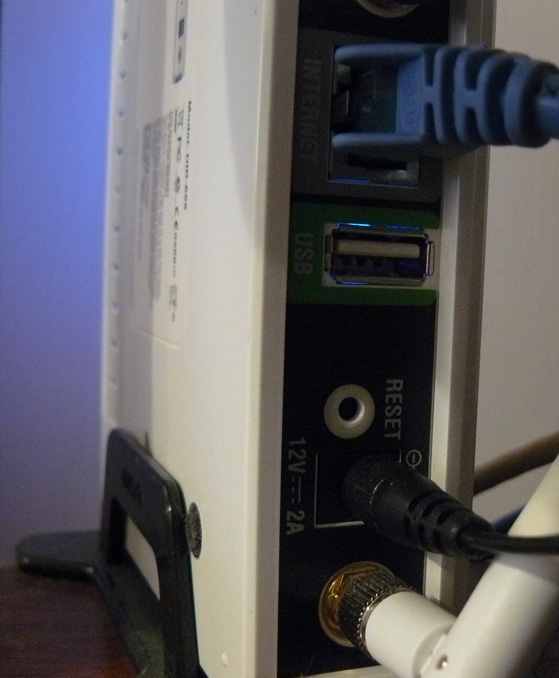
O DIR-655 possui uma porta USB na parte traseira, os testes parecem indicar é uma porta USB 1.1, até agora, o porto era utilizado para ajustes sem fio que pode ser armazenado em uma chave USB.

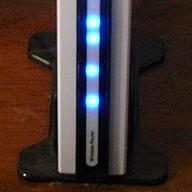
DIR-655 DIR-655 USB Port

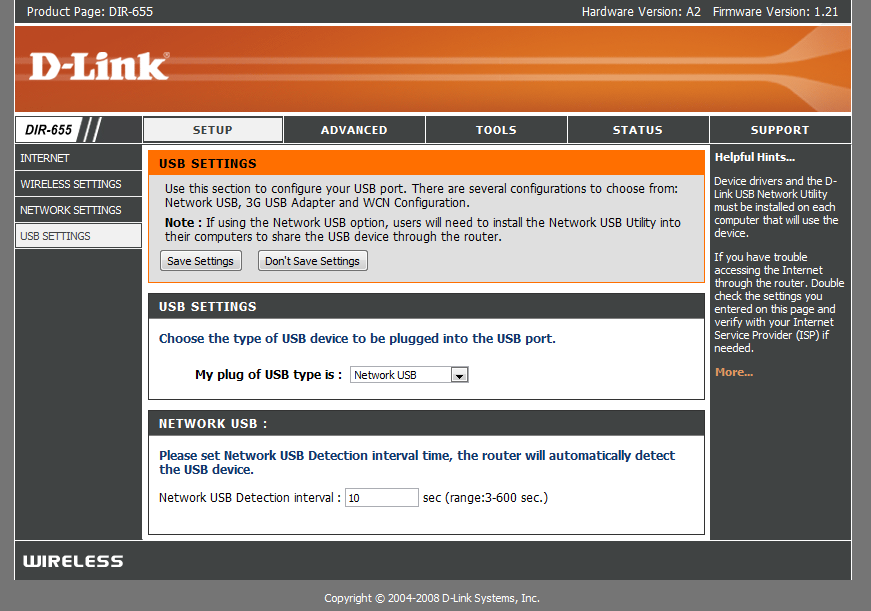
Depois de instalar o novo firmware no entanto, a porta USB tem encontrado uso mais, estamos cumprimentada com um novo menu de configuração em que controla o uso do porto.

New USB Page

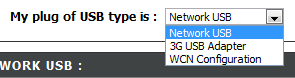
Como você pode ver não há muito para a instalação desta porta USB, WCN é a configuração padrão, é usado para a chave de configuração sem fio, escolha a lista:

Choices

Escolhendo Rede USB coloca o roteador em modo SharePort, escolhendo 3G USB Adapter é um bocado de um mistério para mim, eu não tenho a certeza que os dispositivos são compatíveis com o presente ainda, porém como a maioria das pessoas, eu tenho um serviço 3G e usá-lo como um backup apenas de ligar o aparelho até a porta USB e escolher 3G USB Adapter seria muito útil.

Depois de ter escolhido o dispositivo de rede USB é automaticamente compartilhada, no entanto, para conectar você deve instalar o software SharePort da D-Link, este ainda está em Beta, parece assim use com cuidado etc etc, eu não tive um problema com e ele ainda parece bastante polido. uma vez que é instalado certifique-se de permitir que ele seja executado na inicialização e executá-lo imediatamente, caso contrário você não será capaz de utilizar o dispositivo sem executar o software manualmente SharePort cada vez, ele usa apenas 2 MB de memória RAM para que ele não é um recurso porco.

SharePort Printer

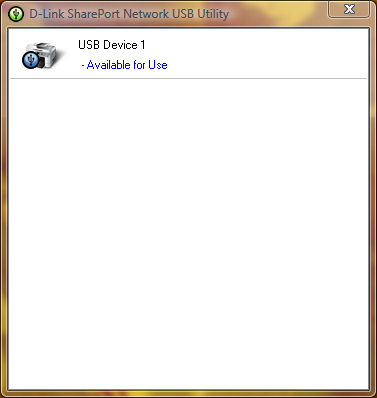
Se o dispositivo USB está ligado e conectado, em seguida, o utilitário deve exibir SharePort como este uma vez que você clicar duas vezes sobre o ícone na bandeja do sistema. Isso permitirá então que você execute através de um assistente para instalar o dispositivo, você precisará de driver do seu dispositivo de CD ou o driver mais recente para o seu site, no final você será perguntado se você deseja se conectar automaticamente ao dispositivo quando você imprime se é uma impressora, esta é uma boa idéia caso contrário, você deve escolher manualmente para se conectar.

Uma vez que está tudo configurado em cada computador que utiliza o dispositivo, você vai notar que cada dispositivo afirma que a impressora está em pausa e off-line, imprimir para a impressora de qualquer maneira, o software detecta SharePort que uma cópia foi enviada para a impressora e atribui automaticamente a impressora ao computador e quando a impressora está se comunicando com o PC irá mostrar como conectado, uma vez que o trabalho de impressão tiver sido concluído, ele irá voltar ao offline, uma pausa.

A limitação desse recurso é que ele só irá funcionar em um PC ao mesmo tempo, dispositivos USB, simplesmente não são projetados para serem conectados a PCs dois de uma vez por isso faz sentido porque este é o caso.
Eu não tentei coisas como webcams, porém eles têm sido conhecida a obra, embora a um ritmo mais lento do que o normal, o recurso de scanner da minha impressora funciona perfeitamente, porém você deve manualmente conectar usando o software SharePort usá-lo, certifique-se de desconectar depois que você está feito.

Como afirmei no início deste artigo, o software SharePort é algo que eu tenho esperado há muito tempo a favor, é uma grande característica, considerando o meu roteador não é o mais recente lá fora e agora ele parecia quase como D-Link tinha desistido adição de novos recursos para ele, ele também mostra o quão bem o dispositivo pode funcionar se pode tratar de um dispositivo USB enquanto ele está executando todas as suas outras funções.

Related posts:

  1. D-Link Update SharePort
  2. D-Link SharePort nova versão 1.10 e DIR-655 Firmware 1,30
  3. D-Link DIR-655 1,32 Build 04 Beta SharePort fixar 01
  4. D-Link DIR-655 Firmware 1.34b02 Beta e 3,0 SharePort
  5. D-Link DIR-655 Firmware 1.32NA Final

Comentários:

  1. Apenas atualizado firmware no meu router DIR 655 a 1,21. Quando comecei a instalar o aplicativo Utilitário SharePort que caiu minha computadores desktop e laptop ambos são Windows Vista Home Premium. Dlink chamado de suporte técnico, mas não encontrou problemas. Alguém teve o mesmo problema? Na necessidade de uma solução para este problema ... por favor me ajude.

  2. Bem, eu ainda estou correndo 1,21 Beta 04, pode haver algo com 1,21 final, também pode ser uma boa idéia de voltar a baixar o utilitário de ftp://ftp.dlink.com/Gateway/dir655/Apps/SharePort_Network_USB_Utility_094. zip e, possivelmente, re-flash do roteador com ftp://ftp.dlink.com/Gateway/dir655/Firmware/dir655_firmware_121.zip OR ftp://ftp.dlink.com/Gateway/dir655/Firmware/dir655_firmware_121_no_securespot.zip o no_securespot arquivo tem uma nova data para isso que o firmware 1,21 padrão. Que tipo de software que tem actualmente em execução em ambos os computadores? Tente desligar antivírus etc tanto para instalar este.

  3. Acabei de instalar o firmware 1,13 no meu DGL-4500, bem como instalar o utilitário SharePort. SharePort não é recionizing meu router como na rede ou no meu HD externo como sendo ligado. Todos os pensamentos?

  4. Eu estou realmente tentando chegar ao fundo de um problema parecido, eu estou experimentando, poucos dias atrás meu pc parou de detectar quando a impressora estava ligada e na maioria das vezes também não detecta quando o roteador foi conectado.

    Tenho reinstalado ele, reiniciado o router e ele não muda, mesmo quando todos os outros PC funciona perfeitamente.

    Possível solução: Na verdade eu acabei de corrigir o problema, parece que não pode reconhecer dispositivos quando você tiver mais de uma placa de rede habilitada, por isso, se você estiver executando o VMware etc você terá que desativar as conexões de rede e outros antes de reiniciar começará a detectar novamente. Se você é capaz de fazê-lo funcionar também a partir deste me avise.

  5. Oi!

    Aparentemente, isso só funciona na versão E.U. do 655. Tenho piscou o firmware para a versão mais recente da União Europeia e não há nenhuma tela, como descrito acima.

    Só queria deixar claro que este é apenas para usuários E.U.. Todos os outros, não seja enganado em pensar o router tudo outra rede de acesso à web.

  6. Graças a cabeça para cima, eu estive usando a versão do firmware E.U. no meu comprou AU 655.

    Eu não recomendo fazer isso, porém eu não acredito que haja qualquer diferença no hardware para diferentes regiões também.

  7. Ben-Obrigado por este excelente tutorial - usando suas instruções, eu era capaz de atualizar o firmware, instale o utilitário de impressão e imprimir usando o meu laptop roteador ligado! Apenas uma palavra de agradecimento.

    Como um FYI, eu costumava verificar o software do roteador D-Link "própria para atualizações de firmware" característica, e automaticamente recomenda a versão 1.21 (datado de 2008/10/09). Agora eu estou imprimindo ótimo em um laptop baseado Vista (Compaq), e um desktop XP / Home-based (Compaq). Ainda tenho outro laptop Dell para se conectar. Impressora é uma HP Deskjet F4180 All-In-One. Teve de instalar o SharePoint eo driver de impressora HP no laptop, mas que não era grande coisa.

    Uma diferença de eu ter notado que você tinha dito: eu não tenho de reconectar a impressora cada vez que eu usá-lo. Uma vez que estou conectado, ele permanece conectado a menos que eu optar por "libertação" dele. Se um dos PC é ligado, e você quer imprimir a partir de uma diferente, que vai oferecer a opção de "pedir um release" da máquina que está conectada. Em seguida, a máquina que está conectado recebe uma mensagem pop-up pedindo-lhe para desligar assim que um outro usuário pode usar a impressora. A barra de status também mostra o nome do computador de qualquer máquina está ligada ativamente para a impressora. Talvez esta foi mais uma atualização de firmware que foi incluído na versão 10/9/08?

    Como um FYI, eu sou um usuário E.U..

  8. Obrigado pelo seu comentário Lisa, Fico feliz que você gostou das minhas instruções.

    Eu nunca realmente vêm através deste, todos os meus computadores estão definidos para auto-conexão que eles são apenas conectado à impressora em poucos segundos curto que o trabalho de impressão for enviado, em seguida ele desconecta de novo, eu supor que seria parte do o meu também porém eu não encontrei por não tê-lo de qualquer PC conectado a um tempo suficiente para que outro pedido de utilização do mesmo.

  9. Há definitivamente problemas com a versão 1.2 e 1,21 versões do firmware DIR-655.

    O mapeamento de servidores virtuais não funciona corretamente para pacotes de saída. Eu corro um servidor de e-mail que começou a funcionar intermitentemente sobre estas duas rotações do firmware. Revertendo a 1,11 resolveu o problema. Conexões à porta 25 (smtp) seria rota para o servidor apropriado na minha rede interna, mas parece que a resp servidores nem sempre foi voltar para o servidor remoto conectar. Isso deixa o smtp rotinas de espera para uma comunicação adicional que vem e nunca expira. Às vezes o servidor de origem irá desistir e-mail está perdido.

    Além disso, os horários não podem ser configurados corretamente .. o firmware vezes incorretamente bandeiras como isto é inválido: onze horas - cinco horas é inválido 1.2x ok e em 1,11.

  10. Isso é muito ruim Brian, eu não experimentei nada de muito ruim com esses firmwares mim, mas outros estão relatando problemas. Antigamente eu segurei o 1.2 como as pessoas estavam tendo problemas com ele, mas ele não aparece todos os problemas podem ter sido corrigidos.

  11. Gostaria de saber se você poderia testar algo para mim ... você poderia tentar criar um calendário com onze horas - cinco horas e ver se ele entende que é válido? Isso vai me dizer se este é um problema universal com 1.21 ou algo que é apenas um problema com meu aparelho e firmware .... thx

  12. Estou enfrentando o mesmo erro, parece não gostar abrangendo mais de meia-noite. O que acontece quando você definir um horário de 11:00-12:00 e outro 12:00-05:00?

  13. Achei o site francês onde o representante dlink francês alega SharePort funcionalidade estará disponível nas últimas semanas em firmwares da UE:
    http://www.clubic.com/actualite-170094-dlink-routeurs-dir-655-dir-855.html

    Um dos comentários abaixo do artigo sais firmware E.U. funciona bem em hardware da UE (como Ben escreveu - provavelmente não há diferenças de hardware), SharePort funciona bem, e é multifuncional Canon PIXMA pode verificar através da porta compartilhada.
    Eu estou ordenando o DIR-655 para mim ...

  14. @ Jun (e ninguém) ... Eu também correu para a "instalação SharePort" caiu o meu problema de sistemas. (V libera ambos 0,94 e 1,0)

    O DIR-655 foi em grande atualização do firmware correu bem. Router / wireless rápido rasgando.

    Fui para instalar o software SharePort e caiu meu XP SP3 e os sistemas Vista Home Premium terrivelmente ruim. Era capaz de ir buscá-los através de restauração do sistema, mas não foi bem por um tempo.

    Estou suspeitando de um conflito com o AVG Free 8, que é uma peça comum de software em todos os meus sistemas.

    Ninguém pode, eventualmente, confirmar a SharePort / AVG Free conflito de driver de 8 que pode ter deixado de funcionar seus sistemas durante / após a instalação SharePort?

    -Cheers

  15. Bem, eu tenho o mesmo problema junho versão Sharepoint 1,0 acidentes minha laptops durante a instalação e desinstalação. Eu tenho 1,21 firmware, mas eu não acho que o que importa, porque eu não consigo sequer instalar o software sem bater. Chamado de apoio Dlink e eles dizem que o SharePoint ea porta USB não são suportados sobre o DIR-655.

    Poderá procurar um produto alternativo que pode apoiar adequadamente um disco rígido. Alguma recomendação? Eu poderia tentar a Apple Airport Extreeme agora que é Gigabit Dual Mode e capaz.

  16. Eu estou quase certo no meu caso há um conflito entre o driver driver SharePort e algo mais. Estou fortemente inclinado a favor de que seja algum tipo de proteção do sistema (HIPS?) Recurso do AVG Free 8 no meu caso.

    Em sistemas de ensaio, posso instalar SharePort apenas multa (v.94 ou v1.0). No entanto, se primeiro eu tenho o AVG Free 8 instalado nas máquinas de tela azul durante o final do processo de instalação ... ou quando um driver ou serviço de tentativas para ser instalado. Curiosamente, em um sistema "real" que os tanques durante a instalação, em um sistema virtual, que só tanques durante a desinstalação do AVG Free com SharePort 8.

    No entanto, (sobre os sistemas virtuais) se eu primeiro desinstalar o AVG Free 8 reiniciar, instalar SharePort, reiniciar, em seguida, instalar o AVG Free 8 tudo parece feliz.

    Eu preciso fazer um pouco mais de resolução de problemas antes de me mudar para o meu "ao vivo" de sistemas. Foi muito divertido fazer uma restauração do sistema em dois dos meus três sistemas, este fim de semana.

    Eu não acho que isso é uma questão router-hardware/firmware melhor que eu posso dizer. Meu DIR-655 se rasgando rápida e sólida. Eu fiz upgrade de firmware 1,21 que permite esse recurso SharePort novo, mas eu não vejo como o firmware do router está impactando os sistemas. Estou convencido de que é com o software SharePort si e, especificamente, um driver ou serviço conflito na inicialização da instalação. Eu só tenho que fechar o ponto de conflito.

    E sim ... Passei mais de 30 minutos no telefone com o suporte Dlink noite passada e foi ao lado de inútil. Eu comecei finalmente a tecnologia pobres para aumentar as minhas conclusões de um supervisor e talvez ele vai fazê-lo a uma mesa técnica, Dlink.

    De acordo com esse cara, não existem novas "quarto-back" versões disponíveis para SharePort neste momento.

    Será que você sabe o que eu descobrir.

    Caso contrário, eu fui muito feliz com o DIR-655 dispositivos em geral. Pena que o recurso SharePort foi um dos fatores decisivos para ir com este modelo.

    Sigh ....

    (BTW, eu postei o comentário acima do meu direito SteveW acima de ... de alguma forma o browser preso junho nome no campo autor.)

    -Cheers

  17. Isso é bom trabalhar lá depanagem Claus, seria um problema de software SharePort, com certeza, talvez AVG não está jogando bonito seja, eles não têm exatamente tem o melhor registo recentemente em relação às questões com outros softwares. Vou ver se consigo descobrir nada sobre amanhã AVG / SharePort, tenho certeza que uma das empresas que sabe alguma coisa.

    Eu não esperaria D-Link para atualizar o software por um tempo, mas eu acho que eles só sabem que, com certeza.

    Esperemos que se bastante pessoas têm o problema que eles vão corrigir isso em breve, o próprio software tem de trabalhar com todo o hardware capaz SharePort e há muito poucos desses lá fora agora.

    By the way eu mudei o seu nome no comentário acima SteveW então a conversa pode ser entendida corretamente, deixe-me saber se você enfrentar bugs com o sistema de comentários, é o meu código para que ele tenha a possibilidade de erros.

  18. Eu também instalado 1,21 no meu DIR-655 eo software USB. Meu computador hardwired encontrou a impressora imediatamente. Meu notebook (wireless) sharport diz que não pode encontrar um dispositivo USB. Alguma sugestão?

  19. Tente desativar todos os cartões de outras redes e reiniciar, mesmo a placa ethernet, SharePort se confunde facilmente por várias conexões de rede, se ele está sendo executado VMWare tente desabilitar as placas de rede vmnet.

    Também desative temporariamente qualquer firewall que você possa ter sobre o laptop em apenas um caso está bloqueando a conexão.

  20. Tendo o mesmo problema que Valca mas eu estou correndo o novo Norton scanner de vírus que eu estou querendo saber se a sua outra coisa depois de um scanner de vírus.

  21. Oi gente. Ainda testando o problema.

    Eu já tinha suspeitado AVG 8, por isso este fim de semana eu encontrei algum tempo livre. Decidi colocar minha teoria para o teste no meu Vista Home Prem. sistema SP1.

    Eu desinstalei o AVG 8, fez um ponto de restauro manual (coisa boa eu fiz) reiniciou, até aí tudo bem. Então, eu instalei SharePort.

    BSOD.

    Restauração do sistema usando o meu ponto de salvaguarda restaurado meu sistema. Agora eu estava de volta à estaca zero.

    Mudou-se para uma sessão Virtual PC novo com uma instalação pristine XP SP2. Instalado SharePort bem. Não há nenhum problema. Desinstalado-lo muito bem.

    Próximo suspeito que eu tinha era NetLimiter Monitor que também é comum em todas as minhas três sistemas.

    NetLimiter Monitor instalado e reiniciado. Good. Não há nenhum problema de estabilidade.

    Fui instalar SharePort (v1.0) e perto do final da instalação ... como meus sistemas real ... o sistema virtual fez um reboot tela preta imediato.

    Hmmmm.

    Então, eu tenho desinstalado NetLimiter Monitor de meus sistemas e coloque em uma consulta de e-mail à sua equipe de apoio, perguntando se eles podem olhar para isto de forma independente.

    Vendo como ele aparece tanto SharePort e NetLimiter Monitor ambos parecem ligar para os drivers de rede do Windows / serviços isto faz sentido muito bem.

    Vai dar uma outra atualização, se / quando eles respondem.

    Não tenho certeza se eu sou corajoso o suficiente apenas ainda repetir a experiência em meus sistemas viver novamente.

    -Felicidades!

  22. Olá a todos, eu sou novo em tudo isso. Recentemente atualizado para o DIR655. Grandes. 1 Desktop 5 Notebooks. Desktop tem a placa de rede PCI, Router, Modem DSL Etc. Notebooks estão todos em funcionamento interno dispositivos 802.11g.
    Se eu desconectar o cabo USB da impressora laser colorida Oki550 do Desktop, e ligá-lo na porta USB do DIR655. É este, em última instância (ou teoricamente) vai permitir-nos a impressão de que o laser sem ligar o computador desktop em primeiro lugar?
    Por enquanto esse é o meu objetivo final e esta é minha primeira pergunta.
    Obrigado
    Dave

  23. Sim, isto vai permitir o acesso à impressora a qualquer momento o roteador está ligado, a impressora eo router são as únicas duas coisas que precisam de estar ligado para que isso funcione, no entanto, que é, desde que não via através do desktop, em qualquer fase. Como se pode ver pelos comentários que você deve exercer um pouco de cuidado durante a instalação do software SharePort como não jogar bem com outros softwares que tem componentes de rede.

  24. Ei eu encontrei o problema ... O que desinstalar o Net Limiter e você é bom para ir ^ _ ^

  25. Ben,

    Só para confirmar o que eu suspeitava e Nick confirmou ... o Net Limiter 2 O programa Monitor não criticamente conflito com a aplicação SharePort (neste momento).

    Eu tinha desinstalado ele do meu XP Home (SP3) e Windows Vista Home Premium (SP1) sistemas. Então eu SharePort reinstalado depois de criar pontos de restauração do sistema (apenas para ser seguro).

    Instalação correu bem neste momento e não BSOD ou conflitos foram observados. A aplicação SharePort rapidamente encontrou a Seagate dispositivo de armazenamento USB flash e eu era capaz de "mount / ligar" para ela e ler / escrever arquivos de todos os sistemas.

    Para ser claro ... apenas um sistema pode ser conectado ao dispositivo de uma só vez, tanto quanto eu posso dizer. Exceto que agora ele funciona muito bem.

    Ufa! Esse foi um trabalho doozie que saem. Graças ao Nick para enviar uma confirmação.

    Eu enviei um e-mail para a equipe de apoio Net Limiter sobre o assunto, mas nenhuma resposta ainda.

    Não tenho certeza se isso irá ocorrer com todos os seus programas (pagas / free) ou apenas com a Net Limiter 2 Monitor.

    Obrigado a todos!

    Cheers!

    V. Claus-

  26. Oi, eu sou dono do Dir-855 como o meu velho e querido Dir-655 passou para o meu apartamento irmãs como uma solução permanente. No entanto, eu estaria muito interessado em saber se o DIR-855 suporta esse recurso também. Pode ser um bom add-on para o meu router sem fios já impressionante.

    Daniel

  27. Daniel,

    De acordo com um comunicado de imprensa da D-Link, o DIR-855 está incluída naquelas que SharePort suporta.

    http://www.dlink.com/press/pr/?prid=442

    Citando:

    "A característica inovadora SharePort USB rede de ponte está disponível no D-Link Xtreme N Gigabit Router modelos - o DIR-655, DIR-825, DIR-855 e DGL-4500 Gaming Router com GameFuelâ" ¢. A atualização da tecnologia SharePort também está disponível no RangeBooster N DIR-628. Os proprietários atuais dos roteadores será capaz de atualizar a tecnologia SharePort baixando o mais recente firmware e utilitário cliente a partir do site Link-D, http://www.dlink.com ".

    Acho que este é o link para o DIR-855 e firmware SharePort página de download:

    Firmware -
    http://www.dlink.com/products/support.asp?pid=548&sec=1 firmware #

    (Essa é uma vista agradável modelo 855 by-the-way. Faz meu olhar puro 655! ;)

    Boa sorte!

    Claus V.

  28. Oi, eu tenho o meu DIR655 próprios para uma semana. Sua versão da UE, mas E.U. firmware 1,21 executar smothly. SharePort funciona, mas não muito estável.

    Primeira questão, a partilha de unidade de disco USB sobre o Wi-Fi não é uma boa idéia IMHO. Qualquer problema de rede e Vista têm problemas com o dispositivo. Também é uma questão de desempenho (800kB / s quando 2m / s quando a cópia de arquivos entre computadores portáteis com adaptadores Wi-Fi n).
    Mas eu comprei esse roteador para compartilhar a impressora. E é possível, mas SharePort Utility (1.0) só funciona na conta local. Quando se trabalha com a conta do Active Directory, a janela do utilitário popup mostra o dispositivo conectado à porta USB do roteador. Mas, ao clicar no ícone da bandeja da janela app não é mostrado. A aplicação é na barra de tarefas, mas não tem janela para selecionar o dispositivo e se conectar.
    No local conta tudo está OK. Parece ser a questão SharePort Utility. O sistema operacional foi instalado há uma semana, não muitas aplicações instaladas.

    Alguma idéia?
    Piotr

  29. Claus, muito obrigado, eu estava sofrendo com esse problema até agora. Passei meu fim de semana inteiro para nada, muito obrigado!
    este limitador net sucks: \

  30. Oi, eu estou tendo esta isue com dlink 655 v1.21
    e v.1.0 SharePort ...
    multifuction impressora e USB flash drive trabalho impecável em 2 xp sp3, e uma vista 64 máquinas,
    mas quando eu ligar um iPod touch v. 2.0, o utilitário SharePort mostra "disponível para uso"
    e tente se conectar a ele e todos os três de largar o meu pc é a ligação à Internet, wireless e com fio e, escusado será dizer que o vai ligar e itouch a internet é restabelecida automaticamente, é como o router entra em um ciclo de energia ou algo assim.
    Então eu tentei o mesmo procedimento, mas com um iPod nano desta vez, e adivinhem, funcionou perfeito!
    é alguém com esse problema e / ou sabe a solução para isso?
    Obrigado pela vossa ajuda.

  31. Oi lá!
    Então .. Eu tenho um roteador DIR-655 da UE e tentou os E.U. 1,21 firmware mim. Eu não vou mentir, a atualização do firmware não foi sem um engate. Quando eu o upload de firmware para o roteador, eu não poderia ir para a página de administração do router mais ... mas depois de um reset tudo voltou ao normal (pode ser uma boa idéia para salvar a configuração do roteador antes de fazer a atualização de firmware). De qualquer forma, eu encorajo a qualquer um de nós não dir-655 para tentar o firmware 1,21 ... tudo tão longe de funcionar bem e até conseguiu juntar a minha impressora e ela funciona grande coisa ... próximo a tentar é um dispositivo de armazenamento : D

  32. Lembre-se de caras, o router parece estar limitado a velocidade de USB 1.1, ou seja, cerca de 1MB/second por isso não é recomendado a menos que você tenha um dispositivo pequeno e não tem muito a transferência, também roteadores não são os mais rápidos sistemas para transferência de dados sobre o USB provavelmente coloca muita pressão sobre o dispositivo que possam causar qualquer coisa de menor velocidade LAN sem fios e saídas para reboots router.

    Obrigado por todas as suas pesquisas Claus, esperamos que em breve uma das empresas é capaz de corrigir os problemas com compatibilidade.

  33. Eu estava esperando que você poderia me ajudar com outro problema.

    Eu recentemente actualizado a partir do outro roteador D-link para um Dir-655. Atualizado para o F / W 1.21. Tem várias máquinas em uma rede local de grupo de trabalho que todos viram cada coima outros com o antigo router. Agora eu não consigo ver nenhuma das outras máquinas da rede local. Eu sei que eu perdi algo tão simples que eu estava esperando que você poderia me dar um heads-up. Todos nós ver a multa internet e IP's são reservados e dentro do alcance dhcp. O que eu perdi? Muito obrigado

  34. Há duas coisas em cima da minha cabeça que tem problemas quando as redes móveis, principalmente quando as alterações na rede é regime de IP, software de firewall, incluindo o Firewall do Windows e geralmente ZoneAlarm pode bloquear um PC de ser "descoberto" como ela acredita que esta nova rede é uma rede pública na Internet em vez de uma LAN privada, se você estiver executando o Windows Vista a mesma coisa pode acontecer, certifique-se o seu computador tem a sua conexão de rede definido como Home ou privado, os mesmo devem ser as únicas vezes em que o problema deve ocorrer.

    Se eles são sem fio também certificar-se que Partition Wireless está desativada nas propriedades Advanced Wireless, isso irá causar um efeito similar.

  35. Eu estou tendo o mesmo problema BSOD no Vista como mencionado por outros. O PC foi BSOD no final da SharePort instalar e depois BSOD'ed cada vez que eu tentei fazer o login. Tenho Trend Micro AV ea Nortel Contivity cliente VPN. Ambos os programas são essenciais e não posso desinstalar qualquer um. Podia qualquer um desses é um problema?

  36. Oi,
    Estou interessado em atualizar para este router, por isso tenho procurado fóruns para diferentes pistas.

    Hoje eu notei há um novo (ainda v1.21) arquivo atualizado 12.12.08. Alguém tentou se esta é uma nova versão com correções ou não?

  37. Eu vou dar-lhe uma tentativa e ver se ele muda alguma coisa com base em assuntos que as pessoas tiveram, em que nota uma nova questão que tenho notado surgiu, ocasionalmente, após ter o router por mais de uma semana, o software SharePort em todos os computadores começa dando erros de conexão, se é deixado por um tempo, pode haver centenas na tela, reiniciar o roteador pára os erros por um tempo.

  38. O 1,21 é a mesma que a que foi lançada há alguns meses atrás, apenas com a data alterada, no entanto cerca de 2 ou 3 versões foram marcados 1,21 sem uma etiqueta beta, com o que está sendo passado 1,21 B10 em novembro, então se você baixado em outubro de 1,21 ou mais cedo, faça o download e instalar novamente, ele corrige alguns problemas com o encaminhamento de porta e as configurações de poupança.

  39. Oi turma,

    grande discussão!

    Estou tendo um problema SharePort, e queria ver se alguém tem tido o mesmo.

    aqui está a minha configuração:

    1. DIR-655 com firmware 1,21
    2. Win XP Pro máquina (como um cliente vmware) com um SharePort
    3. WD external HDD

    The HDD is plugged into the USB port on the router, but I'm not able to connect to it from the the Win XP pro machine. The XP machine will continuously notify me that it has “Found” the HDD, but the Shareport tray icon continues to stay red, and never turns green. After about 30 seconds, the notification will come back. I'm completely at a loss, as it workeed in the past when I had this vm client on another host. I know that vmware may be causing this, but I don't see how, because I only have one network adapter enabled on the XP machine (ethernet bridged). I've spent hours trying to get this to work…Any ideas would be greatly appreciated!

    Obrigado,

    John

  40. I have this setup DIR-655 Firmware 1.2.1 and Shareport I got to work if I disable my Microsoft OneCare firewall.

    Does anyone know the Port's used by D-Link SharePort?

  41. If you all go to Dlink's website for the router, you will see that it says,
    “This firmware is engineered for US products only.
    Using this firmware on a device outside of the United States will void your warranty and may render the device unusable.

    Please contact the D-Link office in your region for firmware updates that are compatible with your D-Link product.”
    e,
    “¤ Added SharePort features.
    ¤ Fixed email notification issue.

    Please download the SharePort Utility and see the SharePort manual before use.”
    You have to download the actual utility to use it!

  42. Oh, and I almost forgot, this is for x86 version OS's only. x64 is not supported.

  43. Hi James, I'm not sure of the ports myself however if you open up a command prompt and use the command 'netstat' just after attempting to connect using Shareport, look for the router's IP and you should be able to see all ports that the PC is connecting to the router for, OneCare may have a log file that might allow you to do a similar thing, just make sure you're running as little network applications as possible at the time as the lists can get pretty long and do not have any p2p programs running at the time either.

    Hi Jody, I have tested version 0.94 and version 1.00 on Windows XP x64 and Windows Vista x64 and have had no problems, is there an x64 version that doesn't allow this to run?

  44. I just got a D-Link DIR628 which also has the shareport utility. However, I am having some rather strange problem and wonder if anyone can offer some help or suggestions.

    On my wife's Vista laptop, the shareport network USB utility installed smoothly and works nicely. On my XP Pro desktop, the first installation hung and when I rebooted, the network USB utility started but couldn't see the devices behind the router. I have been trying different firewall settings (and eventually turned off all firewalls just to try it) the last few days and nothing seemed to really work.

    The only thing that seemed to work is if I uninstall the shareport utility, reinstall it, then the first time it got started after reinstall, I could see the devices. If I exit out and restart the utility, it's the same old problem of not seeing any device. Rebooting also has the same problem of not seeing anything. The only way to get it to work so far, seems to be uninstall->reboot->reinstall and it only worked after that sequence.

    Anyone has any idea on what this problem might be? When it worked, it worked great. I got 80 Mbps from an external HD which is not great but not too bad either. I could also put both my MFP printer and the HD behind a hub and access both of them. It's really wonderful that way. I just wish I can get it to work on all my computers. By the way, my other system is a Mac and there isn'ta Mac version for that utility. : (

    Sorry for the long mail, any help or suggestion is really appreciated. Graças.

  45. I have seen a few instances where the devices can't be found on a pc randomly, however I have not experienced this on a PC every time after it has been installed. Is the PC able to detect the router using the Shareport utility?

    Right click on the Shareport icon, in the menu you should see the name of your router and it's IP address, make sure it is selected, if not go to it and a new menu will open up, make sure you click on Enable, also you can click on Configuration to get some advanced settings.

    D-Link Shareport Network Selection

    If the router doesn't show up in the list then there may be some connection settings on that PC that are limiting the connection between it and the router.

    I'm also waiting on a Mac version of the software, though I think it might not happen any time soon.

  46. Anybody use a USB hub on the shareport and get more than 1 device to work?

  47. Ben – thanks for the response. The PC that I am problem with is directly connected to the route through a wired connection using a CAT5 cable. It is the primary system that I use to set up and configure the router. When I had the problem, the top line in the right-click screen of the shareport icon, the one showing the IP addresses and things was not visible. I only got things from the “Advanced Options” down.

    Mike – I did put a USB hub in and connected a Canon MP470 printer and a external HD at the same time. I was able to see both of them and were able to connect to them from my Vista laptop.I didn't try to read/write to the HD and print at the same time though.

    By the way, I made a typo earlier. I think I was only getting 8 Mbps, not 80. So roughtly 1 MB/sec read throughput is what I was getting. Not very fast but good enough to move small amount of data.

  48. I'm having the same trouble: Have a Dlink655 with a wired connection to a Vista Home Premium laptop and an older desktop box running Win XP.

    Shareport works just fine on the laptop – I want to use it for a shared printer.

    I can install shareport fine on the XP machine, but it doesn't find any devices connected… and I also don't see the router's IP address upon right-click. I disabled firewalls, uninstalled antivirus software etc. but to no avail.

    Would love some hints if anyone has them!

  49. To Jacko

    I went into admin, clicked on ADVANCED, then WISH on the left, then I made sure it was ENABLED and for PRIORITY CLASSIFIERS I clicked AUTOMATIC. Experimentá-lo.

  50. Mike – you said you “went into admin, clicked on ADVANCED, then WISH on the left, then I made sure it was ENABLED and for PRIORITY CLASSIFIERS I clicked AUTOMATIC…”

    I assume you are talking about the web administration page for the Dlink655 router? What is the “WISH” thing you talked about? I have a Dlink628 and I didn't see anything that looks like “WISH” in the advanced menu. I was wondering if you can explain what that menu does, I might be able to find the equivalence in my router. Graças.

  51. I've checked out the DIR-628 emulator on the D-Link site and it appears that router doesn't have WISH at all, perhaps you could try messing about with the QOS settings as they are similar to WISH except they affect both wired and wireless on the WAN side of things, but may not have the same effect as WISH, personally I have WISH off and have no problems.

  52. Oi tudo,

    I tried changing the WISH settings, but no luck. The Vista laptop has no issues with Shareport at all, whereas the XP machine cannot even recognize the router.

    If the issue is router-side, I don't know why the Vista box would work and the XP box not?

    Obrigado!

  53. Hey guys, i am seeing the same thing on the dlink dir-825. Wireless PC's see my printer connected to the usb shareport fine. My wired PC's lose the printer whenever they are restarted. If i reboot the dir-825 the wired pc's will see the router again.

    When I click the sharepoint icon, I see the ipaddress for the router when it's working correctly with the printer. When it's not, the ip address is not there and the first entry is advanced options.

    I tried changing the wish settings but no change….

  54. Hi Jacko and hoc, are either of your PCs that have this problem set to connect to the router via DHCP or via menually entered static IPs?

  55. Hi
    Both my laptop (Vista) and desktop (XP) are connected by wire to the router, and both are set up using DHCP.
    Obrigado!

  56. I talked to dlink 3rd level today who was passing this on to the product manager. I need this to work so have done a good amount of testing. My PC's are all connecting via dhcp, all vista (some x32 and some x64).

    From the testing here i have found that the wireless PC's always detect the printer connected to the shareport. The wired PC's are inconsistent… at best. If I reboot the dir-825, the wired pc's will immediately detect the shareport printer and keep it until the network connection is interrupted. If i pull the network cable on the wired pc, and then plug it back in, they will lose the printer and not re-establish it (exactly what happens when you power off your PC).

    Hoping we can come up with a better solution than rebooting the router every day!!! I'm sure linksys would like to hear about that.

  57. hoc,

    Eu acho que você pode estar ligada a algo. No meu set up, o sistema que o problema tem a ver a porta de rede USB é conectado ao roteador por meio de um CAT5 diretamente. O laptop com conexão sem fio sempre foi boa. Eu tenho uma variável adicional no meu ambiente no sistema operacional utilizado. O desktop com fio usa XP, enquanto o laptop sem fio usa o Vista.

    Eu instalei o Windows 7 Beta sobre a máquina de fio no fim de semana. Eu era capaz de ver novamente a impressora na porta USB de rede sobre a primeira partida do utilitário. Quando saiu para fora e reiniciar o serviço público, eu tive problema novamente. Vou tentar reiniciar o router quando cheguei em casa hoje à noite.

  58. Estou recebendo uma "Conexão falhou, por favor, tente novamente. ' mensagem a cada minuto ou assim SharePort utilitário USB Network.

    É estranho porque eu tenho a minha impressora na porta USB e funciona bem.

    As teorias sobre onde procurar?

  59. Eu conseguir isso também em todos os outros computadores que a minha, estranhamente desinstalar / reinstalar não quer corrigi-lo, a única coisa que fiz foi atualizar o firmware, o meu computador instalado SharePort após a atualização do firmware ainda a outros PCs que se tivesse instalado desde antes e enfrentar o problema.

    Eu não consigo ver qualquer ligação entre o sistema operacional que estavam em execução ou o firewall / software antivírus ou, o que tenho feito é desativado a opção de inicialização do programa e executar os programas apenas quando eu precisar imprimir.

  60. Alguém pode recomendar uma configuração para permitir que um Mac e um PC para acessar e usar o mesmo disco rígido externo através de uma rede? Ou onde eu posso encontrar informação sobre isso? Aqui estão os desafios:

    - PC e Mac são um pouco velho, por isso não N-padrão
    - Formatação do disco: têm de ser HSF + PC e usarão MacDrive?
    - Considerada a compra de um PC de entretenimento e usar isso como "Server"

    Sugestões?

  61. Dlink lançou uma atualização para o software utilitário sharepoint esta semana. Para o meu pc wired questões que não ajuda, mas não é uma correção completa.
    No início, o meu pc wired não vê a impressora conectada ao SharePort. Na versão 1.0, a caixa de diálogo do utilitário começou com "opções avançadas". Agora ele começa com o endereço do roteador.

    I can force the utility to see the printer by selecting disable and then enable in that shareport dialog. Still not a complete solution but getting better…

  62. Shareport is not finding my router in the pop up menu from the system tray icon. I have the DIR 655 and a vista x64 OS. Dlink support stated that shareport does not support 64 bit vista OS but posts here seem to contradict that. Any recommendations, advice would be much appreciated.

  63. I installed Shareport 1.14 and it works better, although when I disconnect from a hard drive it says it's busy and should I force or cancel. Force seems to work and I can re-connect ok

  64. I've just upgrade my firmware and everything work's fine. I've test USB HDD and USB Printer both work fine. I'm pleased with DIR-655. Real cool

  65. Finally got second laptop to connect to printer hanging off DIR-855. The cuplrit was OneCare – thanks James 30 December. Once One Care Firewall was disabled my Shareport icon turned green and the printer was able to be used. Only took me a couple of days and many grey hairs !

  66. Oi tudo,
    I setup the DIR-655 for a friend – one older desktop with Windows ME and a new laptop with Vista. The desktop is wired to the router, the laptop is wireless. I installed Shareport and hooked up his printer to the USB on the router. It worked! for a few days. Now the printer seems to have disappeared…. sort of. It's not listed in any application, but if I click on the Shareport Utility, it says the printer (a fairly new HP) is available. There's got to be something I'm missing here. Alguém sabe?
    (For now, he's not trying to print from the desktop, but I was thinking a usb hub would allow me to hook the printer to the desktop as well as the router.)
    obrigado

  67. Oh well, I went to my friend's house and everything worked fine… of course! The printer was available and I clicked Connect and it connected. It did reinstall the printer driver. Who knows what he did — he did say he'd been turning. So maybe when I rebooted, it got straightened out.

    I am still interested in using a usb hub so his desktop is wired to the printer. So, if anyone has done that and has any “gotchas” to warn me about, I'd appreciate it. I'm thinking printer to hub and hub to desktop and hub to router.
    obrigado

  68. Just got a DIR-655 last week after all the good reviews. I downloaded the SharePort fw 1.21 (2008/10/09). I'ma bit disappointed with it. Wanted to share some of the issues I'm seeing perhaps you have solutions to share;

    - Clients (3x Vista Acers, & XP Pro Lenovo) have hard time getting an IP address with WPA-personal, and WPA2-personal after wake-up. I must have the laptop try few times until it succeeds. They worked quite fine with cheap Belkin 802.11g routers

    - Connection drops even though signal is in the 85% or greater most of the time

    - Finally, I bought this when I heard about the SharePort fw. This feature was a big disappointment. I thought it may work as a printserver, but clients have to request and grant the connection before use… very stupid when no one is using the already connected client! – Also, if the laptop sleeps, the connection gets stuck and a USB disconnect/re-connect must be done for the printer to be re-discovered. Lastly, my Canon MF MP830 is not happy with it. The print preview doesn't work anymore, the printer doesn't wake up on jobs, and the jobs error out frequently.

  69. having the same issue as this guy below is telling every thing is ok but when i click on the utility on task bar nothing flashes on desktop.it work well on my other computer running vista 32 home premium , it was doing good on this system too but i don't know why it start acting up like this.this is vista 32 ultimate any suggestion guys would be appreciated.
    “Author: Pit
    Date: Nov 8, 2008

    Hi, I have my own DIR655 for 1 week. Its an EU version, but US firmware 1.21 run smothly. Shareport works, but not very stable.

    First issue, sharing USB disk drive over the WiFi is not a good idea IMHO. Any network problem and Vista have issues with device. Also performance is an issue (800kB/s when 2M/s when copying files between laptops with WiFi n adapters).
    But I purchased this router for printer sharing. And it is possible, but Shareport Utility (1.0) works only on the local account. When working on the active directory account, the utility's popup window shows the device connected to the router's USB port. But when clicking on the tray icon the app window is not shown. Application is on the taskbar but has no window to select device and do connect.
    On the local account everything is OK. Seems to be the SharePort Utility issue. The OS was installed a week ago, not many aplications installed.

  70. forget to tell in above post im using Dlink-655 with firmware 1.21 (latestone) and share port utility 1.14. hope that u guys will provide some assistance on this issue.

  71. For KingTut: I have a similar problem on my laptop, the problem is caused by the channels the router is using for wireless, sometimes it will get out of range of standard wireless cards, even my laptop's N card doesn't work properly sometimes, try forcing the wireless channel to something like channel 6 for a while and see how it goes, you can also try having the channel set to 20Mhz, not 20/40.

    For bally: It's possible SharePort needs certain permissions to run properly, it may be a good idea to get in contact with D-Link so they are aware of this issue, it could be a bug that they are unaware of as of yet.

  72. Just installed the latest firmware for DIR-655 and Shareport on three Vista and three XP Pro SP3 pcs. The vista pc's are both wired and wireless and works fine. Te XP pc's refuse to find the router (all three wired). What more is that the Shareport uses up all CPU power when I try to exit the application. There is definitely problems with the software. All firewalls have been turned off. The XP machines have different Anti virus (AVG, Avast and Norman). One of the XP PC's are connected directly to the router, two through a access point. Changing channels or stopping other applications using communication ports have no effect. The Shareport has been tested 0.94 and also updated to 1.0 and tested with clean installations. If anyone is able to run Shareport on XP, please explain how it was installed. Also try Exiting the application and check the CPU meeter.

  73. dlink support q-less regarding active directory matter. even no reply for 4 days upto now. WTF Support they r providing . just dont even know what the thing is

  74. Just wondering out loud: do you think that it would be possible to use DIR-655´s USB port for something else then sharing a printer?

    It certainly doesn´t sound to be good enough for usb-hdd´s for very low transfer speeds that´s been mentioned over here.

    Could it be used for hosting a very small web server from an USB stick, like a static home page?

  75. I have the same problem after install all my laptops, Vista and XP starts to crash and no one could reach the printer plugged in the USB port….

  76. I think i have a different problem here.. i connected a usb hard disk on the usb port of my dir-655 (1.21 firmware) and installed the shareport utility on my vista32 and xp sp3 computers.. I get no router name when i right click the utility in the system tray so I can't select any usb device from the router.. By double clicking the utility, i get no detected usb device in the utiliy's panel either.. I even tried without wirewall, to no avaqil.. what's up with this?

  77. ..also, whenever i boot vista32 i get a 'new hardware found' message and the request to install drivers for the router.. except that there are no drivers in the cd that came with it or on dlink's website… any suggestions? (by the way, the router works, as I can connect wireless and share my internet connection..)

  78. For Stefano:

    Try downloading/installing SharePort again, the drivers are a combination of generic drivers that Windows should already have and 1 or 2 that should be installed with that setup program.

    Looks like the program has installed but has been unsuccessful in installing the drivers for some reason, it is most likely that the setup program has exited and deleted the required driver files in the temporary directory before it has had a chance to install them.

    Have you V-Lited or stripped down your Windows XP cds in any way? Sometimes removing inbuilt drivers stops less common drivers that some hardware needs.

    For Gustavo:

    Unfortunately this software and the drivers don't play well with other software and drivers and there is so many possible incompatabilities, it crashes many computers with seemingly no reason.

    If there is any software that is installed on those Laptops however unconnected they may seem to the problem, try removing them temporarily.

    For Mika:

    I don't think there's much chance of that being possible until they create some sort of interface that allows the router to use the stick for storage so it can run an additional server, then I think the router may not have the processing power needed for such a task.

    For Bally:

    This would be more of an additional feature in D-Link's eyes, they would have no obligation to get it working correctly, it's just the way those companies work, they don't get much more money on additional functionality such as this so it's not really worth their time.

    For GC:

    I've never experienced cpu usage issues at any time with SharePort on XP or vista, using different virus scanners or wireless/wired, or even through another access point, I actually have the program set to not startup as it has all sorts of problems when it's allowed to run all the time.

    My installation was fairly straight forward so it probably won't help you much, double clicked on the install file, installed with default options and when it was done restarted.

    PARA TODOS:

    I had problems with the program telling me the usb device was connected, then not every 10 minutes or so, then when attempting to use it it would disconnect each time, seems that the router no longer liked my usb extension cable, so I removed it and all is good now, so try changing usb cables when things don't work out properly.

  79. for Ben.
    Thanks for the answer… my xp install is fairly clean, so i don't think it has any problems.. also, i didn't detect any problems while installing the shareport utility in both computers, so i find it hard to believe it's a bad installation.. i'm clueless..

  80. Hi Ben, what version is your router? AU or US? Have you tried 3G USB modem on your router?

  81. Getting the same issue with my wired connection to the DIR-655, Shareport software works after fresh install, connects to the printer shared through the router, but only until the first suspend or reboot, then Shareport no longer detects the router. I'd rather not have to uninstall and reinstall the software every reboot. Alguma idéia?

  82. Hi Adam, I have the AU version router, I have no idea what kind of 3g usb modem they are referring to and have none to test anyway other than my phone (which I assume doesn't count).

    Edward, I'm not sure what is going on with that issue but hopefully D-Link fix it as more than a handful of people seem to be experiencing it.

  83. Hi everyone!

    I just read most of this comments here, but it seems that I have diffrent kind of problem. Although I know that D-Link DIR-655 is exellent, I am thinking to buy DIR-855 or DIR-825 which are DualBand. I have TOSHIBA Qosmio F50-10K, so inegrated wireless card uses Atheros AR9280 chipset.

    1. Can somebody tell me does my wireless card support 2,4GHz and 5 GHz simultaneously?

    2. Which D-Link wireless Router should I buy?

    Thanks for any comment!

  84. Hi Jerry,

    Your wireless card supposedly does do 2.4ghz/5ghz simultaneously, though I would check with nay documentation that came with it just to make sure.

    I'm not too sure about those 2 routers as I have not had any experience personally with any of them, however I have heard that the DIR-855s have all sorts of issues, however we hear of all sorts of issues with the 655 so it really depends on what kind of bugs you can handle. If you want you can even go for another brand such as Linksys, their routers have great reviews lately.

    I forgot to mention before for DIR-655 users:
    There is a new beta firmware out called 1.22b05 , a significant portion of users have reported that it works great, much better than their recent releases, however this is a beta so be careful and don't install if you're worried about voiding your warranty etc, if it does fail and you're running the beta firmware they are likely to say no to a warranty replacement.

  85. Jerry,
    I bought 2 of the DIR-825 routers. They do simultaneous 2.4GHz and 5GHz, which is why I wanted them instead of the 655.

    I am having trouble, though, in getting Shareport to recogni the router on my Vista Ultimate system.

  86. I have Blink as my Security software and there's a conflict with eeyet.sys driver of Blink (EEye).

    Would it help to uninstall Blink, install shareport and reinstall Blink or will i always get the conflict between the drivers!

    Obrigado

  87. Hi Sebastien, You will probably always get conflict with that driver, unless SharePort is updated by D-Link to stop conflicting, or if the security software company changes how it works.

  88. I have a laptop computer running Vista home premium and Windows Live OneCare for a firewall. I installed the Shareport software for my new 655. As long as I have the firewall turned off, the software works. I am using version 1.00 of the USB Network Utility. Can anyone identify the ports I need to enable to pass through the firewall?

  89. Well I'm not sure the specifics but…

    It uses an open incoming port at port 9303 using the UDP protocol so try opening that port on the firewall.

    It doesn't appear to do any other activity incoming or outgoing so I'm assuming that's all you need to fix.

  90. So with share port i have to decide either having internet security on my network or a usb device is that what i'm understanding and expiriencing with trend micro

  91. I'd stick with security ;)

  92. Olá! I got another problem. I got d-link dir-655 Firmware 1.21EU and Hardware version A3. I have installed drivers for printer and shareport. The pc with wired network/cable found the printer on shareport, but the wireless/cableless network didnt found the printer. Por quê?

  93. The DIR-655 is a great router, but the shareport utility is absolutely the worst piece of garbage I have ever had the displeasure of using. It is flaky at best…sometimes it works fine but most of the time it just simply doesn't work. If they are going to release this feature, they need to ensure it works. Otherwise it just serves to frustrate users.

  94. There is a new version of SharePort (in a way, it has a lower version number but is newer), also there is now an OSX version out.

  95. I have a DIR-655 router and have been trying to get the Shareport utility to work. I have three computers in the network: a laptop with Vista and two desktops, one Vista one XP. The laptop uses a wireless connection and the two desktops are hooked to the router with ethernet cable. The laptop and the XP desktop work fine. But the Vista desktop only works sometimes. It's really random, sometimes the Shareport utility recognizes the printer plugged into the router and sometimes it doesn't. Todos os pensamentos?

  96. I'm seeing more and more cases of Ethernet connected PCs that can't get SharePort working correctly where wireless PCs work fine, I would have expected the opposite to happen.

    If there is no software on the Vista PC that could block it intermittently, such as a VPN or an active firewall then it may just be one of those times where it just doesn't want to work, as an outside the box idea try updating the network card's drivers on that PC, occasionally I have seen that fix all sorts of strange network application issues.

    If you have time to spare it doesn't hurt to send an e-mail to D-Link explaining the symptoms, if we get enough in they may be able to stabilise the program more.

    PS Try the new 1.10 version if you haven't already: ftp://ftp.d-link.com/Gateway/dir655/Apps/dir655_pc_shareport_utility_110.zip

  97. Take a look at the d-link forums before upgrading to shareport 110. People are having some issues with it.

    http://forums.dlink.com/index.php?topic=5098.0

  98. Looks like Ben has already addressed this on the main site. BTW, thanks to Ben I have my Canon MP610 working wireless using shareport 114 and FW121. Thanks Ben!

  99. Thank you for your information Lex. I wasn't aware that they had to be used with the 1.30 firmware but it makes a bit more sense now, I'll update the main post to reflect that.

  100. Hi Ben and all,

    thanks for all the tips and hints, i've read everything.
    I bought a 655 a few days ago and tried to get the shareport working since (tried really hard).
    I just wanted to view some movies on my laptop without having to turn on the PC and make backups to the USB-HDD. Shareport seemed great and made me pay 179 EUR.

    Tomorrow it's going back to the shelf. I want my money back.

    I hope the people at D-Link think twice next time before launching something so crappy!

  101. They are having alot of trouble keeping customers at this stage, It would have helped them alot if they had not advertised shareport as a feature.

  102. I tried getting Shareport to work for a while and finally gave up and uninstalled it. Now I am trying to print the old fashioned way (over the network and not using the d link's USB hub) and I am having huge problems. Printing over the network was fine before shareport, now after intsalling and uninstalling it I have serious issues. Printing takes FOREVER. I mean it is VERY slow. Could the shareport software have left something on my machine that is causing this? Graças.

  103. It could have done something, SharePort connects you straight to the printer, so you install drivers for the printer that are configured to connect via usb, if they weren't uninstalled properly then there may be some redundancy that is causing the slowness, try removing all of the printers listed in “Printers & Faxes” and reinstall the network printer driver, unfortunately printer drivers are tricky to remove completely but that should at least remove some connection to the old (USB SharePort) drivers.

  104. Graças. Where exactly would I find the “network printer driver?”

  105. Well when you have all your printers uninstalled and you find the printer over the network windows should prompt to install the printer, you may have to right click it and click connect if double clicking doesn't work, here's an example:

    network-printer-install

    Often it will get the driver for the printer from the other computer or windows update so you don't have to find it, however if it asks for a driver simply use the printer's driver cd and it will install those instead.

  106. Hello all, I noticed you guys are posting on the shareport Utility.
    I just wanted to give you guys out there a heads up on the New firmware for DIR655 (ver 1.31) that requires you to upgrade the shareport utility to ver 1.10

    It seems there is a bug in the utility or the firmware. Once installed the utility is able to “see” the printer and connect to it with the connect button, however, if you want to be able to connect to the printer automatically (like with ver 1.14)your not going to be able too.
    After spending a couple of hours on the phone with Dlink and various support personnel, I was finally told by a “software specialist” that it will not work and I will have to manually connect every time I want to print.

    Some may thinks, that's no big deal just hit the connect button, but when you have several computers and they all want to print from that particular printer it can be a hassle to go to every machine and connect then disconnect.

    So if you decide you want to upgrade your firmware, keep this bit of info in mind.
    Until then I have to wait till another software upgrade to become available and hope that it resolves the problem.

    Oh! and by the way once you upgrade the routers' firmware to ver 1.31 you CAN NOT revert back to the previous one.

  107. Thanks for the information, I wasn't aware of the bug in the newer version, hopefully they fix them all later on, but I wouldn't bet on it.

  108. Hey Ben,

    Thanks for the tutorial and screenshots. I have tried your method to set up the SharePort 1.14 with my DIR-655 Firmware V. 1.21. It is working well. Obrigado!

    Initially, the print job encountered a problem. I just restart the print job and use SharePort to disconnect with the printer then reconnect again, then it starts printing as normal.

    Obrigado!

    Dennis

  109. Ei!

    I am also interested in the D-Link DIR-655 and I want to connect my USB hard disk to it as some kind of mini-NAS. Has anyone here successfully connected a USB hard disk yet and (more importantly) tested the speed you can achive through this connection? Thanks a lot in advance,

    David

  110. Connecting a hard disk works however the connection is limited to USB 1.1 speeds (12 Megabits/Second or 1.5 Megabytes/Second), so it's quite slow, generally not recommended if you're going to be transferring large files.

  111. Hi guys, just letting you know there is a new version of the DIR-655 firmware that you can read about here that fixes a few SharePort issues.

  112. Hey…

    Anyone know if the usb utility can be used when the router is configured static as an access point? I ask because I have had no luck in doing so. '-'

    Agradecemos antecipadamente por qualquer ajuda.

  113. I just upgraded to the latest firmware…

    Firmware Version : 1.31NA, 2009/04/24

    Besides the Web Environment not working in Opera, the speeds for the SharePort with a USB2.0 HDD are really slow… I get from 800KB/s to 2MB/s… while I think USB2.0 directly connected should be around 30MB/s.

  114. Hi Julio,

    SharePort only works at USB 1.1 speeds and you're getting the correct speeds for that. I wouldn't recommend hard drive usage with it as there have been a few people talk about losing data when the software/connection decides to act up.

  115. Ben Oi,
    I am from India.
    Recently bought the DIR 655. (H/w Ver: A3 & F/w Ver: 1.11WW)
    and couldn't use the usb port for accessing the external hard disc or a printer. on calling the tech support, they said the hardware version you are using doesn't support this feature, it should be A4.
    Is this the problem of h/w ver. or F/w version.

  116. I don't think they have been telling the truth there, the A3 can use SharePort, however you will need to upgrade to a newer firmware version to be able to use this, either a 1.2x version or a 1.3x version, keep in mind if you upgrade to the 1.3x series of firmware you will not be able to downgrade again.

  117. thanks a lot Ben for clearing this confusion. I have another query. After speaking to the D Link tech support, they say if i upgrade the firmware version, then the warranty on the product won't be valid. so should i just go ahead with the upgrade.
    and why do you think after upgrading the firmware, i may need to downgrade it again.

  118. When it comes to the 1.3x firmwares they do have problems that the 1.2x series don't have, but they do fix a few problems with SharePort that were causing a few users to not be able to use it, all DIR-655 routers respond differently to different firmwares so what works for one may not work properly for another.

    To be safe I would recommend using a 1.2x version firmware to use at first, if it doesn't work properly for whatever reason you can downgrade the firmware back to the version you currently have.

    Most people have only a few problems with 1.31 but if you want to readup on these check out the D-Link Forums here

  119. Had the same problem with SharePort not finding the USB-printer (connected to a DIR-825 router) on one my computers. Tried updating firmeware, s/w, just about everything, but no. At one time though, it did find the device, which set me off thinking. This might just sound stupid: but don't touch the mouse (USB-connecdted) while rebooting”. Works for me every time!!! Anybody that could understand why?

  120. That is a very odd solution for it, but if it works then I would encourage people to test it out if they have that issue, doesn't hurt to try. Perhaps disconnecting such usb devices while rebooting would also work?

  121. I connect Buffalo Drive Station external usb harddisk to my DIR-655. Before I use Network USB Utility to access the harddisk, the router is working fine (no disconnection when surfing internet). However, after I connect to my external harddisk via Network USB Utility and then try to copy files to the harddisk, every time after a few seconds, the connection to the router is broken. I have to reboot my computer.

    Does anyone encounter this problem? Como posso resolver isso? Obrigado.

  122. I had a problem with Shareport (1.14) not detecting my Seagate 1 TB USB HDD connected to my DIR-855 (1.12EU)
    It would only detect if i connected my laptop (Vista) to the DIR-855 through cable, not wireless.

    Problem was resolved after disabling my ethernet adapter, keeping only the wifi adapter enabled, then rebooting.

    So it seems like Shareport “locks” onto the initial adapter used for connecting.

    Now it works like a charm, with no noticeable delay r/w on the HDD vs connecting directly to the laptops usb-port.

  123. Olá

    I have read the dfferent posts but not seem people having a similar problem…
    FW : 1.32NA
    1 computer with Vista, 1 with XP

    Bought the router last week.

    Globally it works fine but I have problems using the shareport utility frequently.
    If I want to print :
    When I switch the router on, it connects to the printer (Samsung ML2510) and everything works fine. The page prints.
    If the router is up for a few hours and I want to print, the router sees the printer, shows it as “available” but is not able to connect to the printer. It always tries (can see the trying to connect to samsung ML2510, please wait). The message stops and comes back 2 seconds after and even after 10 minutes it is still not able to connect to the printer.
    If I reboot the router, everything works fine.

    If I wait a few more hours, same pattern, not able to connect to the printer except if I reboot the router.

    Do you have any ideas ?
    Obrigado!
    GG

  124. Same problem here, works fine and dandy after install but a day or two later you try to connect, it says connecting, times out in a refresh to available status, and nothing. I'm so frustrated with this shareport utility and every time I call customer svc some Indian person with the thickest accent I've heard answers the phone. I bought this router specifically for this feature and it's very broken. It's a huge oversight on an otherwise excellent router. Anyone have any ideas?

  125. Same problem here on a dgl-4500, not very happy worked well for the first 2 days then nothing. All PC's are XP.

  126. All users having issues with SharePort, check out this post I have made about a possible newer version of the software.

  127. Hi, I have a DLink DIR-628 router and I acctually buy it for the shareport application… Like some of the people here it worked fine for maybe two days, the its doesnt find anything that I connect to the port. Recently I download a shareport update to see if that would fix the problem but it didn't. I hope someone can help me

  128. Did you try rebooting the router? Just disconnect the power, wait a minute and reconnect. See if that helps.

  129. I have done that, but again you will have to do it every 2 days. If I reboot the computer it sometimes shows 2 of the same usb device. I will have to scrap the whole idea and share the damn thing through a networked PC. What a joke, get it right the first time…Is it that hard to fix it? While I am on this topic ever scince I have updated the frimware the router just periodically shuts down? It was a great router before not sure what is happening now?

  130. The router is shutting down?
    As in off completely or a reboot?

    If it's turning off then you may have a much bigger but slightly less common problem with it, if it's rebooting then I'd still suggest to give D-Link a call/email and see if you can get it replaced with a new one.

  131. It just reboots periodicaly, I will call but I don't think it is under waranty

  132. Some people have luck when calling the manufacturer (in this case D-Link) directly when out of warranty but I wouldn't hold my breath.

  133. Spoke with DLink tech support yesterday, and after an HOUR of trying to get the SharePort to work, I was transferred to a 4th support agent who actually knew what he was talking about. Within seconds, he informed me that not all devices are supported, and that DLINK will not publish a list of devices that are. My 250GB Western Digital USB drive will not work, which defeats the purpose of paying extra for the SharePort feature.

  134. i bought this router for the shareport feature and after readings hours of the above and trying numerous tweaks i still cannot get my external drive connected. i love the performace of the 655 but feel a little ripped off by our D-link bros – as it just isn't worth anymore effort to try to get this puppy to work 'as advertised'.

    Dear D-LINK – please get your sh$t together. xoxox

  135. Currently have two laptops connected to my DIR-655. However, only one can detect the printer though the router's USB port. The other one has “No USB device is detected” message. Would appreciate assitance from anyone. Obrigado!

  136. Bonjour,

    I had similar Shareport issues two weeks ago. I wrote to DLink and their answer solved my problem. I take the liberty to show it below in the hope it will help somebody. IN my case I was not using the proper version of the Shareport utility.

    With the firmware 1.32NA make sure that the shareport utility that you using is version 1.10. This can be downloaded from the following link http://www.dlink.ca/products/?pid=530

  137. Having the same problem as jimmey above.
    Got a DIR-655 V1.21 and shareport V1.15, running on a vista laptop. I use a Dynex 7port USB hub on the router.
    Seems like I can use 2 Lexar thumb drives fine and can use my IPOD hook up fine as well as my HP printer, all @ once if i wanted but if i hooked up my 500GB lacie external HD it sends windows explorer into (not responding) after i try to connect. tried the same HD just into slots on laptop and no problems.
    WTF!
    Thinking maybe this HD is incompatible as well.
    Any idea's of which HD's will work?

  138. There are many usb storage devices that don't work at all and more that don't work properly, I haven't heard anything from D-Link about any reasons why.

    Is the hub self powered? The hard drive may be after more power than the router can supply to it, a hub with it's own power source may be able to provide enough power instead.

  139. QUOTE from Author: Denis Galipeau Date: October 1, 2009 Time: 7:55 am, you wrote : “With the firmware 1.32NA make sure that the shareport utility that you using is version 1.10. This can be downloaded from the following link http://www.dlink.ca/products/?pid=530

    ———————————–

    Dear Sir/Madame
    It took me two days to search, read, install, reboot… and messed up with DIR-655, finally I got the FW upgrade to 1.32NA + SharePort 1.15 just after I bought the 655 3 days ago (I returned the 825 Dual Bands to exchange for this 655) and your post makes my day. I uninstall the 1.15 Share Port and install V1.10 as you said http://farm3.static.flickr.com/2541/3983347534_0b8a0cc795_o.jpg

    Thank you, et al.

  140. hi here is jean from germany…

    i have trouble setting up my printer to the router above and i really need some help on it.

    first at all im using the dlink dir-655 router (Version A2). the first thing i did was updating the firmware up to the latest 1.32NA. after that i configured my internet and all the network settings. it works just fine but here is my problem: i cant setting up my printer (a canon pixma ip4500). under the setting usb-settings i just dont have the possibility to choose usb, only shareport or wcn configuration. i already installed the sharport utility (version 1.15) on my computer. the printer drivers are installed too.

    before i used a separate printserver. but i cant use it anymore because i switched to wpa2 and draft-n in my whole network. the printserver doesnt work with it so i need the usb port on the router.

    i also tried to change the connection type to an ip-port on my computer. i did all the settings (ip-adress of the router, lpr with byte counting and stuff) but it doesnt work. my printer doesnt get shown online on the shareport utility. how can i make my printer work???

    very thanx for your help.

  141. its jean again…

    my problem changed a little. i kicked off the shareport utility v1.15 from my computer and i reinstalled v1.10. now the utility shows my printer online. the drivers are still installed of my printer.

    but i still dont get my printer work. even its connected. i guess i need to configure the connection settings on the port settings of the printer local on my computer, because its not working about the settings in the shareport utility.

    how do i get my printer work??? thanx a lot.

  142. Try to reinstall that printer driver to your computer and test print to make sure it works then from there connect that printer USB cable to the router. Now it must works.

  143. I agree, it seems the printer is being correctly connected to, remove any cases of that printer that you already have installed as they would be pointing to the wrong device location and then reinstall the printer to change the location from a network device (before) to a virtual usb port (now on shareport).

  144. I have firmware 1.32NA with Shareport 1.2.0 B3. Didn't work until I opened port TCP/UDP 19540 in my router (DIR-655). Works perfectly now with all my wireless laptops. KK

  145. “I have firmware 1.32NA with Shareport 1.2.0 B3. Didn't work until I opened port TCP/UDP 19540 in my router (DIR-655). Works perfectly now with all my wireless laptops. KK”

    Please let us know how to do that. Graças.

  146. Do you have any more specific information on where you opened the port kk? There are many ways of opening a port on the router.

  147. I guess that can be in the http://192.168.0.1/Advanced/Gaming.shtml at ADVANCED/PORT FORWARDING and check your Computer name/select + IP/add, to allow it can see TCP/UDP in range of 19540 ? Since mine is working with 1.32NA vs 1.10 Shareport and I did not know much so I try not to touch anything and if kk can give us the correct answer what had been done, that would be fantastic.

  148. The only problem I have with it is that you can't forward that port to more than one computer and if it does work by forwarding to only one of the computers then I'm not sure how it would change anything, unless it's some sort of bug in the router.

  149. I assume as Dlink or someone stated that the shareport can only be used for users one at a time, so I also assume the Router Admin can go ahead input all computer name + its IP into the port forwarding list, be readied for users to use as one person at a time. Well if FW 1.32NA + SP 1.10 work as it is, why not just use this configuration, make it simple. My thought.

  150. hello people, its jean again.

    i still have this problem to connect my printer but now i can be more specific. i tested it on different computers in my network and it only works on my netbook… so here is what i did:

    i connected the printer to the router via usb. the shareport utility shows my printer as available. if i want to connect it, it works just fine (on my netbookk). now i plugged off the printer and i plugged on an usb-hub on my router. now i plugged in a second device, my printer again and an optical disk drive. the utility shows both as available and the connection works fine too on my netbook, even with both devices at the same time.

    but this only works on my netbook. maybe (i think) it really must have to do anything with a port opening on my other computers. on my netbook it works. i have win home on it. unfortunately it doesnt work on my other computers in my network (i have win pro on each one on it).

    i already know that i only can connect one computer to those devices. even when i disconnect the devices from my netbook, i cant get them run on an other machine. the utility shows those devices on my other computers as available but i damn cant get it connected there.

    now im really out of advice here and i need some help. someone please need to tell me how it works with the port opening or some other reason.

    POR FAVOR AJUDEM. thanx alot.

  151. Many people have insisted that re-flashing the firmware on the router does wonders for it's reliability but I'm not such a fan, but it's always worth a try.

    It's a good sign that the devices can be seen at least on the other PCs, is there any form of firewall or antivirus software that the other PCs have that isn't installed on the netbook?

    I notice from your previous comments that you are already on 1.32, so flashing the firmware shouldn't cause any harm, I would recommend trying the firmware here , it fixes a SharePort bug of some kind, it may be the bug that you are experiencing. At the very least some users that have had trouble with 1.32NA have reported that the firmware just works better anyway, which could be caused any number of things from a better flash to it's ability to wipe the settings. I'm *still* yet to test how SharePort works with it, but I may do so shortly.

    The port forwarding idea above is interesting, but doesn't sound practical as SharePort is automatic and port forwarding is not, so you would be forever going in and changing the port forwarding options to each PC.

  152. last night i tried that thing about opening a port on the router and -how surprising- it doesnt work either.

    i need to know how to open this port on the other computers, i dont know. maybe this works.

    i have already thought about switching back to an older version of the firmware on the router. but i think that would not change anything. its how you said before, its a good sign, that the devices are shown as available on the other computers.

    by the way i have installed on each machine the same antivir software, service pack 3 and included the windows firewall. the only thing different on my netbook is, i have xp home on it and xp pro on the others. oh yes on each machine i also have peer guardian installed.

    i doesnt work even if i terminate the task of peer gaurdian or the other firewall software. there is also no way to change something in the win registry about the shareport utility.

    so how does this work with the port opening or do you have some other advice maybe i should try to get back to an older version of the firmware.

    thanx alot.

  153. For starters I would recommend the fixed firmware here as it really has helped with SharePort's connectivity and stability for me, you can also try going to the earlier firmware as well, I think 1.30 or 1.31 supports the older version that seemed to work well for people.

    I don't know how the whole port forwarding thing is supposed to work and it just seems really strange to me.

    I don't think the software you are running would cause any problems as I also run them on the computers that don't have SharePort issues.

    This is a little off-topic but I started using PeerBlock a few months ago, it's a recent fork of PeerGuardian where they have performed many fixes and even have a signed driver, I highly recommend it if you find PeerGuardian to be a little unstable/slow like I did.

  154. im back and i solved this problem. the solution is so damn easy *self-banging-head-against-a-wall*

    in the network options i just needed to unmark the utility in the firewall options. now it works fine. :)

  155. Great news Jean, glad you were able to get it all worked out properly.

  156. Quote from: Jean Seidel, Comment #154

    im back and i solved this problem. the solution is so damn easy *self-banging-head-against-a-wall*

    in the network options i just needed to unmark the utility in the firewall options. now it works fine. :)

    Good info. Hah haha :) )) that can make an early TGIF for this week

  157. I have a 1.5TB WD USB hard drive. I have the 655 with 1.32NA A2 firmware. I can connect to the drive but nothing happens I do not get explorer opening up to auto play or anything. Happening with WinXp home and WinXP pro…
    I don't see the drive show up in my computer but if I connect the usb 1.5TB drive to my pc or laptop I can see it and read/write to it.

  158. I also am using shareport 1.10 newest one for this firmware

  159. I used a corsair usb stick and it open and works perfectly!

  160. Some of these drives, especially the newer ones need extra USB power to turn on fully and I don't believe the router has the power capability in the USB port to do so, if you have a self-powered 4 port usb hub or anything like that you can try connecting through it as it should have the necessary power.

    If you a clicking sound that happens every 1-2 seconds at a regular interval from the drive when it's plugged into that port it's a sign that it's not getting the power that it needs as it is stuck in the power up cycle, my external USB drive does the same thing if it connects to a port that doesn't have enough power for it.

    Officially D-Link insist that large drives do actually work, just in reality people are finding that it's hit and miss.

  161. Oi

    I have tried do download shareport to my computers, all of them running win xp.
    Every time the installation is almost completed, the computer goes into “bluescreen”, and I have to restart it. The same happens again if I try to run the program.
    The only time I manage to run the program is when I disconnect any network connection…but then I don't have much use for the software…
    Do any of you have any ideas why my computer crashes??

    please reply!

    thnx

  162. Find any software that the computers share in common, for example security or Anti-virus software and try disabling them while you do the install and see if it occurs during, some software needs to be uninstalled before it will let it work properly though.

    It seems that it may be caused by the network card's driver or some service running on it like the security software from above.

    The easiest way to know for certain what specifically is causing it is to Google search the message that appears in your blue screen, usually just the error code(s) are needed, if it states a .sys file then you can search and find what it's for.

    Usually a driver update can help but if it's occurring on multiple PCs with different hardware then it's probably some software conflicting with SharePort, it is very picky and in many cases will not install with certain software installed.

  163. I have DIR-655 firmware 1.21
    Network USB Utility 0.93
    3 computers on network

    2 computers recognize and can connect to the usb printer (an HP Laserjet 1200) through Network USB Utility with no problems.

    3rd computer has been able to connect with no problems for months until upgrade to version 1.15 from the program. After install both version 0.93 and 1.15 were present but neither saw the router. Uninstalled 0.93 and 1.15 still did not see router. Uninstalled 1.15 and reinstalled 0.93 and 0.93 still did not see router. Uninstalled 0.93. Removed referrences in HKEY_CURRENT_USER / SOFTWARE / D-Link and HKEY_LOCAL_MACHINE / SOFTWARE / D-Link to both 0.93 and 1.15. Restored factory default on DIR-655. Reset all settings. Reinstalled 0.93 but still no connection to router.

    When right clicking on the red icon in the taskbar on the 3rd computer, the menu does not include the top portion that lists the router name and ip. The top of the box is right above Advanced Options. The router name and ip are present on the 1st and 2nd computers.

    I have hit a frustrating dead end. I do not understand why this no longer works on this computer. Other than my previous attempt to upgrade to 1.15 through the network usb utility program itself there are no other software changes on the 3rd computer. I'd be grateful for any ideas on how to fix…

  164. To remove HKEY completely, you may need the Registry cleaner such as http://www.yamicsoft.com/ or I guess you can Restore your system to the old Point before the date you installed 1.15 if that Point is still available in your System Tool / System Restore.

    I suspect your 3rd computer must has something not compatible in the Window itself or so ?

  165. I do have restore points prior to the installation of 1.15 but all attempts to restore to these points fail. I will look at the registry cleaner next.

  166. Registry cleaned and defrag'd. Smart uninstaller utilized to ensure Network USB Utility and Shareport completely uninstalled (it did find a registry key I did not previously locate). Unfortunately, after doing a fresh install of the Network USB Utility ver. 0.93 from the disk that came with the router, it still doesn't display the D-Link Router at the top of the menu displayed when right-clicking on the icon. The utility is still red – not recognizing the network and the utility states no usb devices are connected to the network. I am connected to the network and have internet access. The other computers on the network are recognizing the device and network through the USB Utility. Some fragment of the previous 1.15 install must still be screwing this up…

  167. Even with registry cleaner, sometimes user has to reboot and reclean by two or more passes as my experienced and surprised some still shows up.

  168. Hello – glad I found this thread/forum.
    I purchased ( just 2 weeks ago ) a D-Link ( my first ) DIR-628 SPECIFICALLY for the Shareport feature.
    I'm running Windows 7 64bit on my main system… and I've flashed the router firmware to the latest rev. and have downloaded the latest Shareport util. I've been on the phone several times with D-Link ( support ) and they pretty much have given up… with the last word being “Sorry, doesn't work with Windows 7″… watch for an update to this utility.
    I figured I could make this work in a Virtual Machine running WinXP Pro~32bit as the guest OS… still nothing. Is this just a waste of my time and money ? Should I return the router and get a NetGear ?
    I've never owned a D-Link before… are they a reputable company with good intentions to make their products work ( even if I have to wait for some update ? ) ?
    Obrigado antecipadamente!
    Cheers, Sean

  169. The SharePort Utility works with Windows 7 (x86/x64) just fine, in theory it should always work, it's just that it is easier for them to say it doesn't as I don't think they support Windows 7 officially with their current range of routers yet.

    D-Link have made progress with their SharePort software but it takes them a lot of time to fix things and they don't seem too enthusiastic about it anymore.

    D-Link used to be a reputable company with good intentions…

    Netgear routers are pretty good, their latest range beat D-Link's hands down IMO :)

  170. I have not been able to fix this problem. I have uninstalled the program using the software at http://www.yamicsoft.com/ and cleaned the registry many, many times. Whatever happened when I chose to upgrade to the SharePort Utility 1.15 from within the Network USB Utility program has modified some file on my computer that is not getting fixed when the program is uninstalled…even when it is all completely uninstalled and the registry cleaned. I know that the failed, attempted upgrade did not modify the router because the other computers in my residence that are using version 0.93 of the Network USB Utility (and which never underwent the attempted upgrade to 1.15) continue to be able to print to the printer connected to the usb port on the router. Its just this, my computer, on which I had attempted the upgrade. I have even installed the software on a laptop and had it wirelessly connected to the router and it could print from the printer. So something has been changed on the computer as a result of the installation of 1.15 that doesnt show up when uninstalling the program. The change has to do with this computer's recognition of the server ip address because when Network USB Utility 0.93 is reinstalled it fails to recognize the network or list it in the box you get from right clicking the utility icon on the task bar. This computer is connected to the router and does have internet access as this is the computer i am posting this message with. Any ideas on what file may have been modified by 1.15 so I can attempted to fix it. My only other option is a complete reinstall of all my programs on a new hard drive…I would like to avoid that.

  171. i have a dir 655 router firmware 1.30v
    shareport v1.15.9 installed on the systems on the network.
    am using an hp laserjet 1320 printer
    the problem i have is once the shareport is launched i keep getting the pop up message that reads: connection failed! the server is not responding/your internet connection is down.please check and try again later on and on.and i cant seem to print.this message was not coming on before just started i reset the router when i had issues to it.i have uninstalled and reinstalled the shareport on my system but i still get this message.what could be wrong?
    also what should be the normal setup,after installing the shareport on your system dou installed the driver for the printer

  172. Jeff, I had the same problem after doing a firmware upgrade on my 635. I had to disable the “auto channel scan” (located in wireless settings) which allowed me to fix the routers channel to channel [x]. I also checked that my “transmission rate” was set to “auto”. HTH
    Secondly, with the shareport I can get my 1TB hard drive to work but not my 3 Mobile 3G modem. I believe I have set it up correctly and my ISP is listed in the WWAN ISP dialogue box. Any further tips???

  173. Quote from: Jeff, Comment #170

    I have not been able to fix this problem. … The change has to do with this computer's recognition of the server ip address because when Network USB Utility 0.93 is reinstalled it fails to recognize the network or list it in the box you get from right clicking the utility icon on the task bar. This computer is connected to the router and does have internet access as this is the computer i am posting this message with. Any ideas on what file may have been modified by 1.15 so I can attempted to fix it. My only other option is a complete reinstall of all my programs on a new hard drive…I would like to avoid that.

    Hi Jeff

    I have exactly the same problem. 3 notebooks, 2 work fine with SharePort, one simply refuses to see the router / usb devices. All computers have the same setup, OS, security, but something obviously must be different and I just can't figure out what it is. I tried everything and I consider myself quite computer savvy. Any success stories from your side in the meantime?

  174. Hi guys, Firmware 1.33b01NA has been released .

  175. I see some of you have got sharepoint to work, good for you. I cant seem to get it to work at all. What a load of bxllxcks! I'm in the UK and have 1.21EU firmware and tried to use 1.15 sharepoint sofware, the router is Version A5. I just get a series of what sounds (like a usb device being plugged in and then out). As a wireless router it is good but I have to say I didnt do enough research and was expecting the usb port to work. Don't buy this thing if you need a NAS style sharing thing. I haven't tried my printer and probably won't waste my time doing so.

  176. Eu tive um problema semelhante. Turned out to be the Windows Firewall, of all things.
    Confira:
    http://forums.dlink.com/index.php?topic=9786.0

  177. I have a DLink DIR-635 also with an usb sharepoint/port but I cannot find the sharepoint software, or how to use this
    where can I find it?

    obrigado

  178. Firmaware and SharePort Utility for D-LINK D-635:
    http://www.dlink.com.au/tech/Download/download.aspx?product=DIR-635&revision=REV_B&filetype=Firmware

  179. Question – rather than have one device operate from 3 computers, can you operate 3 devices (laser, inkjet and storage) from one computer using a usb 2.0 4 point hub (for example) on the router?

  180. Do i need to install printer drivers on all my computers using the shareport printer? Seems like there are no working printer drivers (Canon LBP 2900) on my laptop running under Win 7 64-bit version. Are there any solutions?

  181. You must install printer drivers on all computers, if there aren't any for your operating system then you're out of luck.

  182. I am operating on windows xp PRO with a D-Link DIR-655 router (Firmware Version: 1.21) and I have installed the the latest SharePort utitity (version 3.0.0 R1).

    I am trying to connect my iosafe solo 1.5 TB external HD to my router via USB either through my computer or the USB port on the back of the router. The problem I am having is that the SharePort Utility simply cannot detect my hard drive. I have added it and SXUPTP to my list of exception for Windows firewall. I have configured my external hard drive for file sharing by right clicking on the drive icon and manually selecting the settings through sharing and security.I have tried using a different USB cord. I have also tried uninstalling/reinstalling the SharePort Utility

    I am not sure if the problem lies with the SharePort Utility or with the iosafe freeware. I read quite a few blogs and support forums and i seem to be the only one having this problem that i know of. I do not have another external hard drive to test unfortunately.

  183. i have a new dr 628 router with a usb port on it ,but cant find a shareport utility to use it,do you know how? i want to put my seagate 1.5 tb external drive on it,and also,my camera chip photos,and my usb printer.i have a laptop ustairs,and 2 tabletops down stairs with, the epson stylus cx6000,printer,downstairs,and do video editing/photos.is this a good idea to use all this on the usb port,downstairs,router?thanks for your help! mk.

  184. Either this or this should work for you, depending on which version of firmware your router is running.

  185. Quote from: Ben, Comment #184

    Either this or this should work for you, depending on which version of firmware your router is running.

    your second file for 114 WORKED!!!!! I thank you ever so much for your help. I've looked everywhere and tried everything.
    What did you do to make this work? Onde você encontrou isso? how did you figure this out?

  186. D-Link has changed the SharePort software and the firmware for their routers a few times, generally a certain firmware version needs to match up with a certain version of the SharePort software.

    D-Link's website has the software in their support/downloads section for each router.

  187. I have a DIR-655 router and now I cannot send emails from Outlook on my computer. Very frustrating that it doesn't work like it did before I installed the router. Any suggestions to make it work again?

  188. Wish I could read what you wrote darrinmurremn – might be helpful to me.

  189. That was just Russian spam, it gets through on occasion.

    I assume any other Internet activity is working correctly for you though?

    There may be something specific with the configuration from your Internet provider that they may be able to help you out with, or there might be something that D-Link support can help you out with over the phone.

    I personally don't know of any reason that the email would stop working as the router is really only redirecting and doesn't normally interfere with email protocols. I'll comment in here if I find anything out though.

  190. Yes, the other activity is working fine. I've been on the phone with dlink & qwest. Since the email worked when we bypassed the router qwest says it's the router. Obrigado por comentar.

  191. Hi TG,

    I have a Dir-655 and I have plugged a USB hub into the back. Into the hub, I have a printer and a 2 TB hard drive. Both are detected, but when I print, the system kicks out the HD and it has to auto scan as if everything was turning back on. Also, sometimes the HD goes to sleep and I have to unplug, let it wind down and then plug everything back in. How do I set the router to keep everything on all the time if even possible?

    Obrigado,
    Miles

  192. Does it do this when you plug either device directly into the router?

    This router has issues with devices that need a lot of power through usb and this sounds like they are losing power at some point, if the hub is self powered then I'm not too sure what could be causing it though as it should be able to handle it.

    The router doesn't really have any usb settings, but SharePort might have some related to idle power down.

  193. Hello Ben,

    Obrigado pela resposta. The printer seems ok at all times. But, the HD is another matter. I havn't plugged the drive directly into the router yet, but will try that and reply. Sorry for the delay in responding, I didn't click the auto notification box.

    I couldn't find anything in the shareport utility to increase the power at any point, but will review again. Maybe I missed something.

    Miles

  194. Does printer connected by SharePoint work even the server is turn off?
    If it can, then I will try to use it.

    Obrigado antecipadamente.

  195. As long as the router is connected to the PC you want to use SharePort with, and is turned on, it will work.

  196. Whenever I connect my Samsung scx4623f multifunction printer, it will show up and connect but then immediately disconnect. Ele dirá disponível para um pouco, mas não ser capaz de imprimir e, em seguida, ele começa a ligar a impressora de diálogo novamente. Portanto, parece que ele mantém a conexão e desconexão. This is on both Win7 and Vista.

  197. Olá,
    I would like to use my Dlink Dir655 router and the USB port on the back to connect a 1.5TB drive (in an external case of course) to stream media to my XBox 360. Does anyone know if/how this can be done?

    Obrigado antecipadamente!

Trackbacks/Pingbacks:

  1. Link: Shared printer printing too many copies
    Date: August 1, 2010
    Time: 3:25 am

Deixe uma resposta

XHTML: You can use these tags: <a href="" title=""> <abbr title=""> <acronym title=""> <b> <blockquote cite=""> <cite> <code> <del datetime=""> <em> <i> <p> <q cite=""> <strike> <strong>

Por favor, deixe esses dois domínios, tal como é:

Protegido por Defender invisível .