D-Link DIR-655 и SharePoint / SharePort

Обновление 16 января 2010: 1.33b01NA был освобожден.
Обновление 2 ноября 2009: Все пользователи возникают проблемы с SharePort, ознакомьтесь с этой должности на самой последней информации.
Обновление: Убедитесь, что вы прочитали комментарий ниже, чтобы узнать что-нибудь новое об этой функции, многие ошибки были исправлены после оригинального релиза, а августа 2009 Firmware 1.32NA Финал последней прошивки, читал о ней и скачать ее здесь.
Я имею в собственности D-Link DIR-655 за прошедший год, и это намного лучше маршрутизатор, который я когда-либо использовали, хотя я платить $ 150 больше, чем я заплатил за маршрутизатором раньше, поэтому я получил что я заплатил за.
Начиная с версии 1.21 Beta 04 DIR-655 прошивка сейчас SharePoint функциональность доступна. SharePoint как средства массовой информации и другие сайты называют его частичной или SharePort, как его называют повсюду, включая программное обеспечение само по себе является способом для D-Link продукцию долю USB-устройства через локальную сеть, я постараюсь, чтобы не запутать вас дальнейшем я буду называть его только как SharePort с этого момента.
SharePort является интересной особенностью, что я действительно хотел, чтобы быть в состоянии делать несколько лет назад, путем обмена USB устройства от компьютера, чтобы они могли быть использованы на другом компьютере, как если бы на самом деле устройство подключено к компьютеру. D-Link, наконец, принес эту технологию для жизни в ограниченных масштабах с SharePort.
Вот как SharePort работы, я буду использовать мои DIR-655 и Brother DCP-150C MFC в качестве примера.
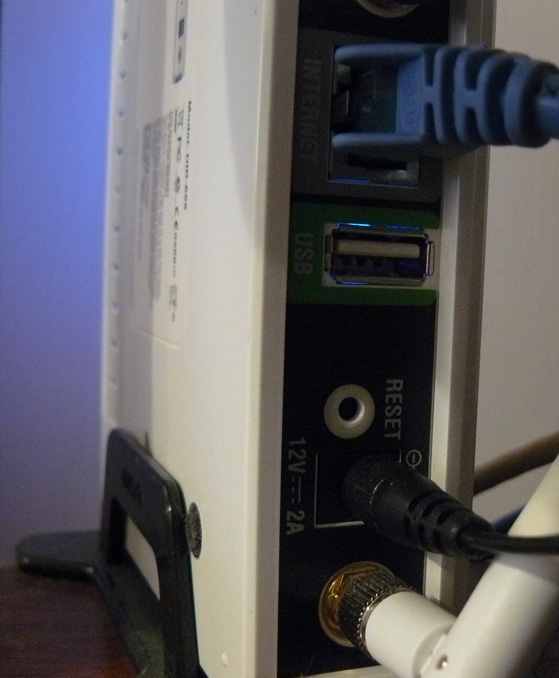
DIR-655 имеет порт USB на задней панели, тесты-видимому, указывают на то, портом USB 1.1, до сих пор порт был использован для беспроводной настройки, может быть сохранена на ключе USB.
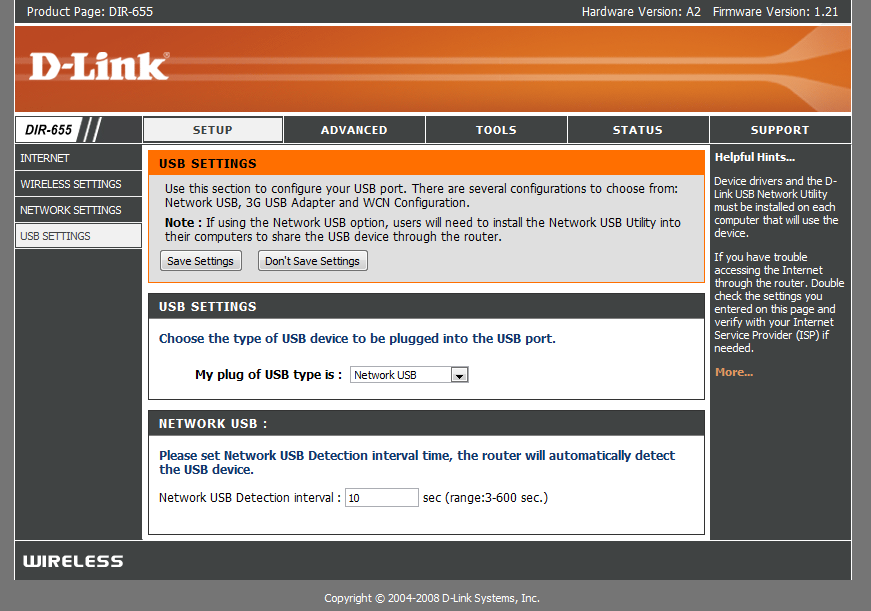
После установки новой прошивки Однако порт USB нашла более широкое использование, мы встретили с новым меню под установку, которая контролирует использование порта.
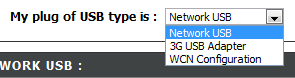
Как вы видите, существует не так много по установке этого порта USB, WCN конфигурация по умолчанию, это используется для беспроводного ключевой конфигурации, выберите раскрывающееся окно:

Выбор Network USB ставит маршрутизатора в режиме SharePort, выбирая 3G USB-адаптер представляет собой кусочек для меня загадка, я не уверен, что устройство совместимо с этим пока, однако, как делает большинство людей, у меня есть 3G услуг и его использование в качестве резервного только при подключении устройства к порту USB и выборе 3G USB-адаптер будет весьма кстати.
После того как вы выбрали сеть USB устройство автоматически передаваться, однако для того, чтобы соединить необходимо установить программное обеспечение SharePort от D-Link, это все еще в бета-версии оно появляется, чтобы использовать с осторожностью, и т.д. и т.д., у меня не было проблем с это еще и кажется довольно полируют. После его установки убедитесь, чтобы она могла запускаться при старте и запустить ее прямо сейчас, иначе вы не сможете использовать устройство без вручную запустив программу SharePort каждый раз, он использует только 2 Мб ОЗУ так что это не ресурс Боров.

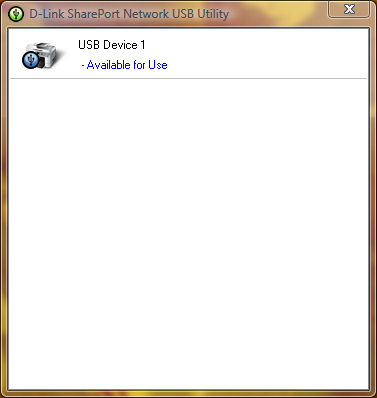
Если ваши USB устройства и подключен, то утилита SharePort должен отобразить этот раз, как вы дважды щелкните по иконке в системном трее. Затем он позволяет запускать через мастер установки устройств, вам придется вашего устройства CD или драйвер последней версии драйвера для веб-сайта, в конце вам будет предложено, если вы хотите автоматически установить соединение с устройством при печати, если это принтер, это хорошая идея в противном случае необходимо вручную выбрать для подключения.
Когда это все создано на каждом компьютере, который использует устройство, вы заметите, что каждое устройство государства, что принтер остановился и в автономном режиме, печать на принтере в любом случае, обнаруживает SharePort программное обеспечение, печать был отправлен на принтер и автоматически присваивает принтер к компьютеру и в то время как принтер взаимодействует с компьютером будет показать как связаны, после того как задание на печать закончена она будет затем возвращаться в автономном режиме паузы.
Ограничения этой функции является то, что она будет работать только на одном компьютере одновременно, USB устройства просто не предназначены для подключения к ПК 2 сразу поэтому имеет смысл, почему это так.
Я не пробовал такие вещи, как веб-камеры однако они были известны на работу, однако более медленными темпами, чем обычно, сканер особенность моего принтер работает отлично, однако вы должны вручную соединить с помощью программного обеспечения SharePort использовать его, убедитесь, что вы отключите после того, как сделали вы.
Как я уже говорил в начале этой статьи программ SharePort то, что я так долго ждали долго, это большой особенностью рассмотрения моего Маршрутизатор не последний там теперь и он казался почти D-Link отказались добавление новых Особенности ее, она также показывает, насколько хорошо устройство может работать, если он может работать с USB-устройство в то время как она выполняет все его другие обязанности.
Похожие сообщения:
Комментарии:
Написать ответ


Дата: 14 октября 2008
Время: 5:57 утра
Просто обновления прошивки на моем DIR 655 до 1,21. Когда я начал устанавливать приложение SharePort утилиты разбился мой настольных и портативных компьютерах обе Windows Vista Home Premium ОС. Призвали Dlink технической поддержки, но не нашел вопросов. Никто была та же проблема? В необходимости решения этой проблемы ... пожалуйста, помогите.
Дата: 14 октября 2008
Время: 11:47 утра
Ну, я еще работает 1.21 Beta 04, там может быть что-то с 1.21 окончательным, также она может быть хорошей идеей, чтобы повторно загрузить утилиту из ftp://ftp.dlink.com/Gateway/dir655/Apps/SharePort_Network_USB_Utility_094. Zip и, возможно, перепрошивки маршрутизатора с ftp://ftp.dlink.com/Gateway/dir655/Firmware/dir655_firmware_121.zip ИЛИ ftp://ftp.dlink.com/Gateway/dir655/Firmware/dir655_firmware_121_no_securespot.zip no_securespot Файл имеет новую дату, чем стандартный 1,21 прошивки. Какое программное обеспечение вы настоящее время работает на обоих компьютерах? Попробуйте отключения и т.д. антивирусные сканеры по обе при установке этого.
Дата: 16 октября 2008
Время: 4:56 утра
Я только что установил прошивку 1.13 на моем DGL-4500, а также установлены SharePort полезности. SharePort не recionizing мой маршрутизатор как от сети или мой внешний HD как связаны. Любые мысли?
Дата: 16 октября 2008
Время: 6:44 вечера
Я на самом деле пытается докопаться до аналогичной проблемой я испытывал, несколько дней назад мой компьютер остановил обнаружения, когда моя была на принтере и в большинстве случаев также не определяет, когда была подключена к маршрутизатору.
Я переустановил его перезагрузки маршрутизатора и она не меняется, даже тогда, когда каждый другой компьютер работает идеально.
Возможное решение: На самом деле я только что проблема решена, кажется, он не может распознать устройство, когда вы имеете больше чем одну сетевую карту, так что если вы работаете в VMware и т.д. Вам придется отключить другие сетевые подключения и перезагрузки в своем распоряжении начнется снова обнаружения. Если вы сможете достать рабочие и из этого дайте мне знать.
Дата: 18 октября 2008
Время: 5:54 вечера
Привет!
Видимо, это работает только на американской версии 655. У меня мелькнула микропрограмму в последней версии ЕС и нет экрана, как описано выше.
Просто хотел дать понять, что это для пользователей, только в США. Все остальные, не ошибаются, думая этот маршрутизатор сеть будет ничего, кроме веб-доступа.
Дата: 19 октября 2008
Время: 12:13 утра
Спасибо за головы, я использую американскую версию прошивки на моем АС купила 655.
Я не рекомендую делать это, однако я не думаю, что есть разница на всех в оборудовании для различных регионов либо.
Дата: 20 октября 2008
Время: 5:35 утра
Бен-Спасибо за эту замечательную Учебник - Использование инструкций, я смог обновить прошивку, установить утилиту печать и печать с помощью моего маршрутизатора подключенного ноутбука! Просто слов благодарности.
Как вашему сведению, я использовал D-Link собственные "проверить программное обеспечение маршрутизатора для обновления микропрограммы" функцию, и он автоматически рекомендовал версии 1.21 (от 10/9/2008). Теперь я печать первоклассный Vista на основе ноутбука (Compaq), и XP / дома Desktop (Compaq). Но есть другой ноутбуков Dell для подключения. Принтер HP Deskjet F4180 All-in-One. Пришлось установить SharePoint и драйвер принтера HP на ноутбуке, но это не большая проблема.
Одно из отличий я заметил из того, что бы вы сказали: не нужно подключить к принтеру каждый раз, когда я его использовать. Когда утром я связан, он остается подключенным, если я включу на "освобождение" ее. Если одна из подключен компьютер, и вы хотите выполнить печать из другой, она предложит вам вариант "с требованием освобождения" от машины были подключены. Затем машина, которая в данный момент подключен получает всплывающее сообщение с просьбой отключить так что еще один пользователь может использовать принтер. Строка состояния показывает также имя компьютера, какая машина в данный момент подключен активный принтер. Может быть, это была другая обновления прошивки, которая была включена в 10/9/08 релиз?
Как вашему сведению, я являюсь пользователем США.
Дата: 20 октября 2008
Время: 12:34 вечера
Спасибо за ваш комментарий Лиза, я рад, что вы понравились мои указания.
Я никогда не встретить этого, все мои компьютеры настроены на автоматическое подключение поэтому они только связаны с принтером в краткосрочной несколько секунд, что послал задание на печать, то оно отключается снова, я полагаю, оно станет частью мое тоже Однако я не встречал в связи с ее отсутствием подключен к любому одному компьютеру достаточно долго еще просить ее использовать.
Дата: 23 октября 2008
Время: 7:48 утра
Есть вопросы, безусловно, с вер 1.2 & 1,21 версии DIR-655 прошивки.
Виртуальные серверы отображение не работает должным образом на исходящие пакеты. Я запустить почтовый сервер, который начал функционировать с перерывами на этих двух прошивки оборотах. Возвращаясь к 1,11 решить эту проблему. Подключение к порту 25 (SMTP) будет путь к соответствующим внутренним сервером в сети, но, кажется, серверы Респ не всегда возвращается к далеким подключения серверов. Это оставляет SMTP процедур ждет дополнительную связь, которая никогда не приходит и времени ожидания. Иногда передающего сервера сдастся и теряется почта.
Кроме того, график не может быть правильно настроена .. прошивка неправильного флага раза недействительными т.е. 11 вечера до 5 утра является недействительным в 1.2x и ОК в 1.11.
Дата: 23 октября 2008
Время: 11:52 утра
Это очень плохо Брайан, я не испытывал ничего слишком плохо с этими прошивки себя, а других проблем с отчетностью. Раньше я сдерживал 1,2 поскольку люди возникают проблемы с ним, но, похоже, не все проблемы могут быть исправлены.
Дата: 24 октября 2008
Время: 6:35 утра
Интересно, если бы вы могли что-то испытание для меня ... Можете ли вы попробовать настроить расписание, используя 11 вечера до 5 утра и посмотреть, если он считает, что в силе? Что скажет мне, если это универсальная проблема с 1,21 или что-то Thats только проблема с моей группой и прошивки .... Thx
Дата: 24 октября 2008
Время: 4:47 вечера
Я испытываю ту же ошибку, по-видимому, не хотели охватывая более полуночи. Что произойдет, если вы установите график с 11 вечера до 12 вечера и один из 12 утра до 5 утра?
Дата: 27 октября 2008
Время: 7:28 утра
Я нашла сайт, где французский французский представитель DLink претензий SharePort функциональность будет доступна в неделю прошивки ЕС:
http://www.clubic.com/actualite-170094-dlink-routeurs-dir-655-dir-855.html
Один комментарий ниже статье ВОФК США прошивка работает на аппаратной ЕС (как Бен написал - вероятно, не существует различий в оборудовании), SharePort тонкой работы, и многофункциональный Canon PIXMA может сканировать через общий порт.
Я приказываю DIR-655 для меня ...
Дата: 28 октября 2008
Время: 2:03 утра
@ Jun (и любой другой) ... Я также столкнулся с "Установка SharePort" разбившегося системах мой вопрос. (оба в .94 и 1.0-релизы)
DIR-655 вошел в большую, обновление прошивки прошло хорошо. Маршрутизатор / беспроводного быстрого копирования.
Пошел к установке программного обеспечения SharePort и разбился мой XP SP3 и Vista Home Premium системах ужасно плохо. Удалось получить через них происходит восстановление системы, но не было достаточно на некоторое время.
Я подозревал конфликт с AVG Free 8, которая является общей частью программного обеспечения на всех моих системах.
Может кто-либо другой возможности подтвердить SharePort / AVG Free 8 конфликте драйверов, которые могут иметь свои системы разбился во время или после установки SharePort?
Cheers -
Дата: 28 октября 2008
Время: 7:35 утра
Ну, у меня та же проблема, июнь Sharepoint версии 1.0 аварий моего ноутбука при установке и удалении. Я прошивку 1.21, но я не думаю, что очень важно, поскольку я даже не могу установить программное обеспечение без аварий. Призвали Dlink поддержки, и они говорят, что Sharepoint и порт USB, не поддерживаются на DIR-655.
Могут запросить альтернативный продукт, который может правильно поддержки жесткого диска. Любые рекомендации? Я мог бы попытаться Apple Airport Extreeme теперь, что это гигабитных и Dual Mode способны.
Дата: 28 октября 2008
Время: 9:30 вечера
Я почти уверен в моем случае это драйвер конфликт между водителем SharePort и что-то другое. Я твердо опираясь в пользу этого времени какая-то система защиты (HIPS?) Особенность AVG Free 8 в моем случае.
На тест-систем кровать, я могу установить SharePort хорошо (v.94 или v1.0). Однако, если я сначала AVG Free 8 установлены машины Синяя экране во время просмотра в конце процесса установки ... Или когда драйвер или служба старается быть установлены. Любопытно, что на "система реального" Это цистернах во время установки, на виртуальной системе, только с танками, при деинсталляции из SharePort с AVG Free 8.
Однако, (на виртуальных системах), если я сначала удалите AVG Free 8, перезагрузите компьютер, установите SharePort, перезагрузите компьютер, затем установить AVG Free 8 все, кажется, счастлива.
Мне нужно сделать немного больше устранения неисправностей, прежде чем я перехожу к моей "живой" системы. Это было не очень весело делать восстановление системы на два из трех моих системах в эти выходные.
Я не думаю, что это router-hardware/firmware вопрос, как лучше, как я могу сказать. Моя DIR-655, если копирования быстро и солидно. Я сделал обновление для прошивки 1.21, который позволит эту новую функцию SharePort, но я не вижу, каким прошивки маршрутизатора, что повлияло на систему. Я убежден, что это вместе с программным обеспечением SharePort себя и конкретно драйвера или службы конфликтов при установке инициализации. Мне просто нужно придавить конфликте точку.
И да ... я провел более 30 минут на телефон с поддержкой Dlink прошлой ночью, и она была рядом с бесполезной. Я, наконец, получили бедные Tech эскалации мои выводы, чтобы руководитель и, возможно, это сделает его техническое бюро на Dlink.
В соответствии с этим парнем, нет никаких новых "задней комнате" версии доступны для SharePort в это время.
Даст Вам знать, что я узнаю.
В противном случае я был очень доволен DIR-655 Устройство в целом. Too Bad функцию SharePort было одним из решающих факторов для выезда с этой моделью.
Вздох ....
(BTW-я опубликовал комментарий справа вверху над моей SteveW's ... как-то имя браузера ловушке июня в поле Автор.)
Cheers -
Дата: 29 октября 2008
Время: 2:44 утра
Это хорошая работа Troubleshooting там Мороз, было бы SharePort выпуск программного обеспечения для уверен, AVG, возможно, не играл ни приятно, они не совсем получили лучшие записи Недавно по вопросам, с другим программным обеспечением. Я посмотрю, если я могу узнать что-нибудь завтра относительно AVG / SharePort, я уверен, что одна из компаний, что-то знает.
Я не ожидаю D-Link для обновления программного обеспечения на некоторое время, но я думаю, они будут только знаю, что наверняка.
Надеюсь, если достаточное количество людей имеют проблемы, хотя они будут это исправить в ближайшее время, само программное обеспечение должно работать со всеми SharePort способны аппаратно и есть немало тех, там сейчас.
Кстати, я изменил свое имя в комментариях выше SteveW такой разговор может быть понято неправильно, дайте мне знать, если у вас возникли ошибки с системой комментариев, это мой код таким образом, имеет возможность ошибок.
Дата: 31 октября 2008
Время: 8:34 утра
Я также установил 1,21 на мой DIR-655 и программным обеспечением USB. Постоянное Мой компьютер нашел принтер сразу. Мой блокнот (беспроводной) sharport говорит, что не может найти устройство USB. Любые предложения?
Дата: 31 октября 2008
Время: 10:20 утра
Попробуйте отключить все другие сетевые карты и перезапуска, даже сетевой карты, SharePort путается легко несколькими сетевыми подключениями, если она запущена VMWare попробуйте отключить карты VMNet сети.
Также временно отключить все брандмауэры Вы можете иметь на ноутбуке только в случае, если один блокирует соединение.
Дата: 2 ноября 2008
Время: 10:51 утра
Имея тот же вопрос, Valča но я Запуск новой Нортон Антивирусный сканер поэтому я интересно, если ее некоторые другие вещи Затем вирус сканер.
Дата: 3 ноября 2008
Время: 4:14 утра
Привет ребята. В стадии тестирования данного вопроса.
Я раньше подозревали AVG 8, поэтому в эти выходные я нашел немного свободного времени. Решил поставить свою теорию проверять на Vista Home Prem. SP1 система.
Я удалил AVG 8, сделал точки восстановления вручную (хорошо, что я сделал) перезагружена, до сих пор так хорошо. Затем я установил SharePort.
BSOD.
Восстановление системы использование моих сохранить точки восстановил мою систему. Сейчас я вернулась к исходной точке.
Перешел на новую сессию виртуальных ПК, используя нетронутых XP SP2 установка. Установленная SharePort только штрафом. Нет проблем. Uninstalled это просто прекрасно.
Следующий подозреваю что у меня было NetLimiter монитор, который также является общим для всех трех моих системах.
Установленная NetLimiter Monitor и перезагрузка. Хороший. Нет проблемы со стабильностью.
Пошел к установке SharePort (v1.0) и в конце установки ... так же как моя настоящая систем ... виртуальная система не немедленное черный экран перезагрузки.
Хммм.
Поэтому я удалил NetLimiter монитор с моего компьютера и поставить в электронной почте запрос на их поддержку команде с просьбой, если они могут смотреть в этом самостоятельно.
Видя, как она представляется как SharePort и NetLimiter Monitor оба, кажется, крюк в драйверах Windows Networking / услуги это делает очень хорошее чувство.
Даст новый обновление, если / когда они отвечают.
Не уверен, если я осмелился только еще предстоит повторить эксперимент, на мой живых системах снова.
-Салют!
Дата: 3 ноября 2008
Время: 7:27 утра
Привет Всем, я новые марки на все это. Недавно обновлен до DIR655. Большой. 1 Desktop 5 ноутбуков. Панель управления для карт PCI Network, маршрутизатор, DSL Modem т.д. Ноутбуки все работает внутренний 802.11G устройств.
Если я отсоединить кабель USB от лазера Oki550 цвета с рабочего стола, и подключите его к порту USB на DIR655. Это в конечном счете (или теоретически) собирается позволить нам для печати на лазерных не оборачиваясь на настольном компьютере в первую очередь?
Сейчас это моя конечная цель, а это мой первый вопрос.
Спасибо
Дэйв
Дата: 3 ноября 2008
Время: 3:10 вечера
Да это позволит доступ к принтеру любое время маршрутизатор, принтер и маршрутизатор только 2 вещи, которые должны быть для этого к работе, однако, что это, если они не маршрутом через настольный компьютер на любом этапе. Как видно по комментариям вы должны проявлять немного осторожности при установке программного обеспечения SharePort как это не очень хорошо с другим программным обеспечением, которое сетевые компоненты.
Дата: 4 ноября 2008
Время: 6:30 вечера
Hey Guys я нашла вопрос ... Чистая удалить лимитер, что и вы хорошо идти ^ _ ^
Дата: 6 ноября 2008
Время: 12:01 утра
Бен,
Просто чтобы подтвердить то, что я подозревал и Ник подтвердил ... Чистая Limiter 2 монитора программа делает критический конфликт с применением SharePort (в это время).
Я удалил ее из моей XP Home (SP3) и Vista Home Premium (SP1) систем. Тогда я переустановил SharePort после создания точки восстановления системы (на всякий случай).
Установка прошла штрафа на этот раз и не BSOD или наблюдаются конфликты. Применение SharePort быстро нашла Seagate USB флэш-накопитель, и я был в состоянии "Гора / подключение" к нему и читать / записывать файлы из всех систем.
Чтобы было ясно ... только одна система может быть подключена к устройству в одно время, насколько я могу сказать. За исключением, что теперь прекрасно работает.
Уф! Это была рабочая doozie этому вопросу Out. Благодаря Ником для размещения подтверждение.
Я послал их по электронной почте нетто поддержки Лимитер команды по этому вопросу, но ответа пока нет.
Не уверены, что это произойдет со всеми своими программами (платные / бесплатные) или только с Чистая Limiter 2 монитора.
Спасибо всем!
Ура!
Мороз В.
Дата: 7 ноября 2008
Время: 12:34 утра
Привет, я владеющие DIR-855 как мой дорогой DIR-655 пошел в мою квартиру сестрам в качестве постоянного решения. Однако я бы очень интересно узнать, если DIR-855 поддерживает эту функцию, а также. Это может быть хорошим дополнением к моей уже Awesome беспроводного маршрутизатора.
Даниэль
Дата проведения: 8 ноября 2008
Время: 6:13 утра
Даниил,
По словам D-Link пресс-релизе, DIR-855 входит в тех, которые SharePort поддерживает.
http://www.dlink.com/press/pr/?prid=442
Крайний:
"Инновационная сеть SharePort USB-Bridging функция доступна на D-Link Xtreme N Gigabit Маршрутизатор Модель - DIR-655, DIR-825, DIR-855 и DGL-4500 игровой маршрутизатор с GameFuelâ" ¢. Обновление SharePort технология доступна на RangeBooster N DIR-628. Текущие владельцы этих маршрутизаторов сможет перейти на технологию SharePort, загрузив последнюю версию аппаратного и клиентской программы с D-Link сайта, http://www.dlink.com ".
Я думаю, что это ссылка на DIR-855 прошивки и SharePort странице загрузки:
Firmware --
http://www.dlink.com/products/support.asp?pid=548&sec=1 # микропрограммы
(Это одна приятные глазу 855 модель, между прочим. Делает мой взгляд 655 равнине!
Удачи!
В. Мороз
Дата проведения: 8 ноября 2008
Время: 9:41 вечера
Привет, у меня есть свой DIR655 за 1 неделю. Его версии ЕС, но и США прошивки 1.21 запустить smothly. SharePort работ, но не очень стабильно.
Первый вопрос, обмен USB диск над WiFi не является хорошей идеей IMHO. Любые проблемы с сетью и Vista имеют проблемы с устройством. Кроме того, производительность выпуск (800KB / с при 2 м / с при копировании файлов между ноутбуками с адаптерами WiFi N).
Но я купил этот маршрутизатор для принтеров. А это возможно, но SharePort Utility (1,0) работает только на локальной учетной записи. При работе с активной учетной записи каталога, всплывающее окно утилиты показывает устройства, подключенного к USB порту маршрутизатора. Но при нажатии на иконку в трее App окне не отображается. Применение находится на панели задач, но не имеет окно для выбора устройства и соединяются.
На местном счету все в порядке. Представляется вопрос SharePort Utility. ОС была установлена неделю назад, не многие Приложение установлено.
Любые идеи?
Петра
Дата: 9 ноября 2008
Время: 8:18 утра
Мороз, спасибо вам большое, я страдал от этого вопроса до сих пор. Я провела всю мою выходные ничего, благодарю вас!
это чистая ограничитель сосет: \
Дата: 10 ноября 2008
Время: 1:27 вечера
Привет, я с этим isue с DLink 655 v1.21
и SharePort v.1.0 ...
multifuction принтера и USB Flash Drive безупречная работа на 2 XP SP3, и 1 Vista 64 машин,
но когда я подключить Ipod Touch v. 2.0, SharePort утилита показывает "доступен для использования"
и попытаться подключиться к ней, и все 3 капли моего ПК подключение к Интернету, беспроводной и аппаратно и Излишне говорить ITouch обыкновение подключать и Интернет восстановлены автоматически, подобно маршрутизатор входит в цикл питания или что-то.
Затем я попытался же процедура, но с IPOD NANO это время, и думаю, что, работали совершенной!
это кто-нибудь с этой проблемой и знает или обходной путь к этому?
Thanx за вашу помощь.
Дата: 14 ноября 2008
Время: 1:29 вечера
Привет там!
So .. У меня DIR-655 Маршрутизатор ЕС и пытался 1,21 США прошивки себя. Я не буду врать, обновление микропрограммы не идти без сучка и задоринки. Когда я загрузил микропрограмму маршрутизатора, я не мог попасть на страницу администрирования маршрутизатора больше ... но после сброса все вернулись к нормальной (это может быть хорошей идеей, чтобы сохранить конфигурацию маршрутизатора, прежде чем делать Firmware Update). В любом случае, я призываю всех, не с нами DIR-655 попробовать прошивку 1.21 ... до сих пор все работает нормально и даже успел приложить мой принтер к нему и он прекрасно работает ... Следующее, что нужно попытаться это устройство хранения
Дата: 15 ноября 2008
Время: 10:16 вечера
Помните ребята, маршрутизатор, как представляется, ограничена скоростью USB 1.1, т.е. примерно 1MB/second так что это не рекомендуется, если у вас есть небольшое устройство и не так много для передачи, а также маршрутизаторы не таким быстрым системам передачи данных по USB, вероятно, ставит много нагрузки на устройство, которое может вызвать ничего от медленных скоростей LAN и беспроводных маршрутизаторов для отсева перезагрузок.
Спасибо вам за все ваши исследования Мороза, надеюсь, вскоре один из компаний сможет исправить проблемы с совместимостью.
Дата: 26 ноября 2008
Время: 3:22 утра
Я надеялся, что ты мог бы помочь мне с другим вопросом.
Я недавно повышен с другой D-Link маршрутизатор DIR-655. Модернизированный на F / W 1.21. Иметь несколько машин в локальной сетью рабочих групп, чтобы все видели друг друга хорошо с взрослыми маршрутизатора. Теперь я наклоняю увидеть какие-либо другие машины в локальной сети. Я знаю, что пропустили что-то простое и я надеялся, что ты не мог дать мне головы. Все узлы см. в Интернете штрафом и зарезервированы IP и DHCP в рамках диапазона. Что я упустил? Многое благодаря
Дата: 26 ноября 2008
Время: 1:25 вечера
Есть 2 вещи, от верхней части моей головы, что есть проблемы при переходе сетей, в основном при изменениях в сети его IP-соглашений, некоторые, включая брандмауэр Windows Firewall и ZoneAlarm обычно можно заблокировать компьютер от 'обнаружить, как оно считает, что эта новая сеть является общественной сети Интернет вместо частной сети, если вы работаете в Windows Vista В то же самое может случиться, убедитесь, что ваши компьютеры имеют свое сетевое соединение установлено в жилище или частную, кто действительно должен быть единственным времена, когда эта проблема должна происходят.
Если они беспроводные также убедиться, что беспроводные разделов отключена в дополнительных свойствах беспроводного так как это приведет к аналогичным аффекта.
Дата: 11 декабря 2008
Время: 10:55 утра
У меня та же проблема BSOD на Vista Как отмечали другие. PC отправился в BSOD в конце SharePort установить и затем BSOD'ed каждый раз, когда я пытался Логин. Я Trend Micro А.В. и Nortel Contivity VPN Client. Оба они необходимы программы, и я не могу удалить либо. Может либо одной из этих быть проблема?
Дата: 18 декабря 2008
Время: 11:01 вечера
Привет,
Я заинтересован в совершенствовании этого маршрутизатора так что я искал различные форумы для ключей.
Сегодня я заметила, есть новые (еще v1.21) обновление файла 12.12.08. Любое пытался ли это новая версия с исправлениями или нет?
Дата: 19 декабря 2008
Время: 2:57 вечера
Я дам ему попробовать и посмотреть, если он изменяет все основано на вопросы у людей было, на этой ноте новый вопрос, который я заметил, возник, иногда после того, как маршрутизатор на протяжении более чем на неделю SharePort программного обеспечения на всех компьютерах, начинается выдавая ошибки подключения, если они уехали в то время как там могут быть сотни на экране, перезагрузить маршрутизатор останавливается ошибки на некоторое время.
Дата: 20 декабря 2008
Время: 6:52 вечера
1.21 такая же, как тот, который был освобожден через несколько месяцев назад, только с даты изменились, однако около 2 или 3 версии были названы 1,21 бета без тегов, с последним из которых 1,21 B10 в ноябре, так что если вы скачано 1,21 в октябре или ранее, скачайте его и установите снова, он устраняет несколько проблем с перенаправлением портов и сохранение настроек.
Дата: 29 декабря 2008
Время: 6:59 утра
Привет банда,
Великая нить!
Мне не SharePort проблема, и хотели видеть, если кто пережил то же самое.
Вот мои установки:
1. DIR-655 с прошивкой 1.21
2. Win XP Pro машины (как VMware клиентов) с 1 SharePort
3. Внешний жесткий диск WD
HDD подключен к порту USB на маршрутизаторе, но я не смог подключиться к ней с Win XP Pro машине. Машина XP будет постоянно сообщать мне, что оно "Found" HDD, но значок SharePort лоток продолжает оставаться красным, и никогда не будет светиться зеленым. После примерно 30 секунд, уведомление вернется. Я совершенно в растерянности, поскольку workeed в прошлом, когда я это В.М. клиента на другом хосте. Я знаю, что VMware может быть причиной этого, но я не вижу, потому что есть только один сетевой адаптер включен на машине XP (Ethernet моста). Я часами пытался получить эту работу ... Любая идея будет принята с благодарностью!
Спасибо,
Джон
Дата: 30 декабря 2008
Время: 8:02 утра
Я эту настройку DIR-655 Firmware 1.2.1 и SharePort я работать, если отключить мою брандмауэра Microsoft OneCare.
Кто-нибудь знает Порт используются D-Link SharePort?
Дата: 31 декабря 2008
Время: 12:08 утра
Если вы все переход на сайт Dlink для маршрутизатора, вы увидите, что он говорит:
"Эта прошивка разработан для продуктов только в США.
С помощью этой прошивки на устройство за пределами Соединенных Штатов приведет к аннулированию гарантии и может привести к тому устройство непригодным для использования.
Пожалуйста, свяжитесь с D-Link Офис в вашем регионе для обновления микропрограмм, которые совместимы с D-Link продукт ".
и,
"¤ Добавлена функция SharePort.
¤ Исправлено выпуск электронной почте уведомление.
Пожалуйста, скачайте SharePort Utility и увидеть SharePort руководством перед использованием. "
Вам нужно скачать утилиту фактическое ее использовать!
Дата: 31 декабря 2008
Время: 12:10 утра
Да, и я почти забыл, это для x86 версии ОС только. x64 не поддерживается.
Дата: 2 января 2009
Время: 3:12 утра
Привет Джеймс, я не уверен в себе порты Однако, если вы откроете окно командной строки и использование Netstat команда 'только после попытки подключиться с помощью SharePort, посмотрите на IP маршрутизатора, и вы должны иметь возможность видеть все порты, ПК подключается к маршрутизатору, OneCare, возможно, в лог-файл, который может позволить вам сделать аналогичную вещь, убедитесь, что Вы работаете как мало сетевых приложений как возможное в то время как списки можно получить довольно долго и делать не имеет p2p программ, выполняющихся в то время как.
Джоди Привет, я испытал версии 0.94 и версии 1.00 на Windows XP x64 и Windows Vista x64 и не было никаких проблем, есть 64-разрядной версии, которая не допустить, чтобы это запустить?
Дата: 7 января 2009
Время: 5:38 вечера
Я только что получил D-Link DIR628 который также имеет SharePort полезности. Однако я с довольно странной проблемой и удивительного, если кто может предложить некоторую помощь и предложения.
На ноутбуке Vista моей жены, SharePort Network USB установлена утилита гладко и работает прекрасно. На моем рабочем столе XP Pro, при первой установке и повесил При перезагрузке, утилита Network USB начал, но не могла видеть устройства позади маршрутизатора. Я пытался различные настройки брандмауэра (а затем и отключить все брандмауэры просто попробуйте) последние несколько дней, и ничто, казалось, действительно работают.
Единственное, что, казалось, работы, если я удалю SharePort утилита, переустановите его, тогда он впервые получил началось после переустановки, я мог видеть эти устройства. Если я выходим и перезапустите утилиту, это та же старая проблема не видит любого устройства. Перезагрузка также имеет те же проблемы, не видя ничего. Единственный способ заставить его работать до сих пор, кажется, удалите-> перезагрузка-> переустановить и только после этого работал последовательности.
Каждый имеет никакого представления о том, что эта проблема может быть? Когда она работала, она работала больше. Я получил 80 Мбит / с внешним HD, который не большой, но не слишком плох. Я мог бы также положить оба моих принтеров и МФУ HD позади центра и доступ к обеим из них. Это действительно чудесно, что путь. Я лишь хотел я могу заставить его работать на всех компьютерах. Кстати, мой другой системе Mac и там не является версии для Mac, что полезность.
Sorry for the long mail, any help or suggestion is really appreciated. Спасибо.
Date: January 7, 2009
Time: 6:36 pm
I have seen a few instances where the devices can't be found on a pc randomly, however I have not experienced this on a PC every time after it has been installed. Is the PC able to detect the router using the Shareport utility?
Right click on the Shareport icon, in the menu you should see the name of your router and it's IP address, make sure it is selected, if not go to it and a new menu will open up, make sure you click on Enable, also you can click on Configuration to get some advanced settings.
If the router doesn't show up in the list then there may be some connection settings on that PC that are limiting the connection between it and the router.
I'm also waiting on a Mac version of the software, though I think it might not happen any time soon.
Date: January 8, 2009
Time: 4:19 am
Anybody use a USB hub on the shareport and get more than 1 device to work?
Date: January 8, 2009
Time: 5:21 am
Ben – thanks for the response. The PC that I am problem with is directly connected to the route through a wired connection using a CAT5 cable. It is the primary system that I use to set up and configure the router. When I had the problem, the top line in the right-click screen of the shareport icon, the one showing the IP addresses and things was not visible. I only got things from the “Advanced Options” down.
Mike – I did put a USB hub in and connected a Canon MP470 printer and a external HD at the same time. I was able to see both of them and were able to connect to them from my Vista laptop.I didn't try to read/write to the HD and print at the same time though.
By the way, I made a typo earlier. I think I was only getting 8 Mbps, not 80. So roughtly 1 MB/sec read throughput is what I was getting. Not very fast but good enough to move small amount of data.
Date: January 8, 2009
Time: 10:28 am
I'm having the same trouble: Have a Dlink655 with a wired connection to a Vista Home Premium laptop and an older desktop box running Win XP.
Shareport works just fine on the laptop – I want to use it for a shared printer.
I can install shareport fine on the XP machine, but it doesn't find any devices connected… and I also don't see the router's IP address upon right-click. I disabled firewalls, uninstalled antivirus software etc. but to no avail.
Would love some hints if anyone has them!
Date: January 8, 2009
Time: 2:42 pm
To Jacko
I went into admin, clicked on ADVANCED, then WISH on the left, then I made sure it was ENABLED and for PRIORITY CLASSIFIERS I clicked AUTOMATIC. Попробуйте.
Date: January 10, 2009
Time: 4:44 am
Mike – you said you “went into admin, clicked on ADVANCED, then WISH on the left, then I made sure it was ENABLED and for PRIORITY CLASSIFIERS I clicked AUTOMATIC…”
I assume you are talking about the web administration page for the Dlink655 router? What is the “WISH” thing you talked about? I have a Dlink628 and I didn't see anything that looks like “WISH” in the advanced menu. I was wondering if you can explain what that menu does, I might be able to find the equivalence in my router. Спасибо.
Date: January 10, 2009
Time: 3:04 pm
I've checked out the DIR-628 emulator on the D-Link site and it appears that router doesn't have WISH at all, perhaps you could try messing about with the QOS settings as they are similar to WISH except they affect both wired and wireless on the WAN side of things, but may not have the same effect as WISH, personally I have WISH off and have no problems.
Date: January 12, 2009
Time: 1:45 am
Привет всем,
I tried changing the WISH settings, but no luck. The Vista laptop has no issues with Shareport at all, whereas the XP machine cannot even recognize the router.
If the issue is router-side, I don't know why the Vista box would work and the XP box not?
Спасибо!
Date: January 12, 2009
Time: 2:25 am
Hey guys, i am seeing the same thing on the dlink dir-825. Wireless PC's see my printer connected to the usb shareport fine. My wired PC's lose the printer whenever they are restarted. If i reboot the dir-825 the wired pc's will see the router again.
When I click the sharepoint icon, I see the ipaddress for the router when it's working correctly with the printer. When it's not, the ip address is not there and the first entry is advanced options.
I tried changing the wish settings but no change….
Date: January 12, 2009
Time: 4:38 pm
Hi Jacko and hoc, are either of your PCs that have this problem set to connect to the router via DHCP or via menually entered static IPs?
Date: January 13, 2009
Time: 3:10 am
Привет
Both my laptop (Vista) and desktop (XP) are connected by wire to the router, and both are set up using DHCP.
Спасибо!
Date: January 14, 2009
Time: 3:14 am
I talked to dlink 3rd level today who was passing this on to the product manager. I need this to work so have done a good amount of testing. My PC's are all connecting via dhcp, all vista (some x32 and some x64).
From the testing here i have found that the wireless PC's always detect the printer connected to the shareport. The wired PC's are inconsistent… at best. If I reboot the dir-825, the wired pc's will immediately detect the shareport printer and keep it until the network connection is interrupted. If i pull the network cable on the wired pc, and then plug it back in, they will lose the printer and not re-establish it (exactly what happens when you power off your PC).
Hoping we can come up with a better solution than rebooting the router every day!!! I'm sure linksys would like to hear about that.
Date: January 14, 2009
Time: 7:14 am
hoc,
I think you may be on to something. In my set up, the system that has problem seeing the network USB port is connected to the router through a CAT5 directly. The laptop using wireless connection has always been good. I have an additional variable in my environment on the OS used. The wired desktop uses XP while the wireless laptop uses Vista.
I installed Windows 7 Beta on the wired machine over the weekend. I was again able to see the printer on the network USB port upon first start of the utility. When I exited out and restart the utility, I had problem again. I will try rebooting the router when I got home tonight.
Date: January 17, 2009
Time: 2:23 am
I am getting a 'Connection failed, please try again.' message every minute or so from SharePort Network USB utility.
It's odd because I have my printer on the USB port and it works fine.
Any theories on where to look??
Date: January 17, 2009
Time: 3:24 pm
I get that too on every computer other than mine, strangely uninstalling/reinstalling doesn't fix it either, the only thing I did was upgrade the firmware, my computer installed SharePort after the firmware upgrade yet the other PCs have had it installed since before and they experience the problem.
I can't see any link between the Operating System they were running or the firewall/antivirus software either, what I have done is turned off the startup option in the program and run the programs only when I need to print.
Date: January 18, 2009
Time: 7:18 am
Can anyone recommend a setup for allowing a mac and a PC to access and use the same external harddisk over a network? Or where I can find info on this? Here are the challenges:
- Both PC and Mac are a bit old, so no N-standard
- Formatting of disk: has to be HSF+ and PC will use MacDrive?
- Considered buying an entertainment PC and use this as “Server”
Предложения?
Date: January 19, 2009
Time: 9:49 am
Dlink released an update to the sharepoint utility software this week. For my wired pc issues it does help, but is not a complete fix.
At start-up my wired pc doesn't see the printer connected to the shareport. In the 1.0 version, the dialog box for the utility started with “advanced options”. Now it starts with the address for the router.
I can force the utility to see the printer by selecting disable and then enable in that shareport dialog. Still not a complete solution but getting better…
Date: January 22, 2009
Time: 1:38 pm
Shareport is not finding my router in the pop up menu from the system tray icon. I have the DIR 655 and a vista x64 OS. Dlink support stated that shareport does not support 64 bit vista OS but posts here seem to contradict that. Any recommendations, advice would be much appreciated.
Date: January 24, 2009
Time: 12:49 pm
I installed Shareport 1.14 and it works better, although when I disconnect from a hard drive it says it's busy and should I force or cancel. Force seems to work and I can re-connect ok
Date: January 25, 2009
Time: 8:29 am
I've just upgrade my firmware and everything work's fine. I've test USB HDD and USB Printer both work fine. I'm pleased with DIR-655. Real cool
Date: January 25, 2009
Time: 2:00 pm
Finally got second laptop to connect to printer hanging off DIR-855. The cuplrit was OneCare – thanks James 30 December. Once One Care Firewall was disabled my Shareport icon turned green and the printer was able to be used. Only took me a couple of days and many grey hairs !
Date: January 26, 2009
Time: 12:18 pm
Привет всем,
I setup the DIR-655 for a friend – one older desktop with Windows ME and a new laptop with Vista. The desktop is wired to the router, the laptop is wireless. I installed Shareport and hooked up his printer to the USB on the router. Она работала! for a few days. Now the printer seems to have disappeared…. sort of. It's not listed in any application, but if I click on the Shareport Utility, it says the printer (a fairly new HP) is available. There's got to be something I'm missing here. Anyone know?
(For now, he's not trying to print from the desktop, but I was thinking a usb hub would allow me to hook the printer to the desktop as well as the router.)
спасибо
Date: January 27, 2009
Time: 4:37 am
Oh well, I went to my friend's house and everything worked fine… of course! The printer was available and I clicked Connect and it connected. It did reinstall the printer driver. Who knows what he did — he did say he'd been turning. So maybe when I rebooted, it got straightened out.
I am still interested in using a usb hub so his desktop is wired to the printer. So, if anyone has done that and has any “gotchas” to warn me about, I'd appreciate it. I'm thinking printer to hub and hub to desktop and hub to router.
спасибо
Date: February 1, 2009
Time: 3:01 pm
Just got a DIR-655 last week after all the good reviews. I downloaded the SharePort fw 1.21 (2008/10/09). I'ma bit disappointed with it. Wanted to share some of the issues I'm seeing perhaps you have solutions to share;
- Clients (3x Vista Acers, & XP Pro Lenovo) have hard time getting an IP address with WPA-personal, and WPA2-personal after wake-up. I must have the laptop try few times until it succeeds. They worked quite fine with cheap Belkin 802.11g routers
- Connection drops even though signal is in the 85% or greater most of the time
- Finally, I bought this when I heard about the SharePort fw. This feature was a big disappointment. I thought it may work as a printserver, but clients have to request and grant the connection before use… very stupid when no one is using the already connected client! – Also, if the laptop sleeps, the connection gets stuck and a USB disconnect/re-connect must be done for the printer to be re-discovered. Lastly, my Canon MF MP830 is not happy with it. The print preview doesn't work anymore, the printer doesn't wake up on jobs, and the jobs error out frequently.
Date: February 3, 2009
Time: 7:14 am
having the same issue as this guy below is telling every thing is ok but when i click on the utility on task bar nothing flashes on desktop.it work well on my other computer running vista 32 home premium , it was doing good on this system too but i don't know why it start acting up like this.this is vista 32 ultimate any suggestion guys would be appreciated.
“Author: Pit
Date: Nov 8, 2008
Hi, I have my own DIR655 for 1 week. Its an EU version, but US firmware 1.21 run smothly. Shareport works, but not very stable.
First issue, sharing USB disk drive over the WiFi is not a good idea IMHO. Any network problem and Vista have issues with device. Also performance is an issue (800kB/s when 2M/s when copying files between laptops with WiFi n adapters).
But I purchased this router for printer sharing. And it is possible, but Shareport Utility (1.0) works only on the local account. When working on the active directory account, the utility's popup window shows the device connected to the router's USB port. But when clicking on the tray icon the app window is not shown. Application is on the taskbar but has no window to select device and do connect.
On the local account everything is OK. Seems to be the SharePort Utility issue. The OS was installed a week ago, not many aplications installed.
"
Date: February 3, 2009
Time: 7:17 am
forget to tell in above post im using Dlink-655 with firmware 1.21 (latestone) and share port utility 1.14. hope that u guys will provide some assistance on this issue.
Date: February 3, 2009
Time: 11:37 am
For KingTut: I have a similar problem on my laptop, the problem is caused by the channels the router is using for wireless, sometimes it will get out of range of standard wireless cards, even my laptop's N card doesn't work properly sometimes, try forcing the wireless channel to something like channel 6 for a while and see how it goes, you can also try having the channel set to 20Mhz, not 20/40.
For bally: It's possible SharePort needs certain permissions to run properly, it may be a good idea to get in contact with D-Link so they are aware of this issue, it could be a bug that they are unaware of as of yet.
Date: February 5, 2009
Time: 5:15 pm
Just installed the latest firmware for DIR-655 and Shareport on three Vista and three XP Pro SP3 pcs. The vista pc's are both wired and wireless and works fine. Te XP pc's refuse to find the router (all three wired). What more is that the Shareport uses up all CPU power when I try to exit the application. There is definitely problems with the software. All firewalls have been turned off. The XP machines have different Anti virus (AVG, Avast and Norman). One of the XP PC's are connected directly to the router, two through a access point. Changing channels or stopping other applications using communication ports have no effect. The Shareport has been tested 0.94 and also updated to 1.0 and tested with clean installations. If anyone is able to run Shareport on XP, please explain how it was installed. Also try Exiting the application and check the CPU meeter.
Date: February 7, 2009
Time: 8:41 am
dlink support q-less regarding active directory matter. even no reply for 4 days upto now. WTF Support they r providing . just dont even know what the thing is
Date: February 11, 2009
Time: 5:22 am
Just wondering out loud: do you think that it would be possible to use DIR-655´s USB port for something else then sharing a printer?
It certainly doesn´t sound to be good enough for usb-hdd´s for very low transfer speeds that´s been mentioned over here.
Could it be used for hosting a very small web server from an USB stick, like a static home page?
Date: February 12, 2009
Time: 12:02 am
I have the same problem after install all my laptops, Vista and XP starts to crash and no one could reach the printer plugged in the USB port….
Date: February 13, 2009
Time: 7:03 pm
I think i have a different problem here.. i connected a usb hard disk on the usb port of my dir-655 (1.21 firmware) and installed the shareport utility on my vista32 and xp sp3 computers.. I get no router name when i right click the utility in the system tray so I can't select any usb device from the router.. By double clicking the utility, i get no detected usb device in the utiliy's panel either.. I even tried without wirewall, to no avaqil.. what's up with this?
Date: February 13, 2009
Time: 7:07 pm
..also, whenever i boot vista32 i get a 'new hardware found' message and the request to install drivers for the router.. except that there are no drivers in the cd that came with it or on dlink's website… any suggestions? (by the way, the router works, as I can connect wireless and share my internet connection..)
Date: February 13, 2009
Time: 10:55 pm
For Stefano:
Try downloading/installing SharePort again, the drivers are a combination of generic drivers that Windows should already have and 1 or 2 that should be installed with that setup program.
Looks like the program has installed but has been unsuccessful in installing the drivers for some reason, it is most likely that the setup program has exited and deleted the required driver files in the temporary directory before it has had a chance to install them.
Have you V-Lited or stripped down your Windows XP cds in any way? Sometimes removing inbuilt drivers stops less common drivers that some hardware needs.
For Gustavo:
Unfortunately this software and the drivers don't play well with other software and drivers and there is so many possible incompatabilities, it crashes many computers with seemingly no reason.
If there is any software that is installed on those Laptops however unconnected they may seem to the problem, try removing them temporarily.
For Mika:
I don't think there's much chance of that being possible until they create some sort of interface that allows the router to use the stick for storage so it can run an additional server, then I think the router may not have the processing power needed for such a task.
For Bally:
This would be more of an additional feature in D-Link's eyes, they would have no obligation to get it working correctly, it's just the way those companies work, they don't get much more money on additional functionality such as this so it's not really worth their time.
For GC:
I've never experienced cpu usage issues at any time with SharePort on XP or vista, using different virus scanners or wireless/wired, or even through another access point, I actually have the program set to not startup as it has all sorts of problems when it's allowed to run all the time.
My installation was fairly straight forward so it probably won't help you much, double clicked on the install file, installed with default options and when it was done restarted.
FOR ALL:
I had problems with the program telling me the usb device was connected, then not every 10 minutes or so, then when attempting to use it it would disconnect each time, seems that the router no longer liked my usb extension cable, so I removed it and all is good now, so try changing usb cables when things don't work out properly.
Date: February 14, 2009
Time: 11:44 am
for Ben.
Thanks for the answer… my xp install is fairly clean, so i don't think it has any problems.. also, i didn't detect any problems while installing the shareport utility in both computers, so i find it hard to believe it's a bad installation.. i'm clueless..
Date: March 2, 2009
Time: 11:31 am
Hi Ben, what version is your router? AU or US? Have you tried 3G USB modem on your router?
Date: March 3, 2009
Time: 5:47 pm
Getting the same issue with my wired connection to the DIR-655, Shareport software works after fresh install, connects to the printer shared through the router, but only until the first suspend or reboot, then Shareport no longer detects the router. I'd rather not have to uninstall and reinstall the software every reboot. Любые идеи?
Date: March 4, 2009
Time: 10:02 pm
Hi Adam, I have the AU version router, I have no idea what kind of 3g usb modem they are referring to and have none to test anyway other than my phone (which I assume doesn't count).
Edward, I'm not sure what is going on with that issue but hopefully D-Link fix it as more than a handful of people seem to be experiencing it.
Date: March 6, 2009
Time: 11:35 am
Привет всем!
I just read most of this comments here, but it seems that I have diffrent kind of problem. Although I know that D-Link DIR-655 is exellent, I am thinking to buy DIR-855 or DIR-825 which are DualBand. I have TOSHIBA Qosmio F50-10K, so inegrated wireless card uses Atheros AR9280 chipset.
1. Can somebody tell me does my wireless card support 2,4GHz and 5 GHz simultaneously?
2. Which D-Link wireless Router should I buy?
Thanks for any comment!
Date: March 6, 2009
Time: 3:43 pm
Привет Джерри,
Your wireless card supposedly does do 2.4ghz/5ghz simultaneously, though I would check with nay documentation that came with it just to make sure.
I'm not too sure about those 2 routers as I have not had any experience personally with any of them, however I have heard that the DIR-855s have all sorts of issues, however we hear of all sorts of issues with the 655 so it really depends on what kind of bugs you can handle. If you want you can even go for another brand such as Linksys, their routers have great reviews lately.
I forgot to mention before for DIR-655 users:
There is a new beta firmware out called 1.22b05 , a significant portion of users have reported that it works great, much better than their recent releases, however this is a beta so be careful and don't install if you're worried about voiding your warranty etc, if it does fail and you're running the beta firmware they are likely to say no to a warranty replacement.
Date: March 6, 2009
Time: 3:47 pm
Jerry,
I bought 2 of the DIR-825 routers. They do simultaneous 2.4GHz and 5GHz, which is why I wanted them instead of the 655.
I am having trouble, though, in getting Shareport to recogni the router on my Vista Ultimate system.
Date: March 7, 2009
Time: 12:30 am
I have Blink as my Security software and there's a conflict with eeyet.sys driver of Blink (EEye).
Would it help to uninstall Blink, install shareport and reinstall Blink or will i always get the conflict between the drivers!
Спасибо
Date: March 7, 2009
Time: 2:58 pm
Hi Sebastien, You will probably always get conflict with that driver, unless SharePort is updated by D-Link to stop conflicting, or if the security software company changes how it works.
Date: March 25, 2009
Time: 11:40 am
I have a laptop computer running Vista home premium and Windows Live OneCare for a firewall. I installed the Shareport software for my new 655. As long as I have the firewall turned off, the software works. I am using version 1.00 of the USB Network Utility. Can anyone identify the ports I need to enable to pass through the firewall?
Date: March 26, 2009
Time: 7:12 pm
Well I'm not sure the specifics but…
It uses an open incoming port at port 9303 using the UDP protocol so try opening that port on the firewall.
It doesn't appear to do any other activity incoming or outgoing so I'm assuming that's all you need to fix.
Date: April 9, 2009
Time: 8:29 am
So with share port i have to decide either having internet security on my network or a usb device is that what i'm understanding and expiriencing with trend micro
Date: April 9, 2009
Time: 1:00 pm
I'd stick with security
Date: April 11, 2009
Time: 2:57 pm
Здравствуйте! I got another problem. I got d-link dir-655 Firmware 1.21EU and Hardware version A3. I have installed drivers for printer and shareport. The pc with wired network/cable found the printer on shareport, but the wireless/cableless network didnt found the printer. Почему?
Date: April 13, 2009
Time: 12:42 pm
The DIR-655 is a great router, but the shareport utility is absolutely the worst piece of garbage I have ever had the displeasure of using. It is flaky at best…sometimes it works fine but most of the time it just simply doesn't work. If they are going to release this feature, they need to ensure it works. Otherwise it just serves to frustrate users.
Date: April 16, 2009
Time: 9:52 pm
There is a new version of SharePort (in a way, it has a lower version number but is newer), also there is now an OSX version out.
Date: April 18, 2009
Time: 1:51 am
I have a DIR-655 router and have been trying to get the Shareport utility to work. I have three computers in the network: a laptop with Vista and two desktops, one Vista one XP. The laptop uses a wireless connection and the two desktops are hooked to the router with ethernet cable. The laptop and the XP desktop work fine. But the Vista desktop only works sometimes. It's really random, sometimes the Shareport utility recognizes the printer plugged into the router and sometimes it doesn't. Любые мысли?
Date: April 18, 2009
Time: 12:33 pm
I'm seeing more and more cases of Ethernet connected PCs that can't get SharePort working correctly where wireless PCs work fine, I would have expected the opposite to happen.
If there is no software on the Vista PC that could block it intermittently, such as a VPN or an active firewall then it may just be one of those times where it just doesn't want to work, as an outside the box idea try updating the network card's drivers on that PC, occasionally I have seen that fix all sorts of strange network application issues.
If you have time to spare it doesn't hurt to send an e-mail to D-Link explaining the symptoms, if we get enough in they may be able to stabilise the program more.
PS Try the new 1.10 version if you haven't already: ftp://ftp.d-link.com/Gateway/dir655/Apps/dir655_pc_shareport_utility_110.zip
Date: April 19, 2009
Time: 3:42 am
Take a look at the d-link forums before upgrading to shareport 110. People are having some issues with it.
http://forums.dlink.com/index.php?topic=5098.0
Date: April 19, 2009
Time: 3:50 am
Looks like Ben has already addressed this on the main site. BTW, thanks to Ben I have my Canon MP610 working wireless using shareport 114 and FW121. Thanks Ben!
Date: April 19, 2009
Time: 9:25 pm
Thank you for your information Lex. I wasn't aware that they had to be used with the 1.30 firmware but it makes a bit more sense now, I'll update the main post to reflect that.
Date: April 22, 2009
Time: 5:12 am
Hi Ben and all,
thanks for all the tips and hints, i've read everything.
I bought a 655 a few days ago and tried to get the shareport working since (tried really hard).
I just wanted to view some movies on my laptop without having to turn on the PC and make backups to the USB-HDD. Shareport seemed great and made me pay 179 EUR.
Tomorrow it's going back to the shelf. I want my money back.
I hope the people at D-Link think twice next time before launching something so crappy!
Date: April 22, 2009
Time: 12:00 pm
They are having alot of trouble keeping customers at this stage, It would have helped them alot if they had not advertised shareport as a feature.
Date: May 19, 2009
Time: 12:10 pm
I tried getting Shareport to work for a while and finally gave up and uninstalled it. Now I am trying to print the old fashioned way (over the network and not using the d link's USB hub) and I am having huge problems. Printing over the network was fine before shareport, now after intsalling and uninstalling it I have serious issues. Printing takes FOREVER. I mean it is VERY slow. Could the shareport software have left something on my machine that is causing this? Спасибо.
Date: May 19, 2009
Time: 4:41 pm
It could have done something, SharePort connects you straight to the printer, so you install drivers for the printer that are configured to connect via usb, if they weren't uninstalled properly then there may be some redundancy that is causing the slowness, try removing all of the printers listed in “Printers & Faxes” and reinstall the network printer driver, unfortunately printer drivers are tricky to remove completely but that should at least remove some connection to the old (USB SharePort) drivers.
Date: May 20, 2009
Time: 1:03 am
Спасибо. Where exactly would I find the “network printer driver?”
Date: May 20, 2009
Time: 3:51 pm
Well when you have all your printers uninstalled and you find the printer over the network windows should prompt to install the printer, you may have to right click it and click connect if double clicking doesn't work, here's an example:
Often it will get the driver for the printer from the other computer or windows update so you don't have to find it, however if it asks for a driver simply use the printer's driver cd and it will install those instead.
Date: May 21, 2009
Time: 2:05 am
Hello all, I noticed you guys are posting on the shareport Utility.
I just wanted to give you guys out there a heads up on the New firmware for DIR655 (ver 1.31) that requires you to upgrade the shareport utility to ver 1.10
It seems there is a bug in the utility or the firmware. Once installed the utility is able to “see” the printer and connect to it with the connect button, however, if you want to be able to connect to the printer automatically (like with ver 1.14)your not going to be able too.
After spending a couple of hours on the phone with Dlink and various support personnel, I was finally told by a “software specialist” that it will not work and I will have to manually connect every time I want to print.
Some may thinks, that's no big deal just hit the connect button, but when you have several computers and they all want to print from that particular printer it can be a hassle to go to every machine and connect then disconnect.
So if you decide you want to upgrade your firmware, keep this bit of info in mind.
Until then I have to wait till another software upgrade to become available and hope that it resolves the problem.
Ах! and by the way once you upgrade the routers' firmware to ver 1.31 you CAN NOT revert back to the previous one.
Date: May 21, 2009
Time: 4:41 pm
Thanks for the information, I wasn't aware of the bug in the newer version, hopefully they fix them all later on, but I wouldn't bet on it.
Date: May 28, 2009
Time: 8:27 am
Эй Бен,
Thanks for the tutorial and screenshots. I have tried your method to set up the SharePort 1.14 with my DIR-655 Firmware V. 1.21. It is working well. Спасибо!
Initially, the print job encountered a problem. I just restart the print job and use SharePort to disconnect with the printer then reconnect again, then it starts printing as normal.
Спасибо!
Деннис
Date: June 3, 2009
Time: 4:01 pm
Hey Guys!
I am also interested in the D-Link DIR-655 and I want to connect my USB hard disk to it as some kind of mini-NAS. Has anyone here successfully connected a USB hard disk yet and (more importantly) tested the speed you can achive through this connection? Thanks a lot in advance,
Дэвид
Date: June 3, 2009
Time: 9:38 pm
Connecting a hard disk works however the connection is limited to USB 1.1 speeds (12 Megabits/Second or 1.5 Megabytes/Second), so it's quite slow, generally not recommended if you're going to be transferring large files.
Date: June 5, 2009
Time: 10:41 am
Hi guys, just letting you know there is a new version of the DIR-655 firmware that you can read about here that fixes a few SharePort issues.
Date: June 8, 2009
Time: 9:15 pm
Hey…
Anyone know if the usb utility can be used when the router is configured static as an access point? I ask because I have had no luck in doing so. '-'
Thanks in advance for any help.
Date: June 16, 2009
Time: 10:20 am
I just upgraded to the latest firmware…
Firmware Version : 1.31NA, 2009/04/24
Besides the Web Environment not working in Opera, the speeds for the SharePort with a USB2.0 HDD are really slow… I get from 800KB/s to 2MB/s… while I think USB2.0 directly connected should be around 30MB/s.
Date: June 16, 2009
Time: 12:42 pm
Hi Julio,
SharePort only works at USB 1.1 speeds and you're getting the correct speeds for that. I wouldn't recommend hard drive usage with it as there have been a few people talk about losing data when the software/connection decides to act up.
Date: July 9, 2009
Time: 10:55 am
Hi Ben,
I am from India.
Recently bought the DIR 655. (H/w Ver: A3 & F/w Ver: 1.11WW)
and couldn't use the usb port for accessing the external hard disc or a printer. on calling the tech support, they said the hardware version you are using doesn't support this feature, it should be A4.
Is this the problem of h/w ver. or F/w version.
Date: July 9, 2009
Time: 12:53 pm
I don't think they have been telling the truth there, the A3 can use SharePort, however you will need to upgrade to a newer firmware version to be able to use this, either a 1.2x version or a 1.3x version, keep in mind if you upgrade to the 1.3x series of firmware you will not be able to downgrade again.
Date: July 11, 2009
Time: 2:18 am
thanks a lot Ben for clearing this confusion. I have another query. After speaking to the D Link tech support, they say if i upgrade the firmware version, then the warranty on the product won't be valid. so should i just go ahead with the upgrade.
and why do you think after upgrading the firmware, i may need to downgrade it again.
Date: July 11, 2009
Time: 1:09 pm
When it comes to the 1.3x firmwares they do have problems that the 1.2x series don't have, but they do fix a few problems with SharePort that were causing a few users to not be able to use it, all DIR-655 routers respond differently to different firmwares so what works for one may not work properly for another.
To be safe I would recommend using a 1.2x version firmware to use at first, if it doesn't work properly for whatever reason you can downgrade the firmware back to the version you currently have.
Most people have only a few problems with 1.31 but if you want to readup on these check out the D-Link Forums here
Date: July 24, 2009
Time: 12:25 am
Had the same problem with SharePort not finding the USB-printer (connected to a DIR-825 router) on one my computers. Tried updating firmeware, s/w, just about everything, but no. At one time though, it did find the device, which set me off thinking. This might just sound stupid: but don't touch the mouse (USB-connecdted) while rebooting”. Works for me every time!!! Anybody that could understand why?
Date: July 24, 2009
Time: 6:09 pm
That is a very odd solution for it, but if it works then I would encourage people to test it out if they have that issue, doesn't hurt to try. Perhaps disconnecting such usb devices while rebooting would also work?
Date: July 25, 2009
Time: 10:23 pm
I connect Buffalo Drive Station external usb harddisk to my DIR-655. Before I use Network USB Utility to access the harddisk, the router is working fine (no disconnection when surfing internet). However, after I connect to my external harddisk via Network USB Utility and then try to copy files to the harddisk, every time after a few seconds, the connection to the router is broken. I have to reboot my computer.
Does anyone encounter this problem? How can I solve this? Спасибо.
Date: July 26, 2009
Time: 3:45 am
I had a problem with Shareport (1.14) not detecting my Seagate 1 TB USB HDD connected to my DIR-855 (1.12EU)
It would only detect if i connected my laptop (Vista) to the DIR-855 through cable, not wireless.
Problem was resolved after disabling my ethernet adapter, keeping only the wifi adapter enabled, then rebooting.
So it seems like Shareport “locks” onto the initial adapter used for connecting.
Now it works like a charm, with no noticeable delay r/w on the HDD vs connecting directly to the laptops usb-port.
Date: August 8, 2009
Time: 9:24 pm
Привет
I have read the dfferent posts but not seem people having a similar problem…
FW : 1.32NA
1 computer with Vista, 1 with XP
Bought the router last week.
Globally it works fine but I have problems using the shareport utility frequently.
If I want to print :
When I switch the router on, it connects to the printer (Samsung ML2510) and everything works fine. The page prints.
If the router is up for a few hours and I want to print, the router sees the printer, shows it as “available” but is not able to connect to the printer. It always tries (can see the trying to connect to samsung ML2510, please wait). The message stops and comes back 2 seconds after and even after 10 minutes it is still not able to connect to the printer.
If I reboot the router, everything works fine.
If I wait a few more hours, same pattern, not able to connect to the printer except if I reboot the router.
Do you have any ideas ?
Спасибо!
Г.Г.
Date: August 14, 2009
Time: 12:22 am
Same problem here, works fine and dandy after install but a day or two later you try to connect, it says connecting, times out in a refresh to available status, and nothing. I'm so frustrated with this shareport utility and every time I call customer svc some Indian person with the thickest accent I've heard answers the phone. I bought this router specifically for this feature and it's very broken. It's a huge oversight on an otherwise excellent router. Anyone have any ideas?
Date: August 18, 2009
Time: 10:48 am
Same problem here on a dgl-4500, not very happy worked well for the first 2 days then nothing. All PC's are XP.
Date: August 20, 2009
Time: 9:44 pm
All users having issues with SharePort, check out this post I have made about a possible newer version of the software.
Date: September 11, 2009
Time: 5:51 am
Hi, I have a DLink DIR-628 router and I acctually buy it for the shareport application… Like some of the people here it worked fine for maybe two days, the its doesnt find anything that I connect to the port. Recently I download a shareport update to see if that would fix the problem but it didn't. I hope someone can help me
Date: September 14, 2009
Time: 7:48 am
Did you try rebooting the router? Just disconnect the power, wait a minute and reconnect. See if that helps.
Date: September 15, 2009
Time: 5:47 am
I have done that, but again you will have to do it every 2 days. If I reboot the computer it sometimes shows 2 of the same usb device. I will have to scrap the whole idea and share the damn thing through a networked PC. What a joke, get it right the first time…Is it that hard to fix it? While I am on this topic ever scince I have updated the frimware the router just periodically shuts down? It was a great router before not sure what is happening now?
Date: September 15, 2009
Time: 3:50 pm
The router is shutting down?
As in off completely or a reboot?
If it's turning off then you may have a much bigger but slightly less common problem with it, if it's rebooting then I'd still suggest to give D-Link a call/email and see if you can get it replaced with a new one.
Дата: 16 сентября 2009
Time: 11:41 am
It just reboots periodicaly, I will call but I don't think it is under waranty
Дата: 16 сентября 2009
Time: 1:36 pm
Some people have luck when calling the manufacturer (in this case D-Link) directly when out of warranty but I wouldn't hold my breath.
Date: September 20, 2009
Time: 1:59 am
Spoke with DLink tech support yesterday, and after an HOUR of trying to get the SharePort to work, I was transferred to a 4th support agent who actually knew what he was talking about. Within seconds, he informed me that not all devices are supported, and that DLINK will not publish a list of devices that are. My 250GB Western Digital USB drive will not work, which defeats the purpose of paying extra for the SharePort feature.
Date: September 24, 2009
Time: 10:52 am
i bought this router for the shareport feature and after readings hours of the above and trying numerous tweaks i still cannot get my external drive connected. i love the performace of the 655 but feel a little ripped off by our D-link bros – as it just isn't worth anymore effort to try to get this puppy to work 'as advertised'.
Dear D-LINK – please get your sh$t together. xoxox
Дата: 26 сентября 2009
Time: 8:51 pm
Currently have two laptops connected to my DIR-655. However, only one can detect the printer though the router's USB port. The other one has “No USB device is detected” message. Would appreciate assitance from anyone. Спасибо!
Date: October 1, 2009
Time: 7:55 am
Bonjour,
I had similar Shareport issues two weeks ago. I wrote to DLink and their answer solved my problem. I take the liberty to show it below in the hope it will help somebody. IN my case I was not using the proper version of the Shareport utility.
With the firmware 1.32NA make sure that the shareport utility that you using is version 1.10. This can be downloaded from the following link http://www.dlink.ca/products/?pid=530
Date: October 2, 2009
Time: 9:04 am
Having the same problem as jimmey above.
Got a DIR-655 V1.21 and shareport V1.15, running on a vista laptop. I use a Dynex 7port USB hub on the router.
Seems like I can use 2 Lexar thumb drives fine and can use my IPOD hook up fine as well as my HP printer, all @ once if i wanted but if i hooked up my 500GB lacie external HD it sends windows explorer into (not responding) after i try to connect. tried the same HD just into slots on laptop and no problems.
WTF!
Thinking maybe this HD is incompatible as well.
Any idea's of which HD's will work?
Date: October 2, 2009
Time: 5:31 pm
There are many usb storage devices that don't work at all and more that don't work properly, I haven't heard anything from D-Link about any reasons why.
Is the hub self powered? The hard drive may be after more power than the router can supply to it, a hub with it's own power source may be able to provide enough power instead.
Date: October 5, 2009
Time: 3:53 pm
QUOTE from Author: Denis Galipeau Date: October 1, 2009 Time: 7:55 am, you wrote : “With the firmware 1.32NA make sure that the shareport utility that you using is version 1.10. This can be downloaded from the following link http://www.dlink.ca/products/?pid=530 ”
------------
Dear Sir/Madame
It took me two days to search, read, install, reboot… and messed up with DIR-655, finally I got the FW upgrade to 1.32NA + SharePort 1.15 just after I bought the 655 3 days ago (I returned the 825 Dual Bands to exchange for this 655) and your post makes my day. I uninstall the 1.15 Share Port and install V1.10 as you said http://farm3.static.flickr.com/2541/3983347534_0b8a0cc795_o.jpg
Thank you, et al.
Date: October 14, 2009
Time: 4:10 am
hi here is jean from germany…
i have trouble setting up my printer to the router above and i really need some help on it.
first at all im using the dlink dir-655 router (Version A2). the first thing i did was updating the firmware up to the latest 1.32NA. after that i configured my internet and all the network settings. it works just fine but here is my problem: i cant setting up my printer (a canon pixma ip4500). under the setting usb-settings i just dont have the possibility to choose usb, only shareport or wcn configuration. i already installed the sharport utility (version 1.15) on my computer. the printer drivers are installed too.
before i used a separate printserver. but i cant use it anymore because i switched to wpa2 and draft-n in my whole network. the printserver doesnt work with it so i need the usb port on the router.
i also tried to change the connection type to an ip-port on my computer. i did all the settings (ip-adress of the router, lpr with byte counting and stuff) but it doesnt work. my printer doesnt get shown online on the shareport utility. how can i make my printer work???
very thanx for your help.
Date: October 14, 2009
Time: 5:01 am
its jean again…
my problem changed a little. i kicked off the shareport utility v1.15 from my computer and i reinstalled v1.10. now the utility shows my printer online. the drivers are still installed of my printer.
but i still dont get my printer work. even its connected. i guess i need to configure the connection settings on the port settings of the printer local on my computer, because its not working about the settings in the shareport utility.
how do i get my printer work??? thanx a lot.
Date: October 14, 2009
Time: 10:24 am
Try to reinstall that printer driver to your computer and test print to make sure it works then from there connect that printer USB cable to the router. Now it must works.
Date: October 14, 2009
Time: 2:52 pm
I agree, it seems the printer is being correctly connected to, remove any cases of that printer that you already have installed as they would be pointing to the wrong device location and then reinstall the printer to change the location from a network device (before) to a virtual usb port (now on shareport).
Date: October 25, 2009
Time: 4:28 am
I have firmware 1.32NA with Shareport 1.2.0 B3. Didn't work until I opened port TCP/UDP 19540 in my router (DIR-655). Works perfectly now with all my wireless laptops. KK
Date: October 26, 2009
Time: 8:29 am
“I have firmware 1.32NA with Shareport 1.2.0 B3. Didn't work until I opened port TCP/UDP 19540 in my router (DIR-655). Works perfectly now with all my wireless laptops. KK”
Please let us know how to do that. Спасибо.
Date: October 26, 2009
Time: 8:58 am
Do you have any more specific information on where you opened the port kk? There are many ways of opening a port on the router.
Date: October 26, 2009
Time: 9:35 am
I guess that can be in the http://192.168.0.1/Advanced/Gaming.shtml at ADVANCED/PORT FORWARDING and check your Computer name/select + IP/add, to allow it can see TCP/UDP in range of 19540 ? Since mine is working with 1.32NA vs 1.10 Shareport and I did not know much so I try not to touch anything and if kk can give us the correct answer what had been done, that would be fantastic.
Date: October 26, 2009
Time: 10:35 am
The only problem I have with it is that you can't forward that port to more than one computer and if it does work by forwarding to only one of the computers then I'm not sure how it would change anything, unless it's some sort of bug in the router.
Date: October 26, 2009
Time: 11:10 am
I assume as Dlink or someone stated that the shareport can only be used for users one at a time, so I also assume the Router Admin can go ahead input all computer name + its IP into the port forwarding list, be readied for users to use as one person at a time. Well if FW 1.32NA + SP 1.10 work as it is, why not just use this configuration, make it simple. My thought.
Date: October 28, 2009
Time: 5:22 am
hello people, its jean again.
i still have this problem to connect my printer but now i can be more specific. i tested it on different computers in my network and it only works on my netbook… so here is what i did:
i connected the printer to the router via usb. the shareport utility shows my printer as available. if i want to connect it, it works just fine (on my netbookk). now i plugged off the printer and i plugged on an usb-hub on my router. now i plugged in a second device, my printer again and an optical disk drive. the utility shows both as available and the connection works fine too on my netbook, even with both devices at the same time.
but this only works on my netbook. maybe (i think) it really must have to do anything with a port opening on my other computers. on my netbook it works. i have win home on it. unfortunately it doesnt work on my other computers in my network (i have win pro on each one on it).
i already know that i only can connect one computer to those devices. even when i disconnect the devices from my netbook, i cant get them run on an other machine. the utility shows those devices on my other computers as available but i damn cant get it connected there.
now im really out of advice here and i need some help. someone please need to tell me how it works with the port opening or some other reason.
PLEASE HELP. thanx alot.
Date: October 28, 2009
Time: 10:28 am
Many people have insisted that re-flashing the firmware on the router does wonders for it's reliability but I'm not such a fan, but it's always worth a try.
It's a good sign that the devices can be seen at least on the other PCs, is there any form of firewall or antivirus software that the other PCs have that isn't installed on the netbook?
I notice from your previous comments that you are already on 1.32, so flashing the firmware shouldn't cause any harm, I would recommend trying the firmware here , it fixes a SharePort bug of some kind, it may be the bug that you are experiencing. At the very least some users that have had trouble with 1.32NA have reported that the firmware just works better anyway, which could be caused any number of things from a better flash to it's ability to wipe the settings. I'm *still* yet to test how SharePort works with it, but I may do so shortly.
The port forwarding idea above is interesting, but doesn't sound practical as SharePort is automatic and port forwarding is not, so you would be forever going in and changing the port forwarding options to each PC.
Date: October 28, 2009
Time: 7:37 pm
last night i tried that thing about opening a port on the router and -how surprising- it doesnt work either.
i need to know how to open this port on the other computers, i dont know. maybe this works.
i have already thought about switching back to an older version of the firmware on the router. but i think that would not change anything. its how you said before, its a good sign, that the devices are shown as available on the other computers.
by the way i have installed on each machine the same antivir software, service pack 3 and included the windows firewall. the only thing different on my netbook is, i have xp home on it and xp pro on the others. oh yes on each machine i also have peer guardian installed.
i doesnt work even if i terminate the task of peer gaurdian or the other firewall software. there is also no way to change something in the win registry about the shareport utility.
so how does this work with the port opening or do you have some other advice maybe i should try to get back to an older version of the firmware.
thanx alot.
Date: October 28, 2009
Time: 7:53 pm
For starters I would recommend the fixed firmware here as it really has helped with SharePort's connectivity and stability for me, you can also try going to the earlier firmware as well, I think 1.30 or 1.31 supports the older version that seemed to work well for people.
I don't know how the whole port forwarding thing is supposed to work and it just seems really strange to me.
I don't think the software you are running would cause any problems as I also run them on the computers that don't have SharePort issues.
This is a little off-topic but I started using PeerBlock a few months ago, it's a recent fork of PeerGuardian where they have performed many fixes and even have a signed driver, I highly recommend it if you find PeerGuardian to be a little unstable/slow like I did.
Date: October 28, 2009
Time: 8:05 pm
im back and i solved this problem. the solution is so damn easy *self-banging-head-against-a-wall*
in the network options i just needed to unmark the utility in the firewall options. now it works fine.
Date: October 28, 2009
Time: 8:14 pm
Great news Jean, glad you were able to get it all worked out properly.
Date: October 29, 2009
Time: 2:37 am
Хорошая информация. Hah haha
)) that can make an early TGIF for this week
Date: October 29, 2009
Time: 9:10 am
I have a 1.5TB WD USB hard drive. I have the 655 with 1.32NA A2 firmware. I can connect to the drive but nothing happens I do not get explorer opening up to auto play or anything. Happening with WinXp home and WinXP pro…
I don't see the drive show up in my computer but if I connect the usb 1.5TB drive to my pc or laptop I can see it and read/write to it.
Date: October 29, 2009
Time: 9:11 am
I also am using shareport 1.10 newest one for this firmware
Date: October 29, 2009
Time: 9:19 am
I used a corsair usb stick and it open and works perfectly!
Date: October 29, 2009
Time: 10:21 am
Some of these drives, especially the newer ones need extra USB power to turn on fully and I don't believe the router has the power capability in the USB port to do so, if you have a self-powered 4 port usb hub or anything like that you can try connecting through it as it should have the necessary power.
If you a clicking sound that happens every 1-2 seconds at a regular interval from the drive when it's plugged into that port it's a sign that it's not getting the power that it needs as it is stuck in the power up cycle, my external USB drive does the same thing if it connects to a port that doesn't have enough power for it.
Officially D-Link insist that large drives do actually work, just in reality people are finding that it's hit and miss.
Date: November 13, 2009
Time: 5:48 am
Привет
I have tried do download shareport to my computers, all of them running win xp.
Every time the installation is almost completed, the computer goes into “bluescreen”, and I have to restart it. The same happens again if I try to run the program.
The only time I manage to run the program is when I disconnect any network connection…but then I don't have much use for the software…
Do any of you have any ideas why my computer crashes??
please reply!
Thnx
Date: November 13, 2009
Time: 8:10 pm
Find any software that the computers share in common, for example security or Anti-virus software and try disabling them while you do the install and see if it occurs during, some software needs to be uninstalled before it will let it work properly though.
It seems that it may be caused by the network card's driver or some service running on it like the security software from above.
The easiest way to know for certain what specifically is causing it is to Google search the message that appears in your blue screen, usually just the error code(s) are needed, if it states a .sys file then you can search and find what it's for.
Usually a driver update can help but if it's occurring on multiple PCs with different hardware then it's probably some software conflicting with SharePort, it is very picky and in many cases will not install with certain software installed.
Date: November 25, 2009
Time: 7:02 am
I have DIR-655 firmware 1.21
Network USB Utility 0.93
3 computers on network
2 computers recognize and can connect to the usb printer (an HP Laserjet 1200) through Network USB Utility with no problems.
3rd computer has been able to connect with no problems for months until upgrade to version 1.15 from the program. After install both version 0.93 and 1.15 were present but neither saw the router. Uninstalled 0.93 and 1.15 still did not see router. Uninstalled 1.15 and reinstalled 0.93 and 0.93 still did not see router. Uninstalled 0.93. Removed referrences in HKEY_CURRENT_USER / SOFTWARE / D-Link and HKEY_LOCAL_MACHINE / SOFTWARE / D-Link to both 0.93 and 1.15. Restored factory default on DIR-655. Reset all settings. Reinstalled 0.93 but still no connection to router.
When right clicking on the red icon in the taskbar on the 3rd computer, the menu does not include the top portion that lists the router name and ip. The top of the box is right above Advanced Options. The router name and ip are present on the 1st and 2nd computers.
I have hit a frustrating dead end. I do not understand why this no longer works on this computer. Other than my previous attempt to upgrade to 1.15 through the network usb utility program itself there are no other software changes on the 3rd computer. I'd be grateful for any ideas on how to fix…
Date: November 25, 2009
Time: 7:41 am
To remove HKEY completely, you may need the Registry cleaner such as http://www.yamicsoft.com/ or I guess you can Restore your system to the old Point before the date you installed 1.15 if that Point is still available in your System Tool / System Restore.
I suspect your 3rd computer must has something not compatible in the Window itself or so ?
Date: November 26, 2009
Time: 2:42 am
I do have restore points prior to the installation of 1.15 but all attempts to restore to these points fail. I will look at the registry cleaner next.
Date: November 26, 2009
Time: 10:45 am
Registry cleaned and defrag'd. Smart uninstaller utilized to ensure Network USB Utility and Shareport completely uninstalled (it did find a registry key I did not previously locate). Unfortunately, after doing a fresh install of the Network USB Utility ver. 0.93 from the disk that came with the router, it still doesn't display the D-Link Router at the top of the menu displayed when right-clicking on the icon. The utility is still red – not recognizing the network and the utility states no usb devices are connected to the network. I am connected to the network and have internet access. The other computers on the network are recognizing the device and network through the USB Utility. Some fragment of the previous 1.15 install must still be screwing this up…
Date: November 26, 2009
Time: 3:31 pm
Even with registry cleaner, sometimes user has to reboot and reclean by two or more passes as my experienced and surprised some still shows up.
Date: November 28, 2009
Time: 1:25 pm
Hello – glad I found this thread/forum.
I purchased ( just 2 weeks ago ) a D-Link ( my first ) DIR-628 SPECIFICALLY for the Shareport feature.
I'm running Windows 7 64bit on my main system… and I've flashed the router firmware to the latest rev. and have downloaded the latest Shareport util. I've been on the phone several times with D-Link ( support ) and they pretty much have given up… with the last word being “Sorry, doesn't work with Windows 7″… watch for an update to this utility.
I figured I could make this work in a Virtual Machine running WinXP Pro~32bit as the guest OS… still nothing. Is this just a waste of my time and money ? Should I return the router and get a NetGear ?
I've never owned a D-Link before… are they a reputable company with good intentions to make their products work ( even if I have to wait for some update ? ) ?
Thanks in advance !
Cheers, Sean
Date: November 28, 2009
Time: 3:19 pm
The SharePort Utility works with Windows 7 (x86/x64) just fine, in theory it should always work, it's just that it is easier for them to say it doesn't as I don't think they support Windows 7 officially with their current range of routers yet.
D-Link have made progress with their SharePort software but it takes them a lot of time to fix things and they don't seem too enthusiastic about it anymore.
D-Link used to be a reputable company with good intentions…
Netgear routers are pretty good, their latest range beat D-Link's hands down IMO
Date: December 2, 2009
Time: 2:01 am
I have not been able to fix this problem. I have uninstalled the program using the software at http://www.yamicsoft.com/ and cleaned the registry many, many times. Whatever happened when I chose to upgrade to the SharePort Utility 1.15 from within the Network USB Utility program has modified some file on my computer that is not getting fixed when the program is uninstalled…even when it is all completely uninstalled and the registry cleaned. I know that the failed, attempted upgrade did not modify the router because the other computers in my residence that are using version 0.93 of the Network USB Utility (and which never underwent the attempted upgrade to 1.15) continue to be able to print to the printer connected to the usb port on the router. Its just this, my computer, on which I had attempted the upgrade. I have even installed the software on a laptop and had it wirelessly connected to the router and it could print from the printer. So something has been changed on the computer as a result of the installation of 1.15 that doesnt show up when uninstalling the program. The change has to do with this computer's recognition of the server ip address because when Network USB Utility 0.93 is reinstalled it fails to recognize the network or list it in the box you get from right clicking the utility icon on the task bar. This computer is connected to the router and does have internet access as this is the computer i am posting this message with. Any ideas on what file may have been modified by 1.15 so I can attempted to fix it. My only other option is a complete reinstall of all my programs on a new hard drive…I would like to avoid that.
Date: December 3, 2009
Time: 6:38 pm
i have a dir 655 router firmware 1.30v
shareport v1.15.9 installed on the systems on the network.
am using an hp laserjet 1320 printer
the problem i have is once the shareport is launched i keep getting the pop up message that reads: connection failed! the server is not responding/your internet connection is down.please check and try again later on and on.and i cant seem to print.this message was not coming on before just started i reset the router when i had issues to it.i have uninstalled and reinstalled the shareport on my system but i still get this message.what could be wrong?
also what should be the normal setup,after installing the shareport on your system dou installed the driver for the printer
Date: December 14, 2009
Time: 8:47 pm
Jeff, I had the same problem after doing a firmware upgrade on my 635. I had to disable the “auto channel scan” (located in wireless settings) which allowed me to fix the routers channel to channel [x]. I also checked that my “transmission rate” was set to “auto”. HTH
Secondly, with the shareport I can get my 1TB hard drive to work but not my 3 Mobile 3G modem. I believe I have set it up correctly and my ISP is listed in the WWAN ISP dialogue box. Any further tips???
Date: December 21, 2009
Time: 10:22 pm
Hi Jeff
I have exactly the same problem. 3 notebooks, 2 work fine with SharePort, one simply refuses to see the router / usb devices. All computers have the same setup, OS, security, but something obviously must be different and I just can't figure out what it is. I tried everything and I consider myself quite computer savvy. Any success stories from your side in the meantime?
Date: January 16, 2010
Time: 8:01 pm
Hi guys, Firmware 1.33b01NA has been released .
Date: January 17, 2010
Time: 6:35 am
I see some of you have got sharepoint to work, good for you. I cant seem to get it to work at all. What a load of bxllxcks! I'm in the UK and have 1.21EU firmware and tried to use 1.15 sharepoint sofware, the router is Version A5. I just get a series of what sounds (like a usb device being plugged in and then out). As a wireless router it is good but I have to say I didnt do enough research and was expecting the usb port to work. Don't buy this thing if you need a NAS style sharing thing. I haven't tried my printer and probably won't waste my time doing so.
Date: February 4, 2010
Time: 2:18 pm
I had a similar problem. Turned out to be the Windows Firewall, of all things.
Отъезд:
http://forums.dlink.com/index.php?topic=9786.0