PostAge Of Empires 2 in VMWare

March 14, 2010 – 1:22 am

Ever since I ran Hidden & Dangerous Deluxe in a VMWare Windows XP machine in order to get around Windows 7 and Vista incompatibilities I have wondered what other games this would work with and how to get it working a little easier.

I haven’t played Age Of Empires 2 or the Conquerors expansion in a while so I was surprised when after installing it and starting my first game I ended up with strange colour issues, eg, red grass and purple water, the game would also crash occasionally when trying out different compatibility modes. So I tried my Windows Vista laptop, but the same thing happened with it, I tried using Wine on my linux laptop but 9 times out of 10 it causes x.org to crash and other times it just ran too slowly.

I had since deleted my VMWare virtual machine, so I looked for a quicker option and came across this to quickly convert an XP mode virtual machine to a working VMware image usable in the free VMWare Player, in total it took about 15 minutes to get up and running and at no cost other than a Windows 7 license that can use XP Mode.

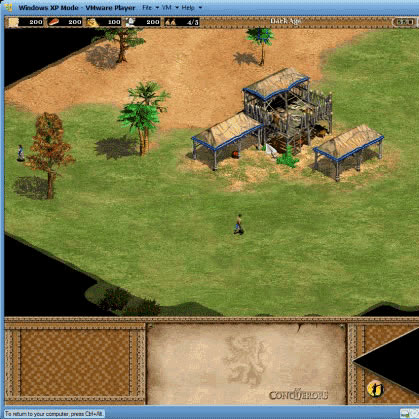
The game works fine out of the box, here’s an example:

Get the Flash Player to see this content.

That example was for the expansion pack but it also works fine without.

PostD-Link SharePort Update

August 20, 2009 – 9:07 pm
Post Image

Update: D-Link has released a new firmware for the DIR-655 here, it contains a version of SharePort that is newer than SX Virtual Link.

I haven’t been following D-Link’s SharePort fiasco since the first few months of my previous blog posting about it here. This is due to the fact that as many users have experienced since the original release it appears to have gained more and more bugs in each new version and we only occasionally see them being fixed.

A forum post in the official D-Link forums about the Apple OSX users of the software pointed me to the fact that the drivers and software used to connect to the router appears to have been made by a company called Silex Technology.

I searched around and found SX-Virtual Link, the original name of the D-Link SharePort Utility, upon downloading and installing the latest version 3.2.3 I found that the application was the same as the SharePort Utility except for the branding and the version. D-Link’s latest SharePort Utility has the date 2009/01/06 and theirs is 2009/02/02, there is also a major version difference, the specific version number for the utility/drivers with SharePort is version 4.9.5 and SX-Virtual Link is up to version 5.3.0.

Upon using the utility I had no problems at all connecting to my D-Link DIR-655’s device, I used a wireless mouse to test the functionality and it worked flawlessly for some time, so I am encouraging users who currently have issues with SharePort to uninstall it and install SX-Virtual Link and see if it fixes any of the issues you are currently having with your devices.

For OSX users I have not been able to test out the OSX version and I am unaware of any changes you might need to make to get it working but I will provide a link below for those users to test if they so wish.

You can get the latest version of SX-Virtual Link just below:

These are updated versions (3.4.0) 31/12/2009

SX Virtual Link 3.4.0 Windows
SX Virtual Link 3.3.0 Mac OSX

Please comment below with your experiences.

PostD-Link SharePort new release 1.10 and DIR-655 1.30 Firmware

April 16, 2009 – 8:52 pm
Post Image

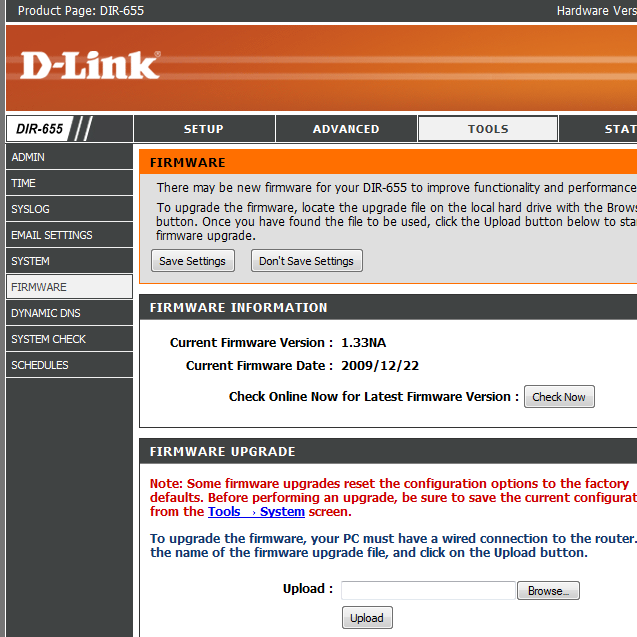
Update 16th January 2010: 1.33b01NA has been released.

Update 20th August 2009: All users having issues with SharePort, check out this post for the latest information.

Update 1: The 1.30 firmware now has a beta tag and is available at: ftp://ftp.dlink.com/Gateway/dir655/Firmware/dir655_firmware_130_beta.zip. Before downloading please read below as this firmware isn’t like the others:

Update 2: Firmware 1.31 is available from the D-Link website now, you can get it here.

Update 3: Beta firmware 1.32NA is available now, it fixes a SharePort issue, read about it and download here.

Update 4: Firmware 1.32NA FINAL is available now, read about it and download here.

Update 5: D-Link has released a new beta firmware for the DIR-655 here, it ONLY fixes *a* SharePort issue.

It appears that D-Link have updated the firmware of the DIR-655 router to v1.30, however it has been pulled from their servers just after release, if it becomes available again it should be at ftp://ftp.dlink.com/Gateway/dir655/Firmware/dir655_firmware_130.zip which is the link they had before it was pulled. The most likely reason for pulling the release is due to that fact that it cannot be downgraded once it is installed, coupled with the fact that it removed wireless B support makes it a bit of a gamble.

According to a D-Link forum admin:

The 1.30 Firmware has been taken down from the support site. It may do a little too much at once.
Removing 802.11b is not a bad thing for most people.
Conditions that make a firmware unable to be downgraded are not always avoidable.
Distributing a firmware that removed 802.11b and also will not allow the end-user to downgrade said firmware, could result in customer service or RMA issues neither the customer, seller, or manufacture desire.

Granted from what I have seen, people are reading the release notes and the warnings about the firmware, but I am looking to be on the safe side as the user base with access to the code made change (not read).

It may go back up because the benefits to the majority are to great, but for now we just need too take a closer look at the release.

It is available to download on some sites and people who have installed it are finding it to be a good release, but I urge people not to try it just yet as D-Link may put a new version out soon that can be downgraded or has wireless B support.

Change Log:
Fix DHCP server issue.
Modify the turn from “Network USB” to “Shareport” in the option of “My USB Type is:”
Add Advanced DNS Service feature.
Add SecureSpot 2.0
Remove the 3G from GUI
Fix LLTD wrong icon in Vista.
Fix reboot issue when connecting to Internet
Add Graphical authentication to log-in page.
Removed 802.11b
This firmware can not downgraded to previous versions.
Guest Zone disable SharePort support (USB spec v1.05)
New SharePort support PC/Mac (Requires Utility Installed on PC or Mac to work)
Router time is not reset when factory reset.
Fix schedule end time error.

SharePort 1.10 for PC and now 1.01 for Mac OSX was released at the same time, the PC version has a lower version number than the previous 1.14 release but it is most likely a newer version.
Update: This appears to only work with the above 1.30 firmware.

You can get it here for: Windows OSX

PostWindows 7 Conexant Sound Card Issue

April 10, 2009 – 4:56 pm

I am running the Windows 7 beta on my 4 year old Laptop, It’s not recommended but it does run well, using the Windows XP display and ethernet drivers it is a well functioning machine that doesn’t act much different from when it had Windows XP installed, however there is an odd issue with the sound card driver from Windows update that I will explain.

Continue reading “Windows 7 Conexant Sound Card Issue” »

PostWindows 7 – Can’t delete exe files on Desktop

March 6, 2009 – 1:18 am

During my testing of Windows 7 I have had almost no issues to report, the only things that have been of notice have been third party or driver related. Then there’s the permissions bug, this bug is so elusive that hardly anybody has reported it and nobody has a solution, not even me.

Update 1: It appears that as of build 7068 this bug may have been fixed, see comments below for details.

Update 2: There are reports the bug has reappeared in the RTM build, it can also occur in Windows Vista but slightly less often.

Update, September 2 2009: It has been mentioned below that this website has a possible fix and that it can fix both Windows Vista and Windows 7. I don’t get this bug any more on any of my machines so I am unable to verify it however.

Continue reading “Windows 7 – Can’t delete exe files on Desktop” »

PostWindows 7 at the PDC

October 29, 2008 – 3:07 am

For now I do not have access to Windows 7 so I can only go on other peoples’ experiences and of course the live stream of the Microsoft PDC, but so far it looks amazing, take a look at some screenshots here at my favorite tech site, Neowin.

From a UI standpoint I am very excited about the possibilities that will be available.
From a web developer standpoint I’m eager to learn how it fits in with Windows Azure and the cloud computing vision.

I hope to do a review once it is available and look forward to other peoples’ reviews, expectations and experiences.

In other news I put Xubuntu on my laptop, I’m actually using it at the moment, It’s a great OS to run when you have an older PC, in this case 4 years old, my laptop maintenance guide will be up soon, I’ve been meaning to finish it but it’s one of those articles you can take forever to write if you wanted to.

I have decided to put up interesting facts, the first fact is that my review on D-Link SharePort on the DIR-655 has had the most views of any posts, you guys seem to like it so I will hopefully bring more of the same in future reviews.

PostWindows Vista SP2 release before Windows 7

October 18, 2008 – 1:02 pm

Earlier this week Microsoft stated that Vista’s Service Pack 2 will be released before Windows 7. As Windows 7 will be released in the second half of that year it has caused many to be worried that Microsoft are rushing SP2.

I don’t believe this will be a problem and I certainly don’t believe Microsoft would be rushing this, to release a Service Pack within a year was common before Windows XP and has happened since, things have changed and Vista SP2 is not focused on the amount of features and deep fixes that have been needed in Service Packs in the past 6 years.

Windows XP SP1 had a reasonable time frame of just under a year, however it was fairly rushed and rightly so, but there were no issues caused by rushing the update. SP2 of XP took quite some time (2 years since SP1) and this was due to the radical changes in the OS that were proposed, new device drivers had to be made, this led to more and more testing and in the end it was a significant change, but with the amount of changes you would expect from 2 Service Packs, released in the same amount of time. Windows XP SP3 is again more of a roll up release that was not necessarily needed due to Windows Update, it was delayed because Windows Vista needed more resources at the time.

Windows Vista SP1 was like the Windows XP SP1 in a way, there were necessary changes that needed to be implemented and they were implemented fast, just over a year from the Retail release date and it was finished and ready, no rushing was needed.

PostWindows x64 plagued with BS news stories

October 10, 2008 – 1:38 pm

Seems a little article has been getting a lot of attention, its the article at Windows Secrets about 64-bit users of Windows and their problems getting things to work, if you’re looking for the article you’ll have to scroll down the page a bit, there’s a whole heap of ads/look-at-me-i’m-so-smart that you must wade through first.

I have used Windows Vista x64 for 2 years now, before that I was using Windows XP x64 since it was in early Beta status, i’m no stranger to issues with compatibility, however I have rarely encountered a problem that wasn’t the direct result of a dodgy driver, or dodgy software.

When I first began using Windows XP x64 I had trouble with certain software not handling installing on the OS, after all it was built on the Windows Server 2003 kernel and because of a lot of the software that i used early on identified it as the wrong OS to run on. Since then however most software is at least Windows x64 tolerant, unless you’re trying to run something that directly affects Windows that was built 4+ years ago you should have no problems.

Drivers were a big issue with Windows XP x64, this was not Microsoft’s fault, it is the job of the device manufacturers to release drivers for their hardware, basically most of them didn’t bother coding drivers for it. However with Windows Vista they have a reason to code drivers and I have not come across any of my hardware that is missing 64-bit drivers except for Dvico’s FusionHDTV Lite DVB-T TV Card and I’ve written about that once before, that card uses an old chip that is used in many old TV cards that has never had 64-bit drivers written for it, I no longer use this card anyway as it’s out of date.

Printers used to be an issue with drivers, now they don’t come without them on the install CD, plus Windows supports most of the older ones that don’t have driver support from the manufacturers anymore.

Using Internet Explorer x64 edition is not much of an option at this stage, Adobe and Sun have stated that they still don’t wish to give support to it as they don’t believe many people use it, this is mainly because they haven’t released any plugins for it which kinda keeps the cycle going but I won’t get into it today. There’s no real benefit in using it yet, web pages do not hit the 4gb memory limit.. obviously.

I’m currently fixing 2 laptops, I’m making a guide about laptop maintenance that I will put up later on.

PostOs Collection – Part 3 – MS-DOS 6

October 4, 2008 – 4:55 pm

I figured I’d make less of a review and more of a guide this time around, MS-DOS is really only necessary to use when you are installing Windows on top, or if you need to use a boot disk.

This guide is very image heavy, so click below to open it, it may not be dialup friendly.

Continue reading “Os Collection – Part 3 – MS-DOS 6” »

PostRibbon UI in Windows 7 M3

September 19, 2008 – 8:02 pm

It appears going by the 2 images that have so far been released showing Paint and WordPad that Microsoft have decided to extend the Ribbon UI used in the Microsoft Office Suite to the included applications in Windows 7.

It’s a small change, but it shows that with Windows 7 Microsoft are willing to try new things. The Ribbon is a fairly handy part of the Office UI, in the case of WordPad it will allow people who are familiar with Word use WordPad much quicker.

I don’t believe the use of Paint will be more productive necessarily, as previously in Paint there was only 1 layer to most of the functionality, however the upside is that this allows Paint to increase in features if necessary without having to have yet another UI change.

Overall I believe it’s a nice addition to the Windows UI, even if it only affects a few applications, I look forward to seeing more of Windows 7 Milestone 3