 TechGremlin
I wrote a post many years ago here explaining how to get Age of Empires working on modern windows using VMWare and Windows XP, there is now an updated version of the game that you can get on Steam that makes things much easier. If however you want to play the old version anyway it seems that many of the graphical problems were solved in Windows 8 and last time I tested it was working fine out of the box. Age of Empires does seem to have a networking issue however and the best solution I have found is to use the IPX Wrapper that you can get at Solemn’s Site and play using the game’s IPX networking.

Capturing 40mbps video with the AVerMedia Live Gamer HD
Recently I picked up an AVerMedia Live Gamer HD capture card for various recording scenarios and while it has its issues, it is a valuable part of the recordings I do for PC Required, one thing that struck me as a little odd is that the program it uses to record “RECentral” doesn’t allow you to select over a 20000kbps or 20mbps bitrate for recording.
Continue reading Capturing 40mbps video with the AVerMedia Live Gamer HD

Adobe Premiere Pro, SLI and the 310.70 nvidia drivers
Update: This also appears to be true for the new 310.90 WHQL drivers.
With the latest (at this time) nvidia WHQL drivers 310.70 and running in SLI mode, Adobe Premiere Pro does not display the video preview when the Mercury Playback Engine is set to GPU Acceleration (CUDA) mode, instead the display is blank, changing to software mode, reverting the driver or turning off SLI mode completely fixes this but it’s not an ideal solution.
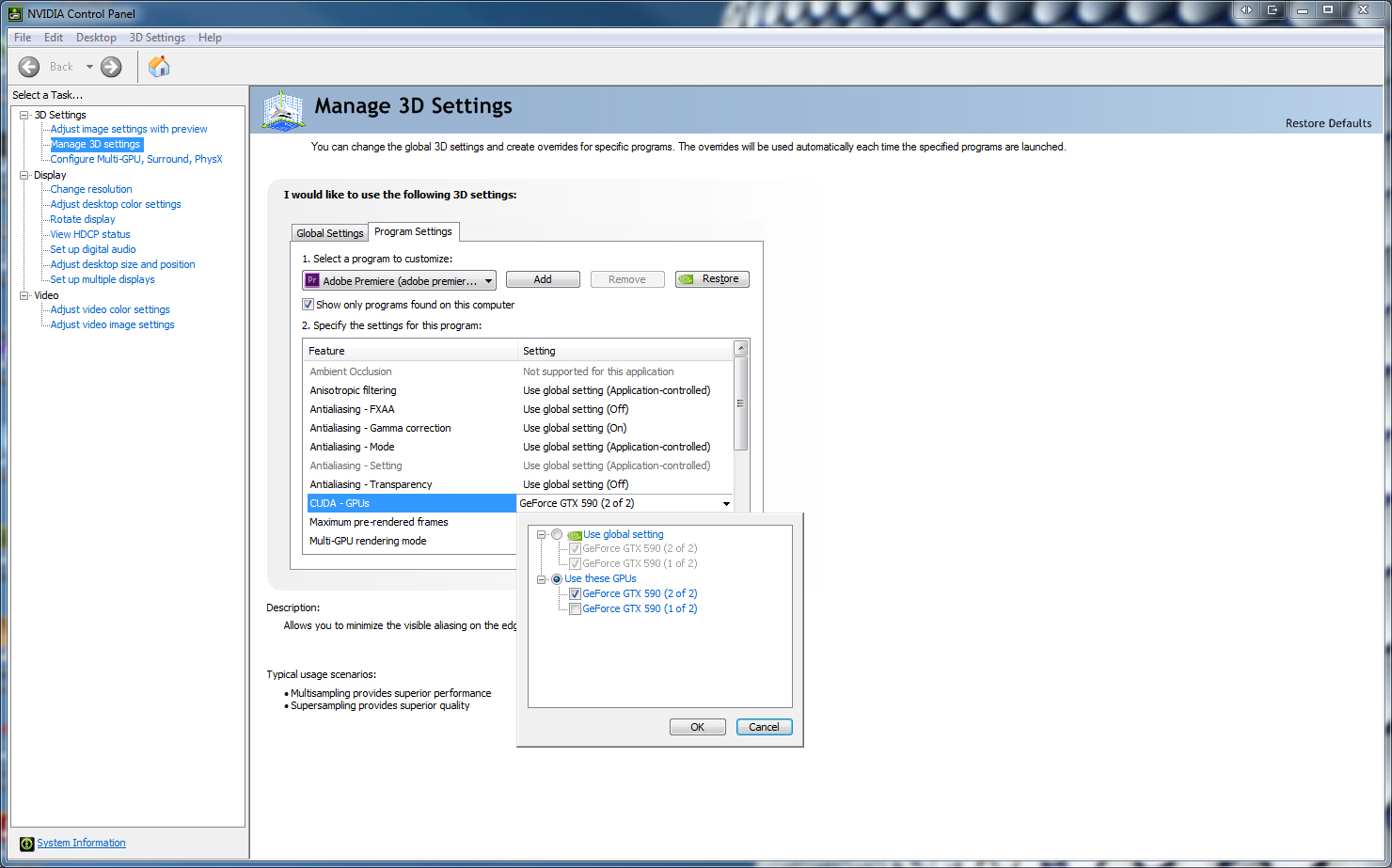
However I have figured out how to fix the problem and keep the acceleration and driver version. The nvidia control panel in Windows allows you to determine which GPU is used for CUDA for a specific application, by default it is always set to auto, this appears to be why it is failing, as it appears that the GPU it is choosing is either incorrect or Premiere Pro doesn’t support it.
At first I tried manually setting GPU 1, but the display was still blank, then I set GPU 2 and it worked as it had in the previous drivers with no further tweaking required.
If you have trouble with the setting I have made a screenshot of the setting below.
Fix for youtube video resize pauses
Last year I started getting strange pauses in video playback on Youtube when resizing video or putting it in fullscreen and that can get a little annoying, especially when the glitch occurs at an important moment, I haven’t found out why this happens, only that it occurs due to the flash player being set to software rendering mode.
The easiest way to fix it is to download and use YousableTubeFix, it is a javascript file that adds certain enhancements to Youtube but more importantly lets you change the rendering mode, you will need the Gresemonkey plugin for Firefox but you can install it straight into Opera and Google Chrome.
The setting you need to change is the Flash Player wMode under All Pages after clicking the Configure button under any Youtube video and make sure it is set to Direct.
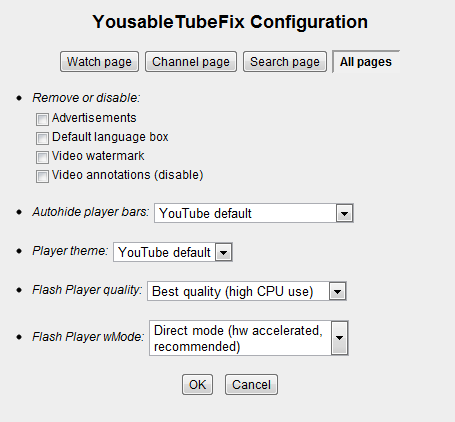
Once this is done a playing video should no longer have any pauses when resizing or fullscreening it. To verify that it is indeed working correctly you can right click the video and click ‘Show Video Info’, in the upper left corner of the video a little window should appear stating ‘accelerated video rendering’, if it is still showing software video rendering then it’s either not working or not possible with your hardware.
PC Required launched – Shadow Harvest Review
Today PC Required launched, it’s a combined review site that I contribute to, focusing on PC Games with a unique style.
The first review is for the game Shadow Harvest: Phantom Ops.

Q1 2011 Browser Roundup
All the major web browsers have a new version recently released or are planning to release a new version within the next few months and I have taken this opportunity to put them to the test.
Continue reading Q1 2011 Browser Roundup
Mafia 2 Jimmy’s Vendetta & Joe’s Adventures Mini-Review
After reviewing Mafia 2 I planned on reviewing Jimmy’s Vendetta, however I postponed it until now in order to review both (and possibly the last) expansions for this game.
My Mafia 2 review has already covered many things that haven’t changed, thus there will be no Graphics or Sound sections to this review.
Introduction
Jimmy’s Vendetta is the second expansion to Mafia 2, centering around the character of Jimmy from the previous PS3 exclusive The Betrayal of Jimmy, it brings Mafia 2 to an arcade style open world gameplay that the main game missed.
Joe’s Adventures takes place during the time when Vito is in Jail, centering around his best friend Joe from the main game, it contains slightly more story than Jimmy’s Vendetta but still contains the same arcade style gameplay.
Continue reading Mafia 2 Jimmy’s Vendetta & Joe’s Adventures Mini-Review
Review of VPS.NET – 9 months of usage
I like to use a service for some time in order to make an informed decision about staying or going, it’s something that I don’t take lightly and any one thing cannot make me change no matter how bad it is because as everyone knows companies change and service from those companies change also.
This is why after 9 months I have decided to leave VPS.NET, it’s nothing personal and I’m not saying that it’s not a great service to use for others, it’s just not right for me.
Before I get to the review I’d like to point out that I was using a 1 node VPS at the Salt Lake City cloud running Debian 5.0 x64 and it’s very important that if you’re comparing it to another provider to only compare it with similar services.
Mafia 2 Review
Mafia 2 is the long awaited sequel to the 2002 Illusion Softworks (now 2k Czech) classic Mafia. The version I will be reviewing is the PC version, released on the 26th of August 2010.
My Mafia 2 Demo review has already covered many things that haven’t changed in the finished game, so I’ll try not to repeat too much.
Introduction
The PC version of this game is a Steam exclusive, though you can buy a physical copy that contains the Steam files. Installation was smooth and there were no issues with the PhysX runtime like there were with the demo.
You play as Vito Scaletta and follow his rise through organised crime in the fictional city of Empire Bay during the 1940s and 1950s. This is an open world game, though the storyline quite linear for a game of this type, not unlike Mafia.
Dead Space Review
Dead Space is a 2008 survivor horror third person game from Electronic Arts, released on the Xbox 360, Playstation 3 and PC. The version I will be reviewing is the PC version.
First Impressions
The game places you in the shoes of Isaac Clarke, a ship specialist who you will immediately notice is in a full body armored space suit and stays in it for the duration of the game. The year is 2414 and shortly after the beginning of the game you find yourself inside the seemingly empty USG Ishimura, a “Planet Cracker” starship that is sending out a distress signal and isn’t responding to radio messages.
This game is primarily horror, along the lines of Doom 3, however it includes many puzzles to stop things getting too boring.