PostD-Link SharePort Update

August 20, 2009 – 9:07 pm
Post Image

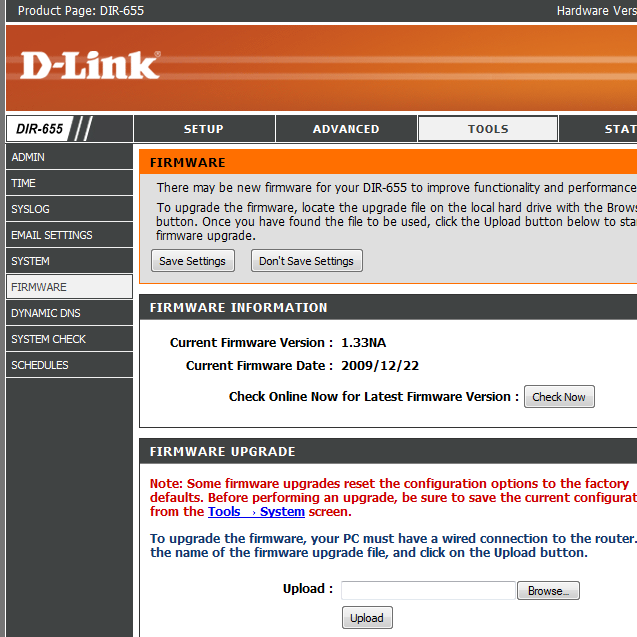
Update: D-Link has released a new firmware for the DIR-655 here, it contains a version of SharePort that is newer than SX Virtual Link.

I haven’t been following D-Link’s SharePort fiasco since the first few months of my previous blog posting about it here. This is due to the fact that as many users have experienced since the original release it appears to have gained more and more bugs in each new version and we only occasionally see them being fixed.

A forum post in the official D-Link forums about the Apple OSX users of the software pointed me to the fact that the drivers and software used to connect to the router appears to have been made by a company called Silex Technology.

I searched around and found SX-Virtual Link, the original name of the D-Link SharePort Utility, upon downloading and installing the latest version 3.2.3 I found that the application was the same as the SharePort Utility except for the branding and the version. D-Link’s latest SharePort Utility has the date 2009/01/06 and theirs is 2009/02/02, there is also a major version difference, the specific version number for the utility/drivers with SharePort is version 4.9.5 and SX-Virtual Link is up to version 5.3.0.

Upon using the utility I had no problems at all connecting to my D-Link DIR-655’s device, I used a wireless mouse to test the functionality and it worked flawlessly for some time, so I am encouraging users who currently have issues with SharePort to uninstall it and install SX-Virtual Link and see if it fixes any of the issues you are currently having with your devices.

For OSX users I have not been able to test out the OSX version and I am unaware of any changes you might need to make to get it working but I will provide a link below for those users to test if they so wish.

You can get the latest version of SX-Virtual Link just below:

These are updated versions (3.4.0) 31/12/2009

SX Virtual Link 3.4.0 Windows
SX Virtual Link 3.3.0 Mac OSX

Please comment below with your experiences.

Related posts:

  1. D-Link DIR-655 1.32 Build 04 Beta 01 SharePort fix
  2. D-Link SharePort new release 1.10 and DIR-655 1.30 Firmware
  3. D-Link DIR-655 Router and SharePoint/SharePort
  4. D-Link DIR-655 1.32NA Firmware Final
  5. D-Link DIR-655 BETA01 Firmware 1.32NA

Comments:

  1. Had trouble connecting to my Canon MP470 multifunction printer via Shareport 1.10/DIR-655 firmware 1.32NA. Uninstalled Shareport, installed SX-Virtual Link 3.2.3 and still no joy. Printer displays as Available, but attempts to connect fail and status reverts to Available.

  2. I have noticed upon using it some more that when I use my mouse it will disconnect after about 15 minutes and even though it’s set to reconnect it will just sit there, not sure if it’s some sort of incompatibility with the mouse or if it happens to all devices.

  3. Hi Ben,

    Thanks so much for trying to help us out. I got Shareport to run perfectly on my eMac using the download for Macs on Dlink’s website. However it’s my Lenovo X200 laptop running XPpro that sees the my Canon MP610 but can not connect. I have tried your fix up above but it did not work as I was having the same problem. D-Link has one big mess on the their hands.

    Thanks Paul

  4. They sure do Paul, now that I know that another company who seem to update it regularly are in charge of making the software I am confident at least the software will become more stable over time, however I think the main problem here is the flaky firmware on the routers that have the feature.

  5. I recently updated to the newest versions of the firmware and the shareport utility. It DID seem to work better at first, but now I’m having a serious problem that makes it almost unusable for my family.

    The problem is that after some time, the computers running the utility cannot connect to the printer. They continually try to connect to the printer, but it just goes back to available status. I think that this is the same thing as some of you have already reported.

    What I have found is that if I reboot the router, the computers that are not able to connect to the printer are immediately able to connect to it, and the spooled-up print job gets printed.

    This shareport stuff has always been buggy for me. I’m disappointed in it.

  6. WOW. I was fighting with this shareport stuff for hours with the same issues as everyone. Installed this SX utility and INSTANT success. It works insanely fast as well!

  7. Hi Dan,

    I am glad it worked for you. Are you running XP? Just curious. Thanks

  8. Hi all, and thanks Ben for all your info.

    I have the dir-655 with hardware A2 and recently updated firmware 1.32NA. I want to really use the SharePort feature, so i downloaded the utility from the d-link website. I have a Macbook 2nd generation Core2Duo with 10.5.8 Leopard. I also have an HP laptop running Vista.

    Sharing an external hard drive works just fine, but I’m having the same trouble as everyone else, not being able to connect to my HP Photosmart C4280. It recognizes that it is “available,” but it is unable to connect to my macbook. I tried uninstalling the utility, and downloading instead the SX-Virtual Link like you suggested, but the same problem occurs.

    Is there anything else special I must do to be able to share a printer?

  9. oops…i meant dir-655 with hardware A4.

  10. Hi Paul,

    I am actually using Vista Home Premium x64.

    Interestingly after 3 days of success with SX Virtual Link, I have a new problem and it’s the apparently popular one where the device is disconnected after a few seconds of being in use.

    Will provide updates when I get a fix.

    Dan

  11. Hi Dan,

    Isn’t frustrating with these apps that one day they work then the next they crap out! Well at least you had it working. Good luck with the fix. I am going to sit on the side lines until D-Link comes up with one.

    To their credit they responded lightening fast to my e-mail last week asking them if a fix was in the pipeline. They responded within 5 hours and said yes, but an ETA has not been determined.

    They should really post something front and center on their web site about the known problems with Shareport. Ah well wait we will.

    Keep me posted on your progress. Good luck.

    Paul

  12. Hi Paul,

    Didn’t think I would be writing back so soon. I have the issue fixed. Rebooting the computer did not work. Rebooting the router did not work. Re-installing SX Virtual Link did not work. Believe it or not, unplugging and re-connecting the USB hub that I have my printer and MyBook connected to fixed the issue immediately. Unfortunately, I have a corrupted NTFS file system on the MyBook due to this issue, but on the other hand SX Virtual Link 3.2.3 is holding strong for over 3 hours while checkdisk runs ;)

    Hope you get some resolution to your issues as well.

    Regards,

    Dan

  13. How did you guys get virtual link to work on the DIR-655?

    I installed it but it doesn’t see anything. Tried with usb key (which is seen on windows) and the printer.

    Is there something to configure somewhere?

    Thx

  14. The first time I tried it it wouldn’t work for me, I uninstalled it, made sure shareport was completely gone and reinstalled it and tried a few devices, my usb key wouldn’t work in it for some reason but everything else did. Does it show up your DIR-655 at all?

  15. Actually i can’t see anything, but i wondered if i needed the latest firmware because I’m currently with the 1.21.

    I hesitated to upgrade because of some problems i saw on dlink forum.
    I’m still not sure. Often in forums, only people who have problems post, and i don’t know if they have just done a bad flash or what… And as it’s irreversible…

  16. Hi QuarkZ,

    You’re instincts are correct. Personally if I knew about all the *&(*&% problems with the new firmware 1.32NA I would have never upgraded to it. Stir clear until Dlink can get it’s act together for a fix for Shareport running on v1.32NA.

    Stay well….Paul

  17. You’re correct QuarkZ, but with the new firmware as Paul says comes many issues, it’s best that if you’re on 1.21 to stay put for now in my opinion.

  18. OK then i’ll keep the current firmware.
    Thx guys :)

  19. Thanks for this, shareport util from d-link dind’t work on my usb hdd/d-link 655, now with this utility it found it right away after the installation.

    Firmware Version: 1.32NA HW A4

  20. Quote from: gstrat, Comment #1

    Had trouble connecting to my Canon MP470 multifunction printer via Shareport 1.10/DIR-655 firmware 1.32NA. Uninstalled Shareport, installed SX-Virtual Link 3.2.3 and still no joy. Printer displays as Available, but attempts to connect fail and status reverts to Available.

    Had the same issue. Had to reset the router and re-do the setup… Works fine now, except for the “Unknown Publisher” error when starting the program

  21. Shareport is working for both mac and windows for me.
    This is the set up I have.
    Please note i have tried with all other firmware 1.3X, beta softwares and Other latest SX Virtual link software and also with DLINK Shareport software.

    working
    firmware: DIR 655 1.32 NA Build 01 Beta
    Date on router firmware page – 2009/08/27
    http://www.techgremlin.com/downloads/dir655_fw_132b04NA_beta01.zip
    SX-Virtual Link for Windows 3.2.3 (10.9 MB) 20-08-2009
    SX-Virtual Link for Mac OSX 3.1.0 (9.41 MB) 20-08-2009

    Thanks a lot Ben.

  22. Hello i got the same problem.

    I have a d-link dir 855 and connected a seagate extreme external hdd on it.

    Is it maybe that the device connected to the sharepoint is going in to some kind of a sleep or a standby and the router can’t activated it?

    Because if i dissconnect the external hdd and connect it with my pc my external hdd is beining activated.

    And when i put the usb back in the sharepoint of the router than the sx virtual link works again.
    And i can use my external hdd at the sharepoint.
    But iff i wait to long and the external hdd doesn’t get a signal from my pc than the external goes to sleep and after a while i cannot connect to my external hdd anymore with sx virtual link.

  23. Thank you so much for sharing this. After shareport nightmares on Windows 7 (with a Laser Jet Printer), this is a GREAT solution. By the way, I noticed that the Internet speed drops to the ground while printing. Actually on shareport, my router dir 955 restarted frequently. Great help. God bless

  24. Hi, seems like you all know alot about this router, and since I dont I just want to ask you all a question.

    I want to use the shareport to get a 1T hd on my home nettwork, so that all the computers in the house can use it as a back up disk or to download and upload.

    Even tho I have been googled it a lot I cant seem to find the answer to it.

    What hard drives is compitable with the software.
    All of them or …?
    I have a WD My Book Essential Apollo 1TB, is this hd compitable with the d-link shareport?

  25. There’s no way of really knowing what is compatible or not, I believe D-Link have said that all of them should work, but it is clear that some people seem to have problems. I can only really recommend the minimum you would need to get it working, it needs to have it’s own power source and shouldn’t be powered by the USB port, your drive’s model seems to fulfill that requirement from looking at the specs, other than that there’s really no way of knowing but to try it out.

    I really recommend checking out other routers that can do this, I believe there are a few out now that are quite a bit newer than this router and they may have better compatibility, also….

    The USB port on the DIR-655 is very slow, it takes a long time to copy large files so I don’t recommend it, however if you don’t have any other means of getting the drive shared to all computers it should be bearable.

  26. I am European user of the Dlink DIR-655.

    I have firmware FW v1.30EU running (currently latest EU version) with SharePort_v1.15.9.
    Could not get sx-virtual_link_win_340 to work with it yet.

    I found out that writing lage files (800MB and larger) to USB stick connected to DIR-655 is very slow. However reading is lightning fast. My test has been done while connected to GB port, via wireless its slow reading to (which makes sense).

    Oscar.

  27. To: Ben
    Re: D-Link SharePort Update
    I have given a try to this SX Virtual Link 3.4.0 Windows. Looks the problem remains as it was before. My HP printer connects after about 20 seond, then stays connected for 10 sec, then my Win7-64b issues a message for SX Virtual Link
    “HP… did not dosconnect properly”, printer is disconnected, then it connects autmatically again for 20 sec, then disconnects, and so on… Shareport just does not connect at all until Dlink DIR-655 is rebooted.

Leave a Reply

XHTML: You can use these tags: <a href="" title=""> <abbr title=""> <acronym title=""> <b> <blockquote cite=""> <cite> <code> <del datetime=""> <em> <i> <p> <q cite=""> <strike> <strong>