Authors
October 2008
M T W T F S S
« Sep   Nov »
 12345
6789101112
13141516171819
20212223242526
2728293031  
Features
Subscribe by FeedBurner

D-Link DIR-655 Router and SharePoint/SharePort

Written on October 2, 2008 – 5:49 pm

I have owned a D-Link DIR-655 router for the past year and it is by far the best router that I have ever used, although I did pay $150 more than what I have paid for a router before, so I’ve gotten what I have paid for.

Starting with the version 1.21 Beta 04 (the final is out now, I have not installed it yet) of the DIR-655 firmware there is now SharePoint functonality available. SharePoint as the media and other sites partially call it or SharePort as it is called everywhere else including the software itself is a way for D-Link products to share a USB device over the LAN, i’m going to try to not confuse you any further so I will refer to it only as SharePort from now on.

SharePort is an interesting feature that I actually wanted to be able to do a few years ago, by sharing USB devices from a computer so they can be used on another PC as if the device was actually plugged into your PC. D-Link have finally brought this technology to life in a limited fashion with SharePort.

This is how SharePort works, I will use my DIR-655 and Brother DCP-150C MFC as an example.
The DIR-655 has a USB port on the back, tests seem to indicate it is a USB 1.1 port, up until now the port was used for wireless settings that could be stored on a USB key.
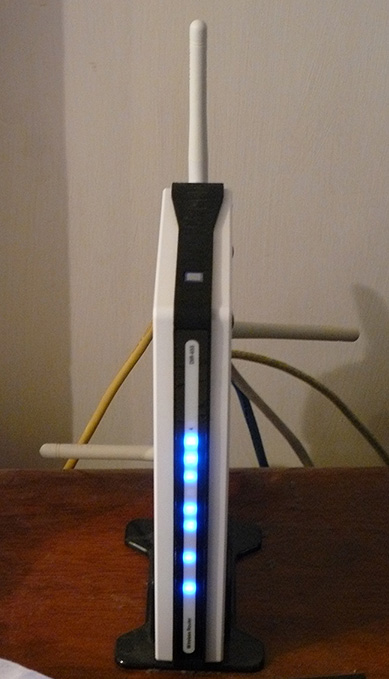
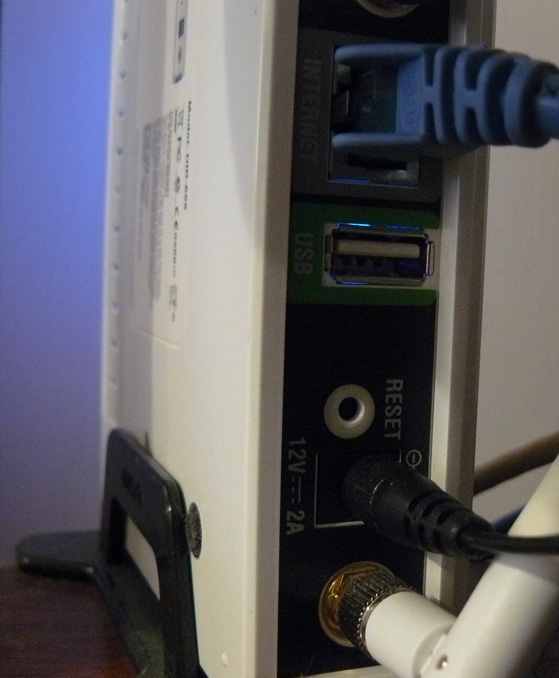
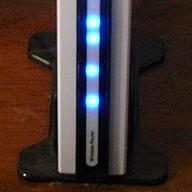
DIR-655DIR-655 USB Port

After installing the new firmware however the USB port has found more use, we’re greeted with a new menu under Setup that controls the use of the port.
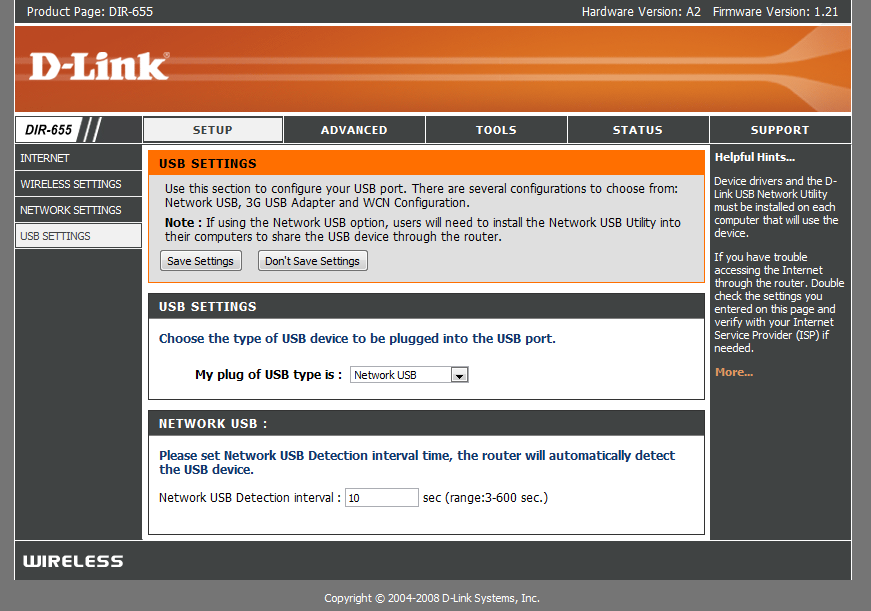
New USB Page

As you can see there is not much to the setup of this USB port, WCN Configuration is the default, this is used for the wireless configuration key, choose the dropdown box:
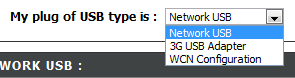
Choices

Choosing Network USB puts the router in SharePort mode, choosing 3G USB Adapter is a bit of a mystery to me, I’m not sure what devices are compatible with this yet, however as most people do, I have a 3G service and using it as a backup by only connecting the device up to the USB port and choosing 3G USB Adapter would be very handy.

Once you have chosen Network USB the device is automatically shared, however in order to connect you must install the SharePort software from D-Link, this is still in Beta it appears so use with caution etc etc, I haven’t had a problem with it yet and it seems fairly polished. once it is installed make sure you allow it to run at startup and run it straight away, otherwise you won’t be able to use the device without manually running the SharePort software each time, it only uses 2MB of ram so it’s not a resource hog.
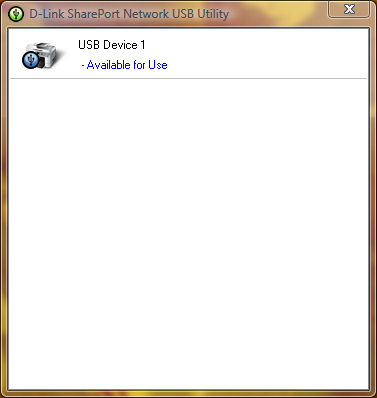
SharePort Printer

If your USB device is on and connected then the SharePort utility should display like this once you double click on the icon in the system tray. It will then allow you to run through a wizard for installing the device, you will need your device’s driver cd or the latest driver for their website, at the end you will be asked if you want to automatically connect to the device when you print if it is a printer, this is a good idea otherwise you must manually choose to connect.

Once that is all set up on each computer that uses the device, you will notice that each device states that the printer is paused and offline, print to the printer anyway, the SharePort software detects that a print has been sent to the printer and it automatically assigns the printer to your computer and while the printer is communicating with your PC it will show as connected, once the print job has been finished it will then return back to offline, paused.

The limitation of this feature is that it will only work on one PC at a time, USB devices simply aren’t designed to be connected to 2 PCs at once so it makes sense why this is the case.
I have not tried such things as webcams however they have been known to work, however at a slower rate than normal, the scanner feature of my printer works fine, however you must manually connect using the SharePort software to use it, make sure you disconnect after you are done.

As I stated at the start of this article the SharePort software is something I have been waiting a long time for, it’s a great feature considering my router is not the latest out there now and it almost seemed like D-Link had given up adding new features to it, it also shows how well the device can work if it can handle a USB device while it is performing all it’s other duties.

Comments:

  1. Just upgraded firmware on my DIR 655 router to 1.21. When I started to install the SharePort Utility application it crashed my Desktop and Laptop computers both are Windows Vista Home Premium OS. Called Dlink tech support but found no issues. Anybody had the same problem? In need of a solution on this problem…please help.

  2. Well i’m still running 1.21 Beta 04, there might be something with 1.21 final, also it might be a good idea to re-download the utility from ftp://ftp.dlink.com/Gateway/dir655/Apps/SharePort_Network_USB_Utility_094.zip and possibly re-flash the router with ftp://ftp.dlink.com/Gateway/dir655/Firmware/dir655_firmware_121.zip OR ftp://ftp.dlink.com/Gateway/dir655/Firmware/dir655_firmware_121_no_securespot.zip the no_securespot file has a newer date on it than the standard 1.21 firmware. What kind of software do you currently have running on both of the computers? Try shutting off virus scanners etc on both when installing this.

  3. I just installed firmware 1.13 on my dgl-4500 as well as installed the shareport utility. Shareport isn’t recionizing my router as on the network or my external HD as being connected. Any thoughts?

  4. I’m actually trying to get to the bottom of a similar problem i’m experiencing, a few days ago my pc stopped detecting when my printer was on and most of the time also didn’t detect when the router was connected.

    I have reinstalled it, rebooted the router and it doesn’t change, even when every other PC works perfectly.

    Possible Solution: Actually I have just fixed the problem, it seems it can’t recognize devices when you have more than one enabled network card, so if you’re running VMware etc you will have to disable the other network connections and reboot before it will start detecting again. If you are able to get it working also from this let me know.

  5. Hi!

    Apparently this only works on the US version of the 655. I have flashed the firmware to the latest EU version and there is no screen as described above.

    Just wanted to make it clear that this is for US users only. Everyone else, don’t be mistaken into thinking this router will network anything other than web access.

  6. Thanks for the heads up, I’ve been using the US version of the firmware in my AU bought 655.

    I don’t recommend doing that, however I don’t believe there is any difference at all in the hardware for different regions either.

  7. Ben- Thanks for this great tutorial – using your instructions, I was able to update the firmware, install the print utility and print using my router-connected laptop! Just a word of thanks.

    As an FYI, I used the D-Link router software’s own “check for firmware updates” feature, and it automatically recommended version 1.21 (dated 10/9/2008). Now I’m printing hunky-dory on a Vista-based laptop (Compaq), and an XP/Home-based desktop (Compaq). Still have another Dell laptop to connect. Printer is an HP Deskjet F4180 All-In-One. Had to install SharePoint and the HP printer driver on the laptop, but that was no big deal.

    One difference I have noticed from what you had said: I do not have to reconnect to the printer each time I use it. Once I am connected, it stays connected unless I opt to “release” it. If one of the PC’s is connected, and you want to print from a different one, it will offer you the option of “requesting a release” from the machine that is connected. Then, the machine that is currently connected receives a pop-up message asking it to disconnect so another user may use the printer. The status bar also shows the computer name of whichever machine is currently connected actively to the printer. Maybe this was another firmware update that was included in the 10/9/08 release?

    As an FYI, I am a US user.

  8. Thank you for your comment Lisa, I’m glad you liked my instructions.

    I’ve never actually come across this, all my computers are set to auto-connect so they are only connected to the printer in the short few seconds that the print job is sent, then it disconnects again, I assume it would be part of mine too however I haven’t come across due to not having it connected to any one PC long enough for another to request the use of it.

  9. There are definitely issues with ver 1.2 & 1.21 versions of the DIR-655 firmware.

    The Virtual Servers mapping does not work properly for outgoing packets. I run a mail server that started functioning intermittently on these two firmware revs. Reverting to 1.11 solved the problem. Connections to port 25 (smtp) would route to the appropriate internal server on my network but it seems the servers resp was not always getting back to the distant connecting server. this leaves the smtp routines waiting for additional communication that never comes and times out. Sometimes the transmitting server will give up and mail is lost.

    Also, schedules can’t be configured properly.. the firmware incorrectly flags times as invalid ie: 11pm to 5am is invalid in 1.2x and ok in 1.11.

  10. That’s pretty bad Brian, I haven’t experienced anything too bad with these firmwares myself, but others are reporting problems. Previously I held off 1.2 as people were having issues with it, but it appears not all of the issues may have been fixed.

  11. I wonder if you could test something for me… could you try to set up a schedule using 11pm to 5am and see if it considers that valid? That will tell me if this is a universal problem with 1.21 or something thats just a problem with my unit and firmware…. thx

  12. I am experiencing the same error, seems to not like spanning over midnight. What happens when you set a schedule from 11PM to 12PM and one from 12AM to 5AM?

  13. I have found the french website where french dlink representative claims shareport functionality will be available in weeks in EU firmwares:
    http://www.clubic.com/actualite-170094-dlink-routeurs-dir-655-dir-855.html

    One of the comment below the artical sais US firmware works fine on EU hardware (as Ben wrote – probably there are no differences in hardware), shareport works fine, and canon’s multifunction pixma can scan via the shared port.
    I’m ordering the DIR-655 for me…

  14. @ Jun (and anyone else)…I also ran into the “installing SharePort” crashed my systems issue. (both v .94 and 1.0 releases)

    The DIR-655 went in great, firmware update went fine. Router/wireless ripping fast.

    Went to install the SharePort software and it crashed my XP SP3 and Vista Home Premium systems horribly bad. Was able to get them going via system restore, but wasn’t pretty for a while.

    I’m suspecting a conflict with AVG Free 8 which is a common piece of software on all my systems.

    Can anyone else possibly confirm a SharePort/AVG Free 8 driver conflict who may have crashed their systems during/after installing SharePort?

    –Cheers

  15. Well, I have the same problem as jun. Sharepoint version 1.0 crashes my laptops when installing and uninstalling. I have firmware 1.21 but I don’t think that matters because I can’t even install the software without crashing. Called Dlink support and tehy say that Sharepoint and the USB port are not supported on the DIR-655.

    Might seek an alternative product that can properly support a hard drive. Any recommendations? I might try the Apple Airport Extreeme now that it is Gigabit and Dual Mode capable.

  16. I’m almost certain in my case there is a driver conflict between the SharePort driver and something else. I’m strongly leaning in favor of it being some kind of system protection (HIPS?) feature of AVG Free 8 in my case.

    On test-bed systems, I can install SharePort just fine (v.94 or v1.0). However if I first have AVG Free 8 installed the machines blue-screen during the end of the installation process…either when a driver or service attempts to be installed. Curiously, on a “real” system it tanks during the installation, on a virtual system, it only tanks during uninstallation of SharePort with AVG Free 8.

    However, (on the Virtual systems) if I first uninstall AVG Free 8, reboot, install SharePort, reboot, then install AVG Free 8 everything seems happy.

    I need to do a bit more troubleshooting first before I move to my “live” systems. It wasn’t much fun doing a system restore on two out of my three systems this weekend.

    I don’t think it is a router-hardware/firmware issue as best as I can tell. My DIR-655 if ripping fast and solid. I did upgrade to firmware 1.21 which enables this new SharePort feature, but I don’t see how the router firmware is impacting the systems. I’m convinced it is with the SharePort sofware itself and specifically a driver or service conflict at installation initialization. I just have to pin down the conflict point.

    And yes…I spent over 30 min on the phone with Dlink support last night and it was next to worthless. I finally got the poor tech to escalate my findings to a supervisor and maybe it will make it to a technical desk at Dlink.

    According to this guy, there are no newer “back-room” versions available for SharePort at this time.

    Will let you know what I find out.

    Otherwise I’ve been very happy with the DIR-655 device overall. Too bad the SharePort feature was one of the deciding factors for going with this model.

    Sigh….

    (BTW–I posted the comment right above SteveW’s above mine…somehow the browser trapped jun’s name in the author field.)

    –Cheers

  17. That’s good troubleshooting work there Claus, it would be a SharePort software issue for sure, perhaps AVG isn’t playing nice either, they haven’t exactly got the best record recently regarding issues with other software. I will see if I can find out anything tomorrow regarding AVG/SharePort, I’m sure one of the companies knows something.

    I wouldn’t expect D-Link to update the software for a while but I guess they would only know that for sure.

    Hopefully if enough people have the issue though they will fix it soon, the software itself has to work with all SharePort capable hardware and there’s quite a few of those out there now.

    By the way I have changed your name in the comment above SteveW so the conversation can be understood properly, let me know if you experience bugs with the comments system, it’s my code so it has a possibility of bugs.

  18. I also installed 1.21 on my DIR-655 and the USB software. My hardwired computer found the printer immediately. My notebook (wireless) sharport says it can’t find a USB device. Any suggestions?

  19. Try disabling any other network cards and restarting, even the ethernet card, Shareport gets confused easily by multiple network connections, if it is running VMWare try disabling the VMNet network cards.

    Also temporarily disable any firewalls you may have on the laptop just in case one is blocking the connection.

  20. Having the same issue as Valca but I am running the new Norton Virus scanner so I am wondering if its some thing other then a virus scanner.

  21. Hi guys. Still testing the issue.

    I had previously suspected AVG 8 so this weekend I found some free time. Decided to put my theory to the test on my Vista Home Prem. SP1 system.

    I uninstalled AVG 8, made a manual Restore Point (good thing I did) rebooted, so far so good. Then I installed SharePort.

    BSOD.

    System Restore using my save-point restored my system. Now I was back to square one.

    Moved on to a fresh Virtual PC session using a pristine XP SP2 installation. Installed SharePort just fine. No issues. Uninstalled it just fine.

    Next suspect I had was NetLimiter Monitor which is also common on all my three systems.

    Installed NetLimiter Monitor and rebooted. Good. No stability issues.

    Went to install SharePort (v1.0) and near the end of the setup…just like my real systems…the virtual system did an immediate black-screen reboot.

    Hmmmm.

    So I have uninstalled NetLimiter Monitor from my systems and put in a email query to their support team asking if they can look into this independently.

    Seeing how it appears both SharePort and NetLimiter Monitor both seem to hook into the Windows networking drivers/services this makes pretty good sense.

    Will give another update if/when they respond.

    Not sure if I am brave enough just yet to repeat the experiment on my live systems again.

    –Cheers!

  22. Hi Everyone, I am Brand new to all of this. Recently Upgraded to the DIR655. Great. 1 Desktop 5 Notebooks. Desktop has the PCI network card, Router, DSL Modem Etc. Notebooks are all running internal 802.11G Devices.
    If I unplug the USB Cable from the Oki550 color laser from the Desktop, and plug it into the USB Port on the DIR655. Is this ultimately (or Theoretically)going to allow us to print to that Laser without turning on the Desktop Computer first?
    For now that is my ultimate objective and this is my first question.
    Thanks
    Dave

  23. Yes this will allow access to the Printer any time the Router is on, the printer and router are the only 2 things that need to be on for this to work, however that is provided they do not route through the desktop at any stage. As can be seen by the comments you should exercise a bit of caution when installing the Shareport software as it doesn’t play well with other software that has networking components.

  24. Hey guys I found the issue… Its Net Limiter uninstall that and you are good to go ^_^

  25. Ben,

    Just to confirm what I suspected and Nick has confirmed…the Net Limiter 2 Monitor program does critically conflict with the SharePort application (at this time).

    I had uninstalled it from my XP Home (SP3) and Vista Home Premium (SP1) systems. Then I reinstalled SharePort after creating System Restore points (just to be safe).

    Installation went fine this time and no BSOD or conflicts were observed. The SharePort application quickly found the Seagate USB flash storage device and I was able to “mount/connect” to it and read/write files from all systems.

    To be clear…only one system can be connected to the device at one time as far as I can tell. Other than that it now works great.

    Whew! That was a doozie working that issue out. Thanks to Nick for posting a confirmation.

    I did send an email to the Net Limiter support team about the issue, but no response yet.

    Not sure if it will occur with all their programs (paid/free) or just with Net Limiter 2 Monitor.

    Thanks all!

    Cheers!

    –Claus V.

  26. Hi, i’m owning the Dir-855 as my dear old Dir-655 went to my sisters apartment as a permanent solution. However i’d be very interested in knowing if the DIR-855 supports this feature as well. It might be a good add-on for my already awesome Wireless router.

    Daniel

  27. Daniel,

    According to a D-Link press release, the DIR-855 is included in those that SharePort supports.

    http://www.dlink.com/press/pr/?prid=442

    Quoting:

    “The innovative SharePort USB network-bridging feature is available on D-Link Xtreme N Gigabit Router models – the DIR-655, DIR-825, DIR-855 and DGL-4500 Gaming Router with GameFuelâ„¢. The SharePort technology upgrade is also available on the RangeBooster N DIR-628. Current owners of those routers will be able to upgrade to SharePort technology by downloading the latest firmware and client utility from the D-Link website, http://www.dlink.com.”

    I think this is the link to the DIR-855 firmware and SharePort download page:

    Firmware –
    http://www.dlink.com/products/support.asp?pid=548&sec=1#firmware

    (That’s one nice looking 855 model by-the-way. Makes my 655 look plain! ;)

    Good luck!

    Claus V.

  28. Hi, I have my own DIR655 for 1 week. Its an EU version, but US firmware 1.21 run smothly. Shareport works, but not very stable.

    First issue, sharing USB disk drive over the WiFi is not a good idea IMHO. Any network problem and Vista have issues with device. Also performance is an issue (800kB/s when 2M/s when copying files between laptops with WiFi n adapters).
    But I purchased this router for printer sharing. And it is possible, but Shareport Utility (1.0) works only on the local account. When working on the active directory account, the utility’s popup window shows the device connected to the router’s USB port. But when clicking on the tray icon the app window is not shown. Application is on the taskbar but has no window to select device and do connect.
    On the local account everything is OK. Seems to be the SharePort Utility issue. The OS was installed a week ago, not many aplications installed.

    Any ideas?
    Piotr

  29. Claus, thank you very much, i was suffering from this issue until now. I spent my whole weekend for nothing, thank you!
    this net limiter sucks:\

  30. Hi, i am having this isue with dlink 655 v1.21
    and shareport v.1.0…
    multifuction printer and usb flash drive work flawless on 2 xp sp3, and 1 vista 64 machines,
    but when i connect an ipod touch v. 2.0, the shareport utility shows “available for use”
    and try to connect to it and all 3 of my pc’s drop the internet connection, wireless and hardwired and needless to say the itouch wont connect and the internet is restored automatically, is like the router goes into a power cycle or something.
    Then i tried same procedure but with an ipod nano this time, and guess what, worked perfect!!
    is anybody having this problem and or know the workaround to this?
    thanx for your help.

  31. Hi there!
    So.. i have a dir-655 EU router and tried the 1.21 US firmware myself. i’m not going to lie, the firmware upgrade didn’t go without a hitch. When i uploaded the firmware to the router, i couldn’t get to the administration page of the router anymore… but after a reset everything went back to normal (it might be a good idea to save the configuration of the router before you do the firmware update). Anyways, i encourage everybody with a non us dir-655 to try the 1.21 firmware… so far everything’s working fine and even managed to attach my printer to it and it works great… next thing to try is a storage device :D

  32. Remember guys, the router appears to be limited to USB 1.1 speeds, ie about 1MB/second so it is not recommended unless you have a small device and don’t have much to transfer, also routers aren’t the fastest systems so transferring data over the USB probably puts alot of strain on the device which could cause anything from slower LAN speeds and wireless dropouts to router reboots.

    Thank you for all your research Claus, hopefully soon one of the companies is able to fix the problems with compatibility.

  33. I was hoping you could help me with another issue.

    I recently upgraded from another D-link router to a Dir-655. Upgraded to f/w 1.21. Have multiple machines on a local network workgroup that all saw each other fine with the older router. Now I cant see any of the other machines on the lan. I know I’ve missed something simple so I was hoping you could give me a heads up. All nodes see the internet fine and ip’s are reserved and withing dhcp range. What have I missed? Much thanks

  34. There are 2 things off the top of my head that have issues when moving networks, mainly when the network changes it’s IP arrangements, some firewall software including Windows Firewall and commonly ZoneAlarm can block a PC from being ‘discoverable’ as it believes this new network is a public network on the internet instead of a private LAN, if you are running Windows Vista the same thing can happen, make sure your PCs have their network connection set to Home or Private, those really should be the only times when that problem should occur.

    If they are wireless also make sure that Wireless Partition is disabled in the Advanced Wireless properties as this will cause a similar affect.

  35. I am having the same BSOD problem on Vista as mentioned by others. The PC went to BSOD at the end of the Shareport install and then BSOD’ed each time I tried to login. I have Trend Micro AV and the Nortel Contivity VPN client. Both are essential programs and I can’t uninstall either. Could either one of these be a problem?

  36. Hi,
    I am interested in upgrading to this router so I have searched different forums for clues.

    Today I noticed there is a new (still v1.21) file updated 12.12.08. Anyone tried if this is a new version with fixes or not ?

  37. I’ll give it a try and see if it changes anything based on issues people have had, on that note a new issue I have noticed has arisen, occasionally after having the router on for more than a week the shareport software on all computers starts giving out connection errors, if they’re left for a while there can be hundreds on the screen, restarting the router stops the errors for a while.

  38. The 1.21 is the same as the one that was released a few months ago, just with the date changed, however about 2 or 3 versions have been labelled 1.21 without a beta tag, with the last one being 1.21 B10 in November, so if you downloaded 1.21 in October or earlier, download it again and install, it fixes a few problems with port forwarding and saving settings.

  39. Hi gang,

    Great thread!

    I’m having a shareport problem, and wanted to see if anyone has experienced the same.

    here’s my setup:

    1. DIR-655 with firmware 1.21
    2. Win XP Pro machine (as a vmware client) with shareport 1
    3. WD external HDD

    The HDD is plugged into the USB port on the router, but I’m not able to connect to it from the the Win XP pro machine. The XP machine will continuously notify me that it has “Found” the HDD, but the Shareport tray icon continues to stay red, and never turns green. After about 30 seconds, the notification will come back. I’m completely at a loss, as it workeed in the past when I had this vm client on another host. I know that vmware may be causing this, but I don’t see how, because I only have one network adapter enabled on the XP machine (ethernet bridged). I’ve spent hours trying to get this to work…Any ideas would be greatly appreciated!

    Thanks,

    John

  40. I have this setup DIR-655 Firmware 1.2.1 and Shareport I got to work if I disable my Microsoft OneCare firewall.

    Does anyone know the Port’s used by D-Link SharePort?

  41. If you all go to Dlink’s website for the router, you will see that it says,
    “This firmware is engineered for US products only.
    Using this firmware on a device outside of the United States will void your warranty and may render the device unusable.

    Please contact the D-Link office in your region for firmware updates that are compatible with your D-Link product.”
    and,
    “¤ Added SharePort features.
    ¤ Fixed email notification issue.

    Please download the SharePort Utility and see the SharePort manual before use.”
    You have to download the actual utility to use it!

  42. Oh, and I almost forgot, this is for x86 version OS’s only. x64 is not supported.

  43. Hi James, I’m not sure of the ports myself however if you open up a command prompt and use the command ‘netstat’ just after attempting to connect using Shareport, look for the router’s IP and you should be able to see all ports that the PC is connecting to the router for, OneCare may have a log file that might allow you to do a similar thing, just make sure you’re running as little network applications as possible at the time as the lists can get pretty long and do not have any p2p programs running at the time either.

    Hi Jody, I have tested version 0.94 and version 1.00 on Windows XP x64 and Windows Vista x64 and have had no problems, is there an x64 version that doesn’t allow this to run?

  44. I just got a D-Link DIR628 which also has the shareport utility. However, I am having some rather strange problem and wonder if anyone can offer some help or suggestions.

    On my wife’s Vista laptop, the shareport network USB utility installed smoothly and works nicely. On my XP Pro desktop, the first installation hung and when I rebooted, the network USB utility started but couldn’t see the devices behind the router. I have been trying different firewall settings (and eventually turned off all firewalls just to try it) the last few days and nothing seemed to really work.

    The only thing that seemed to work is if I uninstall the shareport utility, reinstall it, then the first time it got started after reinstall, I could see the devices. If I exit out and restart the utility, it’s the same old problem of not seeing any device. Rebooting also has the same problem of not seeing anything. The only way to get it to work so far, seems to be uninstall->reboot->reinstall and it only worked after that sequence.

    Anyone has any idea on what this problem might be? When it worked, it worked great. I got 80 Mbps from an external HD which is not great but not too bad either. I could also put both my MFP printer and the HD behind a hub and access both of them. It’s really wonderful that way. I just wish I can get it to work on all my computers. By the way, my other system is a Mac and there isn’t a Mac version for that utility. :(

    Sorry for the long mail, any help or suggestion is really appreciated. Thanks.

  45. I have seen a few instances where the devices can’t be found on a pc randomly, however I have not experienced this on a PC every time after it has been installed. Is the PC able to detect the router using the Shareport utility?

    Right click on the Shareport icon, in the menu you should see the name of your router and it’s IP address, make sure it is selected, if not go to it and a new menu will open up, make sure you click on Enable, also you can click on Configuration to get some advanced settings.

    D-Link Shareport Network Selection

    If the router doesn’t show up in the list then there may be some connection settings on that PC that are limiting the connection between it and the router.

    I’m also waiting on a Mac version of the software, though I think it might not happen any time soon.

  46. Anybody use a USB hub on the shareport and get more than 1 device to work?

  47. Ben – thanks for the response. The PC that I am problem with is directly connected to the route through a wired connection using a CAT5 cable. It is the primary system that I use to set up and configure the router. When I had the problem, the top line in the right-click screen of the shareport icon, the one showing the IP addresses and things was not visible. I only got things from the “Advanced Options” down.

    Mike – I did put a USB hub in and connected a Canon MP470 printer and a external HD at the same time. I was able to see both of them and were able to connect to them from my Vista laptop.I didn’t try to read/write to the HD and print at the same time though.

    By the way, I made a typo earlier. I think I was only getting 8 Mbps, not 80. So roughtly 1 MB/sec read throughput is what I was getting. Not very fast but good enough to move small amount of data.

  48. I’m having the same trouble: Have a Dlink655 with a wired connection to a Vista Home Premium laptop and an older desktop box running Win XP.

    Shareport works just fine on the laptop – I want to use it for a shared printer.

    I can install shareport fine on the XP machine, but it doesn’t find any devices connected… and I also don’t see the router’s IP address upon right-click. I disabled firewalls, uninstalled antivirus software etc. but to no avail.

    Would love some hints if anyone has them!

  49. To Jacko

    I went into admin, clicked on ADVANCED, then WISH on the left, then I made sure it was ENABLED and for PRIORITY CLASSIFIERS I clicked AUTOMATIC. Try it.

  50. Mike – you said you “went into admin, clicked on ADVANCED, then WISH on the left, then I made sure it was ENABLED and for PRIORITY CLASSIFIERS I clicked AUTOMATIC…”

    I assume you are talking about the web administration page for the Dlink655 router? What is the “WISH” thing you talked about? I have a Dlink628 and I didn’t see anything that looks like “WISH” in the advanced menu. I was wondering if you can explain what that menu does, I might be able to find the equivalence in my router. Thanks.

  51. I’ve checked out the DIR-628 emulator on the D-Link site and it appears that router doesn’t have WISH at all, perhaps you could try messing about with the QOS settings as they are similar to WISH except they affect both wired and wireless on the WAN side of things, but may not have the same effect as WISH, personally I have WISH off and have no problems.

  52. Hi all,

    I tried changing the WISH settings, but no luck. The Vista laptop has no issues with Shareport at all, whereas the XP machine cannot even recognize the router.

    If the issue is router-side, I don’t know why the Vista box would work and the XP box not?

    Thanks!

  53. Hey guys, i am seeing the same thing on the dlink dir-825. Wireless PC’s see my printer connected to the usb shareport fine. My wired PC’s lose the printer whenever they are restarted. If i reboot the dir-825 the wired pc’s will see the router again.

    When I click the sharepoint icon, I see the ipaddress for the router when it’s working correctly with the printer. When it’s not, the ip address is not there and the first entry is advanced options.

    I tried changing the wish settings but no change….

  54. Hi Jacko and hoc, are either of your PCs that have this problem set to connect to the router via DHCP or via menually entered static IPs?

  55. Hi
    Both my laptop (Vista) and desktop (XP) are connected by wire to the router, and both are set up using DHCP.
    Thanks!

  56. I talked to dlink 3rd level today who was passing this on to the product manager. I need this to work so have done a good amount of testing. My PC’s are all connecting via dhcp, all vista (some x32 and some x64).

    From the testing here i have found that the wireless PC’s always detect the printer connected to the shareport. The wired PC’s are inconsistent… at best. If I reboot the dir-825, the wired pc’s will immediately detect the shareport printer and keep it until the network connection is interrupted. If i pull the network cable on the wired pc, and then plug it back in, they will lose the printer and not re-establish it (exactly what happens when you power off your PC).

    Hoping we can come up with a better solution than rebooting the router every day!!! I’m sure linksys would like to hear about that.

  57. hoc,

    I think you may be on to something. In my set up, the system that has problem seeing the network USB port is connected to the router through a CAT5 directly. The laptop using wireless connection has always been good. I have an additional variable in my environment on the OS used. The wired desktop uses XP while the wireless laptop uses Vista.

    I installed Windows 7 Beta on the wired machine over the weekend. I was again able to see the printer on the network USB port upon first start of the utility. When I exited out and restart the utility, I had problem again. I will try rebooting the router when I got home tonight.

  58. I am getting a ‘Connection failed, please try again.’ message every minute or so from SharePort Network USB utility.

    It’s odd because I have my printer on the USB port and it works fine.

    Any theories on where to look??

  59. I get that too on every computer other than mine, strangely uninstalling/reinstalling doesn’t fix it either, the only thing I did was upgrade the firmware, my computer installed SharePort after the firmware upgrade yet the other PCs have had it installed since before and they experience the problem.

    I can’t see any link between the Operating System they were running or the firewall/antivirus software either, what I have done is turned off the startup option in the program and run the programs only when I need to print.

  60. Can anyone recommend a setup for allowing a mac and a PC to access and use the same external harddisk over a network? Or where I can find info on this? Here are the challenges:

    - Both PC and Mac are a bit old, so no N-standard
    - Formatting of disk: has to be HSF+ and PC will use MacDrive?
    - Considered buying an entertainment PC and use this as “Server”

    Suggestions?

  61. Dlink released an update to the sharepoint utility software this week. For my wired pc issues it does help, but is not a complete fix.
    At start-up my wired pc doesn’t see the printer connected to the shareport. In the 1.0 version, the dialog box for the utility started with “advanced options”. Now it starts with the address for the router.

    I can force the utility to see the printer by selecting disable and then enable in that shareport dialog. Still not a complete solution but getting better…

  62. Shareport is not finding my router in the pop up menu from the system tray icon. I have the DIR 655 and a vista x64 OS. Dlink support stated that shareport does not support 64 bit vista OS but posts here seem to contradict that. Any recommendations, advice would be much appreciated.

  63. I installed Shareport 1.14 and it works better, although when I disconnect from a hard drive it says it’s busy and should I force or cancel. Force seems to work and I can re-connect ok

  64. I’ve just upgrade my firmware and everything work’s fine. I’ve test USB HDD and USB Printer both work fine. I’m pleased with DIR-655. Real cool

  65. Finally got second laptop to connect to printer hanging off DIR-855. The cuplrit was OneCare – thanks James 30 December. Once One Care Firewall was disabled my Shareport icon turned green and the printer was able to be used. Only took me a couple of days and many grey hairs !

  66. Hi all,
    I setup the DIR-655 for a friend – one older desktop with Windows ME and a new laptop with Vista. The desktop is wired to the router, the laptop is wireless. I installed Shareport and hooked up his printer to the USB on the router. It worked! for a few days. Now the printer seems to have disappeared…. sort of. It’s not listed in any application, but if I click on the Shareport Utility, it says the printer (a fairly new HP) is available. There’s got to be something I’m missing here. Anyone know?
    (For now, he’s not trying to print from the desktop, but I was thinking a usb hub would allow me to hook the printer to the desktop as well as the router.)
    thanks

  67. Oh well, I went to my friend’s house and everything worked fine… of course! The printer was available and I clicked Connect and it connected. It did reinstall the printer driver. Who knows what he did — he did say he’d been turning. So maybe when I rebooted, it got straightened out.

    I am still interested in using a usb hub so his desktop is wired to the printer. So, if anyone has done that and has any “gotchas” to warn me about, I’d appreciate it. I’m thinking printer to hub and hub to desktop and hub to router.
    thanks

  68. Just got a DIR-655 last week after all the good reviews. I downloaded the SharePort fw 1.21 (2008/10/09). I’m a bit disappointed with it. Wanted to share some of the issues I’m seeing perhaps you have solutions to share;

    - Clients (3x Vista Acers, & XP Pro Lenovo) have hard time getting an IP address with WPA-personal, and WPA2-personal after wake-up. I must have the laptop try few times until it succeeds. They worked quite fine with cheap Belkin 802.11g routers

    - Connection drops even though signal is in the 85% or greater most of the time

    - Finally, I bought this when I heard about the SharePort fw. This feature was a big disappointment. I thought it may work as a printserver, but clients have to request and grant the connection before use… very stupid when no one is using the already connected client! – Also, if the laptop sleeps, the connection gets stuck and a USB disconnect/re-connect must be done for the printer to be re-discovered. Lastly, my Canon MF MP830 is not happy with it. The print preview doesn’t work anymore, the printer doesn’t wake up on jobs, and the jobs error out frequently.

  69. having the same issue as this guy below is telling every thing is ok but when i click on the utility on task bar nothing flashes on desktop.it work well on my other computer running vista 32 home premium , it was doing good on this system too but i don’t know why it start acting up like this.this is vista 32 ultimate any suggestion guys would be appreciated.
    “Author: Pit
    Date: Nov 8, 2008

    Hi, I have my own DIR655 for 1 week. Its an EU version, but US firmware 1.21 run smothly. Shareport works, but not very stable.

    First issue, sharing USB disk drive over the WiFi is not a good idea IMHO. Any network problem and Vista have issues with device. Also performance is an issue (800kB/s when 2M/s when copying files between laptops with WiFi n adapters).
    But I purchased this router for printer sharing. And it is possible, but Shareport Utility (1.0) works only on the local account. When working on the active directory account, the utility’s popup window shows the device connected to the router’s USB port. But when clicking on the tray icon the app window is not shown. Application is on the taskbar but has no window to select device and do connect.
    On the local account everything is OK. Seems to be the SharePort Utility issue. The OS was installed a week ago, not many aplications installed.

  70. forget to tell in above post i m using Dlink-655 with firmware 1.21 (latestone) and share port utility 1.14. hope that u guys will provide some assistance on this issue.

  71. For KingTut: I have a similar problem on my laptop, the problem is caused by the channels the router is using for wireless, sometimes it will get out of range of standard wireless cards, even my laptop’s N card doesn’t work properly sometimes, try forcing the wireless channel to something like channel 6 for a while and see how it goes, you can also try having the channel set to 20Mhz, not 20/40.

    For bally: It’s possible SharePort needs certain permissions to run properly, it may be a good idea to get in contact with D-Link so they are aware of this issue, it could be a bug that they are unaware of as of yet.

  72. Just installed the latest firmware for DIR-655 and Shareport on three Vista and three XP Pro SP3 pcs. The vista pc’s are both wired and wireless and works fine. Te XP pc’s refuse to find the router (all three wired). What more is that the Shareport uses up all CPU power when I try to exit the application. There is definitely problems with the software. All firewalls have been turned off. The XP machines have different Anti virus (AVG, Avast and Norman). One of the XP PC’s are connected directly to the router, two through a access point. Changing channels or stopping other applications using communication ports have no effect. The Shareport has been tested 0.94 and also updated to 1.0 and tested with clean installations. If anyone is able to run Shareport on XP, please explain how it was installed. Also try Exiting the application and check the CPU meeter.

  73. dlink support q-less regarding active directory matter. even no reply for 4 days upto now. WTF Support they r providing . just dont even know what the thing is

  74. Just wondering out loud: do you think that it would be possible to use DIR-655´s USB port for something else then sharing a printer?

    It certainly doesn´t sound to be good enough for usb-hdd´s for very low transfer speeds that´s been mentioned over here.

    Could it be used for hosting a very small web server from an USB stick, like a static home page?

  75. I have the same problem after install all my laptops, Vista and XP starts to crash and no one could reach the printer plugged in the USB port….

  76. I think i have a different problem here.. i connected a usb hard disk on the usb port of my dir-655 (1.21 firmware) and installed the shareport utility on my vista32 and xp sp3 computers.. I get no router name when i right click the utility in the system tray so I can’t select any usb device from the router.. By double clicking the utility, i get no detected usb device in the utiliy’s panel either.. I even tried without wirewall, to no avaqil.. what’s up with this?

  77. ..also, whenever i boot vista32 i get a ‘new hardware found’ message and the request to install drivers for the router.. except that there are no drivers in the cd that came with it or on dlink’s website… any suggestions? (by the way, the router works, as I can connect wireless and share my internet connection..)

  78. For Stefano:

    Try downloading/installing SharePort again, the drivers are a combination of generic drivers that Windows should already have and 1 or 2 that should be installed with that setup program.

    Looks like the program has installed but has been unsuccessful in installing the drivers for some reason, it is most likely that the setup program has exited and deleted the required driver files in the temporary directory before it has had a chance to install them.

    Have you V-Lited or stripped down your Windows XP cds in any way? Sometimes removing inbuilt drivers stops less common drivers that some hardware needs.

    For Gustavo:

    Unfortunately this software and the drivers don’t play well with other software and drivers and there is so many possible incompatabilities, it crashes many computers with seemingly no reason.

    If there is any software that is installed on those Laptops however unconnected they may seem to the problem, try removing them temporarily.

    For Mika:

    I don’t think there’s much chance of that being possible until they create some sort of interface that allows the router to use the stick for storage so it can run an additional server, then I think the router may not have the processing power needed for such a task.

    For Bally:

    This would be more of an additional feature in D-Link’s eyes, they would have no obligation to get it working correctly, it’s just the way those companies work, they don’t get much more money on additional functionality such as this so it’s not really worth their time.

    For GC:

    I’ve never experienced cpu usage issues at any time with SharePort on XP or vista, using different virus scanners or wireless/wired, or even through another access point, I actually have the program set to not startup as it has all sorts of problems when it’s allowed to run all the time.

    My installation was fairly straight forward so it probably won’t help you much, double clicked on the install file, installed with default options and when it was done restarted.

    FOR ALL:

    I had problems with the program telling me the usb device was connected, then not every 10 minutes or so, then when attempting to use it it would disconnect each time, seems that the router no longer liked my usb extension cable, so I removed it and all is good now, so try changing usb cables when things don’t work out properly.

  79. for Ben.
    Thanks for the answer… my xp install is fairly clean, so i don’t think it has any problems.. also, i didn’t detect any problems while installing the shareport utility in both computers, so i find it hard to believe it’s a bad installation.. i’m clueless..

  80. Hi Ben, what version is your router? AU or US? Have you tried 3G USB modem on your router?

  81. Getting the same issue with my wired connection to the DIR-655, Shareport software works after fresh install, connects to the printer shared through the router, but only until the first suspend or reboot, then Shareport no longer detects the router. I’d rather not have to uninstall and reinstall the software every reboot. Any ideas?

  82. Hi Adam, I have the AU version router, I have no idea what kind of 3g usb modem they are referring to and have none to test anyway other than my phone (which I assume doesn’t count).

    Edward, I’m not sure what is going on with that issue but hopefully D-Link fix it as more than a handful of people seem to be experiencing it.

  83. Hi everyone!

    I just read most of this comments here, but it seems that I have diffrent kind of problem. Although I know that D-Link DIR-655 is exellent, I am thinking to buy DIR-855 or DIR-825 which are DualBand. I have TOSHIBA Qosmio F50-10K, so inegrated wireless card uses Atheros AR9280 chipset.

    1. Can somebody tell me does my wireless card support 2,4GHz and 5 GHz simultaneously?

    2. Which D-Link wireless Router should I buy?

    Thanks for any comment!

  84. Hi Jerry,

    Your wireless card supposedly does do 2.4ghz/5ghz simultaneously, though I would check with nay documentation that came with it just to make sure.

    I’m not too sure about those 2 routers as I have not had any experience personally with any of them, however I have heard that the DIR-855s have all sorts of issues, however we hear of all sorts of issues with the 655 so it really depends on what kind of bugs you can handle. If you want you can even go for another brand such as Linksys, their routers have great reviews lately.

    I forgot to mention before for DIR-655 users:
    There is a new beta firmware out called 1.22b05, a significant portion of users have reported that it works great, much better than their recent releases, however this is a beta so be careful and don’t install if you’re worried about voiding your warranty etc, if it does fail and you’re running the beta firmware they are likely to say no to a warranty replacement.

  85. Jerry,
    I bought 2 of the DIR-825 routers. They do simultaneous 2.4GHz and 5GHz, which is why I wanted them instead of the 655.

    I am having trouble, though, in getting Shareport to recogni the router on my Vista Ultimate system.

  86. I have Blink as my Security software and there’s a conflict with eeyet.sys driver of Blink (EEye).

    Would it help to uninstall Blink, install shareport and reinstall Blink or will i always get the conflict between the drivers!

    Thanks

  87. Hi Sebastien, You will probably always get conflict with that driver, unless SharePort is updated by D-Link to stop conflicting, or if the security software company changes how it works.

  88. I have a laptop computer running Vista home premium and Windows Live OneCare for a firewall. I installed the Shareport software for my new 655. As long as I have the firewall turned off, the software works. I am using version 1.00 of the USB Network Utility. Can anyone identify the ports I need to enable to pass through the firewall?

  89. Well I’m not sure the specifics but…

    It uses an open incoming port at port 9303 using the UDP protocol so try opening that port on the firewall.

    It doesn’t appear to do any other activity incoming or outgoing so I’m assuming that’s all you need to fix.

  90. So with share port i have to decide either having internet security on my network or a usb device is that what i’m understanding and expiriencing with trend micro

  91. I’d stick with security ;)

  92. Hello! I got another problem. I got d-link dir-655 Firmware 1.21EU and Hardware version A3. I have installed drivers for printer and shareport. The pc with wired network/cable found the printer on shareport, but the wireless/cableless network didnt found the printer. Why?

  93. The DIR-655 is a great router, but the shareport utility is absolutely the worst piece of garbage I have ever had the displeasure of using. It is flaky at best…sometimes it works fine but most of the time it just simply doesn’t work. If they are going to release this feature, they need to ensure it works. Otherwise it just serves to frustrate users.

  94. There is a new version of SharePort (in a way, it has a lower version number but is newer), also there is now an OSX version out.

  95. I have a DIR-655 router and have been trying to get the Shareport utility to work. I have three computers in the network: a laptop with Vista and two desktops, one Vista one XP. The laptop uses a wireless connection and the two desktops are hooked to the router with ethernet cable. The laptop and the XP desktop work fine. But the Vista desktop only works sometimes. It’s really random, sometimes the Shareport utility recognizes the printer plugged into the router and sometimes it doesn’t. Any thoughts?

  96. I’m seeing more and more cases of Ethernet connected PCs that can’t get SharePort working correctly where wireless PCs work fine, I would have expected the opposite to happen.

    If there is no software on the Vista PC that could block it intermittently, such as a VPN or an active firewall then it may just be one of those times where it just doesn’t want to work, as an outside the box idea try updating the network card’s drivers on that PC, occasionally I have seen that fix all sorts of strange network application issues.

    If you have time to spare it doesn’t hurt to send an e-mail to D-Link explaining the symptoms, if we get enough in they may be able to stabilise the program more.

    P.S. Try the new 1.10 version if you haven’t already: ftp://ftp.d-link.com/Gateway/dir655/Apps/dir655_pc_shareport_utility_110.zip

  97. Take a look at the d-link forums before upgrading to shareport 110. People are having some issues with it.

    http://forums.dlink.com/index.php?topic=5098.0

  98. Looks like Ben has already addressed this on the main site. BTW, thanks to Ben I have my Canon MP610 working wireless using shareport 114 and FW121. Thanks Ben!

  99. Thank you for your information Lex. I wasn’t aware that they had to be used with the 1.30 firmware but it makes a bit more sense now, I’ll update the main post to reflect that.

  100. Hi Ben and all,

    thanks for all the tips and hints, i’ve read everything.
    I bought a 655 a few days ago and tried to get the shareport working since (tried really hard).
    I just wanted to view some movies on my laptop without having to turn on the PC and make backups to the USB-HDD. Shareport seemed great and made me pay 179 EUR.

    Tomorrow it’s going back to the shelf. I want my money back.

    I hope the people at D-Link think twice next time before launching something so crappy!

  101. They are having alot of trouble keeping customers at this stage, It would have helped them alot if they had not advertised shareport as a feature.

  102. I tried getting Shareport to work for a while and finally gave up and uninstalled it. Now I am trying to print the old fashioned way (over the network and not using the d link’s USB hub) and I am having huge problems. Printing over the network was fine before shareport, now after intsalling and uninstalling it I have serious issues. Printing takes FOREVER. I mean it is VERY slow. Could the shareport software have left something on my machine that is causing this? Thanks.

  103. It could have done something, SharePort connects you straight to the printer, so you install drivers for the printer that are configured to connect via usb, if they weren’t uninstalled properly then there may be some redundancy that is causing the slowness, try removing all of the printers listed in “Printers & Faxes” and reinstall the network printer driver, unfortunately printer drivers are tricky to remove completely but that should at least remove some connection to the old (USB SharePort) drivers.

  104. Thanks. Where exactly would I find the “network printer driver?”

  105. Well when you have all your printers uninstalled and you find the printer over the network windows should prompt to install the printer, you may have to right click it and click connect if double clicking doesn’t work, here’s an example:

    network-printer-install

    Often it will get the driver for the printer from the other computer or windows update so you don’t have to find it, however if it asks for a driver simply use the printer’s driver cd and it will install those instead.

  106. Hello all, I noticed you guys are posting on the shareport Utility.
    I just wanted to give you guys out there a heads up on the New firmware for DIR655 (ver 1.31) that requires you to upgrade the shareport utility to ver 1.10

    It seems there is a bug in the utility or the firmware. Once installed the utility is able to “see” the printer and connect to it with the connect button, however, if you want to be able to connect to the printer automatically (like with ver 1.14)your not going to be able too.
    After spending a couple of hours on the phone with Dlink and various support personnel, I was finally told by a “software specialist” that it will not work and I will have to manually connect every time I want to print.

    Some may thinks, that’s no big deal just hit the connect button, but when you have several computers and they all want to print from that particular printer it can be a hassle to go to every machine and connect then disconnect.

    So if you decide you want to upgrade your firmware, keep this bit of info in mind.
    Until then I have to wait till another software upgrade to become available and hope that it resolves the problem.

    Oh! and by the way once you upgrade the routers’ firmware to ver 1.31 you CAN NOT revert back to the previous one.

  107. Thanks for the information, I wasn’t aware of the bug in the newer version, hopefully they fix them all later on, but I wouldn’t bet on it.

  108. Hey Ben,

    Thanks for the tutorial and screenshots. I have tried your method to set up the SharePort 1.14 with my DIR-655 Firmware V. 1.21. It is working well. Thanks!

    Initially, the print job encountered a problem. I just restart the print job and use SharePort to disconnect with the printer then reconnect again, then it starts printing as normal.

    Thanks!

    Dennis

  109. Hey guys!

    I am also interested in the D-Link DIR-655 and I want to connect my USB hard disk to it as some kind of mini-NAS. Has anyone here successfully connected a USB hard disk yet and (more importantly) tested the speed you can achive through this connection? Thanks a lot in advance,

    David

  110. Connecting a hard disk works however the connection is limited to USB 1.1 speeds (12 Megabits/Second or 1.5 Megabytes/Second), so it’s quite slow, generally not recommended if you’re going to be transferring large files.

  111. Hi guys, just letting you know there is a new version of the DIR-655 firmware that you can read about here that fixes a few SharePort issues.

  112. Hey…

    Anyone know if the usb utility can be used when the router is configured static as an access point? I ask because I have had no luck in doing so. ‘-’

    Thanks in advance for any help.

  113. I just upgraded to the latest firmware…

    Firmware Version : 1.31NA, 2009/04/24

    Besides the Web Environment not working in Opera, the speeds for the SharePort with a USB2.0 HDD are really slow… I get from 800KB/s to 2MB/s… while I think USB2.0 directly connected should be around 30MB/s.

  114. Hi Julio,

    SharePort only works at USB 1.1 speeds and you’re getting the correct speeds for that. I wouldn’t recommend hard drive usage with it as there have been a few people talk about losing data when the software/connection decides to act up.

Leave a Reply

XHTML: You can use these tags: <a href="" title=""> <abbr title=""> <acronym title=""> <b> <blockquote cite=""> <cite> <code> <del datetime=""> <em> <i> <q cite=""> <strike> <strong>