D-Link DIR-655 Router y SharePoint / SharePort

Actualización 16 de enero 2010: 1.33b01NA ha sido liberado.
Actualización de 2 de noviembre 2009: Todos los usuarios tienen problemas con SharePort, echa un vistazo a este puesto para la última información.
Actualizado: Asegúrese de leer los comentarios de abajo para encontrar algo nuevo sobre esta característica, muchos errores se han corregido desde la versión original, a partir de agosto 2009 Firmware 1.32NA final es el firmware más reciente, leer sobre él y descargarlo aquí.
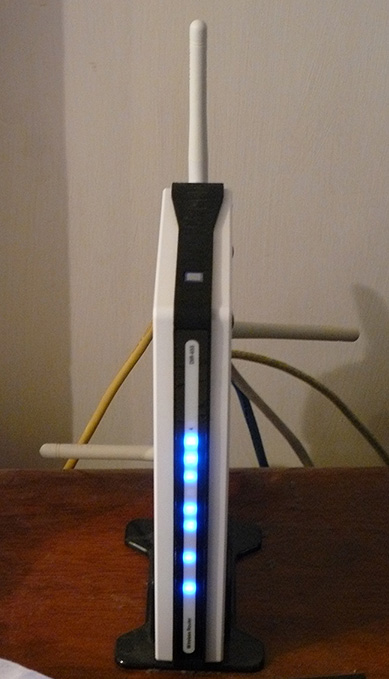
He tenido una D-Link DIR-655 para el año pasado y es por lejos el mejor router que he usado, aunque lo hice pagar $ 150 más de lo que he pagado por un router antes, por lo que he conseguido lo que he pagado.
A partir de la versión 1.21 beta 04 de la DIR-655 firmware hay ahora la funcionalidad de SharePoint disponibles. SharePoint como los medios de comunicación y otros sitios lo llaman o parcialmente SharePort como se le conoce en todas partes, incluyendo el software en sí es una forma de productos D-Link para compartir un dispositivo USB a través de la LAN, voy a tratar de no confundirlo todo aún más, así que se refieren a ella sólo como SharePort partir de ahora.
SharePort es una característica interesante que yo realmente quería ser capaz de hacer hace unos años, al compartir dispositivos USB desde un ordenador de modo que puedan usarse en otro PC como si el dispositivo fue realmente conectado a su PC. D-Link finalmente han llevado esta tecnología a la vida en forma limitada con SharePort.
Así es como funciona SharePort, voy a utilizar mi DIR-655 y Brother DCP-150C MFC como un ejemplo.
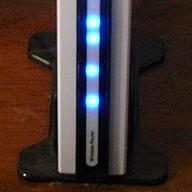
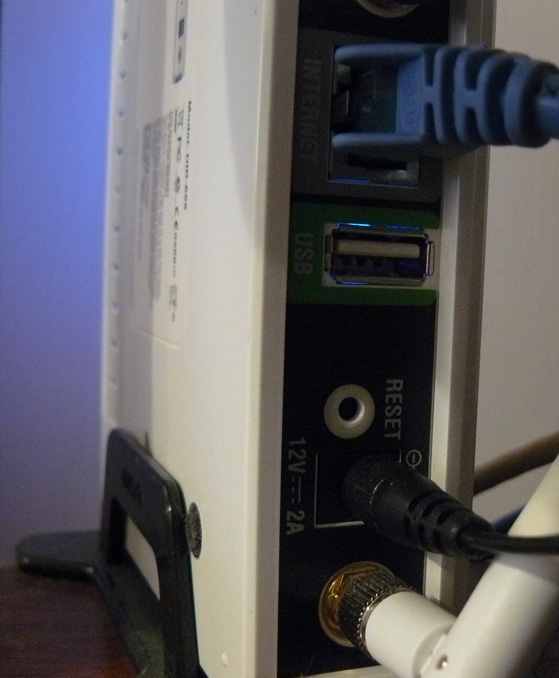
El DIR-655 tiene un puerto USB en la parte posterior, las pruebas parecen indicar que es un puerto USB 1.1, hasta ahora, el puerto fue utilizado para la configuración inalámbrica que pueden ser almacenados en una memoria USB.
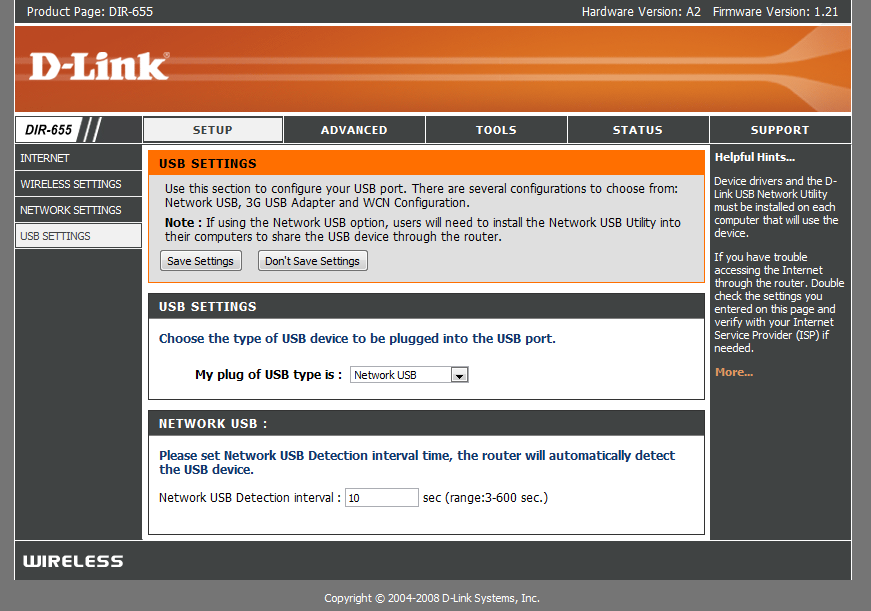
Después de instalar el nuevo firmware sin embargo, el puerto USB se ha encontrado un uso más, nos saludó con un nuevo menú en el programa de instalación que controla el uso del puerto.
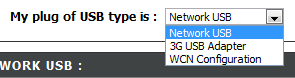
Como se puede ver que no hay mucho a la configuración de este puerto USB, WCN es la configuración por defecto, esto se utiliza para la tecla de configuración inalámbrica, seleccione la casilla desplegable:

Selección de red USB pone el router en modo SharePort, la elección de 3G USB Adapter es un poco un misterio para mí, no estoy seguro de qué dispositivos son compatibles con este momento, sin embargo como la mayoría de la gente, tengo un servicio de 3G y su uso como una copia de seguridad sólo conectar el dispositivo al puerto USB y la elección de 3G USB Adapter sería muy útil.
Una vez elegido el dispositivo de red USB se comparte automáticamente, sin embargo, a fin de contactar debe instalar el software SharePort de D-Link, esto todavía está en beta, parece que usarlo con precaución etc etc, no he tenido un problema con todavía y parece bastante pulida. una vez que está instalado asegúrese de permitir que se ejecute al iniciar y ejecutar de inmediato, de lo contrario no podrá usar el dispositivo sin manualmente ejecutando el software SharePort cada vez, sólo utiliza 2 MB de memoria RAM así que no es un recurso de cerdo.

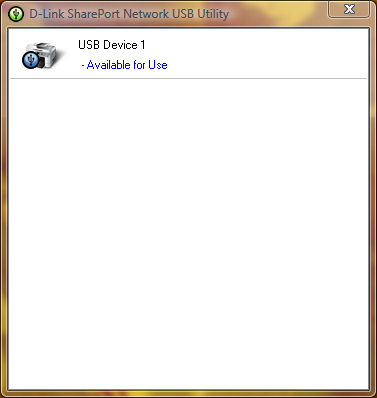
Si el dispositivo USB está encendido y conectado a continuación, la utilidad SharePort debe mostrar como este una vez que usted haga doble clic sobre el icono en la bandeja del sistema. A continuación, se permite llevar a cabo a través de un asistente para la instalación del dispositivo, usted necesitará su CD de controladores de dispositivo o el controlador más reciente para su sitio web, al final se le preguntará si desea que se conecte automáticamente al dispositivo cuando se imprime si Se trata de una impresora, esta es una buena idea de lo contrario, debe elegir manualmente la conexión.
Una vez que está todo listo en cada equipo que utiliza el dispositivo, te darás cuenta de que cada dispositivo señala que la impresora está en pausa y fuera de línea, impresión a la impresora en cualquier caso, el software detecta SharePort que una impresión se ha enviado a la impresora y asigna automáticamente la impresora a su computadora y cuando la impresora se comunica con el PC se mostrará como conectado, una vez que el trabajo de impresión se ha terminado luego regresará de nuevo a fuera de línea, hizo una pausa.
La limitación de esta función es que sólo funcionará en un PC a la vez, dispositivos USB, simplemente no están diseñados para ser conectados a 2 PCs a la vez lo que tiene sentido por qué este es el caso.
No he tratado cosas como las cámaras web que sin embargo se sabe que el trabajo, aunque a un ritmo más lento de lo normal, la función de escáner de la impresora funciona bien, sin embargo usted debe conectar manualmente utilizando el software SharePort utilizarlo, asegúrese de desconectar después de que se haya terminado.
Como dije al comienzo de este artículo, el software SharePort es algo que he estado esperando mucho tiempo, es una gran característica en vista de mi router no es la última allí ahora y casi parecía como D-Link había renunciado a la adición de nuevos características a él, sino que también muestra lo bien que el dispositivo puede funcionar si se puede manejar un dispositivo USB mientras se está llevando a cabo todas sus otras obligaciones.
Puestos relacionados con:
Comentarios:
Deje una contestación


Fecha: 14 de octubre 2008
Hora: 5:57 am
Acabo de actualizar el firmware en mi router DIR 655 a 1,21. Cuando empecé a instalar la aplicación SharePort utilidad se estrelló a mi escritorio y ordenadores portátiles, tanto con Windows Vista Home Premium OS. Llamado de apoyo Dlink tecnología, pero no encontró problemas. Nadie tenía el mismo problema? En la necesidad de una solución a este problema ... por favor ayuda.
Fecha: 14 de octubre 2008
Hora: 11:47 am
Bueno, yo todavía estoy corriendo 1.21 Beta 04, que podría haber algo con 1,21 final, también podría ser una buena idea volver a descargar la utilidad de ftp://ftp.dlink.com/Gateway/dir655/Apps/SharePort_Network_USB_Utility_094. zip y posiblemente re-flash del router con ftp://ftp.dlink.com/Gateway/dir655/Firmware/dir655_firmware_121.zip O ftp://ftp.dlink.com/Gateway/dir655/Firmware/dir655_firmware_121_no_securespot.zip la no_securespot archivo tiene una fecha más reciente en lo que el firmware estándar de 1,21. ¿Qué tipo de software que usted tiene actualmente en ejecución en ambos equipos? Intente apagar el antivirus, etc, tanto cuando la instalación de este.
Fecha: 16 de octubre 2008
Hora: 4:56 am
Acabo de instalar el firmware 1.13 en mi DGL-4500, así como instalar la utilidad shareport. Shareport no es recionizing mi router como en la red o mi HD externo como su conexión. ¿Alguna idea?
Fecha: 16 de octubre 2008
Hora: 6:44 pm
Realmente estoy tratando de llegar al fondo de un problema similar que estoy viviendo, hace unos días mi PC dejó de detectar cuando la impresora estaba encendida y la mayoría del tiempo tampoco se detecta cuando se conecta el router.
He reinstalado, reiniciado el router y no cambia, incluso cuando todos los otros PC funciona perfectamente.
Posible solución: En realidad acabo de solucionado el problema, parece que no puede reconocer los dispositivos cuando se han activado más de una tarjeta de red, así que si estás ejecutando VMware, etc, tendrá que desactivar las conexiones de red y reiniciar antes de que se iniciará la detección de nuevo. Si usted es capaz de conseguir que funcione también de esta hágamelo saber.
Fecha: 18 de octubre 2008
Hora: 5:54 pm
Hola!
Al parecer, esto sólo funciona en la versión de EE.UU. de los 655. He actualizamos el firmware a la versión más reciente de la UE y no hay pantalla como se describe anteriormente.
Sólo quería dejar claro que esto es para los usuarios de EE.UU. solamente. Todos los demás, no se equivoca en el pensamiento de este router se conectará en red nada más que acceso a la web.
Fecha: 19 de octubre 2008
Hora: 12:13a.m.
Gracias por los jefes, yo he estado usando la versión de EE.UU. del firmware en mi au compró 655.
Yo no recomiendo hacer eso, sin embargo yo no creo que haya ninguna diferencia en el hardware para las distintas regiones tampoco.
Fecha: 20 de octubre 2008
Hora: 5:35 am
Ben-Gracias por este gran tutorial - con ayuda de sus instrucciones, he podido actualizar el firmware, instalar la utilidad de impresión e imprimir utilizando mi router-portátil conectado! Sólo una palabra de agradecimiento.
Como un FYI, he utilizado el D-Link propio software de router "comprobar si hay actualizaciones de firmware" característica, y automáticamente se recomienda la versión 1.21 (de fecha 10/9/2008). Ahora tengo la impresión las mil maravillas en Vista-based portátil (Compaq), y un XP / Home-based desktop (Compaq). Aún dispone de otra computadora portátil de Dell para conectarse. Impresora es una impresora HP Deskjet F4180 All-In-One. Tuvo que instalar SharePoint y el controlador de impresora de HP en el portátil, pero que no fue gran cosa.
Una diferencia que he notado de lo que había dicho: Yo no tengo que volver a conectar a la impresora cada vez que lo uso. Una vez que estoy conectado, permanece conectado a menos que la opción de "liberarlo". Si una de las PC está conectada, y si desea imprimir desde una diferente, se le ofrecerá la opción de "solicitar una liberación" de la máquina que está conectada. Entonces, la máquina que está conectado actualmente recibe un mensaje pop-up solicitándole que desconectar para que otro usuario puede utilizar la impresora. La barra de estado también muestra el nombre del equipo que sea la máquina está conectada activamente a la impresora. Tal vez esto era otra actualización de firmware que se incluye en la versión 10/9/08?
Como para tu información, yo soy un usuario de EE.UU..
Fecha: 20 de octubre 2008
Hora: 12:34p.m.
Gracias por tu comentario Lisa, me alegro de que te gustaba mis instrucciones.
En realidad nunca he encontrado con esto, todos mis equipos están configurados para auto-conexión de modo que sólo están conectados a la impresora en el segundo cuento con unos cuantos que se envía el trabajo de impresión, entonces se desconecta de nuevo, supongo que sería parte de Sin embargo, también el mío no lo he encontrado por no tenerlo conectado a la PC cualquier tiempo suficiente para que otro a la solicitud del uso de ella.
Fecha: 23 de octubre 2008
Hora: 7:48 am
Definitivamente, hay problemas con ver las versiones 1.2 y 1.21 del DIR-655 firmware.
El mapeo de servidores virtuales no funciona correctamente para los paquetes salientes. Tengo un servidor de correo electrónico que comenzó a funcionar de forma intermitente en estas dos revoluciones del firmware. Volviendo a 1,11 resuelto el problema. Las conexiones al puerto 25 (SMTP) que la ruta al servidor interno apropiado en mi red pero parece que el Resp. servidores no siempre fue volver a conectar al servidor distante. Esto deja a las rutinas de espera para la comunicación SMTP adicional que nunca llega y el tiempo de espera. A veces el servidor se transmite por vencido y de correo electrónico está perdido.
Además, los horarios no se puede configurar correctamente .. el firmware de forma incorrecta banderas veces, es decir nulas: 11-5 no es válida en 1,2 x y en Aceptar en 1,11.
Fecha: 23 de octubre 2008
Hora: 11:52 am
Eso es muy malo Brian, no he experimentado algo muy malo con estos firmwares mí mismo, pero otros son los problemas que planteen. Anteriormente tuve un 1,2 medida que las personas estaban teniendo problemas con él, pero parece que no todos los problemas que puede haber sido fijado.
Fecha: 24 de octubre 2008
Hora: 6:35 am
Me pregunto si usted podría probar algo por mí ... ¿Podrías tratar de establecer un horario de uso de 11-5 y ver si se considera que es válido? Que me diga si esto es un problema universal con 1.21 o algo thats sólo un problema con mi unidad y el firmware .... THX
Fecha: 24 de octubre 2008
Hora: 4:47 pm
Estoy experimentando el mismo error, parece que no les gusta que abarca más de la medianoche. ¿Qué sucede cuando se establece un horario de 11 p.m.-12 p.m. y un 12 a.m.-5 a.m.?
Fecha: 27 de octubre 2008
Hora: 7:28 am
He encontrado el sitio web francés cuando el representante de dlink francés reclamaciones shareport funcionalidad estará disponible en las últimas semanas en el firmware de la UE:
http://www.clubic.com/actualite-170094-dlink-routeurs-dir-655-dir-855.html
Uno de los comentarios debajo del artículo sais firmware EE.UU. funciona bien en el hardware de la UE (como Ben escribió - probablemente no hay diferencias en el hardware), shareport funciona bien, y multifunción de Canon PIXMA puede explorar a través del puerto compartido.
Estoy ordenando el DIR-655 para mí ...
Fecha: 28 de octubre 2008
Hora: 2:03 am
@ Jun (y cualquier otra persona) ... También me encontré con la "instalación de SharePort" se estrelló mis sistemas de emisión. (tanto v .94 y 1.0 las versiones)
El DIR-655 fue en gran actualización del firmware ha ido bien. Router / Wireless rasgadura rápida.
Fui a instalar el software SharePort y se estrelló mi XP SP3 y Windows Vista Home Premium sistemas horriblemente mal. Fue capaz de conseguir que va a través de la restauración del sistema, pero no fue bonito por un tiempo.
Estoy sospechando de un conflicto con AVG Free 8, que es una pieza de software común en todos mis sistemas.
¿Alguien más puede confirmar, posiblemente, a / SharePort AVG Free 8 conflicto conductor que podría haberse estrellado sus sistemas durante / después de instalar SharePort?
-Cheers
Fecha: 28 de octubre 2008
Hora: 7:35 am
Bueno, tengo el mismo problema que junio SharePoint, versión 1.0 bloquea mi portátiles cuando la instalación y desinstalación. Tengo el firmware 1.21, pero no creo que lo que importa, porque ni siquiera puedo instalar el software sin que se caiga. Llamado de apoyo Dlink y dicen que el Sharepoint y el puerto USB no son compatibles con el DIR-655.
Podría buscar un producto alternativo que bien puede soportar un disco duro. ¿Alguna sugerencia? Yo podría tratar de la Extreeme Aeropuerto de Apple ahora que es de Modo Dual Gigabit y capaz.
Fecha: 28 de octubre 2008
Hora: 9:30 pm
Estoy casi seguro en mi caso hay un conflicto entre el conductor conductor SharePort y algo más. Estoy fuertemente inclinado a favor de que sea algún tipo de protección del sistema (HIPS?) Característica de AVG Free 8 en mi caso.
En la prueba de los sistemas de cama, puedo instalar SharePort bien (v.94 o v1.0). Sin embargo, si primero tengo AVG Free 8 instalado las máquinas de pantalla azul durante el final del proceso de instalación ... bien cuando un conductor o el servicio intenta ser instalado. Curiosamente, en un sistema "real" que los tanques durante la instalación, en un sistema virtual, que sólo los tanques durante la desinstalación de SharePort con AVG Free 8.
Sin embargo, (en los sistemas virtuales) si primero desinstalar AVG Free 8, reiniciar, instalar SharePort, reinicie, y luego instale AVG Free 8, todo parece feliz.
Tengo que hacer un poco más de solución de problemas primero antes de pasar a mi "en vivo" de sistemas. No fue muy divertido hacer una restauración del sistema en dos de mis tres sistemas de este fin de semana.
No creo que es una cuestión router-hardware/firmware lo mejor que puedo decir. Mi DIR-655, si rasgadura rápida y sólida. Hice la actualización al firmware 1.21 que permite esta característica SharePort nuevo, pero yo no veo cómo el firmware del router está afectando a los sistemas. Estoy convencido de que es con el software de SharePort sí mismo y en concreto el conductor o el conflicto en el servicio en la inicialización de la instalación. Sólo tengo que precisar el punto de conflicto.
Y sí ... me pasé más de 30 minutos en el teléfono con el apoyo Dlink anoche y que era casi nada. Finalmente tuve la tecnología pobres a intensificar mis resultados a un supervisor y tal vez lo hará a una mesa técnica en Dlink.
Según este individuo, no hay más nuevas "trastienda" versiones disponibles para SharePort en este momento.
Le hará saber lo que quiero averiguar.
De lo contrario, he estado muy contento con el DIR-655 del dispositivo general. Lástima que la función de SharePort fue uno de los factores decisivos para ir con este modelo.
Sigh ....
(BTW-he publicado un comentario sobre el derecho de las minas por encima de SteveW's ... de alguna manera el junio atrapados navegador nombre en el campo de autor.)
-Cheers
Fecha: 29 de octubre 2008
Hora: 2:44 am
Ese es el trabajo de solución de problemas bien allí Claus, sería un problema de software SharePort seguro, tal vez AVG no está jugando bien bonito, no tienen exactamente consiguió el mejor registro recientemente respecto a las cuestiones con otro software. Voy a ver si puedo averiguar mañana, algo relacionado con AVG / SharePort, que estoy seguro de las compañías sabe algo.
Yo no esperaría que D-Link para actualizar el software por un tiempo pero creo que sólo se sabe con seguridad.
Esperemos que si hay suficiente gente que la cuestión de si van a arreglar pronto, el software tiene que trabajar con todo el hardware SharePort capaz y hay muy pocos de los que por ahí ahora.
Por cierto, ha cambiado de nombre en el comentario anterior SteveW así que la conversación puede ser entendida correctamente, hágamelo saber si usted presenta errores con el sistema de comentarios, es mi código para que haya una posibilidad de errores.
Fecha: 31 de octubre 2008
Hora: 8:34 am
También instalado 1,21 en mi DIR-655 y el software USB. Mi equipo cableado encuentra la impresora de inmediato. Mi bloc de notas (sin cables) sharport dice que no puede encontrar un dispositivo USB. ¿Alguna sugerencia?
Fecha: 31 de octubre 2008
Hora: 10:20 am
Pruebe a deshabilitar todas las tarjetas de red y reiniciar, incluso la tarjeta ethernet, Shareport se confunde fácilmente con múltiples conexiones de red, si se está ejecutando VMWare intente desactivar las tarjetas de red VMNet.
También desactivar temporalmente cualquier servidor de seguridad que pueda tener en la computadora portátil sólo en un caso que está bloqueando la conexión.
Fecha: 2 de noviembre 2008
Hora: 10:51 am
Tener el mismo problema que Valca pero estoy corriendo el nuevo escáner de virus de Norton, así que me pregunto si es otra cosa a continuación, un escáner de virus.
Fecha: 3 de noviembre 2008
Hora: 4:14 am
Hola chicos. Sin embargo las pruebas al respecto.
Yo sospechaba con anterioridad AVG 8 por lo que este fin de semana he encontrado algo de tiempo libre. Decidido a poner mi teoría a prueba en mi Vista Home Prem. Sistema de SP1.
He desinstalado AVG 8, hizo un punto de restauración manual (bueno yo) se reinicia, hasta ahora tan bueno. Entonces he instalado SharePort.
BSOD.
Restaurar sistema usando mi punto de salvar restaurado mi sistema. Ahora estaba de vuelta al punto de partida.
Se trasladó a una nueva sesión de Virtual PC con una instalación de Windows XP SP2 prístina. Instalado SharePort bien. No hay ningún problema. Desinstalado bien.
Siguiente sospecha que tuve fue NetLimiter Monitor, que también es común en todas mis tres sistemas.
Instalado NetLimiter Monitor y reiniciado. Bueno. No hay problemas de estabilidad.
Fui a instalar SharePort (v1.0) y cerca del final de la instalación ... igual que mis sistemas reales ... el sistema virtual hizo un negro inmediata pantalla reiniciar el sistema.
Hmmmm.
Así que he desinstalado NetLimiter Monitor de mis sistemas y poner en una consulta por correo electrónico a su equipo de apoyo que pregunta si se puede mirar en forma independiente.
Ver cómo se parece a la vez SharePort NetLimiter Monitor y ambos parecen gancho en los controladores de red de Windows y servicios esto tiene sentido bastante bien.
Dará otra actualización si / cuando ellos responden.
No estoy seguro si soy lo suficientemente valiente todavía a repetir el experimento en mis sistemas de vivir de nuevo.
-A tu salud!
Fecha: 3 de noviembre 2008
Hora: 7:27 am
Hola a todos, soy Nuevo en todo esto. Ha actualizado recientemente a la DIR655. Gran. 1 Desktop 5 Notebooks. Desktop tiene la tarjeta de red PCI, Router, ADSL módem, etc cuadernos son todos funcionamiento interno dispositivos 802.11g.
Si desenchufa el cable USB del láser color Oki550 desde el escritorio, y conéctelo al puerto USB de la DIR655. ¿Es esta última instancia (o teoría) nos va a permitir imprimir a ese láser sin necesidad de encender el escritorio del ordenador en primer lugar?
Por ahora ese es mi objetivo final y esta es mi primera pregunta.
Gracias
Dave
Fecha: 3 de noviembre 2008
Hora: 3:10 pm
Si lo que permitirá el acceso a la impresora cada vez que el router está encendido, la impresora y el router son las únicas 2 cosas que tienen que estar encendido para que esto funcione, sin embargo, que es, siempre que no la ruta a través del escritorio en cualquier momento. Como puede verse por los comentarios que usted debe ejercer un poco de cautela al instalar el software Shareport ya que no juega bien con otro software que tiene componentes de red.
Fecha: 4 de noviembre 2008
Hora: 6:30 pm
Hola chicos he encontrado el problema ... Su desinstalar limitador de red que ya está bueno para ir ^ _ ^
Fecha: 6 de noviembre 2008
Hora: 12:01 am
Ben,
Sólo para confirmar lo que sospechaba y Nick ha confirmado ... la neta Limitador 2 del programa Monitor de la crítica no entrar en conflicto con la aplicación SharePort (en este momento).
Había desinstalado de mi XP Home (SP3) y Windows Vista Home Premium (SP1) de los sistemas. Entonces reinstalado SharePort después de crear puntos de restauración del sistema (sólo para estar seguro).
Instalación ha ido bien este tiempo y no BSOD o conflictos se han observado. La aplicación SharePort encontró rápidamente el almacenamiento Seagate flash USB y yo era capaz de "montar / conectar" a ella y leer / escribir archivos de todos los sistemas.
Para ser claro ... con un solo sistema puede ser conectado al dispositivo en un momento en lo que puedo decir. Aparte de que ahora funciona muy bien.
¡Uf! Eso fue un doozie de trabajo a esta cuestión. Gracias a Nick para enviar una confirmación.
Envié un correo electrónico al equipo limitador de red de apoyo sobre el tema, pero no hay respuesta todavía.
No está seguro si va a ocurrir con todos sus programas (pagadas o libre) o sólo con la red de Limitador 2 Monitor.
Gracias a todos!
¡Salud!!
-Claus V.
Fecha: 7 de noviembre 2008
Hora: 12:34a.m.
Hola, soy el propietario del DIR-855 como mi viejo y querido Dir-655 se fue a casa de mis hermanas, como una solución permanente. Sin embargo, yo estaría muy interesado en saber si el DIR-855 soporta esta funcionalidad. Podría ser un buen complemento para mi router inalámbrico ya impresionante.
Daniel
Fecha: 8 de noviembre 2008
Hora: 6:13 am
Daniel,
De acuerdo con un D-Link comunicado de prensa, el DIR-855 está incluida en los que SharePort apoya.
http://www.dlink.com/press/pr/?prid=442
Citando a:
"La red de innovadores SharePort USB función de puente se encuentra disponible en D-Link Xtreme N Gigabit Router modelos - el DIR-655, DIR-825, DIR-855 y Router DGL-4500 Juego con ¢ GameFuelâ". La actualización de la tecnología de SharePort también está disponible en el Wireless N DIR-628. Los propietarios actuales de los routers podrá actualizar a la tecnología de SharePort descargando la última versión del firmware y la utilidad de cliente desde el sitio web de D-Link, http://www.dlink.com ".
Creo que este es el enlace con el DIR-855 firmware y la página SharePort descarga:
Firmware --
http://www.dlink.com/products/support.asp?pid=548&sec=1 # firmware
(Esta es una bonita modelo 855 por la forma. Rinde mi llanura 655 mira!
Buena suerte!
Claus V.
Fecha: 8 de noviembre 2008
Hora: 9:41 pm
Hola, tengo mi propia DIR655 de 1 semana. Su una versión de la UE, pero el firmware 1.21 EE.UU. ejecutar smothly. Shareport obras, pero no muy estable.
Primera emisión, el intercambio de la unidad de disco USB por el WiFi no es una buena idea en mi humilde opinión. Cualquier problema de la red y Vista tienen problemas con el dispositivo. También el rendimiento es una cuestión (800KB / s, 2m / s, cuando la copia de archivos entre ordenadores portátiles con adaptadores WiFi n).
Pero he comprado este router para compartir la impresora. Y es posible, pero Shareport Utilidad (1,0) sólo funciona en la cuenta local. Cuando se trabaja en la cuenta de Active Directory, la ventana emergente de la utilidad muestra el dispositivo conectado al puerto USB del router. Sin embargo, al hacer clic en el icono de la bandeja de la ventana de aplicación no se muestra. La aplicación está en la barra de tareas, pero no tiene ninguna ventana para seleccionar el dispositivo y se conectan.
En la cuenta local todo está bien. Parece ser la cuestión SharePort utilidad. El sistema operativo se instaló hace una semana, no muchas aplicaciones instaladas.
¿Alguna idea?
Piotr
Fecha: 9 de noviembre 2008
Hora: 8:18 am
Noel, muchas gracias, yo sufría de este problema hasta ahora. Pasé mi fin de semana entero de nada, gracias!
Este limitador neto sucks: \
Fecha: 10 de noviembre 2008
Hora: 1:27 pm
Hola, estoy teniendo este Isue con dlink 655 v1.21
y v.1.0 shareport ...
multifuction de la impresora y el flash USB Drive trabajo impecable, el 2 de XP SP3, y el 1 de Vista de 64 máquinas,
pero cuando puedo conectar un iPod touch v. 2.0, la utilidad shareport muestra "disponible para su uso"
y tratar de conectarse a ella y las 3 de la caída de mi PC es la conexión a Internet, inalámbrico y por cable y huelga decir que la costumbre y el itouch conectarse a Internet se restablece automáticamente, es como el router entra en un ciclo de potencia o algo así.
Luego probé el mismo procedimiento pero con un iPod nano este tiempo, y adivinen qué, trabajó perfecto!
¿Hay alguien con este problema y / o conocer la solución a esto?
Dar gracias por su ayuda.
Fecha: 14 de noviembre 2008
Hora: 1:29 pm
Hi there!
Así que .. Tengo un router DIR-655 de la UE y probado el firmware 1.21 EE.UU. a mí mismo. No voy a mentir, la actualización del firmware no fue sin problemas. Cuando he subido el firmware para el router, no pude ir a la página de administración del router ya ... pero después de un reinicio todo volvió a la normalidad (que podría ser una buena idea guardar la configuración del router antes de hacer la actualización de firmware). De todas formas, animo a todo el mundo con un no nos dir-655 para juzgar a los 1,21 del firmware ... hasta ahora todo está funcionando bien e incluso logró conectar la impresora a la misma y funciona muy bien ... Lo siguiente a probar es un dispositivo de almacenamiento
Fecha: 15 de noviembre 2008
Hora: 10:16 pm
Recordar chicos, el router parece estar limitada a velocidades de USB 1.1, es decir, sobre 1MB/second por lo que no es recomendable a menos que tenga un dispositivo pequeño y no tienen mucho que la transferencia, también routers no son los más rápidos sistemas para la transferencia de datos más de la USB, probablemente pone mucha tensión en el dispositivo que podría causar algo de velocidad más lenta y la deserción de LAN inalámbrica para router se reinicie.
Gracias por toda su investigación Claus, ojalá sea pronto una de las empresas es capaz de solucionar los problemas de compatibilidad.
Fecha: 26 de noviembre 2008
Hora: 3:22 am
I was hoping you could help me with another issue.
I recently upgraded from another D-link router to a Dir-655. Upgraded to f/w 1.21. Have multiple machines on a local network workgroup that all saw each other fine with the older router. Now I cant see any of the other machines on the lan. I know I've missed something simple so I was hoping you could give me a heads up. All nodes see the internet fine and ip's are reserved and withing dhcp range. ¿Qué he perdido? Much thanks
Date: November 26, 2008
Time: 1:25 pm
There are 2 things off the top of my head that have issues when moving networks, mainly when the network changes it's IP arrangements, some firewall software including Windows Firewall and commonly ZoneAlarm can block a PC from being 'discoverable' as it believes this new network is a public network on the internet instead of a private LAN, if you are running Windows Vista the same thing can happen, make sure your PCs have their network connection set to Home or Private, those really should be the only times when that problem should occur.
If they are wireless also make sure that Wireless Partition is disabled in the Advanced Wireless properties as this will cause a similar affect.
Date: December 11, 2008
Time: 10:55 am
I am having the same BSOD problem on Vista as mentioned by others. The PC went to BSOD at the end of the Shareport install and then BSOD'ed each time I tried to login. I have Trend Micro AV and the Nortel Contivity VPN client. Both are essential programs and I can't uninstall either. Could either one of these be a problem?
Date: December 18, 2008
Time: 11:01 pm
Hola,
I am interested in upgrading to this router so I have searched different forums for clues.
Today I noticed there is a new (still v1.21) file updated 12.12.08. Anyone tried if this is a new version with fixes or not ?
Date: December 19, 2008
Time: 2:57 pm
I'll give it a try and see if it changes anything based on issues people have had, on that note a new issue I have noticed has arisen, occasionally after having the router on for more than a week the shareport software on all computers starts giving out connection errors, if they're left for a while there can be hundreds on the screen, restarting the router stops the errors for a while.
Date: December 20, 2008
Time: 6:52 pm
The 1.21 is the same as the one that was released a few months ago, just with the date changed, however about 2 or 3 versions have been labelled 1.21 without a beta tag, with the last one being 1.21 B10 in November, so if you downloaded 1.21 in October or earlier, download it again and install, it fixes a few problems with port forwarding and saving settings.
Date: December 29, 2008
Time: 6:59 am
Hi gang,
Gran hilo!
I'm having a shareport problem, and wanted to see if anyone has experienced the same.
here's my setup:
1. DIR-655 with firmware 1.21
2. Win XP Pro machine (as a vmware client) with shareport 1
3. WD external HDD
The HDD is plugged into the USB port on the router, but I'm not able to connect to it from the the Win XP pro machine. The XP machine will continuously notify me that it has “Found” the HDD, but the Shareport tray icon continues to stay red, and never turns green. After about 30 seconds, the notification will come back. I'm completely at a loss, as it workeed in the past when I had this vm client on another host. I know that vmware may be causing this, but I don't see how, because I only have one network adapter enabled on the XP machine (ethernet bridged). I've spent hours trying to get this to work…Any ideas would be greatly appreciated!
Gracias,
John
Date: December 30, 2008
Time: 8:02 am
I have this setup DIR-655 Firmware 1.2.1 and Shareport I got to work if I disable my Microsoft OneCare firewall.
Does anyone know the Port's used by D-Link SharePort?
Date: December 31, 2008
Time: 12:08 am
If you all go to Dlink's website for the router, you will see that it says,
“This firmware is engineered for US products only.
Using this firmware on a device outside of the United States will void your warranty and may render the device unusable.
Please contact the D-Link office in your region for firmware updates that are compatible with your D-Link product.”
y,
“¤ Added SharePort features.
¤ Fixed email notification issue.
Please download the SharePort Utility and see the SharePort manual before use.”
You have to download the actual utility to use it!
Date: December 31, 2008
Time: 12:10 am
Oh, and I almost forgot, this is for x86 version OS's only. x64 is not supported.
Date: January 2, 2009
Time: 3:12 am
Hi James, I'm not sure of the ports myself however if you open up a command prompt and use the command 'netstat' just after attempting to connect using Shareport, look for the router's IP and you should be able to see all ports that the PC is connecting to the router for, OneCare may have a log file that might allow you to do a similar thing, just make sure you're running as little network applications as possible at the time as the lists can get pretty long and do not have any p2p programs running at the time either.
Hi Jody, I have tested version 0.94 and version 1.00 on Windows XP x64 and Windows Vista x64 and have had no problems, is there an x64 version that doesn't allow this to run?
Date: January 7, 2009
Time: 5:38 pm
I just got a D-Link DIR628 which also has the shareport utility. However, I am having some rather strange problem and wonder if anyone can offer some help or suggestions.
El portátil de mi esposa Vista, la shareport de red USB utilidad instalado sin problemas y funciona bien. En el escritorio de XP Pro, la primera instalación colgado y Al reiniciar, la red de servicios públicos USB en marcha, pero no podía ver los dispositivos detrás del enrutador. He estado probando diferentes ajustes de servidor de seguridad (y eventualmente desactivado todos los firewalls sólo para probar) en los últimos días y nada parecía realmente funcionan.
Lo único que parece funcionar es si puedo desinstalar la utilidad shareport, vuelva a instalar, entonces la primera vez que se inició después de reinstalar, pude ver los dispositivos. Si la salida fuera y reiniciar la utilidad, es el mismo viejo problema de no ver a ningún dispositivo. Reiniciando también tiene el mismo problema de no ver nada. La única manera de conseguir que funcione hasta el momento, parece que desinstalar-> Reiniciar-> instalar y sólo trabajó después de esa secuencia.
Alguien tiene alguna idea sobre lo que este problema podría ser? Cuando funcionó, funcionó muy bien. Tengo 80 Mbps desde un HD externo que no es grande pero no demasiado mal. También podría poner tanto mi impresora multifunción y el HD detrás de un centro y el acceso a ambos. Es realmente maravilloso de esa manera. Sólo deseo que puedo conseguir que funcione en todos mis equipos. Por cierto, mi otro sistema es un Mac y no hay versión para Mac no es para que la utilidad.
Lo siento por el correo de largo, cualquier ayuda o sugerencia es muy apreciada. Gracias.
Fecha: 7 de enero 2009
Hora: 6:36 pm
He visto pocos casos en que los dispositivos no se pueden encontrar en un PC al azar, sin embargo no he experimentado esto en un PC cada vez que después de haber sido instalado. Es el ordenador capaz de detectar el router con la utilidad Shareport?
Haga clic en el icono Shareport, en el menú que se debe ver el nombre de su router y su dirección IP, asegúrese de que está seleccionado, si no ir a él y un nuevo menú se abrirá, asegúrese de hacer clic en Habilitar, también Puede hacer clic en Configuración para obtener algunos parámetros avanzados.
Si el router no aparece en la lista a continuación, puede haber algunos ajustes de conexión en ese PC que están limitando la conexión entre éste y el router.
También estoy esperando en una versión para Mac del software, aunque creo que no podría suceder en el corto plazo.
Fecha: 8 de enero 2009
Hora: 4:19 am
Cualquier persona utilice un concentrador USB de la shareport y recibe más de 1 dispositivo para trabajar?
Fecha: 8 de enero 2009
Hora: 5:21 am
Ben - gracias por la respuesta. El PC que estoy con el problema está directamente conectado a la ruta a través de una conexión por cable utilizando un cable CAT5. Es el sistema principal que yo uso para instalar y configurar el router. Cuando tuve el problema, la línea superior de la derecha de la pantalla, haga clic en el icono de la shareport, el que muestra las direcciones IP y las cosas no era visible. Sólo tengo las cosas desde el "Opciones avanzadas" abajo.
Mike - he puesto un hub USB y conectado una impresora Canon MP470 y un HD externo, al mismo tiempo. Pude ver a los dos y fueron capaces de conectarse a ellas desde mi Vista laptop.I no intenta leer / escribir en el HD y de impresión al mismo tiempo, sin embargo.
Por cierto, he hecho un error anterior. Creo que estaba consiguiendo solamente 8 Mbps, no 80. Así roughtly 1 MB / seg lectura rendimiento es lo que yo estaba recibiendo. No muy rápido, pero lo suficientemente bueno para mover pequeña cantidad de datos.
Fecha: 8 de enero 2009
Hora: 10:28 am
Tengo el mismo problema: Tener un Dlink655 con una conexión por cable a un ordenador portátil Vista Home Premium y un cuadro de más edad de escritorio que ejecutan Win XP.
Shareport funciona bien en el portátil - Quiero utilizarlo para una impresora compartida.
Puedo instalar multa shareport en la máquina XP, pero no encuentra los dispositivos conectados ... y yo también no ver la dirección IP del router al botón derecho del ratón. I cortafuegos con discapacidad, etc desinstalar el software antivirus, pero sin éxito.
Gustaría algunos consejos, si alguien los tiene!
Fecha: 8 de enero 2009
Hora: 2:42 pm
Para Jacko
Fui al administrador, hacer clic en las más avanzadas, a continuación, deseo a la izquierda, a continuación, me aseguré de que estaba habilitado y los clasificadores PRIORIDAD I clic AUTOMÁTICO. Try it.
Fecha: 10 de enero 2009
Hora: 4:44 am
Mike - Usted dijo que "entró en administración, hace clic en las más avanzadas, a continuación, deseo a la izquierda, a continuación, me aseguré de que estaba habilitado y los clasificadores PRIORIDAD I clic en automático ..."
Supongo que se trata de la página web de administración para el router Dlink655? ¿Qué es el "deseo" lo que hablamos? Tengo un Dlink628 y yo no vi nada que se parezca "deseo" en el menú avanzado. Me pregunto si usted puede explicar lo que el menú lo hace, podría ser capaz de encontrar la equivalencia en mi router. Gracias.
Fecha: 10 de enero 2009
Hora: 3:04 pm
He comprobado el DIR-628 emulador en el D-Link sitio y parece que el router no tiene deseo en todo, tal vez usted podría intentar perder el tiempo con los ajustes de QOS, ya que son similares a DESEO salvo que afectan tanto a cable y móviles en el lado WAN de las cosas, pero no pueden tener el mismo efecto que QUERER, personalmente he WISH fuera y no tienen problemas.
Fecha: 12 de enero 2009
Hora: 1:45 am
Hola a todos,
He intentado cambiar la configuración de deseo, pero sin suerte. El portátil con Vista no tiene problemas con Shareport en absoluto, mientras que la máquina XP ni siquiera puede reconocer el router.
Si el problema es router lado, yo no sé por qué el cuadro de Vista funcionaría y no la casilla de XP?
Gracias!
Fecha: 12 de enero 2009
Hora: 2:25 am
Hola chicos, estoy viendo lo mismo en el dlink dir-825. Wireless PC a ver mi impresora conectada a la multa shareport USB. Mi PC con conexión de cable de perder la impresora cada vez que se reinicien. Si me reinicia el dir-825 al PC por cable de verá el router.
Cuando hago clic en el icono de SharePoint, veo la Dirección IP para el router cuando está funcionando correctamente con la impresora. Cuando no lo es, la dirección IP no está allí y la primera entrada es las opciones avanzadas.
He intentado cambiar la configuración, pero no quieren cambiar ....
Fecha: 12 de enero 2009
Hora: 4:38 pm
Hola Jacko y especiales, son uno de sus equipos que tienen este conjunto de problemas para conectarse al router a través de DHCP o mediante menually entró IP estáticas?
Fecha: 13 de enero 2009
Hora: 3:10 am
Hola
Both my laptop (Vista) and desktop (XP) are connected by wire to the router, and both are set up using DHCP.
Gracias!
Date: January 14, 2009
Time: 3:14 am
I talked to dlink 3rd level today who was passing this on to the product manager. I need this to work so have done a good amount of testing. My PC's are all connecting via dhcp, all vista (some x32 and some x64).
From the testing here i have found that the wireless PC's always detect the printer connected to the shareport. The wired PC's are inconsistent… at best. If I reboot the dir-825, the wired pc's will immediately detect the shareport printer and keep it until the network connection is interrupted. If i pull the network cable on the wired pc, and then plug it back in, they will lose the printer and not re-establish it (exactly what happens when you power off your PC).
Hoping we can come up with a better solution than rebooting the router every day!!! I'm sure linksys would like to hear about that.
Date: January 14, 2009
Time: 7:14 am
hoc,
I think you may be on to something. In my set up, the system that has problem seeing the network USB port is connected to the router through a CAT5 directly. The laptop using wireless connection has always been good. I have an additional variable in my environment on the OS used. The wired desktop uses XP while the wireless laptop uses Vista.
I installed Windows 7 Beta on the wired machine over the weekend. I was again able to see the printer on the network USB port upon first start of the utility. When I exited out and restart the utility, I had problem again. I will try rebooting the router when I got home tonight.
Fecha: 17 de enero 2009
Hora: 2:23 am
I am getting a 'Connection failed, please try again.' message every minute or so from SharePort Network USB utility.
It's odd because I have my printer on the USB port and it works fine.
Any theories on where to look??
Date: January 17, 2009
Time: 3:24 pm
I get that too on every computer other than mine, strangely uninstalling/reinstalling doesn't fix it either, the only thing I did was upgrade the firmware, my computer installed SharePort after the firmware upgrade yet the other PCs have had it installed since before and they experience the problem.
I can't see any link between the Operating System they were running or the firewall/antivirus software either, what I have done is turned off the startup option in the program and run the programs only when I need to print.
Date: January 18, 2009
Time: 7:18 am
Can anyone recommend a setup for allowing a mac and a PC to access and use the same external harddisk over a network? Or where I can find info on this? Here are the challenges:
- Both PC and Mac are a bit old, so no N-standard
- Formatting of disk: has to be HSF+ and PC will use MacDrive?
- Considered buying an entertainment PC and use this as “Server”
¿Sugerencias?
Date: January 19, 2009
Time: 9:49 am
Dlink released an update to the sharepoint utility software this week. For my wired pc issues it does help, but is not a complete fix.
At start-up my wired pc doesn't see the printer connected to the shareport. In the 1.0 version, the dialog box for the utility started with “advanced options”. Now it starts with the address for the router.
I can force the utility to see the printer by selecting disable and then enable in that shareport dialog. Still not a complete solution but getting better…
Date: January 22, 2009
Time: 1:38 pm
Shareport is not finding my router in the pop up menu from the system tray icon. I have the DIR 655 and a vista x64 OS. Dlink support stated that shareport does not support 64 bit vista OS but posts here seem to contradict that. Any recommendations, advice would be much appreciated.
Date: January 24, 2009
Time: 12:49 pm
I installed Shareport 1.14 and it works better, although when I disconnect from a hard drive it says it's busy and should I force or cancel. Force seems to work and I can re-connect ok
Date: January 25, 2009
Time: 8:29 am
I've just upgrade my firmware and everything work's fine. I've test USB HDD and USB Printer both work fine. I'm pleased with DIR-655. Real Cool
Date: January 25, 2009
Hora: 2:00 pm
Finally got second laptop to connect to printer hanging off DIR-855. The cuplrit was OneCare – thanks James 30 December. Once One Care Firewall was disabled my Shareport icon turned green and the printer was able to be used. Only took me a couple of days and many grey hairs !
Date: January 26, 2009
Time: 12:18 pm
Hola a todos,
I setup the DIR-655 for a friend – one older desktop with Windows ME and a new laptop with Vista. The desktop is wired to the router, the laptop is wireless. I installed Shareport and hooked up his printer to the USB on the router. ¡Funcionó! for a few days. Now the printer seems to have disappeared…. sort of. It's not listed in any application, but if I click on the Shareport Utility, it says the printer (a fairly new HP) is available. There's got to be something I'm missing here. Anyone know?
(For now, he's not trying to print from the desktop, but I was thinking a usb hub would allow me to hook the printer to the desktop as well as the router.)
gracias
Date: January 27, 2009
Time: 4:37 am
Oh well, I went to my friend's house and everything worked fine… of course! The printer was available and I clicked Connect and it connected. It did reinstall the printer driver. Who knows what he did — he did say he'd been turning. So maybe when I rebooted, it got straightened out.
I am still interested in using a usb hub so his desktop is wired to the printer. So, if anyone has done that and has any “gotchas” to warn me about, I'd appreciate it. I'm thinking printer to hub and hub to desktop and hub to router.
gracias
Date: February 1, 2009
Time: 3:01 pm
Just got a DIR-655 last week after all the good reviews. I downloaded the SharePort fw 1.21 (2008/10/09). I'ma bit disappointed with it. Wanted to share some of the issues I'm seeing perhaps you have solutions to share;
- Clients (3x Vista Acers, & XP Pro Lenovo) have hard time getting an IP address with WPA-personal, and WPA2-personal after wake-up. I must have the laptop try few times until it succeeds. They worked quite fine with cheap Belkin 802.11g routers
- Connection drops even though signal is in the 85% or greater most of the time
- Finally, I bought this when I heard about the SharePort fw. This feature was a big disappointment. I thought it may work as a printserver, but clients have to request and grant the connection before use… very stupid when no one is using the already connected client! – Also, if the laptop sleeps, the connection gets stuck and a USB disconnect/re-connect must be done for the printer to be re-discovered. Lastly, my Canon MF MP830 is not happy with it. The print preview doesn't work anymore, the printer doesn't wake up on jobs, and the jobs error out frequently.
Date: February 3, 2009
Time: 7:14 am
having the same issue as this guy below is telling every thing is ok but when i click on the utility on task bar nothing flashes on desktop.it work well on my other computer running vista 32 home premium , it was doing good on this system too but i don't know why it start acting up like this.this is vista 32 ultimate any suggestion guys would be appreciated.
“Author: Pit
Date: Nov 8, 2008
Hi, I have my own DIR655 for 1 week. Its an EU version, but US firmware 1.21 run smothly. Shareport works, but not very stable.
First issue, sharing USB disk drive over the WiFi is not a good idea IMHO. Any network problem and Vista have issues with device. Also performance is an issue (800kB/s when 2M/s when copying files between laptops with WiFi n adapters).
But I purchased this router for printer sharing. And it is possible, but Shareport Utility (1.0) works only on the local account. When working on the active directory account, the utility's popup window shows the device connected to the router's USB port. But when clicking on the tray icon the app window is not shown. Application is on the taskbar but has no window to select device and do connect.
On the local account everything is OK. Seems to be the SharePort Utility issue. The OS was installed a week ago, not many aplications installed.
"
Date: February 3, 2009
Time: 7:17 am
forget to tell in above post im using Dlink-655 with firmware 1.21 (latestone) and share port utility 1.14. hope that u guys will provide some assistance on this issue.
Date: February 3, 2009
Time: 11:37 am
For KingTut: I have a similar problem on my laptop, the problem is caused by the channels the router is using for wireless, sometimes it will get out of range of standard wireless cards, even my laptop's N card doesn't work properly sometimes, try forcing the wireless channel to something like channel 6 for a while and see how it goes, you can also try having the channel set to 20Mhz, not 20/40.
For bally: It's possible SharePort needs certain permissions to run properly, it may be a good idea to get in contact with D-Link so they are aware of this issue, it could be a bug that they are unaware of as of yet.
Date: February 5, 2009
Time: 5:15 pm
Just installed the latest firmware for DIR-655 and Shareport on three Vista and three XP Pro SP3 pcs. The vista pc's are both wired and wireless and works fine. Te XP pc's refuse to find the router (all three wired). What more is that the Shareport uses up all CPU power when I try to exit the application. There is definitely problems with the software. All firewalls have been turned off. The XP machines have different Anti virus (AVG, Avast and Norman). One of the XP PC's are connected directly to the router, two through a access point. Changing channels or stopping other applications using communication ports have no effect. The Shareport has been tested 0.94 and also updated to 1.0 and tested with clean installations. If anyone is able to run Shareport on XP, please explain how it was installed. Also try Exiting the application and check the CPU meeter.
Date: February 7, 2009
Time: 8:41 am
dlink support q-less regarding active directory matter. even no reply for 4 days upto now. WTF Support they r providing . just dont even know what the thing is
Date: February 11, 2009
Time: 5:22 am
Just wondering out loud: do you think that it would be possible to use DIR-655´s USB port for something else then sharing a printer?
It certainly doesn´t sound to be good enough for usb-hdd´s for very low transfer speeds that´s been mentioned over here.
Could it be used for hosting a very small web server from an USB stick, like a static home page?
Fecha: 12 de febrero 2009
Time: 12:02 am
I have the same problem after install all my laptops, Vista and XP starts to crash and no one could reach the printer plugged in the USB port….
Date: February 13, 2009
Time: 7:03 pm
I think i have a different problem here.. i connected a usb hard disk on the usb port of my dir-655 (1.21 firmware) and installed the shareport utility on my vista32 and xp sp3 computers.. I get no router name when i right click the utility in the system tray so I can't select any usb device from the router.. By double clicking the utility, i get no detected usb device in the utiliy's panel either.. I even tried without wirewall, to no avaqil.. what's up with this?
Date: February 13, 2009
Time: 7:07 pm
..also, whenever i boot vista32 i get a 'new hardware found' message and the request to install drivers for the router.. except that there are no drivers in the cd that came with it or on dlink's website… any suggestions? (by the way, the router works, as I can connect wireless and share my internet connection..)
Date: February 13, 2009
Time: 10:55 pm
For Stefano:
Try downloading/installing SharePort again, the drivers are a combination of generic drivers that Windows should already have and 1 or 2 that should be installed with that setup program.
Looks like the program has installed but has been unsuccessful in installing the drivers for some reason, it is most likely that the setup program has exited and deleted the required driver files in the temporary directory before it has had a chance to install them.
Have you V-Lited or stripped down your Windows XP cds in any way? Sometimes removing inbuilt drivers stops less common drivers that some hardware needs.
For Gustavo:
Unfortunately this software and the drivers don't play well with other software and drivers and there is so many possible incompatabilities, it crashes many computers with seemingly no reason.
If there is any software that is installed on those Laptops however unconnected they may seem to the problem, try removing them temporarily.
For Mika:
I don't think there's much chance of that being possible until they create some sort of interface that allows the router to use the stick for storage so it can run an additional server, then I think the router may not have the processing power needed for such a task.
For Bally:
This would be more of an additional feature in D-Link's eyes, they would have no obligation to get it working correctly, it's just the way those companies work, they don't get much more money on additional functionality such as this so it's not really worth their time.
For GC:
I've never experienced cpu usage issues at any time with SharePort on XP or vista, using different virus scanners or wireless/wired, or even through another access point, I actually have the program set to not startup as it has all sorts of problems when it's allowed to run all the time.
My installation was fairly straight forward so it probably won't help you much, double clicked on the install file, installed with default options and when it was done restarted.
FOR ALL:
I had problems with the program telling me the usb device was connected, then not every 10 minutes or so, then when attempting to use it it would disconnect each time, seems that the router no longer liked my usb extension cable, so I removed it and all is good now, so try changing usb cables when things don't work out properly.
Date: February 14, 2009
Time: 11:44 am
for Ben.
Thanks for the answer… my xp install is fairly clean, so i don't think it has any problems.. also, i didn't detect any problems while installing the shareport utility in both computers, so i find it hard to believe it's a bad installation.. i'm clueless..
Date: March 2, 2009
Time: 11:31 am
Hi Ben, what version is your router? AU or US? Have you tried 3G USB modem on your router?
Date: March 3, 2009
Time: 5:47 pm
Getting the same issue with my wired connection to the DIR-655, Shareport software works after fresh install, connects to the printer shared through the router, but only until the first suspend or reboot, then Shareport no longer detects the router. I'd rather not have to uninstall and reinstall the software every reboot. ¿Alguna idea?
Date: March 4, 2009
Time: 10:02 pm
Hi Adam, I have the AU version router, I have no idea what kind of 3g usb modem they are referring to and have none to test anyway other than my phone (which I assume doesn't count).
Edward, I'm not sure what is going on with that issue but hopefully D-Link fix it as more than a handful of people seem to be experiencing it.
Date: March 6, 2009
Time: 11:35 am
Hola a todos!
I just read most of this comments here, but it seems that I have diffrent kind of problem. Although I know that D-Link DIR-655 is exellent, I am thinking to buy DIR-855 or DIR-825 which are DualBand. I have TOSHIBA Qosmio F50-10K, so inegrated wireless card uses Atheros AR9280 chipset.
1. Can somebody tell me does my wireless card support 2,4GHz and 5 GHz simultaneously?
2. Which D-Link wireless Router should I buy?
Thanks for any comment!
Date: March 6, 2009
Time: 3:43 pm
Hi Jerry,
Your wireless card supposedly does do 2.4ghz/5ghz simultaneously, though I would check with nay documentation that came with it just to make sure.
I'm not too sure about those 2 routers as I have not had any experience personally with any of them, however I have heard that the DIR-855s have all sorts of issues, however we hear of all sorts of issues with the 655 so it really depends on what kind of bugs you can handle. If you want you can even go for another brand such as Linksys, their routers have great reviews lately.
I forgot to mention before for DIR-655 users:
There is a new beta firmware out called 1.22b05 , a significant portion of users have reported that it works great, much better than their recent releases, however this is a beta so be careful and don't install if you're worried about voiding your warranty etc, if it does fail and you're running the beta firmware they are likely to say no to a warranty replacement.
Date: March 6, 2009
Time: 3:47 pm
Jerry,
I bought 2 of the DIR-825 routers. They do simultaneous 2.4GHz and 5GHz, which is why I wanted them instead of the 655.
I am having trouble, though, in getting Shareport to recogni the router on my Vista Ultimate system.
Date: March 7, 2009
Time: 12:30 am
I have Blink as my Security software and there's a conflict with eeyet.sys driver of Blink (EEye).
Would it help to uninstall Blink, install shareport and reinstall Blink or will i always get the conflict between the drivers!
Gracias
Date: March 7, 2009
Time: 2:58 pm
Hi Sebastien, You will probably always get conflict with that driver, unless SharePort is updated by D-Link to stop conflicting, or if the security software company changes how it works.
Date: March 25, 2009
Time: 11:40 am
I have a laptop computer running Vista home premium and Windows Live OneCare for a firewall. I installed the Shareport software for my new 655. As long as I have the firewall turned off, the software works. I am using version 1.00 of the USB Network Utility. Can anyone identify the ports I need to enable to pass through the firewall?
Fecha: 26 de marzo 2009
Time: 7:12 pm
Well I'm not sure the specifics but…
It uses an open incoming port at port 9303 using the UDP protocol so try opening that port on the firewall.
It doesn't appear to do any other activity incoming or outgoing so I'm assuming that's all you need to fix.
Date: April 9, 2009
Time: 8:29 am
So with share port i have to decide either having internet security on my network or a usb device is that what i'm understanding and expiriencing with trend micro
Date: April 9, 2009
Time: 1:00 pm
I'd stick with security
Date: April 11, 2009
Time: 2:57 pm
Hola! I got another problem. I got d-link dir-655 Firmware 1.21EU and Hardware version A3. I have installed drivers for printer and shareport. The pc with wired network/cable found the printer on shareport, but the wireless/cableless network didnt found the printer. ¿Por qué?
Date: April 13, 2009
Time: 12:42 pm
The DIR-655 is a great router, but the shareport utility is absolutely the worst piece of garbage I have ever had the displeasure of using. It is flaky at best…sometimes it works fine but most of the time it just simply doesn't work. If they are going to release this feature, they need to ensure it works. Otherwise it just serves to frustrate users.
Date: April 16, 2009
Time: 9:52 pm
There is a new version of SharePort (in a way, it has a lower version number but is newer), also there is now an OSX version out.
Date: April 18, 2009
Time: 1:51 am
I have a DIR-655 router and have been trying to get the Shareport utility to work. I have three computers in the network: a laptop with Vista and two desktops, one Vista one XP. The laptop uses a wireless connection and the two desktops are hooked to the router with ethernet cable. The laptop and the XP desktop work fine. But the Vista desktop only works sometimes. It's really random, sometimes the Shareport utility recognizes the printer plugged into the router and sometimes it doesn't. ¿Alguna idea?
Date: April 18, 2009
Time: 12:33 pm
I'm seeing more and more cases of Ethernet connected PCs that can't get SharePort working correctly where wireless PCs work fine, I would have expected the opposite to happen.
If there is no software on the Vista PC that could block it intermittently, such as a VPN or an active firewall then it may just be one of those times where it just doesn't want to work, as an outside the box idea try updating the network card's drivers on that PC, occasionally I have seen that fix all sorts of strange network application issues.
If you have time to spare it doesn't hurt to send an e-mail to D-Link explaining the symptoms, if we get enough in they may be able to stabilise the program more.
PS Try the new 1.10 version if you haven't already: ftp://ftp.d-link.com/Gateway/dir655/Apps/dir655_pc_shareport_utility_110.zip
Date: April 19, 2009
Time: 3:42 am
Take a look at the d-link forums before upgrading to shareport 110. People are having some issues with it.
http://forums.dlink.com/index.php?topic=5098.0
Date: April 19, 2009
Time: 3:50 am
Looks like Ben has already addressed this on the main site. BTW, thanks to Ben I have my Canon MP610 working wireless using shareport 114 and FW121. Thanks Ben!
Date: April 19, 2009
Time: 9:25 pm
Thank you for your information Lex. I wasn't aware that they had to be used with the 1.30 firmware but it makes a bit more sense now, I'll update the main post to reflect that.
Date: April 22, 2009
Time: 5:12 am
Hi Ben and all,
thanks for all the tips and hints, i've read everything.
I bought a 655 a few days ago and tried to get the shareport working since (tried really hard).
I just wanted to view some movies on my laptop without having to turn on the PC and make backups to the USB-HDD. Shareport seemed great and made me pay 179 EUR.
Tomorrow it's going back to the shelf. Quiero que me devuelvan mi dinero.
I hope the people at D-Link think twice next time before launching something so crappy!
Date: April 22, 2009
Time: 12:00 pm
They are having alot of trouble keeping customers at this stage, It would have helped them alot if they had not advertised shareport as a feature.
Date: May 19, 2009
Time: 12:10 pm
I tried getting Shareport to work for a while and finally gave up and uninstalled it. Now I am trying to print the old fashioned way (over the network and not using the d link's USB hub) and I am having huge problems. Printing over the network was fine before shareport, now after intsalling and uninstalling it I have serious issues. Printing takes FOREVER. I mean it is VERY slow. Could the shareport software have left something on my machine that is causing this? Gracias.
Date: May 19, 2009
Time: 4:41 pm
It could have done something, SharePort connects you straight to the printer, so you install drivers for the printer that are configured to connect via usb, if they weren't uninstalled properly then there may be some redundancy that is causing the slowness, try removing all of the printers listed in “Printers & Faxes” and reinstall the network printer driver, unfortunately printer drivers are tricky to remove completely but that should at least remove some connection to the old (USB SharePort) drivers.
Date: May 20, 2009
Time: 1:03 am
Gracias. Where exactly would I find the “network printer driver?”
Date: May 20, 2009
Time: 3:51 pm
Well when you have all your printers uninstalled and you find the printer over the network windows should prompt to install the printer, you may have to right click it and click connect if double clicking doesn't work, here's an example:
Often it will get the driver for the printer from the other computer or windows update so you don't have to find it, however if it asks for a driver simply use the printer's driver cd and it will install those instead.
Date: May 21, 2009
Time: 2:05 am
Hello all, I noticed you guys are posting on the shareport Utility.
I just wanted to give you guys out there a heads up on the New firmware for DIR655 (ver 1.31) that requires you to upgrade the shareport utility to ver 1.10
It seems there is a bug in the utility or the firmware. Once installed the utility is able to “see” the printer and connect to it with the connect button, however, if you want to be able to connect to the printer automatically (like with ver 1.14)your not going to be able too.
After spending a couple of hours on the phone with Dlink and various support personnel, I was finally told by a “software specialist” that it will not work and I will have to manually connect every time I want to print.
Some may thinks, that's no big deal just hit the connect button, but when you have several computers and they all want to print from that particular printer it can be a hassle to go to every machine and connect then disconnect.
So if you decide you want to upgrade your firmware, keep this bit of info in mind.
Until then I have to wait till another software upgrade to become available and hope that it resolves the problem.
¡Oh! and by the way once you upgrade the routers' firmware to ver 1.31 you CAN NOT revert back to the previous one.
Date: May 21, 2009
Time: 4:41 pm
Thanks for the information, I wasn't aware of the bug in the newer version, hopefully they fix them all later on, but I wouldn't bet on it.
Date: May 28, 2009
Time: 8:27 am
Hola Ben,
Thanks for the tutorial and screenshots. I have tried your method to set up the SharePort 1.14 with my DIR-655 Firmware V. 1.21. It is working well. Gracias!
Initially, the print job encountered a problem. I just restart the print job and use SharePort to disconnect with the printer then reconnect again, then it starts printing as normal.
Gracias!
Dennis
Date: June 3, 2009
Time: 4:01 pm
Hola chicos!
I am also interested in the D-Link DIR-655 and I want to connect my USB hard disk to it as some kind of mini-NAS. Has anyone here successfully connected a USB hard disk yet and (more importantly) tested the speed you can achive through this connection? Muchas gracias de antemano,
David
Date: June 3, 2009
Time: 9:38 pm
Connecting a hard disk works however the connection is limited to USB 1.1 speeds (12 Megabits/Second or 1.5 Megabytes/Second), so it's quite slow, generally not recommended if you're going to be transferring large files.
Date: June 5, 2009
Time: 10:41 am
Hi guys, just letting you know there is a new version of the DIR-655 firmware that you can read about here that fixes a few SharePort issues.
Date: June 8, 2009
Hora: 9:15 pm
Hey ...
Anyone know if the usb utility can be used when the router is configured static as an access point? I ask because I have had no luck in doing so. '-'
Gracias de antemano por cualquier ayuda.
Date: June 16, 2009
Time: 10:20 am
I just upgraded to the latest firmware…
Firmware Version : 1.31NA, 2009/04/24
Besides the Web Environment not working in Opera, the speeds for the SharePort with a USB2.0 HDD are really slow… I get from 800KB/s to 2MB/s… while I think USB2.0 directly connected should be around 30MB/s.
Date: June 16, 2009
Time: 12:42 pm
Hi Julio,
SharePort only works at USB 1.1 speeds and you're getting the correct speeds for that. I wouldn't recommend hard drive usage with it as there have been a few people talk about losing data when the software/connection decides to act up.
Date: July 9, 2009
Time: 10:55 am
Hola Ben,
Yo soy de la India.
Recently bought the DIR 655. (H/w Ver: A3 & F/w Ver: 1.11WW)
and couldn't use the usb port for accessing the external hard disc or a printer. on calling the tech support, they said the hardware version you are using doesn't support this feature, it should be A4.
Is this the problem of h/w ver. or F/w version.
Date: July 9, 2009
Time: 12:53 pm
I don't think they have been telling the truth there, the A3 can use SharePort, however you will need to upgrade to a newer firmware version to be able to use this, either a 1.2x version or a 1.3x version, keep in mind if you upgrade to the 1.3x series of firmware you will not be able to downgrade again.
Date: July 11, 2009
Time: 2:18 am
thanks a lot Ben for clearing this confusion. I have another query. After speaking to the D Link tech support, they say if i upgrade the firmware version, then the warranty on the product won't be valid. so should i just go ahead with the upgrade.
and why do you think after upgrading the firmware, i may need to downgrade it again.
Date: July 11, 2009
Time: 1:09 pm
When it comes to the 1.3x firmwares they do have problems that the 1.2x series don't have, but they do fix a few problems with SharePort that were causing a few users to not be able to use it, all DIR-655 routers respond differently to different firmwares so what works for one may not work properly for another.
To be safe I would recommend using a 1.2x version firmware to use at first, if it doesn't work properly for whatever reason you can downgrade the firmware back to the version you currently have.
Most people have only a few problems with 1.31 but if you want to readup on these check out the D-Link Forums here
Date: July 24, 2009
Time: 12:25 am
Had the same problem with SharePort not finding the USB-printer (connected to a DIR-825 router) on one my computers. Tried updating firmeware, s/w, just about everything, but no. At one time though, it did find the device, which set me off thinking. This might just sound stupid: but don't touch the mouse (USB-connecdted) while rebooting”. Works for me every time!!! Anybody that could understand why?
Date: July 24, 2009
Time: 6:09 pm
That is a very odd solution for it, but if it works then I would encourage people to test it out if they have that issue, doesn't hurt to try. Perhaps disconnecting such usb devices while rebooting would also work?
Date: July 25, 2009
Time: 10:23 pm
I connect Buffalo Drive Station external usb harddisk to my DIR-655. Before I use Network USB Utility to access the harddisk, the router is working fine (no disconnection when surfing internet). However, after I connect to my external harddisk via Network USB Utility and then try to copy files to the harddisk, every time after a few seconds, the connection to the router is broken. I have to reboot my computer.
Does anyone encounter this problem? How can I solve this? Gracias.
Date: July 26, 2009
Time: 3:45 am
I had a problem with Shareport (1.14) not detecting my Seagate 1 TB USB HDD connected to my DIR-855 (1.12EU)
It would only detect if i connected my laptop (Vista) to the DIR-855 through cable, not wireless.
Problem was resolved after disabling my ethernet adapter, keeping only the wifi adapter enabled, then rebooting.
So it seems like Shareport “locks” onto the initial adapter used for connecting.
Now it works like a charm, with no noticeable delay r/w on the HDD vs connecting directly to the laptops usb-port.
Date: August 8, 2009
Time: 9:24 pm
Hola
I have read the dfferent posts but not seem people having a similar problem…
FW : 1.32NA
1 computer with Vista, 1 with XP
Bought the router last week.
Globally it works fine but I have problems using the shareport utility frequently.
If I want to print :
When I switch the router on, it connects to the printer (Samsung ML2510) and everything works fine. The page prints.
If the router is up for a few hours and I want to print, the router sees the printer, shows it as “available” but is not able to connect to the printer. It always tries (can see the trying to connect to samsung ML2510, please wait). The message stops and comes back 2 seconds after and even after 10 minutes it is still not able to connect to the printer.
If I reboot the router, everything works fine.
If I wait a few more hours, same pattern, not able to connect to the printer except if I reboot the router.
Do you have any ideas ?
Gracias!
GG
Date: August 14, 2009
Time: 12:22 am
Same problem here, works fine and dandy after install but a day or two later you try to connect, it says connecting, times out in a refresh to available status, and nothing. I'm so frustrated with this shareport utility and every time I call customer svc some Indian person with the thickest accent I've heard answers the phone. I bought this router specifically for this feature and it's very broken. It's a huge oversight on an otherwise excellent router. Alguien tiene alguna idea?
Date: August 18, 2009
Time: 10:48 am
Same problem here on a dgl-4500, not very happy worked well for the first 2 days then nothing. All PC's are XP.
Date: August 20, 2009
Time: 9:44 pm
All users having issues with SharePort, check out this post I have made about a possible newer version of the software.
Date: September 11, 2009
Time: 5:51 am
Hi, I have a DLink DIR-628 router and I acctually buy it for the shareport application… Like some of the people here it worked fine for maybe two days, the its doesnt find anything that I connect to the port. Recently I download a shareport update to see if that would fix the problem but it didn't. Espero que alguien me puede ayudar
Date: September 14, 2009
Time: 7:48 am
Did you try rebooting the router? Just disconnect the power, wait a minute and reconnect. A ver si eso ayuda.
Date: September 15, 2009
Time: 5:47 am
I have done that, but again you will have to do it every 2 days. If I reboot the computer it sometimes shows 2 of the same usb device. I will have to scrap the whole idea and share the damn thing through a networked PC. What a joke, get it right the first time…Is it that hard to fix it? While I am on this topic ever scince I have updated the frimware the router just periodically shuts down? It was a great router before not sure what is happening now?
Date: September 15, 2009
Time: 3:50 pm
The router is shutting down?
As in off completely or a reboot?
If it's turning off then you may have a much bigger but slightly less common problem with it, if it's rebooting then I'd still suggest to give D-Link a call/email and see if you can get it replaced with a new one.
Fecha: 16 de septiembre 2009
Time: 11:41 am
It just reboots periodicaly, I will call but I don't think it is under waranty
Fecha: 16 de septiembre 2009
Time: 1:36 pm
Some people have luck when calling the manufacturer (in this case D-Link) directly when out of warranty but I wouldn't hold my breath.
Date: September 20, 2009
Time: 1:59 am
Spoke with DLink tech support yesterday, and after an HOUR of trying to get the SharePort to work, I was transferred to a 4th support agent who actually knew what he was talking about. Within seconds, he informed me that not all devices are supported, and that DLINK will not publish a list of devices that are. My 250GB Western Digital USB drive will not work, which defeats the purpose of paying extra for the SharePort feature.
Date: September 24, 2009
Time: 10:52 am
i bought this router for the shareport feature and after readings hours of the above and trying numerous tweaks i still cannot get my external drive connected. i love the performace of the 655 but feel a little ripped off by our D-link bros – as it just isn't worth anymore effort to try to get this puppy to work 'as advertised'.
Dear D-LINK – please get your sh$t together. xoxox
Fecha: 26 de septiembre 2009
Time: 8:51 pm
Currently have two laptops connected to my DIR-655. However, only one can detect the printer though the router's USB port. The other one has “No USB device is detected” message. Would appreciate assitance from anyone. Gracias!
Date: October 1, 2009
Time: 7:55 am
Bonjour,
I had similar Shareport issues two weeks ago. I wrote to DLink and their answer solved my problem. I take the liberty to show it below in the hope it will help somebody. IN my case I was not using the proper version of the Shareport utility.
With the firmware 1.32NA make sure that the shareport utility that you using is version 1.10. This can be downloaded from the following link http://www.dlink.ca/products/?pid=530
Date: October 2, 2009
Time: 9:04 am
Having the same problem as jimmey above.
Got a DIR-655 V1.21 and shareport V1.15, running on a vista laptop. I use a Dynex 7port USB hub on the router.
Seems like I can use 2 Lexar thumb drives fine and can use my IPOD hook up fine as well as my HP printer, all @ once if i wanted but if i hooked up my 500GB lacie external HD it sends windows explorer into (not responding) after i try to connect. tried the same HD just into slots on laptop and no problems.
WTF!
Thinking maybe this HD is incompatible as well.
Any idea's of which HD's will work?
Date: October 2, 2009
Time: 5:31 pm
There are many usb storage devices that don't work at all and more that don't work properly, I haven't heard anything from D-Link about any reasons why.
Is the hub self powered? The hard drive may be after more power than the router can supply to it, a hub with it's own power source may be able to provide enough power instead.
Date: October 5, 2009
Time: 3:53 pm
QUOTE from Author: Denis Galipeau Date: October 1, 2009 Time: 7:55 am, you wrote : “With the firmware 1.32NA make sure that the shareport utility that you using is version 1.10. This can be downloaded from the following link http://www.dlink.ca/products/?pid=530 ”
------------
Dear Sir/Madame
It took me two days to search, read, install, reboot… and messed up with DIR-655, finally I got the FW upgrade to 1.32NA + SharePort 1.15 just after I bought the 655 3 days ago (I returned the 825 Dual Bands to exchange for this 655) and your post makes my day. I uninstall the 1.15 Share Port and install V1.10 as you said http://farm3.static.flickr.com/2541/3983347534_0b8a0cc795_o.jpg
Thank you, et al.
Date: October 14, 2009
Time: 4:10 am
hi here is jean from germany…
i have trouble setting up my printer to the router above and i really need some help on it.
first at all im using the dlink dir-655 router (Version A2). the first thing i did was updating the firmware up to the latest 1.32NA. after that i configured my internet and all the network settings. it works just fine but here is my problem: i cant setting up my printer (a canon pixma ip4500). under the setting usb-settings i just dont have the possibility to choose usb, only shareport or wcn configuration. i already installed the sharport utility (version 1.15) on my computer. the printer drivers are installed too.
before i used a separate printserver. but i cant use it anymore because i switched to wpa2 and draft-n in my whole network. the printserver doesnt work with it so i need the usb port on the router.
i also tried to change the connection type to an ip-port on my computer. i did all the settings (ip-adress of the router, lpr with byte counting and stuff) but it doesnt work. my printer doesnt get shown online on the shareport utility. how can i make my printer work???
very thanx for your help.
Date: October 14, 2009
Time: 5:01 am
its jean again…
my problem changed a little. i kicked off the shareport utility v1.15 from my computer and i reinstalled v1.10. now the utility shows my printer online. the drivers are still installed of my printer.
but i still dont get my printer work. even its connected. i guess i need to configure the connection settings on the port settings of the printer local on my computer, because its not working about the settings in the shareport utility.
how do i get my printer work??? thanx mucho.
Date: October 14, 2009
Time: 10:24 am
Try to reinstall that printer driver to your computer and test print to make sure it works then from there connect that printer USB cable to the router. Now it must works.
Date: October 14, 2009
Time: 2:52 pm
I agree, it seems the printer is being correctly connected to, remove any cases of that printer that you already have installed as they would be pointing to the wrong device location and then reinstall the printer to change the location from a network device (before) to a virtual usb port (now on shareport).
Date: October 25, 2009
Time: 4:28 am
I have firmware 1.32NA with Shareport 1.2.0 B3. Didn't work until I opened port TCP/UDP 19540 in my router (DIR-655). Works perfectly now with all my wireless laptops. KK
Date: October 26, 2009
Time: 8:29 am
“I have firmware 1.32NA with Shareport 1.2.0 B3. Didn't work until I opened port TCP/UDP 19540 in my router (DIR-655). Works perfectly now with all my wireless laptops. KK”
Please let us know how to do that. Gracias.
Date: October 26, 2009
Time: 8:58 am
Do you have any more specific information on where you opened the port kk? There are many ways of opening a port on the router.
Date: October 26, 2009
Time: 9:35 am
I guess that can be in the http://192.168.0.1/Advanced/Gaming.shtml at ADVANCED/PORT FORWARDING and check your Computer name/select + IP/add, to allow it can see TCP/UDP in range of 19540 ? Since mine is working with 1.32NA vs 1.10 Shareport and I did not know much so I try not to touch anything and if kk can give us the correct answer what had been done, that would be fantastic.
Date: October 26, 2009
Time: 10:35 am
The only problem I have with it is that you can't forward that port to more than one computer and if it does work by forwarding to only one of the computers then I'm not sure how it would change anything, unless it's some sort of bug in the router.
Date: October 26, 2009
Time: 11:10 am
I assume as Dlink or someone stated that the shareport can only be used for users one at a time, so I also assume the Router Admin can go ahead input all computer name + its IP into the port forwarding list, be readied for users to use as one person at a time. Well if FW 1.32NA + SP 1.10 work as it is, why not just use this configuration, make it simple. My thought.
Date: October 28, 2009
Time: 5:22 am
hello people, its jean again.
i still have this problem to connect my printer but now i can be more specific. i tested it on different computers in my network and it only works on my netbook… so here is what i did:
i connected the printer to the router via usb. the shareport utility shows my printer as available. if i want to connect it, it works just fine (on my netbookk). now i plugged off the printer and i plugged on an usb-hub on my router. now i plugged in a second device, my printer again and an optical disk drive. the utility shows both as available and the connection works fine too on my netbook, even with both devices at the same time.
but this only works on my netbook. maybe (i think) it really must have to do anything with a port opening on my other computers. on my netbook it works. i have win home on it. unfortunately it doesnt work on my other computers in my network (i have win pro on each one on it).
i already know that i only can connect one computer to those devices. even when i disconnect the devices from my netbook, i cant get them run on an other machine. the utility shows those devices on my other computers as available but i damn cant get it connected there.
now im really out of advice here and i need some help. someone please need to tell me how it works with the port opening or some other reason.
POR FAVOR, AYUDA. thanx mucho.
Date: October 28, 2009
Time: 10:28 am
Many people have insisted that re-flashing the firmware on the router does wonders for it's reliability but I'm not such a fan, but it's always worth a try.
It's a good sign that the devices can be seen at least on the other PCs, is there any form of firewall or antivirus software that the other PCs have that isn't installed on the netbook?
I notice from your previous comments that you are already on 1.32, so flashing the firmware shouldn't cause any harm, I would recommend trying the firmware here , it fixes a SharePort bug of some kind, it may be the bug that you are experiencing. At the very least some users that have had trouble with 1.32NA have reported that the firmware just works better anyway, which could be caused any number of things from a better flash to it's ability to wipe the settings. I'm *still* yet to test how SharePort works with it, but I may do so shortly.
The port forwarding idea above is interesting, but doesn't sound practical as SharePort is automatic and port forwarding is not, so you would be forever going in and changing the port forwarding options to each PC.
Date: October 28, 2009
Time: 7:37 pm
last night i tried that thing about opening a port on the router and -how surprising- it doesnt work either.
i need to know how to open this port on the other computers, i dont know. maybe this works.
i have already thought about switching back to an older version of the firmware on the router. but i think that would not change anything. its how you said before, its a good sign, that the devices are shown as available on the other computers.
by the way i have installed on each machine the same antivir software, service pack 3 and included the windows firewall. the only thing different on my netbook is, i have xp home on it and xp pro on the others. oh yes on each machine i also have peer guardian installed.
i doesnt work even if i terminate the task of peer gaurdian or the other firewall software. there is also no way to change something in the win registry about the shareport utility.
so how does this work with the port opening or do you have some other advice maybe i should try to get back to an older version of the firmware.
thanx mucho.
Date: October 28, 2009
Time: 7:53 pm
For starters I would recommend the fixed firmware here as it really has helped with SharePort's connectivity and stability for me, you can also try going to the earlier firmware as well, I think 1.30 or 1.31 supports the older version that seemed to work well for people.
I don't know how the whole port forwarding thing is supposed to work and it just seems really strange to me.
I don't think the software you are running would cause any problems as I also run them on the computers that don't have SharePort issues.
This is a little off-topic but I started using PeerBlock a few months ago, it's a recent fork of PeerGuardian where they have performed many fixes and even have a signed driver, I highly recommend it if you find PeerGuardian to be a little unstable/slow like I did.
Date: October 28, 2009
Time: 8:05 pm
im back and i solved this problem. the solution is so damn easy *self-banging-head-against-a-wall*
in the network options i just needed to unmark the utility in the firewall options. now it works fine.
Date: October 28, 2009
Time: 8:14 pm
Great news Jean, glad you were able to get it all worked out properly.
Date: October 29, 2009
Time: 2:37 am
Buena información. Hah haha
)) that can make an early TGIF for this week
Date: October 29, 2009
Time: 9:10 am
I have a 1.5TB WD USB hard drive. I have the 655 with 1.32NA A2 firmware. I can connect to the drive but nothing happens I do not get explorer opening up to auto play or anything. Happening with WinXp home and WinXP pro…
I don't see the drive show up in my computer but if I connect the usb 1.5TB drive to my pc or laptop I can see it and read/write to it.
Date: October 29, 2009
Time: 9:11 am
I also am using shareport 1.10 newest one for this firmware
Date: October 29, 2009
Time: 9:19 am
I used a corsair usb stick and it open and works perfectly!
Date: October 29, 2009
Time: 10:21 am
Some of these drives, especially the newer ones need extra USB power to turn on fully and I don't believe the router has the power capability in the USB port to do so, if you have a self-powered 4 port usb hub or anything like that you can try connecting through it as it should have the necessary power.
If you a clicking sound that happens every 1-2 seconds at a regular interval from the drive when it's plugged into that port it's a sign that it's not getting the power that it needs as it is stuck in the power up cycle, my external USB drive does the same thing if it connects to a port that doesn't have enough power for it.
Officially D-Link insist that large drives do actually work, just in reality people are finding that it's hit and miss.
Date: November 13, 2009
Time: 5:48 am
Hola
I have tried do download shareport to my computers, all of them running win xp.
Every time the installation is almost completed, the computer goes into “bluescreen”, and I have to restart it. The same happens again if I try to run the program.
The only time I manage to run the program is when I disconnect any network connection…but then I don't have much use for the software…
Do any of you have any ideas why my computer crashes??
please reply!
thnx
Date: November 13, 2009
Time: 8:10 pm
Find any software that the computers share in common, for example security or Anti-virus software and try disabling them while you do the install and see if it occurs during, some software needs to be uninstalled before it will let it work properly though.
It seems that it may be caused by the network card's driver or some service running on it like the security software from above.
The easiest way to know for certain what specifically is causing it is to Google search the message that appears in your blue screen, usually just the error code(s) are needed, if it states a .sys file then you can search and find what it's for.
Usually a driver update can help but if it's occurring on multiple PCs with different hardware then it's probably some software conflicting with SharePort, it is very picky and in many cases will not install with certain software installed.
Date: November 25, 2009
Time: 7:02 am
I have DIR-655 firmware 1.21
Network USB Utility 0.93
3 computers on network
2 computers recognize and can connect to the usb printer (an HP Laserjet 1200) through Network USB Utility with no problems.
3rd computer has been able to connect with no problems for months until upgrade to version 1.15 from the program. After install both version 0.93 and 1.15 were present but neither saw the router. Uninstalled 0.93 and 1.15 still did not see router. Uninstalled 1.15 and reinstalled 0.93 and 0.93 still did not see router. Uninstalled 0.93. Removed referrences in HKEY_CURRENT_USER / SOFTWARE / D-Link and HKEY_LOCAL_MACHINE / SOFTWARE / D-Link to both 0.93 and 1.15. Restored factory default on DIR-655. Reset all settings. Reinstalled 0.93 but still no connection to router.
When right clicking on the red icon in the taskbar on the 3rd computer, the menu does not include the top portion that lists the router name and ip. The top of the box is right above Advanced Options. The router name and ip are present on the 1st and 2nd computers.
I have hit a frustrating dead end. I do not understand why this no longer works on this computer. Other than my previous attempt to upgrade to 1.15 through the network usb utility program itself there are no other software changes on the 3rd computer. I'd be grateful for any ideas on how to fix…
Date: November 25, 2009
Time: 7:41 am
To remove HKEY completely, you may need the Registry cleaner such as http://www.yamicsoft.com/ or I guess you can Restore your system to the old Point before the date you installed 1.15 if that Point is still available in your System Tool / System Restore.
I suspect your 3rd computer must has something not compatible in the Window itself or so ?
Date: November 26, 2009
Time: 2:42 am
I do have restore points prior to the installation of 1.15 but all attempts to restore to these points fail. I will look at the registry cleaner next.
Date: November 26, 2009
Time: 10:45 am
Registry cleaned and defrag'd. Smart uninstaller utilized to ensure Network USB Utility and Shareport completely uninstalled (it did find a registry key I did not previously locate). Unfortunately, after doing a fresh install of the Network USB Utility ver. 0.93 from the disk that came with the router, it still doesn't display the D-Link Router at the top of the menu displayed when right-clicking on the icon. The utility is still red – not recognizing the network and the utility states no usb devices are connected to the network. I am connected to the network and have internet access. The other computers on the network are recognizing the device and network through the USB Utility. Some fragment of the previous 1.15 install must still be screwing this up…
Date: November 26, 2009
Time: 3:31 pm
Even with registry cleaner, sometimes user has to reboot and reclean by two or more passes as my experienced and surprised some still shows up.
Date: November 28, 2009
Time: 1:25 pm
Hello – glad I found this thread/forum.
I purchased ( just 2 weeks ago ) a D-Link ( my first ) DIR-628 SPECIFICALLY for the Shareport feature.
I'm running Windows 7 64bit on my main system… and I've flashed the router firmware to the latest rev. and have downloaded the latest Shareport util. I've been on the phone several times with D-Link ( support ) and they pretty much have given up… with the last word being “Sorry, doesn't work with Windows 7″… watch for an update to this utility.
I figured I could make this work in a Virtual Machine running WinXP Pro~32bit as the guest OS… still nothing. Is this just a waste of my time and money ? Should I return the router and get a NetGear ?
I've never owned a D-Link before… are they a reputable company with good intentions to make their products work ( even if I have to wait for some update ? ) ?
Gracias por adelantado!
Cheers, Sean
Date: November 28, 2009
Time: 3:19 pm
The SharePort Utility works with Windows 7 (x86/x64) just fine, in theory it should always work, it's just that it is easier for them to say it doesn't as I don't think they support Windows 7 officially with their current range of routers yet.
D-Link have made progress with their SharePort software but it takes them a lot of time to fix things and they don't seem too enthusiastic about it anymore.
D-Link used to be a reputable company with good intentions…
Netgear routers are pretty good, their latest range beat D-Link's hands down IMO
Date: December 2, 2009
Time: 2:01 am
I have not been able to fix this problem. I have uninstalled the program using the software at http://www.yamicsoft.com/ and cleaned the registry many, many times. Whatever happened when I chose to upgrade to the SharePort Utility 1.15 from within the Network USB Utility program has modified some file on my computer that is not getting fixed when the program is uninstalled…even when it is all completely uninstalled and the registry cleaned. I know that the failed, attempted upgrade did not modify the router because the other computers in my residence that are using version 0.93 of the Network USB Utility (and which never underwent the attempted upgrade to 1.15) continue to be able to print to the printer connected to the usb port on the router. Its just this, my computer, on which I had attempted the upgrade. I have even installed the software on a laptop and had it wirelessly connected to the router and it could print from the printer. So something has been changed on the computer as a result of the installation of 1.15 that doesnt show up when uninstalling the program. The change has to do with this computer's recognition of the server ip address because when Network USB Utility 0.93 is reinstalled it fails to recognize the network or list it in the box you get from right clicking the utility icon on the task bar. This computer is connected to the router and does have internet access as this is the computer i am posting this message with. Any ideas on what file may have been modified by 1.15 so I can attempted to fix it. My only other option is a complete reinstall of all my programs on a new hard drive…I would like to avoid that.
Date: December 3, 2009
Time: 6:38 pm
i have a dir 655 router firmware 1.30v
shareport v1.15.9 installed on the systems on the network.
am using an hp laserjet 1320 printer
the problem i have is once the shareport is launched i keep getting the pop up message that reads: connection failed! the server is not responding/your internet connection is down.please check and try again later on and on.and i cant seem to print.this message was not coming on before just started i reset the router when i had issues to it.i have uninstalled and reinstalled the shareport on my system but i still get this message.what could be wrong?
also what should be the normal setup,after installing the shareport on your system dou installed the driver for the printer
Date: December 14, 2009
Time: 8:47 pm
Jeff, I had the same problem after doing a firmware upgrade on my 635. I had to disable the “auto channel scan” (located in wireless settings) which allowed me to fix the routers channel to channel [x]. I also checked that my “transmission rate” was set to “auto”. HTH
Secondly, with the shareport I can get my 1TB hard drive to work but not my 3 Mobile 3G modem. I believe I have set it up correctly and my ISP is listed in the WWAN ISP dialogue box. Any further tips???
Date: December 21, 2009
Time: 10:22 pm
Hi Jeff
Tengo exactamente el mismo problema. 3 notebooks, 2 work fine with SharePort, one simply refuses to see the router / usb devices. All computers have the same setup, OS, security, but something obviously must be different and I just can't figure out what it is. I tried everything and I consider myself quite computer savvy. Any success stories from your side in the meantime?
Date: January 16, 2010
Time: 8:01 pm
Hi guys, Firmware 1.33b01NA has been released .
Date: January 17, 2010
Time: 6:35 am
I see some of you have got sharepoint to work, good for you. I cant parecen conseguir que funcione en absoluto. ¿Qué una carga de bxllxcks! Estoy en el Reino Unido y han 1.21EU firmware y trató de usar el software SharePoint 1,15, el router es la versión A5. Acabo de recibir una serie de lo que los sonidos (como un dispositivo USB está conectado y luego hacia fuera). Como un router inalámbrico es bueno, pero tengo que decir que aún no ha realizado suficientes investigaciones y esperaba el puerto USB para trabajar. No compre esto si usted necesita un estilo compartido NAS cosa. No he probado mi impresora y probablemente no va a perder mi tiempo de hacerlo.