D-Link DIR-655 Routeur et SharePoint / SharePort

Mise à jour de 16th Janvier 2010: 1.33b01NA a été libéré .
Mise à jour 2nd Novembre 2009: Tous les utilisateurs ayant des problèmes avec SharePort, consultez ce post pour les dernières informations.
Mise à jour: Assurez-vous de lire les commentaires ci-dessous pour trouver quelque chose de nouveau sur cette fonctionnalité, de nombreux bugs ont été corrigés depuis la version d'origine, en août 2009 Firmware 1.32NA finale est la dernière version du firmware, lire à ce sujet et de le télécharger ici .
J'ai possédé un D-Link DIR-655 routeur pour l'année écoulée et il est de loin le meilleur routeur que j'ai jamais utilisé, même si je ne paie 150 $ de plus que ce que j'ai payé pour un routeur, alors je suis devenu ce que j'ai payé pour.
À partir de la version 1.21 Beta 04 du firmware DIR-655 il ya maintenant des fonctionnalités SharePoint disponibles. SharePoint que les médias et d'autres sites partiellement appel ou SharePort comme on l'appelle partout ailleurs, y compris le logiciel lui-même est une façon pour les produits D-Link pour partager un périphérique USB sur le réseau local, je vais essayer de ne pas confondre-vous des encore si je vais voir uniquement comme SharePort partir de maintenant.
SharePort est une fonctionnalité intéressante qui fait, je voulais être capable de le faire il ya quelques années, par le partage des périphériques USB à partir d'un ordinateur de sorte qu'ils puissent être utilisés sur un autre PC comme si l'appareil était en fait branché sur votre PC. D-Link ont finalement mis cette technologie à la vie de façon limitée avec SharePort.
C'est ainsi que SharePort œuvres, je vais utiliser mon DIR-655 et Brother DCP-150C MFC à titre d'exemple.
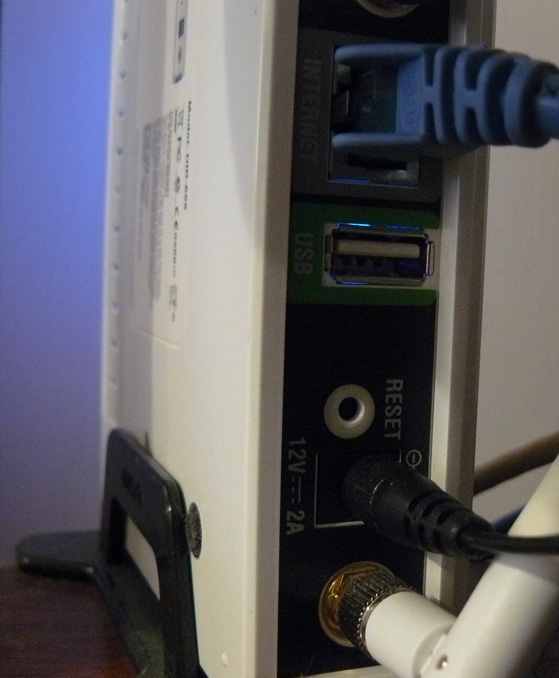
Le DIR-655 dispose d'un port USB à l'arrière, les tests semblent indiquer qu'il s'agit d'un port USB 1.1, jusqu'à présent, le port a été utilisé pour les paramètres sans fil qui pourraient être stockés sur une clé USB.
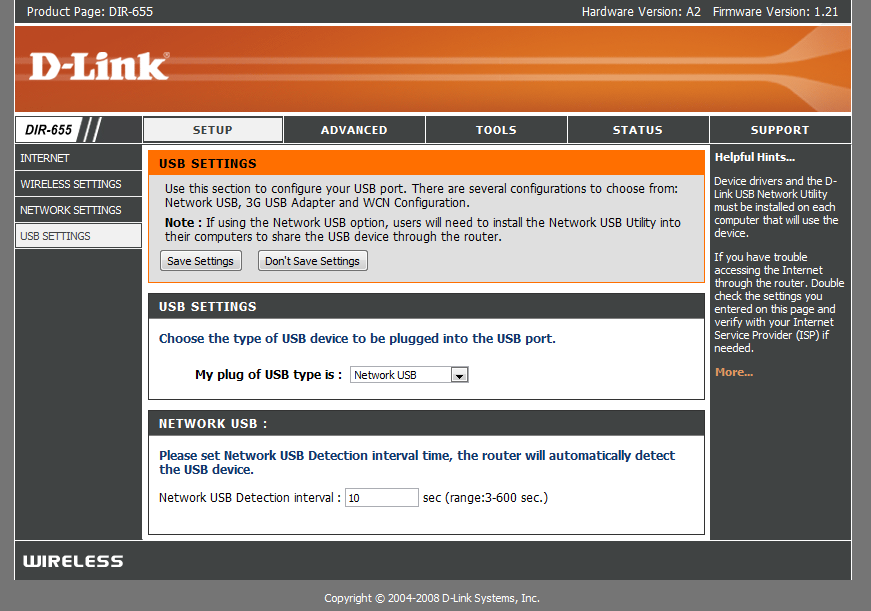
Après l'installation du nouveau firmware Toutefois, le port USB a trouvé une utilisation plus, nous sommes accueillis avec un nouveau menu dans le programme d'installation qui contrôle l'utilisation du port.
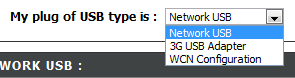
Comme vous pouvez le voir il n'y a pas beaucoup à la configuration de ce port USB, WCN configuration par défaut, il est utilisé pour la clé de configuration sans fil, choisissez dans la liste déroulante:

Choisir USB réseau met le routeur en mode SharePort, en choisissant 3G USB Adapter est un peu un mystère pour moi, je ne suis pas sûr de ce que les appareils sont compatibles avec la présente encore, cependant que la plupart des gens, j'ai un service 3G et l'utiliser comme une sauvegarde que de connecter l'appareil à un port USB et de choisir adaptateur USB 3G serait très utile.
Une fois que vous avez sélectionné Réseau USB l'appareil est automatiquement partagée, mais pour se connecter, vous devez installer le logiciel SharePort de D-Link, cela est encore en version bêta il apparaît donc à utiliser avec prudence, etc etc, je n'ai pas eu un problème avec il encore, et il semble assez poli. une fois qu'il est installé assurez-vous de lui permettre de s'exécuter au démarrage et l'exécuter immédiatement, sinon vous ne serez pas en mesure d'utiliser l'appareil sans exécuter manuellement le logiciel SharePort chaque fois, il utilise seulement 2 Mo de RAM donc ce n'est pas une ressource porcs.

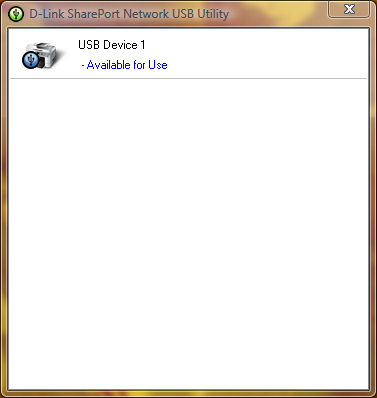
Si votre périphérique USB est allumé et connecté, puis l'utilitaire SharePort doit afficher comme celui-ci une fois que vous double-cliquez sur l'icône dans la barre d'état système. Il vous permettra alors à courir à travers un assistant pour l'installation de l'appareil, vous aurez besoin de pilote de votre périphérique CD ou le dernier pilote pour son site Web, à la fin, on vous demandera si vous voulez vous connecter automatiquement à l'appareil lorsque vous imprimez si Il s'agit d'une imprimante, c'est une bonne idée sinon, vous devez choisir manuellement la connexion.
Une fois que c'est tout mis en place sur chaque ordinateur qui utilise l'appareil, vous remarquerez que chaque État périphérique que l'imprimante est en pause et hors ligne, impression à l'imprimante de toute façon, le logiciel détecte SharePort qu'une impression a été envoyé à l'imprimante et attribue automatiquement l'imprimante à votre ordinateur et alors que l'imprimante est en communication avec votre PC, il sera de connectés, une fois le travail d'impression a été terminé, il sera ensuite retourner au mode hors connexion, en pause.
La limitation de cette fonction est qu'elle ne fonctionne que sur un PC à un moment, les périphériques USB ne sont pas conçues pour être connecté à 2 ordinateurs à la fois si il est logique pourquoi c'est le cas.
Je n'ai pas essayé des choses telles que les webcams mais ils ont été connus pour fonctionner, mais à un rythme plus lent que la normale, la fonction scanner de mon imprimante fonctionne très bien, mais vous devez vous connecter manuellement à l'aide du logiciel SharePort de l'utiliser, assurez-vous de débrancher après vous avez terminé.
Comme je l'ai dit au début de cet article le logiciel SharePort est quelque chose que j'ai attendu longtemps pour, c'est un grand dispositif compte tenu de mon routeur n'est pas la dernière là-bas maintenant et il semblait presque comme D-Link a renoncé à l'ajout de nouveaux fonctionnalités à lui, il montre également comment bien le dispositif peut fonctionner que s'il peut gérer un périphérique USB alors qu'il effectue toutes ses autres fonctions.
Related posts:
Commentaires:
Trackbacks/Pingbacks:
Laisser un commentaire


Date: 14 Octobre 2008
05:57 Heure: am
Juste à niveau du micrologiciel sur mon routeur DIR 655 à 1,21. Quand j'ai commencé à installer l'application Utilitaire SharePort il s'est écrasé mon bureau et ordinateurs portables sont à la fois Windows Vista Home Premium OS. Appelé Dlink support technique, mais n'a trouvé aucune questions. Tout le monde avait le même problème? Besoin d'une solution à ce problème ... s'il vous plaît aider.
Date: 14 Octobre 2008
11:47 Temps: am
Eh bien, je suis toujours en cours d'exécution 1,21 Beta 04, il pourrait y avoir quelque chose à 1,21 final, il pourrait aussi être une bonne idée de re-télécharger l'utilitaire à partir ftp://ftp.dlink.com/Gateway/dir655/Apps/SharePort_Network_USB_Utility_094. zip et peut-être re-flasher le routeur avec ftp://ftp.dlink.com/Gateway/dir655/Firmware/dir655_firmware_121.zip OU ftp://ftp.dlink.com/Gateway/dir655/Firmware/dir655_firmware_121_no_securespot.zip l'no_securespot fichier a une date plus récente à ce sujet que la norme 1.21 du firmware. Quel type de logiciel avez-vous actuellement en cours d'exécution sur les deux ordinateurs? Essayez de couper scanners anti-virus etc sur les deux lors de l'installation.
Date: Octobre 16, 2008
04:56 Heure: am
Je viens d'installer sur mon firmware 1.13 DGL-4500 ainsi que l'utilitaire installé shareport. Shareport n'est pas recionizing mon routeur que sur le réseau ou mon disque dur externe comme étant liés. Toute pensée?
Date: Octobre 16, 2008
Heure: 18h44
Je suis en fait cherche à aller au fond d'un problème similaire Je rencontre, il ya quelques jours mon pc cessé de détecter quand mon imprimante était allumée et la plupart du temps n'a pas détecté lorsque le routeur est connecté.
Je l'ai réinstallé, redémarré le routeur et il ne change pas, même quand tous les autres PC fonctionne parfaitement.
Solution possible: En fait je viens de réglé le problème, il semble qu'il ne peut pas reconnaître les périphériques lorsque vous avez plus d'un permis de carte réseau, donc si vous utilisez VMware etc, vous devrez désactiver les connexions réseau et d'autres avant de redémarrer va commencer la détection de nouveau. Si vous êtes en mesure de faire fonctionner aussi de cette let me know.
Date: Octobre 18, 2008
Heure: 17h54
Salut!
Apparemment cela ne fonctionne que sur la version américaine de la 655. J'ai flashé le firmware à la dernière version de l'UE et il n'y a pas d'écran tel que décrit ci-dessus.
Je voulais juste préciser que ce n'est pour les utilisateurs des États-Unis seulement. Tous les autres, ne vous y trompez en pensant ce routeur tout réseau autre que l'accès à Internet.
Date: Octobre 19, 2008
12:13 Temps: am
Merci pour le heads up, je me sers de la version US du firmware dans mon UA acheté 655.
Je ne recommande pas le faire, mais je ne crois pas qu'il existe une différence du tout dans le matériel pour les différentes régions non plus.
Date: Octobre 20, 2008
05:35 Heure: am
Ben Merci pour ce tutoriel - en utilisant vos instructions, j'ai pu mettre à jour le firmware, installez l'utilitaire d'impression et d'impression en utilisant mon ordinateur portable connecté à un routeur! Juste un mot de Merci.
À titre d'info, j'ai utilisé le logiciel propre routeur D-Link "vérifier les mises à jour firmware" caractéristique, et il a recommandé automatiquement la version 1.21 (en date du 09/10/2008). Maintenant, je suis d'impression tiguidou sur un ordinateur portable Vista (Compaq), et un XP / bureau à domicile (Compaq). Vous avez encore un autre ordinateur portable Dell de se connecter. Printer est un Deskjet F4180 All-In-One HP. Si pour installer SharePoint et le pilote d'imprimante HP sur le portable, mais ce n'était pas une grosse affaire.
Une différence que j'ai remarqué de ce que vous avait dit: Je n'ai pas de se reconnecter à l'imprimante à chaque fois que je l'utilise. Une fois que je suis connecté, il reste connecté à moins que je opter pour la «libération» il. Si l'un des PC est connecté, et que vous souhaitez imprimer à partir d'un autre, il vous offrira la possibilité de "demander une" version de la machine qui est connectée. Ensuite, la machine qui est actuellement connecté reçoit un message pop-up pour lui demander de débrancher si un autre utilisateur peut utiliser l'imprimante. La barre d'état affiche également le nom de l'ordinateur de n'importe quel ordinateur est actuellement connecté activement à l'imprimante. Peut-être que ce fut une autre mise à jour du firmware qui a été inclus dans la version 10/9/08?
À titre d'info, je suis un utilisateur des États-Unis.
Date: Octobre 20, 2008
Heure: 12h34
Merci pour votre commentaire Lisa, je suis heureux vous avez aimé mes instructions.
Je n'ai jamais rencontré ce, tous mes ordinateurs sont mis à la connexion automatique de sorte qu'ils ne sont connectés à l'imprimante en quelques secondes à court que le travail d'impression est envoyé, puis il se déconnecte à nouveau, je suppose que ce serait une partie de la mienne aussi mais je n'ai pas rencontré en raison de ne pas l'avoir connecté à un PC assez longue pour une autre de demander à l'utilisation de celui-ci.
Date: Octobre 23, 2008
07:48 Heure: am
Il ya certainement des problèmes avec le v. 1.2 et versions 1.21 de la DIR-655 firmware.
La cartographie de serveurs virtuels ne fonctionne pas correctement pour les paquets sortants. Je lance un serveur de messagerie qui a commencé à fonctionner par intermittence sur les deux tours du firmware. Revenant à 1,11 résolu le problème. Les connexions au port 25 (SMTP) serait route vers le serveur interne approprié sur mon réseau, mais il semble que le REEE serveurs n'est pas toujours en revenir à la connexion serveur distant. Cela laisse le smtp routines d'attente pour la communication supplémentaires qui ne vient jamais et arrive à expiration. Parfois, le serveur transmettant donnera et courrier est perdu.
En outre, les horaires ne peut pas être configuré correctement .. le firmware fois drapeaux à tort comme invalide à savoir: 23 heures-5 heures est invalide en 1.2x et autorisé à 1.11.
Date: Octobre 23, 2008
11:52 Temps: am
C'est assez mauvais Brian, je n'ai pas connu quelque chose de trop mauvaise avec ces firmwares moi-même, mais d'autres font état de problèmes. Auparavant, j'ai eu lieu au large 1.2 comme les gens avaient des problèmes avec elle, mais il ne semble pas tous les problèmes ont pu être corrigés.
Date: Octobre 24, 2008
06:35 Heure: am
Je me demande si vous pouvez tester quelque chose pour moi ... pourriez-vous essayer de mettre en place un calendrier à l'aide 23 heures-5 heures et voir si elle estime que les valides? Cela va me dire si c'est un problème universel avec 1,21 ou quelque chose thats juste un problème avec mon appareil et le firmware .... thx
Date: Octobre 24, 2008
Heure: 16h47
Je rencontre la même erreur, semble ne pas aimer s'étend sur plus de minuit. Qu'est-ce qui se passe lorsque vous définissez un horaire 23 heures-douze heures et un 00 heures-cinq heures?
Date: Octobre 27, 2008
07:28 Heure: am
J'ai trouvé le site français où le représentant de dlink français fait valoir fonctionnalité shareport sera disponible dans les semaines à firmwares de l'UE:
http://www.clubic.com/actualite-170094-dlink-routeurs-dir-655-dir-855.html
L'un des commentaires ci-dessous l'article sais firmware US fonctionne très bien sur le matériel de l'UE (comme Ben écrit - il ya probablement pas de différences dans le matériel), shareport fonctionne très bien, et PIXMA multifonctions de Canon permet de numériser via le port partagé.
Je commande le DIR-655 pour moi ...
Date: Octobre 28, 2008
02:03 Heure: am
@ Jun (et toute autre personne) ... J'ai aussi couru dans la section «Installation SharePort" s'est écrasé mon problème systèmes. (V 0.94 libère les deux et 1,0)
Le DIR-655 est allé au grand jour le firmware s'est bien passé. Routeur / sans fil vitesse de déchirure.
Je suis allé à installer le logiciel SharePort et il s'est écrasé mon XP SP3 et Vista Home Premium systèmes horriblement mauvais. A pu obtenir leur passer par la restauration du système, mais n'était pas assez pour un temps.
Je suis soupçonner un conflit avec AVG Free 8, qui est une pièce commune d'un logiciel sur tous mes systèmes.
Quelqu'un d'autre peut éventuellement confirmer une SharePort / AVG Free conflit Driver 8 qui ont écrasé leurs systèmes pendant / après l'installation SharePort?
-Vive
Date: Octobre 28, 2008
07:35 Heure: am
Eh bien, j'ai le même problème que juin Sharepoint version 1.0 bloque mon ordinateur portable lors de l'installation et la désinstallation. J'ai firmware 1.21 mais je ne pense pas que les questions parce que je ne peux même pas l'installation du logiciel sans s'écraser. Appelé soutien Dlink et ils disent que Sharepoint et le port USB ne sont pas pris en charge sur le DIR-655.
Pourrait chercher un produit de substitution qui peuvent supporter correctement un disque dur. Toutes les recommandations? Je peux essayer de l'Apple Airport Extreeme maintenant qu'il est Gigabit et Dual Mode capable.
Date: Octobre 28, 2008
Heure: 21h30
Je suis presque certain, dans mon cas il ya un conflit de pilote entre le conducteur et SharePort autre chose. Je suis fortement appuyé en faveur de celui-ci étant une sorte de système de protection (HIPS?) Caractéristique de AVG Free 8 dans mon cas.
Sur les systèmes banc d'essai, je peux installer SharePort très bien (v.94 ou v1.0). Toutefois, si je dois d'abord AVG Free 8 installé les machines d'écran bleu lors de la fin du processus d'installation ... soit lorsque le conducteur ou le service tente d'être installé. Curieusement, sur un «vrai» système, il réservoirs lors de l'installation, sur un système virtuel, il ne chars durant la désinstallation du SharePort avec AVG Free 8.
Toutefois, (sur les systèmes virtuels) si je désinstaller AVG Free 8, redémarrer, installer SharePort, redémarrer, puis installer AVG Free 8 Tout semble heureux.
J'ai besoin de faire un peu plus de dépannage avant de passer à ma "live" des systèmes. Ce n'était pas amusant faire une restauration du système sur deux de mes trois systèmes de ce week-end.
Je ne pense pas que c'est une question router-hardware/firmware du mieux que je peux dire. Mon DIR-655, si la vitesse de déchirure et solide. Je ne mettre à jour firmware 1.21 qui permet à cette nouvelle fonctionnalité SharePort, mais je ne vois pas comment le firmware du routeur a un impact sur les systèmes. Je suis convaincu que c'est avec le logiciel lui-même et SharePort précisément un pilote ou un service de conflit lors de l'initialisation d'installation. J'ai juste à cerner le point de conflit.
Et oui ... j'ai passé plus de 30 min au téléphone avec le soutien de Dlink nuit dernière et il était à côté de rien. J'ai finalement eu la tech pauvres à intensifier mes conclusions à un superviseur et peut-être elle permettra à un bureau technique à Dlink.
Selon ce gars-là, il n'ya pas de nouvelles "back-room" versions disponibles pour SharePort en ce moment.
Vous permettra de savoir ce que je le savoir.
Sinon, j'ai été très heureux avec le DIR-655 ensemble du dispositif. Dommage que la fonction SharePort a été l'un des facteurs déterminants pour aller avec ce modèle.
Sigh ....
(BTW j'ai posté un commentaire ci-dessus le droit mine au-dessus de SteveW ... en quelque sorte pris au piège le navigateur le nom de Jun dans le domaine de l'auteur.)
-Vive
Date: Octobre 29, 2008
02:44 Heure: am
C'est bon de dépannage y travailler Noël, ce serait un problème logiciel SharePort à coup sûr, peut-être AVG n'est pas en jouant à Nice non plus, ils n'ont pas exactement eu les meilleurs résultats récents concernant les questions avec d'autres logiciels. Je vais voir si je peux trouver quoi que ce soit demain au sujet de AVG / SharePort, je suis sûr que l'une des sociétés sait quelque chose.
Je ne m'attends pas D-Link à jour le logiciel pendant un moment mais je pense qu'ils ne savent que, pour sûr.
Espérons que si suffisamment de gens ont la question si elles le fixer rapidement, le logiciel lui-même a à travailler avec tous les matériels capables SharePort et il ya un bon nombre de ceux là maintenant.
Par la façon dont j'ai changé de nom dans le commentaire ci-dessus SteveW de sorte que la conversation peut être bien compris, laissez-moi savoir si vous rencontrez des bugs avec le système de commentaires, c'est mon code de sorte qu'il a une possibilité de bugs.
Date: Octobre 31, 2008
08:34 Heure: am
J'ai aussi installé sur mon 1,21 DIR-655 et le logiciel USB. Mon ordinateur câblé trouve immédiatement l'imprimante. Mon ordinateur portable (sans fil) sharport dit qu'il ne trouve pas un périphérique USB. Des suggestions?
Date: Octobre 31, 2008
10:20 Heure: am
Essayez de désactiver les autres cartes réseau et de redémarrer, même la carte Ethernet, Shareport se confond facilement par plusieurs connexions réseau, s'il est en marche VMWare essayez de désactiver les cartes réseau vmnet.
Aussi temporairement désactiver tout pare-feu que vous pouvez avoir sur l'ordinateur portable juste dans un cas bloque la connexion.
Date: Novembre 2, 2008
10:51 Temps: am
Ayant la même question que Valča mais je suis en cours d'exécution du nouveau virus Norton scanner alors je me demande si son autre chose, puis un scanner de virus.
Date: 3 Novembre 2008
04:14 Heure: am
Salut les gars. Toujours tester la question.
J'avais déjà soupçonné AVG 8 pour ce week-end j'ai trouvé peu de temps libre. Décidé de mettre ma théorie à l'épreuve sur mon Vista Home Prem. système de SP1.
J'ai désinstallé AVG 8, a fait un point de restauration manuel (bonne chose que j'ai fait) redémarré, jusqu'ici tout va bien. Ensuite, j'ai installé SharePort.
BSOD.
Restauration du système en utilisant mon point de mettre restauré mon système. Maintenant, j'étais de retour à la case départ.
Proposé à une session Virtual PC en utilisant une nouvelle installation du SP2 XP vierge. Installé SharePort très bien. Aucun problème. désinstallé très bien.
Suivant suspect que j'ai eu était NetLimiter Monitor qui est également commune à tous mes trois systèmes.
Installé NetLimiter Surveiller et redémarré. Bon. Aucun problème de stabilité.
Je suis allé à installer SharePort (v1.0) et près de la fin de l'installation ... tout comme mon systèmes réels ... le système virtuel fait un redémarrage immédiat écran noir.
Hmmmm.
J'ai donc désinstallé NetLimiter moniteur de mon système et de mettre dans une requête par courriel à leur équipe de soutien leur demander s'ils peuvent se pencher sur cette indépendance.
De voir comment il apparaît à la fois SharePort et NetLimiter Monitor semblent tous deux pour accrocher les pilotes de réseau Windows / Services cela a un sens plutôt bien.
Donnera une autre mise à jour si / quand ils répondent.
Vous ne savez pas si je suis brave suffit pas encore à répéter l'expérience sur mon systèmes revivre.
-Vive!
Date: 3 Novembre 2008
07:27 Heure: am
Salut à tous, je suis tout nouveau à tout cela. Récemment mis à jour à l'DIR655. Grande. 1 Desktop 5 ordinateurs portables. Desktop est la carte réseau PCI, routeur, modem DSL etc portables sont tous en cours d'exécution internes dispositifs 802.11g.
Si je débranche le câble USB de l'laser couleur Oki550 à partir du Bureau, et de le brancher sur le port USB sur le DIR655. Est-ce à terme (ou théorique) va nous permettre d'imprimer à ce laser sans se retourner sur le bureau en premier?
Pour l'instant, c'est mon objectif ultime, et c'est ma première question.
Merci
Dave
Date: 3 Novembre 2008
Heure: 15h10
Oui, cela permettra d'accéder à l'imprimante une fois que le routeur est allumé, l'imprimante et le routeur sont les 2 seules choses qui doivent être sur que cela fonctionne, mais c'est à condition de ne pas passer par l'intermédiaire du bureau à tout moment. Comme on le voit par les commentaires que vous devez faire un peu de prudence lors de l'installation du logiciel Shareport car il ne joue pas bien avec d'autres logiciels qui a composants réseau.
Date: 4 Novembre 2008
Heure: 18h30
Hé les gars j'ai trouvé le problème ... Son désinstaller net limiteur et vous êtes bon pour aller ^ _ ^
Date: Novembre 6, 2008
Durée: 0h01
Ben,
Juste pour confirmer ce que je pensais et Nick a confirmé ... le Net Limiter programme 2 Monitor ne critique en conflit avec l'application SharePort (en ce moment).
Je l'avais désinstallé de mon XP Home (SP3) et Vista Home Premium (SP1) des systèmes. Puis j'ai réinstallé SharePort après la création de points de restauration système (juste pour être sûr).
Installation s'est bien passé ce moment et aucun BSOD ou les conflits ont été observés. L'application SharePort rapidement trouvé le périphérique USB de stockage flash Seagate et j'ai pu "mount / connect" et de le lire / écrire des fichiers de tous les systèmes.
Pour être clair ... un seul système peut être connecté à l'appareil à un moment aussi loin que je peux dire. Autres que cela fonctionne maintenant beaucoup.
Ouf! Ce fut un travail Doozie cette question à. Merci à Nick pour l'affichage d'une confirmation.
J'ai envoyé un courriel à l'équipe de soutien Limiter net sur la question, mais aucune réponse pour le moment.
Vous ne savez pas si elle aura lieu avec tous leurs programmes (payant / gratuit) ou tout simplement avec Net Limiter 2 MONITOR.
Merci à tous!
Cheers!
Claus-V.
Date: 7 Novembre 2008
12:34 Heure: am
Salut, je suis propriétaire de la DIR-855 que mon cher vieux DIR-655 est allé à mon appartement sœurs comme une solution permanente. Cependant, je serais très intéressé de savoir si le DIR-855 prend en charge cette fonctionnalité. Il pourrait être un bon add-on pour mon routeur sans fil est déjà impressionnant.
Daniel
Date: 8 Novembre, 2008
06:13 Heure: am
Daniel,
Selon un communiqué de presse D-Link, le DIR-855 est inclus dans ceux qui SharePort soutient.
http://www.dlink.com/press/pr/?prid=442
Clôture:
«L'aspect innovant SharePort USB réseau de raccordement est disponible sur le D-Link Xtreme N Gigabit Router modèles - le DIR-655, DIR-825, DIR-855 et DGL-4500 Gaming Router avec GameFuelâ" ¢. La mise à niveau technologique SharePort est également disponible sur le RangeBooster N DIR-628. Les propriétaires actuels de ces routeurs seront en mesure de mettre à niveau vers la technologie SharePort en téléchargeant le dernier firmware et l'utilité client à partir du site Web de D-Link, http://www.dlink.com . "
Je pense que c'est le lien vers le DIR-855 firmware et SharePort la page de téléchargement:
Firmware -
http://www.dlink.com/products/support.asp?pid=548&sec=1 firmware #
(C'est une belle recherche modèle 855 par la voie-. Plaine me fait 655 coup d'oeil!
Bonne chance!
Claus V.
Date: 8 Novembre, 2008
Heure: 21h41
Salut, j'ai mes propres DIR655 pour 1 semaine. Son une version de l'UE, mais des États-Unis firmware 1.21 exécuter smothly. Shareport fonctionne, mais pas très stable.
Première édition, le partage de disque USB sur le WiFi n'est pas une bonne idée à mon humble avis. Tout problème de réseau et des problèmes avec Vista appareil. Également les performances est un problème (800kb / s en 2m / s lors de la copie des fichiers entre les ordinateurs portables avec des adaptateurs WiFi n).
Mais j'ai acheté ce routeur pour le partage d'imprimante. Et il est possible, mais Shareport Utility (1,0) ne fonctionne que sur le compte local. Lorsque vous travaillez sur le compte Active Directory, fenêtre de l'utilitaire affiche le périphérique connecté au port USB du routeur. Mais lorsque l'on clique sur l'icône de la fenêtre soft n'est pas montré. Application sur la barre des tâches, mais n'a pas de fenêtre pour sélectionner le périphérique et ne connecter.
Sur le tout compte local est OK. Semble être la question SharePort utilitaire. L'OS a été installé il ya une semaine, pas beaucoup Applications installées.
Des idées?
Piotr
Date: Novembre 9, 2008
08:18 Heure: am
Noël, je vous remercie beaucoup, je souffrais de cette question jusqu'à maintenant. J'ai passé mon week-end pour rien, je vous remercie!
Ce limiteur net suce: \
Date: Novembre 10, 2008
Heure: 13h27
Salut, je suis d'avoir cette isue avec dlink 655 v1.21
et v.1.0 shareport ...
multifuction imprimante et le travail clé USB sans faille sur 2 XP SP3, Vista 64 et 1 machines,
Mais lorsque je connecte un iPod touch version 2.0, l'utilitaire shareport montre "disponible pour une utilisation"
et essayer de se connecter à lui et tous les 3 de la chute de mon pc de la connexion Internet, sans fil et câblés et inutile de dire que l'habitude se connecter iTouch et l'Internet est restauré automatiquement, est comme le routeur passe dans un cycle d'alimentation ou de quelque chose.
Ensuite, j'ai essayé la même procédure, mais avec un iPod nano cette fois, et devinez quoi, a fonctionné parfaitement!
Est ce que quelqu'un ayant ce problème et la solution de contournement ou de savoir à ce sujet?
merci pour votre aide.
Date: Novembre 14, 2008
Heure: 13h29
Salut à tous!
Alors .. Je possède un routeur DIR-655 de l'Union européenne et les États-Unis 1,21 essayé moi-même firmware. Je ne vais pas mentir, la mise à jour du firmware n'est pas allé sans accroc. Quand j'ai téléchargé le firmware du routeur, je ne pouvais pas accéder à la page d'administration du routeur plus ... mais après un reset tout rentra dans l'ordre (ce pourrait être une bonne idée de sauvegarder la configuration du routeur avant de faire le mise à jour du firmware). Quoi qu'il en soit, j'encourage tout le monde avec un non nous dir-655 pour essayer le firmware 1.21 ... Jusqu'ici tout va bien travailler et a même réussi à joindre mon imprimante à lui et il fonctionne très bonne chose ... la prochaine à essayer est un périphérique de stockage
Date: Novembre 15, 2008
Heure: 22h16
Rappelez-vous les gars, le routeur semble être limité à la vitesse USB 1.1, soit environ 1MB/second il n'est donc pas recommandée, sauf si vous avez un petit appareil et n'ont pas beaucoup de transférer, également des routeurs ne sont pas les systèmes les plus rapides afin de transférer des données sur l'USB met probablement beaucoup de pression sur le dispositif qui pourrait provoquer quoi que ce soit à partir des vitesses plus lentes et LAN sans fil pour les décrocheurs redémarre le routeur.
Merci pour tous vos Claus de recherche, nous espérons bientôt l'une des sociétés est en mesure de régler les problèmes de compatibilité.
Date: 26 Novembre 2008
03:22 Heure: am
J'espérais que vous pourriez m'aider avec une autre question.
J'ai récemment mis à jour depuis un autre routeur D-link à un DIR-655. Mise à jour vers f / w 1.21. Have multiple machines on a local network workgroup that all saw each other fine with the older router. Now I cant see any of the other machines on the lan. I know I've missed something simple so I was hoping you could give me a heads up. All nodes see the internet fine and ip's are reserved and withing dhcp range. What have I missed? Much thanks
Date: November 26, 2008
Time: 1:25 pm
There are 2 things off the top of my head that have issues when moving networks, mainly when the network changes it's IP arrangements, some firewall software including Windows Firewall and commonly ZoneAlarm can block a PC from being 'discoverable' as it believes this new network is a public network on the internet instead of a private LAN, if you are running Windows Vista the same thing can happen, make sure your PCs have their network connection set to Home or Private, those really should be the only times when that problem should occur.
If they are wireless also make sure that Wireless Partition is disabled in the Advanced Wireless properties as this will cause a similar affect.
Date: December 11, 2008
Time: 10:55 am
I am having the same BSOD problem on Vista as mentioned by others. The PC went to BSOD at the end of the Shareport install and then BSOD'ed each time I tried to login. I have Trend Micro AV and the Nortel Contivity VPN client. Both are essential programs and I can't uninstall either. Could either one of these be a problem?
Date: December 18, 2008
Time: 11:01 pm
Salut,
I am interested in upgrading to this router so I have searched different forums for clues.
Today I noticed there is a new (still v1.21) file updated 12.12.08. Anyone tried if this is a new version with fixes or not ?
Date: December 19, 2008
Time: 2:57 pm
I'll give it a try and see if it changes anything based on issues people have had, on that note a new issue I have noticed has arisen, occasionally after having the router on for more than a week the shareport software on all computers starts giving out connection errors, if they're left for a while there can be hundreds on the screen, restarting the router stops the errors for a while.
Date: December 20, 2008
Time: 6:52 pm
The 1.21 is the same as the one that was released a few months ago, just with the date changed, however about 2 or 3 versions have been labelled 1.21 without a beta tag, with the last one being 1.21 B10 in November, so if you downloaded 1.21 in October or earlier, download it again and install, it fixes a few problems with port forwarding and saving settings.
Date: December 29, 2008
Time: 6:59 am
Hi gang,
Great thread!
I'm having a shareport problem, and wanted to see if anyone has experienced the same.
here's my setup:
1. DIR-655 with firmware 1.21
2. Win XP Pro machine (as a vmware client) with shareport 1
3. WD external HDD
The HDD is plugged into the USB port on the router, but I'm not able to connect to it from the the Win XP pro machine. The XP machine will continuously notify me that it has “Found” the HDD, but the Shareport tray icon continues to stay red, and never turns green. After about 30 seconds, the notification will come back. I'm completely at a loss, as it workeed in the past when I had this vm client on another host. I know that vmware may be causing this, but I don't see how, because I only have one network adapter enabled on the XP machine (ethernet bridged). I've spent hours trying to get this to work…Any ideas would be greatly appreciated!
Merci,
Jean
Date: December 30, 2008
Time: 8:02 am
I have this setup DIR-655 Firmware 1.2.1 and Shareport I got to work if I disable my Microsoft OneCare firewall.
Does anyone know the Port's used by D-Link SharePort?
Date: December 31, 2008
Time: 12:08 am
If you all go to Dlink's website for the router, you will see that it says,
“This firmware is engineered for US products only.
Using this firmware on a device outside of the United States will void your warranty and may render the device unusable.
Please contact the D-Link office in your region for firmware updates that are compatible with your D-Link product.”
and,
“¤ Added SharePort features.
¤ Fixed email notification issue.
Please download the SharePort Utility and see the SharePort manual before use.”
You have to download the actual utility to use it!
Date: December 31, 2008
Time: 12:10 am
Oh, and I almost forgot, this is for x86 version OS's only. x64 is not supported.
Date: January 2, 2009
Time: 3:12 am
Hi James, I'm not sure of the ports myself however if you open up a command prompt and use the command 'netstat' just after attempting to connect using Shareport, look for the router's IP and you should be able to see all ports that the PC is connecting to the router for, OneCare may have a log file that might allow you to do a similar thing, just make sure you're running as little network applications as possible at the time as the lists can get pretty long and do not have any p2p programs running at the time either.
Hi Jody, I have tested version 0.94 and version 1.00 on Windows XP x64 and Windows Vista x64 and have had no problems, is there an x64 version that doesn't allow this to run?
Date: January 7, 2009
Heure: 17h38
I just got a D-Link DIR628 which also has the shareport utility. However, I am having some rather strange problem and wonder if anyone can offer some help or suggestions.
On my wife's Vista laptop, the shareport network USB utility installed smoothly and works nicely. On my XP Pro desktop, the first installation hung and when I rebooted, the network USB utility started but couldn't see the devices behind the router. I have been trying different firewall settings (and eventually turned off all firewalls just to try it) the last few days and nothing seemed to really work.
The only thing that seemed to work is if I uninstall the shareport utility, reinstall it, then the first time it got started after reinstall, I could see the devices. If I exit out and restart the utility, it's the same old problem of not seeing any device. Rebooting also has the same problem of not seeing anything. The only way to get it to work so far, seems to be uninstall->reboot->reinstall and it only worked after that sequence.
Anyone has any idea on what this problem might be? When it worked, it worked great. I got 80 Mbps from an external HD which is not great but not too bad either. I could also put both my MFP printer and the HD behind a hub and access both of them. It's really wonderful that way. I just wish I can get it to work on all my computers. By the way, my other system is a Mac and there isn'ta Mac version for that utility.
Sorry for the long mail, any help or suggestion is really appreciated. Merci.
Date: January 7, 2009
Time: 6:36 pm
I have seen a few instances where the devices can't be found on a pc randomly, however I have not experienced this on a PC every time after it has been installed. Is the PC able to detect the router using the Shareport utility?
Right click on the Shareport icon, in the menu you should see the name of your router and it's IP address, make sure it is selected, if not go to it and a new menu will open up, make sure you click on Enable, also you can click on Configuration to get some advanced settings.
If the router doesn't show up in the list then there may be some connection settings on that PC that are limiting the connection between it and the router.
I'm also waiting on a Mac version of the software, though I think it might not happen any time soon.
Date: January 8, 2009
Time: 4:19 am
Anybody use a USB hub on the shareport and get more than 1 device to work?
Date: January 8, 2009
Time: 5:21 am
Ben – thanks for the response. The PC that I am problem with is directly connected to the route through a wired connection using a CAT5 cable. It is the primary system that I use to set up and configure the router. When I had the problem, the top line in the right-click screen of the shareport icon, the one showing the IP addresses and things was not visible. I only got things from the “Advanced Options” down.
Mike – I did put a USB hub in and connected a Canon MP470 printer and a external HD at the same time. I was able to see both of them and were able to connect to them from my Vista laptop.I didn't try to read/write to the HD and print at the same time though.
By the way, I made a typo earlier. I think I was only getting 8 Mbps, not 80. So roughtly 1 MB/sec read throughput is what I was getting. Not very fast but good enough to move small amount of data.
Date: January 8, 2009
Time: 10:28 am
I'm having the same trouble: Have a Dlink655 with a wired connection to a Vista Home Premium laptop and an older desktop box running Win XP.
Shareport works just fine on the laptop – I want to use it for a shared printer.
I can install shareport fine on the XP machine, but it doesn't find any devices connected… and I also don't see the router's IP address upon right-click. I disabled firewalls, uninstalled antivirus software etc. but to no avail.
Would love some hints if anyone has them!
Date: January 8, 2009
Time: 2:42 pm
To Jacko
I went into admin, clicked on ADVANCED, then WISH on the left, then I made sure it was ENABLED and for PRIORITY CLASSIFIERS I clicked AUTOMATIC. Essayez-le.
Date: January 10, 2009
Time: 4:44 am
Mike – you said you “went into admin, clicked on ADVANCED, then WISH on the left, then I made sure it was ENABLED and for PRIORITY CLASSIFIERS I clicked AUTOMATIC…”
I assume you are talking about the web administration page for the Dlink655 router? What is the “WISH” thing you talked about? I have a Dlink628 and I didn't see anything that looks like “WISH” in the advanced menu. I was wondering if you can explain what that menu does, I might be able to find the equivalence in my router. Merci.
Date: January 10, 2009
Time: 3:04 pm
I've checked out the DIR-628 emulator on the D-Link site and it appears that router doesn't have WISH at all, perhaps you could try messing about with the QOS settings as they are similar to WISH except they affect both wired and wireless on the WAN side of things, but may not have the same effect as WISH, personally I have WISH off and have no problems.
Date: January 12, 2009
Time: 1:45 am
Salut à tous,
I tried changing the WISH settings, but no luck. The Vista laptop has no issues with Shareport at all, whereas the XP machine cannot even recognize the router.
If the issue is router-side, I don't know why the Vista box would work and the XP box not?
Merci!
Date: January 12, 2009
Time: 2:25 am
Hey guys, i am seeing the same thing on the dlink dir-825. Wireless PC's see my printer connected to the usb shareport fine. My wired PC's lose the printer whenever they are restarted. If i reboot the dir-825 the wired pc's will see the router again.
When I click the sharepoint icon, I see the ipaddress for the router when it's working correctly with the printer. When it's not, the ip address is not there and the first entry is advanced options.
I tried changing the wish settings but no change….
Date: January 12, 2009
Time: 4:38 pm
Hi Jacko and hoc, are either of your PCs that have this problem set to connect to the router via DHCP or via menually entered static IPs?
Date: January 13, 2009
03:10 Heure: am
Salut
Both my laptop (Vista) and desktop (XP) are connected by wire to the router, and both are set up using DHCP.
Merci!
Date: January 14, 2009
Time: 3:14 am
I talked to dlink 3rd level today who was passing this on to the product manager. I need this to work so have done a good amount of testing. My PC's are all connecting via dhcp, all vista (some x32 and some x64).
From the testing here i have found that the wireless PC's always detect the printer connected to the shareport. The wired PC's are inconsistent… at best. If I reboot the dir-825, the wired pc's will immediately detect the shareport printer and keep it until the network connection is interrupted. If i pull the network cable on the wired pc, and then plug it back in, they will lose the printer and not re-establish it (exactly what happens when you power off your PC).
Hoping we can come up with a better solution than rebooting the router every day!!! I'm sure linksys would like to hear about that.
Date: January 14, 2009
Time: 7:14 am
hoc,
Je pense que vous pouvez être à quelque chose. Dans ma mise en place, le système qui a un problème car le port réseau USB est connecté au routeur par un câble CAT5 directement. L'ordinateur portable en utilisant la connexion sans fil a toujours été bonne. J'ai une variable supplémentaire dans mon environnement sur le système d'exploitation utilisé. Le bureau filaire utilise XP alors que le portable sans fil utilise Vista.
J'ai installé Windows 7 Beta sur la machine câblé le week-end. J'étais de nouveau en mesure de voir l'imprimante sur le port USB sur le réseau du premier démarrage du service public. Quand j'ai quitté les et redémarrez l'utilitaire, j'ai eu problème à nouveau. Je vais essayer de redémarrer le routeur quand je suis rentré ce soir.
Date: 17 Janvier 2009
02:23 Heure: am
Je reçois un "Échec de la connexion, s'il vous plaît essayer de nouveau." message toutes les minutes de SharePort USB réseau de services publics.
C'est bizarre parce que j'ai mon imprimante sur le port USB et il fonctionne très bien.
Les théories sur l'endroit où chercher??
Date: 17 Janvier 2009
Heure: 15h24
Je reçois cela sur tous les ordinateurs autres que le mien, étrangement désinstallation / réinstallation ne pas y toucher, soit, la seule chose que j'ai faite a été mise à jour le firmware, mon ordinateur installé SharePort après la mise à niveau du firmware encore les autres ordinateurs ont installé depuis avant et ils rencontrent le problème.
Je ne vois pas de lien entre le système d'exploitation qu'ils étaient en marche ou le pare-feu / logiciel antivirus soit, ce que j'ai fait est désactivé l'option de démarrage dans le programme et exécuter les programmes que lorsque j'ai besoin d'imprimer.
Date: 18 Janvier 2009
07:18 Heure: am
Can anyone recommend a setup for allowing a mac and a PC to access and use the same external harddisk over a network? Or where I can find info on this? Here are the challenges:
- Both PC and Mac are a bit old, so no N-standard
- Formatting of disk: has to be HSF+ and PC will use MacDrive?
- Considered buying an entertainment PC and use this as “Server”
Suggestions?
Date: January 19, 2009
Time: 9:49 am
Dlink released an update to the sharepoint utility software this week. For my wired pc issues it does help, but is not a complete fix.
At start-up my wired pc doesn't see the printer connected to the shareport. In the 1.0 version, the dialog box for the utility started with “advanced options”. Now it starts with the address for the router.
I can force the utility to see the printer by selecting disable and then enable in that shareport dialog. Still not a complete solution but getting better…
Date: January 22, 2009
Time: 1:38 pm
Shareport is not finding my router in the pop up menu from the system tray icon. I have the DIR 655 and a vista x64 OS. Dlink support stated that shareport does not support 64 bit vista OS but posts here seem to contradict that. Any recommendations, advice would be much appreciated.
Date: January 24, 2009
Time: 12:49 pm
I installed Shareport 1.14 and it works better, although when I disconnect from a hard drive it says it's busy and should I force or cancel. Force seems to work and I can re-connect ok
Date: January 25, 2009
Time: 8:29 am
I've just upgrade my firmware and everything work's fine. I've test USB HDD and USB Printer both work fine. I'm pleased with DIR-655. Real cool
Date: January 25, 2009
Time: 2:00 pm
Finally got second laptop to connect to printer hanging off DIR-855. The cuplrit was OneCare – thanks James 30 December. Once One Care Firewall was disabled my Shareport icon turned green and the printer was able to be used. Only took me a couple of days and many grey hairs !
Date: January 26, 2009
Time: 12:18 pm
Salut à tous,
I setup the DIR-655 for a friend – one older desktop with Windows ME and a new laptop with Vista. The desktop is wired to the router, the laptop is wireless. I installed Shareport and hooked up his printer to the USB on the router. It worked! for a few days. Now the printer seems to have disappeared…. sort of. It's not listed in any application, but if I click on the Shareport Utility, it says the printer (a fairly new HP) is available. There's got to be something I'm missing here. Quelqu'un sait?
(For now, he's not trying to print from the desktop, but I was thinking a usb hub would allow me to hook the printer to the desktop as well as the router.)
Merci
Date: January 27, 2009
Time: 4:37 am
Oh well, I went to my friend's house and everything worked fine… of course! The printer was available and I clicked Connect and it connected. It did reinstall the printer driver. Who knows what he did — he did say he'd been turning. So maybe when I rebooted, it got straightened out.
I am still interested in using a usb hub so his desktop is wired to the printer. So, if anyone has done that and has any “gotchas” to warn me about, I'd appreciate it. I'm thinking printer to hub and hub to desktop and hub to router.
Merci
Date: February 1, 2009
Time: 3:01 pm
Just got a DIR-655 last week after all the good reviews. I downloaded the SharePort fw 1.21 (2008/10/09). I'ma bit disappointed with it. Wanted to share some of the issues I'm seeing perhaps you have solutions to share;
- Clients (3x Vista Acers, & XP Pro Lenovo) have hard time getting an IP address with WPA-personal, and WPA2-personal after wake-up. I must have the laptop try few times until it succeeds. They worked quite fine with cheap Belkin 802.11g routers
- Connection drops even though signal is in the 85% or greater most of the time
- Finally, I bought this when I heard about the SharePort fw. This feature was a big disappointment. I thought it may work as a printserver, but clients have to request and grant the connection before use… very stupid when no one is using the already connected client! – Also, if the laptop sleeps, the connection gets stuck and a USB disconnect/re-connect must be done for the printer to be re-discovered. Lastly, my Canon MF MP830 is not happy with it. The print preview doesn't work anymore, the printer doesn't wake up on jobs, and the jobs error out frequently.
Date: February 3, 2009
Time: 7:14 am
having the same issue as this guy below is telling every thing is ok but when i click on the utility on task bar nothing flashes on desktop.it work well on my other computer running vista 32 home premium , it was doing good on this system too but i don't know why it start acting up like this.this is vista 32 ultimate any suggestion guys would be appreciated.
“Author: Pit
Date: Nov 8, 2008
Hi, I have my own DIR655 for 1 week. Its an EU version, but US firmware 1.21 run smothly. Shareport works, but not very stable.
First issue, sharing USB disk drive over the WiFi is not a good idea IMHO. Any network problem and Vista have issues with device. Also performance is an issue (800kB/s when 2M/s when copying files between laptops with WiFi n adapters).
But I purchased this router for printer sharing. And it is possible, but Shareport Utility (1.0) works only on the local account. When working on the active directory account, the utility's popup window shows the device connected to the router's USB port. But when clicking on the tray icon the app window is not shown. Application is on the taskbar but has no window to select device and do connect.
On the local account everything is OK. Seems to be the SharePort Utility issue. The OS was installed a week ago, not many aplications installed.
“
Date: February 3, 2009
Time: 7:17 am
forget to tell in above post im using Dlink-655 with firmware 1.21 (latestone) and share port utility 1.14. hope that u guys will provide some assistance on this issue.
Date: February 3, 2009
Time: 11:37 am
For KingTut: I have a similar problem on my laptop, the problem is caused by the channels the router is using for wireless, sometimes it will get out of range of standard wireless cards, even my laptop's N card doesn't work properly sometimes, try forcing the wireless channel to something like channel 6 for a while and see how it goes, you can also try having the channel set to 20Mhz, not 20/40.
For bally: It's possible SharePort needs certain permissions to run properly, it may be a good idea to get in contact with D-Link so they are aware of this issue, it could be a bug that they are unaware of as of yet.
Date: February 5, 2009
Time: 5:15 pm
Just installed the latest firmware for DIR-655 and Shareport on three Vista and three XP Pro SP3 pcs. The vista pc's are both wired and wireless and works fine. Te XP pc's refuse to find the router (all three wired). What more is that the Shareport uses up all CPU power when I try to exit the application. There is definitely problems with the software. All firewalls have been turned off. The XP machines have different Anti virus (AVG, Avast and Norman). One of the XP PC's are connected directly to the router, two through a access point. Changing channels or stopping other applications using communication ports have no effect. The Shareport has been tested 0.94 and also updated to 1.0 and tested with clean installations. If anyone is able to run Shareport on XP, please explain how it was installed. Also try Exiting the application and check the CPU meeter.
Date: February 7, 2009
Time: 8:41 am
dlink support q-less regarding active directory matter. even no reply for 4 days upto now. WTF Support they r providing . just dont even know what the thing is
Date: February 11, 2009
Time: 5:22 am
Just wondering out loud: do you think that it would be possible to use DIR-655´s USB port for something else then sharing a printer?
It certainly doesn´t sound to be good enough for usb-hdd´s for very low transfer speeds that´s been mentioned over here.
Could it be used for hosting a very small web server from an USB stick, like a static home page?
Date: February 12, 2009
Time: 12:02 am
I have the same problem after install all my laptops, Vista and XP starts to crash and no one could reach the printer plugged in the USB port….
Date: February 13, 2009
Time: 7:03 pm
I think i have a different problem here.. i connected a usb hard disk on the usb port of my dir-655 (1.21 firmware) and installed the shareport utility on my vista32 and xp sp3 computers.. I get no router name when i right click the utility in the system tray so I can't select any usb device from the router.. By double clicking the utility, i get no detected usb device in the utiliy's panel either.. I even tried without wirewall, to no avaqil.. what's up with this?
Date: February 13, 2009
Time: 7:07 pm
..also, whenever i boot vista32 i get a 'new hardware found' message and the request to install drivers for the router.. except that there are no drivers in the cd that came with it or on dlink's website… any suggestions? (by the way, the router works, as I can connect wireless and share my internet connection..)
Date: February 13, 2009
Time: 10:55 pm
For Stefano:
Try downloading/installing SharePort again, the drivers are a combination of generic drivers that Windows should already have and 1 or 2 that should be installed with that setup program.
Looks like the program has installed but has been unsuccessful in installing the drivers for some reason, it is most likely that the setup program has exited and deleted the required driver files in the temporary directory before it has had a chance to install them.
Have you V-Lited or stripped down your Windows XP cds in any way? Sometimes removing inbuilt drivers stops less common drivers that some hardware needs.
For Gustavo:
Unfortunately this software and the drivers don't play well with other software and drivers and there is so many possible incompatabilities, it crashes many computers with seemingly no reason.
If there is any software that is installed on those Laptops however unconnected they may seem to the problem, try removing them temporarily.
For Mika:
I don't think there's much chance of that being possible until they create some sort of interface that allows the router to use the stick for storage so it can run an additional server, then I think the router may not have the processing power needed for such a task.
For Bally:
This would be more of an additional feature in D-Link's eyes, they would have no obligation to get it working correctly, it's just the way those companies work, they don't get much more money on additional functionality such as this so it's not really worth their time.
For GC:
I've never experienced cpu usage issues at any time with SharePort on XP or vista, using different virus scanners or wireless/wired, or even through another access point, I actually have the program set to not startup as it has all sorts of problems when it's allowed to run all the time.
My installation was fairly straight forward so it probably won't help you much, double clicked on the install file, installed with default options and when it was done restarted.
FOR ALL:
I had problems with the program telling me the usb device was connected, then not every 10 minutes or so, then when attempting to use it it would disconnect each time, seems that the router no longer liked my usb extension cable, so I removed it and all is good now, so try changing usb cables when things don't work out properly.
Date: February 14, 2009
Time: 11:44 am
for Ben.
Thanks for the answer… my xp install is fairly clean, so i don't think it has any problems.. also, i didn't detect any problems while installing the shareport utility in both computers, so i find it hard to believe it's a bad installation.. i'm clueless..
Date: March 2, 2009
Time: 11:31 am
Salut Ben, quelle version est votre routeur? AU or US? Have you tried 3G USB modem on your router?
Date: March 3, 2009
Time: 5:47 pm
Getting the same issue with my wired connection to the DIR-655, Shareport software works after fresh install, connects to the printer shared through the router, but only until the first suspend or reboot, then Shareport no longer detects the router. I'd rather not have to uninstall and reinstall the software every reboot. Des idées?
Date: March 4, 2009
Time: 10:02 pm
Hi Adam, I have the AU version router, I have no idea what kind of 3g usb modem they are referring to and have none to test anyway other than my phone (which I assume doesn't count).
Edward, I'm not sure what is going on with that issue but hopefully D-Link fix it as more than a handful of people seem to be experiencing it.
Date: March 6, 2009
Time: 11:35 am
Salut tout le monde!
I just read most of this comments here, but it seems that I have diffrent kind of problem. Although I know that D-Link DIR-655 is exellent, I am thinking to buy DIR-855 or DIR-825 which are DualBand. I have TOSHIBA Qosmio F50-10K, so inegrated wireless card uses Atheros AR9280 chipset.
1. Can somebody tell me does my wireless card support 2,4GHz and 5 GHz simultaneously?
2. Which D-Link wireless Router should I buy?
Thanks for any comment!
Date: March 6, 2009
Time: 3:43 pm
Hi Jerry,
Your wireless card supposedly does do 2.4ghz/5ghz simultaneously, though I would check with nay documentation that came with it just to make sure.
I'm not too sure about those 2 routers as I have not had any experience personally with any of them, however I have heard that the DIR-855s have all sorts of issues, however we hear of all sorts of issues with the 655 so it really depends on what kind of bugs you can handle. If you want you can even go for another brand such as Linksys, their routers have great reviews lately.
I forgot to mention before for DIR-655 users:
There is a new beta firmware out called 1.22b05 , a significant portion of users have reported that it works great, much better than their recent releases, however this is a beta so be careful and don't install if you're worried about voiding your warranty etc, if it does fail and you're running the beta firmware they are likely to say no to a warranty replacement.
Date: March 6, 2009
Time: 3:47 pm
Jerry,
I bought 2 of the DIR-825 routers. They do simultaneous 2.4GHz and 5GHz, which is why I wanted them instead of the 655.
I am having trouble, though, in getting Shareport to recogni the router on my Vista Ultimate system.
Date: March 7, 2009
Time: 12:30 am
I have Blink as my Security software and there's a conflict with eeyet.sys driver of Blink (EEye).
Would it help to uninstall Blink, install shareport and reinstall Blink or will i always get the conflict between the drivers!
Merci
Date: March 7, 2009
Time: 2:58 pm
Hi Sebastien, You will probably always get conflict with that driver, unless SharePort is updated by D-Link to stop conflicting, or if the security software company changes how it works.
Date: March 25, 2009
Time: 11:40 am
I have a laptop computer running Vista home premium and Windows Live OneCare for a firewall. I installed the Shareport software for my new 655. As long as I have the firewall turned off, the software works. I am using version 1.00 of the USB Network Utility. Can anyone identify the ports I need to enable to pass through the firewall?
Date: March 26, 2009
Time: 7:12 pm
Well I'm not sure the specifics but…
It uses an open incoming port at port 9303 using the UDP protocol so try opening that port on the firewall.
It doesn't appear to do any other activity incoming or outgoing so I'm assuming that's all you need to fix.
Date: April 9, 2009
Time: 8:29 am
So with share port i have to decide either having internet security on my network or a usb device is that what i'm understanding and expiriencing with trend micro
Date: April 9, 2009
Time: 1:00 pm
I'd stick with security
Date: April 11, 2009
Time: 2:57 pm
Bonjour! I got another problem. I got d-link dir-655 Firmware 1.21EU and Hardware version A3. I have installed drivers for printer and shareport. The pc with wired network/cable found the printer on shareport, but the wireless/cableless network didnt found the printer. Pourquoi?
Date: April 13, 2009
Time: 12:42 pm
The DIR-655 is a great router, but the shareport utility is absolutely the worst piece of garbage I have ever had the displeasure of using. It is flaky at best…sometimes it works fine but most of the time it just simply doesn't work. If they are going to release this feature, they need to ensure it works. Otherwise it just serves to frustrate users.
Date: April 16, 2009
Heure: 21h52
There is a new version of SharePort (in a way, it has a lower version number but is newer), also there is now an OSX version out.
Date: April 18, 2009
Time: 1:51 am
I have a DIR-655 router and have been trying to get the Shareport utility to work. I have three computers in the network: a laptop with Vista and two desktops, one Vista one XP. The laptop uses a wireless connection and the two desktops are hooked to the router with ethernet cable. The laptop and the XP desktop work fine. But the Vista desktop only works sometimes. It's really random, sometimes the Shareport utility recognizes the printer plugged into the router and sometimes it doesn't. Toute pensée?
Date: April 18, 2009
Time: 12:33 pm
I'm seeing more and more cases of Ethernet connected PCs that can't get SharePort working correctly where wireless PCs work fine, I would have expected the opposite to happen.
If there is no software on the Vista PC that could block it intermittently, such as a VPN or an active firewall then it may just be one of those times where it just doesn't want to work, as an outside the box idea try updating the network card's drivers on that PC, occasionally I have seen that fix all sorts of strange network application issues.
If you have time to spare it doesn't hurt to send an e-mail to D-Link explaining the symptoms, if we get enough in they may be able to stabilise the program more.
PS Try the new 1.10 version if you haven't already: ftp://ftp.d-link.com/Gateway/dir655/Apps/dir655_pc_shareport_utility_110.zip
Date: April 19, 2009
Time: 3:42 am
Take a look at the d-link forums before upgrading to shareport 110. People are having some issues with it.
http://forums.dlink.com/index.php?topic=5098.0
Date: April 19, 2009
Time: 3:50 am
Looks like Ben has already addressed this on the main site. BTW, thanks to Ben I have my Canon MP610 working wireless using shareport 114 and FW121. Thanks Ben!
Date: April 19, 2009
Time: 9:25 pm
Thank you for your information Lex. I wasn't aware that they had to be used with the 1.30 firmware but it makes a bit more sense now, I'll update the main post to reflect that.
Date: 22 avril 2009
Time: 5:12 am
Hi Ben and all,
thanks for all the tips and hints, i've read everything.
I bought a 655 a few days ago and tried to get the shareport working since (tried really hard).
I just wanted to view some movies on my laptop without having to turn on the PC and make backups to the USB-HDD. Shareport seemed great and made me pay 179 EUR.
Tomorrow it's going back to the shelf. I want my money back.
I hope the people at D-Link think twice next time before launching something so crappy!
Date: 22 avril 2009
Time: 12:00 pm
They are having alot of trouble keeping customers at this stage, It would have helped them alot if they had not advertised shareport as a feature.
Date: 19 mai 2009
Time: 12:10 pm
I tried getting Shareport to work for a while and finally gave up and uninstalled it. Now I am trying to print the old fashioned way (over the network and not using the d link's USB hub) and I am having huge problems. Printing over the network was fine before shareport, now after intsalling and uninstalling it I have serious issues. Printing takes FOREVER. I mean it is VERY slow. Could the shareport software have left something on my machine that is causing this? Merci.
Date: 19 mai 2009
Time: 4:41 pm
It could have done something, SharePort connects you straight to the printer, so you install drivers for the printer that are configured to connect via usb, if they weren't uninstalled properly then there may be some redundancy that is causing the slowness, try removing all of the printers listed in “Printers & Faxes” and reinstall the network printer driver, unfortunately printer drivers are tricky to remove completely but that should at least remove some connection to the old (USB SharePort) drivers.
Date: May 20, 2009
Time: 1:03 am
Merci. Where exactly would I find the “network printer driver?”
Date: May 20, 2009
Time: 3:51 pm
Well when you have all your printers uninstalled and you find the printer over the network windows should prompt to install the printer, you may have to right click it and click connect if double clicking doesn't work, here's an example:
Often it will get the driver for the printer from the other computer or windows update so you don't have to find it, however if it asks for a driver simply use the printer's driver cd and it will install those instead.
Date: May 21, 2009
Time: 2:05 am
Hello all, I noticed you guys are posting on the shareport Utility.
I just wanted to give you guys out there a heads up on the New firmware for DIR655 (ver 1.31) that requires you to upgrade the shareport utility to ver 1.10
It seems there is a bug in the utility or the firmware. Once installed the utility is able to “see” the printer and connect to it with the connect button, however, if you want to be able to connect to the printer automatically (like with ver 1.14)your not going to be able too.
After spending a couple of hours on the phone with Dlink and various support personnel, I was finally told by a “software specialist” that it will not work and I will have to manually connect every time I want to print.
Some may thinks, that's no big deal just hit the connect button, but when you have several computers and they all want to print from that particular printer it can be a hassle to go to every machine and connect then disconnect.
So if you decide you want to upgrade your firmware, keep this bit of info in mind.
Until then I have to wait till another software upgrade to become available and hope that it resolves the problem.
Oh! and by the way once you upgrade the routers' firmware to ver 1.31 you CAN NOT revert back to the previous one.
Date: May 21, 2009
Time: 4:41 pm
Thanks for the information, I wasn't aware of the bug in the newer version, hopefully they fix them all later on, but I wouldn't bet on it.
Date: May 28, 2009
Time: 8:27 am
Hey Ben,
Thanks for the tutorial and screenshots. I have tried your method to set up the SharePort 1.14 with my DIR-655 Firmware V. 1.21. It is working well. Merci!
Initially, the print job encountered a problem. I just restart the print job and use SharePort to disconnect with the printer then reconnect again, then it starts printing as normal.
Merci!
Dennis
Date: June 3, 2009
Time: 4:01 pm
Hey guys!
I am also interested in the D-Link DIR-655 and I want to connect my USB hard disk to it as some kind of mini-NAS. Has anyone here successfully connected a USB hard disk yet and (more importantly) tested the speed you can achive through this connection? Thanks a lot in advance,
David
Date: June 3, 2009
Time: 9:38 pm
Connecting a hard disk works however the connection is limited to USB 1.1 speeds (12 Megabits/Second or 1.5 Megabytes/Second), so it's quite slow, generally not recommended if you're going to be transferring large files.
Date: Juin 5, 2009
Time: 10:41 am
Hi guys, just letting you know there is a new version of the DIR-655 firmware that you can read about here that fixes a few SharePort issues.
Date: June 8, 2009
Time: 9:15 pm
Hey…
Anyone know if the usb utility can be used when the router is configured static as an access point? I ask because I have had no luck in doing so. '-'
Merci d'avance pour toute aide.
Date: June 16, 2009
Time: 10:20 am
I just upgraded to the latest firmware…
Firmware Version : 1.31NA, 2009/04/24
Besides the Web Environment not working in Opera, the speeds for the SharePort with a USB2.0 HDD are really slow… I get from 800KB/s to 2MB/s… while I think USB2.0 directly connected should be around 30MB/s.
Date: June 16, 2009
Time: 12:42 pm
Hi Julio,
SharePort only works at USB 1.1 speeds and you're getting the correct speeds for that. I wouldn't recommend hard drive usage with it as there have been a few people talk about losing data when the software/connection decides to act up.
Date: July 9, 2009
Time: 10:55 am
Hi Ben,
I am from India.
Recently bought the DIR 655. (H/w Ver: A3 & F/w Ver: 1.11WW)
and couldn't use the usb port for accessing the external hard disc or a printer. on calling the tech support, they said the hardware version you are using doesn't support this feature, it should be A4.
Is this the problem of h/w ver. or F/w version.
Date: July 9, 2009
Time: 12:53 pm
I don't think they have been telling the truth there, the A3 can use SharePort, however you will need to upgrade to a newer firmware version to be able to use this, either a 1.2x version or a 1.3x version, keep in mind if you upgrade to the 1.3x series of firmware you will not be able to downgrade again.
Date: July 11, 2009
Time: 2:18 am
thanks a lot Ben for clearing this confusion. I have another query. After speaking to the D Link tech support, they say if i upgrade the firmware version, then the warranty on the product won't be valid. so should i just go ahead with the upgrade.
and why do you think after upgrading the firmware, i may need to downgrade it again.
Date: July 11, 2009
Time: 1:09 pm
When it comes to the 1.3x firmwares they do have problems that the 1.2x series don't have, but they do fix a few problems with SharePort that were causing a few users to not be able to use it, all DIR-655 routers respond differently to different firmwares so what works for one may not work properly for another.
To be safe I would recommend using a 1.2x version firmware to use at first, if it doesn't work properly for whatever reason you can downgrade the firmware back to the version you currently have.
Most people have only a few problems with 1.31 but if you want to readup on these check out the D-Link Forums here
Date: July 24, 2009
Time: 12:25 am
Had the same problem with SharePort not finding the USB-printer (connected to a DIR-825 router) on one my computers. Tried updating firmeware, s/w, just about everything, but no. At one time though, it did find the device, which set me off thinking. This might just sound stupid: but don't touch the mouse (USB-connecdted) while rebooting”. Works for me every time!!! Anybody that could understand why?
Date: July 24, 2009
Time: 6:09 pm
That is a very odd solution for it, but if it works then I would encourage people to test it out if they have that issue, doesn't hurt to try. Perhaps disconnecting such usb devices while rebooting would also work?
Date: July 25, 2009
Time: 10:23 pm
I connect Buffalo Drive Station external usb harddisk to my DIR-655. Before I use Network USB Utility to access the harddisk, the router is working fine (no disconnection when surfing internet). However, after I connect to my external harddisk via Network USB Utility and then try to copy files to the harddisk, every time after a few seconds, the connection to the router is broken. I have to reboot my computer.
Does anyone encounter this problem? Comment puis-je résoudre ce problème? Merci.
Date: July 26, 2009
Time: 3:45 am
I had a problem with Shareport (1.14) not detecting my Seagate 1 TB USB HDD connected to my DIR-855 (1.12EU)
It would only detect if i connected my laptop (Vista) to the DIR-855 through cable, not wireless.
Problem was resolved after disabling my ethernet adapter, keeping only the wifi adapter enabled, then rebooting.
So it seems like Shareport “locks” onto the initial adapter used for connecting.
Now it works like a charm, with no noticeable delay r/w on the HDD vs connecting directly to the laptops usb-port.
Date: August 8, 2009
Time: 9:24 pm
Hello
I have read the dfferent posts but not seem people having a similar problem…
FW : 1.32NA
1 computer with Vista, 1 with XP
Bought the router last week.
Globally it works fine but I have problems using the shareport utility frequently.
If I want to print :
When I switch the router on, it connects to the printer (Samsung ML2510) and everything works fine. The page prints.
If the router is up for a few hours and I want to print, the router sees the printer, shows it as “available” but is not able to connect to the printer. It always tries (can see the trying to connect to samsung ML2510, please wait). The message stops and comes back 2 seconds after and even after 10 minutes it is still not able to connect to the printer.
If I reboot the router, everything works fine.
If I wait a few more hours, same pattern, not able to connect to the printer except if I reboot the router.
Do you have any ideas ?
Thank you !
GG
Date: 14 août 2009
Time: 12:22 am
Same problem here, works fine and dandy after install but a day or two later you try to connect, it says connecting, times out in a refresh to available status, and nothing. I'm so frustrated with this shareport utility and every time I call customer svc some Indian person with the thickest accent I've heard answers the phone. I bought this router specifically for this feature and it's very broken. It's a huge oversight on an otherwise excellent router. Anyone have any ideas?
Date: August 18, 2009
Time: 10:48 am
Same problem here on a dgl-4500, not very happy worked well for the first 2 days then nothing. All PC's are XP.
Date: August 20, 2009
Time: 9:44 pm
All users having issues with SharePort, check out this post I have made about a possible newer version of the software.
Date: September 11, 2009
Time: 5:51 am
Hi, I have a DLink DIR-628 router and I acctually buy it for the shareport application… Like some of the people here it worked fine for maybe two days, the its doesnt find anything that I connect to the port. Recently I download a shareport update to see if that would fix the problem but it didn't. I hope someone can help me
Date: September 14, 2009
Time: 7:48 am
Did you try rebooting the router? Just disconnect the power, wait a minute and reconnect. See if that helps.
Date: September 15, 2009
Time: 5:47 am
I have done that, but again you will have to do it every 2 days. If I reboot the computer it sometimes shows 2 of the same usb device. I will have to scrap the whole idea and share the damn thing through a networked PC. What a joke, get it right the first time…Is it that hard to fix it? While I am on this topic ever scince I have updated the frimware the router just periodically shuts down? It was a great router before not sure what is happening now?
Date: September 15, 2009
Time: 3:50 pm
The router is shutting down?
As in off completely or a reboot?
If it's turning off then you may have a much bigger but slightly less common problem with it, if it's rebooting then I'd still suggest to give D-Link a call/email and see if you can get it replaced with a new one.
Date: September 16, 2009
Time: 11:41 am
It just reboots periodicaly, I will call but I don't think it is under waranty
Date: September 16, 2009
Time: 1:36 pm
Some people have luck when calling the manufacturer (in this case D-Link) directly when out of warranty but I wouldn't hold my breath.
Date: September 20, 2009
Time: 1:59 am
Spoke with DLink tech support yesterday, and after an HOUR of trying to get the SharePort to work, I was transferred to a 4th support agent who actually knew what he was talking about. Within seconds, he informed me that not all devices are supported, and that DLINK will not publish a list of devices that are. My 250GB Western Digital USB drive will not work, which defeats the purpose of paying extra for the SharePort feature.
Date: September 24, 2009
Time: 10:52 am
i bought this router for the shareport feature and after readings hours of the above and trying numerous tweaks i still cannot get my external drive connected. i love the performace of the 655 but feel a little ripped off by our D-link bros – as it just isn't worth anymore effort to try to get this puppy to work 'as advertised'.
Dear D-LINK – please get your sh$t together. xoxox
Date: September 26, 2009
Time: 8:51 pm
Currently have two laptops connected to my DIR-655. However, only one can detect the printer though the router's USB port. The other one has “No USB device is detected” message. Would appreciate assitance from anyone. Merci!
Date: October 1, 2009
Time: 7:55 am
Bonjour,
I had similar Shareport issues two weeks ago. I wrote to DLink and their answer solved my problem. I take the liberty to show it below in the hope it will help somebody. IN my case I was not using the proper version of the Shareport utility.
With the firmware 1.32NA make sure that the shareport utility that you using is version 1.10. This can be downloaded from the following link http://www.dlink.ca/products/?pid=530
Date: October 2, 2009
Time: 9:04 am
Having the same problem as jimmey above.
Got a DIR-655 V1.21 and shareport V1.15, running on a vista laptop. I use a Dynex 7port USB hub on the router.
Seems like I can use 2 Lexar thumb drives fine and can use my IPOD hook up fine as well as my HP printer, all @ once if i wanted but if i hooked up my 500GB lacie external HD it sends windows explorer into (not responding) after i try to connect. tried the same HD just into slots on laptop and no problems.
WTF!
Thinking maybe this HD is incompatible as well.
Any idea's of which HD's will work?
Date: October 2, 2009
Time: 5:31 pm
There are many usb storage devices that don't work at all and more that don't work properly, I haven't heard anything from D-Link about any reasons why.
Is the hub self powered? The hard drive may be after more power than the router can supply to it, a hub with it's own power source may be able to provide enough power instead.
Date: October 5, 2009
Time: 3:53 pm
QUOTE from Author: Denis Galipeau Date: October 1, 2009 Time: 7:55 am, you wrote : “With the firmware 1.32NA make sure that the shareport utility that you using is version 1.10. This can be downloaded from the following link http://www.dlink.ca/products/?pid=530 ”
------------
Dear Sir/Madame
It took me two days to search, read, install, reboot… and messed up with DIR-655, finally I got the FW upgrade to 1.32NA + SharePort 1.15 just after I bought the 655 3 days ago (I returned the 825 Dual Bands to exchange for this 655) and your post makes my day. I uninstall the 1.15 Share Port and install V1.10 as you said http://farm3.static.flickr.com/2541/3983347534_0b8a0cc795_o.jpg
Thank you, et al.
Date: October 14, 2009
Time: 4:10 am
hi here is jean from germany…
i have trouble setting up my printer to the router above and i really need some help on it.
first at all im using the dlink dir-655 router (Version A2). the first thing i did was updating the firmware up to the latest 1.32NA. after that i configured my internet and all the network settings. it works just fine but here is my problem: i cant setting up my printer (a canon pixma ip4500). under the setting usb-settings i just dont have the possibility to choose usb, only shareport or wcn configuration. i already installed the sharport utility (version 1.15) on my computer. the printer drivers are installed too.
before i used a separate printserver. but i cant use it anymore because i switched to wpa2 and draft-n in my whole network. the printserver doesnt work with it so i need the usb port on the router.
i also tried to change the connection type to an ip-port on my computer. i did all the settings (ip-adress of the router, lpr with byte counting and stuff) but it doesnt work. my printer doesnt get shown online on the shareport utility. how can i make my printer work???
very thanx for your help.
Date: October 14, 2009
Time: 5:01 am
its jean again…
my problem changed a little. i kicked off the shareport utility v1.15 from my computer and i reinstalled v1.10. now the utility shows my printer online. the drivers are still installed of my printer.
but i still dont get my printer work. even its connected. i guess i need to configure the connection settings on the port settings of the printer local on my computer, because its not working about the settings in the shareport utility.
how do i get my printer work??? thanx a lot.
Date: October 14, 2009
Time: 10:24 am
Try to reinstall that printer driver to your computer and test print to make sure it works then from there connect that printer USB cable to the router. Now it must works.
Date: October 14, 2009
Time: 2:52 pm
I agree, it seems the printer is being correctly connected to, remove any cases of that printer that you already have installed as they would be pointing to the wrong device location and then reinstall the printer to change the location from a network device (before) to a virtual usb port (now on shareport).
Date: October 25, 2009
Time: 4:28 am
I have firmware 1.32NA with Shareport 1.2.0 B3. Didn't work until I opened port TCP/UDP 19540 in my router (DIR-655). Works perfectly now with all my wireless laptops. KK
Date: October 26, 2009
Time: 8:29 am
“I have firmware 1.32NA with Shareport 1.2.0 B3. Didn't work until I opened port TCP/UDP 19540 in my router (DIR-655). Works perfectly now with all my wireless laptops. KK”
Please let us know how to do that. Merci.
Date: October 26, 2009
Time: 8:58 am
Do you have any more specific information on where you opened the port kk? There are many ways of opening a port on the router.
Date: October 26, 2009
Time: 9:35 am
I guess that can be in the http://192.168.0.1/Advanced/Gaming.shtml at ADVANCED/PORT FORWARDING and check your Computer name/select + IP/add, to allow it can see TCP/UDP in range of 19540 ? Since mine is working with 1.32NA vs 1.10 Shareport and I did not know much so I try not to touch anything and if kk can give us the correct answer what had been done, that would be fantastic.
Date: October 26, 2009
10:35 Heure: am
The only problem I have with it is that you can't forward that port to more than one computer and if it does work by forwarding to only one of the computers then I'm not sure how it would change anything, unless it's some sort of bug in the router.
Date: October 26, 2009
Time: 11:10 am
I assume as Dlink or someone stated that the shareport can only be used for users one at a time, so I also assume the Router Admin can go ahead input all computer name + its IP into the port forwarding list, be readied for users to use as one person at a time. Well if FW 1.32NA + SP 1.10 work as it is, why not just use this configuration, make it simple. My thought.
Date: October 28, 2009
Time: 5:22 am
hello people, its jean again.
i still have this problem to connect my printer but now i can be more specific. i tested it on different computers in my network and it only works on my netbook… so here is what i did:
i connected the printer to the router via usb. the shareport utility shows my printer as available. if i want to connect it, it works just fine (on my netbookk). now i plugged off the printer and i plugged on an usb-hub on my router. now i plugged in a second device, my printer again and an optical disk drive. the utility shows both as available and the connection works fine too on my netbook, even with both devices at the same time.
but this only works on my netbook. maybe (i think) it really must have to do anything with a port opening on my other computers. on my netbook it works. i have win home on it. unfortunately it doesnt work on my other computers in my network (i have win pro on each one on it).
i already know that i only can connect one computer to those devices. even when i disconnect the devices from my netbook, i cant get them run on an other machine. the utility shows those devices on my other computers as available but i damn cant get it connected there.
now im really out of advice here and i need some help. someone please need to tell me how it works with the port opening or some other reason.
PLEASE HELP. thanx alot.
Date: October 28, 2009
Time: 10:28 am
Many people have insisted that re-flashing the firmware on the router does wonders for it's reliability but I'm not such a fan, but it's always worth a try.
It's a good sign that the devices can be seen at least on the other PCs, is there any form of firewall or antivirus software that the other PCs have that isn't installed on the netbook?
I notice from your previous comments that you are already on 1.32, so flashing the firmware shouldn't cause any harm, I would recommend trying the firmware here , it fixes a SharePort bug of some kind, it may be the bug that you are experiencing. At the very least some users that have had trouble with 1.32NA have reported that the firmware just works better anyway, which could be caused any number of things from a better flash to it's ability to wipe the settings. I'm *still* yet to test how SharePort works with it, but I may do so shortly.
The port forwarding idea above is interesting, but doesn't sound practical as SharePort is automatic and port forwarding is not, so you would be forever going in and changing the port forwarding options to each PC.
Date: October 28, 2009
Time: 7:37 pm
last night i tried that thing about opening a port on the router and -how surprising- it doesnt work either.
i need to know how to open this port on the other computers, i dont know. maybe this works.
i have already thought about switching back to an older version of the firmware on the router. but i think that would not change anything. its how you said before, its a good sign, that the devices are shown as available on the other computers.
by the way i have installed on each machine the same antivir software, service pack 3 and included the windows firewall. the only thing different on my netbook is, i have xp home on it and xp pro on the others. oh yes on each machine i also have peer guardian installed.
i doesnt work even if i terminate the task of peer gaurdian or the other firewall software. there is also no way to change something in the win registry about the shareport utility.
so how does this work with the port opening or do you have some other advice maybe i should try to get back to an older version of the firmware.
thanx alot.
Date: October 28, 2009
Time: 7:53 pm
For starters I would recommend the fixed firmware here as it really has helped with SharePort's connectivity and stability for me, you can also try going to the earlier firmware as well, I think 1.30 or 1.31 supports the older version that seemed to work well for people.
I don't know how the whole port forwarding thing is supposed to work and it just seems really strange to me.
I don't think the software you are running would cause any problems as I also run them on the computers that don't have SharePort issues.
This is a little off-topic but I started using PeerBlock a few months ago, it's a recent fork of PeerGuardian where they have performed many fixes and even have a signed driver, I highly recommend it if you find PeerGuardian to be a little unstable/slow like I did.
Date: October 28, 2009
Time: 8:05 pm
im back and i solved this problem. the solution is so damn easy *self-banging-head-against-a-wall*
in the network options i just needed to unmark the utility in the firewall options. now it works fine.
Date: October 28, 2009
Time: 8:14 pm
Great news Jean, glad you were able to get it all worked out properly.
Date: October 29, 2009
Time: 2:37 am
Bonne info. Hah haha
)) that can make an early TGIF for this week
Date: October 29, 2009
Time: 9:10 am
I have a 1.5TB WD USB hard drive. I have the 655 with 1.32NA A2 firmware. I can connect to the drive but nothing happens I do not get explorer opening up to auto play or anything. Happening with WinXp home and WinXP pro…
I don't see the drive show up in my computer but if I connect the usb 1.5TB drive to my pc or laptop I can see it and read/write to it.
Date: October 29, 2009
Time: 9:11 am
I also am using shareport 1.10 newest one for this firmware
Date: October 29, 2009
Time: 9:19 am
I used a corsair usb stick and it open and works perfectly!
Date: October 29, 2009
Time: 10:21 am
Some of these drives, especially the newer ones need extra USB power to turn on fully and I don't believe the router has the power capability in the USB port to do so, if you have a self-powered 4 port usb hub or anything like that you can try connecting through it as it should have the necessary power.
If you a clicking sound that happens every 1-2 seconds at a regular interval from the drive when it's plugged into that port it's a sign that it's not getting the power that it needs as it is stuck in the power up cycle, my external USB drive does the same thing if it connects to a port that doesn't have enough power for it.
Officially D-Link insist that large drives do actually work, just in reality people are finding that it's hit and miss.
Date: November 13, 2009
Time: 5:48 am
Salut
I have tried do download shareport to my computers, all of them running win xp.
Every time the installation is almost completed, the computer goes into “bluescreen”, and I have to restart it. The same happens again if I try to run the program.
The only time I manage to run the program is when I disconnect any network connection…but then I don't have much use for the software…
Do any of you have any ideas why my computer crashes??
please reply!
thnx
Date: November 13, 2009
Time: 8:10 pm
Find any software that the computers share in common, for example security or Anti-virus software and try disabling them while you do the install and see if it occurs during, some software needs to be uninstalled before it will let it work properly though.
It seems that it may be caused by the network card's driver or some service running on it like the security software from above.
The easiest way to know for certain what specifically is causing it is to Google search the message that appears in your blue screen, usually just the error code(s) are needed, if it states a .sys file then you can search and find what it's for.
Usually a driver update can help but if it's occurring on multiple PCs with different hardware then it's probably some software conflicting with SharePort, it is very picky and in many cases will not install with certain software installed.
Date: November 25, 2009
Time: 7:02 am
I have DIR-655 firmware 1.21
Network USB Utility 0.93
3 computers on network
2 computers recognize and can connect to the usb printer (an HP Laserjet 1200) through Network USB Utility with no problems.
3rd computer has been able to connect with no problems for months until upgrade to version 1.15 from the program. After install both version 0.93 and 1.15 were present but neither saw the router. Uninstalled 0.93 and 1.15 still did not see router. Uninstalled 1.15 and reinstalled 0.93 and 0.93 still did not see router. Uninstalled 0.93. Removed referrences in HKEY_CURRENT_USER / SOFTWARE / D-Link and HKEY_LOCAL_MACHINE / SOFTWARE / D-Link to both 0.93 and 1.15. Restored factory default on DIR-655. Reset all settings. Reinstalled 0.93 but still no connection to router.
When right clicking on the red icon in the taskbar on the 3rd computer, the menu does not include the top portion that lists the router name and ip. The top of the box is right above Advanced Options. The router name and ip are present on the 1st and 2nd computers.
I have hit a frustrating dead end. I do not understand why this no longer works on this computer. Other than my previous attempt to upgrade to 1.15 through the network usb utility program itself there are no other software changes on the 3rd computer. I'd be grateful for any ideas on how to fix…
Date: November 25, 2009
Time: 7:41 am
To remove HKEY completely, you may need the Registry cleaner such as http://www.yamicsoft.com/ or I guess you can Restore your system to the old Point before the date you installed 1.15 if that Point is still available in your System Tool / System Restore.
I suspect your 3rd computer must has something not compatible in the Window itself or so ?
Date: 26 Novembre 2009
Time: 2:42 am
I do have restore points prior to the installation of 1.15 but all attempts to restore to these points fail. I will look at the registry cleaner next.
Date: 26 Novembre 2009
Time: 10:45 am
Registry cleaned and defrag'd. Smart uninstaller utilized to ensure Network USB Utility and Shareport completely uninstalled (it did find a registry key I did not previously locate). Unfortunately, after doing a fresh install of the Network USB Utility ver. 0.93 from the disk that came with the router, it still doesn't display the D-Link Router at the top of the menu displayed when right-clicking on the icon. The utility is still red – not recognizing the network and the utility states no usb devices are connected to the network. I am connected to the network and have internet access. The other computers on the network are recognizing the device and network through the USB Utility. Some fragment of the previous 1.15 install must still be screwing this up…
Date: 26 Novembre 2009
Time: 3:31 pm
Even with registry cleaner, sometimes user has to reboot and reclean by two or more passes as my experienced and surprised some still shows up.
Date: Novembre 28, 2009
Time: 1:25 pm
Bonjour - heureux, j'ai trouvé ce fil / forum.
J'ai acheté (juste il ya 2 semaines) un D-Link (mon premier) DIR-628 SPÉCIFIQUEMENT pour la fonctionnalité Shareport.
J'utilise Windows 7 64 bits sur mon système principal ... et j'ai flashé le firmware du routeur à la dernière rev. et avez téléchargé le dernier Shareport utiles. J'ai été sur le téléphone à plusieurs reprises avec D-Link (support) et ils ont à peu près abandonné ... avec le dernier mot étant "Désolé, ne fonctionne pas avec Windows 7" ... regarder pour une mise à jour de cet utilitaire.
J'ai pensé que je pouvais faire ce travail dans une machine virtuelle fonctionnant WinXP Pro 32 bits ~ que le système d'exploitation invité ... toujours rien. Est-ce juste une perte de temps et d'argent? Devrais-je retourner le routeur NetGear et obtenir un?
Je n'ai jamais possédé un D-Link avant ... sont-ils une entreprise digne de confiance avec de bonnes intentions pour faire leur travail les produits (même si je dois attendre quelque jour?)?
Merci d'avance!
Cheers, Sean
Date: Novembre 28, 2009
Heure: 15h19
L'utilitaire fonctionne avec SharePort Windows 7 (x86/x64) très bien, en théorie, il devrait toujours fonctionner, c'est juste qu'il est plus facile pour eux de dire ce n'est pas que je ne pense pas qu'ils soutiennent officiellement Windows 7 avec leurs cours gamme de routeurs pour le moment.
D-Link a fait des progrès avec leur logiciel SharePort mais il leur faut beaucoup de temps pour arranger les choses et ils ne semblent pas trop enthousiaste à ce sujet plus.
D-Link était une entreprise digne de confiance avec de bonnes intentions ...
routeurs Netgear sont très bonnes, leur dernière gamme battre des mains de D-Link à l'OMI
Date: 2 Décembre 2009
02:01 Heure: am
Je n'ai pas été en mesure de résoudre ce problème. J'ai désinstallé le programme en utilisant le logiciel à http://www.yamicsoft.com/ et nettoyé le registre de nombreuses fois. Qu'est-il arrivé quand j'ai choisi de passer à l'utilitaire SharePort 1,15 à partir du programme Network USB utilitaire a modifié certains fichiers sur mon ordinateur qui ne donne pas fixe lorsque le programme est désinstallé ... même si tout cela est complètement désinstallé et nettoyé le registre. Je sais que l'échec, de mise à niveau n'a pas tenté de modifier le routeur parce que les autres ordinateurs de mon séjour qui utilisent version 0.93 de l'utilitaire de réseau USB (et qui n'ont jamais subi la mise à niveau a tenté de 1,15) continuent d'être en mesure d'imprimer sur l'imprimante connecté au port USB sur le routeur. C'est juste cela, mon ordinateur, sur lequel j'avais tenté la mise à niveau. J'ai même installé le logiciel sur un ordinateur portable et il avait sans fil connecté au routeur et il pourrait imprimer à partir de l'imprimante. Donc, quelque chose a été modifié sur l'ordinateur à la suite de l'installation de 1,15 qui ne marche pas apparaître lors de la désinstallation du programme. Le changement a à voir avec la reconnaissance de cet ordinateur de l'adresse IP du serveur parce que quand 0,93 Network USB Utility est réinstallé qu'il ne reconnaît pas le réseau ou la liste de la boîte que vous obtenez de clic droit sur l'icône de l'utilitaire dans la barre de tâche. Cet ordinateur est connecté au routeur et ne possèdent un accès Internet car c'est l'ordinateur, je suis de ce message avec. Toutes les idées sur ce fichier peut avoir été modifiée par 1,15 afin que je puisse essayé de le réparer. Ma seule autre option est une réinstallation complète de tous mes programmes sur un nouveau disque dur ... Je voudrais éviter cela.
Date: Décembre 3, 2009
Heure: 18h38
J'ai un dir 655 1.30v firmware du routeur
shareport v1.15.9 installé sur les systèmes sur le réseau.
J'utilise une imprimante HP LaserJet 1320 imprimante
le problème que j'ai est à l'shareport est lancé Je reçois le message pop up qui dit: connexion a échoué! le serveur ne répond pas ou votre connexion Internet est down.please vérifier et de réessayer plus tard et on.and i cant semblent print.this message ne venait pas devant tout juste de commencer je réinitialiser le routeur quand j'avais des questions à it.I avez désinstallé et réinstallé le shareport sur mon système mais j'ai toujours cette message.what trompe peut-être?
aussi ce que devrait être la configuration normale, après l'installation du shareport sur votre dou système installé le pilote de l'imprimante
Date: Décembre 14, 2009
Heure: 20h47
Jeff, j'ai eu le même problème après avoir effectué une mise à niveau du micrologiciel sur mon 635. J'ai dû désactiver le canal automatique "scan" (situé dans les paramètres sans fil) qui m'a permis de fixer la chaîne sur le canal routeurs [x]. J'ai aussi vérifié que mon "taux de transmission» est réglé sur "automatique". HTH
Deuxièmement, avec le shareport je peux obtenir mon disque dur de 1 To à travailler, mais pas mon modem 3G 3 Mobile. Je crois que je l'ai mis en place correctement et mon fournisseur d'accès est répertorié dans la boîte de dialogue WWAN FAI. Tout autres conseils???
Date: December 21, 2009
Time: 10:22 pm
Hi Jeff
I have exactly the same problem. 3 notebooks, 2 work fine with SharePort, one simply refuses to see the router / usb devices. All computers have the same setup, OS, security, but something obviously must be different and I just can't figure out what it is. I tried everything and I consider myself quite computer savvy. Any success stories from your side in the meantime?
Date: Janvier 16, 2010
Time: 8:01 pm
Salut les gars, Firmware 1.33b01NA a été libéré .
Date: January 17, 2010
Time: 6:35 am
I see some of you have got sharepoint to work, good for you. I cant seem to get it to work at all. What a load of bxllxcks! I'm in the UK and have 1.21EU firmware and tried to use 1.15 sharepoint sofware, the router is Version A5. I just get a series of what sounds (like a usb device being plugged in and then out). As a wireless router it is good but I have to say I didnt do enough research and was expecting the usb port to work. Don't buy this thing if you need a NAS style sharing thing. I haven't tried my printer and probably won't waste my time doing so.
Date: February 4, 2010
Time: 2:18 pm
I had a similar problem. Turned out to be the Windows Firewall, of all things.
Départ:
http://forums.dlink.com/index.php?topic=9786.0
Date: Février 19, 2010
Time: 1:04 am
I have a DLink DIR-635 also with an usb sharepoint/port but I cannot find the sharepoint software, or how to use this
where can I find it?
Merci
Date: February 22, 2010
Time: 10:56 pm
Firmaware and SharePort Utility for D-LINK D-635:
http://www.dlink.com.au/tech/Download/download.aspx?product=DIR-635&revision=REV_B&filetype=Firmware
Date: March 4, 2010
Time: 7:15 am
Question – rather than have one device operate from 3 computers, can you operate 3 devices (laser, inkjet and storage) from one computer using a usb 2.0 4 point hub (for example) on the router?
Date: March 5, 2010
Time: 8:46 pm
Do i need to install printer drivers on all my computers using the shareport printer? Seems like there are no working printer drivers (Canon LBP 2900) on my laptop running under Win 7 64-bit version. Are there any solutions?
Date: March 7, 2010
Heure: 15h07
You must install printer drivers on all computers, if there aren't any for your operating system then you're out of luck.
Date: May 8, 2010
Time: 7:21 pm
I am operating on windows xp PRO with a D-Link DIR-655 router (Firmware Version: 1.21) and I have installed the the latest SharePort utitity (version 3.0.0 R1).
I am trying to connect my iosafe solo 1.5 TB external HD to my router via USB either through my computer or the USB port on the back of the router. The problem I am having is that the SharePort Utility simply cannot detect my hard drive. I have added it and SXUPTP to my list of exception for Windows firewall. I have configured my external hard drive for file sharing by right clicking on the drive icon and manually selecting the settings through sharing and security.I have tried using a different USB cord. I have also tried uninstalling/reinstalling the SharePort Utility
I am not sure if the problem lies with the SharePort Utility or with the iosafe freeware. I read quite a few blogs and support forums and i seem to be the only one having this problem that i know of. I do not have another external hard drive to test unfortunately.
Date: June 3, 2010
Time: 4:31 am
i have a new dr 628 router with a usb port on it ,but cant find a shareport utility to use it,do you know how? i want to put my seagate 1.5 tb external drive on it,and also,my camera chip photos,and my usb printer.i have a laptop ustairs,and 2 tabletops down stairs with, the epson stylus cx6000,printer,downstairs,and do video editing/photos.is this a good idea to use all this on the usb port,downstairs,router?thanks for your help! mk.
Date: June 3, 2010
Time: 11:50 am
Either this or this should work for you, depending on which version of firmware your router is running.
Date: June 15, 2010
11:04 Heure: am
your second file for 114 WORKED!!!!! I thank you ever so much for your help. I've looked everywhere and tried everything.
What did you do to make this work? where did you find this? how did you figure this out?
Date: June 16, 2010
Time: 5:25 am
D-Link has changed the SharePort software and the firmware for their routers a few times, generally a certain firmware version needs to match up with a certain version of the SharePort software.
D-Link's website has the software in their support/downloads section for each router.
Date: July 2, 2010
Time: 7:09 am
I have a DIR-655 router and now I cannot send emails from Outlook on my computer. Very frustrating that it doesn't work like it did before I installed the router. Any suggestions to make it work again?
Date: July 5, 2010
Time: 12:59 am
Wish I could read what you wrote darrinmurremn – might be helpful to me.
Date: July 5, 2010
Time: 6:47 pm
That was just Russian spam, it gets through on occasion.
I assume any other Internet activity is working correctly for you though?
There may be something specific with the configuration from your Internet provider that they may be able to help you out with, or there might be something that D-Link support can help you out with over the phone.
I personally don't know of any reason that the email would stop working as the router is really only redirecting and doesn't normally interfere with email protocols. I'll comment in here if I find anything out though.
Date: July 5, 2010
Time: 10:12 pm
Yes, the other activity is working fine. I've been on the phone with dlink & qwest. Since the email worked when we bypassed the router qwest says it's the router. Thanks for commenting.
Date: July 10, 2010
Time: 5:38 am
Hi TG,
I have a Dir-655 and I have plugged a USB hub into the back. Into the hub, I have a printer and a 2 TB hard drive. Both are detected, but when I print, the system kicks out the HD and it has to auto scan as if everything was turning back on. Also, sometimes the HD goes to sleep and I have to unplug, let it wind down and then plug everything back in. How do I set the router to keep everything on all the time if even possible?
Merci,
Miles
Date: July 10, 2010
Time: 12:28 pm
Does it do this when you plug either device directly into the router?
This router has issues with devices that need a lot of power through usb and this sounds like they are losing power at some point, if the hub is self powered then I'm not too sure what could be causing it though as it should be able to handle it.
The router doesn't really have any usb settings, but SharePort might have some related to idle power down.
Date: July 21, 2010
Time: 1:24 am
Bonjour Ben,
Thank you for the reply. The printer seems ok at all times. But, the HD is another matter. I havn't plugged the drive directly into the router yet, but will try that and reply. Sorry for the delay in responding, I didn't click the auto notification box.
I couldn't find anything in the shareport utility to increase the power at any point, but will review again. Maybe I missed something.
Miles
Date: July 31, 2010
Time: 1:06 am
Does printer connected by SharePoint work even the server is turn off?
If it can, then I will try to use it.
Merci d'avance.
Date: August 1, 2010
Time: 2:33 am
As long as the router is connected to the PC you want to use SharePort with, and is turned on, it will work.
Date: August 8, 2010
03:10 Heure: am
Whenever I connect my Samsung scx4623f multifunction printer, it will show up and connect but then immediately disconnect. Il dira disponible pour un peu, mais ne pas être en mesure d'imprimer et ensuite il commence à se connecter à l'imprimante boîte de dialogue. Ainsi, il semble que cela tient la connexion et déconnexion. C'est à la fois sur Win7 et Vista.