D-Link DIR-655 Router e SharePoint / SharePort

Update 2 Novembre 2009: Tutti gli utenti che hanno problemi con SharePort, check out questo post per le ultime informazioni.
Update: Assicurarsi di leggere i commenti qui sotto per scoprire qualcosa di nuovo su questa funzione, molti bug è stato corretto a partire dalla versione originale, così come di Agosto 2009 Firmware 1.32NA finale è l'ultimo firmware, leggere e scaricare qui.
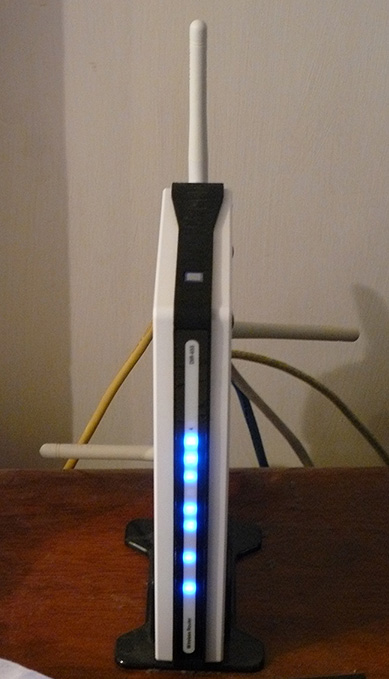
Ho posseduto un D-Link DIR-655 router per l'anno passato e che è di gran lunga il router migliore che io abbia mai utilizzato, anche se ho fatto pagare $ 150 più di quello che ho pagato per un router prima, così ho ricevuto quello che ho pagato.
A partire dalla versione 1.21 Beta 04 del DIR-655 firmware vi è ora disponibile functonality SharePoint. SharePoint come i mezzi di comunicazione e di altri siti, in parte, chiamata o SharePort, come viene chiamato in tutti gli altri compreso il software in sé è un modo per i prodotti D-Link per condividere una periferica USB attraverso la LAN, ho intenzione di provare a non confondere le ulteriormente, in modo farò riferimento ad esso solo come SharePort da ora in poi.
SharePort è una caratteristica interessante che ho in realtà voleva essere in grado di fare qualche anno fa, dalla condivisione di dispositivi USB da un computer in modo che possano essere utilizzati su un altro PC, come se il dispositivo è stato effettivamente inserito nel vostro PC. D-Link hanno infine portato questa tecnologia per la vita in modo limitato con SharePort.
Questo è il modo SharePort opere, userò il mio DIR-655 e Brother DCP-150C MFC come un esempio.
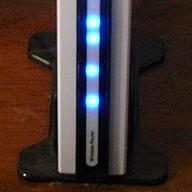
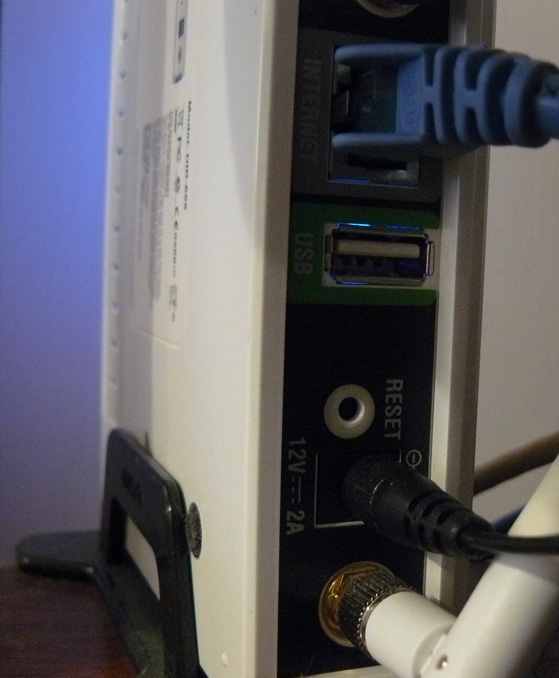
Il DIR-655 dispone di una porta USB sul retro, le prove sembrano indicare che è una porta USB 1.1, fino ad oggi il porto è stato utilizzato per le impostazioni wireless che possono essere archiviati su una chiave USB.
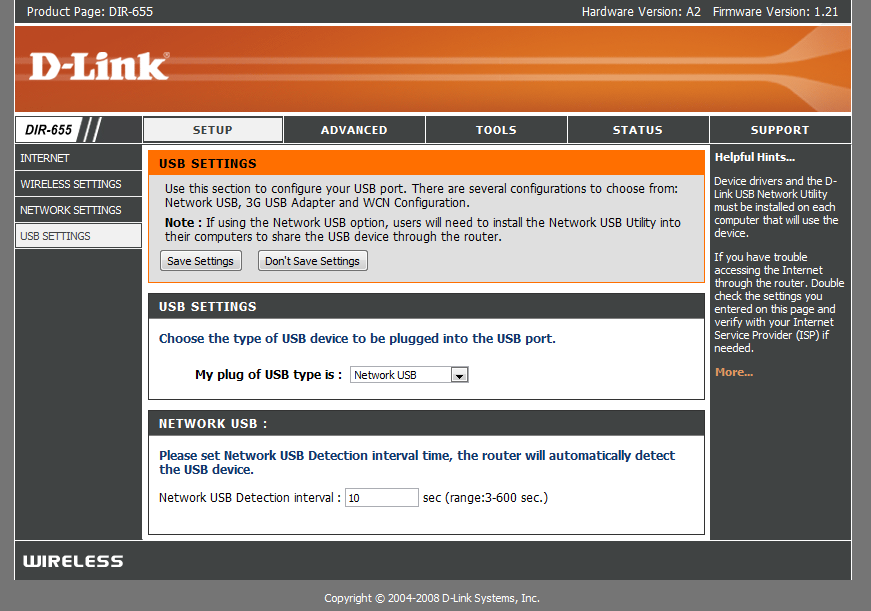
Dopo aver installato il nuovo firmware però la porta USB ha trovato un uso più, siamo accolti con un nuovo menu con il programma di installazione che controlla l'uso del porto.
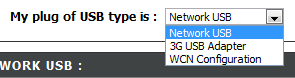
Come potete vedere non c'è molto per l'installazione di questa porta USB, WCN configurazione è l'impostazione predefinita, questo viene utilizzato per la chiave di configurazione wireless, selezionare la casella a discesa:

Scelta di rete USB mette il router in modalità SharePort, scegliendo 3G USB Adapter è un po 'un mistero per me, io non sono sicuro di quali sono i dispositivi compatibili con questo ancora, tuttavia, come maggior parte della gente, ho un servizio 3G e usarlo come un backup solo da collegare il dispositivo fino alla porta USB e scegliendo 3G USB Adapter sarebbe molto utile.
Una volta che avete scelto di rete USB il dispositivo è automaticamente condivisa, tuttavia, al fine di connettere è necessario installare il software SharePort da D-Link, questo è ancora in Beta appare così utilizzare con cautela etc etc, non ho avuto un problema con ancora e sembra abbastanza lucido. Una volta installato assicurarsi che permettono di eseguire all'avvio ed eseguirlo subito, altrimenti non sarà in grado di utilizzare il dispositivo senza eseguire manualmente il software SharePort ogni volta, si usa solo 2 MB di RAM, quindi non è una risorsa hog.

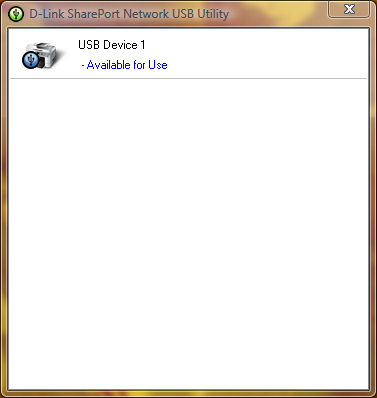
Se il dispositivo USB è acceso e connesso quindi l'utilità SharePort dovrebbe mostrare come questa volta si fa doppio clic sull'icona nella barra delle applicazioni. Sarà quindi consentono di eseguire attraverso una procedura guidata per l'installazione del dispositivo, avrete bisogno del vostro dispositivo cd driver o il driver più recenti per il proprio sito, alla fine vi verrà chiesto se si desidera connettersi automaticamente al dispositivo quando si stampa se Si tratta di una stampante, questa è una buona idea altrimenti si deve scegliere manualmente la connessione.
Una volta che è tutto impostato su ogni computer che utilizza il dispositivo, si noterà che ogni dispositivo afferma che la stampante è in pausa e non in linea, stampa alla stampante in ogni caso, il software rileva SharePort una stampa che è stato inviato alla stampante e assegna automaticamente la stampante al computer e mentre la stampante sta comunicando con il vostro PC verrà visualizzato come connesso, una volta che il processo di stampa è stato finito poi tornare a non in linea, in pausa.
La limitazione di questa caratteristica è che funziona solo su un solo PC alla volta, i dispositivi USB semplicemente non sono progettati per essere collegato a 2 PC contemporaneamente quindi ha senso perché è questo il caso.
Non ho provato le cose come webcam tuttavia essi sono stati conosciuti per lavoro, anche se a un ritmo più lento rispetto al normale, la funzione di scanner della mia stampante funziona bene, tuttavia è necessario connettersi manualmente utilizzando il software SharePort ad usarlo, assicurarsi di scollegare dopo aver terminato.
Come ho detto all'inizio di questo articolo del software SharePort è qualcosa che ho aspettato a lungo, questa è proprio una grande caratteristica considerare il mio router non è l'ultima fuori adesso e quasi sembrava D-Link aveva rinunciato aggiunta di nuove funzioni ad esso, si mostra anche come sia il dispositivo può funzionare se è in grado di gestire un dispositivo USB mentre si sta eseguendo tutte le sue altre funzioni.
Related posts:
Commenti:
Lasci una risposta


Data: 14 ottobre 2008
Orario: 5:57
Appena aggiornato il firmware sul mio router DIR 655 a 1.21. Quando ho iniziato a installare l'applicazione SharePort Utility è caduto il mio computer desktop e portatili, sia con Windows Vista Home Premium OS. Chiamato il supporto tecnico Dlink, ma non ha trovato problemi. Qualcuno aveva lo stesso problema? Che necessitano di una soluzione a questo problema ... please help.
Data: 14 ottobre 2008
Orario: 11:47
Beh io sono ancora in corso 1,21 Beta 04, ci potrebbe essere qualcosa con 1,21 finale, inoltre potrebbe essere una buona idea di ri-scaricare l'utility da ftp://ftp.dlink.com/Gateway/dir655/Apps/SharePort_Network_USB_Utility_094. zip ed eventualmente re-flash del router con ftp://ftp.dlink.com/Gateway/dir655/Firmware/dir655_firmware_121.zip O ftp://ftp.dlink.com/Gateway/dir655/Firmware/dir655_firmware_121_no_securespot.zip the no_securespot file ha una data più recente su di esso rispetto alla norma 1,21 firmware. Che tipo di software hai attualmente in esecuzione su entrambi i computer? Provare a arrestare etc antivirus sia durante l'installazione di questo.
Data: 16 ottobre 2008
Orario: 4:56
Ho appena installato il firmware 1,13 sul mio DGL-4500 così come installato l'utility shareport. Shareport non è recionizing mio router della rete o il mio HD esterno, come essere connessi. Qualche idea?
Data: 16 ottobre 2008
Orario: 6:44
In realtà sto cercando di andare a fondo di un problema simile che ho riscontrato, a pochi giorni fa il mio pc smesso di rilevare quando la mia stampante era accesa e la maggior parte del tempo anche non rilevare quando il router era collegato.
Ho reinstallato, riavviato il router e non cambia, anche quando ogni altro PC funziona perfettamente.
Possibile soluzione: In realtà ho appena risolto il problema, a quanto pare non in grado di riconoscere i dispositivi quando si hanno più di una scheda di rete attivata, quindi se si sta eseguendo VMware etc dovrete disabilitare le altre connessioni di rete e riavviare il sistema prima che avrà inizio la rilevazione di nuovo. Se siete in grado di farlo funzionare anche da questo me lo faccia sapere.
Data: 18 ottobre 2008
Orario: 5:54
Salve!
Pare che questo funziona solo sulla versione americana del 655. Ho un lampo il firmware alla versione più recente UE e non vi è alcuna schermata come descritto sopra.
Volevo solo far capire che questo è solo per gli utenti degli Stati Uniti. Tutti gli altri, non essere scambiato a pensare questo router di rete qualcosa di diverso da un accesso web.
Data: 19 ottobre 2008
Orario: 12:13
Grazie per il testa a testa, ho usato la versione americana del firmware nel mio AU ha acquistato 655.
Mi consiglia di non farlo, però io non credo che ci sia alcuna differenza in hardware per le diverse regioni o.
Data: 20 ottobre 2008
Orario: 5:35
Ben-Grazie per questa grande esercitazione - usando le tue istruzioni, sono stato in grado di aggiornare il firmware, installare l'utilità di stampa e stampare utilizzando il mio router-portatile connesso! Solo una parola di ringraziamento.
Come Cordiali saluti, ho usato la D-Link proprio software router "verificare gli aggiornamenti del firmware" caratteristica, e si raccomanda automaticamente la versione 1.21 (del 10/9/2008). Now I'm stampa-Hunky dory su un Vista-based portatile (Compaq), e uno XP / Home-based desktop (Compaq). Ancora un altro computer portatile Dell per la connessione. La stampante è una HP Deskjet F4180 All-In-One. Dovuto installare SharePoint e il driver della stampante HP sul portatile, ma che non era un grosso problema.
Una differenza che ho notato da quello che aveva detto: non ho di riconnettersi alla stampante ogni volta che lo uso. Una volta mi sono connesso, rimane connesso a meno che non decidano di "liberazione" si. Se uno dei PC è collegato, e si desidera stampare da un altro, che vi offrirà la possibilità di "chiedere un comunicato" dalla macchina che è connesso. Poi, la macchina che è attualmente collegato riceve un messaggio pop-up chiedendo di staccare in modo un altro utente può utilizzare la stampante. La barra di stato mostra anche il nome del computer di qualsiasi macchina è attualmente connesso attivamente alla stampante. Forse questo è stato un altro aggiornamento del firmware che è stato incluso nella release 10/9/08?
Come Cordiali saluti, io sono un utente americano.
Data: 20 ottobre 2008
Orario: 12:34
La ringrazio per il tuo commento Lisa, sono contento che ti è piaciuto le mie istruzioni.
Non ho mai fatto venire attraverso questo, tutti i miei computer sono impostate su connessione automatica in modo che siano ben collegato alla stampante in pochi secondi breve che il processo di stampa viene inviato, poi si disconnette di nuovo, suppongo che sarebbe parte di anche il mio però non ho incontrato a causa di non averlo collegato a qualsiasi PC uno abbastanza a lungo per un altro per richiedere l'uso di esso.
Data: 23 ottobre 2008
Orario: 7:48
Ci sono sicuramente problemi con la ver 1.2 e 1,21 versioni del DIR-655 firmware.
Il Virtual Server mappatura non funziona correttamente per i pacchetti in uscita. Eseguire un server di posta che ha iniziato il funzionamento intermittente su queste due giri del firmware. Tornando a 1,11 risolto il problema. Connessioni alla porta 25 (SMTP) sarebbe il percorso al server appropriato interno della mia rete, ma sembra che il resp server non è stato sempre tornare al server remoto di collegamento. questo lascia la routine SMTP in attesa di comunicazioni ulteriori che non arriva mai e timeout. A volte il server di trasmissione verrà rinunciare e la posta è perduto.
Inoltre, gli orari non possono essere configurati correttamente .. il firmware in modo errato bandiere volte cioè nullo: 11-5 non è valido in 1.2x e ok a 1.11.
Data: 23 ottobre 2008
Orario: 11:52
That's pretty bad Brian, non ho provato niente di male con questi firmware me, ma altri sono i problemi di segnalazione. In precedenza ho tenuto fuori 1,2 come persone sono state avendo problemi con esso, ma non appare tutti i problemi possono essere stati fissati.
Data: 24 ottobre 2008
Orario: 6:35
Mi chiedo se si potrebbe mettere alla prova qualcosa per me ... potresti provare a creare un calendario con 11-5 e vedere se si ritiene che validi? Che mi dirà se questo è un problema universale, con 1,21 o thats qualcosa solo un problema con la mia unità e il firmware .... THX
Data: 24 ottobre 2008
Orario: 4:47
Sto vivendo lo stesso errore, sembra che non piace che coprono oltre la mezzanotte. Che cosa succede quando si imposta un programma 11-12 e un 12-5?
Data: 27 ottobre 2008
Orario: 7:28
Ho trovato il sito francese in cui il rappresentante Dlink francese sostiene shareport funzionalità sarà disponibile nella settimana in firmwares UE:
http://www.clubic.com/actualite-170094-dlink-routeurs-dir-655-dir-855.html
Uno dei commenti qui sotto l'articolo sais firmware degli Stati Uniti funziona bene su hardware UE (come Ben scritto - probabilmente non ci sono differenze di hardware), shareport funziona bene, e PIXMA Canon multifunzione possibile eseguire la scansione tramite la porta condivisa.
Io sto per ordinare il DIR-655 per me ...
Data: 28 ottobre 2008
Orario: 2:03
@ Giugno (e chiunque altro) ... ho anche incontrato il "Installazione SharePort" è schiantato i miei sistemi problema. (sia V ,94 e 1.0 release)
Il DIR-655 è andato in grande, l'aggiornamento del firmware è andato bene. Router / wireless che strappa veloce.
È andato per installare il software SharePort e si è schiantato il mio XP SP3 e Vista Home Premium sistemi terribilmente male. È stato in grado di farli andare via di ripristino del sistema, ma non era abbastanza per un po '.
Sono sospettare un conflitto con AVG Free 8, che è un pezzo comune di software su tutti i miei sistemi.
Chiunque altro può eventualmente confermare una SharePort / AVG Free 8 conflitto di driver che possono avere i loro sistemi caduto durante / dopo l'installazione SharePort?
-Cheers
Data: 28 ottobre 2008
Orario: 7:35
Beh, io ho lo stesso problema giugno Versione Sharepoint 1,0 blocca il mio laptop durante l'installazione e disinstallazione. Ho il firmware 1,21, ma non credo che le cose perché non posso nemmeno installare il software senza bloccarsi. Chiamato il supporto Dlink e dicono che Sharepoint e la porta USB non sono supportate sul DIR-655.
Potrebbe cercare un prodotto alternativo in grado di supportare correttamente un disco rigido. Eventuali raccomandazioni? Potrei provare la Apple Airport Extreeme ora che è Gigabit e dual-mode in grado.
Data: 28 ottobre 2008
Orario: 9:30
Sono quasi certo nel mio caso c'è un conflitto di driver tra il driver SharePort e qualcos'altro. Sono fortemente appoggiato in favore di esso che è un qualche tipo di protezione del sistema HIPS (?) Funzionalità di AVG Free 8 nel mio caso.
Il test di sistemi letto, posso installare SharePort benissimo (v.94 o v1.0). Tuttavia, se prima mi hanno AVG Free 8 installate le macchine blu-schermo durante la fine del processo di installazione ... o quando un driver o un servizio di tentativi per essere installato. Curiosamente, su un "vero" sistema di cisterne che durante l'installazione, su un sistema virtuale, solo carri armati durante la disinstallazione di SharePort con AVG Free 8.
Tuttavia, (sui sistemi virtuali) se io prima disinstallare AVG Free 8, riavviare, installare SharePort, riavviare, quindi installare AVG Free 8 tutto sembra felice.
Ho bisogno di fare un po 'più di risoluzione dei problemi prima, prima di passare alla mia "live" dei sistemi. Non è stato molto divertente fare un ripristino di sistema su due dei miei tre sistemi di questo fine settimana.
Non credo sia una questione router-hardware/firmware come meglio posso dire. My DIR-655, se strappo rapido e solido. Ho fatto l'aggiornamento al firmware 1,21 che permette questa funzione SharePort nuova, ma io non vedo come il firmware del router è l'impatto dei sistemi. Sono convinto che è con il software SharePort stessa e in particolare di un driver o di conflitto di servizio in fase di inizializzazione di installazione. Devo solo da definire il punto di conflitto.
E sì ... ho trascorso più di 30 minuti al telefono con il sostegno Dlink la notte scorsa ed è stato accanto al valore. Finalmente ho avuto la tecnologia poveri a crescere i miei risultati a un supervisore e forse farà un desk tecnico al Dlink.
Secondo questo tizio, non ci sono più recenti "back-room" versioni disponibili per SharePort in questo momento.
Ti consente di sapere che cosa posso sapere.
In caso contrario, sono stato molto felice con il DIR-655 dispositivo generale. Peccato che la funzione SharePort è stato uno dei fattori decisivi per andare con questo modello.
Sigh ....
(BTW-ho postato il diritto di cui sopra il mio commento sopra SteveW's ... in qualche modo il giugno browser intrappolato il nome nel campo autore.)
-Cheers
Data: 29 ottobre 2008
Orario: 2:44
Che il lavoro è una buona risoluzione dei problemi c'è Natale, sarebbe un problema software SharePort di sicuro, forse AVG non è bello giocare sia, non hanno proprio avuto il miglior record di recente per quanto riguarda i problemi con altri software. Vedrò se riesco a trovare nulla a proposito domani AVG / SharePort, uno sono sicuro delle aziende sa qualcosa.
Non mi aspetto che D-Link per aggiornare il software per un po ', ma credo che sarebbe solo sapere che per certo.
Speriamo che se abbastanza persone hanno il problema se si risolverà presto, il software stesso è costretto a lavorare con tutto l'hardware in grado SharePort e c'è un bel po 'di quei fuori adesso.
Dal modo in cui ho cambiato il tuo nome nel commento precedente SteveW così la conversazione può essere inteso correttamente, vorrei sapere se si verificano errori con il sistema di commenti, è il mio codice in modo che abbia una possibilità di bug.
Data: 31 ottobre 2008
Orario: 8:34
Ho anche installato 1,21 sul mio DIR-655 e il software USB. Il mio computer cablati trovato immediatamente la stampante. Il mio notebook (wireless) sharport dice che non riesce a trovare un dispositivo USB. Qualche suggerimento?
Data: 31 ottobre 2008
Orario: 10:20
Prova a disabilitare eventuali altre schede di rete e il riavvio, anche la scheda ethernet, Shareport si confonde facilmente con le connessioni di rete multiple, se è in esecuzione VMWare provare a disabilitare le schede di rete vmnet.
Anche disattivare temporaneamente eventuali firewall si può avere sul proprio computer portatile in un caso, sta bloccando la connessione.
Data: 2 novembre 2008
Orario: 10:51
Avendo lo stesso problema Valca ma sono in esecuzione il nuovo Norton Virus scanner così mi chiedo se qualche altra cosa allora un programma antivirus.
Data: 3 novembre 2008
Orario: 4:14
Hi guys. Ancora testando il problema.
In precedenza avevo sospettato AVG 8 quindi questo fine settimana ho trovato un po di tempo libero. Deciso di mettere la mia teoria alla prova sul mio Vista Home Prem. SP1 di sistema.
Ho disinstallato AVG 8, fatto un punto di ripristino manuale (cosa buona che ho fatto) riavviato, finora tutto bene. Poi ho installato SharePort.
BSOD.
Ripristino configurazione di sistema utilizzando il mio save-point ripristinato il mio sistema. Ora mi è tornato al punto di partenza.
È passato ad una nuova sessione di Virtual PC usando una installazione di Windows XP SP2 incontaminata. Installato SharePort bene. Nessun problema. Disinstallato che bene.
Avanti il sospetto che ho avuto era NetLimiter Monitor, che è anche comune a tutti i miei tre sistemi.
NetLimiter Monitor installato e riavviato. Buono. No problemi di stabilità.
È andato per installare SharePort (v1.0) e verso la fine del setup ... come i miei sistemi reali ... il sistema virtuale ha uno schermo nero immediato riavvio.
Hmmmm.
Così ho disinstallato NetLimiter Monitor dal mio sistema e mettere in una query e-mail al loro team di assistenza che chiede se si può guardare in questo modo indipendente.
Vedere come appare sia SharePort e NetLimiter Monitor entrambi sembrano collegare in rete i driver di Windows / servizi di questo senso abbastanza bene.
Vi darà un altro aggiornamento se e quando essi rispondono.
Non è sicuro se sarò abbastanza coraggioso da solo ancora per ripetere l'esperimento sui miei sistemi vivere di nuovo.
-Cheers!
Data: 3 novembre 2008
Orario: 7:27
Ciao a tutti, sono nuovo Brand a tutto questo. Recentemente aggiornato alla DIR655. Grande. 1 Desktop 5 Notebooks. Desktop è la scheda di rete PCI, router, modem DSL Notebooks Etc. sono tutti in esecuzione interne dispositivi 802.11g.
Se si scollega il cavo USB dal laser a colori Oki550 dal Desktop, e collegarlo alla porta USB del DIR655. È questo in ultima analisi (o teoria) che vanno per permetterci di stampa che il laser senza accendere il computer desktop per primo?
Per ora questo è il mio obiettivo finale e questa è la mia prima domanda.
Grazie
Dave
Data: 3 novembre 2008
Orario: 3:10
Sì questo permetterà l'accesso alla stampante in qualsiasi momento il router è acceso, la stampante e router sono le uniche 2 cose che vanno avanti per far funzionare tutto questo, tuttavia, che è a condizione che non percorso attraverso il desktop in qualsiasi momento. Come si può vedere dai commenti che si dovrebbe esercitare un po 'di cautela quando si installa il software Shareport in quanto non gioca bene con altri software che ha componenti di rete.
Data: 4 novembre 2008
Orario: 6:30
Ehi ragazzi ho trovato il problema ... La sua disinstallazione limitatore Net che e siete pronti per partire ^ _ ^
Data: 6 novembre 2008
Orario: 12:01
Ben,
Giusto per confermare quello che ho sospettato e Nick ha confermato ... the Net Limiter 2 programma Monitor non criticamente in conflitto con l'applicazione SharePort (in questo momento).
Avevo disinstallato dal mio XP Home (SP3) e Vista Home Premium (SP1) sistemi. Poi ho reinstallato SharePort dopo la creazione di punti di ripristino (giusto per essere sicuri).
L'installazione è andato bene questo tempo e non BSOD o conflitti sono stati osservati. L'applicazione SharePort trovato rapidamente il dispositivo di archiviazione flash USB Seagate e sono stato in grado di "montare / connect" ad esso e lettura / scrittura di file da tutti i sistemi.
Per essere chiari ... un solo sistema può essere collegato al dispositivo in una sola volta, per quanto posso dire. Diversi da quelli che ora funziona grande.
Wow! Che è stato un problema doozie di lavoro che fuori. Grazie a Nick per inviare un messaggio di conferma.
Io ho mandato una e-mail al team di Net Limiter sostegno sulla questione, ma nessuna risposta ancora.
Non è sicuro se si verificherà con tutti i loro programmi (a pagamento / gratuito) o semplicemente con Net Limiter 2 monitor.
Ringrazia tutti!
Salute!
Claus-V.
Data: 7 novembre 2008
Orario: 12:34
Hi, I'm proprietaria del Dir-855 come il mio caro vecchio DIR-655 è andato alle mie sorelle appartamento come una soluzione permanente. Comunque sarei molto interessato a sapere se il DIR-855 supporta questa funzionalità. Potrebbe essere un buon add-on per il mio router wireless già impressionante.
Daniel
Data: 8 novembre 2008
Orario: 6:13
Daniel,
Secondo un D-Link comunicato stampa, il DIR-855 è compresa tra quelle che SharePort supporta.
http://www.dlink.com/press/pr/?prid=442
Citando:
"L'innovativo SharePort rete USB-funzione di transizione è disponibile su D-Link Wireless N Gigabit Router modelli - il DIR-655, DIR-825 DIR-855 e DGL-4500 Gaming Router con GameFuelâ" ¢. L'aggiornamento della tecnologia SharePort è disponibile anche sul RangeBooster N DIR-628. Gli attuali proprietari di questi router è in grado di aggiornare la tecnologia SharePort scaricando il firmware più recente e l'utilità client dal sito D-Link, http://www.dlink.com ".
Credo che questo sia il link al DIR-855 firmware e la pagina SharePort download:
Firmware --
http://www.dlink.com/products/support.asp?pid=548&sec=1 # firmware
(Questo è un nice looking 855 model by-the-way. Makes my plain 655 look!
Buona fortuna!
Claus V.
Data: 8 novembre 2008
Orario: 9:41
Ciao, ho il mio DIR655 proprie per 1 settimana. La sua una versione europea, ma il firmware US 1,21 eseguire smothly. Shareport funziona, ma non è molto stabile.
Prima emissione, la condivisione di unità disco USB sul Wi-Fi non è una buona idea IMHO. Qualsiasi problema di rete e Vista hanno problemi con il dispositivo. Anche le prestazioni è un problema (800kb / s quando 2M / s, quando la copia di file tra computer portatili con schede Wi-Fi n).
Ma ho acquistato questo router per la condivisione della stampante. Ed è possibile, ma Shareport Utility (1.0) funziona solo con l'account locale. Quando si lavora sul conto di Active Directory, la finestra popup l'utilità mostra il dispositivo collegato alla porta USB del router. Ma quando si fa clic sull'icona nella barra della finestra applicazione non viene visualizzato. Domanda è sulla barra delle applicazioni, ma non ha la finestra per selezionare il dispositivo e si connettono.
Sul conto locale tutto è OK. Sembra essere il problema SharePort Utility. Il sistema operativo è stato installato una settimana fa, non molti aplications installato.
Tutte le idee?
Piotr
Data: 9 novembre 2008
Orario: 8:18
Claus, la ringrazio molto, sono stato colpito da questo problema fino ad ora. Ho trascorso la mia intero fine settimana per niente, thank you!
Questo limitatore net sucks: \
Data: 10 novembre 2008
Orario: 1:27
Ciao, sto avendo questo isue con Dlink 655 v1.21
e v.1.0 shareport ...
stampante multifunzione e flash drive USB lavoro impeccabile su 2 XP SP3, e 1 Vista 64 macchine,
ma quando collego un iPod touch v. 2.0, l'utilità shareport mostra "disponibile per l'uso"
e tenta di connettersi ad esso e tutti e 3 di goccia del mio PC la connessione ad internet, wireless e cablata e, inutile dirlo il solito iTouch e la connessione Internet viene ripristinato automaticamente, è come il router va in un ciclo di alimentazione o qualcosa del genere.
Poi ho provato la stessa procedura, ma con un iPod nano questa volta, e indovinate un po ', ha lavorato perfettamente!
è chiunque abbia questo problema e / o conoscere la soluzione a questo?
Thanx for your help.
Data: 14 novembre 2008
Orario: 1:29
Hi there!
Così .. Ho un router DIR-655 UE e provato il 1,21 degli Stati Uniti firmware me. Non ho intenzione di mentire, l'aggiornamento del firmware non è andato senza intoppi. Quando ho caricato il firmware del router, non ho potuto accedere alla pagina di amministrazione del router più ... ma dopo un reset tutto è tornato normale (potrebbe essere una buona idea per salvare la configurazione del router prima di fare il aggiornamento del firmware). Comunque, vi incoraggio tutti, con uno non ci dir-655 per cercare il firmware 1,21 ... finora tutto bene lavoro e persino riuscito a collegare la mia stampante ad esso e funziona benissimo ... prossima cosa da provare è una periferica di archiviazione
Data: 15 novembre 2008
Orario: 10:16
Ricordate ragazzi, il router sembra essere limitato a velocità USB 1.1, vale a dire circa 1MB/second quindi non è raccomandato a meno che non si dispone di un dispositivo di piccole dimensioni e non hanno molto da trasferire, anche i router non sono i sistemi in modo più veloce il trasferimento dei dati tramite il bus USB mette probabilmente un sacco di tensione sul dispositivo che potrebbe provocare qualsiasi cosa, da una velocità più lenta e abbandoni LAN wireless router si riavvia.
Vi ringrazio per tutte le vostre ricerche Claus, speriamo presto una delle società è in grado di risolvere i problemi di compatibilità.
Data: 26 novembre 2008
Orario: 3:22
Speravo che potesse aiutarmi con un altro problema.
Di recente ho aggiornato da un altro router D-Link ad un Dir-655. Aggiornato a f / w 1.21. Hanno più macchine in un gruppo di lavoro di rete locale che tutti vedevano bene gli altri con il router più anziani. Ora I cant vedere una qualsiasi delle altre macchine della rete LAN. So che ho perso qualcosa di semplice, in modo speravo che potesse darmi un testa a testa. Tutti i nodi vedere l'ammenda Internet e IP sono riservati e all'interno di range dhcp. Che cosa ho perso? Molto grazie
Data: 26 novembre 2008
Orario: 1:25
Ci sono 2 cose fuori della parte superiore della mia testa che hanno problemi quando si spostano le reti, soprattutto quando la rete cambia è regime IP, tra cui alcuni software firewall di Windows Firewall e comunemente ZoneAlarm può bloccare un PC di essere 'rilevabile' quanto ritiene questa nuova rete è una rete pubblica su Internet, invece di una LAN privata, se si esegue Windows Vista la stessa cosa può accadere, assicurarsi che il proprio PC hanno impostato la loro connessione di rete in casa o private, quelle veramente dovrebbe essere il momento solo quando il problema dovrebbe verificarsi.
Se sono wireless anche assicurarsi che Wireless partizione è disattivato nelle proprietà di Advanced Wireless ciò causerebbe un effetto simile.
Data: 11 dicembre 2008
Orario: 10:55
Ho lo stesso problema BSOD su Vista come detto da altri. Il PC è andato a BSOD alla fine del Shareport installare e poi BSOD'ed ogni volta che ho cercato di effettuare il login. Ho Trend Micro AV e Nortel Contivity client VPN. Entrambi i programmi sono essenziali e non posso disinstallare sia. Potrebbe uno di questi è un problema?
Data: 18 dicembre 2008
Orario: 11:01
Salve,
Sono interessato a passare a questo router quindi ho cercato vari forum in cerca di indizi.
Oggi ho notato che c'è un nuovo (ancora v1.21) file aggiornato 12.12.08. Qualcuno ha cercato se questa è una nuova versione con correzioni o no?
Data: 19 dicembre 2008
Orario: 2:57
Io darò una prova e vedere se cambia qualche cosa si basa su persone hanno avuto problemi, in quella nota un nuovo problema che ho notato è emersa, a volte dopo aver il router per più di una settimana il software shareport su tutti i computer si avvia dando gli errori di connessione, se sono rimasto per un po 'ci possono essere centinaia sullo schermo, riavviare il router gli errori si ferma per un po'.
Data: 20 dicembre 2008
Orario: 6:52
The 1.21 è la stessa di quella che è stata rilasciata pochi mesi fa, solo con la modifica della data, tuttavia circa 2 o 3 versioni sono state etichettate 1,21 senza un tag beta, con l'ultimo è 1,21 B10 nel mese di novembre, quindi se si scaricato 1,21 nel mese di ottobre o precedente, scaricare e installare di nuovo, si risolve alcuni problemi con il port forwarding e le impostazioni di risparmio energetico.
Data: 29 dicembre 2008
Orario: 6:59
Hi gang,
Grande thread!
Sto avendo un problema shareport, e voleva vedere se qualcuno ha provato lo stesso.
ecco il mio setup:
1. DIR-655 con firmware 1,21
2. Win XP Pro macchina (come un client vmware) con shareport 1
3. WD HDD esterno
Il disco fisso sia collegato alla porta USB del router, ma non sono in grado di connettersi a dalla macchina win xp pro. La macchina XP sarà continuamente mi informi che ha "trovato" il disco fisso, ma l'icona nella barra Shareport continua a rimanere rosso, e non diventa verde. Dopo circa 30 secondi, la notifica tornerà. Sono completamente in perdita, come workeed in passato, quando ho avuto questa Client VM su un altro host. So che VMware possono causare questo, ma io non vedo come, perché ho solo una scheda di rete attivata sulla macchina XP (ethernet bridged). Ho passato ore a cercare di ottenere questo al lavoro ... Qualche idea sarebbe molto apprezzato!
Grazie,
John
Data: 30 dicembre 2008
Orario: 8:02
Io ho questo setup DIR-655 Firmware 1.2.1 e Shareport ho avuto modo di lavorare, se mi disattivare il mio firewall Microsoft OneCare.
C'è qualcuno che conosce il porto utilizzato da D-Link SharePort?
Data: 31 dicembre 2008
Orario: 12:08
Se tutti vanno al sito Dlink per il router, vedrai che si dice,
"Questo firmware è stata progettata per i prodotti solo negli Stati Uniti.
L'utilizzo di questo firmware su un dispositivo di fuori degli Stati Uniti invalida la garanzia e può rendere il dispositivo inutilizzabile.
Si prega di contattare il D-Link ufficio nella vostra regione per gli aggiornamenti del firmware che sono compatibili con il prodotto D-Link. "
e,
"¤ Added SharePort caratteristiche.
¤ Risolto il problema di notifica e-mail.
Si prega di scaricare l'utilità SharePort e vedere il manuale SharePort prima dell'uso ".
È necessario scaricare l'utilità effettiva di usarlo!
Data: 31 dicembre 2008
Orario: 12:10
Oh, e ho quasi dimenticato, questo è per x86 versione del sistema operativo solo. x64 non è supportato.
Data: 2 gennaio 2009
Orario: 3:12
Ciao Giacomo, non sono sicuro delle porte me però se si apre un prompt dei comandi e utilizzare il comando netstat '' solo dopo aver tentato di connettersi utilizzando Shareport, cercare IP del router e si dovrebbe essere in grado di vedere tutte le porte che il PC si collega al router per l', OneCare può avere un file di log che potrebbe consentire di fare una cosa simile, assicurati solo che si sta eseguendo le applicazioni di rete meno possibile al momento, come gli elenchi possono ottenere abbastanza lungo e non non hanno tutti i programmi p2p in esecuzione al momento sia.
Ciao Jody, ho provato la versione 0.94 e la versione 1.00 su Windows XP x64 e Windows Vista x64 e non ho avuto problemi, c'è una versione x64 che non consente di eseguire questo?
Data: 7 Gennaio 2009
Orario: 5:38
Ho appena ricevuto un D-Link DIR628 che ha anche l'utilità shareport. Tuttavia, io sto avendo qualche problema piuttosto strano e chiedo se qualcuno può offrire qualche aiuto o suggerimenti.
Sul portatile di mia moglie Vista, l'utilità shareport rete USB installato senza problemi e funziona bene. Sul mio XP Pro Desktop, la prima installazione impiccato e quando ho riavviato, l'utilità di rete USB iniziato, ma non ha potuto vedere i dispositivi dietro il router. I have been trying different firewall settings (and eventually turned off all firewalls just to try it) the last few days and nothing seemed to really work.
The only thing that seemed to work is if I uninstall the shareport utility, reinstall it, then the first time it got started after reinstall, I could see the devices. If I exit out and restart the utility, it's the same old problem of not seeing any device. Rebooting also has the same problem of not seeing anything. The only way to get it to work so far, seems to be uninstall->reboot->reinstall and it only worked after that sequence.
Anyone has any idea on what this problem might be? Quando ha funzionato, ha funzionato grande. I got 80 Mbps from an external HD which is not great but not too bad either. I could also put both my MFP printer and the HD behind a hub and access both of them. It's really wonderful that way. I just wish I can get it to work on all my computers. By the way, my other system is a Mac and there isn'ta Mac version for that utility.
Sorry for the long mail, any help or suggestion is really appreciated. Grazie.
Date: January 7, 2009
Time: 6:36 pm
I have seen a few instances where the devices can't be found on a pc randomly, however I have not experienced this on a PC every time after it has been installed. Is the PC able to detect the router using the Shareport utility?
Right click on the Shareport icon, in the menu you should see the name of your router and it's IP address, make sure it is selected, if not go to it and a new menu will open up, make sure you click on Enable, also you can click on Configuration to get some advanced settings.
If the router doesn't show up in the list then there may be some connection settings on that PC that are limiting the connection between it and the router.
I'm also waiting on a Mac version of the software, though I think it might not happen any time soon.
Date: January 8, 2009
Time: 4:19 am
Anybody use a USB hub on the shareport and get more than 1 device to work?
Date: January 8, 2009
Time: 5:21 am
Ben – thanks for the response. The PC that I am problem with is directly connected to the route through a wired connection using a CAT5 cable. It is the primary system that I use to set up and configure the router. When I had the problem, the top line in the right-click screen of the shareport icon, the one showing the IP addresses and things was not visible. I only got things from the “Advanced Options” down.
Mike – I did put a USB hub in and connected a Canon MP470 printer and a external HD at the same time. I was able to see both of them and were able to connect to them from my Vista laptop.I didn't try to read/write to the HD and print at the same time though.
By the way, I made a typo earlier. I think I was only getting 8 Mbps, not 80. So roughtly 1 MB/sec read throughput is what I was getting. Not very fast but good enough to move small amount of data.
Date: January 8, 2009
Time: 10:28 am
I'm having the same trouble: Have a Dlink655 with a wired connection to a Vista Home Premium laptop and an older desktop box running Win XP.
Shareport works just fine on the laptop – I want to use it for a shared printer.
I can install shareport fine on the XP machine, but it doesn't find any devices connected… and I also don't see the router's IP address upon right-click. I disabled firewalls, uninstalled antivirus software etc. but to no avail.
Would love some hints if anyone has them!
Date: January 8, 2009
Time: 2:42 pm
To Jacko
I went into admin, clicked on ADVANCED, then WISH on the left, then I made sure it was ENABLED and for PRIORITY CLASSIFIERS I clicked AUTOMATIC. Try it.
Data: 10 gennaio 2009
Time: 4:44 am
Mike – you said you “went into admin, clicked on ADVANCED, then WISH on the left, then I made sure it was ENABLED and for PRIORITY CLASSIFIERS I clicked AUTOMATIC…”
I assume you are talking about the web administration page for the Dlink655 router? What is the “WISH” thing you talked about? I have a Dlink628 and I didn't see anything that looks like “WISH” in the advanced menu. I was wondering if you can explain what that menu does, I might be able to find the equivalence in my router. Grazie.
Data: 10 gennaio 2009
Time: 3:04 pm
I've checked out the DIR-628 emulator on the D-Link site and it appears that router doesn't have WISH at all, perhaps you could try messing about with the QOS settings as they are similar to WISH except they affect both wired and wireless on the WAN side of things, but may not have the same effect as WISH, personally I have WISH off and have no problems.
Date: January 12, 2009
Time: 1:45 am
Ciao a tutti,
I tried changing the WISH settings, but no luck. The Vista laptop has no issues with Shareport at all, whereas the XP machine cannot even recognize the router.
If the issue is router-side, I don't know why the Vista box would work and the XP box not?
Grazie!
Date: January 12, 2009
Time: 2:25 am
Hey guys, i am seeing the same thing on the dlink dir-825. Wireless PC's see my printer connected to the usb shareport fine. My wired PC's lose the printer whenever they are restarted. If i reboot the dir-825 the wired pc's will see the router again.
When I click the sharepoint icon, I see the ipaddress for the router when it's working correctly with the printer. When it's not, the ip address is not there and the first entry is advanced options.
I tried changing the wish settings but no change….
Date: January 12, 2009
Time: 4:38 pm
Hi Jacko and hoc, are either of your PCs that have this problem set to connect to the router via DHCP or via menually entered static IPs?
Date: January 13, 2009
Time: 3:10 am
Salve
Both my laptop (Vista) and desktop (XP) are connected by wire to the router, and both are set up using DHCP.
Grazie!
Date: January 14, 2009
Time: 3:14 am
I talked to dlink 3rd level today who was passing this on to the product manager. I need this to work so have done a good amount of testing. My PC's are all connecting via dhcp, all vista (some x32 and some x64).
From the testing here i have found that the wireless PC's always detect the printer connected to the shareport. The wired PC's are inconsistent… at best. If I reboot the dir-825, the wired pc's will immediately detect the shareport printer and keep it until the network connection is interrupted. If i pull the network cable on the wired pc, and then plug it back in, they will lose the printer and not re-establish it (exactly what happens when you power off your PC).
Hoping we can come up with a better solution than rebooting the router every day!!! I'm sure linksys would like to hear about that.
Date: January 14, 2009
Time: 7:14 am
hoc,
I think you may be on to something. In my set up, the system that has problem seeing the network USB port is connected to the router through a CAT5 directly. The laptop using wireless connection has always been good. I have an additional variable in my environment on the OS used. The wired desktop uses XP while the wireless laptop uses Vista.
I installed Windows 7 Beta on the wired machine over the weekend. I was again able to see the printer on the network USB port upon first start of the utility. When I exited out and restart the utility, I had problem again. I will try rebooting the router when I got home tonight.
Date: January 17, 2009
Time: 2:23 am
I am getting a 'Connection failed, please try again.' message every minute or so from SharePort Network USB utility.
It's odd because I have my printer on the USB port and it works fine.
Any theories on where to look??
Date: January 17, 2009
Time: 3:24 pm
I get that too on every computer other than mine, strangely uninstalling/reinstalling doesn't fix it either, the only thing I did was upgrade the firmware, my computer installed SharePort after the firmware upgrade yet the other PCs have had it installed since before and they experience the problem.
I can't see any link between the Operating System they were running or the firewall/antivirus software either, what I have done is turned off the startup option in the program and run the programs only when I need to print.
Date: January 18, 2009
Time: 7:18 am
Can anyone recommend a setup for allowing a mac and a PC to access and use the same external harddisk over a network? Or where I can find info on this? Here are the challenges:
- Both PC and Mac are a bit old, so no N-standard
- Formatting of disk: has to be HSF+ and PC will use MacDrive?
- Considered buying an entertainment PC and use this as “Server”
Suggerimenti?
Date: January 19, 2009
Time: 9:49 am
Dlink released an update to the sharepoint utility software this week. For my wired pc issues it does help, but is not a complete fix.
At start-up my wired pc doesn't see the printer connected to the shareport. In the 1.0 version, the dialog box for the utility started with “advanced options”. Now it starts with the address for the router.
I can force the utility to see the printer by selecting disable and then enable in that shareport dialog. Still not a complete solution but getting better…
Date: January 22, 2009
Time: 1:38 pm
Shareport is not finding my router in the pop up menu from the system tray icon. I have the DIR 655 and a vista x64 OS. Dlink support stated that shareport does not support 64 bit vista OS but posts here seem to contradict that. Any recommendations, advice would be much appreciated.
Date: January 24, 2009
Time: 12:49 pm
I installed Shareport 1.14 and it works better, although when I disconnect from a hard drive it says it's busy and should I force or cancel. Force seems to work and I can re-connect ok
Date: January 25, 2009
Time: 8:29 am
I've just upgrade my firmware and everything work's fine. I've test USB HDD and USB Printer both work fine. I'm pleased with DIR-655. Real cool
Date: January 25, 2009
Time: 2:00 pm
Finally got second laptop to connect to printer hanging off DIR-855. The cuplrit was OneCare – thanks James 30 December. Once One Care Firewall was disabled my Shareport icon turned green and the printer was able to be used. Only took me a couple of days and many grey hairs !
Date: January 26, 2009
Time: 12:18 pm
Ciao a tutti,
I setup the DIR-655 for a friend – one older desktop with Windows ME and a new laptop with Vista. The desktop is wired to the router, the laptop is wireless. I installed Shareport and hooked up his printer to the USB on the router. Ha funzionato! for a few days. Now the printer seems to have disappeared…. sort of. It's not listed in any application, but if I click on the Shareport Utility, it says the printer (a fairly new HP) is available. There's got to be something I'm missing here. Anyone know?
(For now, he's not trying to print from the desktop, but I was thinking a usb hub would allow me to hook the printer to the desktop as well as the router.)
grazie
Date: January 27, 2009
Time: 4:37 am
Oh well, I went to my friend's house and everything worked fine… of course! The printer was available and I clicked Connect and it connected. It did reinstall the printer driver. Who knows what he did — he did say he'd been turning. So maybe when I rebooted, it got straightened out.
I am still interested in using a usb hub so his desktop is wired to the printer. So, if anyone has done that and has any “gotchas” to warn me about, I'd appreciate it. I'm thinking printer to hub and hub to desktop and hub to router.
grazie
Date: February 1, 2009
Time: 3:01 pm
Just got a DIR-655 last week after all the good reviews. I downloaded the SharePort fw 1.21 (2008/10/09). I'ma bit disappointed with it. Wanted to share some of the issues I'm seeing perhaps you have solutions to share;
- Clients (3x Vista Acers, & XP Pro Lenovo) have hard time getting an IP address with WPA-personal, and WPA2-personal after wake-up. I must have the laptop try few times until it succeeds. They worked quite fine with cheap Belkin 802.11g routers
- Connection drops even though signal is in the 85% or greater most of the time
- Finally, I bought this when I heard about the SharePort fw. This feature was a big disappointment. I thought it may work as a printserver, but clients have to request and grant the connection before use… very stupid when no one is using the already connected client! – Also, if the laptop sleeps, the connection gets stuck and a USB disconnect/re-connect must be done for the printer to be re-discovered. Lastly, my Canon MF MP830 is not happy with it. The print preview doesn't work anymore, the printer doesn't wake up on jobs, and the jobs error out frequently.
Date: February 3, 2009
Time: 7:14 am
having the same issue as this guy below is telling every thing is ok but when i click on the utility on task bar nothing flashes on desktop.it work well on my other computer running vista 32 home premium , it was doing good on this system too but i don't know why it start acting up like this.this is vista 32 ultimate any suggestion guys would be appreciated.
“Author: Pit
Date: Nov 8, 2008
Hi, I have my own DIR655 for 1 week. Its an EU version, but US firmware 1.21 run smothly. Shareport works, but not very stable.
First issue, sharing USB disk drive over the WiFi is not a good idea IMHO. Any network problem and Vista have issues with device. Also performance is an issue (800kB/s when 2M/s when copying files between laptops with WiFi n adapters).
But I purchased this router for printer sharing. And it is possible, but Shareport Utility (1.0) works only on the local account. When working on the active directory account, the utility's popup window shows the device connected to the router's USB port. But when clicking on the tray icon the app window is not shown. Application is on the taskbar but has no window to select device and do connect.
On the local account everything is OK. Seems to be the SharePort Utility issue. The OS was installed a week ago, not many aplications installed.
"
Date: February 3, 2009
Time: 7:17 am
forget to tell in above post im using Dlink-655 with firmware 1.21 (latestone) and share port utility 1.14. hope that u guys will provide some assistance on this issue.
Date: February 3, 2009
Time: 11:37 am
For KingTut: I have a similar problem on my laptop, the problem is caused by the channels the router is using for wireless, sometimes it will get out of range of standard wireless cards, even my laptop's N card doesn't work properly sometimes, try forcing the wireless channel to something like channel 6 for a while and see how it goes, you can also try having the channel set to 20Mhz, not 20/40.
For bally: It's possible SharePort needs certain permissions to run properly, it may be a good idea to get in contact with D-Link so they are aware of this issue, it could be a bug that they are unaware of as of yet.
Date: February 5, 2009
Time: 5:15 pm
Just installed the latest firmware for DIR-655 and Shareport on three Vista and three XP Pro SP3 pcs. The vista pc's are both wired and wireless and works fine. Te XP pc's refuse to find the router (all three wired). What more is that the Shareport uses up all CPU power when I try to exit the application. There is definitely problems with the software. All firewalls have been turned off. The XP machines have different Anti virus (AVG, Avast and Norman). One of the XP PC's are connected directly to the router, two through a access point. Changing channels or stopping other applications using communication ports have no effect. The Shareport has been tested 0.94 and also updated to 1.0 and tested with clean installations. If anyone is able to run Shareport on XP, please explain how it was installed. Also try Exiting the application and check the CPU meeter.
Date: February 7, 2009
Time: 8:41 am
dlink support q-less regarding active directory matter. even no reply for 4 days upto now. WTF Support they r providing . just dont even know what the thing is
Date: February 11, 2009
Time: 5:22 am
Just wondering out loud: do you think that it would be possible to use DIR-655´s USB port for something else then sharing a printer?
It certainly doesn´t sound to be good enough for usb-hdd´s for very low transfer speeds that´s been mentioned over here.
Could it be used for hosting a very small web server from an USB stick, like a static home page?
Date: February 12, 2009
Time: 12:02 am
I have the same problem after install all my laptops, Vista and XP starts to crash and no one could reach the printer plugged in the USB port….
Date: February 13, 2009
Time: 7:03 pm
I think i have a different problem here.. i connected a usb hard disk on the usb port of my dir-655 (1.21 firmware) and installed the shareport utility on my vista32 and xp sp3 computers.. I get no router name when i right click the utility in the system tray so I can't select any usb device from the router.. By double clicking the utility, i get no detected usb device in the utiliy's panel either.. I even tried without wirewall, to no avaqil.. what's up with this?
Date: February 13, 2009
Time: 7:07 pm
..also, whenever i boot vista32 i get a 'new hardware found' message and the request to install drivers for the router.. except that there are no drivers in the cd that came with it or on dlink's website… any suggestions? (by the way, the router works, as I can connect wireless and share my internet connection..)
Date: February 13, 2009
Time: 10:55 pm
For Stefano:
Try downloading/installing SharePort again, the drivers are a combination of generic drivers that Windows should already have and 1 or 2 that should be installed with that setup program.
Looks like the program has installed but has been unsuccessful in installing the drivers for some reason, it is most likely that the setup program has exited and deleted the required driver files in the temporary directory before it has had a chance to install them.
Have you V-Lited or stripped down your Windows XP cds in any way? Sometimes removing inbuilt drivers stops less common drivers that some hardware needs.
For Gustavo:
Unfortunately this software and the drivers don't play well with other software and drivers and there is so many possible incompatabilities, it crashes many computers with seemingly no reason.
If there is any software that is installed on those Laptops however unconnected they may seem to the problem, try removing them temporarily.
For Mika:
I don't think there's much chance of that being possible until they create some sort of interface that allows the router to use the stick for storage so it can run an additional server, then I think the router may not have the processing power needed for such a task.
For Bally:
This would be more of an additional feature in D-Link's eyes, they would have no obligation to get it working correctly, it's just the way those companies work, they don't get much more money on additional functionality such as this so it's not really worth their time.
For GC:
I've never experienced cpu usage issues at any time with SharePort on XP or vista, using different virus scanners or wireless/wired, or even through another access point, I actually have the program set to not startup as it has all sorts of problems when it's allowed to run all the time.
My installation was fairly straight forward so it probably won't help you much, double clicked on the install file, installed with default options and when it was done restarted.
FOR ALL:
I had problems with the program telling me the usb device was connected, then not every 10 minutes or so, then when attempting to use it it would disconnect each time, seems that the router no longer liked my usb extension cable, so I removed it and all is good now, so try changing usb cables when things don't work out properly.
Date: February 14, 2009
Time: 11:44 am
for Ben.
Thanks for the answer… my xp install is fairly clean, so i don't think it has any problems.. also, i didn't detect any problems while installing the shareport utility in both computers, so i find it hard to believe it's a bad installation.. i'm clueless..
Date: March 2, 2009
Time: 11:31 am
Hi Ben, what version is your router? AU or US? Have you tried 3G USB modem on your router?
Date: March 3, 2009
Time: 5:47 pm
Getting the same issue with my wired connection to the DIR-655, Shareport software works after fresh install, connects to the printer shared through the router, but only until the first suspend or reboot, then Shareport no longer detects the router. I'd rather not have to uninstall and reinstall the software every reboot. Tutte le idee?
Date: March 4, 2009
Time: 10:02 pm
Hi Adam, I have the AU version router, I have no idea what kind of 3g usb modem they are referring to and have none to test anyway other than my phone (which I assume doesn't count).
Edward, I'm not sure what is going on with that issue but hopefully D-Link fix it as more than a handful of people seem to be experiencing it.
Date: March 6, 2009
Time: 11:35 am
Ciao a tutti!
I just read most of this comments here, but it seems that I have diffrent kind of problem. Although I know that D-Link DIR-655 is exellent, I am thinking to buy DIR-855 or DIR-825 which are DualBand. I have TOSHIBA Qosmio F50-10K, so inegrated wireless card uses Atheros AR9280 chipset.
1. Can somebody tell me does my wireless card support 2,4GHz and 5 GHz simultaneously?
2. Which D-Link wireless Router should I buy?
Thanks for any comment!
Date: March 6, 2009
Time: 3:43 pm
Hi Jerry,
Your wireless card supposedly does do 2.4ghz/5ghz simultaneously, though I would check with nay documentation that came with it just to make sure.
I'm not too sure about those 2 routers as I have not had any experience personally with any of them, however I have heard that the DIR-855s have all sorts of issues, however we hear of all sorts of issues with the 655 so it really depends on what kind of bugs you can handle. If you want you can even go for another brand such as Linksys, their routers have great reviews lately.
I forgot to mention before for DIR-655 users:
There is a new beta firmware out called 1.22b05 , a significant portion of users have reported that it works great, much better than their recent releases, however this is a beta so be careful and don't install if you're worried about voiding your warranty etc, if it does fail and you're running the beta firmware they are likely to say no to a warranty replacement.
Date: March 6, 2009
Time: 3:47 pm
Jerry,
I bought 2 of the DIR-825 routers. They do simultaneous 2.4GHz and 5GHz, which is why I wanted them instead of the 655.
I am having trouble, though, in getting Shareport to recogni the router on my Vista Ultimate system.
Date: March 7, 2009
Time: 12:30 am
I have Blink as my Security software and there's a conflict with eeyet.sys driver of Blink (EEye).
Would it help to uninstall Blink, install shareport and reinstall Blink or will i always get the conflict between the drivers!
Grazie
Date: March 7, 2009
Orario: 2:58
Hi Sebastien, You will probably always get conflict with that driver, unless SharePort is updated by D-Link to stop conflicting, or if the security software company changes how it works.
Date: March 25, 2009
Time: 11:40 am
I have a laptop computer running Vista home premium and Windows Live OneCare for a firewall. I installed the Shareport software for my new 655. As long as I have the firewall turned off, the software works. I am using version 1.00 of the USB Network Utility. Can anyone identify the ports I need to enable to pass through the firewall?
Date: March 26, 2009
Time: 7:12 pm
Well I'm not sure the specifics but…
It uses an open incoming port at port 9303 using the UDP protocol so try opening that port on the firewall.
It doesn't appear to do any other activity incoming or outgoing so I'm assuming that's all you need to fix.
Date: April 9, 2009
Time: 8:29 am
So with share port i have to decide either having internet security on my network or a usb device is that what i'm understanding and expiriencing with trend micro
Date: April 9, 2009
Time: 1:00 pm
I'd stick with security
Date: April 11, 2009
Time: 2:57 pm
Ciao! I got another problem. I got d-link dir-655 Firmware 1.21EU and Hardware version A3. I have installed drivers for printer and shareport. The pc with wired network/cable found the printer on shareport, but the wireless/cableless network didnt found the printer. Perché?
Date: April 13, 2009
Time: 12:42 pm
The DIR-655 is a great router, but the shareport utility is absolutely the worst piece of garbage I have ever had the displeasure of using. It is flaky at best…sometimes it works fine but most of the time it just simply doesn't work. If they are going to release this feature, they need to ensure it works. Otherwise it just serves to frustrate users.
Date: April 16, 2009
Time: 9:52 pm
There is a new version of SharePort (in a way, it has a lower version number but is newer), also there is now an OSX version out.
Date: April 18, 2009
Time: 1:51 am
I have a DIR-655 router and have been trying to get the Shareport utility to work. I have three computers in the network: a laptop with Vista and two desktops, one Vista one XP. The laptop uses a wireless connection and the two desktops are hooked to the router with ethernet cable. The laptop and the XP desktop work fine. But the Vista desktop only works sometimes. It's really random, sometimes the Shareport utility recognizes the printer plugged into the router and sometimes it doesn't. Qualche idea?
Date: April 18, 2009
Time: 12:33 pm
I'm seeing more and more cases of Ethernet connected PCs that can't get SharePort working correctly where wireless PCs work fine, I would have expected the opposite to happen.
If there is no software on the Vista PC that could block it intermittently, such as a VPN or an active firewall then it may just be one of those times where it just doesn't want to work, as an outside the box idea try updating the network card's drivers on that PC, occasionally I have seen that fix all sorts of strange network application issues.
If you have time to spare it doesn't hurt to send an e-mail to D-Link explaining the symptoms, if we get enough in they may be able to stabilise the program more.
PS Try the new 1.10 version if you haven't already: ftp://ftp.d-link.com/Gateway/dir655/Apps/dir655_pc_shareport_utility_110.zip
Date: April 19, 2009
Time: 3:42 am
Take a look at the d-link forums before upgrading to shareport 110. People are having some issues with it.
http://forums.dlink.com/index.php?topic=5098.0
Date: April 19, 2009
Time: 3:50 am
Looks like Ben has already addressed this on the main site. BTW, thanks to Ben I have my Canon MP610 working wireless using shareport 114 and FW121. Thanks Ben!
Date: April 19, 2009
Time: 9:25 pm
Thank you for your information Lex. I wasn't aware that they had to be used with the 1.30 firmware but it makes a bit more sense now, I'll update the main post to reflect that.
Date: April 22, 2009
Time: 5:12 am
Hi Ben and all,
thanks for all the tips and hints, i've read everything.
I bought a 655 a few days ago and tried to get the shareport working since (tried really hard).
I just wanted to view some movies on my laptop without having to turn on the PC and make backups to the USB-HDD. Shareport seemed great and made me pay 179 EUR.
Tomorrow it's going back to the shelf. I want my money back.
I hope the people at D-Link think twice next time before launching something so crappy!
Date: April 22, 2009
Time: 12:00 pm
They are having alot of trouble keeping customers at this stage, It would have helped them alot if they had not advertised shareport as a feature.
Date: May 19, 2009
Time: 12:10 pm
I tried getting Shareport to work for a while and finally gave up and uninstalled it. Now I am trying to print the old fashioned way (over the network and not using the d link's USB hub) and I am having huge problems. Printing over the network was fine before shareport, now after intsalling and uninstalling it I have serious issues. Printing takes FOREVER. I mean it is VERY slow. Could the shareport software have left something on my machine that is causing this? Grazie.
Date: May 19, 2009
Time: 4:41 pm
It could have done something, SharePort connects you straight to the printer, so you install drivers for the printer that are configured to connect via usb, if they weren't uninstalled properly then there may be some redundancy that is causing the slowness, try removing all of the printers listed in “Printers & Faxes” and reinstall the network printer driver, unfortunately printer drivers are tricky to remove completely but that should at least remove some connection to the old (USB SharePort) drivers.
Date: May 20, 2009
Time: 1:03 am
Grazie. Where exactly would I find the “network printer driver?”
Date: May 20, 2009
Time: 3:51 pm
Well when you have all your printers uninstalled and you find the printer over the network windows should prompt to install the printer, you may have to right click it and click connect if double clicking doesn't work, here's an example:
Often it will get the driver for the printer from the other computer or windows update so you don't have to find it, however if it asks for a driver simply use the printer's driver cd and it will install those instead.
Date: May 21, 2009
Time: 2:05 am
Hello all, I noticed you guys are posting on the shareport Utility.
I just wanted to give you guys out there a heads up on the New firmware for DIR655 (ver 1.31) that requires you to upgrade the shareport utility to ver 1.10
It seems there is a bug in the utility or the firmware. Once installed the utility is able to “see” the printer and connect to it with the connect button, however, if you want to be able to connect to the printer automatically (like with ver 1.14)your not going to be able too.
After spending a couple of hours on the phone with Dlink and various support personnel, I was finally told by a “software specialist” that it will not work and I will have to manually connect every time I want to print.
Some may thinks, that's no big deal just hit the connect button, but when you have several computers and they all want to print from that particular printer it can be a hassle to go to every machine and connect then disconnect.
So if you decide you want to upgrade your firmware, keep this bit of info in mind.
Until then I have to wait till another software upgrade to become available and hope that it resolves the problem.
Oh! and by the way once you upgrade the routers' firmware to ver 1.31 you CAN NOT revert back to the previous one.
Date: May 21, 2009
Time: 4:41 pm
Thanks for the information, I wasn't aware of the bug in the newer version, hopefully they fix them all later on, but I wouldn't bet on it.
Date: May 28, 2009
Time: 8:27 am
Hey Ben,
Thanks for the tutorial and screenshots. I have tried your method to set up the SharePort 1.14 with my DIR-655 Firmware V. 1.21. It is working well. Grazie!
Initially, the print job encountered a problem. I just restart the print job and use SharePort to disconnect with the printer then reconnect again, then it starts printing as normal.
Grazie!
Dennis
Date: June 3, 2009
Time: 4:01 pm
Hey guys!
I am also interested in the D-Link DIR-655 and I want to connect my USB hard disk to it as some kind of mini-NAS. Has anyone here successfully connected a USB hard disk yet and (more importantly) tested the speed you can achive through this connection? Thanks a lot in advance,
David
Date: June 3, 2009
Time: 9:38 pm
Connecting a hard disk works however the connection is limited to USB 1.1 speeds (12 Megabits/Second or 1.5 Megabytes/Second), so it's quite slow, generally not recommended if you're going to be transferring large files.
Date: June 5, 2009
Time: 10:41 am
Hi guys, just letting you know there is a new version of the DIR-655 firmware that you can read about here that fixes a few SharePort issues.
Date: June 8, 2009
Time: 9:15 pm
Hey…
Anyone know if the usb utility can be used when the router is configured static as an access point? I ask because I have had no luck in doing so. '-'
Thanks in advance for any help.
Date: June 16, 2009
Time: 10:20 am
I just upgraded to the latest firmware…
Firmware Version : 1.31NA, 2009/04/24
Besides the Web Environment not working in Opera, the speeds for the SharePort with a USB2.0 HDD are really slow… I get from 800KB/s to 2MB/s… while I think USB2.0 directly connected should be around 30MB/s.
Date: June 16, 2009
Time: 12:42 pm
Hi Julio,
SharePort only works at USB 1.1 speeds and you're getting the correct speeds for that. I wouldn't recommend hard drive usage with it as there have been a few people talk about losing data when the software/connection decides to act up.
Date: July 9, 2009
Time: 10:55 am
Hi Ben,
I am from India.
Recently bought the DIR 655. (H/w Ver: A3 & F/w Ver: 1.11WW)
and couldn't use the usb port for accessing the external hard disc or a printer. on calling the tech support, they said the hardware version you are using doesn't support this feature, it should be A4.
Is this the problem of h/w ver. or F/w version.
Date: July 9, 2009
Time: 12:53 pm
I don't think they have been telling the truth there, the A3 can use SharePort, however you will need to upgrade to a newer firmware version to be able to use this, either a 1.2x version or a 1.3x version, keep in mind if you upgrade to the 1.3x series of firmware you will not be able to downgrade again.
Date: July 11, 2009
Time: 2:18 am
thanks a lot Ben for clearing this confusion. I have another query. After speaking to the D Link tech support, they say if i upgrade the firmware version, then the warranty on the product won't be valid. so should i just go ahead with the upgrade.
and why do you think after upgrading the firmware, i may need to downgrade it again.
Date: July 11, 2009
Time: 1:09 pm
When it comes to the 1.3x firmwares they do have problems that the 1.2x series don't have, but they do fix a few problems with SharePort that were causing a few users to not be able to use it, all DIR-655 routers respond differently to different firmwares so what works for one may not work properly for another.
To be safe I would recommend using a 1.2x version firmware to use at first, if it doesn't work properly for whatever reason you can downgrade the firmware back to the version you currently have.
Most people have only a few problems with 1.31 but if you want to readup on these check out the D-Link Forums here
Date: July 24, 2009
Time: 12:25 am
Had the same problem with SharePort not finding the USB-printer (connected to a DIR-825 router) on one my computers. Tried updating firmeware, s/w, just about everything, but no. At one time though, it did find the device, which set me off thinking. This might just sound stupid: but don't touch the mouse (USB-connecdted) while rebooting”. Works for me every time!!! Anybody that could understand why?
Date: July 24, 2009
Time: 6:09 pm
That is a very odd solution for it, but if it works then I would encourage people to test it out if they have that issue, doesn't hurt to try. Perhaps disconnecting such usb devices while rebooting would also work?
Date: July 25, 2009
Time: 10:23 pm
I connect Buffalo Drive Station external usb harddisk to my DIR-655. Before I use Network USB Utility to access the harddisk, the router is working fine (no disconnection when surfing internet). However, after I connect to my external harddisk via Network USB Utility and then try to copy files to the harddisk, every time after a few seconds, the connection to the router is broken. I have to reboot my computer.
Does anyone encounter this problem? How can I solve this? Grazie.
Date: July 26, 2009
Time: 3:45 am
I had a problem with Shareport (1.14) not detecting my Seagate 1 TB USB HDD connected to my DIR-855 (1.12EU)
It would only detect if i connected my laptop (Vista) to the DIR-855 through cable, not wireless.
Problem was resolved after disabling my ethernet adapter, keeping only the wifi adapter enabled, then rebooting.
So it seems like Shareport “locks” onto the initial adapter used for connecting.
Now it works like a charm, with no noticeable delay r/w on the HDD vs connecting directly to the laptops usb-port.
Date: August 8, 2009
Time: 9:24 pm
Ciao
I have read the dfferent posts but not seem people having a similar problem…
FW : 1.32NA
1 computer with Vista, 1 with XP
Bought the router last week.
Globally it works fine but I have problems using the shareport utility frequently.
If I want to print :
When I switch the router on, it connects to the printer (Samsung ML2510) and everything works fine. The page prints.
If the router is up for a few hours and I want to print, the router sees the printer, shows it as “available” but is not able to connect to the printer. It always tries (can see the trying to connect to samsung ML2510, please wait). The message stops and comes back 2 seconds after and even after 10 minutes it is still not able to connect to the printer.
If I reboot the router, everything works fine.
If I wait a few more hours, same pattern, not able to connect to the printer except if I reboot the router.
Do you have any ideas ?
Thank you !
GG
Date: August 14, 2009
Time: 12:22 am
Same problem here, works fine and dandy after install but a day or two later you try to connect, it says connecting, times out in a refresh to available status, and nothing. I'm so frustrated with this shareport utility and every time I call customer svc some Indian person with the thickest accent I've heard answers the phone. I bought this router specifically for this feature and it's very broken. It's a huge oversight on an otherwise excellent router. Qualcuno ha qualche idea?
Date: August 18, 2009
Time: 10:48 am
Same problem here on a dgl-4500, not very happy worked well for the first 2 days then nothing. All PC's are XP.
Date: August 20, 2009
Time: 9:44 pm
All users having issues with SharePort, check out this post I have made about a possible newer version of the software.
Date: September 11, 2009
Time: 5:51 am
Hi, I have a DLink DIR-628 router and I acctually buy it for the shareport application… Like some of the people here it worked fine for maybe two days, the its doesnt find anything that I connect to the port. Recently I download a shareport update to see if that would fix the problem but it didn't. I hope someone can help me
Date: September 14, 2009
Time: 7:48 am
Did you try rebooting the router? Just disconnect the power, wait a minute and reconnect. See if that helps.
Date: September 15, 2009
Time: 5:47 am
I have done that, but again you will have to do it every 2 days. If I reboot the computer it sometimes shows 2 of the same usb device. I will have to scrap the whole idea and share the damn thing through a networked PC. What a joke, get it right the first time…Is it that hard to fix it? While I am on this topic ever scince I have updated the frimware the router just periodically shuts down? It was a great router before not sure what is happening now?
Date: September 15, 2009
Time: 3:50 pm
The router is shutting down?
As in off completely or a reboot?
If it's turning off then you may have a much bigger but slightly less common problem with it, if it's rebooting then I'd still suggest to give D-Link a call/email and see if you can get it replaced with a new one.
Date: September 16, 2009
Time: 11:41 am
It just reboots periodicaly, I will call but I don't think it is under waranty
Date: September 16, 2009
Time: 1:36 pm
Some people have luck when calling the manufacturer (in this case D-Link) directly when out of warranty but I wouldn't hold my breath.
Date: September 20, 2009
Time: 1:59 am
Spoke with DLink tech support yesterday, and after an HOUR of trying to get the SharePort to work, I was transferred to a 4th support agent who actually knew what he was talking about. Within seconds, he informed me that not all devices are supported, and that DLINK will not publish a list of devices that are. My 250GB Western Digital USB drive will not work, which defeats the purpose of paying extra for the SharePort feature.
Date: September 24, 2009
Time: 10:52 am
i bought this router for the shareport feature and after readings hours of the above and trying numerous tweaks i still cannot get my external drive connected. i love the performace of the 655 but feel a little ripped off by our D-link bros – as it just isn't worth anymore effort to try to get this puppy to work 'as advertised'.
Dear D-LINK – please get your sh$t together. xoxox
Date: September 26, 2009
Time: 8:51 pm
Currently have two laptops connected to my DIR-655. However, only one can detect the printer though the router's USB port. The other one has “No USB device is detected” message. Would appreciate assitance from anyone. Grazie!
Date: October 1, 2009
Time: 7:55 am
Bonjour,
I had similar Shareport issues two weeks ago. I wrote to DLink and their answer solved my problem. I take the liberty to show it below in the hope it will help somebody. IN my case I was not using the proper version of the Shareport utility.
With the firmware 1.32NA make sure that the shareport utility that you using is version 1.10. This can be downloaded from the following link http://www.dlink.ca/products/?pid=530
Date: October 2, 2009
Time: 9:04 am
Having the same problem as jimmey above.
Got a DIR-655 V1.21 and shareport V1.15, running on a vista laptop. I use a Dynex 7port USB hub on the router.
Seems like I can use 2 Lexar thumb drives fine and can use my IPOD hook up fine as well as my HP printer, all @ once if i wanted but if i hooked up my 500GB lacie external HD it sends windows explorer into (not responding) after i try to connect. tried the same HD just into slots on laptop and no problems.
WTF!
Thinking maybe this HD is incompatible as well.
Any idea's of which HD's will work?
Date: October 2, 2009
Time: 5:31 pm
There are many usb storage devices that don't work at all and more that don't work properly, I haven't heard anything from D-Link about any reasons why.
Is the hub self powered? The hard drive may be after more power than the router can supply to it, a hub with it's own power source may be able to provide enough power instead.
Date: October 5, 2009
Time: 3:53 pm
QUOTE from Author: Denis Galipeau Date: October 1, 2009 Time: 7:55 am, you wrote : “With the firmware 1.32NA make sure that the shareport utility that you using is version 1.10. This can be downloaded from the following link http://www.dlink.ca/products/?pid=530 ”
———————————–
Dear Sir/Madame
It took me two days to search, read, install, reboot… and messed up with DIR-655, finally I got the FW upgrade to 1.32NA + SharePort 1.15 just after I bought the 655 3 days ago (I returned the 825 Dual Bands to exchange for this 655) and your post makes my day. I uninstall the 1.15 Share Port and install V1.10 as you said http://farm3.static.flickr.com/2541/3983347534_0b8a0cc795_o.jpg
Thank you, et al.
Date: October 14, 2009
Time: 4:10 am
hi here is jean from germany…
i have trouble setting up my printer to the router above and i really need some help on it.
first at all im using the dlink dir-655 router (Version A2). the first thing i did was updating the firmware up to the latest 1.32NA. after that i configured my internet and all the network settings. it works just fine but here is my problem: i cant setting up my printer (a canon pixma ip4500). under the setting usb-settings i just dont have the possibility to choose usb, only shareport or wcn configuration. i already installed the sharport utility (version 1.15) on my computer. the printer drivers are installed too.
before i used a separate printserver. but i cant use it anymore because i switched to wpa2 and draft-n in my whole network. the printserver doesnt work with it so i need the usb port on the router.
i also tried to change the connection type to an ip-port on my computer. i did all the settings (ip-adress of the router, lpr with byte counting and stuff) but it doesnt work. my printer doesnt get shown online on the shareport utility. how can i make my printer work???
very thanx for your help.
Date: October 14, 2009
Time: 5:01 am
its jean again…
my problem changed a little. i kicked off the shareport utility v1.15 from my computer and i reinstalled v1.10. now the utility shows my printer online. the drivers are still installed of my printer.
but i still dont get my printer work. even its connected. i guess i need to configure the connection settings on the port settings of the printer local on my computer, because its not working about the settings in the shareport utility.
how do i get my printer work??? thanx a lot.
Date: October 14, 2009
Time: 10:24 am
Try to reinstall that printer driver to your computer and test print to make sure it works then from there connect that printer USB cable to the router. Now it must works.
Date: October 14, 2009
Time: 2:52 pm
I agree, it seems the printer is being correctly connected to, remove any cases of that printer that you already have installed as they would be pointing to the wrong device location and then reinstall the printer to change the location from a network device (before) to a virtual usb port (now on shareport).
Date: October 25, 2009
Time: 4:28 am
I have firmware 1.32NA with Shareport 1.2.0 B3. Didn't work until I opened port TCP/UDP 19540 in my router (DIR-655). Works perfectly now with all my wireless laptops. KK
Date: October 26, 2009
Time: 8:29 am
“I have firmware 1.32NA with Shareport 1.2.0 B3. Didn't work until I opened port TCP/UDP 19540 in my router (DIR-655). Works perfectly now with all my wireless laptops. KK”
Please let us know how to do that. Grazie.
Date: October 26, 2009
Time: 8:58 am
Do you have any more specific information on where you opened the port kk? There are many ways of opening a port on the router.
Date: October 26, 2009
Time: 9:35 am
I guess that can be in the http://192.168.0.1/Advanced/Gaming.shtml at ADVANCED/PORT FORWARDING and check your Computer name/select + IP/add, to allow it can see TCP/UDP in range of 19540 ? Since mine is working with 1.32NA vs 1.10 Shareport and I did not know much so I try not to touch anything and if kk can give us the correct answer what had been done, that would be fantastic.
Date: October 26, 2009
Time: 10:35 am
The only problem I have with it is that you can't forward that port to more than one computer and if it does work by forwarding to only one of the computers then I'm not sure how it would change anything, unless it's some sort of bug in the router.
Date: October 26, 2009
Time: 11:10 am
I assume as Dlink or someone stated that the shareport can only be used for users one at a time, so I also assume the Router Admin can go ahead input all computer name + its IP into the port forwarding list, be readied for users to use as one person at a time. Well if FW 1.32NA + SP 1.10 work as it is, why not just use this configuration, make it simple. My thought.
Date: October 28, 2009
Time: 5:22 am
hello people, its jean again.
i still have this problem to connect my printer but now i can be more specific. i tested it on different computers in my network and it only works on my netbook… so here is what i did:
i connected the printer to the router via usb. the shareport utility shows my printer as available. if i want to connect it, it works just fine (on my netbookk). now i plugged off the printer and i plugged on an usb-hub on my router. now i plugged in a second device, my printer again and an optical disk drive. the utility shows both as available and the connection works fine too on my netbook, even with both devices at the same time.
but this only works on my netbook. maybe (i think) it really must have to do anything with a port opening on my other computers. on my netbook it works. i have win home on it. unfortunately it doesnt work on my other computers in my network (i have win pro on each one on it).
i already know that i only can connect one computer to those devices. even when i disconnect the devices from my netbook, i cant get them run on an other machine. the utility shows those devices on my other computers as available but i damn cant get it connected there.
now im really out of advice here and i need some help. someone please need to tell me how it works with the port opening or some other reason.
PLEASE HELP. thanx alot.
Date: October 28, 2009
Time: 10:28 am
Many people have insisted that re-flashing the firmware on the router does wonders for it's reliability but I'm not such a fan, but it's always worth a try.
It's a good sign that the devices can be seen at least on the other PCs, is there any form of firewall or antivirus software that the other PCs have that isn't installed on the netbook?
I notice from your previous comments that you are already on 1.32, so flashing the firmware shouldn't cause any harm, I would recommend trying the firmware here , it fixes a SharePort bug of some kind, it may be the bug that you are experiencing. At the very least some users that have had trouble with 1.32NA have reported that the firmware just works better anyway, which could be caused any number of things from a better flash to it's ability to wipe the settings. I'm *still* yet to test how SharePort works with it, but I may do so shortly.
The port forwarding idea above is interesting, but doesn't sound practical as SharePort is automatic and port forwarding is not, so you would be forever going in and changing the port forwarding options to each PC.
Date: October 28, 2009
Time: 7:37 pm
last night i tried that thing about opening a port on the router and -how surprising- it doesnt work either.
i need to know how to open this port on the other computers, i dont know. maybe this works.
i have already thought about switching back to an older version of the firmware on the router. but i think that would not change anything. its how you said before, its a good sign, that the devices are shown as available on the other computers.
by the way i have installed on each machine the same antivir software, service pack 3 and included the windows firewall. the only thing different on my netbook is, i have xp home on it and xp pro on the others. oh yes on each machine i also have peer guardian installed.
i doesnt work even if i terminate the task of peer gaurdian or the other firewall software. there is also no way to change something in the win registry about the shareport utility.
so how does this work with the port opening or do you have some other advice maybe i should try to get back to an older version of the firmware.
thanx alot.
Date: October 28, 2009
Time: 7:53 pm
For starters I would recommend the fixed firmware here as it really has helped with SharePort's connectivity and stability for me, you can also try going to the earlier firmware as well, I think 1.30 or 1.31 supports the older version that seemed to work well for people.
I don't know how the whole port forwarding thing is supposed to work and it just seems really strange to me.
I don't think the software you are running would cause any problems as I also run them on the computers that don't have SharePort issues.
This is a little off-topic but I started using PeerBlock a few months ago, it's a recent fork of PeerGuardian where they have performed many fixes and even have a signed driver, I highly recommend it if you find PeerGuardian to be a little unstable/slow like I did.
Date: October 28, 2009
Time: 8:05 pm
im back and i solved this problem. the solution is so damn easy *self-banging-head-against-a-wall*
in the network options i just needed to unmark the utility in the firewall options. now it works fine.
Date: October 28, 2009
Time: 8:14 pm
Great news Jean, glad you were able to get it all worked out properly.
Date: October 29, 2009
Time: 2:37 am
Good info. Hah haha
)) that can make an early TGIF for this week
Date: October 29, 2009
Time: 9:10 am
I have a 1.5TB WD USB hard drive. I have the 655 with 1.32NA A2 firmware. I can connect to the drive but nothing happens I do not get explorer opening up to auto play or anything. Happening with WinXp home and WinXP pro…
I don't see the drive show up in my computer but if I connect the usb 1.5TB drive to my pc or laptop I can see it and read/write to it.
Date: October 29, 2009
Time: 9:11 am
I also am using shareport 1.10 newest one for this firmware
Date: October 29, 2009
Time: 9:19 am
I used a corsair usb stick and it open and works perfectly!
Date: October 29, 2009
Time: 10:21 am
Some of these drives, especially the newer ones need extra USB power to turn on fully and I don't believe the router has the power capability in the USB port to do so, if you have a self-powered 4 port usb hub or anything like that you can try connecting through it as it should have the necessary power.
If you a clicking sound that happens every 1-2 seconds at a regular interval from the drive when it's plugged into that port it's a sign that it's not getting the power that it needs as it is stuck in the power up cycle, my external USB drive does the same thing if it connects to a port that doesn't have enough power for it.
Officially D-Link insist that large drives do actually work, just in reality people are finding that it's hit and miss.
Date: November 13, 2009
Time: 5:48 am
Salve
I have tried do download shareport to my computers, all of them running win xp.
Every time the installation is almost completed, the computer goes into “bluescreen”, and I have to restart it. The same happens again if I try to run the program.
The only time I manage to run the program is when I disconnect any network connection…but then I don't have much use for the software…
Do any of you have any ideas why my computer crashes??
please reply!
thnx
Date: November 13, 2009
Time: 8:10 pm
Find any software that the computers share in common, for example security or Anti-virus software and try disabling them while you do the install and see if it occurs during, some software needs to be uninstalled before it will let it work properly though.
It seems that it may be caused by the network card's driver or some service running on it like the security software from above.
The easiest way to know for certain what specifically is causing it is to Google search the message that appears in your blue screen, usually just the error code(s) are needed, if it states a .sys file then you can search and find what it's for.
Usually a driver update can help but if it's occurring on multiple PCs with different hardware then it's probably some software conflicting with SharePort, it is very picky and in many cases will not install with certain software installed.
Date: November 25, 2009
Time: 7:02 am
I have DIR-655 firmware 1.21
Network USB Utility 0.93
3 computers on network
2 computers recognize and can connect to the usb printer (an HP Laserjet 1200) through Network USB Utility with no problems.
3rd computer has been able to connect with no problems for months until upgrade to version 1.15 from the program. After install both version 0.93 and 1.15 were present but neither saw the router. Uninstalled 0.93 and 1.15 still did not see router. Uninstalled 1.15 and reinstalled 0.93 and 0.93 still did not see router. Uninstalled 0.93. Removed referrences in HKEY_CURRENT_USER / SOFTWARE / D-Link and HKEY_LOCAL_MACHINE / SOFTWARE / D-Link to both 0.93 and 1.15. Restored factory default on DIR-655. Reset all settings. Reinstalled 0.93 but still no connection to router.
When right clicking on the red icon in the taskbar on the 3rd computer, the menu does not include the top portion that lists the router name and ip. The top of the box is right above Advanced Options. The router name and ip are present on the 1st and 2nd computers.
I have hit a frustrating dead end. I do not understand why this no longer works on this computer. Other than my previous attempt to upgrade to 1.15 through the network usb utility program itself there are no other software changes on the 3rd computer. I'd be grateful for any ideas on how to fix…
Date: November 25, 2009
Time: 7:41 am
To remove HKEY completely, you may need the Registry cleaner such as http://www.yamicsoft.com/ or I guess you can Restore your system to the old Point before the date you installed 1.15 if that Point is still available in your System Tool / System Restore.
I suspect your 3rd computer must has something not compatible in the Window itself or so ?
Date: November 26, 2009
Time: 2:42 am
I do have restore points prior to the installation of 1.15 but all attempts to restore to these points fail. I will look at the registry cleaner next.
Date: November 26, 2009
Time: 10:45 am
Registry cleaned and defrag'd. Smart uninstaller utilized to ensure Network USB Utility and Shareport completely uninstalled (it did find a registry key I did not previously locate). Unfortunately, after doing a fresh install of the Network USB Utility ver. 0.93 from the disk that came with the router, it still doesn't display the D-Link Router at the top of the menu displayed when right-clicking on the icon. The utility is still red – not recognizing the network and the utility states no usb devices are connected to the network. I am connected to the network and have internet access. The other computers on the network are recognizing the device and network through the USB Utility. Some fragment of the previous 1.15 install must still be screwing this up…
Date: November 26, 2009
Time: 3:31 pm
Even with registry cleaner, sometimes user has to reboot and reclean by two or more passes as my experienced and surprised some still shows up.
Date: November 28, 2009
Time: 1:25 pm
Hello – glad I found this thread/forum.
I purchased ( just 2 weeks ago ) a D-Link ( my first ) DIR-628 SPECIFICALLY for the Shareport feature.
I'm running Windows 7 64bit on my main system… and I've flashed the router firmware to the latest rev. and have downloaded the latest Shareport util. I've been on the phone several times with D-Link ( support ) and they pretty much have given up… with the last word being “Sorry, doesn't work with Windows 7″… watch for an update to this utility.
I figured I could make this work in a Virtual Machine running WinXP Pro~32bit as the guest OS… still nothing. Is this just a waste of my time and money ? Should I return the router and get a NetGear ?
I've never owned a D-Link before… are they a reputable company with good intentions to make their products work ( even if I have to wait for some update ? ) ?
Thanks in advance !
Cheers, Sean
Date: November 28, 2009
Time: 3:19 pm
The SharePort Utility works with Windows 7 (x86/x64) just fine, in theory it should always work, it's just that it is easier for them to say it doesn't as I don't think they support Windows 7 officially with their current range of routers yet.
D-Link have made progress with their SharePort software but it takes them a lot of time to fix things and they don't seem too enthusiastic about it anymore.
D-Link used to be a reputable company with good intentions…
Netgear routers are pretty good, their latest range beat D-Link's hands down IMO
Date: December 2, 2009
Time: 2:01 am
I have not been able to fix this problem. I have uninstalled the program using the software at http://www.yamicsoft.com/ and cleaned the registry many, many times. Whatever happened when I chose to upgrade to the SharePort Utility 1.15 from within the Network USB Utility program has modified some file on my computer that is not getting fixed when the program is uninstalled…even when it is all completely uninstalled and the registry cleaned. I know that the failed, attempted upgrade did not modify the router because the other computers in my residence that are using version 0.93 of the Network USB Utility (and which never underwent the attempted upgrade to 1.15) continue to be able to print to the printer connected to the usb port on the router. Its just this, my computer, on which I had attempted the upgrade. I have even installed the software on a laptop and had it wirelessly connected to the router and it could print from the printer. So something has been changed on the computer as a result of the installation of 1.15 that doesnt show up when uninstalling the program. The change has to do with this computer's recognition of the server ip address because when Network USB Utility 0.93 is reinstalled it fails to recognize the network or list it in the box you get from right clicking the utility icon on the task bar. This computer is connected to the router and does have internet access as this is the computer i am posting this message with. Any ideas on what file may have been modified by 1.15 so I can attempted to fix it. My only other option is a complete reinstall of all my programs on a new hard drive…I would like to avoid that.
Date: December 3, 2009
Time: 6:38 pm
i have a dir 655 router firmware 1.30v
shareport v1.15.9 installed on the systems on the network.
am using an hp laserjet 1320 printer
the problem i have is once the shareport is launched i keep getting the pop up message that reads: connection failed! the server is not responding/your internet connection is down.please check and try again later on and on.and i cant seem to print.this message was not coming on before just started i reset the router when i had issues to it.i have uninstalled and reinstalled the shareport on my system but i still get this message.what could be wrong?
also what should be the normal setup,after installing the shareport on your system dou installed the driver for the printer
Date: December 14, 2009
Time: 8:47 pm
Jeff, I had the same problem after doing a firmware upgrade on my 635. I had to disable the “auto channel scan” (located in wireless settings) which allowed me to fix the routers channel to channel [x]. I also checked that my “transmission rate” was set to “auto”. HTH
Secondly, with the shareport I can get my 1TB hard drive to work but not my 3 Mobile 3G modem. I believe I have set it up correctly and my ISP is listed in the WWAN ISP dialogue box. Any further tips???
Date: December 21, 2009
Time: 10:22 pm
Hi Jeff
I have exactly the same problem. 3 notebooks, 2 work fine with SharePort, one simply refuses to see the router / usb devices. All computers have the same setup, OS, security, but something obviously must be different and I just can't figure out what it is. I tried everything and I consider myself quite computer savvy. Any success stories from your side in the meantime?