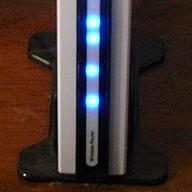
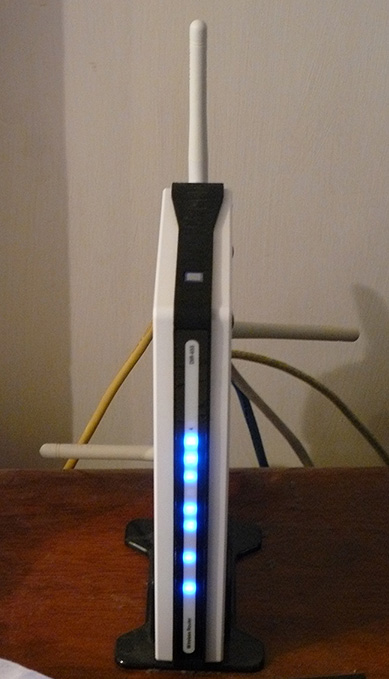
D - 링크에 dir - 655 라우터 및 SharePoint / SharePort

업데이트 : 16 년 1 월 2010 1.33b01NA가 릴리스되었습니다 .
업데이트 2 년 11 월 2009 : 모든 사용자는 체크 아웃, SharePort하는 데 문제가 이 정보를 최신 게시물에 대한.
업데이트 : 그것이 확인에 대해 아무것도 새로운 발견 아래 있는지 코멘트를 자기가 읽으 기능, 많은 다운로드하여 수정된 버그가되어 이후 릴리스에 원래대로 8 월 약 2009 펌웨어 1.32NA 최종 최신이다 펌웨어를 읽고, 여기에 .
난 지난 1 년 동안 D - 링크에 dir - 655 라우터를 소유하고 그것은 지금까지 최고의 라우터 내가 만난 사용하는 것입니다, 나는 $ 150 이상의 라우터 이전에 대한 지불 무엇을 지불했지만, 그래서 들어왔 내가 무엇을 지불.
버전은 DIR을 - 655 펌웨어 1.21 베타 04 지금 거기 셰어 포인트 기능을 사용할 수 시작. , 난 당신을 어떤 혼동하지려고하는 거예요 그것은 다른 곳에 소프트웨어 자체를 포함하여 호출로 매체와 다른 사이트는 부분적으로 또는 SharePort 그것을 전화로 SharePoint는 D - 링크 제품에 대한 방법은 LAN을 통해 USB 장치를 공유할 수 있습니다 나는 그것에 SharePort뿐 아니라 지금부터 참조 추가 있도록.
장치가 실제로 사용자의 PC에 연결되어있다면 그들은 다른 PC에서 사용할 수 있도록 SharePort는 컴퓨터에서 공유 USB 장치에 의해 사실은 몇 년 전 할 수가되고 싶었 흥미로운 기능입니다. D - 링크는 결국 생명 SharePort과 제한된 방식으로이 기술을 가져왔다.
이것은 어떻게 SharePort, 내가 예를 들어 나의 DIR을 - 655과 형님 DCP - 150C MFC를 사용합니다 작품이다.
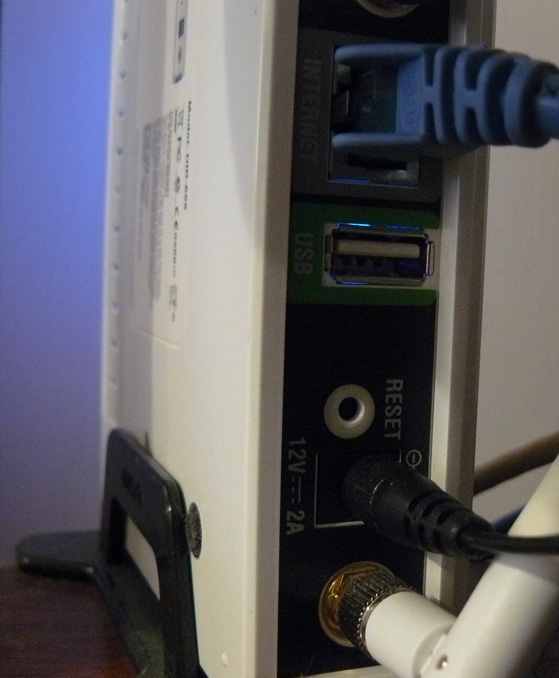
DIR을 - 655은 뒷면에 USB 포트가 있으며, 검사 결과가있는 USB 1.1 포트, 지금까지 포트의 USB 키에 저장할 수있는 무선 설정에 사용되었다 나타낼 것 같습니다.
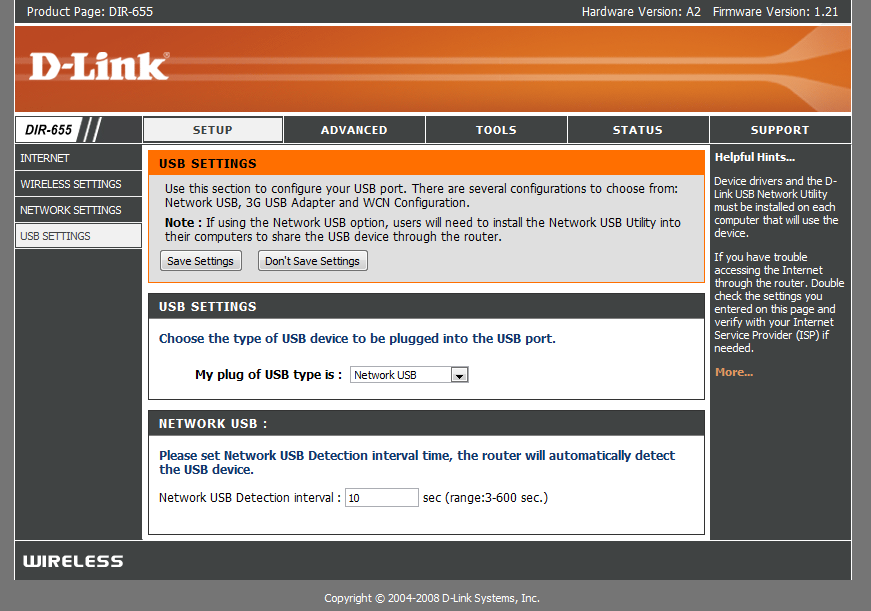
그러나 USB 포트를 새로운 펌웨어를 설치한 후, 우리는 설치 프로그램이 포트의 사용을 제어 아래에 새 메뉴로 인사있어 더 사용을 발견했다.
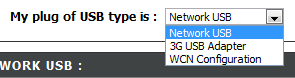
당신이 볼 수 있듯이 USB 포트의 설정을 많이하지 않습니다, WCN 구성은 기본이다, 이것은 무선 설정 키에 대한 드롭 다운 상자를 선택하는 데 사용됩니다 :

선택 네트워크 USB는 SharePort 모드에서, 세대의 USB 어댑터 미스터리 약간의 나에게는 선택 라우터를두고, 무슨 장치가이와 호환 아직 있는지, 그러나 대부분의 사람처럼 아니에요, 난 3G 서비스를하고 그것을 사용하여 백업은 USB 포트에 장치를 연결 및 3G USB 어댑터를 선택 매우 편리할 것입 의해.
문제가 없었 일단 당신이 네트워크는 USB에게 장치를 선택한이 가지고 자동 그러나 주문이 D - 링크에서 SharePort 소프트웨어를 설치합니다 연결에서 공유하는 것은, 이것은 아직 베타 버전에 너무주의 등 등에 사용 나타나있다, 내가 가진 아직 그것도 상당히 세련된 것 같습니다. 한번, 그렇지 않으면 수동으로 SharePort 소프트웨어를 매번 실행하지 않고 장치를 사용할 수 없습니다 당신이 시작할 때 실행하고 즉시 그것을 실행할 수 있는지 확인하십시오를 설치, 그것은 단지 숫양의 2메가바이트를 사용하여이 리소스라서 돼지.

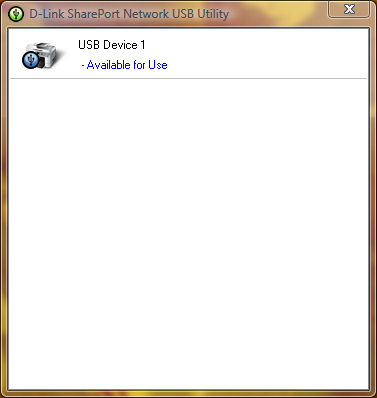
귀하의 USB 장치에있는 경우 다음 SharePort 유틸리티는 이런 시스템 트레이에있는 아이콘을 한 번 두 번 클릭을 표시합니다 연결되어 있습니다. 그것은 다음 장치를 설치 마법사를 실행할 수 있도록, 당신은 장치 드라이버가 필요하거나 자신의 웹사이트에 대한 최신 드라이버 끝에 당신이 자동으로 장치를 인쇄할에 연결할 것인지 묻는 것입니다 CD를한다면 그것은 프린터,이하지 않으면 수동으로 연결을 선택하셔야합니다 좋은 생각입니다.
일단 모든 장치를 사용하는 각 컴퓨터에 설정된, 당신은 각각의 장치 상태는 프린터가 일시 중지 및 오프라인, 인쇄 프린터로 어쨌든 통지됩니다 SharePort 소프트웨어 감지 그 지문은 프린터에 전달되었으며, 그것 자동으로 컴퓨터와 동안 프린터는 PC와 같이, 일단 인쇄 작업 그것이 다시 오프라인으로 돌아갑니다 완료되어 연결이 표시됩니다 일시 중지 통신하는 프린터를 할당합니다.
이 기능의 한계는 그것이 하나의 PC에서 한 번에, USB 장치는 PC에 간단하게 2 번에 그래서이 경우는 왜 말이 연결될 수 있도록 설계되지 작동됩니다.
제가 웹캠 그러나 그들이 작동하는 것으로 알려져 있습니다 같은 것들을 시도하지 않은, 정상보다 느린 속도 그러나에, 내 프린터의 스캐너 기능은 괜찮아, 그러나 수동으로 그것을 사용 SharePort 소프트웨어를 사용하여, 당신은 연결을 끊으 확실히 연결해야 작동 작업이 완료 후에.
난이 문서의 시작 부분에 명시된 바와 같이 SharePort 소프트웨어 뭔가 내가 오랜 시간이 기다리고 있는데, 그것은 아주 좋은 기능을 내 라우터를 고려의 최신 밖으로 지금은 아닙니다 그것도 거의 D - 링크 같은 추가 포기 것 같다 새로운 그 기능, 또한 그것은 다른 직무를 모두가 수행되는 동안 그것은 USB 장치를 처리할 수있다면 얼마나 잘 장치가 작동 할 수 보여줍니다.
관련 게시물 :
댓글 :
트랙백 / Pingbacks :
답장를 남겨주세요


날짜 : 2008년 10월 14일
시간 : 오전 5시 57분
내 DIR을 655 라우터에서 1.21으로 펌웨어를 업그레이 드했습니다. 내가 내 데스크톱 및 랩톱 컴퓨터 모두 추락한 SharePort 유틸리티 응용 프로그램을 설치하기 시작했고 윈도우 비스타 홈 프리미엄 운영 체제가 있습니다. Dlink 기술 지원을 호출하지만 문제를 발견. 누구도 같은 문제가 있었죠? 이 문제에 대한 솔루션의 필요에 ... 도와주세요.
날짜 : 2008년 10월 14일
시간 : 오전 11시 47분
그럼 난 04이야 베타 아직 실행 1.21, 거기에서 유틸리티를 뭔가있을 수도 1.21 마지막, 다운로드도 모른다는 되실 다시 생각하는 좋은 ftp://ftp.dlink.com/Gateway/dir655/Apps/SharePort_Network_USB_Utility_094. 우편 가능성이 다시와 라우터를 플래시 ftp://ftp.dlink.com/Gateway/dir655/Firmware/dir655_firmware_121.zip 또는 ftp://ftp.dlink.com/Gateway/dir655/Firmware/dir655_firmware_121_no_securespot.zip no_securespot 파일은 표준 1.21 펌웨어보다 그것에 새로운 날짜를했다. 어떤 종류의 소프트웨어를 현재 두 대의 컴퓨터에서 실행해야합니까? 이것을 설치하는 두시기에 바이러스 스캐너 등에서 종료하십시오.
날짜 : 2008년 10월 16일
시간 : 오전 4시 56분
난 그냥 내 dgl - 4500에서뿐만 아니라 펌웨어 1.13을 설치한로 shareport 유틸리티가 설치되어 있어야합니다. Shareport가 연결되는대로 네트워 크나 내 외부의 HD에로서 라우터를 recionizing되지 않습니다. 어떻게 생각하십니까?
날짜 : 2008년 10월 16일
시간 : 오후 6시 44분
사실 나는 며칠 전 발생한 비슷한 문제의 철저하게 조사하고 내 PC가 언제 프린터 위에 있었고, 대부분의 시간도 때 라우터가 연결된 감지하지 않았 감지 중지 노력 중이야.
난 그것을 다시 설치해야있는 라우터를 다시 부팅하고, 심지어하면 다른 모든 PC를 완벽 작동 변경되지 않습니다.
가능한 해결 방법 : 사실은 내가 좀 문제를 해결한, 당신이 하나 이상의 네트워크 카드를 활성화 때, 그래서 만약 당신이 VM웨어 당신이 전에 다른 네트워크 연결과 재부 팅을 해제해야합니다 등 실행하는 장치를 인식할 수없는 것 같습니다 감지를 다시 시작합니다. 당신은 또한이 알려주부터 일을 얻을 수있다면.
날짜 : 2008년 10월 18일
시간 : 오후 5시 54분
안녕하세요!
655의 미국 버전에 확실히에만 작동합니다. 내가 최근 EU의 버전과 펌웨어를 내보였다는 저기에 위에서 설명한대로 아무 화면입니다.
그냥 분명히 이것은 미국 사용자만을위한 것입니다 그것을하길 원한다. 다른 사람이 라우터를합니다 네트워크 아무것도 웹 액세스 이외의 생각으로 착각하지 말라.
날짜 : 2008년 10월 19일
시간 : 오전 12시 13분
머리까지 줘서 고마워, 난 655을 구입하신 내 남녀 노소에 펌웨어의 미국 버전을 사용 했어요.
나는, 그러나 거기 다른 지역에 대한 하드웨어에 전혀 아무런 차이도 믿지 않는 일을하지 않는 것이 좋습니다.
날짜 : 2008년 10월 20일
시간 : 오전 5시 35분
이 거대한 튜토리얼에 대한 벤 감사합니다 - 귀하의 지침을 사용하여, 나는 펌웨어를 업데이트할 수, 인쇄 유틸리티 및 인쇄 나의 라우터에 연결된 노트북을 사용하여 설치되었습니다! 그냥 감사의 한마디.
참고로, 난 "기능을 펌웨어 업데이 트에 대한 D - 링크 라우터 소프트웨어를 자신의"수표를 사용하는 것처럼, 그것은 자동으로 (2008년 10월 9일 일자) 1.21 버전을 권장합니다. 지금은 늠름한 - 도리 Vista 기반 랩톱 (컴팩), 그리고 XP에서 / 홈 기반 데스크탑 (컴팩) 인쇄입니다. 여전히 다른 델 노트북에 연결했습니다. 프린터의 HP 데스크젯 F4180 전체 - 있음 - 하나입니다. 그리고 노트북에서 HP 프린터 드라이버 SharePoint를 설치했지만, 그건 아무 것도 아냐.
당신이 말한 무엇을했다 : 나는이 프린터 때마다 나는 그것을 사용에 다시 연결하지 않아도 하나의 차이는 전부터 나타났습니다. 내가 ""그것을 풀어 선택하지 않는 한 일단이 연결되어있어, 그것은 연결 유지됩니다. 하나의 PC를 연결의 경우, 다른 하나에서 인쇄하려면, 그것은 당신에게 "연결되어있는 컴퓨터에서 석방"을 요청 수있는 옵션을 제공합니다. 그렇다면, 현재 연결되어있는 기계는 팝업 메시지를 다른 사용자가 프린터를 사용할 수 있으므로 연결을 끊을 것을 요청받습니다. 상태 표시줄은 또한 현재 적극적으로 프린터에 연결된 중에서 컴퓨터의 컴퓨터 이름을 보여줍니다. 어쩌면이게 그 10/9/08 릴리스에 포함된 다른 펌웨어 업데이 트가 어땠어?
참고로, 전 미국 사용자입니다.
날짜 : 2008년 10월 20일
시간 : 오후 12시 34분
코멘트 리사 주셔서 감사합니다, 당신을 만나서 기뻐요 내 지시를 좋아 해요.
그래서 그들은 짧은 몇 초는 인쇄 작업이 전송에서 프린터에 연결되어 내가 사실은 이런 걸쳐 모두 내 컴퓨터로 설정됩니다 온 적이 자동 연결 후 다시, 나는 그것이 부분이 될 수 있다고 가정 끊음 내것도하지만 난 다른 인해 전체에 대한 하나의 PC를 오래로의 사용을 요청에 연결하는 데 그것을하지 못했습니다.
날짜 : 2008년 10월 23일
시간 : 오전 7시 48분
분명히 DIR을 - 655 펌웨어 버전 1.2 및 1.21 버전에 문제가 있습니다.
가상 서버 매핑이 제대로 나가는 패킷에 대해 작동하지 않습니다. 나는 간헐적으로이 두 바퀴 돌았어 펌웨어에 작동하기 시작 메일 서버를 실행합니다. 1.11로 되돌리는이 문제를 해결. 포트 25 (SMTP에 접속) 네트워크에서 적절한 내부 서버에 경로 것이지만 서버 resp 항상 먼 서버에 연결할 수는 없을 것 같소. 이것은 SMTP를 떠나는 오지와 시간에 밖으로 추가적인 의사 소통을 위해 기다리는 루틴. 때로는 전송 서버가 포기하고 메일이 손실됩니다.
또한, 일정이 제대로 .. 구성할 수 없습니다 잘못된 예 : 잘못 플래그 배나 펌웨어 : 오후 11시가 오전 5시 1.2x에서 무효 확인을 1.11에 있습니다.
날짜 : 2008년 10월 23일
시간 : 오전 11시 52분
그 정도론 부족 브라이언, 난 아무것도 이러한 펌웨어 자신과 나쁜 경험하지 않은, 그러나 다른 사람은 문제를보고하고 있습니다. 사람들이 문제를 가지고 있었 1.2으로 이전 제가 그만 개최,하지만 고정되었을 수도 있습니다 모든 문제가 아니가 나타납니다.
날짜 : 2008년 10월 24일
시간 : 오전 6시 35분
날 위해 뭔가를 테스트 수 있을런지 모르 겠네 ... 당신 일정을 오전 5시에서 오후 11시까지를 사용하여 설정하려고 할 수 있고보고 그것 유효한을 고려한다면? 이것은 1.21이나 뭐 그게 전부 내 부대와 펌웨어와 단지 문제를 보편적인 문제가있는 경우 그 말 것입니다 .... 들으
날짜 : 2008년 10월 24일
시간 : 오후 4시 47분
난 자정 이상의 스팬 싫어하는 것 같은 오류가 발생입니다. 어떻게하면 오후 11시에서 정오에 일정을 설정하고 한 자정부터 오전 5시 어떻게됩니까?
날짜 : 2008년 10월 27일
시간 : 오전 7시 28분
난 불어를 dlink 관계자는 shareport 기능을 사용할 수 EU의 펌웨어에 주 것입니다 주장 프랑스의 웹사이트를 찾을 수있다 :
http://www.clubic.com/actualite-170094-dlink-routeurs-dir-655-dir-855.html
하나는 기사 아래 덧글의 미국의 펌웨어가 할 수 EU의 하드웨어에 벌금 (이 벤 썼습니다 - 아마 거기 하드웨어에 차이가) 작동 shareport 잘, 그리고 작품 캐논의 다기능 pixma는 공유 포트를 통해 검색하실 수 있습니다.
나는 나를 위해 DIR을 - 655 주문하고 난 ...
날짜 : 2008년 10월 28일
시간 : 오전 2시 3분
@ 6 월 (그리고 아무도) ... 나는 또한 우연히 만났 "설치 SharePort"내 시스템의 문제를 추락했다. (둘 v를 0.94 및 1.0 버전)
DIR을 - 655 좋은 안으로 들어가시, 펌웨어 업데이 트가 잘 갔다. 라우터 / 무선 추출 빨리.
군함은 SharePort 소프트웨어를 설치하고 내 XP SP3을하고 비스타 홈 프리미엄 시스템이 지경으로 나쁜 추락했습니다. 그들이 시스템 복원을 통해 가야 수 않았지만 한동안 예쁜이 아니 었어.
내가 AVG 무료 8 내 모든 시스템에서 소프트웨어의 일반적인 조각 충돌을 의심 해요.
수있는 다른 사람이 아마도 중 / SharePort를 설치한 후 시스템을 충돌 할 수도 있습니다 SharePort / 평균 8 무료 드라이버 충돌을 확인?
- 건배
날짜 : 2008년 10월 28일
시간 : 오전 7시 35분
글쎄, 난 6 월 같은 문제가 있습니다. 셰어 포인트 버전 1.0 충돌이 내 노트북 설치 및 제거. 제가 펌웨어 1.21가지만 중요한도 충돌없이 소프트웨어를 설치할 수 없기 때문에 안 것있다. Dlink 지원 전화를 그 사람들이 셰어 포인트와 USB 포트가 DIR을 - 655에서 지원되지 않습니다라고.
아마 제대로 하드 드라이브를 지원할 수있는 대안 제품을 추구합니다. 치료 방법은? 지금 그것이 기가 비트 및 듀얼 모드 능력이 애플 공항 Extreeme를보십시오.
날짜 : 2008년 10월 28일
시간 : 오후 9시 반
이제 거의 내 경우에는 특정 SharePort 드라이버와 뭔가 다른 사이에 드라이버 충돌이 발생 해요. 난 강력하게 그것에 찬성 시스템 보호 (엉덩이 살로?) 내 경우에는 AVG 무료 8 기능의 일종되는 기울고 있어요.
테스트 베드 시스템에서, 난 그냥 (v.94 또는 v1.0을) 잘 SharePort를 설치할 수 있습니다. 그러나 내가 먼저있다면 AVG 무료 8 설치 과정 중 ... 드라이 버나 서비스가 시도 끝에 중에 파란 화면에 컴퓨터를 설치가 설치되어 있어야합니다. AVG 무료 8 SharePort을 제거하는 동안 가상 시스템에 설치하는 동안 "진짜"시스템에 기묘하게, 그것은 탱크, 그것은 단지 탱크.
그러나, (가상 시스템) 내가 먼저 제거 AVG 무료 8, 재부팅, 그때 평균 8 무료 다 행복해 보이 설치 SharePort를 다시 설치하는 경우.
내가 좀 더 전에 먼저 내 "라이브"시스템으로 이동해야 할 문제 해결. 그건별로 재미 시스템을 다하고 제 3 시스템의 두 가지 이번 주말에 복원되었습니다.
제가 말씀 드릴 수있는 난 그게 문제가 router-hardware/firmware이 아니라고 생각대로 최선. 내 DIR을 - 655면 리핑 빠르고 단단한. 나는 1.21이 새로운 SharePort 기능을 가능하게 펌웨어로 업그레이 드했지만 어떻게 라우터 펌웨어가 시스템에 영향을 미치지는 표시되지 않습니다. 난 그게 SharePort 소프트웨어 자체와 구체적으로 드라이버 또는 서비스 충돌 설치 초기화시입니다 확신 해요. 난 그냥 충돌 지점을 파악하려고했습니다.
그리고 그래 .. 난 30 Dlink 지원 전화 어젯밤 분 동안 그것은 쓸모없는 옆에했다. 결국 가난한 사람 상사와 결과를 확대하는 아마 것입니다 기술이있어 그것 Dlink에서 기술적 책상.
이 사람에 따르면, 최근에는이 시간에 "백 방"버전 SharePort 사용할 수 있습니다.
윌은 내가 뭘 알아 알려주십시오.
그렇지 않으면 난 정말 행복 DIR을 - 655 장치와 함께 전반적인 있었어요. 나쁘지 SharePort 기능이 하나의이 모델과 같이 내려가지에 대한 결정 요인이었다.
한숨 ....
(BTW - 난 SteveW 이상은 내 위에있는 코멘트 권리를 ... 어떻게든 브라우저는 저자 필드에 6월의 이름을 함정에 게시됩니다.)
- 건배
날짜 : 2008년 10월 29일
시간 : 오전 2시 44분
그거 좋은 거기서 클로스를 작업 문제 해결, 이건 확실히 SharePort 소프트웨어 문제가있을 것이다, 어쩌면 평균 친절도 재생되지 않습니다, 그들은 정확히 최고의 기록을 최근에 다른 소프트웨어와 관련된 문제에 관한 없어요. 내일 AVG / SharePort에 대해 아무 것도 알아낼 수 있는지 물어 볼 것입니다, 나는 회사의 한 뭔가를 알고있는 확신 해요.
난 D - 링크는 잠시 동안 소프트웨어를 업데이 트하는 기대도 못하겠지만, 나는 그들이 단지 그걸 확실히 알게 될 것 같아요.
그들은 곧 그것을 수정할 수 있지만 충분한 사람들이 문제가있다면 아마, 소프트웨어 자체가 모든 SharePort 수있는 하드웨어와 함께 일을하고 있구요, 상당히 그 중에 지금 거기 몇 가지있어.
그것은 버그의 가능성을 가지고 그래서 대화가 제대로 이해할 수 있도록 내가 SteveW 위 덧글에 너의 이름을 변경 그건 그렇고, 당신은 코멘트 시스템과 버그가 발생하면 알려주세요, 내 코드가 있어요.
날짜 : 2008년 10월 31일
시간 : 오전 8시 34분
나는 또한 나의 DIR을 - 655 및 USB 소프트웨어에 1.21를 설치했습니다. 내 컴퓨터가 내장돼 즉시 프린터를 발견. 내 노트북 (무선) sharport 그것은 USB 장치를 찾을 수 없습니다 말합니다. 방법은?
날짜 : 2008년 10월 31일
시간 : 오전 10시 20분
다른 네트워크 카드를 비활성화하고 다시 시작하면, 심지어는 이더넷 카드, 그것은 VMNet 네트워크 카드를 비활성화 VM웨어를 시도 실행중인 경우 Shareport 쉽게 여러 개의 네트워크 연결에 의해 혼란에 도착하십시오.
또한 일시적으로 방화벽을 당신은 노트북의 경우 단지 하나의 연결을 차단 해제에있을 수 있습니다.
날짜 : 2008년 11월 2일
시간 : 오전 10시 51분
Valca 같은 문제를 가졌지만, 난 그 몇 가지 다른한다면 다음 바이러스 스캐너 궁금 오전 그래서 새 노턴 바이러스 스캐너를 실행하고 있습니다.
날짜 : 2008년 11월 3일
시간 : 오전 4시 14분
안녕, 얘들아. 아직이 문제를 테스트.
이번 주말은 좀 자유 시간을 발견 그래서 내가 이전에 AVG 8 의심했다. 내 비스타 홈 프렘의 시험 제 이론을 데려가고 결정. SP1의 시스템.
내가 AVG 8, 제거 수동 복원 지점을 (내가) 재부 팅 한 좋은 일이, 지금까지 잘했다. 그럼 내가 SharePort를 설치했습니다.
BSOD.
시스템 복원은 내 세이브 포인트를 사용하여 내 시스템을 복구했습니다. 지금은 다시 원점으로했다.
새로운 가상 PC 세션에서 원래 XP SP2를 설치를 사용하여 이동. 설치된 SharePort 그냥 괜찮아요. 문제 없음. 잘 그것을 제거한.
다음은 내가 NetLimiter 모니터 또한 일반적인 세 가지 내 모든 시스템에 없었다 용의자.
설치 NetLimiter 모니터 및 재부 팅. 좋아요. 안정성 문제 없음.
군함은 SharePort을 (v1.0을) 및 시스템 ... 내 진짜처럼 설치의 끝 ... 가상 시스템에 가까이 설치하는 즉시 검은 화면의 재부 팅이어요.
흠.
그래서 내 시스템에서 NetLimiter 모니터를 제거하고 그들이 독립적으로 볼 수있는 경우 이메일 쿼리에서 지원 팀에 물어 보는 걸요.
어떻게 모두 SharePort과 NetLimiter 모니터에 나타납니다 보면 둘 다 연결은 Windows 네트워킹 드라이버 /이 꽤 잘 되네요 서비스로 보인다.
윌 다른 업데이 트를하는 경우 / 때 응답 제공합니다.
Not sure if I am brave enough just yet to repeat the experiment on my live systems again.
–Cheers!
Date: November 3, 2008
Time: 7:27 am
Hi Everyone, I am Brand new to all of this. Recently Upgraded to the DIR655. 좋아요. 1 Desktop 5 Notebooks. Desktop has the PCI network card, Router, DSL Modem Etc. Notebooks are all running internal 802.11G Devices.
If I unplug the USB Cable from the Oki550 color laser from the Desktop, and plug it into the USB Port on the DIR655. Is this ultimately (or Theoretically)going to allow us to print to that Laser without turning on the Desktop Computer first?
For now that is my ultimate objective and this is my first question.
감사
데이브
Date: November 3, 2008
Time: 3:10 pm
Yes this will allow access to the Printer any time the Router is on, the printer and router are the only 2 things that need to be on for this to work, however that is provided they do not route through the desktop at any stage. As can be seen by the comments you should exercise a bit of caution when installing the Shareport software as it doesn't play well with other software that has networking components.
Date: November 4, 2008
Time: 6:30 pm
Hey guys I found the issue… Its Net Limiter uninstall that and you are good to go ^_^
Date: November 6, 2008
Time: 12:01 am
벤,
Just to confirm what I suspected and Nick has confirmed…the Net Limiter 2 Monitor program does critically conflict with the SharePort application (at this time).
I had uninstalled it from my XP Home (SP3) and Vista Home Premium (SP1) systems. Then I reinstalled SharePort after creating System Restore points (just to be safe).
Installation went fine this time and no BSOD or conflicts were observed. The SharePort application quickly found the Seagate USB flash storage device and I was able to “mount/connect” to it and read/write files from all systems.
To be clear…only one system can be connected to the device at one time as far as I can tell. Other than that it now works great.
휴! That was a doozie working that issue out. Thanks to Nick for posting a confirmation.
I did send an email to the Net Limiter support team about the issue, but no response yet.
Not sure if it will occur with all their programs (paid/free) or just with Net Limiter 2 Monitor.
Thanks all!
건배!
–Claus V.
Date: November 7, 2008
Time: 12:34 am
Hi, i'm owning the Dir-855 as my dear old Dir-655 went to my sisters apartment as a permanent solution. However i'd be very interested in knowing if the DIR-855 supports this feature as well. It might be a good add-on for my already awesome Wireless router.
다니엘
Date: November 8, 2008
Time: 6:13 am
Daniel,
According to a D-Link press release, the DIR-855 is included in those that SharePort supports.
http://www.dlink.com/press/pr/?prid=442
Quoting:
“The innovative SharePort USB network-bridging feature is available on D-Link Xtreme N Gigabit Router models – the DIR-655, DIR-825, DIR-855 and DGL-4500 Gaming Router with GameFuelâ„¢. The SharePort technology upgrade is also available on the RangeBooster N DIR-628. Current owners of those routers will be able to upgrade to SharePort technology by downloading the latest firmware and client utility from the D-Link website, http://www.dlink.com .”
I think this is the link to the DIR-855 firmware and SharePort download page:
Firmware –
http://www.dlink.com/products/support.asp?pid=548&sec=1#firmware
(That's one nice looking 855 model by-the-way. Makes my 655 look plain!
행운을 빌어요!
Claus V.
Date: November 8, 2008
Time: 9:41 pm
Hi, I have my own DIR655 for 1 week. Its an EU version, but US firmware 1.21 run smothly. Shareport works, but not very stable.
First issue, sharing USB disk drive over the WiFi is not a good idea IMHO. Any network problem and Vista have issues with device. Also performance is an issue (800kB/s when 2M/s when copying files between laptops with WiFi n adapters).
But I purchased this router for printer sharing. And it is possible, but Shareport Utility (1.0) works only on the local account. When working on the active directory account, the utility's popup window shows the device connected to the router's USB port. But when clicking on the tray icon the app window is not shown. Application is on the taskbar but has no window to select device and do connect.
On the local account everything is OK. Seems to be the SharePort Utility issue. The OS was installed a week ago, not many aplications installed.
이유가 뭘까요?
Piotr
Date: November 9, 2008
Time: 8:18 am
Claus, thank you very much, i was suffering from this issue until now. I spent my whole weekend for nothing, thank you!
this net limiter sucks:\
Date: November 10, 2008
Time: 1:27 pm
Hi, i am having this isue with dlink 655 v1.21
and shareport v.1.0…
multifuction printer and usb flash drive work flawless on 2 xp sp3, and 1 vista 64 machines,
but when i connect an ipod touch v. 2.0, the shareport utility shows “available for use”
and try to connect to it and all 3 of my pc's drop the internet connection, wireless and hardwired and needless to say the itouch wont connect and the internet is restored automatically, is like the router goes into a power cycle or something.
Then i tried same procedure but with an ipod nano this time, and guess what, worked perfect!!
is anybody having this problem and or know the workaround to this?
thanx for your help.
Date: November 14, 2008
Time: 1:29 pm
안녕하세요!
그러니까 i have a dir-655 EU router and tried the 1.21 US firmware myself. i'm not going to lie, the firmware upgrade didn't go without a hitch. When i uploaded the firmware to the router, i couldn't get to the administration page of the router anymore… but after a reset everything went back to normal (it might be a good idea to save the configuration of the router before you do the firmware update). Anyways, i encourage everybody with a non us dir-655 to try the 1.21 firmware… so far everything's working fine and even managed to attach my printer to it and it works great… next thing to try is a storage device
Date: November 15, 2008
Time: 10:16 pm
Remember guys, the router appears to be limited to USB 1.1 speeds, ie about 1MB/second so it is not recommended unless you have a small device and don't have much to transfer, also routers aren't the fastest systems so transferring data over the USB probably puts alot of strain on the device which could cause anything from slower LAN speeds and wireless dropouts to router reboots.
Thank you for all your research Claus, hopefully soon one of the companies is able to fix the problems with compatibility.
Date: November 26, 2008
Time: 3:22 am
I was hoping you could help me with another issue.
I recently upgraded from another D-link router to a Dir-655. Upgraded to f/w 1.21. Have multiple machines on a local network workgroup that all saw each other fine with the older router. Now I cant see any of the other machines on the lan. I know I've missed something simple so I was hoping you could give me a heads up. All nodes see the internet fine and ip's are reserved and withing dhcp range. What have I missed? Much thanks
Date: November 26, 2008
Time: 1:25 pm
There are 2 things off the top of my head that have issues when moving networks, mainly when the network changes it's IP arrangements, some firewall software including Windows Firewall and commonly ZoneAlarm can block a PC from being 'discoverable' as it believes this new network is a public network on the internet instead of a private LAN, if you are running Windows Vista the same thing can happen, make sure your PCs have their network connection set to Home or Private, those really should be the only times when that problem should occur.
If they are wireless also make sure that Wireless Partition is disabled in the Advanced Wireless properties as this will cause a similar affect.
Date: December 11, 2008
Time: 10:55 am
I am having the same BSOD problem on Vista as mentioned by others. The PC went to BSOD at the end of the Shareport install and then BSOD'ed each time I tried to login. I have Trend Micro AV and the Nortel Contivity VPN client. Both are essential programs and I can't uninstall either. Could either one of these be a problem?
Date: December 18, 2008
Time: 11:01 pm
안녕하세요,
I am interested in upgrading to this router so I have searched different forums for clues.
Today I noticed there is a new (still v1.21) file updated 12.12.08. Anyone tried if this is a new version with fixes or not ?
Date: December 19, 2008
Time: 2:57 pm
I'll give it a try and see if it changes anything based on issues people have had, on that note a new issue I have noticed has arisen, occasionally after having the router on for more than a week the shareport software on all computers starts giving out connection errors, if they're left for a while there can be hundreds on the screen, restarting the router stops the errors for a while.
Date: December 20, 2008
Time: 6:52 pm
The 1.21 is the same as the one that was released a few months ago, just with the date changed, however about 2 or 3 versions have been labelled 1.21 without a beta tag, with the last one being 1.21 B10 in November, so if you downloaded 1.21 in October or earlier, download it again and install, it fixes a few problems with port forwarding and saving settings.
Date: December 29, 2008
Time: 6:59 am
Hi gang,
멋진 스레드!
I'm having a shareport problem, and wanted to see if anyone has experienced the same.
here's my setup:
1. DIR-655 with firmware 1.21
2. Win XP Pro machine (as a vmware client) with shareport 1
3. WD external HDD
The HDD is plugged into the USB port on the router, but I'm not able to connect to it from the the Win XP pro machine. The XP machine will continuously notify me that it has “Found” the HDD, but the Shareport tray icon continues to stay red, and never turns green. After about 30 seconds, the notification will come back. I'm completely at a loss, as it workeed in the past when I had this vm client on another host. I know that vmware may be causing this, but I don't see how, because I only have one network adapter enabled on the XP machine (ethernet bridged). I've spent hours trying to get this to work…Any ideas would be greatly appreciated!
감사합니다,
남자
Date: December 30, 2008
Time: 8:02 am
I have this setup DIR-655 Firmware 1.2.1 and Shareport I got to work if I disable my Microsoft OneCare firewall.
Does anyone know the Port's used by D-Link SharePort?
Date: December 31, 2008
Time: 12:08 am
If you all go to Dlink's website for the router, you will see that it says,
“This firmware is engineered for US products only.
Using this firmware on a device outside of the United States will void your warranty and may render the device unusable.
Please contact the D-Link office in your region for firmware updates that are compatible with your D-Link product.”
그리고,
“¤ Added SharePort features.
¤ Fixed email notification issue.
Please download the SharePort Utility and see the SharePort manual before use.”
You have to download the actual utility to use it!
Date: December 31, 2008
Time: 12:10 am
Oh, and I almost forgot, this is for x86 version OS's only. x64 is not supported.
Date: January 2, 2009
Time: 3:12 am
안녕 제임스, 내가 포트 자신은 당신이 명령 프롬프트를 열어 그러나 있는지 확실하지 않습니다 '및'그냥 Shareport를 사용하여 라우터의 IP를 찾아 연결을 시도 후에 그리고 당신은 모든 포트를 볼 수 있어야 명령을 'netstat 사용하여 그 는 PC가 라우터에 연결하는 경우, 원케어 당신이 비슷한 짓을 수 있도록 수도 로그 파일을 그냥 실행하고 있는지 확인 할 수 있습니다 목록을 꽤 오랫동안 할 수처럼 당시의 가능성이 조금은 네트워크 응용 프로그램으로 멜라토닌의 P2P 프로그램을 시간에 실행 없습니다.
조디 안녕, 난 및 버전 0.94와 버전 1.00을 Windows XP의 x64 및 x64 윈도우 비스타에서 테스트도 아무런 문제가 있었에는 이것을 실행하는 것을 허용하지 않습니다 x64 버전입니까?
날짜 : 7, 2009 1월
시간 : 오후 5시 38분
난 그냥 또 shareport 유틸리티를 가지고는 D - 링크 DIR628 있어요. 누구 좀 도와이나 제안을 제공할 수 경우에는 몇 가지 문제가 좀 이상한과 경이로움을하는 데.
제 아내의 비스타 노트북에서 shareport 네트워크의 USB 유틸리티가 원활하게 설치하고 작동 잘해줘. 내 XP 프로 바탕 화면에서, 첫 번째 설치가되면 재부 팅 끝났어, 네트워크의 USB 유틸리티를 시작했으나 라우터 뒤에있는 장치를 볼 수 없습니다. 제가 (그리고 다른 방화벽 설정을 시도했습니다 결국)는 지난 며칠 동안 모든 방화벽을 그냥 해보 해제하고 아무것도 진짜로 보였다.
내가 shareport 유틸리티를 제거하는 경우 그것을 다시 설치한 다음 다시 설치 후 시작했는데 처음 일할 것 같았다있는 유일한 방법은, 난 장치를 볼 수 있습니다. 난 종료하는 경우이 유틸리티를 다시 시작하면, 어떤 장치를 확인할 수 없습니다 같은 오래된 문제입니다. 재부 팅도 아무것도 표시되지 않는 것과 같은 문제가 있습니다. 유일한 방법은 지금까지 출근하는 데, 제거 -> 재부팅 -> 다시 설치하는 것으로 보인다 그리고 그것은 단지 그 순서 후에 일했습니다.
누구라도이 문제가있을 무슨 생각을 가지고? 때 효과가, 그것은 큰 일했습니다. 나는 외부의 HD 좋은 것이 아니라, 너무 나쁘진에서 80 Mbps의 있어요. 나는 또한 허브와 둘 중 하나에 접근 뒤에 모두 내 MFP 프린터 및 HD를 넣어 수 있습니다. 정말 멋진 지요. 난 그냥 그것이 모두 내 컴퓨터에서 잘 작동을 잡을 수있을 싶습니다. 그건 그렇고, 내 다른 시스템은 Mac과 그 유틸리티에 대한이 아닙니다 맥 버전입니다.
죄송 긴 메일, 어떤 도움이나 제안 정말 감사합니다. 감사합니다.
날짜 : 7, 2009 1월
시간 : 오후 6시 36분
그것이 설치된 후 그러나 나는 PC의 모든 시간에 이것을 경험하지 않은 장치가 PC에서 임의로 찾을 수없는 몇 가지 인스턴스를 볼 수있다. PC가 라우터를 Shareport 유틸리티를 사용하여 검색할 수 있나요?
메뉴에서 Shareport 아이콘을 마우스 오른쪽 단추로, 당신은 귀하의 라우터의 이름이 나타납니다 그것은 IP 주소, 마치에 가서하지 않을 경우 새 메뉴가 나타납니다 이것이 선택되어 있는지 확인, 확인 설정에서 클릭도 구성에 클릭하면 몇 가지 고급 설정을 얻을 수 있습니다.
라우터가 목록에 표시되지 않으면 다음에는 그것과 라우터 사이의 연결을 제한하는 그 일부 PC에서 연결 설정이있을 수 있습니다.
난 조만간 그런 일 없을 거라고 생각하지만 저는 또한 소프트웨어의 맥 버전에서 기다리고있어.
날짜 : 2009년 1월 8일
시간 : 오전 4시 19분
누구 shareport에 USB 허브를 사용하여 1 개 이상의 장치를 작동 있나요?
날짜 : 2009년 1월 8일
시간 : 오전 5시 21분
벤 - 응답 주셔서 감사합니다. 내가 직접 경로로 유선 연결을 통해 CAT5 케이블을 사용하여 연결되어있는 문제이다 PC에. 이것은 기본 시스템이 내가 설정하고 라우터를 구성 사용해야합니다. 내가 문제를 겪고, shareport 아이콘의 마우스 오른쪽 버튼 클릭 화면에서 최고의 선은, 하나는 IP 주소와 물건을 보여주는 표시되지 않았습니다. 전 단지 "고급 옵션"아래에서 일이있어.
마이크 - 난에 USB 허브를 넣어 한과 동시에 캐논 MP470 프린터 및 외부 HD를 연결. 전 둘 다보고 그들에게 나의 비스타 laptop.I에서 / HD 및 인쇄 동시에 생각에 쓰기 읽으려고 안에 연결할 수 있었다 수있었습니다.
그건 그렇고, 내가 오타 이전했다. 난 단지, 아니 80 8 Mbps의를받을 거라고 생각합니다. 그래서 roughtly 1 메가 / 초 읽기 처리량 내가지고 있다고합니다. 아니 아주 빠른하지만 충분 데이터의 소량을 이동합니다.
날짜 : 2009년 1월 8일
시간 : 오전 10시 28분
저도 같은 문제가 생겨 서요 : 비스타 홈 프리미엄 노트북에 유선 연결 구형 데스크탑 상자 승 XP를 실행하는 Dlink655 되세요.
Shareport 그냥 노트북에서 잘 작동 - 난 공유 프린터 위해 그것을 사용하려고합니다.
난 XP를 컴퓨터에 shareport 벌금을 설치할 수 있지만, 어떤 장치를 연결 ... 찾지 못하는 나는 역시 마우스 오른쪽 단추로시 라우터의 IP 주소가 표시되지 않습니다. 나는 장애인 방화벽, 바이러스 백신 소프트웨어 등을 제거하지만 아무 소용합니다.
아무도 그들을있다면 몇 가지 힌트를 사랑 할것 같아요!
날짜 : 2009년 1월 8일
시간 : 오후 2시 42분
에 잭
제가 관리자로, 고급 켜져 있으면, 그때는 왼쪽에 좋겠 클릭한 다음, 내가가 활성화되어 우선 순위 분류에 나는 자동을 클릭 꼼작말고 갔다. 그것을 시도하십시오.
날짜 : 10 2009 1월
시간 : 오전 4시 44분
마이크 - 당신은 "관리자로, 고급 켜져 있으면, 그때 왼쪽 클릭하면 좋겠 더라, 그럼 내가가 활성화되어 우선 순위 분류에 나는 자동을 클릭 확신했다 ..."
난 당신이 Dlink655 라우터의 웹 관리 페이지에 대한 말을하는 것 같은데요? 무슨 얘기 "위시"뭐였지? 난 Dlink628을 가지고 있고 내가 마치 아무것도 보지 못했다 "위시"고급 메뉴입니다. 당신은 설명할 수 있을지 궁금 해서요 무슨 메뉴가, 제 라우터에서 동등한를 찾을 수있을 않습니다. 감사합니다.
날짜 : 10 2009 1월
시간 : 오후 3시 4분
난 D - 링크 사이트에서 DIR을 - 628 에뮬레이터를 확인하고 그것 라우터는 전혀 그들의 원대로 비슷한 둘 다 유선 영향을 제외대로 아마도 자네가에 대한 QoS를 설정 덤비는 시도해 볼 수도 있습니다 소원을하지 않는 것 같습니다 그리고 사물의 WAN을 측면에 있지만 무선 원하는대로 같은 효과가 없을 수 있습니다, 개인적으로 내가 원하는 내려하고있다 아무런 문제.
날짜 : 12 2009 1월
시간 : 오전 1:45
안녕 모두,
내가 소원이 설정을 변경,하지만 행운을 했어요. XP의 기계도 라우터를 인식할 수없는 반면, 비스타 노트북 전혀 Shareport 아무 문제가있다.
문제는 라우터 사이드 경우 비스타 상자와 XP의 상자가 작동하지 않는 것이 왜 난 몰라?
감사합니다!
날짜 : 12 2009 1월
시간 : 오전 2시 25분
얘들아, 난 말일세 dlink - 825에 똑같이 나타납니다. 무선 PC는 내 프린터는 USB shareport의 벌금에 연결된 참조하십시오. 내 PC는 유선의 프린터를 할 때마다 그들은 다시 시작됩니다 잃게됩니다. 내가 다시 부팅 말일세 - 825 PC의 경우 유선은 다시 라우터를 볼 수 있습니다.
클릭하면는 SharePoint 아이콘을, 난 라우터가 올바르게 프린터와 함께 일하고에 대한 ipaddress를 참조하십시오. 언제 아니라, IP 주소의 존재와 첫 번째 항목은 고급 옵션입니다하지 않습니다.
내가 원하는 설정을 변경했지만 변경하지 ...
날짜 : 12 2009 1월
시간 : 오후 4시 38분
안녕, 잭 및 특별,이 문제를 DHCP를 통해 또는를 통해 라우터에 연결하도록 설정한 당신의 PC를 중 menually 정적 IP를 입력거야?
날짜 : 13 2009 1월
시간 : 오전 3시 10분
안녕
둘 다 내 노트북 (비스타) 및 (XP)을 바탕 화면은 와이어에 의해 라우터에 연결되어 있고 두 DHCP를 사용하여 설정되었습니다.
감사합니다!
날짜 : 14 2009 1월
시간 : 오전 3시 14분
오늘은 누구의 제품 관리자로이를 전달했다 3 수준을 dlink 이야기. 그런 짓을 테스트 적당량을 작업이 필요합니다. 내 PC의 모든 DHCP를 통해 연결, 모든 비스타 (일부 x32 및 일부 x64).
테스트 여기에서 그 무선 PC가 항상 프린터를 shareport에 연결된 감지가 나타났습니다. 유선 PC가의 일관성은 ... 최고. 난 말일세 - 825를 재부 팅하면, 유선 PC가있어 즉시 shareport 프린터를 감지하고 네트워크 연결이 중단 때까지 보관하십시오. 만약에 내가 유선 PC에 네트워크 케이블을 뽑아 다음 다시 플러그를, 그들은 다시 수립 프린터가 아니라 그것을 잃게됩니다 (정확히는 PC에서 전원을 때 발생).
우리는 매일 라우터 재부팅보다는 더 나은 솔루션을 가지고 올 수 바라네! 난 링크시스 그것에 대해 듣고 싶습니다 확신 해요.
날짜 : 14 2009 1월
시간 : 오전 7시 14분
특별,
난 당신이 뭔가를하는 것 같아요. 내 설정에,이 문제는 네트워크에서 USB 포트를 보는 시스템이 라우터에 CAT5를 통해 직접 연결되어 있습니다. 이 노트북은 무선 연결을 사용하여 항상 좋은되었습니다. 나는 OS에서 내 환경에 추가로 변수가 사용됩니다. 무선 노트북 비스타를 사용하면서 유선 데스크탑 XP를 사용합니다.
나는 윈도우 유선 시스템에서 7 베타 주말에 설치됩니다. 나는 다시 유틸리티의 처음 시작시 네트워크의 USB 포트에 프린터를 볼 수있었습니다. 내가 빠져 나가서 및 유틸리티를 다시 시작하면, 다시 문제가 없었다. 오늘 집에 왔을 때 그 라우터를 다시 시도합니다.
날짜 : 17 2009 1월
시간 : 오전 2시 23분
전 '연결, 다시 시도하십시오 실패입니까. 메시지를 매 순간을하거나, SharePort 네트워크의 USB 유틸리티.
난 USB 포트에 내 프린터를 가지고 있기 때문에 그것은 이상하고 작동아요.
보고 어디에 살고 있는지 이론??
날짜 : 17 2009 1월
시간 : 오후 3시 24분
난 그 모든 컴퓨터 광산 이외에, 이상하게도 / 역시 그것을 해결하지 않는 다시 설치 제거도에서 유일하게 내가 펌웨어를 업그레이 드했을, 내 컴퓨터의 펌웨어 업그레 이드 후에 아직 그 이후 이전에 설치한있는 다른 PC를 SharePort를 설치받을 그리고 그들은이 문제가 발생합니다.
제가 운영 체제 사이에 그들이 또는 방화벽 / 바이러스 백신 소프트웨어를 실행중인 모든 링크를 볼 수없는 중, 내가 무슨 짓을 한거지 프로그램의 시작 옵션을 해제하고 프로그램을 오직 나만 인쇄할 필요가 실행됩니다.
날짜 : 18 2009 1월
시간 : 오전 7시 18분
누구나와 PC에 액세스하기 위해 Mac을 허용에 대한 설정을 권장하고 네트워크를 통해 동일한 외부 하드 디스크를 사용할 수 있습니까? 아니면 어디에이에 대한 정보를 찾을 수 있습니까? 여기 도전 위치 :
- 둘 다 PC 및 Mac이 약간 나이가있다 그래서 더 아 - 표준
- 디스크의 서식 : 가지고는 HSF +와 PC MacDrive을 사용해야합니까?
- 엔터테인먼트 PC를 구입 고려 "서버"로 사용
제안?
날짜 : 19 2009 1월
시간 : 오전 9시 49분
Dlink는 SharePoint 유틸리티 소프트웨어로 이번 주에 업데이 트를 릴리스했습니다. 내 유선 PC의 문제에 대한 도움이, 않지만 완전한 해결되지 않습니다.
유선에서 내 PC가 프린터를 shareport에 연결이 표시되지 않는 시동. 1.0 버전에서는이 유틸리티에 대한 대화 상자가 "고급 옵션"으로 시작했다. 이제 라우터의 주소와 함께 시작됩니다.
저는이 유틸리티를 비활성화를 선택하여 프린터를 볼 강제 다음 해당 shareport 대화 상자에서 사용할 수 있습니다. 아직 안 완벽한 솔루션하지만 점점 나아지고 ..
날짜 : 22 2009 1월
시간 : 오후 1시 38분
Shareport는 시스템 트레이 아이콘에서 팝업 메뉴까지 내 라우터를 찾을 수 없습니다. 내가 DIR을 655과 비스타 x64 운영 체제를했습니다. Dlink 지원은 shareport 64 비트 비스타 운영 체제하지만 여기에 게시물을 지원하지 않습니다 명시된 그렇게 반대하는 것 같습니다. 모든 권고, 조언을 많은 감사하겠습니다.
날짜 : 24 2009 1월
시간 : 오후 12시 49분
내가 Shareport 1.14 설치하고 효과가 더 좋아,하지만 내가 하드 드라이브에서 그것도 바쁜이고 내가 강제해야하거나 취소 말합 분리하십시오. 포스가 일을하고 난 할 수 다시 연결할 수 없어 보이는데
날짜 : 25 2009 1월
시간 : 오전 8시 29분
난 그냥 내 펌웨어 및 모든 작업의 벌금을 업그레이 드했습니다. - 난 지금껏 테스트는 USB 하드 디스크 및 USB 프린터 모두 작업아요. 난 - 655 DIR을 만족 해요. 멋진 리얼
날짜 : 25 2009 1월
시간 : 오후 2시
마지막으로 프린터 DIR을 - 855에 걸려에 연결하는 두 번째 노트북을 가지고. cuplrit는 원케어습니다 - 감사 제임스 12월 30일. 일단 하나 케어 방화벽 내 Shareport 아이콘을 중지되었습니다 녹색과 살이 프린터가 사용할 수있게했다. 오직 나에게 일 많은 회색 머리카락이 몇 갔어!
날짜 : 26 2009 1월
시간 : 오후 12시 18분
안녕 모두,
친구를 위해서 내가 설치 DIR을 - 655 - 윈도우 ME와 비스타 새 노트북과 하나가 나이 바탕 화면. 바탕 화면은 라우터에 유선되면, 노트북은 무선이다. 내가 Shareport를 설치하고있는 USB로 라우터에 자신의 프린터를 연결시켜 줬습니다. 성공! 며칠. 이제 프린터가 보이는 사라져 버린 .... 일종의. Shareport 유틸리티에 클릭하면 그것은 모든 응용 프로그램에 표시되지만 아니라, 그것은 프린터 (라는 신종 HP는) 사용할 수 있습니다. 내가 여기서 없어진거야 뭔가있을거야. 누구나 알아?
(당분간, 그는 바탕 화면에서 인쇄하려는 건 아니지만, 내가 소개시켜에 바탕 화면뿐만 아니라 라우터 프린터를 허락해주 것이 USB 허브를 생각하고 있었어요.)
감사
날짜 : 27 2009 1월
시간 : 오전 4시 37분
이런, 제 친구의 집에 가서 다 괜찮았는데 ... 물론! 프린터를 사용할 수 있었는데 연결을 클릭하고이 연결되어 있습니다. 이것은 프린터 드라이버를 다시 설치 했어요. 누가 그가 - 그가 돌고 있었 그랬어 알아. 아마 내가 다시 부팅, 그것은 다 정리했는데.
자신의 바탕 화면은 프린터에 설치된 그래서 여전히 USB 허브를 사용하고 싶습니다. 사람이 행하신면, 그 어떤 "gotchas"를 나에게 경고했다 대해서, 나는 그것을 감사하겠습니다. 나는 허브와 데스크톱 및 허브 허브 라우터에 프린터를 생각 중이에요.
감사
날짜 : 1, 2009 2월
시간 : 오후 3시 1분
Just got a DIR-655 last week after all the good reviews. I downloaded the SharePort fw 1.21 (2008/10/09). I'ma bit disappointed with it. Wanted to share some of the issues I'm seeing perhaps you have solutions to share;
- Clients (3x Vista Acers, & XP Pro Lenovo) have hard time getting an IP address with WPA-personal, and WPA2-personal after wake-up. I must have the laptop try few times until it succeeds. They worked quite fine with cheap Belkin 802.11g routers
- Connection drops even though signal is in the 85% or greater most of the time
- Finally, I bought this when I heard about the SharePort fw. This feature was a big disappointment. I thought it may work as a printserver, but clients have to request and grant the connection before use… very stupid when no one is using the already connected client! – Also, if the laptop sleeps, the connection gets stuck and a USB disconnect/re-connect must be done for the printer to be re-discovered. Lastly, my Canon MF MP830 is not happy with it. The print preview doesn't work anymore, the printer doesn't wake up on jobs, and the jobs error out frequently.
Date: February 3, 2009
Time: 7:14 am
having the same issue as this guy below is telling every thing is ok but when i click on the utility on task bar nothing flashes on desktop.it work well on my other computer running vista 32 home premium , it was doing good on this system too but i don't know why it start acting up like this.this is vista 32 ultimate any suggestion guys would be appreciated.
“Author: Pit
Date: Nov 8, 2008
Hi, I have my own DIR655 for 1 week. Its an EU version, but US firmware 1.21 run smothly. Shareport works, but not very stable.
First issue, sharing USB disk drive over the WiFi is not a good idea IMHO. Any network problem and Vista have issues with device. Also performance is an issue (800kB/s when 2M/s when copying files between laptops with WiFi n adapters).
But I purchased this router for printer sharing. And it is possible, but Shareport Utility (1.0) works only on the local account. When working on the active directory account, the utility's popup window shows the device connected to the router's USB port. But when clicking on the tray icon the app window is not shown. Application is on the taskbar but has no window to select device and do connect.
On the local account everything is OK. Seems to be the SharePort Utility issue. The OS was installed a week ago, not many aplications installed.
"
Date: February 3, 2009
Time: 7:17 am
forget to tell in above post im using Dlink-655 with firmware 1.21 (latestone) and share port utility 1.14. hope that u guys will provide some assistance on this issue.
Date: February 3, 2009
Time: 11:37 am
For KingTut: I have a similar problem on my laptop, the problem is caused by the channels the router is using for wireless, sometimes it will get out of range of standard wireless cards, even my laptop's N card doesn't work properly sometimes, try forcing the wireless channel to something like channel 6 for a while and see how it goes, you can also try having the channel set to 20Mhz, not 20/40.
For bally: It's possible SharePort needs certain permissions to run properly, it may be a good idea to get in contact with D-Link so they are aware of this issue, it could be a bug that they are unaware of as of yet.
Date: February 5, 2009
Time: 5:15 pm
Just installed the latest firmware for DIR-655 and Shareport on three Vista and three XP Pro SP3 pcs. The vista pc's are both wired and wireless and works fine. Te XP pc's refuse to find the router (all three wired). What more is that the Shareport uses up all CPU power when I try to exit the application. There is definitely problems with the software. All firewalls have been turned off. The XP machines have different Anti virus (AVG, Avast and Norman). One of the XP PC's are connected directly to the router, two through a access point. Changing channels or stopping other applications using communication ports have no effect. The Shareport has been tested 0.94 and also updated to 1.0 and tested with clean installations. If anyone is able to run Shareport on XP, please explain how it was installed. Also try Exiting the application and check the CPU meeter.
Date: February 7, 2009
Time: 8:41 am
dlink support q-less regarding active directory matter. even no reply for 4 days upto now. WTF Support they r providing . just dont even know what the thing is
Date: February 11, 2009
Time: 5:22 am
Just wondering out loud: do you think that it would be possible to use DIR-655´s USB port for something else then sharing a printer?
It certainly doesn´t sound to be good enough for usb-hdd´s for very low transfer speeds that´s been mentioned over here.
Could it be used for hosting a very small web server from an USB stick, like a static home page?
Date: February 12, 2009
Time: 12:02 am
I have the same problem after install all my laptops, Vista and XP starts to crash and no one could reach the printer plugged in the USB port….
Date: February 13, 2009
Time: 7:03 pm
I think i have a different problem here.. i connected a usb hard disk on the usb port of my dir-655 (1.21 firmware) and installed the shareport utility on my vista32 and xp sp3 computers.. I get no router name when i right click the utility in the system tray so I can't select any usb device from the router.. By double clicking the utility, i get no detected usb device in the utiliy's panel either.. I even tried without wirewall, to no avaqil.. what's up with this?
Date: February 13, 2009
Time: 7:07 pm
..also, whenever i boot vista32 i get a 'new hardware found' message and the request to install drivers for the router.. except that there are no drivers in the cd that came with it or on dlink's website… any suggestions? (by the way, the router works, as I can connect wireless and share my internet connection..)
Date: February 13, 2009
Time: 10:55 pm
For Stefano:
Try downloading/installing SharePort again, the drivers are a combination of generic drivers that Windows should already have and 1 or 2 that should be installed with that setup program.
Looks like the program has installed but has been unsuccessful in installing the drivers for some reason, it is most likely that the setup program has exited and deleted the required driver files in the temporary directory before it has had a chance to install them.
Have you V-Lited or stripped down your Windows XP cds in any way? Sometimes removing inbuilt drivers stops less common drivers that some hardware needs.
For Gustavo:
Unfortunately this software and the drivers don't play well with other software and drivers and there is so many possible incompatabilities, it crashes many computers with seemingly no reason.
If there is any software that is installed on those Laptops however unconnected they may seem to the problem, try removing them temporarily.
For Mika:
I don't think there's much chance of that being possible until they create some sort of interface that allows the router to use the stick for storage so it can run an additional server, then I think the router may not have the processing power needed for such a task.
For Bally:
This would be more of an additional feature in D-Link's eyes, they would have no obligation to get it working correctly, it's just the way those companies work, they don't get much more money on additional functionality such as this so it's not really worth their time.
For GC:
I've never experienced cpu usage issues at any time with SharePort on XP or vista, using different virus scanners or wireless/wired, or even through another access point, I actually have the program set to not startup as it has all sorts of problems when it's allowed to run all the time.
My installation was fairly straight forward so it probably won't help you much, double clicked on the install file, installed with default options and when it was done restarted.
FOR ALL:
I had problems with the program telling me the usb device was connected, then not every 10 minutes or so, then when attempting to use it it would disconnect each time, seems that the router no longer liked my usb extension cable, so I removed it and all is good now, so try changing usb cables when things don't work out properly.
Date: February 14, 2009
Time: 11:44 am
for Ben.
Thanks for the answer… my xp install is fairly clean, so i don't think it has any problems.. also, i didn't detect any problems while installing the shareport utility in both computers, so i find it hard to believe it's a bad installation.. i'm clueless..
Date: March 2, 2009
Time: 11:31 am
Hi Ben, what version is your router? AU or US? Have you tried 3G USB modem on your router?
Date: March 3, 2009
Time: 5:47 pm
Getting the same issue with my wired connection to the DIR-655, Shareport software works after fresh install, connects to the printer shared through the router, but only until the first suspend or reboot, then Shareport no longer detects the router. I'd rather not have to uninstall and reinstall the software every reboot. 이유가 뭘까요?
Date: March 4, 2009
Time: 10:02 pm
Hi Adam, I have the AU version router, I have no idea what kind of 3g usb modem they are referring to and have none to test anyway other than my phone (which I assume doesn't count).
Edward, I'm not sure what is going on with that issue but hopefully D-Link fix it as more than a handful of people seem to be experiencing it.
Date: March 6, 2009
Time: 11:35 am
안녕 여러분!
I just read most of this comments here, but it seems that I have diffrent kind of problem. Although I know that D-Link DIR-655 is exellent, I am thinking to buy DIR-855 or DIR-825 which are DualBand. I have TOSHIBA Qosmio F50-10K, so inegrated wireless card uses Atheros AR9280 chipset.
1. Can somebody tell me does my wireless card support 2,4GHz and 5 GHz simultaneously?
2. Which D-Link wireless Router should I buy?
Thanks for any comment!
Date: March 6, 2009
Time: 3:43 pm
Hi Jerry,
Your wireless card supposedly does do 2.4ghz/5ghz simultaneously, though I would check with nay documentation that came with it just to make sure.
I'm not too sure about those 2 routers as I have not had any experience personally with any of them, however I have heard that the DIR-855s have all sorts of issues, however we hear of all sorts of issues with the 655 so it really depends on what kind of bugs you can handle. If you want you can even go for another brand such as Linksys, their routers have great reviews lately.
I forgot to mention before for DIR-655 users:
There is a new beta firmware out called 1.22b05 , a significant portion of users have reported that it works great, much better than their recent releases, however this is a beta so be careful and don't install if you're worried about voiding your warranty etc, if it does fail and you're running the beta firmware they are likely to say no to a warranty replacement.
Date: March 6, 2009
Time: 3:47 pm
Jerry,
I bought 2 of the DIR-825 routers. They do simultaneous 2.4GHz and 5GHz, which is why I wanted them instead of the 655.
I am having trouble, though, in getting Shareport to recogni the router on my Vista Ultimate system.
Date: March 7, 2009
Time: 12:30 am
I have Blink as my Security software and there's a conflict with eeyet.sys driver of Blink (EEye).
Would it help to uninstall Blink, install shareport and reinstall Blink or will i always get the conflict between the drivers!
감사
Date: March 7, 2009
Time: 2:58 pm
Hi Sebastien, You will probably always get conflict with that driver, unless SharePort is updated by D-Link to stop conflicting, or if the security software company changes how it works.
Date: March 25, 2009
Time: 11:40 am
I have a laptop computer running Vista home premium and Windows Live OneCare for a firewall. I installed the Shareport software for my new 655. As long as I have the firewall turned off, the software works. I am using version 1.00 of the USB Network Utility. Can anyone identify the ports I need to enable to pass through the firewall?
Date: March 26, 2009
Time: 7:12 pm
Well I'm not sure the specifics but…
It uses an open incoming port at port 9303 using the UDP protocol so try opening that port on the firewall.
It doesn't appear to do any other activity incoming or outgoing so I'm assuming that's all you need to fix.
Date: April 9, 2009
Time: 8:29 am
So with share port i have to decide either having internet security on my network or a usb device is that what i'm understanding and expiriencing with trend micro
Date: April 9, 2009
Time: 1:00 pm
I'd stick with security
Date: April 11, 2009
Time: 2:57 pm
안녕하세요! I got another problem. I got d-link dir-655 Firmware 1.21EU and Hardware version A3. I have installed drivers for printer and shareport. The pc with wired network/cable found the printer on shareport, but the wireless/cableless network didnt found the printer. 왜?
Date: April 13, 2009
Time: 12:42 pm
The DIR-655 is a great router, but the shareport utility is absolutely the worst piece of garbage I have ever had the displeasure of using. It is flaky at best…sometimes it works fine but most of the time it just simply doesn't work. If they are going to release this feature, they need to ensure it works. Otherwise it just serves to frustrate users.
Date: April 16, 2009
Time: 9:52 pm
There is a new version of SharePort (in a way, it has a lower version number but is newer), also there is now an OSX version out.
Date: April 18, 2009
Time: 1:51 am
I have a DIR-655 router and have been trying to get the Shareport utility to work. I have three computers in the network: a laptop with Vista and two desktops, one Vista one XP. The laptop uses a wireless connection and the two desktops are hooked to the router with ethernet cable. The laptop and the XP desktop work fine. But the Vista desktop only works sometimes. It's really random, sometimes the Shareport utility recognizes the printer plugged into the router and sometimes it doesn't. 어떻게 생각하십니까?
Date: April 18, 2009
Time: 12:33 pm
I'm seeing more and more cases of Ethernet connected PCs that can't get SharePort working correctly where wireless PCs work fine, I would have expected the opposite to happen.
If there is no software on the Vista PC that could block it intermittently, such as a VPN or an active firewall then it may just be one of those times where it just doesn't want to work, as an outside the box idea try updating the network card's drivers on that PC, occasionally I have seen that fix all sorts of strange network application issues.
If you have time to spare it doesn't hurt to send an e-mail to D-Link explaining the symptoms, if we get enough in they may be able to stabilise the program more.
PS Try the new 1.10 version if you haven't already: ftp://ftp.d-link.com/Gateway/dir655/Apps/dir655_pc_shareport_utility_110.zip
Date: April 19, 2009
Time: 3:42 am
Take a look at the d-link forums before upgrading to shareport 110. People are having some issues with it.
http://forums.dlink.com/index.php?topic=5098.0
Date: April 19, 2009
Time: 3:50 am
Looks like Ben has already addressed this on the main site. BTW, thanks to Ben I have my Canon MP610 working wireless using shareport 114 and FW121. Thanks Ben!
Date: April 19, 2009
Time: 9:25 pm
Thank you for your information Lex. I wasn't aware that they had to be used with the 1.30 firmware but it makes a bit more sense now, I'll update the main post to reflect that.
Date: April 22, 2009
Time: 5:12 am
Hi Ben and all,
thanks for all the tips and hints, i've read everything.
I bought a 655 a few days ago and tried to get the shareport working since (tried really hard).
I just wanted to view some movies on my laptop without having to turn on the PC and make backups to the USB-HDD. Shareport seemed great and made me pay 179 EUR.
Tomorrow it's going back to the shelf. 난 다시 내 돈 내놔.
I hope the people at D-Link think twice next time before launching something so crappy!
Date: April 22, 2009
Time: 12:00 pm
They are having alot of trouble keeping customers at this stage, It would have helped them alot if they had not advertised shareport as a feature.
Date: May 19, 2009
Time: 12:10 pm
I tried getting Shareport to work for a while and finally gave up and uninstalled it. Now I am trying to print the old fashioned way (over the network and not using the d link's USB hub) and I am having huge problems. Printing over the network was fine before shareport, now after intsalling and uninstalling it I have serious issues. Printing takes FOREVER. I mean it is VERY slow. Could the shareport software have left something on my machine that is causing this? 감사합니다.
Date: May 19, 2009
Time: 4:41 pm
It could have done something, SharePort connects you straight to the printer, so you install drivers for the printer that are configured to connect via usb, if they weren't uninstalled properly then there may be some redundancy that is causing the slowness, try removing all of the printers listed in “Printers & Faxes” and reinstall the network printer driver, unfortunately printer drivers are tricky to remove completely but that should at least remove some connection to the old (USB SharePort) drivers.
Date: May 20, 2009
Time: 1:03 am
감사합니다. Where exactly would I find the “network printer driver?”
Date: May 20, 2009
Time: 3:51 pm
Well when you have all your printers uninstalled and you find the printer over the network windows should prompt to install the printer, you may have to right click it and click connect if double clicking doesn't work, here's an example:
Often it will get the driver for the printer from the other computer or windows update so you don't have to find it, however if it asks for a driver simply use the printer's driver cd and it will install those instead.
Date: May 21, 2009
Time: 2:05 am
Hello all, I noticed you guys are posting on the shareport Utility.
I just wanted to give you guys out there a heads up on the New firmware for DIR655 (ver 1.31) that requires you to upgrade the shareport utility to ver 1.10
It seems there is a bug in the utility or the firmware. Once installed the utility is able to “see” the printer and connect to it with the connect button, however, if you want to be able to connect to the printer automatically (like with ver 1.14)your not going to be able too.
After spending a couple of hours on the phone with Dlink and various support personnel, I was finally told by a “software specialist” that it will not work and I will have to manually connect every time I want to print.
Some may thinks, that's no big deal just hit the connect button, but when you have several computers and they all want to print from that particular printer it can be a hassle to go to every machine and connect then disconnect.
So if you decide you want to upgrade your firmware, keep this bit of info in mind.
Until then I have to wait till another software upgrade to become available and hope that it resolves the problem.
오! and by the way once you upgrade the routers' firmware to ver 1.31 you CAN NOT revert back to the previous one.
Date: May 21, 2009
Time: 4:41 pm
Thanks for the information, I wasn't aware of the bug in the newer version, hopefully they fix them all later on, but I wouldn't bet on it.
Date: May 28, 2009
Time: 8:27 am
Hey Ben,
Thanks for the tutorial and screenshots. I have tried your method to set up the SharePort 1.14 with my DIR-655 Firmware V. 1.21. It is working well. 감사합니다!
Initially, the print job encountered a problem. I just restart the print job and use SharePort to disconnect with the printer then reconnect again, then it starts printing as normal.
감사합니다!
데니스
Date: June 3, 2009
Time: 4:01 pm
얘들아!
I am also interested in the D-Link DIR-655 and I want to connect my USB hard disk to it as some kind of mini-NAS. Has anyone here successfully connected a USB hard disk yet and (more importantly) tested the speed you can achive through this connection? Thanks a lot in advance,
데이비드
Date: June 3, 2009
Time: 9:38 pm
Connecting a hard disk works however the connection is limited to USB 1.1 speeds (12 Megabits/Second or 1.5 Megabytes/Second), so it's quite slow, generally not recommended if you're going to be transferring large files.
Date: June 5, 2009
Time: 10:41 am
Hi guys, just letting you know there is a new version of the DIR-655 firmware that you can read about here that fixes a few SharePort issues.
Date: June 8, 2009
Time: 9:15 pm
Hey…
Anyone know if the usb utility can be used when the router is configured static as an access point? I ask because I have had no luck in doing so. '-'
Thanks in advance for any help.
Date: June 16, 2009
Time: 10:20 am
I just upgraded to the latest firmware…
Firmware Version : 1.31NA, 2009/04/24
Besides the Web Environment not working in Opera, the speeds for the SharePort with a USB2.0 HDD are really slow… I get from 800KB/s to 2MB/s… while I think USB2.0 directly connected should be around 30MB/s.
Date: June 16, 2009
Time: 12:42 pm
Hi Julio,
SharePort only works at USB 1.1 speeds and you're getting the correct speeds for that. I wouldn't recommend hard drive usage with it as there have been a few people talk about losing data when the software/connection decides to act up.
Date: July 9, 2009
Time: 10:55 am
Hi Ben,
나는 인도에서 왔어요.
Recently bought the DIR 655. (H/w Ver: A3 & F/w Ver: 1.11WW)
and couldn't use the usb port for accessing the external hard disc or a printer. on calling the tech support, they said the hardware version you are using doesn't support this feature, it should be A4.
Is this the problem of h/w ver. or F/w version.
Date: July 9, 2009
Time: 12:53 pm
I don't think they have been telling the truth there, the A3 can use SharePort, however you will need to upgrade to a newer firmware version to be able to use this, either a 1.2x version or a 1.3x version, keep in mind if you upgrade to the 1.3x series of firmware you will not be able to downgrade again.
Date: July 11, 2009
Time: 2:18 am
thanks a lot Ben for clearing this confusion. I have another query. After speaking to the D Link tech support, they say if i upgrade the firmware version, then the warranty on the product won't be valid. so should i just go ahead with the upgrade.
and why do you think after upgrading the firmware, i may need to downgrade it again.
Date: July 11, 2009
Time: 1:09 pm
When it comes to the 1.3x firmwares they do have problems that the 1.2x series don't have, but they do fix a few problems with SharePort that were causing a few users to not be able to use it, all DIR-655 routers respond differently to different firmwares so what works for one may not work properly for another.
To be safe I would recommend using a 1.2x version firmware to use at first, if it doesn't work properly for whatever reason you can downgrade the firmware back to the version you currently have.
Most people have only a few problems with 1.31 but if you want to readup on these check out the D-Link Forums here
Date: July 24, 2009
Time: 12:25 am
Had the same problem with SharePort not finding the USB-printer (connected to a DIR-825 router) on one my computers. Tried updating firmeware, s/w, just about everything, but no. At one time though, it did find the device, which set me off thinking. This might just sound stupid: but don't touch the mouse (USB-connecdted) while rebooting”. Works for me every time!!! Anybody that could understand why?
Date: July 24, 2009
Time: 6:09 pm
That is a very odd solution for it, but if it works then I would encourage people to test it out if they have that issue, doesn't hurt to try. Perhaps disconnecting such usb devices while rebooting would also work?
Date: July 25, 2009
Time: 10:23 pm
I connect Buffalo Drive Station external usb harddisk to my DIR-655. Before I use Network USB Utility to access the harddisk, the router is working fine (no disconnection when surfing internet). However, after I connect to my external harddisk via Network USB Utility and then try to copy files to the harddisk, every time after a few seconds, the connection to the router is broken. I have to reboot my computer.
Does anyone encounter this problem? 이걸 어떻게 해결할 수 있습니까? 감사합니다.
Date: July 26, 2009
Time: 3:45 am
I had a problem with Shareport (1.14) not detecting my Seagate 1 TB USB HDD connected to my DIR-855 (1.12EU)
It would only detect if i connected my laptop (Vista) to the DIR-855 through cable, not wireless.
Problem was resolved after disabling my ethernet adapter, keeping only the wifi adapter enabled, then rebooting.
So it seems like Shareport “locks” onto the initial adapter used for connecting.
Now it works like a charm, with no noticeable delay r/w on the HDD vs connecting directly to the laptops usb-port.
Date: August 8, 2009
Time: 9:24 pm
여보세요
I have read the dfferent posts but not seem people having a similar problem…
FW : 1.32NA
1 computer with Vista, 1 with XP
Bought the router last week.
Globally it works fine but I have problems using the shareport utility frequently.
If I want to print :
When I switch the router on, it connects to the printer (Samsung ML2510) and everything works fine. The page prints.
If the router is up for a few hours and I want to print, the router sees the printer, shows it as “available” but is not able to connect to the printer. It always tries (can see the trying to connect to samsung ML2510, please wait). The message stops and comes back 2 seconds after and even after 10 minutes it is still not able to connect to the printer.
If I reboot the router, everything works fine.
If I wait a few more hours, same pattern, not able to connect to the printer except if I reboot the router.
Do you have any ideas ?
감사합니다!
GG 지점
Date: August 14, 2009
Time: 12:22 am
Same problem here, works fine and dandy after install but a day or two later you try to connect, it says connecting, times out in a refresh to available status, and nothing. I'm so frustrated with this shareport utility and every time I call customer svc some Indian person with the thickest accent I've heard answers the phone. I bought this router specifically for this feature and it's very broken. It's a huge oversight on an otherwise excellent router. 누구 있나?
Date: August 18, 2009
Time: 10:48 am
Same problem here on a dgl-4500, not very happy worked well for the first 2 days then nothing. All PC's are XP.
Date: August 20, 2009
Time: 9:44 pm
All users having issues with SharePort, check out this post I have made about a possible newer version of the software.
Date: September 11, 2009
Time: 5:51 am
Hi, I have a DLink DIR-628 router and I acctually buy it for the shareport application… Like some of the people here it worked fine for maybe two days, the its doesnt find anything that I connect to the port. Recently I download a shareport update to see if that would fix the problem but it didn't. I hope someone can help me
Date: September 14, 2009
Time: 7:48 am
Did you try rebooting the router? Just disconnect the power, wait a minute and reconnect. See if that helps.
Date: September 15, 2009
Time: 5:47 am
I have done that, but again you will have to do it every 2 days. If I reboot the computer it sometimes shows 2 of the same usb device. I will have to scrap the whole idea and share the damn thing through a networked PC. What a joke, get it right the first time…Is it that hard to fix it? While I am on this topic ever scince I have updated the frimware the router just periodically shuts down? It was a great router before not sure what is happening now?
Date: September 15, 2009
Time: 3:50 pm
The router is shutting down?
As in off completely or a reboot?
If it's turning off then you may have a much bigger but slightly less common problem with it, if it's rebooting then I'd still suggest to give D-Link a call/email and see if you can get it replaced with a new one.
Date: September 16, 2009
Time: 11:41 am
It just reboots periodicaly, I will call but I don't think it is under waranty
Date: September 16, 2009
Time: 1:36 pm
Some people have luck when calling the manufacturer (in this case D-Link) directly when out of warranty but I wouldn't hold my breath.
Date: September 20, 2009
Time: 1:59 am
Spoke with DLink tech support yesterday, and after an HOUR of trying to get the SharePort to work, I was transferred to a 4th support agent who actually knew what he was talking about. Within seconds, he informed me that not all devices are supported, and that DLINK will not publish a list of devices that are. My 250GB Western Digital USB drive will not work, which defeats the purpose of paying extra for the SharePort feature.
Date: September 24, 2009
시간 : 오전 10시 52분
i bought this router for the shareport feature and after readings hours of the above and trying numerous tweaks i still cannot get my external drive connected. i love the performace of the 655 but feel a little ripped off by our D-link bros – as it just isn't worth anymore effort to try to get this puppy to work 'as advertised'.
Dear D-LINK – please get your sh$t together. xoxox
Date: September 26, 2009
Time: 8:51 pm
Currently have two laptops connected to my DIR-655. However, only one can detect the printer though the router's USB port. The other one has “No USB device is detected” message. Would appreciate assitance from anyone. 감사합니다!
Date: October 1, 2009
Time: 7:55 am
안녕하십니까,
I had similar Shareport issues two weeks ago. I wrote to DLink and their answer solved my problem. I take the liberty to show it below in the hope it will help somebody. IN my case I was not using the proper version of the Shareport utility.
With the firmware 1.32NA make sure that the shareport utility that you using is version 1.10. This can be downloaded from the following link http://www.dlink.ca/products/?pid=530
Date: October 2, 2009
Time: 9:04 am
Having the same problem as jimmey above.
Got a DIR-655 V1.21 and shareport V1.15, running on a vista laptop. I use a Dynex 7port USB hub on the router.
Seems like I can use 2 Lexar thumb drives fine and can use my IPOD hook up fine as well as my HP printer, all @ once if i wanted but if i hooked up my 500GB lacie external HD it sends windows explorer into (not responding) after i try to connect. tried the same HD just into slots on laptop and no problems.
무슨일!
Thinking maybe this HD is incompatible as well.
Any idea's of which HD's will work?
Date: October 2, 2009
Time: 5:31 pm
There are many usb storage devices that don't work at all and more that don't work properly, I haven't heard anything from D-Link about any reasons why.
Is the hub self powered? The hard drive may be after more power than the router can supply to it, a hub with it's own power source may be able to provide enough power instead.
Date: October 5, 2009
Time: 3:53 pm
QUOTE from Author: Denis Galipeau Date: October 1, 2009 Time: 7:55 am, you wrote : “With the firmware 1.32NA make sure that the shareport utility that you using is version 1.10. This can be downloaded from the following link http://www.dlink.ca/products/?pid=530 ”
———————————–
Dear Sir/Madame
It took me two days to search, read, install, reboot… and messed up with DIR-655, finally I got the FW upgrade to 1.32NA + SharePort 1.15 just after I bought the 655 3 days ago (I returned the 825 Dual Bands to exchange for this 655) and your post makes my day. I uninstall the 1.15 Share Port and install V1.10 as you said http://farm3.static.flickr.com/2541/3983347534_0b8a0cc795_o.jpg
Thank you, et al.
Date: October 14, 2009
Time: 4:10 am
hi here is jean from germany…
i have trouble setting up my printer to the router above and i really need some help on it.
first at all im using the dlink dir-655 router (Version A2). the first thing i did was updating the firmware up to the latest 1.32NA. after that i configured my internet and all the network settings. it works just fine but here is my problem: i cant setting up my printer (a canon pixma ip4500). under the setting usb-settings i just dont have the possibility to choose usb, only shareport or wcn configuration. i already installed the sharport utility (version 1.15) on my computer. the printer drivers are installed too.
before i used a separate printserver. but i cant use it anymore because i switched to wpa2 and draft-n in my whole network. the printserver doesnt work with it so i need the usb port on the router.
i also tried to change the connection type to an ip-port on my computer. i did all the settings (ip-adress of the router, lpr with byte counting and stuff) but it doesnt work. my printer doesnt get shown online on the shareport utility. how can i make my printer work???
very thanx for your help.
Date: October 14, 2009
Time: 5:01 am
its jean again…
my problem changed a little. i kicked off the shareport utility v1.15 from my computer and i reinstalled v1.10. now the utility shows my printer online. the drivers are still installed of my printer.
but i still dont get my printer work. even its connected. i guess i need to configure the connection settings on the port settings of the printer local on my computer, because its not working about the settings in the shareport utility.
how do i get my printer work??? thanx a lot.
Date: October 14, 2009
Time: 10:24 am
Try to reinstall that printer driver to your computer and test print to make sure it works then from there connect that printer USB cable to the router. Now it must works.
Date: October 14, 2009
Time: 2:52 pm
I agree, it seems the printer is being correctly connected to, remove any cases of that printer that you already have installed as they would be pointing to the wrong device location and then reinstall the printer to change the location from a network device (before) to a virtual usb port (now on shareport).
Date: October 25, 2009
Time: 4:28 am
I have firmware 1.32NA with Shareport 1.2.0 B3. Didn't work until I opened port TCP/UDP 19540 in my router (DIR-655). Works perfectly now with all my wireless laptops. 주식 회사
Date: October 26, 2009
Time: 8:29 am
“I have firmware 1.32NA with Shareport 1.2.0 B3. Didn't work until I opened port TCP/UDP 19540 in my router (DIR-655). Works perfectly now with all my wireless laptops. KK”
Please let us know how to do that. 감사합니다.
Date: October 26, 2009
Time: 8:58 am
Do you have any more specific information on where you opened the port kk? There are many ways of opening a port on the router.
Date: October 26, 2009
Time: 9:35 am
I guess that can be in the http://192.168.0.1/Advanced/Gaming.shtml at ADVANCED/PORT FORWARDING and check your Computer name/select + IP/add, to allow it can see TCP/UDP in range of 19540 ? Since mine is working with 1.32NA vs 1.10 Shareport and I did not know much so I try not to touch anything and if kk can give us the correct answer what had been done, that would be fantastic.
Date: October 26, 2009
Time: 10:35 am
The only problem I have with it is that you can't forward that port to more than one computer and if it does work by forwarding to only one of the computers then I'm not sure how it would change anything, unless it's some sort of bug in the router.
Date: October 26, 2009
Time: 11:10 am
I assume as Dlink or someone stated that the shareport can only be used for users one at a time, so I also assume the Router Admin can go ahead input all computer name + its IP into the port forwarding list, be readied for users to use as one person at a time. Well if FW 1.32NA + SP 1.10 work as it is, why not just use this configuration, make it simple. My thought.
Date: October 28, 2009
Time: 5:22 am
hello people, its jean again.
i still have this problem to connect my printer but now i can be more specific. i tested it on different computers in my network and it only works on my netbook… so here is what i did:
i connected the printer to the router via usb. the shareport utility shows my printer as available. if i want to connect it, it works just fine (on my netbookk). now i plugged off the printer and i plugged on an usb-hub on my router. now i plugged in a second device, my printer again and an optical disk drive. the utility shows both as available and the connection works fine too on my netbook, even with both devices at the same time.
but this only works on my netbook. maybe (i think) it really must have to do anything with a port opening on my other computers. on my netbook it works. i have win home on it. unfortunately it doesnt work on my other computers in my network (i have win pro on each one on it).
i already know that i only can connect one computer to those devices. even when i disconnect the devices from my netbook, i cant get them run on an other machine. the utility shows those devices on my other computers as available but i damn cant get it connected there.
now im really out of advice here and i need some help. someone please need to tell me how it works with the port opening or some other reason.
제발 도와주세요. thanx alot.
Date: October 28, 2009
Time: 10:28 am
Many people have insisted that re-flashing the firmware on the router does wonders for it's reliability but I'm not such a fan, but it's always worth a try.
It's a good sign that the devices can be seen at least on the other PCs, is there any form of firewall or antivirus software that the other PCs have that isn't installed on the netbook?
I notice from your previous comments that you are already on 1.32, so flashing the firmware shouldn't cause any harm, I would recommend trying the firmware here , it fixes a SharePort bug of some kind, it may be the bug that you are experiencing. At the very least some users that have had trouble with 1.32NA have reported that the firmware just works better anyway, which could be caused any number of things from a better flash to it's ability to wipe the settings. I'm *still* yet to test how SharePort works with it, but I may do so shortly.
The port forwarding idea above is interesting, but doesn't sound practical as SharePort is automatic and port forwarding is not, so you would be forever going in and changing the port forwarding options to each PC.
Date: October 28, 2009
Time: 7:37 pm
last night i tried that thing about opening a port on the router and -how surprising- it doesnt work either.
i need to know how to open this port on the other computers, i dont know. maybe this works.
i have already thought about switching back to an older version of the firmware on the router. but i think that would not change anything. its how you said before, its a good sign, that the devices are shown as available on the other computers.
by the way i have installed on each machine the same antivir software, service pack 3 and included the windows firewall. the only thing different on my netbook is, i have xp home on it and xp pro on the others. oh yes on each machine i also have peer guardian installed.
i doesnt work even if i terminate the task of peer gaurdian or the other firewall software. there is also no way to change something in the win registry about the shareport utility.
so how does this work with the port opening or do you have some other advice maybe i should try to get back to an older version of the firmware.
thanx alot.
Date: October 28, 2009
Time: 7:53 pm
For starters I would recommend the fixed firmware here as it really has helped with SharePort's connectivity and stability for me, you can also try going to the earlier firmware as well, I think 1.30 or 1.31 supports the older version that seemed to work well for people.
I don't know how the whole port forwarding thing is supposed to work and it just seems really strange to me.
I don't think the software you are running would cause any problems as I also run them on the computers that don't have SharePort issues.
This is a little off-topic but I started using PeerBlock a few months ago, it's a recent fork of PeerGuardian where they have performed many fixes and even have a signed driver, I highly recommend it if you find PeerGuardian to be a little unstable/slow like I did.
Date: October 28, 2009
Time: 8:05 pm
im back and i solved this problem. the solution is so damn easy *self-banging-head-against-a-wall*
in the network options i just needed to unmark the utility in the firewall options. 지금은 괜찮아요 작동합니다.
Date: October 28, 2009
Time: 8:14 pm
Great news Jean, glad you were able to get it all worked out properly.
Date: October 29, 2009
Time: 2:37 am
정보 좋아. Hah haha
)) that can make an early TGIF for this week
Date: October 29, 2009
Time: 9:10 am
I have a 1.5TB WD USB hard drive. I have the 655 with 1.32NA A2 firmware. I can connect to the drive but nothing happens I do not get explorer opening up to auto play or anything. Happening with WinXp home and WinXP pro…
I don't see the drive show up in my computer but if I connect the usb 1.5TB drive to my pc or laptop I can see it and read/write to it.
Date: October 29, 2009
Time: 9:11 am
I also am using shareport 1.10 newest one for this firmware
Date: October 29, 2009
Time: 9:19 am
I used a corsair usb stick and it open and works perfectly!
Date: October 29, 2009
Time: 10:21 am
Some of these drives, especially the newer ones need extra USB power to turn on fully and I don't believe the router has the power capability in the USB port to do so, if you have a self-powered 4 port usb hub or anything like that you can try connecting through it as it should have the necessary power.
If you a clicking sound that happens every 1-2 seconds at a regular interval from the drive when it's plugged into that port it's a sign that it's not getting the power that it needs as it is stuck in the power up cycle, my external USB drive does the same thing if it connects to a port that doesn't have enough power for it.
Officially D-Link insist that large drives do actually work, just in reality people are finding that it's hit and miss.
Date: November 13, 2009
Time: 5:48 am
안녕
I have tried do download shareport to my computers, all of them running win xp.
Every time the installation is almost completed, the computer goes into “bluescreen”, and I have to restart it. The same happens again if I try to run the program.
The only time I manage to run the program is when I disconnect any network connection…but then I don't have much use for the software…
Do any of you have any ideas why my computer crashes??
please reply!
thnx
Date: November 13, 2009
Time: 8:10 pm
Find any software that the computers share in common, for example security or Anti-virus software and try disabling them while you do the install and see if it occurs during, some software needs to be uninstalled before it will let it work properly though.
It seems that it may be caused by the network card's driver or some service running on it like the security software from above.
The easiest way to know for certain what specifically is causing it is to Google search the message that appears in your blue screen, usually just the error code(s) are needed, if it states a .sys file then you can search and find what it's for.
Usually a driver update can help but if it's occurring on multiple PCs with different hardware then it's probably some software conflicting with SharePort, it is very picky and in many cases will not install with certain software installed.
Date: November 25, 2009
Time: 7:02 am
I have DIR-655 firmware 1.21
Network USB Utility 0.93
3 computers on network
2 computers recognize and can connect to the usb printer (an HP Laserjet 1200) through Network USB Utility with no problems.
3rd computer has been able to connect with no problems for months until upgrade to version 1.15 from the program. After install both version 0.93 and 1.15 were present but neither saw the router. Uninstalled 0.93 and 1.15 still did not see router. Uninstalled 1.15 and reinstalled 0.93 and 0.93 still did not see router. Uninstalled 0.93. Removed referrences in HKEY_CURRENT_USER / SOFTWARE / D-Link and HKEY_LOCAL_MACHINE / SOFTWARE / D-Link to both 0.93 and 1.15. Restored factory default on DIR-655. Reset all settings. Reinstalled 0.93 but still no connection to router.
When right clicking on the red icon in the taskbar on the 3rd computer, the menu does not include the top portion that lists the router name and ip. The top of the box is right above Advanced Options. The router name and ip are present on the 1st and 2nd computers.
I have hit a frustrating dead end. I do not understand why this no longer works on this computer. Other than my previous attempt to upgrade to 1.15 through the network usb utility program itself there are no other software changes on the 3rd computer. I'd be grateful for any ideas on how to fix…
Date: November 25, 2009
Time: 7:41 am
To remove HKEY completely, you may need the Registry cleaner such as http://www.yamicsoft.com/ or I guess you can Restore your system to the old Point before the date you installed 1.15 if that Point is still available in your System Tool / System Restore.
I suspect your 3rd computer must has something not compatible in the Window itself or so ?
Date: November 26, 2009
Time: 2:42 am
I do have restore points prior to the installation of 1.15 but all attempts to restore to these points fail. I will look at the registry cleaner next.
Date: November 26, 2009
Time: 10:45 am
Registry cleaned and defrag'd. Smart uninstaller utilized to ensure Network USB Utility and Shareport completely uninstalled (it did find a registry key I did not previously locate). Unfortunately, after doing a fresh install of the Network USB Utility ver. 0.93 from the disk that came with the router, it still doesn't display the D-Link Router at the top of the menu displayed when right-clicking on the icon. The utility is still red – not recognizing the network and the utility states no usb devices are connected to the network. I am connected to the network and have internet access. The other computers on the network are recognizing the device and network through the USB Utility. Some fragment of the previous 1.15 install must still be screwing this up…
Date: November 26, 2009
Time: 3:31 pm
Even with registry cleaner, sometimes user has to reboot and reclean by two or more passes as my experienced and surprised some still shows up.
Date: November 28, 2009
Time: 1:25 pm
안녕하세요 - 전 / 포럼이 스레드를 찾아서 기뻐요.
I purchased ( just 2 weeks ago ) a D-Link ( my first ) DIR-628 SPECIFICALLY for the Shareport feature.
I'm running Windows 7 64bit on my main system… and I've flashed the router firmware to the latest rev. and have downloaded the latest Shareport util. I've been on the phone several times with D-Link ( support ) and they pretty much have given up… with the last word being “Sorry, doesn't work with Windows 7″… watch for an update to this utility.
I figured I could make this work in a Virtual Machine running WinXP Pro~32bit as the guest OS… still nothing. Is this just a waste of my time and money ? Should I return the router and get a NetGear ?
I've never owned a D-Link before… are they a reputable company with good intentions to make their products work ( even if I have to wait for some update ? ) ?
미리 감사드립니다!
Cheers, Sean
Date: November 28, 2009
Time: 3:19 pm
The SharePort Utility works with Windows 7 (x86/x64) just fine, in theory it should always work, it's just that it is easier for them to say it doesn't as I don't think they support Windows 7 officially with their current range of routers yet.
D-Link have made progress with their SharePort software but it takes them a lot of time to fix things and they don't seem too enthusiastic about it anymore.
D-Link used to be a reputable company with good intentions…
Netgear routers are pretty good, their latest range beat D-Link's hands down IMO
Date: December 2, 2009
Time: 2:01 am
I have not been able to fix this problem. I have uninstalled the program using the software at http://www.yamicsoft.com/ and cleaned the registry many, many times. Whatever happened when I chose to upgrade to the SharePort Utility 1.15 from within the Network USB Utility program has modified some file on my computer that is not getting fixed when the program is uninstalled…even when it is all completely uninstalled and the registry cleaned. I know that the failed, attempted upgrade did not modify the router because the other computers in my residence that are using version 0.93 of the Network USB Utility (and which never underwent the attempted upgrade to 1.15) continue to be able to print to the printer connected to the usb port on the router. Its just this, my computer, on which I had attempted the upgrade. I have even installed the software on a laptop and had it wirelessly connected to the router and it could print from the printer. So something has been changed on the computer as a result of the installation of 1.15 that doesnt show up when uninstalling the program. The change has to do with this computer's recognition of the server ip address because when Network USB Utility 0.93 is reinstalled it fails to recognize the network or list it in the box you get from right clicking the utility icon on the task bar. This computer is connected to the router and does have internet access as this is the computer i am posting this message with. Any ideas on what file may have been modified by 1.15 so I can attempted to fix it. My only other option is a complete reinstall of all my programs on a new hard drive…I would like to avoid that.
Date: December 3, 2009
Time: 6:38 pm
i have a dir 655 router firmware 1.30v
shareport v1.15.9 installed on the systems on the network.
am using an hp laserjet 1320 printer
the problem i have is once the shareport is launched i keep getting the pop up message that reads: connection failed! the server is not responding/your internet connection is down.please check and try again later on and on.and i cant seem to print.this message was not coming on before just started i reset the router when i had issues to it.i have uninstalled and reinstalled the shareport on my system but i still get this message.what could be wrong?
also what should be the normal setup,after installing the shareport on your system dou installed the driver for the printer
Date: December 14, 2009
Time: 8:47 pm
Jeff, I had the same problem after doing a firmware upgrade on my 635. I had to disable the “auto channel scan” (located in wireless settings) which allowed me to fix the routers channel to channel [x]. I also checked that my “transmission rate” was set to “auto”. HTH
Secondly, with the shareport I can get my 1TB hard drive to work but not my 3 Mobile 3G modem. I believe I have set it up correctly and my ISP is listed in the WWAN ISP dialogue box. Any further tips???
Date: December 21, 2009
Time: 10:22 pm
안녕하세요 제프
I have exactly the same problem. 3 notebooks, 2 work fine with SharePort, one simply refuses to see the router / usb devices. All computers have the same setup, OS, security, but something obviously must be different and I just can't figure out what it is. I tried everything and I consider myself quite computer savvy. Any success stories from your side in the meantime?
날짜 : 2010년 1월 16일
Time: 8:01 pm
안녕, 얘들아, 펌웨어 1.33b01NA가 릴리스되었습니다 .
Date: January 17, 2010
Time: 6:35 am
I see some of you have got sharepoint to work, good for you. I cant seem to get it to work at all. What a load of bxllxcks! I'm in the UK and have 1.21EU firmware and tried to use 1.15 sharepoint sofware, the router is Version A5. I just get a series of what sounds (like a usb device being plugged in and then out). As a wireless router it is good but I have to say I didnt do enough research and was expecting the usb port to work. Don't buy this thing if you need a NAS style sharing thing. I haven't tried my printer and probably won't waste my time doing so.
Date: February 4, 2010
Time: 2:18 pm
I had a similar problem. Turned out to be the Windows Firewall, of all things.
체크 아웃 :
http://forums.dlink.com/index.php?topic=9786.0
Date: February 19, 2010
Time: 1:04 am
I have a DLink DIR-635 also with an usb sharepoint/port but I cannot find the sharepoint software, or how to use this
where can I find it?
감사
Date: February 22, 2010
Time: 10:56 pm
Firmaware and SharePort Utility for D-LINK D-635:
http://www.dlink.com.au/tech/Download/download.aspx?product=DIR-635&revision=REV_B&filetype=Firmware
Date: March 4, 2010
Time: 7:15 am
Question – rather than have one device operate from 3 computers, can you operate 3 devices (laser, inkjet and storage) from one computer using a usb 2.0 4 point hub (for example) on the router?
Date: March 5, 2010
Time: 8:46 pm
Do i need to install printer drivers on all my computers using the shareport printer? Seems like there are no working printer drivers (Canon LBP 2900) on my laptop running under Win 7 64-bit version. Are there any solutions?
Date: March 7, 2010
Time: 3:07 pm
You must install printer drivers on all computers, if there aren't any for your operating system then you're out of luck.
Date: May 8, 2010
Time: 7:21 pm
I am operating on windows xp PRO with a D-Link DIR-655 router (Firmware Version: 1.21) and I have installed the the latest SharePort utitity (version 3.0.0 R1).
I am trying to connect my iosafe solo 1.5 TB external HD to my router via USB either through my computer or the USB port on the back of the router. The problem I am having is that the SharePort Utility simply cannot detect my hard drive. I have added it and SXUPTP to my list of exception for Windows firewall. I have configured my external hard drive for file sharing by right clicking on the drive icon and manually selecting the settings through sharing and security.I have tried using a different USB cord. I have also tried uninstalling/reinstalling the SharePort Utility
I am not sure if the problem lies with the SharePort Utility or with the iosafe freeware. I read quite a few blogs and support forums and i seem to be the only one having this problem that i know of. I do not have another external hard drive to test unfortunately.
Date: June 3, 2010
Time: 4:31 am
i have a new dr 628 router with a usb port on it ,but cant find a shareport utility to use it,do you know how? i want to put my seagate 1.5 tb external drive on it,and also,my camera chip photos,and my usb printer.i have a laptop ustairs,and 2 tabletops down stairs with, the epson stylus cx6000,printer,downstairs,and do video editing/photos.is this a good idea to use all this on the usb port,downstairs,router?thanks for your help! mk.
Date: June 3, 2010
Time: 11:50 am
Either this or this should work for you, depending on which version of firmware your router is running.
Date: June 15, 2010
Time: 11:04 am
your second file for 114 WORKED!!!!! I thank you ever so much for your help. I've looked everywhere and tried everything.
What did you do to make this work? where did you find this? how did you figure this out?
Date: June 16, 2010
Time: 5:25 am
D-Link has changed the SharePort software and the firmware for their routers a few times, generally a certain firmware version needs to match up with a certain version of the SharePort software.
D-Link's website has the software in their support/downloads section for each router.
Date: July 2, 2010
Time: 7:09 am
I have a DIR-655 router and now I cannot send emails from Outlook on my computer. Very frustrating that it doesn't work like it did before I installed the router. Any suggestions to make it work again?
Date: July 5, 2010
Time: 12:59 am
Wish I could read what you wrote darrinmurremn – might be helpful to me.
Date: July 5, 2010
Time: 6:47 pm
That was just Russian spam, it gets through on occasion.
I assume any other Internet activity is working correctly for you though?
There may be something specific with the configuration from your Internet provider that they may be able to help you out with, or there might be something that D-Link support can help you out with over the phone.
I personally don't know of any reason that the email would stop working as the router is really only redirecting and doesn't normally interfere with email protocols. I'll comment in here if I find anything out though.
Date: July 5, 2010
Time: 10:12 pm
Yes, the other activity is working fine. I've been on the phone with dlink & qwest. Since the email worked when we bypassed the router qwest says it's the router. 코멘트 주셔서 감사합니다.
Date: July 10, 2010
Time: 5:38 am
Hi TG,
I have a Dir-655 and I have plugged a USB hub into the back. Into the hub, I have a printer and a 2 TB hard drive. Both are detected, but when I print, the system kicks out the HD and it has to auto scan as if everything was turning back on. Also, sometimes the HD goes to sleep and I have to unplug, let it wind down and then plug everything back in. How do I set the router to keep everything on all the time if even possible?
감사합니다,
마일
Date: July 10, 2010
Time: 12:28 pm
Does it do this when you plug either device directly into the router?
This router has issues with devices that need a lot of power through usb and this sounds like they are losing power at some point, if the hub is self powered then I'm not too sure what could be causing it though as it should be able to handle it.
The router doesn't really have any usb settings, but SharePort might have some related to idle power down.
Date: July 21, 2010
Time: 1:24 am
Hello Ben,
답장을 보내주셔서 감사합니다. The printer seems ok at all times. But, the HD is another matter. I havn't plugged the drive directly into the router yet, but will try that and reply. Sorry for the delay in responding, I didn't click the auto notification box.
I couldn't find anything in the shareport utility to increase the power at any point, but will review again. Maybe I missed something.
마일
Date: July 31, 2010
Time: 1:06 am
Does printer connected by SharePoint work even the server is turn off?
If it can, then I will try to use it.
미리 감사드립니다.
Date: August 1, 2010
Time: 2:33 am
As long as the router is connected to the PC you want to use SharePort with, and is turned on, it will work.
Date: August 8, 2010
Time: 3:10 am
Whenever I connect my Samsung scx4623f multifunction printer, it will show up and connect but then immediately disconnect. 그것은 조금은 사용할 수 있지만 말할 것이다 인쇄 후 그것을 프린터에 다시 연결 대화 상자를 시작하실 수 없습니다. 그래서 그것은 연결 유지처럼 분리 보입니다. 이것은 모두 Win7와 비스타에 있습니다.
Date: August 18, 2010
Time: 2:18 pm
안녕하세요,
I would like to use my Dlink Dir655 router and the USB port on the back to connect a 1.5TB drive (in an external case of course) to stream media to my XBox 360. Does anyone know if/how this can be done?
Thank you in advance!