This page has been translated from English

Post D - Link的目錄- 655路由器和SharePoint / SharePort

2008年10月2日 - 下午5點 49分
Post Image

更新2010年1月16日: 1.33b01NA已被釋放

更新2009年11月2日:所有用戶與SharePort有問題,檢查崗位的最新信息。

更新:請務必閱讀下面的意見,了解有關此功能的任何新事物,許多缺陷已得到修復,由於原版本,截至2009年8月固件1.32NA最後是最新的固件,閱讀並下載在這裡

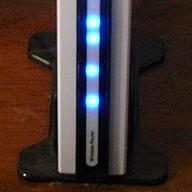
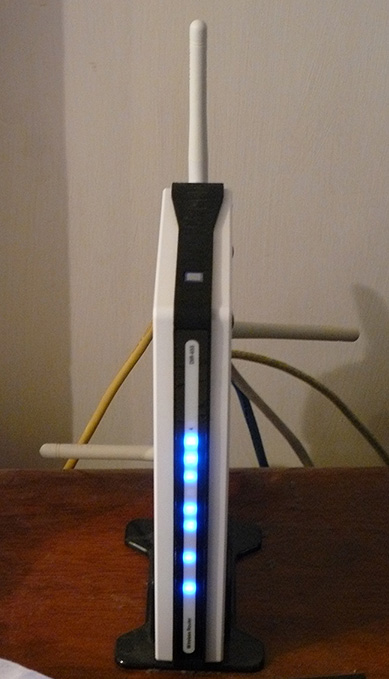
我曾經擁有一個 D - Link的目錄 - 655路由器在過去的一年,這是迄今為止最好的路由器,我已經使用過,雖然我沒有多付150元比我付出的路由器之前,我已經得到我已經付了。

1.21版本開始,測試 04的DIR - 655固件現在有共享點的功能可用。 共享點的媒體和其他網站的部分或稱之為 SharePort,即所謂的其他任何地方,包括軟件本身就是一種方式D - Link的產品共享一個 USB設備通過 LAN,我要去嘗試不是迷惑你任何所以我會再提到它只是作為 SharePort從現在開始。

SharePort是一個有趣的功能,其實我想成為能夠做一個幾年前,通過共享的USB設備,從一個電腦 so be used他們可以在另一台電腦作為 if該裝置實際上是插入到您的電腦。 D - Link公司,最終使這項技術在有限的生活時尚,SharePort。

這就是SharePort的作品,我將用我的目錄 - 655和兄弟的DCP - 150C型MFC為一個例子。
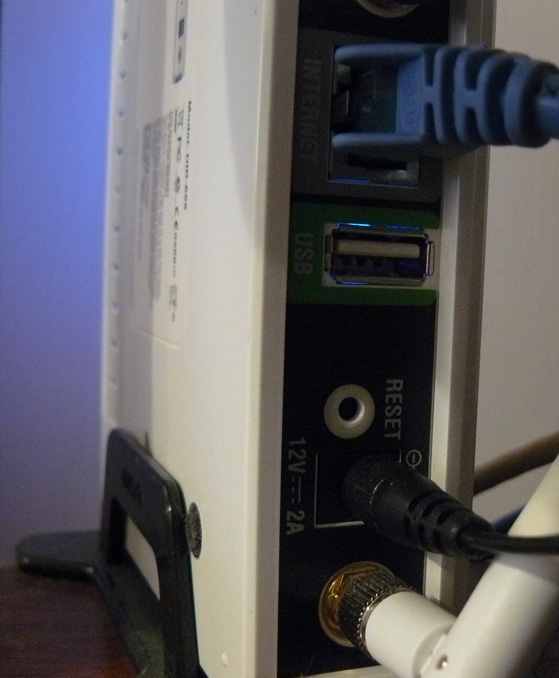
的DIR - 655具有USB端口的背部,測試似乎表明它是一個 USB 1.1端口,直至現在的端口是用於無線設置可以存儲在USB密鑰。

DIR-655 DIR-655 USB Port

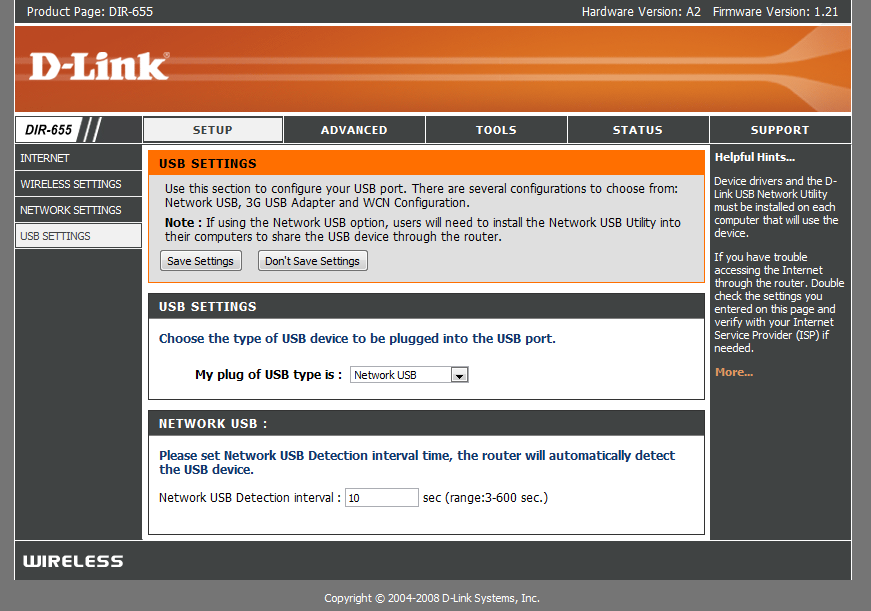
在安裝新的固件,但是,USB端口已發現了更多的使用,我們正在迎來一個新的菜單,它控制下的安裝程序使用的端口。

New USB Page

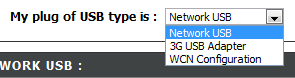
正如你可以看到沒有太多的設置這個 USB接口,灣仔北配置是默認的,這是用於無線配置項,選擇下拉框:

Choices

選擇網絡的USB使路由器在SharePort模式,選擇 3G的USB轉接器是位神秘對我來說,我不知道哪些設備是兼容這事,但是因為大多數人一樣,我有一個 3G服務,並使用它僅作為備份設備連接到USB端口,並選擇 3G的USB轉接器將是非常方便的。

一旦你選擇了網絡的USB設備會自動共享,但為了連接您必須安裝 SharePort軟件從 D - Link的,這是仍處於測試階段出現如此謹慎使用等等等等,我還沒有同一個問題現在還和它似乎相當拋光。 一旦安裝,確保你允許它運行在啟動和運行它直了,否則你將無法使用該設備無需手動運行 SharePort軟件每一次,它只使用2MB的記憶體,所以它不是一個資源豬。

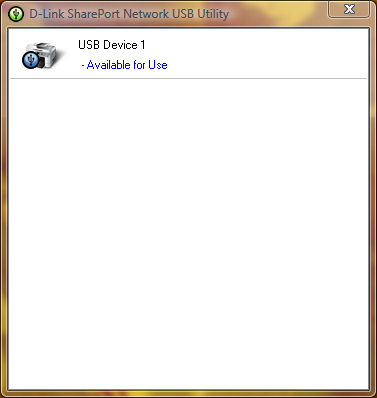
SharePort Printer

如果您的USB設備並連接然後 SharePort公用事業應顯示這樣一旦你雙擊該圖標在系統托盤中。 這將允許你通過一個嚮導來安裝設備,您將需要您的設備的驅動程序光盤或最新的驅動程序為他們的網站,在結束時,您會被詢問是否要自動連接到該設備在打印時,如果它是一台打印機,這是一個好主意,否則你必須手動選擇連接。

一旦成立,是所有的每台計算機上使用該設備,你會發現,每個設備狀態的打印機已暫停和離線,打印到打印機總之,SharePort軟件檢測到打印已發送到打印機,它自動分配給您的計算機和打印機,而打印機是您的電腦溝通它會顯示為連接,一旦打印作業已經完成,然後將返回到離線,已暫停。

此功能的局限性是它只能在一台PC一次,USB設備根本就沒有設計連接到電腦 2,以便它在一次很有意義為什麼是這樣的話。
我還沒有試過這樣的事情作為網絡攝像頭,但是,他們被稱為工作,但以較慢的速度比正常,我的打印機掃描儀功能的正常工作,但是你必須手動連接使用的SharePort軟件使用它,請務必斷開在您是完成。

正如我在開始這篇文章的SharePort軟件是我已經等了很長時間,這是一個偉大的功能考慮我的路由器是不是最新那裡現在幾乎像是D - Link公司已經放棄了加入新它的功能,它也顯示了良好的設備可以工作,如果它可以處理一個 USB設備,而這是執行所有它的其他職責。

相關崗位:

  1. D - Link的SharePort更新
  2. D - Link的SharePort新版本1.10和目錄- 655固件1.30
  3. D - Link的目錄- 655 1.32生成04測試版修復01 SharePort
  4. D - Link的目錄- 655固件1.34b02 3.0 Beta和SharePort
  5. D - Link的目錄- 655 1.32NA固件決賽

評論:

  1. 只是在我的升級固件到1.21迪爾 655路由器。 當我開始安裝 SharePort工具的應用,撞壞了我的台式機和筆記本電腦都是Windows Vista家庭高級版操作系統。 所謂 dlink之外的技術支持,但沒有發現任何問題。 任何人有同樣的問題? 在需要解決這個問題 ...請幫助。

  2. 嗯,我仍然在運行測試04 1.21,這可能是最後的1.21,也可能是一個好主意,重新下載該實用工具從ftp://ftp.dlink.com/Gateway/dir655/Apps/SharePort_Network_USB_Utility_094。拉鍊和可能重新閃光的路由器與ftp://ftp.dlink.com/Gateway/dir655/Firmware/dir655_firmware_121.zipftp://ftp.dlink.com/Gateway/dir655/Firmware/dir655_firmware_121_no_securespot.zip的no_securespot文件有一個較新的日期也比標準的1.21固件。 什麼樣的軟件,你現在有兩個運行的計算機? 嘗試切斷病毒掃描等都有安裝時這一點。

  3. 我剛剛安裝在我的DGL的固件1.13 - 4500,以及安裝了shareport實用工具。 Shareport不是recionizing我的路由器作為網絡上的或我的外置HD作為接駁。 有什麼想法?

  4. 實際上,我想到達底部的一個類似的問題,我經歷,前幾天我的電腦停止檢測,當我的打印機上和大部分的時間也沒有發現,當路由器連接。

    我重新安裝了它,重新啟動路由器,它並沒有改變,即使所有其他電腦完美工作。

    可能的解決方案:其實我剛才已經解決了這一問題,它似乎是無法識別的設備當您有多個網卡啟用,所以如果你運行 VMware等你要禁用其它網絡連接,重新啟動之前,將重新開始檢測。 如果你能得到它的工作也是從這個讓我知道。

  5. 嗨!

    顯然,這僅適用於美國版的655。 我閃到最新的固件版本,歐盟有沒有屏幕如上所述。

    只是想明確指出這是美國用戶。 其他人,不要誤會,以為這個路由器將網絡比任何其他網絡接入。

  6. 感謝您的頭,我一直在使用美國版本的固件在我區購買 655。

    我不建議這樣做,但是我不相信有任何區別,所有在不同地區或硬件。

  7. 本感謝這個偉大的教程 - 使用您的指示,我能更新固件,安裝打印實用程序和打印使用我的路由器連接的筆記本電腦! 只是一個字的感謝。

    作為一個供你參考,我用的D - Link路由器軟件的自己的“檢查固件更新”功能,它會自動推薦版本1.21(日期為 2008年10月9日)。 現在我印刷如此美好的景色為基礎的筆記型電腦(康柏),和一個 XP /家庭為基礎的桌面(康柏)。 另外還有戴爾筆記本電腦連接。 打印機是惠普Deskjet F4180全於一身。 如果安裝 SharePoint和惠普打印機驅動程序的筆記本電腦,但是這沒什麼大不了的。

    我注意到一個區別從什麼你說:我沒有重新連接到打印機每次我用它。 當我連接後,它保持連接,除非我選擇“釋放”了。 如果一個人對電腦的連接,並且您要打印從一個不同的,這給了你選擇的“,要求釋放”從機連接。 然後,該機器是目前連接得到一個彈出式消息,要求其斷開,以便其他用戶可以使用該打印機。 狀態欄還顯示計算機的名稱為準積極機當前連接到打印機。 或許這是另一個固件更新,被列入10/9/08釋放?

    作為一個供參考,我是美國用戶。

  8. 謝謝您的評論麗莎,我很高興你喜歡我的指示。

    其實我從來沒有碰到這樣,我的所有計算機都設置為自動連接所以他們只連接到打印機在短短數秒的打印作業被發送,那麼它再次斷開,我想這將是一部分不過我也是我還沒有遇到因為它沒有連接到任何一台電腦足夠長的另一個要求使用它。

  9. 肯定有問題與版本1.2和1.21版本的目錄 - 655固件。

    虛擬服務器映射不正常工作的傳出的數據包。 我運行郵件服務器間歇性地開始運作這兩個固件轉速。 恢復到1.11解決了這個問題。 連接到端口25(SMTP服務器)將路由到相應的內部服務器,但它在我的網絡服務器 RESP的似乎並不總是能回到遙遠的連接服務器。 剩下的SMTP例程等待更多的溝通,從來不會出現和超時。 有時,轉遞服務器將放棄和郵件丟失。

    此外,時間上是不正確配置.. 固件錯誤地標記為無效,即時間:晚上11時至凌晨5點是無效的1.2倍,並確定在1.11。

  10. 這是非常糟糕布賴恩,我沒有經歷過什麼太壞這些固件自己,但其他人報告問題。 以前我曾下跌1.2有問題,因為人們都用它,但似乎並不是所有的問題可能已經得到修復。

  11. 我不知道你能為我測試的東西 ...你能嘗試建立一個晚上11點到凌晨5點使用的時間表,看看它是否認為有效? 這會告訴我,如果這是一個普遍的問題與 1.21或東西那是一個問題與我的單位和固件...。 THX的

  12. 我遇到了同樣的錯誤,似乎不喜歡延續至午夜。 會發生什麼事您設置一個時間表從下午11時至中午12時至中午12點和1個從上午05點?

  13. 我已經找到了法國網站,法國 dlink之外代表聲稱 shareport功能將在幾週歐盟固件:
    http://www.clubic.com/actualite-170094-dlink-routeurs-dir-655-dir-855.html

    其中一個評論如下文章賽斯美國對歐盟的罰款固件工程硬件(如本說 - 可能不存在差異硬件),shareport工作正常,和佳能的多功能Pixma的可以通過共享的端口掃描。
    我訂購的DIR - 655對我來說 ...

  14. @ 6月(和其他任何人)...我也遇到了“安裝 SharePort”我的系統崩潰問題。 (在V 0.94和1.0版本)

    的DIR - 655走進大,固件更新了罰款。 路由器/無線抓取快。

    去安裝軟件和SharePort墜毀我的XP SP3和Vista家庭高級版系統,可怕的壞。 能夠讓他們將通過系統還原,但不漂亮了一段時間。

    我懷疑這抵觸 AVG免費 8這是一個共同的一塊我所有的軟件系統。

    其他人可能可以確認 SharePort / AVG免費 8驅動衝突誰可能墜毀在他們的系統 /後安裝 SharePort?

    -乾杯

  15. 嗯,我有同樣的問題,6月 共享點版本1.0崩潰時,我的筆記本電腦安裝和卸載。 我有固件1.21,但我不認為事情,因為我什至不能安裝軟件不會崩潰。 所謂 dlink之外的支持,他們說,Sharepoint和USB接口不支持的DIR - 655。

    可能會尋求替代產品,它可以正確支持硬盤驅動器。 任何建議? 我可能會嘗試蘋果機場 Extreeme現在,它是千兆和雙模能力。

  16. 我幾乎可以肯定在我的情況有一個驅動程序之間的衝突 SharePort驅動程序和別的東西。 我強烈傾向於贊成但有一些種的系統保護(高抗衝聚苯乙烯?)功能的AVG免費 8個在我的情況。

    對試驗台系統後,我可以安裝 SharePort只是罰款(v.94或1.0)。 但是,如果我先安裝的AVG免費 8個機器藍屏,在結束安裝過程 ...或者當一個驅動程序或服務嘗試安裝。 奇怪的是,在一個“真實”的體制坦克在安裝過程中,在一個虛擬的系統,它僅在卸載坦克的SharePort與 AVG免費 8。

    但是,(在虛擬系統),如果我先卸載 AVG免費 8,重新啟動,安裝 SharePort,重新啟動,然後安裝 AVG免費 8似乎一切都感到高興。

    我需要做一點故障排除後,我才提出我的“活”的系統。 這不是很有趣做一個系統恢復了我的兩三個系統本週末。

    我不認為這是一個 router-hardware/firmware問題,我可以告訴最好的。 我的目錄 - 655如果抓取快速和固體。 我沒有升級到1.21固件,使這一新的SharePort功能,但我看不出是如何影響路由器固件系統。 我確信它是與 SharePort軟件本身和專門的驅動程序或服務在安裝初始化衝突。 我只是要牽制的衝突點。

    是的...我花了30分鐘的電話支持與 dlink之外昨晚和它旁邊的一文不值。 我終於得到了可憐我的發現技術升級到一個主管,也許它將使一個技術性的辦公桌上dlink之外。

    根據這個傢伙,有沒有新的“回房間”版本為 SharePort在這個時候。

    將讓你知道我知道。

    否則,我已經非常滿意目錄 - 655設備的整體。 太糟糕的SharePort特點是決定性因素之一,為順應這種發展模式。

    唉...。

    (順便說一句,我正上方張貼評論 SteveW的上述地雷...有點被困6月在瀏覽器的名稱在作者字段。)

    -乾杯

  17. 這是很好的故障排除工作有聖誕老人,這將是一個 SharePort軟件的問題肯定地說,也許 AVG是不是在玩好或者,他們還沒有完全得到最佳戰績最近有關問題同其他軟件。 我會看看我是否能找出任何關於明天的AVG / SharePort,我敢肯定一人公司知道的東西。

    我不會期望D - Link的更新軟件了一段時間,但我想他們會只知道肯定。

    如果足夠多的人希望有問題,但他們很快會解決這個問題,軟件本身必須能夠與所有SharePort硬件和有相當多的人在那裡了。

    順便說一下我已經改變了你的名字在評論上述SteveW這樣的談話是可以理解的不好,讓我知道如果您遇到錯誤的評論系統,它是我的代碼,以便它有一個錯誤的可能性。

  18. 我也安裝在我的1.21迪爾 - 655和USB軟件。 我的硬連線的電腦,打印機立即發現。 我的筆記本(無線)sharport說,它無法找到一個 USB設備。 有什麼建議?

  19. 嘗試禁用任何其他的網絡卡,重新啟動,即使是以太網卡,Shareport變得容易混淆多個網絡連接,如果它正在運行 VMWare的嘗試禁用VMNet網卡。

    也暫時禁用任何防火牆可能對您的筆記本電腦,以防萬一之一是阻止連接。

  20. 有同樣的問題,但我Valca運行新的諾頓病毒掃描儀,所以我想知道,如果它的一些其他的東西,然後病毒掃描程序。

  21. 嗨,大家好。 仍在測試的問題。

    我以前一直懷疑的AVG 8,這樣這個週末,我發現了一些空閒時間。 決定把我的理論在我的測試 Vista家庭炳廷。 SP1的系統。

    我卸載的AVG 8,提出了手動還原點(我做一件好事)重新啟動,到目前為止,一切良好。 然後我安裝 SharePort。

    藍屏。

    系統還原使用我節省點恢復我的系統。 現在我又回到了起點。

    移動到一個新的虛擬 PC會話使用原始XP SP2的安裝。 安裝 SharePort只是罰款。 沒有問題。 卸載它只是罰款。

    下一步懷疑我是NetLimiter監視器也是常見的所有我的三個系統。

    安裝 NetLimiter監視器並重新啟動。 良好。 沒有穩定的問題。

    到安裝 SharePort(1.0),在接近年底的設置一樣 ... ...我真正的系統的虛擬系統沒有立即黑色屏幕重新啟動。

    Hmmmm。

    所以,我已經卸載 NetLimiter監視我的系統,放入一個電子郵件查詢自己的支持團隊詢問他們是否能獨立地研究這個問題。

    Seeing how it appears both SharePort and NetLimiter Monitor both seem to hook into the Windows networking drivers/services this makes pretty good sense.

    Will give another update if/when they respond.

    Not sure if I am brave enough just yet to repeat the experiment on my live systems again.

    –Cheers!

  22. Hi Everyone, I am Brand new to all of this. Recently Upgraded to the DIR655. 太好了。 1 Desktop 5 Notebooks. Desktop has the PCI network card, Router, DSL Modem Etc. Notebooks are all running internal 802.11G Devices.
    If I unplug the USB Cable from the Oki550 color laser from the Desktop, and plug it into the USB Port on the DIR655. Is this ultimately (or Theoretically)going to allow us to print to that Laser without turning on the Desktop Computer first?
    For now that is my ultimate objective and this is my first question.
    謝謝
    戴夫

  23. Yes this will allow access to the Printer any time the Router is on, the printer and router are the only 2 things that need to be on for this to work, however that is provided they do not route through the desktop at any stage. As can be seen by the comments you should exercise a bit of caution when installing the Shareport software as it doesn't play well with other software that has networking components.

  24. Hey guys I found the issue… Its Net Limiter uninstall that and you are good to go ^_^

  25. 本,

    Just to confirm what I suspected and Nick has confirmed…the Net Limiter 2 Monitor program does critically conflict with the SharePort application (at this time).

    I had uninstalled it from my XP Home (SP3) and Vista Home Premium (SP1) systems. Then I reinstalled SharePort after creating System Restore points (just to be safe).

    Installation went fine this time and no BSOD or conflicts were observed. The SharePort application quickly found the Seagate USB flash storage device and I was able to “mount/connect” to it and read/write files from all systems.

    To be clear…only one system can be connected to the device at one time as far as I can tell. Other than that it now works great.

    哎呀! That was a doozie working that issue out. Thanks to Nick for posting a confirmation.

    I did send an email to the Net Limiter support team about the issue, but no response yet.

    Not sure if it will occur with all their programs (paid/free) or just with Net Limiter 2 Monitor.

    Thanks all!

    乾杯!

    –Claus V.

  26. Hi, i'm owning the Dir-855 as my dear old Dir-655 went to my sisters apartment as a permanent solution. However i'd be very interested in knowing if the DIR-855 supports this feature as well. It might be a good add-on for my already awesome Wireless router.

    丹尼爾

  27. 丹尼爾,

    According to a D-Link press release, the DIR-855 is included in those that SharePort supports.

    http://www.dlink.com/press/pr/?prid=442

    Quoting:

    “The innovative SharePort USB network-bridging feature is available on D-Link Xtreme N Gigabit Router models – the DIR-655, DIR-825, DIR-855 and DGL-4500 Gaming Router with GameFuelâ„¢. The SharePort technology upgrade is also available on the RangeBooster N DIR-628. Current owners of those routers will be able to upgrade to SharePort technology by downloading the latest firmware and client utility from the D-Link website, http://www.dlink.com .”

    I think this is the link to the DIR-855 firmware and SharePort download page:

    Firmware –
    http://www.dlink.com/products/support.asp?pid=548&sec=1#firmware

    (That's one nice looking 855 model by-the-way. Makes my 655 look plain! ;)

    祝你好運!

    Claus V.

  28. Hi, I have my own DIR655 for 1 week. Its an EU version, but US firmware 1.21 run smothly. Shareport works, but not very stable.

    First issue, sharing USB disk drive over the WiFi is not a good idea IMHO. Any network problem and Vista have issues with device. Also performance is an issue (800kB/s when 2M/s when copying files between laptops with WiFi n adapters).
    But I purchased this router for printer sharing. And it is possible, but Shareport Utility (1.0) works only on the local account. When working on the active directory account, the utility's popup window shows the device connected to the router's USB port. But when clicking on the tray icon the app window is not shown. Application is on the taskbar but has no window to select device and do connect.
    On the local account everything is OK. Seems to be the SharePort Utility issue. The OS was installed a week ago, not many aplications installed.

    任何想法?
    Piotr

  29. Claus, thank you very much, i was suffering from this issue until now. I spent my whole weekend for nothing, thank you!
    this net limiter sucks:\

  30. Hi, i am having this isue with dlink 655 v1.21
    and shareport v.1.0…
    multifuction printer and usb flash drive work flawless on 2 xp sp3, and 1 vista 64 machines,
    but when i connect an ipod touch v. 2.0, the shareport utility shows “available for use”
    and try to connect to it and all 3 of my pc's drop the internet connection, wireless and hardwired and needless to say the itouch wont connect and the internet is restored automatically, is like the router goes into a power cycle or something.
    Then i tried same procedure but with an ipod nano this time, and guess what, worked perfect!!
    is anybody having this problem and or know the workaround to this?
    thanx for your help.

  31. 您好!
    So.. i have a dir-655 EU router and tried the 1.21 US firmware myself. i'm not going to lie, the firmware upgrade didn't go without a hitch. When i uploaded the firmware to the router, i couldn't get to the administration page of the router anymore… but after a reset everything went back to normal (it might be a good idea to save the configuration of the router before you do the firmware update). Anyways, i encourage everybody with a non us dir-655 to try the 1.21 firmware… so far everything's working fine and even managed to attach my printer to it and it works great… next thing to try is a storage device :搭扣

  32. Remember guys, the router appears to be limited to USB 1.1 speeds, ie about 1MB/second so it is not recommended unless you have a small device and don't have much to transfer, also routers aren't the fastest systems so transferring data over the USB probably puts alot of strain on the device which could cause anything from slower LAN speeds and wireless dropouts to router reboots.

    Thank you for all your research Claus, hopefully soon one of the companies is able to fix the problems with compatibility.

  33. I was hoping you could help me with another issue.

    I recently upgraded from another D-link router to a Dir-655. Upgraded to f/w 1.21. Have multiple machines on a local network workgroup that all saw each other fine with the older router. Now I cant see any of the other machines on the lan. I know I've missed something simple so I was hoping you could give me a heads up. All nodes see the internet fine and ip's are reserved and withing dhcp range. What have I missed? Much thanks

  34. There are 2 things off the top of my head that have issues when moving networks, mainly when the network changes it's IP arrangements, some firewall software including Windows Firewall and commonly ZoneAlarm can block a PC from being 'discoverable' as it believes this new network is a public network on the internet instead of a private LAN, if you are running Windows Vista the same thing can happen, make sure your PCs have their network connection set to Home or Private, those really should be the only times when that problem should occur.

    If they are wireless also make sure that Wireless Partition is disabled in the Advanced Wireless properties as this will cause a similar affect.

  35. I am having the same BSOD problem on Vista as mentioned by others. The PC went to BSOD at the end of the Shareport install and then BSOD'ed each time I tried to login. I have Trend Micro AV and the Nortel Contivity VPN client. Both are essential programs and I can't uninstall either. Could either one of these be a problem?

  36. 您好,
    I am interested in upgrading to this router so I have searched different forums for clues.

    Today I noticed there is a new (still v1.21) file updated 12.12.08. Anyone tried if this is a new version with fixes or not ?

  37. I'll give it a try and see if it changes anything based on issues people have had, on that note a new issue I have noticed has arisen, occasionally after having the router on for more than a week the shareport software on all computers starts giving out connection errors, if they're left for a while there can be hundreds on the screen, restarting the router stops the errors for a while.

  38. The 1.21 is the same as the one that was released a few months ago, just with the date changed, however about 2 or 3 versions have been labelled 1.21 without a beta tag, with the last one being 1.21 B10 in November, so if you downloaded 1.21 in October or earlier, download it again and install, it fixes a few problems with port forwarding and saving settings.

  39. Hi gang,

    Great thread!

    I'm having a shareport problem, and wanted to see if anyone has experienced the same.

    here's my setup:

    1。 DIR-655 with firmware 1.21
    2。 Win XP Pro machine (as a vmware client) with shareport 1
    3。 WD external HDD

    The HDD is plugged into the USB port on the router, but I'm not able to connect to it from the the Win XP pro machine. The XP machine will continuously notify me that it has “Found” the HDD, but the Shareport tray icon continues to stay red, and never turns green. After about 30 seconds, the notification will come back. I'm completely at a loss, as it workeed in the past when I had this vm client on another host. I know that vmware may be causing this, but I don't see how, because I only have one network adapter enabled on the XP machine (ethernet bridged). I've spent hours trying to get this to work…Any ideas would be greatly appreciated!

    謝謝,

    約翰

  40. I have this setup DIR-655 Firmware 1.2.1 and Shareport I got to work if I disable my Microsoft OneCare firewall.

    Does anyone know the Port's used by D-Link SharePort?

  41. If you all go to Dlink's website for the router, you will see that it says,
    “This firmware is engineered for US products only.
    Using this firmware on a device outside of the United States will void your warranty and may render the device unusable.

    Please contact the D-Link office in your region for firmware updates that are compatible with your D-Link product.”
    and,
    “¤ Added SharePort features.
    ¤ Fixed email notification issue.

    Please download the SharePort Utility and see the SharePort manual before use.”
    You have to download the actual utility to use it!

  42. Oh, and I almost forgot, this is for x86 version OS's only. x64 is not supported.

  43. Hi James, I'm not sure of the ports myself however if you open up a command prompt and use the command 'netstat' just after attempting to connect using Shareport, look for the router's IP and you should be able to see all ports that the PC is connecting to the router for, OneCare may have a log file that might allow you to do a similar thing, just make sure you're running as little network applications as possible at the time as the lists can get pretty long and do not have any p2p programs running at the time either.

    Hi Jody, I have tested version 0.94 and version 1.00 on Windows XP x64 and Windows Vista x64 and have had no problems, is there an x64 version that doesn't allow this to run?

  44. I just got a D-Link DIR628 which also has the shareport utility. However, I am having some rather strange problem and wonder if anyone can offer some help or suggestions.

    On my wife's Vista laptop, the shareport network USB utility installed smoothly and works nicely. On my XP Pro desktop, the first installation hung and when I rebooted, the network USB utility started but couldn't see the devices behind the router. I have been trying different firewall settings (and eventually turned off all firewalls just to try it) the last few days and nothing seemed to really work.

    The only thing that seemed to work is if I uninstall the shareport utility, reinstall it, then the first time it got started after reinstall, I could see the devices. If I exit out and restart the utility, it's the same old problem of not seeing any device. Rebooting also has the same problem of not seeing anything. The only way to get it to work so far, seems to be uninstall->reboot->reinstall and it only worked after that sequence.

    Anyone has any idea on what this problem might be? When it worked, it worked great. I got 80 Mbps from an external HD which is not great but not too bad either. I could also put both my MFP printer and the HD behind a hub and access both of them. It's really wonderful that way. I just wish I can get it to work on all my computers. By the way, my other system is a Mac and there isn'ta Mac version for that utility. :(

    Sorry for the long mail, any help or suggestion is really appreciated. 謝謝。

  45. I have seen a few instances where the devices can't be found on a pc randomly, however I have not experienced this on a PC every time after it has been installed. Is the PC able to detect the router using the Shareport utility?

    Right click on the Shareport icon, in the menu you should see the name of your router and it's IP address, make sure it is selected, if not go to it and a new menu will open up, make sure you click on Enable, also you can click on Configuration to get some advanced settings.

    D-Link Shareport Network Selection

    If the router doesn't show up in the list then there may be some connection settings on that PC that are limiting the connection between it and the router.

    I'm also waiting on a Mac version of the software, though I think it might not happen any time soon.

  46. Anybody use a USB hub on the shareport and get more than 1 device to work?

  47. Ben – thanks for the response. The PC that I am problem with is directly connected to the route through a wired connection using a CAT5 cable. It is the primary system that I use to set up and configure the router. When I had the problem, the top line in the right-click screen of the shareport icon, the one showing the IP addresses and things was not visible. I only got things from the “Advanced Options” down.

    Mike – I did put a USB hub in and connected a Canon MP470 printer and a external HD at the same time. I was able to see both of them and were able to connect to them from my Vista laptop.I didn't try to read/write to the HD and print at the same time though.

    By the way, I made a typo earlier. I think I was only getting 8 Mbps, not 80. So roughtly 1 MB/sec read throughput is what I was getting. Not very fast but good enough to move small amount of data.

  48. I'm having the same trouble: Have a Dlink655 with a wired connection to a Vista Home Premium laptop and an older desktop box running Win XP.

    Shareport works just fine on the laptop – I want to use it for a shared printer.

    I can install shareport fine on the XP machine, but it doesn't find any devices connected… and I also don't see the router's IP address upon right-click. I disabled firewalls, uninstalled antivirus software etc. but to no avail.

    Would love some hints if anyone has them!

  49. To Jacko

    I went into admin, clicked on ADVANCED, then WISH on the left, then I made sure it was ENABLED and for PRIORITY CLASSIFIERS I clicked AUTOMATIC. Try it.

  50. Mike – you said you “went into admin, clicked on ADVANCED, then WISH on the left, then I made sure it was ENABLED and for PRIORITY CLASSIFIERS I clicked AUTOMATIC…”

    I assume you are talking about the web administration page for the Dlink655 router? What is the “WISH” thing you talked about? I have a Dlink628 and I didn't see anything that looks like “WISH” in the advanced menu. I was wondering if you can explain what that menu does, I might be able to find the equivalence in my router. 謝謝。

  51. I've checked out the DIR-628 emulator on the D-Link site and it appears that router doesn't have WISH at all, perhaps you could try messing about with the QOS settings as they are similar to WISH except they affect both wired and wireless on the WAN side of things, but may not have the same effect as WISH, personally I have WISH off and have no problems.

  52. 大家好,

    I tried changing the WISH settings, but no luck. The Vista laptop has no issues with Shareport at all, whereas the XP machine cannot even recognize the router.

    If the issue is router-side, I don't know why the Vista box would work and the XP box not?

    謝謝!

  53. Hey guys, i am seeing the same thing on the dlink dir-825. Wireless PC's see my printer connected to the usb shareport fine. My wired PC's lose the printer whenever they are restarted. If i reboot the dir-825 the wired pc's will see the router again.

    When I click the sharepoint icon, I see the ipaddress for the router when it's working correctly with the printer. When it's not, the ip address is not there and the first entry is advanced options.

    I tried changing the wish settings but no change….

  54. Hi Jacko and hoc, are either of your PCs that have this problem set to connect to the router via DHCP or via menually entered static IPs?

  55. 你好
    Both my laptop (Vista) and desktop (XP) are connected by wire to the router, and both are set up using DHCP.
    謝謝!

  56. I talked to dlink 3rd level today who was passing this on to the product manager. I need this to work so have done a good amount of testing. My PC's are all connecting via dhcp, all vista (some x32 and some x64).

    From the testing here i have found that the wireless PC's always detect the printer connected to the shareport. The wired PC's are inconsistent… at best. If I reboot the dir-825, the wired pc's will immediately detect the shareport printer and keep it until the network connection is interrupted. If i pull the network cable on the wired pc, and then plug it back in, they will lose the printer and not re-establish it (exactly what happens when you power off your PC).

    Hoping we can come up with a better solution than rebooting the router every day!!! I'm sure linksys would like to hear about that.

  57. hoc,

    我想你可能對某事。 在我的設置,在制度方面的問題看到了網絡的USB端口連接到路由器通過雙絞線直接。 使用無線連接的筆記本電腦一直是好的。 我有一個額外的變量在我的環境上使用的操作系統。 XP中使用的有線桌面,而無線筆記本電腦使用Vista系統。

    我安裝了Windows 7 Beta版的有線機上週末。 我又可以看到在網絡上的打印機的USB端口後,第一次啟動該實用工具。 當我離開了,並重新啟動該實用工具,我有問題了。 我會嘗試重新啟動路由器,當我今晚回家。

  58. 我得到一個'連接失敗,請再試一次。 信息每分鐘左右,從 SharePort網絡 USB工具。

    很奇怪,因為我有我的打印機的USB端口和它工作正常。

    任何理論在哪裡看??

  59. 我得到的太多的每一台計算機的其他比我,奇怪的卸載 /重新安裝或者不修復它,我唯一所做的升級固件,我的電腦安裝 SharePort固件升級後,但其他電腦已經安裝了它,因為前他們的經驗和問題。

    我看不出任何作業系統之間的聯繫,他們正在運行或防火牆 /防病毒軟件或者,我所做的一切是關閉的啟動選項在程序和運行程序只有當我需要打印。

  60. 誰能推薦一個安裝程序,允許在Mac和PC來訪問並使用相同的外部硬盤通過網絡? 或者在哪裡可以找到這個信息? 這裡的挑戰是:

    - PC和Mac都有點老,所以沒有的N -標準
    - 格式化磁盤:要的HSF +和PC將使用MacDrive?
    - 考慮購買個人電腦的娛樂和使用這是“服務器”

    建議?

  61. dlink之外發布了一個更新的SharePoint實用軟件這個星期。 對於我的問題,但是它的個人電腦有線幫助,但不是一個完整的修補程序。
    在啟動我的有線 PC不看打印機連接到shareport。 在1.0版本中,對話框的工具開始的“高級選項”。 現在,它開始的地址為路由器。

    我可以強制公用事業看到打印機通過選擇禁用,然後啟用該 shareport對話框。 仍然沒有一個完整的解決方案,但越來越好...

  62. Shareport是沒有找到我的路由器,在彈出菜單中從系統托盤圖標。 我有655迪爾和Vista 64位操作系統。 dlink之外的支持表示shareport不支持64位Vista操作系統,但這裡的職位似乎矛盾的。 任何建議,意見將非常感謝。

  63. 我安裝 Shareport 1.14和更有效,儘管當我從一個硬盤驅動器斷開它說,它的忙,我應該武力或取消。 部隊工作,我似乎可以重新連接確定

  64. 我剛剛升級我的固件和一切工作的罰款。 我已經測試 USB硬盤和USB打印機都工作得不錯。 我很高興目錄 - 655。 真正的酷

  65. 終於第二台筆記本電腦連接到打印機掛了迪爾 - 855。 該 cuplrit是OneCare的 - 感謝詹姆斯12月30日。 一旦防火牆被禁用一關懷我的Shareport圖標變成了綠色和打印機能夠使用。 一對夫婦只花了我的天,許多白髮!

  66. 大家好,
    我安裝的目錄 - 655的朋友 - 一年紀較大的桌面與 Windows ME和一個新的筆記本電腦與 Vista。 桌面是有線的路由器,筆記本電腦是無線。 我安裝 Shareport和迷上了他的USB打印機上的路由器。 它工作! 幾天。 現在,打印機似乎已經消失...。 樣的。 這沒有列在任何應用程序,但是如果我點擊 Shareport實用工具,它說的打印機(一個相當新的惠普公司)可用。 還有得的東西我在這裡失踪。 有誰知道?
    (現在,他不是要打印從桌面上,但我在想,一個 USB集線器將允許我鉤到桌面打印機以及路由器。)
    謝謝

  67. 哦,好吧,我去找我的朋友家,一切運行良好...當然! 打印機空出來了,我點擊連接,而且連接。 它並重新安裝打印機驅動程序。 誰知道他 - 他說他一直轉動。 所以也許當我重新啟動,它得到理順。

    我仍然有興趣在使用USB集線器,以便他的桌面連接至打印機。 因此,如果任何人有這樣做和有什麼“陷阱”,提醒我時,我會很高興的。 我想打印機樞紐和中心樞紐,以台式機和路由器。
    謝謝

  68. 剛收到的DIR - 655後,上週所有的好評論。 我下載了SharePort固件1.21(2008/10/09)。 我有點失望了。 想分享一些問題,我看到你也許有辦法解決的共享;

    - 客戶(3倍景色阿塞斯,和XP專業版聯想)有困難的時候得到一個 IP地址與 WPA -個人,和WPA2 -個人後喚醒。 我必須擁有筆記本電腦嘗試幾次,直到成功。 他們發揮得相當好廉價的802.11g路由器貝爾金

    - 連接滴即使信號在85%或更多的時間最

    - 最後,我買了這個,當我聽說 SharePort防火牆。 這項功能是一大失望。 我認為它可能會工作作為打印服務器,但客戶有要求,並授予前使用該連接很愚蠢...在沒有人使用已連接的客戶端! - 另外,如果筆記本電腦睡,連接和USB卡住斷開 /重新連接,我們必須為打印機被重新發現。 最後,我的佳能MP830中頻是不滿意的。 打印預覽不起作用了,打印機不起床的工作崗位,工作錯誤頻出。

  69. 有同樣的問題,因為這傢伙下面是告訴每一個東西是好,不過當我點擊任務欄上的工具沒有閃爍 desktop.it工作以及我的其他計算機上運行 Vista的32家溢價,這是做好此系統也但我不知道為什麼開始行動起來就像是遠景 32 this.this最終任何建議傢伙將不勝感激。
    “作者:坑
    日期:2008年11月8日

    嗨,我有我自己的DIR655 1週。 它是歐盟的版本,但美國固件1.21運行 smothly。 Shareport工程,但不是很穩定。

    第一個問題,共享USB磁盤驅動器在WiFi是不是一個好主意恕我直言。 任何網絡問題和Vista有問題的裝置。 還表現是一個問題(在800kb / s的時 2M /秒時,筆記本電腦之間複製文件ñ與 WiFi適配器)。
    但我購買該路由器打印機共享。 它是可能的,但Shareport實用工具(1.0)僅適用於本地帳戶。 當工作在Active Directory帳戶,實用的彈出窗口顯示設備連接到路由器的USB端口。 但是,當點擊托盤圖標應用程序窗口不顯示。 應用程序在任務欄上,但沒有窗口,選擇設備並進行連接。
    在本地帳戶的一切美好。 似乎是SharePort效用問題。 該操作系統是安裝了一個星期前,沒有多少aplications安裝。

  70. 忘記告訴以上職位 im使用dlink之外- 655固件1.21(latestone)和分享港口公用1.14。 希望ü傢伙會提供一些援助這一問題。

  71. 對於 KingTut:我有一個類似的問題對我的筆記本電腦,這個問題是由渠道是利用無線路由器,有時會脫離範圍標準的無線卡,即使我的筆記本電腦的N卡不能正常工作,有時,試圖迫使無線渠道類似頻道 6了一會兒,看看它是如何去,你也可以嘗試的渠道有設置為 20MHz的,而不是20/40。

    對於巴利:這是可能的SharePort需要某些權限才能正常運行,它可能是一個好主意,讓接觸與 D - Link使他們認識到這個問題,它可能是一個錯誤,他們沒有意識到作為呢。

  72. 只要安裝了最新的固件目錄 - 655和Shareport三個 Vista和XP專業版SP3的3件。 在Vista PC的有線和無線都和作品的罰款。 德XP電腦的垃圾找到路由器(所有3個有線)。 什麼更多的是,Shareport用盡了所有的CPU功率,當我嘗試退出該應用程序。 肯定有問題的軟件。 所有的防火牆已關閉。 XP的機器有不同的反病毒(平均值,停住和諾曼)。 一個 XP的個人電腦的直接連接到路由器,通過一兩個接入點。 改變通道或停止其他應用程序使用的通信端口沒有任何效果。 該 Shareport已經過測試 0.94,並更新到1.0的全新安裝和測試。 如果有人能在XP運行 Shareport,請解釋一下它是怎麼安裝。 還嘗試退出應用程序和檢查 CPU meeter。

  73. dlink之外支持Q -活動目錄的問題就少。 甚至沒有回答4天upto現在。 跆拳道支持他們 r提供。 只是都不知道是什麼東西

  74. 只是想大聲:你認為這將有可能使用DIR - 655的USB端口,那麼別的共享一台打印機?

    這當然並不足夠好聲音為 USB - HDD的保證非常低的傳輸速度,能夠在這裡被提到過。

    是否可用於舉辦一個非常小的網絡服務器從一個 USB記憶棒,像一個靜態主頁?

  75. 我有同樣的問題後,安裝所有的筆記本電腦,Vista和XP的開始崩潰,沒有人能達到插入打印機的USB端口...。

  76. 我覺得我有一個不同的問題在這裡 .. 我連接了USB硬盤的USB端口我的目錄 - 655(1.21固件)實用程序並安裝了shareport我vista32和XP SP3電腦 .. 我得不到路由器的名字,當我右鍵點擊系統托盤中的效用,所以我不能選擇任何USB設備從路由器.. 通過雙擊該實用工具,我沒有檢測到USB設備得到了utiliy的面板或者.. 我什至沒有 wirewall嘗試,並沒有 avaqil .. 這是怎麼了呢?

  77. ..同時,我每次開機 vista32我得到一個'新的硬件發現'信息,並要求安裝驅動程序用於路由器.. 但有沒有司機在裁談會附帶或dlink之外它的網站 ...任何建議嗎? (順便說一下,路由器的作品,因為我可以連接無線互聯網連接,分享我的..)

  78. 對於斯特凡諾:

    嘗試下載 /安裝 SharePort再次,司機是一個組合的通用驅動程序的Windows應該已經有1或2,應與該安裝程序安裝。

    看起來該方案已安裝,但一直未能成功安裝的驅動程序由於某種原因,它是最有可能已退出安裝程序所需的驅動程序,刪除臨時目錄中的文件之前,有機會來安裝。

    你的V - Lited或剝奪了你的Windows XP光盤以任何方式? 有時,刪除內置的驅動程序停止一些不常見的驅動程序,硬件的需求。

    對於古斯塔沃:

    遺憾的是這個軟件和驅動程序不發揮好與其他軟件和驅動程序,並有許多可能不兼容,它與許多計算機崩潰似乎沒有理由。

    如果有任何軟件的筆記本電腦上安裝但他們似乎毫無關聯的問題,請嘗試刪除這些暫時的。

    對於米卡:

    我不認為有很多的機會,作為可能的,直到他們建立某種形式的接口,允許路由器用棍的存儲,以便它可以運行一個額外的服務器,那麼我認為路由器可能沒有所需的處理能力這一任務。

    對於巴利:

    這將是更多的附加功能在D - Link的眼睛,他們就沒有義務來得到它正常工作,只是方式的公司工作,他們沒有得到更多的錢的額外功能,例如,因為這樣做是不真正值得他們的時間。

    對於氣相色譜:

    我從來沒有經歷過的CPU使用率的問題在任何時間與 SharePort在XP或Vista,使用不同的病毒掃描儀或無線 /有線,甚至通過另一個接入點,其實我有計劃設置為不啟動,因為它有各種各樣的問題當它允許運行所有的時間。

    我的安裝是相當簡單的所以它可能不會幫你多少,雙點擊安裝文件,安裝的默認選項,當這一切結束後重新啟動。

    我為人人:

    我是有問題的計劃告訴我的USB裝置連接,然後每隔10分鐘或不如此,那麼當試圖用它每次會斷開,似乎是路由器不再喜歡我的USB延長線,所以我刪除它現在,一切都很好,所以試著改變 USB電纜時,事情並沒有工作抓緊抓好。

  79. 對於本。
    感謝您的回答...我的XP安裝相當乾淨,所以我不認為這有任何問題 .. 另外,我沒有發現任何問題,同時安裝在兩台計算機 shareport效用,所以我覺得很難相信這是一個壞的安裝 .. 我無言以對 ..

  80. Hi Ben, what version is your router? AU or US? Have you tried 3G USB modem on your router?

  81. Getting the same issue with my wired connection to the DIR-655, Shareport software works after fresh install, connects to the printer shared through the router, but only until the first suspend or reboot, then Shareport no longer detects the router. I'd rather not have to uninstall and reinstall the software every reboot. 任何想法?

  82. Hi Adam, I have the AU version router, I have no idea what kind of 3g usb modem they are referring to and have none to test anyway other than my phone (which I assume doesn't count).

    Edward, I'm not sure what is going on with that issue but hopefully D-Link fix it as more than a handful of people seem to be experiencing it.

  83. Hi everyone!

    I just read most of this comments here, but it seems that I have diffrent kind of problem. Although I know that D-Link DIR-655 is exellent, I am thinking to buy DIR-855 or DIR-825 which are DualBand. I have TOSHIBA Qosmio F50-10K, so inegrated wireless card uses Atheros AR9280 chipset.

    1。 Can somebody tell me does my wireless card support 2,4GHz and 5 GHz simultaneously?

    2。 Which D-Link wireless Router should I buy?

    Thanks for any comment!

  84. Hi Jerry,

    Your wireless card supposedly does do 2.4ghz/5ghz simultaneously, though I would check with nay documentation that came with it just to make sure.

    I'm not too sure about those 2 routers as I have not had any experience personally with any of them, however I have heard that the DIR-855s have all sorts of issues, however we hear of all sorts of issues with the 655 so it really depends on what kind of bugs you can handle. If you want you can even go for another brand such as Linksys, their routers have great reviews lately.

    I forgot to mention before for DIR-655 users:
    There is a new beta firmware out called 1.22b05 , a significant portion of users have reported that it works great, much better than their recent releases, however this is a beta so be careful and don't install if you're worried about voiding your warranty etc, if it does fail and you're running the beta firmware they are likely to say no to a warranty replacement.

  85. 傑里,
    I bought 2 of the DIR-825 routers. They do simultaneous 2.4GHz and 5GHz, which is why I wanted them instead of the 655.

    I am having trouble, though, in getting Shareport to recogni the router on my Vista Ultimate system.

  86. I have Blink as my Security software and there's a conflict with eeyet.sys driver of Blink (EEye).

    Would it help to uninstall Blink, install shareport and reinstall Blink or will i always get the conflict between the drivers!

    謝謝

  87. Hi Sebastien, You will probably always get conflict with that driver, unless SharePort is updated by D-Link to stop conflicting, or if the security software company changes how it works.

  88. I have a laptop computer running Vista home premium and Windows Live OneCare for a firewall. I installed the Shareport software for my new 655. As long as I have the firewall turned off, the software works. I am using version 1.00 of the USB Network Utility. Can anyone identify the ports I need to enable to pass through the firewall?

  89. Well I'm not sure the specifics but…

    It uses an open incoming port at port 9303 using the UDP protocol so try opening that port on the firewall.

    It doesn't appear to do any other activity incoming or outgoing so I'm assuming that's all you need to fix.

  90. So with share port i have to decide either having internet security on my network or a usb device is that what i'm understanding and expiriencing with trend micro

  91. I'd stick with security ;)

  92. 您好! I got another problem. I got d-link dir-655 Firmware 1.21EU and Hardware version A3. I have installed drivers for printer and shareport. The pc with wired network/cable found the printer on shareport, but the wireless/cableless network didnt found the printer. 為什麼?

  93. The DIR-655 is a great router, but the shareport utility is absolutely the worst piece of garbage I have ever had the displeasure of using. It is flaky at best…sometimes it works fine but most of the time it just simply doesn't work. If they are going to release this feature, they need to ensure it works. Otherwise it just serves to frustrate users.

  94. There is a new version of SharePort (in a way, it has a lower version number but is newer), also there is now an OSX version out.

  95. I have a DIR-655 router and have been trying to get the Shareport utility to work. I have three computers in the network: a laptop with Vista and two desktops, one Vista one XP. The laptop uses a wireless connection and the two desktops are hooked to the router with ethernet cable. The laptop and the XP desktop work fine. But the Vista desktop only works sometimes. It's really random, sometimes the Shareport utility recognizes the printer plugged into the router and sometimes it doesn't. 有什麼想法?

  96. I'm seeing more and more cases of Ethernet connected PCs that can't get SharePort working correctly where wireless PCs work fine, I would have expected the opposite to happen.

    If there is no software on the Vista PC that could block it intermittently, such as a VPN or an active firewall then it may just be one of those times where it just doesn't want to work, as an outside the box idea try updating the network card's drivers on that PC, occasionally I have seen that fix all sorts of strange network application issues.

    If you have time to spare it doesn't hurt to send an e-mail to D-Link explaining the symptoms, if we get enough in they may be able to stabilise the program more.

    PS Try the new 1.10 version if you haven't already: ftp://ftp.d-link.com/Gateway/dir655/Apps/dir655_pc_shareport_utility_110.zip

  97. Take a look at the d-link forums before upgrading to shareport 110. People are having some issues with it.

    http://forums.dlink.com/index.php?topic=5098.0

  98. Looks like Ben has already addressed this on the main site. BTW, thanks to Ben I have my Canon MP610 working wireless using shareport 114 and FW121. Thanks Ben!

  99. Thank you for your information Lex. I wasn't aware that they had to be used with the 1.30 firmware but it makes a bit more sense now, I'll update the main post to reflect that.

  100. Hi Ben and all,

    thanks for all the tips and hints, i've read everything.
    I bought a 655 a few days ago and tried to get the shareport working since (tried really hard).
    I just wanted to view some movies on my laptop without having to turn on the PC and make backups to the USB-HDD. Shareport seemed great and made me pay 179 EUR.

    Tomorrow it's going back to the shelf. I want my money back.

    I hope the people at D-Link think twice next time before launching something so crappy!

  101. They are having alot of trouble keeping customers at this stage, It would have helped them alot if they had not advertised shareport as a feature.

  102. I tried getting Shareport to work for a while and finally gave up and uninstalled it. Now I am trying to print the old fashioned way (over the network and not using the d link's USB hub) and I am having huge problems. Printing over the network was fine before shareport, now after intsalling and uninstalling it I have serious issues. Printing takes FOREVER. I mean it is VERY slow. Could the shareport software have left something on my machine that is causing this? 謝謝。

  103. It could have done something, SharePort connects you straight to the printer, so you install drivers for the printer that are configured to connect via usb, if they weren't uninstalled properly then there may be some redundancy that is causing the slowness, try removing all of the printers listed in “Printers & Faxes” and reinstall the network printer driver, unfortunately printer drivers are tricky to remove completely but that should at least remove some connection to the old (USB SharePort) drivers.

  104. 謝謝。 Where exactly would I find the “network printer driver?”

  105. Well when you have all your printers uninstalled and you find the printer over the network windows should prompt to install the printer, you may have to right click it and click connect if double clicking doesn't work, here's an example:

    network-printer-install

    Often it will get the driver for the printer from the other computer or windows update so you don't have to find it, however if it asks for a driver simply use the printer's driver cd and it will install those instead.

  106. Hello all, I noticed you guys are posting on the shareport Utility.
    I just wanted to give you guys out there a heads up on the New firmware for DIR655 (ver 1.31) that requires you to upgrade the shareport utility to ver 1.10

    It seems there is a bug in the utility or the firmware. Once installed the utility is able to “see” the printer and connect to it with the connect button, however, if you want to be able to connect to the printer automatically (like with ver 1.14)your not going to be able too.
    After spending a couple of hours on the phone with Dlink and various support personnel, I was finally told by a “software specialist” that it will not work and I will have to manually connect every time I want to print.

    Some may thinks, that's no big deal just hit the connect button, but when you have several computers and they all want to print from that particular printer it can be a hassle to go to every machine and connect then disconnect.

    So if you decide you want to upgrade your firmware, keep this bit of info in mind.
    Until then I have to wait till another software upgrade to become available and hope that it resolves the problem.

    哦! and by the way once you upgrade the routers' firmware to ver 1.31 you CAN NOT revert back to the previous one.

  107. Thanks for the information, I wasn't aware of the bug in the newer version, hopefully they fix them all later on, but I wouldn't bet on it.

  108. Hey Ben,

    Thanks for the tutorial and screenshots. I have tried your method to set up the SharePort 1.14 with my DIR-655 Firmware V. 1.21. It is working well. 謝謝!

    Initially, the print job encountered a problem. I just restart the print job and use SharePort to disconnect with the printer then reconnect again, then it starts printing as normal.

    謝謝!

    丹尼斯

  109. 嘿傢伙!

    I am also interested in the D-Link DIR-655 and I want to connect my USB hard disk to it as some kind of mini-NAS. Has anyone here successfully connected a USB hard disk yet and (more importantly) tested the speed you can achive through this connection? Thanks a lot in advance,

    大衛

  110. Connecting a hard disk works however the connection is limited to USB 1.1 speeds (12 Megabits/Second or 1.5 Megabytes/Second), so it's quite slow, generally not recommended if you're going to be transferring large files.

  111. Hi guys, just letting you know there is a new version of the DIR-655 firmware that you can read about here that fixes a few SharePort issues.

  112. Hey…

    Anyone know if the usb utility can be used when the router is configured static as an access point? I ask because I have had no luck in doing so. ' - '

    Thanks in advance for any help.

  113. I just upgraded to the latest firmware…

    Firmware Version : 1.31NA, 2009/04/24

    Besides the Web Environment not working in Opera, the speeds for the SharePort with a USB2.0 HDD are really slow… I get from 800KB/s to 2MB/s… while I think USB2.0 directly connected should be around 30MB/s.

  114. Hi Julio,

    SharePort only works at USB 1.1 speeds and you're getting the correct speeds for that. I wouldn't recommend hard drive usage with it as there have been a few people talk about losing data when the software/connection decides to act up.

  115. 您好本,
    我來自印度。
    Recently bought the DIR 655. (H/w Ver: A3 & F/w Ver: 1.11WW)
    and couldn't use the usb port for accessing the external hard disc or a printer. on calling the tech support, they said the hardware version you are using doesn't support this feature, it should be A4.
    Is this the problem of h/w ver. or F/w version.

  116. I don't think they have been telling the truth there, the A3 can use SharePort, however you will need to upgrade to a newer firmware version to be able to use this, either a 1.2x version or a 1.3x version, keep in mind if you upgrade to the 1.3x series of firmware you will not be able to downgrade again.

  117. thanks a lot Ben for clearing this confusion. I have another query. After speaking to the D Link tech support, they say if i upgrade the firmware version, then the warranty on the product won't be valid. so should i just go ahead with the upgrade.
    and why do you think after upgrading the firmware, i may need to downgrade it again.

  118. When it comes to the 1.3x firmwares they do have problems that the 1.2x series don't have, but they do fix a few problems with SharePort that were causing a few users to not be able to use it, all DIR-655 routers respond differently to different firmwares so what works for one may not work properly for another.

    To be safe I would recommend using a 1.2x version firmware to use at first, if it doesn't work properly for whatever reason you can downgrade the firmware back to the version you currently have.

    Most people have only a few problems with 1.31 but if you want to readup on these check out the D-Link Forums here

  119. Had the same problem with SharePort not finding the USB-printer (connected to a DIR-825 router) on one my computers. Tried updating firmeware, s/w, just about everything, but no. At one time though, it did find the device, which set me off thinking. This might just sound stupid: but don't touch the mouse (USB-connecdted) while rebooting”. Works for me every time!!! Anybody that could understand why?

  120. That is a very odd solution for it, but if it works then I would encourage people to test it out if they have that issue, doesn't hurt to try. Perhaps disconnecting such usb devices while rebooting would also work?

  121. I connect Buffalo Drive Station external usb harddisk to my DIR-655. Before I use Network USB Utility to access the harddisk, the router is working fine (no disconnection when surfing internet). However, after I connect to my external harddisk via Network USB Utility and then try to copy files to the harddisk, every time after a few seconds, the connection to the router is broken. I have to reboot my computer.

    Does anyone encounter this problem? How can I solve this? 謝謝。

  122. I had a problem with Shareport (1.14) not detecting my Seagate 1 TB USB HDD connected to my DIR-855 (1.12EU)
    It would only detect if i connected my laptop (Vista) to the DIR-855 through cable, not wireless.

    Problem was resolved after disabling my ethernet adapter, keeping only the wifi adapter enabled, then rebooting.

    So it seems like Shareport “locks” onto the initial adapter used for connecting.

    Now it works like a charm, with no noticeable delay r/w on the HDD vs connecting directly to the laptops usb-port.

  123. 你好

    I have read the dfferent posts but not seem people having a similar problem…
    FW : 1.32NA
    1 computer with Vista, 1 with XP

    Bought the router last week.

    Globally it works fine but I have problems using the shareport utility frequently.
    If I want to print :
    When I switch the router on, it connects to the printer (Samsung ML2510) and everything works fine. The page prints.
    If the router is up for a few hours and I want to print, the router sees the printer, shows it as “available” but is not able to connect to the printer. It always tries (can see the trying to connect to samsung ML2510, please wait). The message stops and comes back 2 seconds after and even after 10 minutes it is still not able to connect to the printer.
    If I reboot the router, everything works fine.

    If I wait a few more hours, same pattern, not able to connect to the printer except if I reboot the router.

    Do you have any ideas ?
    謝謝!
    GG

  124. Same problem here, works fine and dandy after install but a day or two later you try to connect, it says connecting, times out in a refresh to available status, and nothing. I'm so frustrated with this shareport utility and every time I call customer svc some Indian person with the thickest accent I've heard answers the phone. I bought this router specifically for this feature and it's very broken. It's a huge oversight on an otherwise excellent router. Anyone have any ideas?

  125. Same problem here on a dgl-4500, not very happy worked well for the first 2 days then nothing. All PC's are XP.

  126. All users having issues with SharePort, check out this post I have made about a possible newer version of the software.

  127. Hi, I have a DLink DIR-628 router and I acctually buy it for the shareport application… Like some of the people here it worked fine for maybe two days, the its doesnt find anything that I connect to the port. Recently I download a shareport update to see if that would fix the problem but it didn't. I hope someone can help me

  128. Did you try rebooting the router? Just disconnect the power, wait a minute and reconnect. See if that helps.

  129. I have done that, but again you will have to do it every 2 days. If I reboot the computer it sometimes shows 2 of the same usb device. I will have to scrap the whole idea and share the damn thing through a networked PC. What a joke, get it right the first time…Is it that hard to fix it? While I am on this topic ever scince I have updated the frimware the router just periodically shuts down? It was a great router before not sure what is happening now?

  130. The router is shutting down?
    As in off completely or a reboot?

    If it's turning off then you may have a much bigger but slightly less common problem with it, if it's rebooting then I'd still suggest to give D-Link a call/email and see if you can get it replaced with a new one.

  131. It just reboots periodicaly, I will call but I don't think it is under waranty

  132. Some people have luck when calling the manufacturer (in this case D-Link) directly when out of warranty but I wouldn't hold my breath.

  133. Spoke with DLink tech support yesterday, and after an HOUR of trying to get the SharePort to work, I was transferred to a 4th support agent who actually knew what he was talking about. Within seconds, he informed me that not all devices are supported, and that DLINK will not publish a list of devices that are. My 250GB Western Digital USB drive will not work, which defeats the purpose of paying extra for the SharePort feature.

  134. i bought this router for the shareport feature and after readings hours of the above and trying numerous tweaks i still cannot get my external drive connected. i love the performace of the 655 but feel a little ripped off by our D-link bros – as it just isn't worth anymore effort to try to get this puppy to work 'as advertised'.

    Dear D-LINK – please get your sh$t together. xoxox

  135. Currently have two laptops connected to my DIR-655. However, only one can detect the printer though the router's USB port. The other one has “No USB device is detected” message. Would appreciate assitance from anyone. 謝謝!

  136. Bonjour,

    I had similar Shareport issues two weeks ago. I wrote to DLink and their answer solved my problem. I take the liberty to show it below in the hope it will help somebody. IN my case I was not using the proper version of the Shareport utility.

    With the firmware 1.32NA make sure that the shareport utility that you using is version 1.10. This can be downloaded from the following link http://www.dlink.ca/products/?pid=530

  137. Having the same problem as jimmey above.
    Got a DIR-655 V1.21 and shareport V1.15, running on a vista laptop. I use a Dynex 7port USB hub on the router.
    Seems like I can use 2 Lexar thumb drives fine and can use my IPOD hook up fine as well as my HP printer, all @ once if i wanted but if i hooked up my 500GB lacie external HD it sends windows explorer into (not responding) after i try to connect. tried the same HD just into slots on laptop and no problems.
    WTF!
    Thinking maybe this HD is incompatible as well.
    Any idea's of which HD's will work?

  138. There are many usb storage devices that don't work at all and more that don't work properly, I haven't heard anything from D-Link about any reasons why.

    Is the hub self powered? The hard drive may be after more power than the router can supply to it, a hub with it's own power source may be able to provide enough power instead.

  139. QUOTE from Author: Denis Galipeau Date: October 1, 2009 Time: 7:55 am, you wrote : “With the firmware 1.32NA make sure that the shareport utility that you using is version 1.10. This can be downloaded from the following link http://www.dlink.ca/products/?pid=530

    ———————————–

    Dear Sir/Madame
    It took me two days to search, read, install, reboot… and messed up with DIR-655, finally I got the FW upgrade to 1.32NA + SharePort 1.15 just after I bought the 655 3 days ago (I returned the 825 Dual Bands to exchange for this 655) and your post makes my day. I uninstall the 1.15 Share Port and install V1.10 as you said http://farm3.static.flickr.com/2541/3983347534_0b8a0cc795_o.jpg

    Thank you, et al.

  140. hi here is jean from germany…

    i have trouble setting up my printer to the router above and i really need some help on it.

    first at all im using the dlink dir-655 router (Version A2). the first thing i did was updating the firmware up to the latest 1.32NA. after that i configured my internet and all the network settings. it works just fine but here is my problem: i cant setting up my printer (a canon pixma ip4500). under the setting usb-settings i just dont have the possibility to choose usb, only shareport or wcn configuration. i already installed the sharport utility (version 1.15) on my computer. the printer drivers are installed too.

    before i used a separate printserver. but i cant use it anymore because i switched to wpa2 and draft-n in my whole network. the printserver doesnt work with it so i need the usb port on the router.

    i also tried to change the connection type to an ip-port on my computer. i did all the settings (ip-adress of the router, lpr with byte counting and stuff) but it doesnt work. my printer doesnt get shown online on the shareport utility. how can i make my printer work???

    very thanx for your help.

  141. its jean again…

    my problem changed a little. i kicked off the shareport utility v1.15 from my computer and i reinstalled v1.10. now the utility shows my printer online. the drivers are still installed of my printer.

    but i still dont get my printer work. even its connected. i guess i need to configure the connection settings on the port settings of the printer local on my computer, because its not working about the settings in the shareport utility.

    how do i get my printer work??? thanx a lot.

  142. Try to reinstall that printer driver to your computer and test print to make sure it works then from there connect that printer USB cable to the router. Now it must works.

  143. I agree, it seems the printer is being correctly connected to, remove any cases of that printer that you already have installed as they would be pointing to the wrong device location and then reinstall the printer to change the location from a network device (before) to a virtual usb port (now on shareport).

  144. I have firmware 1.32NA with Shareport 1.2.0 B3. Didn't work until I opened port TCP/UDP 19540 in my router (DIR-655). Works perfectly now with all my wireless laptops. KK

  145. “I have firmware 1.32NA with Shareport 1.2.0 B3. Didn't work until I opened port TCP/UDP 19540 in my router (DIR-655). Works perfectly now with all my wireless laptops. KK”

    Please let us know how to do that. 謝謝。

  146. Do you have any more specific information on where you opened the port kk? There are many ways of opening a port on the router.

  147. I guess that can be in the http://192.168.0.1/Advanced/Gaming.shtml at ADVANCED/PORT FORWARDING and check your Computer name/select + IP/add, to allow it can see TCP/UDP in range of 19540 ? Since mine is working with 1.32NA vs 1.10 Shareport and I did not know much so I try not to touch anything and if kk can give us the correct answer what had been done, that would be fantastic.

  148. The only problem I have with it is that you can't forward that port to more than one computer and if it does work by forwarding to only one of the computers then I'm not sure how it would change anything, unless it's some sort of bug in the router.

  149. I assume as Dlink or someone stated that the shareport can only be used for users one at a time, so I also assume the Router Admin can go ahead input all computer name + its IP into the port forwarding list, be readied for users to use as one person at a time. Well if FW 1.32NA + SP 1.10 work as it is, why not just use this configuration, make it simple. My thought.

  150. hello people, its jean again.

    i still have this problem to connect my printer but now i can be more specific. i tested it on different computers in my network and it only works on my netbook… so here is what i did:

    i connected the printer to the router via usb. the shareport utility shows my printer as available. if i want to connect it, it works just fine (on my netbookk). now i plugged off the printer and i plugged on an usb-hub on my router. now i plugged in a second device, my printer again and an optical disk drive. the utility shows both as available and the connection works fine too on my netbook, even with both devices at the same time.

    but this only works on my netbook. maybe (i think) it really must have to do anything with a port opening on my other computers. on my netbook it works. i have win home on it. unfortunately it doesnt work on my other computers in my network (i have win pro on each one on it).

    i already know that i only can connect one computer to those devices. even when i disconnect the devices from my netbook, i cant get them run on an other machine. the utility shows those devices on my other computers as available but i damn cant get it connected there.

    now im really out of advice here and i need some help. someone please need to tell me how it works with the port opening or some other reason.

    PLEASE HELP. thanx alot.

  151. Many people have insisted that re-flashing the firmware on the router does wonders for it's reliability but I'm not such a fan, but it's always worth a try.

    It's a good sign that the devices can be seen at least on the other PCs, is there any form of firewall or antivirus software that the other PCs have that isn't installed on the netbook?

    I notice from your previous comments that you are already on 1.32, so flashing the firmware shouldn't cause any harm, I would recommend trying the firmware here , it fixes a SharePort bug of some kind, it may be the bug that you are experiencing. At the very least some users that have had trouble with 1.32NA have reported that the firmware just works better anyway, which could be caused any number of things from a better flash to it's ability to wipe the settings. I'm *still* yet to test how SharePort works with it, but I may do so shortly.

    The port forwarding idea above is interesting, but doesn't sound practical as SharePort is automatic and port forwarding is not, so you would be forever going in and changing the port forwarding options to each PC.

  152. last night i tried that thing about opening a port on the router and -how surprising- it doesnt work either.

    i need to know how to open this port on the other computers, i dont know. maybe this works.

    i have already thought about switching back to an older version of the firmware on the router. but i think that would not change anything. its how you said before, its a good sign, that the devices are shown as available on the other computers.

    by the way i have installed on each machine the same antivir software, service pack 3 and included the windows firewall. the only thing different on my netbook is, i have xp home on it and xp pro on the others. oh yes on each machine i also have peer guardian installed.

    i doesnt work even if i terminate the task of peer gaurdian or the other firewall software. there is also no way to change something in the win registry about the shareport utility.

    so how does this work with the port opening or do you have some other advice maybe i should try to get back to an older version of the firmware.

    thanx alot.

  153. For starters I would recommend the fixed firmware here as it really has helped with SharePort's connectivity and stability for me, you can also try going to the earlier firmware as well, I think 1.30 or 1.31 supports the older version that seemed to work well for people.

    I don't know how the whole port forwarding thing is supposed to work and it just seems really strange to me.

    I don't think the software you are running would cause any problems as I also run them on the computers that don't have SharePort issues.

    This is a little off-topic but I started using PeerBlock a few months ago, it's a recent fork of PeerGuardian where they have performed many fixes and even have a signed driver, I highly recommend it if you find PeerGuardian to be a little unstable/slow like I did.

  154. im back and i solved this problem. the solution is so damn easy *self-banging-head-against-a-wall*

    in the network options i just needed to unmark the utility in the firewall options. now it works fine. :)

  155. Great news Jean, glad you were able to get it all worked out properly.

  156. Quote from: Jean Seidel, Comment #154

    im back and i solved this problem. the solution is so damn easy *self-banging-head-against-a-wall*

    in the network options i just needed to unmark the utility in the firewall options. now it works fine. :)

    Good info. Hah haha :) )) that can make an early TGIF for this week

  157. I have a 1.5TB WD USB hard drive. I have the 655 with 1.32NA A2 firmware. I can connect to the drive but nothing happens I do not get explorer opening up to auto play or anything. Happening with WinXp home and WinXP pro…
    I don't see the drive show up in my computer but if I connect the usb 1.5TB drive to my pc or laptop I can see it and read/write to it.

  158. I also am using shareport 1.10 newest one for this firmware

  159. I used a corsair usb stick and it open and works perfectly!

  160. Some of these drives, especially the newer ones need extra USB power to turn on fully and I don't believe the router has the power capability in the USB port to do so, if you have a self-powered 4 port usb hub or anything like that you can try connecting through it as it should have the necessary power.

    If you a clicking sound that happens every 1-2 seconds at a regular interval from the drive when it's plugged into that port it's a sign that it's not getting the power that it needs as it is stuck in the power up cycle, my external USB drive does the same thing if it connects to a port that doesn't have enough power for it.

    Officially D-Link insist that large drives do actually work, just in reality people are finding that it's hit and miss.

  161. 你好

    I have tried do download shareport to my computers, all of them running win xp.
    Every time the installation is almost completed, the computer goes into “bluescreen”, and I have to restart it. The same happens again if I try to run the program.
    The only time I manage to run the program is when I disconnect any network connection…but then I don't have much use for the software…
    Do any of you have any ideas why my computer crashes??

    please reply!

    thnx

  162. Find any software that the computers share in common, for example security or Anti-virus software and try disabling them while you do the install and see if it occurs during, some software needs to be uninstalled before it will let it work properly though.

    It seems that it may be caused by the network card's driver or some service running on it like the security software from above.

    The easiest way to know for certain what specifically is causing it is to Google search the message that appears in your blue screen, usually just the error code(s) are needed, if it states a .sys file then you can search and find what it's for.

    Usually a driver update can help but if it's occurring on multiple PCs with different hardware then it's probably some software conflicting with SharePort, it is very picky and in many cases will not install with certain software installed.

  163. I have DIR-655 firmware 1.21
    Network USB Utility 0.93
    3 computers on network

    2 computers recognize and can connect to the usb printer (an HP Laserjet 1200) through Network USB Utility with no problems.

    3rd computer has been able to connect with no problems for months until upgrade to version 1.15 from the program. After install both version 0.93 and 1.15 were present but neither saw the router. Uninstalled 0.93 and 1.15 still did not see router. Uninstalled 1.15 and reinstalled 0.93 and 0.93 still did not see router. Uninstalled 0.93. Removed referrences in HKEY_CURRENT_USER / SOFTWARE / D-Link and HKEY_LOCAL_MACHINE / SOFTWARE / D-Link to both 0.93 and 1.15. Restored factory default on DIR-655. Reset all settings. Reinstalled 0.93 but still no connection to router.

    When right clicking on the red icon in the taskbar on the 3rd computer, the menu does not include the top portion that lists the router name and ip. The top of the box is right above Advanced Options. The router name and ip are present on the 1st and 2nd computers.

    I have hit a frustrating dead end. I do not understand why this no longer works on this computer. Other than my previous attempt to upgrade to 1.15 through the network usb utility program itself there are no other software changes on the 3rd computer. I'd be grateful for any ideas on how to fix…

  164. To remove HKEY completely, you may need the Registry cleaner such as http://www.yamicsoft.com/ or I guess you can Restore your system to the old Point before the date you installed 1.15 if that Point is still available in your System Tool / System Restore.

    I suspect your 3rd computer must has something not compatible in the Window itself or so ?

  165. I do have restore points prior to the installation of 1.15 but all attempts to restore to these points fail. I will look at the registry cleaner next.

  166. Registry cleaned and defrag'd. Smart uninstaller utilized to ensure Network USB Utility and Shareport completely uninstalled (it did find a registry key I did not previously locate). Unfortunately, after doing a fresh install of the Network USB Utility ver. 0.93 from the disk that came with the router, it still doesn't display the D-Link Router at the top of the menu displayed when right-clicking on the icon. The utility is still red – not recognizing the network and the utility states no usb devices are connected to the network. I am connected to the network and have internet access. The other computers on the network are recognizing the device and network through the USB Utility. Some fragment of the previous 1.15 install must still be screwing this up…

  167. Even with registry cleaner, sometimes user has to reboot and reclean by two or more passes as my experienced and surprised some still shows up.

  168. Hello – glad I found this thread/forum.
    I purchased ( just 2 weeks ago ) a D-Link ( my first ) DIR-628 SPECIFICALLY for the Shareport feature.
    I'm running Windows 7 64bit on my main system… and I've flashed the router firmware to the latest rev. and have downloaded the latest Shareport util. I've been on the phone several times with D-Link ( support ) and they pretty much have given up… with the last word being “Sorry, doesn't work with Windows 7″… watch for an update to this utility.
    I figured I could make this work in a Virtual Machine running WinXP Pro~32bit as the guest OS… still nothing. Is this just a waste of my time and money ? Should I return the router and get a NetGear ?
    I've never owned a D-Link before… are they a reputable company with good intentions to make their products work ( even if I have to wait for some update ? ) ?
    Thanks in advance !
    Cheers, Sean

  169. The SharePort Utility works with Windows 7 (x86/x64) just fine, in theory it should always work, it's just that it is easier for them to say it doesn't as I don't think they support Windows 7 officially with their current range of routers yet.

    D-Link have made progress with their SharePort software but it takes them a lot of time to fix things and they don't seem too enthusiastic about it anymore.

    D-Link used to be a reputable company with good intentions…

    Netgear routers are pretty good, their latest range beat D-Link's hands down IMO :)

  170. I have not been able to fix this problem. I have uninstalled the program using the software at http://www.yamicsoft.com/ and cleaned the registry many, many times. Whatever happened when I chose to upgrade to the SharePort Utility 1.15 from within the Network USB Utility program has modified some file on my computer that is not getting fixed when the program is uninstalled…even when it is all completely uninstalled and the registry cleaned. I know that the failed, attempted upgrade did not modify the router because the other computers in my residence that are using version 0.93 of the Network USB Utility (and which never underwent the attempted upgrade to 1.15) continue to be able to print to the printer connected to the usb port on the router. Its just this, my computer, on which I had attempted the upgrade. I have even installed the software on a laptop and had it wirelessly connected to the router and it could print from the printer. So something has been changed on the computer as a result of the installation of 1.15 that doesnt show up when uninstalling the program. The change has to do with this computer's recognition of the server ip address because when Network USB Utility 0.93 is reinstalled it fails to recognize the network or list it in the box you get from right clicking the utility icon on the task bar. This computer is connected to the router and does have internet access as this is the computer i am posting this message with. Any ideas on what file may have been modified by 1.15 so I can attempted to fix it. My only other option is a complete reinstall of all my programs on a new hard drive…I would like to avoid that.

  171. i have a dir 655 router firmware 1.30v
    shareport v1.15.9 installed on the systems on the network.
    am using an hp laserjet 1320 printer
    the problem i have is once the shareport is launched i keep getting the pop up message that reads: connection failed! the server is not responding/your internet connection is down.please check and try again later on and on.and i cant seem to print.this message was not coming on before just started i reset the router when i had issues to it.i have uninstalled and reinstalled the shareport on my system but i still get this message.what could be wrong?
    also what should be the normal setup,after installing the shareport on your system dou installed the driver for the printer

  172. Jeff, I had the same problem after doing a firmware upgrade on my 635. I had to disable the “auto channel scan” (located in wireless settings) which allowed me to fix the routers channel to channel [x]. I also checked that my “transmission rate” was set to “auto”. 心連心
    Secondly, with the shareport I can get my 1TB hard drive to work but not my 3 Mobile 3G modem. I believe I have set it up correctly and my ISP is listed in the WWAN ISP dialogue box. Any further tips???

  173. Quote from: Jeff, Comment #170

    I have not been able to fix this problem. … The change has to do with this computer's recognition of the server ip address because when Network USB Utility 0.93 is reinstalled it fails to recognize the network or list it in the box you get from right clicking the utility icon on the task bar. This computer is connected to the router and does have internet access as this is the computer i am posting this message with. Any ideas on what file may have been modified by 1.15 so I can attempted to fix it. My only other option is a complete reinstall of all my programs on a new hard drive…I would like to avoid that.

    Hi Jeff

    I have exactly the same problem. 3 notebooks, 2 work fine with SharePort, one simply refuses to see the router / usb devices. All computers have the same setup, OS, security, but something obviously must be different and I just can't figure out what it is. I tried everything and I consider myself quite computer savvy. Any success stories from your side in the meantime?

  174. Hi guys, Firmware 1.33b01NA has been released .

  175. I see some of you have got sharepoint to work, good for you. I cant seem to get it to work at all. What a load of bxllxcks! I'm in the UK and have 1.21EU firmware and tried to use 1.15 sharepoint sofware, the router is Version A5. I just get a series of what sounds (like a usb device being plugged in and then out). As a wireless router it is good but I have to say I didnt do enough research and was expecting the usb port to work. Don't buy this thing if you need a NAS style sharing thing. I haven't tried my printer and probably won't waste my time doing so.

  176. I had a similar problem. Turned out to be the Windows Firewall, of all things.
    退房:
    http://forums.dlink.com/index.php?topic=9786.0

  177. I have a DLink DIR-635 also with an usb sharepoint/port but I cannot find the sharepoint software, or how to use this
    where can I find it?

    謝謝

  178. Firmaware and SharePort Utility for D-LINK D-635:
    http://www.dlink.com.au/tech/Download/download.aspx?product=DIR-635&revision=REV_B&filetype=Firmware

  179. Question – rather than have one device operate from 3 computers, can you operate 3 devices (laser, inkjet and storage) from one computer using a usb 2.0 4 point hub (for example) on the router?

  180. Do i need to install printer drivers on all my computers using the shareport printer? Seems like there are no working printer drivers (Canon LBP 2900) on my laptop running under Win 7 64-bit version. Are there any solutions?

  181. You must install printer drivers on all computers, if there aren't any for your operating system then you're out of luck.

  182. I am operating on windows xp PRO with a D-Link DIR-655 router (Firmware Version: 1.21) and I have installed the the latest SharePort utitity (version 3.0.0 R1).

    I am trying to connect my iosafe solo 1.5 TB external HD to my router via USB either through my computer or the USB port on the back of the router. The problem I am having is that the SharePort Utility simply cannot detect my hard drive. I have added it and SXUPTP to my list of exception for Windows firewall. I have configured my external hard drive for file sharing by right clicking on the drive icon and manually selecting the settings through sharing and security.I have tried using a different USB cord. I have also tried uninstalling/reinstalling the SharePort Utility

    I am not sure if the problem lies with the SharePort Utility or with the iosafe freeware. I read quite a few blogs and support forums and i seem to be the only one having this problem that i know of. I do not have another external hard drive to test unfortunately.

  183. i have a new dr 628 router with a usb port on it ,but cant find a shareport utility to use it,do you know how? i want to put my seagate 1.5 tb external drive on it,and also,my camera chip photos,and my usb printer.i have a laptop ustairs,and 2 tabletops down stairs with, the epson stylus cx6000,printer,downstairs,and do video editing/photos.is this a good idea to use all this on the usb port,downstairs,router?thanks for your help! mk.

  184. Either this or this should work for you, depending on which version of firmware your router is running.

  185. Quote from: Ben, Comment #184

    Either this or this should work for you, depending on which version of firmware your router is running.

    your second file for 114 WORKED!!!!! I thank you ever so much for your help. I've looked everywhere and tried everything.
    What did you do to make this work? where did you find this? how did you figure this out?

  186. D-Link has changed the SharePort software and the firmware for their routers a few times, generally a certain firmware version needs to match up with a certain version of the SharePort software.

    D-Link's website has the software in their support/downloads section for each router.

  187. I have a DIR-655 router and now I cannot send emails from Outlook on my computer. Very frustrating that it doesn't work like it did before I installed the router. Any suggestions to make it work again?

  188. Wish I could read what you wrote darrinmurremn – might be helpful to me.

  189. That was just Russian spam, it gets through on occasion.

    I assume any other Internet activity is working correctly for you though?

    There may be something specific with the configuration from your Internet provider that they may be able to help you out with, or there might be something that D-Link support can help you out with over the phone.

    I personally don't know of any reason that the email would stop working as the router is really only redirecting and doesn't normally interfere with email protocols. I'll comment in here if I find anything out though.

  190. Yes, the other activity is working fine. I've been on the phone with dlink & qwest. Since the email worked when we bypassed the router qwest says it's the router. 感謝您的評論。

  191. Hi TG,

    I have a Dir-655 and I have plugged a USB hub into the back. Into the hub, I have a printer and a 2 TB hard drive. Both are detected, but when I print, the system kicks out the HD and it has to auto scan as if everything was turning back on. Also, sometimes the HD goes to sleep and I have to unplug, let it wind down and then plug everything back in. How do I set the router to keep everything on all the time if even possible?

    謝謝,
    邁爾斯

  192. Does it do this when you plug either device directly into the router?

    This router has issues with devices that need a lot of power through usb and this sounds like they are losing power at some point, if the hub is self powered then I'm not too sure what could be causing it though as it should be able to handle it.

    The router doesn't really have any usb settings, but SharePort might have some related to idle power down.

  193. Hello Ben,

    Thank you for the reply. The printer seems ok at all times. But, the HD is another matter. I havn't plugged the drive directly into the router yet, but will try that and reply. Sorry for the delay in responding, I didn't click the auto notification box.

    I couldn't find anything in the shareport utility to increase the power at any point, but will review again. Maybe I missed something.

    邁爾斯

  194. Does printer connected by SharePoint work even the server is turn off?
    If it can, then I will try to use it.

    在前面感謝。

  195. As long as the router is connected to the PC you want to use SharePort with, and is turned on, it will work.

  196. Whenever I connect my Samsung scx4623f multifunction printer, it will show up and connect but then immediately disconnect. 它會說一點點,供,但不能打印,然後它開始連接到打印機對話框了。 因此,它看起來像它保持連接和斷開。 這是在兩個 Win7和Vista。

Trackbacks/Pingbacks:

  1. Link: Shared printer printing too many copies
    Date: August 1, 2010
    Time: 3:25 am

留下一個回复

XHTML:您可以使用這些標記:<a title="">的<acronym title="">的首的<b> <blockquote cite=""> <cite>的<code>“刪除日期時間=“”“<em>的<i> <p> <q cite=""> <strike>的的<strong>

請留下這兩個領域,是:

保護無形的後衛